
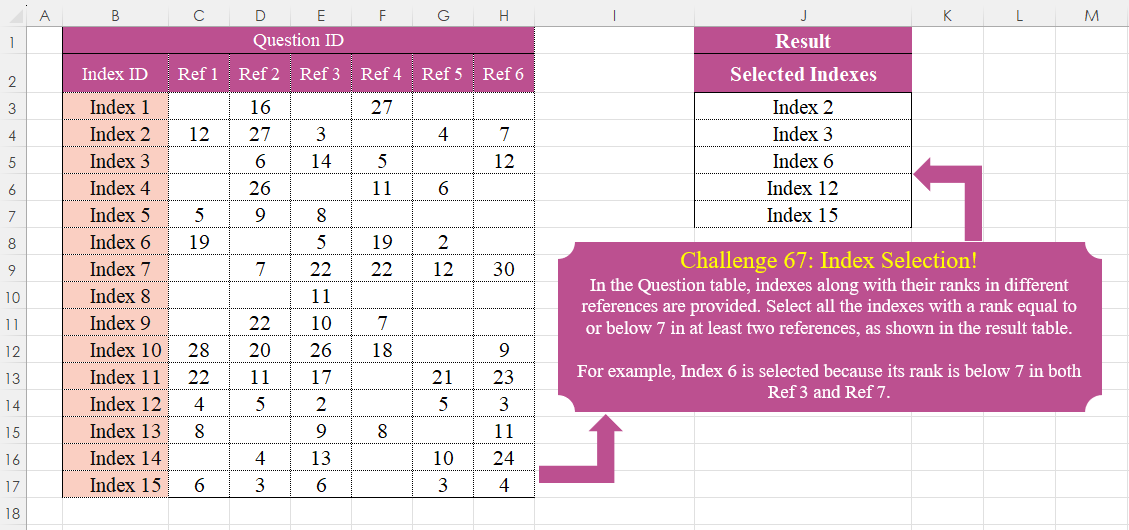
In the Question table, indexes along with their ranks in different references are provided. Select all the indexes with a rank equal to or below 7 in at least two references, as shown in the result table. For example, Index 6 is selected because its rank is below 7 in both Ref 3 and Ref 7.
📌 Challenge Details and Links
Challenge Number: 67
Challenge Difficulty: ⭐⭐⭐
📥Download Sample File
📥Link to the solutions on LinkedIn
Solving the challenge of Add Index Column! Part 1 with Power Query
Power Query solution 1 for Add Index Column! Part 1, proposed by Omid Motamedisedeh:
let
  Source = Excel.CurrentWorkbook(){[Name = "Table1"]}[Content],
  Re = List.Accumulate(
    Table.ToRows(Source),
    {},
    (a, b) =>
      if List.Count(List.Select(List.Skip(b), each Number.From(_) <= 7)) >= 2 then a & {b{0}} else a
  )
in
  Re
Power Query solution 2 for Add Index Column! Part 1, proposed by Zoran Milokanović:
let
  Source = Excel.CurrentWorkbook(){[Name = "Input"]}[Content],
  S = Table.SelectRows(
    Source,
    each List.Count(List.Select(Record.ToList(_), each _ is number and _ < 7)) > 1
  )[Index ID]
in
  S
Power Query solution 3 for Add Index Column! Part 1, proposed by Zoran Milokanović:
let
  Source = Excel.CurrentWorkbook(){[Name = "Input"]}[Content],
  S = List.TransformMany(
    Table.ToRows(Source),
    each {{}, {_}}{Number.From(List.Count(List.Select(_, each _ is number and _ < 7)) > 1)},
    (i, _) => i{0}
  )
in
  S
Power Query solution 4 for Add Index Column! Part 1, proposed by Brian Julius:
let
  Source = Excel.CurrentWorkbook(){[Name = "Table1"]}[Content],
  Split = Table.RemoveColumns(
    Table.SplitColumn(
      Source,
      "Index ID",
      Splitter.SplitTextByEachDelimiter({" "}),
      {"Junk", "Index"}
    ),
    "Junk"
  ),
  ToRows = List.Transform(Table.ToRows(Split), each List.Select(_, each Number.From(_) > 0)),
  NumLTE7 = List.Transform(
    ToRows,
    each List.Count(List.Select(List.Skip(_, 1), each Number.From(_) <= 7))
  ),
  ToTable = Table.FromList(
    List.Transform(
      List.Select(List.Zip({Source[Index ID], NumLTE7}), each _{1} >= 2),
      each List.First(_)
    ),
    null,
    {"Selected Indexes"}
  )
in
  ToTable
Power Query solution 5 for Add Index Column! Part 1, proposed by Rafael González B.:
let
Source = Excel.CurrentWorkbook(){0}[Content],
Index = Source[Index ID],
LG = List.Generate(
() => [i = -1, Ch = false ],
each [i] <= Table.RowCount(Source) - 1,
each [
i = [i] + 1,
Ch = let
a = Record.RemoveFields(V, "Index ID"),
b = List.RemoveNulls(Record.ToList(a)),
c = List.Select(b, each _ <= 7),
d = if List.Count(c) > 1 then true else false
in
d,
V = Source{i}
],
each [[i],[Ch]]
),
Result = List.Transform(List.Select(LG, each _[Ch]), (x) => Index{x[i]})
in
Result
🧙♂️🧙♂️🧙♂️Power Query solution 6 for Add Index Column! Part 1, proposed by Rafael González B.:
let
Source = Excel.CurrentWorkbook(){0}[Content],
Code = Table.AddColumn(Source, "Result", each
let
a = Record.RemoveFields(_, "Index ID"),
b = List.RemoveItems(Record.ToList(a), {""}),
c = List.Select(b, each _ <= 7),
d = List.Count(c)
in
d
),
Result = Table.SelectRows(Code, each [Result] > 1)[[Index ID]]
in
Result
🧙♂️ 🧙♂️🧙♂️Power Query solution 7 for Add Index Column! Part 1, proposed by Ramiro Ayala Chávez:
let
S = Excel.CurrentWorkbook(){[Name="Table1"]}[Content],
a = List.Transform(Table.ToRows(S), each List.Select(_, each _ is text or _<=7)),
b = List.Select(a, each List.Count(_)>=3),
Sol = Table.FromColumns({List.Transform(b, each _{0})},{"Selected Indexes"})
in
Sol
Power Query solution 8 for Add Index Column! Part 1, proposed by Aditya Kumar Darak 🇮🇳:
let
  Source = Excel.CurrentWorkbook(){[Name = "data"]}[Content],
  Return = Table.SelectRows(
    Source,
    each [
      L = Record.ToList(_),
      S = List.Select(L, (f) => try f <= 7 otherwise false),
      R = List.Count(S) >= 2
    ][R]
  )[[Index ID]]
in
  Return
Power Query solution 9 for Add Index Column! Part 1, proposed by Alejandro Simón 🇵🇦 🇪🇸:
let
 Origen = Excel.CurrentWorkbook(){[Name="Tabla1"]}[Content],
 Sol = Table.SelectRows(Origen, each
let
a = List.RemoveNulls(List.Skip(Record.ToList(_))),
b = List.Count(List.Select(a, each _<=7))
in b >1)[[Index ID]]
in
 Sol

El List.RemoveNulls no es necesario, pero igual lo dejé......
Power Query solution 10 for Add Index Column! Part 1, proposed by Kris Jaganah:
let
  Source = Excel.CurrentWorkbook(){[Name = "Table1"]}[Content],
  Filter = Table.SelectRows(
    Source,
    each List.Sum(
      List.Transform(
        List.Skip(Record.ToList(_)),
        each if _ = "" then null else if _ < 8 then 1 else 0
      )
    )
      > 1
  )[Index ID]
in
  Filter
Power Query solution 11 for Add Index Column! Part 1, proposed by 🇮🇷 Navid Esmaeilzadeh اسماعیل زاده:
let
  Source = Excel.CurrentWorkbook(){[Name = "Table1"]}[Content],
  #"Added Custom" = Table.AddColumn(
    Source,
    "Count",
    each List.Count(
      List.Select(List.RemoveItems(List.Skip(Record.ToList(_), 1), {""}), each _ <= 7)
    )
  ),
  #"Changed Type" = Table.TransformColumnTypes(#"Added Custom", {{"Count", Int64.Type}}),
  #"Filtered Rows" = Table.SelectRows(#"Changed Type", each [Count] >= 2),
  #"Removed Other Columns" = Table.SelectColumns(#"Filtered Rows", {"Index ID"})
in
  #"Removed Other Columns"
Power Query solution 12 for Add Index Column! Part 1, proposed by Gerson Pineda:
let
  FP = Table.AddColumn(
    Source,
    "FP",
    each List.Count(
      List.Select(Record.ToList(Record.RemoveFields(_, "Index ID")), each _ <> "" and _ < 8)
    )
      > 1
  ),
  FF = Table.SelectRows(FP, each ([FP] = true))[[Index ID]]
in
  FF
Power Query solution 13 for Add Index Column! Part 1, proposed by Arnaud Duvernois:
let
  Source = Excel.CurrentWorkbook(){[Name = "Tableau1"]}[Content],
  Filter = Table.SelectRows(
    Source,
    each List.Count(List.Select(List.Skip(Record.FieldValues(_)), each _ <= 7)) >= 2
  )[[Index ID]]
in
  Filter
Power Query solution 14 for Add Index Column! Part 1, proposed by Glyn Willis:
let
  Source = Excel.CurrentWorkbook(){[Name = "Table1"]}[Content],
  #"Added Custom" = Table.AddColumn(
    Source,
    "Custom",
    each List.Sum(
      Record.FieldValues(
        Record.TransformFields(
          _,
          List.Transform(
            Record.FieldNames(_),
            (x) => {x, each try Number.From(_ <= 7) ?? 0 otherwise 0}
          )
        )
      )
    )
  ),
  #"Filtered Rows" = Table.SelectRows(#"Added Custom", each [Custom] >= 2)[[Index ID]]
in
  #"Filtered Rows"
Solving the challenge of Add Index Column! Part 1 with Excel
Excel solution 1 for Add Index Column! Part 1, proposed by 🇰🇷 Taeyong Shin:
=FILTER(
    B3:B17,
    GESTEP(
        BYROW(
            1/GESTEP(
                -C3:H17+7,

            ),
            COUNT
        ),
        2
    )
)
Excel solution 2 for Add Index Column! Part 1, proposed by محمد حلمي:
=FILTER(B3:B17,
    BYROW((B3:H17>0)*(B3:H17<8),
    SUM)>1)
Excel solution 3 for Add Index Column! Part 1, proposed by محمد حلمي:
=FILTER(B3:B17,
    BYROW((B3:H17>0)*(B3:H17<8),
    SUM)>1)
Excel solution 4 for Add Index Column! Part 1, proposed by 🇵🇪 Ned Navarrete C.:
=FILTER(
    B3:B17,
    BYROW(
        N(
            C3:H17<=7
        ),
        SUM
    )>=2
)

=FILTER(
    B3:B17,
    BYROW(
        N(
            C3:H17<8
        ),
        SUM
    )>1
)
Excel solution 5 for Add Index Column! Part 1, proposed by Aditya Kumar Darak 🇮🇳:
=FILTER(
    B3:B17,
     BYROW(
         C3:H17,
          LAMBDA(
              a,
               COUNTIFS(
                   a,
                    "<=7"
               ) >= 2
          )
     )
)
Excel solution 6 for Add Index Column! Part 1, proposed by Aditya Kumar Darak 🇮🇳:
=FILTER(
    B3:B17,
     BYROW(
         C3:H17,
          LAMBDA(
              a,
               SUM(
                   N(
                       a <= 7
                   )
               ) >= 2
          )
     )
)
Excel solution 7 for Add Index Column! Part 1, proposed by Oscar Mendez Roca Farell:
=FILTER(
    B3:B17,
     MMULT(
         N(
             ABS(
                 C3:H17-4
             )<4
         ),
          ROW(
              1:6
          )^0
     )>1
)
Excel solution 8 for Add Index Column! Part 1, proposed by Julian Poeltl:
=FILTER(
    B3:B17,
    BYROW(
        C3:H17,
        LAMBDA(
            A,
            COUNTIF(
                A,
                "<8"
            )
        )
    )>1
)
Excel solution 9 for Add Index Column! Part 1, proposed by Kris Jaganah:
=FILTER(
    B3:B17,
    BYROW(
        B3:H17,
        LAMBDA(
            x,
            SUM(
                N(
                    x<8
                )
            )
        )
    )>1
)
Excel solution 10 for Add Index Column! Part 1, proposed by Abdallah Ally:
=FILTER(B3:B17,
    BYROW(LET(
        a,
        C3:H17,
        IF(
            a="",
            7,
            a
        )
    ),
    LAMBDA(x,
    SUM(--(x<7))>1)))
Excel solution 11 for Add Index Column! Part 1, proposed by Sunny Baggu:
=FILTER(
 B3:B17, BYROW(
 (C3:H17 > 0) * (C3:H17 <= 7), LAMBDA(
     a,
      SUM(
          a
      )
 )
 ) > 1
)
Excel solution 12 for Add Index Column! Part 1, proposed by Anil Kumar Goyal:
= "B2:H17")

df %>%
 filter(
     rowSums(
         across(
             everything(),
              ~ . <= 7
         ),
          na.rm = TRUE
     ) >= 2
 )
Excel solution 13 for Add Index Column! Part 1, proposed by Ankur Sharma:
=FILTER(B3:B17,
     BYROW(C3:H17,
     LAMBDA(a,
     SUM((a > 0) * (a < 7)) >= 2)))
Excel solution 14 for Add Index Column! Part 1, proposed by Asheesh Pahwa:
=LET(
    br,
    BYROW(
        C3:H17,
        LAMBDA(
            x,
            LET(
                b,
                N(
                    x<=7
                ),
                SUM(
                    b
                )
            )
        )
    ),
    FILTER(
        B3:B17,
        br>=2
    )
)
Excel solution 15 for Add Index Column! Part 1, proposed by Asheesh Pahwa:
=LET(
    d,
    DROP(
        REDUCE(
            "",
            SEQUENCE(
                ROWS(
                    B3:B17
                )
            ),
            LAMBDA(
                x,
                y,
                VSTACK(
                    x,
                    LET(
                        I,
                        INDEX(
                            C3:H17,
                            y,

                        ),
                        b,
                        N(
                            I<=7
                        ),
                        SUM(
                            b
                        )
                    )
                )
            )
        ),
        1
    ),
    FILTER(
        B3:B17,
        d>=2
    )
)
Excel solution 16 for Add Index Column! Part 1, proposed by El Badlis Mohd Marzudin:
=LET(     a,
     C3:H17,     FILTER(
         B3:B17,
          BYROW(
              a,
               LAMBDA(
                   x,
                    COUNT(
                        IF(
                            x <= 7,
                             x
                        )
                    ) >= 2
               )
          )
     ))
Excel solution 17 for Add Index Column! Part 1, proposed by Gerson Pineda:
=FILTER(B3:B17,
    MAP(B3:B17,
    LAMBDA(i,
    SUM(--(OFFSET(
        i,
        ,
        ,
        ,
        7
    )<8))>1)))
Excel solution 18 for Add Index Column! Part 1, proposed by Hussein SATOUR:
=FILTER(B3:B17,
    BYROW(C3:H17,
    LAMBDA(x,
    SUM(--(x<7))))>1)
Excel solution 19 for Add Index Column! Part 1, proposed by Meganathan Elumalai:
=INDEX($B$3:$B$17,
    MODE.MULT(IFERROR(MATCH((ROW(
        $C$3:$H$17
    )-ROW(
        $C$3
    )+1),
    (ROW(
        $C$3:$H$17
    )-ROW(
        $C$3
    )+1)/(MMULT(($C$3:$H$17<=7)*($C$3:$H$17>0),
    TRANSPOSE(
        COLUMN(
        $C$3:$H$17
    )^0
    ))>=2),
    {0,
    0}),
    "")))
Excel solution 20 for Add Index Column! Part 1, proposed by Meganathan Elumalai:
=FILTER($B$3:$B$17,
    MMULT(($C$3:$H$17<=7)*($C$3:$H$17>0),
    TRANSPOSE(
        COLUMN(
            $C$3:$H$17
        )^0
    ))>=2)
Excel solution 21 for Add Index Column! Part 1, proposed by Mey Tithveasna:
=FILTER(
    B3:B17,
    BYROW(
        C3:H17,
        LAMBDA(
            c,
            COUNTIF(
                c,
                "<=7"
            )
        )
    )>1
)
Excel solution 22 for Add Index Column! Part 1, proposed by Peter Bartholomew:
= LET(     count,
     BYROW(
         ranks,          LAMBDA(
              r,
               COUNTIFS(
                   r,
                    "<=7"
               )
          )
     ),     FILTER(
         index,
          count>1
     ))
Excel solution 23 for Add Index Column! Part 1, proposed by Peter Tholstrup:
=FILTER(
    B3:B17,
     BYROW(
         C3:H17,
          LAMBDA(
              r,
               COUNTIFS(
                   r,
                    "<= 7"
               ) >= 2
          )
     )
)
Excel solution 24 for Add Index Column! Part 1, proposed by Pieter de Bruijn:
=FILTER(
    B3:B17,
    BYROW(
        N(
            IF(
                C3:H17,
                C3:H17,
                9
            )<8
        ),
        SUM
    )>1
)
Excel solution 25 for Add Index Column! Part 1, proposed by Rayan Saud:
=FILTER(B3:B17,
    MAP(SEQUENCE(
        15,
        ,
        3
    ),
    LAMBDA(x,
    LET(s,
    SORT(
        INDIRECT(
            "C"&x&":H"&x
        ),
        ,
        1,
        TRUE
    ),
    COUNTA(FILTER(s,
    (s<8)*(s>0))))))>1)
Excel solution 26 for Add Index Column! Part 1, proposed by Rick Rothstein:
=FILTER(B3:B17,
    BYROW((C3:H17)*(C3:H17<8)>1,
    LAMBDA(
        r,
        SUM(
            0+r
        )>1
    )))
Excel solution 27 for Add Index Column! Part 1, proposed by Sergei Baklan:
=FILTER(
    index,
     BYROW(
          --REGEXTEST(
              ranks,
               "d{2,}|[7-9]"
          ),
          SUM
     ) > 1
)
Excel solution 28 for Add Index Column! Part 1, proposed by Ziad Ahmed:
=FILTER(
    B3:B,
    1
Solving the challenge of Add Index Column! Part 1 with Python
Python solution 1 for Add Index Column! Part 1, proposed by Konrad Gryczan, PhD:
import pandas as pd

input = pd.read_excel("CH-067 Index Selections.xlsx", usecols="B:H", skiprows= 1, nrows = 15)
test  = pd.read_excel("CH-067 Index Selections.xlsx", usecols="J", skiprows=1, nrows = 5)

result = input[(input.iloc[:, 1:6] <= 7).sum(axis=1) >= 2].iloc[:,0].reset_index(drop=True)

print(result.tolist() == test.iloc[:,0].tolist()) # True
Python solution 2 for Add Index Column! Part 1, proposed by Abdallah Ally:
import pandas as pd

# Read the Excel file
file_path = 'CH-067 Index Selections.xlsx'
df = pd.read_excel(file_path, usecols='B:H', skiprows=1)

# Perform data wrangling
df = df[['Index ID']][df.apply(lambda x: sum([a < 7 for a in x[1 : ]]) > 1, axis=1)]

# Display the final output
df
Solving the challenge of Add Index Column! Part 1 with R
R solution 1 for Add Index Column! Part 1, proposed by Konrad Gryczan, PhD:
library(tidyverse)
library(readxl)

input = read_excel("files/CH-067 Index Selections.xlsx", range = "B2:H17")
test = read_excel("files/CH-067 Index Selections.xlsx", range = "J2:J7")

result = input %>%
 rowwise() %>%
 filter(sum(c_across(2:7) <= 7, na.rm = TRUE) >= 2) %>%
 ungroup() %>%
 select(`Selected Indexes` = 1)

identical(result, test)
#> [1] TRUE