
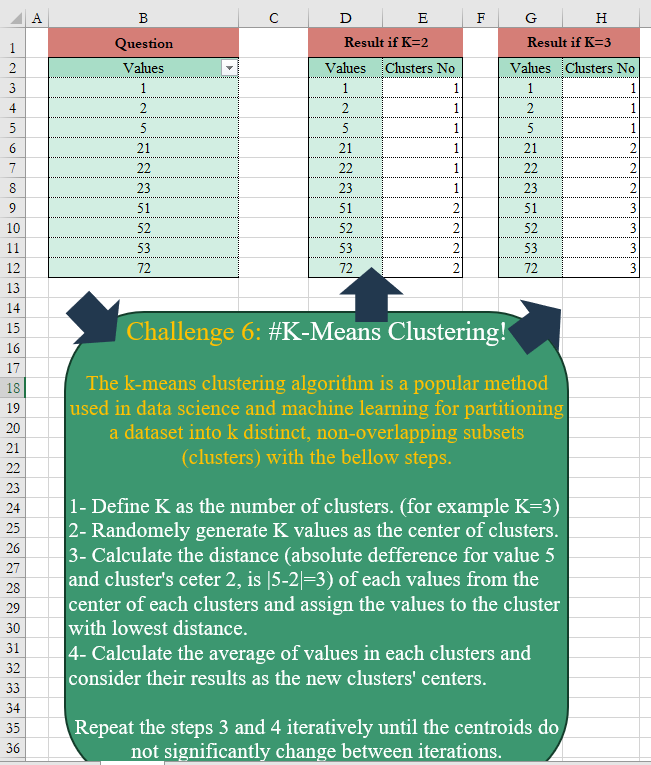
The k-means clustering algorithm is a popular method used in data science and machine learning for partitioning a dataset into k distinct, non-overlapping subsets (clusters) with the below steps. 1- Define K as the number of clusters. (for example K=3) 2- Randomly generate K values as the center of clusters. 3- Calculate the distance (absolute difference for value 5 and cluster’s center 2, is |5-2|=3) of each value from the center of each cluster and assign the values to the cluster with the lowest distance. 4- Calculate the average of values in each cluster and consider their results as the new clusters’ centers. Repeat the steps 3 and 4 iteratively until the centroids do not significantly change between iterations.
📌 Challenge Details and Links
Challenge Number: 6
Challenge Difficulty: ⭐⭐⭐⭐⭐
📥Download Sample File
📥Link to the solutions on LinkedIn
Solving the challenge of K-Means Clustering Algorithm! with Power Query
Power Query solution 1 for K-Means Clustering Algorithm!, proposed by Omid Motamedisedeh:
let
  Source = Excel.CurrentWorkbook(){[Name = "Table1"]}[Content],
  Fun = (val, c1, c2) =>
    let
      Clustering = Table.AddColumn(
        Source,
        "Cluster",
        each [
          a = List.Transform(c2, (x) => Number.Abs(_[Values] - x)),
          b = List.Min(a),
          c = List.PositionOf(a, b)
        ][c]
      ),
      newc2 = Table.Group(Clustering, {"Cluster"}, {{"Count", each List.Average([Values])}})[Count],
      result = if newc2 = c2 then Clustering else xxx(val, c2, newc2)
    in
      result,
  u = Fun(Source[Values], {1 .. 3}, List.Numbers(1, 3, 1.1 * List.Max(Source[Values]) / 3))
in
  u
Solving the challenge of K-Means Clustering Algorithm! with Excel
Excel solution 1 for K-Means Clustering Algorithm!, proposed by John Jairo Vergara Domínguez:
=LET(
    _k,
     M2,
     _v,
     B3:B12,
     _m,
     LAMBDA(
         a,
          BYROW(
              a,
               LAMBDA(
                   x,
                    XMATCH(
                        MIN(
                            x
                        ),
                         x
                    )
               )
          )
     ),
     _g,
     LAMBDA(
         n,
          MAP(
              TOROW(
                  UNIQUE(
                      n
                  )
              ),
               LAMBDA(
                   x,
                    AVERAGE(
                        IF(
                            n = x,
                             _v
                        )
                    )
               )
          )
     ),
     _r,
     LAMBDA(
         _r,
          a,
          LET(
              c,
               _m(
                   ABS(
                       _v - _g(
                           a
                       )
                   )
               ),
               IF(
                   AND(
                       c = a
                   ),
                    a,
                    _r(
                        _r,
                         c
                    )
               )
          )
     ),
     _r(
         _r,
          _m(
              ABS(
                  _v - SORT(
                      RANDARRAY(
                          ,
                           _k,
                           MIN(
                               _v
                           ),
                           MAX(
                               _v
                           )
                      ),
                       ,
                       ,
                       1
                  )
              )
          )
     )
)

_g,
     LAMBDA(
         n,
          TOROW(
              DROP(
                  GROUPBY(
                      n,
                       _v,
                       AVERAGE,
                       ,
                       0
                  ),
                   ,
                   1
              )
          )
     )

Can be "forced" to always give the "k" numbers initially given (with an additional recursive function in the random generation) (sometimes give #¡NUM! error):

✅
=LET(
    _k,
     M2,
     _v,
     B3:B12,
     _m,
     LAMBDA(
         a,
          BYROW(
              a,
               LAMBDA(
                   x,
                    XMATCH(
                        MIN(
                            x
                        ),
                         x
                    )
               )
          )
     ),
     _f,
     LAMBDA(
         _f,
         a,
          IF(
              ROWS(
                  UNIQUE(
                      _m(
                          ABS(
                              _v - a
                          )
                      )
                  )
              ) = _k,
               _m(
                          ABS(
                              _v - a
                          )
                      ),
               _f(
                   _f,
                    a
               )
          )
     ),
     _b,
     _f(
         _f,
          SORT(
                      RANDARRAY(
                          ,
                           _k,
                           MIN(
                               _v
                           ),
                           MAX(
                               _v
                           )
                      ),
                       ,
                       ,
                       1
                  )
     ),
     _g,
     LAMBDA(
         n,
          MAP(
              TOROW(
                  UNIQUE(
                      n
                  )
              ),
               LAMBDA(
                   x,
                    AVERAGE(
                        IF(
                            n = x,
                             _v
                        )
                    )
               )
          )
     ),
     _r,
     LAMBDA(
         _r,
         a,
          LET(
              c,
               _m(
                   ABS(
                       _v - _g(
                           a
                       )
                   )
               ),
               IF(
                   AND(
                       c = a
                   ),
                    a,
                    _r(
                        _r,
                         c
                    )
               )
          )
     ),
     _r(
         _r,
          _b
     )
)

P.D. You can replace in both formulas the _g variable with GROUPBY function:

_g,
     LAMBDA(
         n,
          TOROW(
              DROP(
                  GROUPBY(
                      n,
                       _v,
                       AVERAGE,
                       ,
                       0
                  ),
                   ,
                   1
              )
          )
     )
Excel solution 2 for K-Means Clustering Algorithm!, proposed by Diarmuid Early:
=4,
     {1,
    1,
    1,
    2,
    3,
    3,
    4,
    4,
    4,
    4} is also a stable configuration.
2. If you pick the initial centers as random values in the range,
     you may not end up with K clusters (because it could be that none of the values is closest to one or more of the initial centers).

Here's a version that runs as described in your note:
=LET(
    in,
    B3:B12,
     K,
     N2,     seed,
     RANDARRAY(
         ,
         K,
         MIN(
             in
         ),
         MAX(
             in
         )
     ),
     seedDist,
     ABS(
         seed-in
     ),     seedAlloc,
     BYROW(
         seedDist,
         LAMBDA(
             rw,
             XMATCH(
                 0,
                 rw,
                 1
             )
         )
     ),     iter,
     LAMBDA(
         prev,
         stp,          LET(
              newCent,
               TOROW(
                   TAKE(
                       GROUPBY(
                           prev,
                           in,
                           AVERAGE,
                           0,
                           0,
                           1
                       ),
                       ,
                       -1
                   )
               ),

               newDist,
               ABS(
                   newCent-in
               ),

               newAlloc,
               BYROW(
                   newDist,
                   LAMBDA(
             rw,
             XMATCH(
                 0,
                 rw,
                 1
             )
         )
               ),

               IF(
                   AND(
                       newAlloc=prev
                   ),
                   prev,
                   stp(
                       newAlloc,
                       stp
                   )
               )
          )
     ),     out,
    iter(
        seedAlloc,
         iter
    ),     out
)

iter is a recursive function that takes an allocation (like {1,
    1,
    1,
    2,
    3,
    3,
    4,
    4,
    4,
    4})