
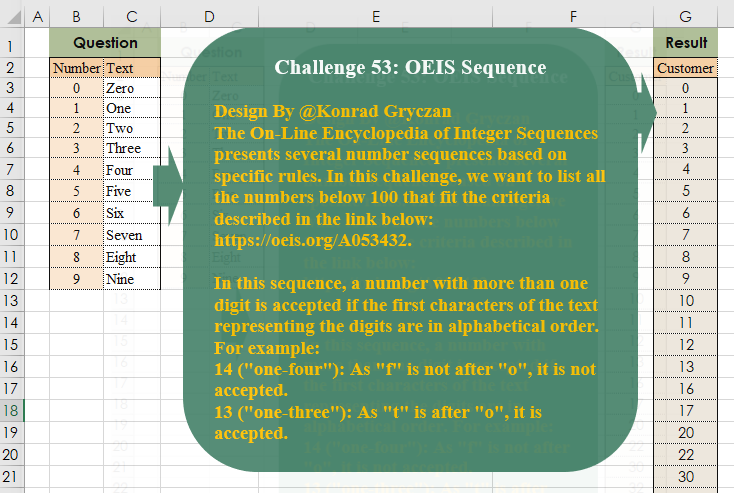
The On-Line Encyclopedia of Integer Sequences presents several number sequences based on specific rules. In this challenge, we want to list all the numbers below 100 that fit the criteria described in the link below:
📌 Challenge Details and Links
Challenge Number: 53
Challenge Difficulty: ⭐⭐⭐
Designed by: Konrad Gryczan, PhD
📥Download Sample File
📥Link to the solutions on LinkedIn
Solving the challenge of Oeis Sequence with Power Query
Power Query solution 1 for Oeis Sequence, proposed by Brian Julius:
let
  Source = Excel.CurrentWorkbook(){[Name = "Table1"]}[Content],
  Numbers = Table.FromList({0 .. 99}, Splitter.SplitByNothing(), {"Numbers"}),
  AddNumTbl = Table.AddColumn(
    Numbers,
    "NumTbl",
    each [
      a = [Numbers],
      b = List.Transform(Text.ToList(Text.From(a)), each Number.From(_)),
      c = Table.AddIndexColumn(Table.FromList(b, Splitter.SplitByNothing(), {"Numbers"}), "Sort")
    ][c]
  ),
  AddJoined = Table.ExpandTableColumn(
    Table.AddIndexColumn(
      Table.SelectColumns(
        Table.AddColumn(AddNumTbl, "Joined", each Table.Join([NumTbl], "Numbers", Source, "Number")),
        "Joined"
      ),
      "Answer"
    ),
    "Joined",
    {"Number", "Text", "Sort"}
  ),
  Group = Table.Group(
    AddJoined,
    {"Answer"},
    {{"All", each Table.Sort(_, {"Sort", Order.Ascending})}}
  ),
  TestOrder = Table.AddColumn(
    Group,
    "Test",
    each [a = [All], b = a[Text], c = if b = List.Sort(b) then true else false][c]
  ),
  Filter = Table.SelectColumns(Table.SelectRows(TestOrder, each ([Test] = true)), "Answer")
in
  Filter
Power Query solution 2 for Oeis Sequence, proposed by Ramiro Ayala Chávez:
let
S = Excel.CurrentWorkbook(){[Name="Table1"]}[Content],
T = Table.TransformColumnTypes(S,{"Number",type text}),
U = Table.FromColumns({List.Transform({0..100},Text.From)},{"D"}),
a = List.Accumulate(List.Positions(T[Text]),U,(s,c)=> Table.ReplaceValue(s,T[Number]{c},T[Text]{c},Replacer.ReplaceText,{"D"})),
b = Table.TransformColumns(a,{"D", Splitter.SplitTextByCharacterTransition({"a".."z"},{"A".."Z"})}),
c = List.Select(b[D], each List.Sort(_)=_),
d = Table.FromColumns({List.Transform(c, each Text.Combine(_))},{"Customer"}),
Sol = List.Accumulate(List.Positions(T[Number]),d,(s,c)=> Table.ReplaceValue(s,T[Text]{c},T[Number]{c},Replacer.ReplaceText,{"Customer"}))
in
Sol
Power Query solution 3 for Oeis Sequence, proposed by Aditya Kumar Darak 🇮🇳:
let
  Source = Excel.CurrentWorkbook(){[Name = "data"]}[Content],
  Generate = List.TransformMany(
    {"A"} & List.Skip(Source[Text]),
    (x) => List.Select(Source[Text], (f) => f >= x),
    (x, y) =>
      [
        L = List.Transform({x, y}, (f) => Text.From(Source{[Text = f]}?[Number]? ?? 0)),
        R = Number.From(Text.Combine(L))
      ][R]
  ),
  Return = Table.FromList(Generate, each {_}, type table [Numbers = Int64.Type])
in
  Return
Power Query solution 4 for Oeis Sequence, proposed by Aditya Kumar Darak 🇮🇳:
let
  Source = Excel.CurrentWorkbook(){[Name = "data"]}[Content],
  ReplaceList = Table.TransformRows(Source, each {Text.From([Number])} & {[Text]}),
  Return = List.Select(
    {0 .. 100},
    each [
      T  = Text.From(_),
      L  = Text.ToList(T),
      RL = List.ReplaceMatchingItems(L, ReplaceList),
      R  = List.Sort(RL) = RL
    ][R]
  )
in
  Return
Power Query solution 5 for Oeis Sequence, proposed by Alejandro Simón 🇵🇦 🇪🇸:
let
 Source = Excel.CurrentWorkbook(){[Name="Table1"]}[Content],
 Zip = List.Transform(Table.ToRows(Source), each List.Transform(_, (x)=> Text.From(x))),
 Lst = {0..100},
 Zip2 = List.Zip({Lst, List.Transform(Lst, each
let
a = Text.From(_),
b = Text.ToList(a),
c = List.Accumulate(Zip, b, (s,cu)=> List.Transform(s, each Text.Replace(_, cu{0}, cu{1})))
in c)}),
 Sol = Table.FromColumns({List.Transform(List.Select(Zip2, each if List.Count(_{1})<2 then true else List.AllTrue(List.RemoveLastN(List.Transform({0..List.Count(_{1})-1}, (x)=> _{1}{x}<=_{1}{x+1})))), each _{0})}, {"Customer"})
in
 Sol
Power Query solution 6 for Oeis Sequence, proposed by Venkata Rajesh:
let
  Source = Data,
  Output = List.Select(
    {0 .. 100},
    each [
      n = Text.ToList(Text.From(_)),
      x = (x) => Source{[Number = Number.From(n{x})]}[Text],
      z = if List.Count(n) = 1 then true else if x(0) <= x(1) then true else false
    ][z]
  )
in
  Output
Solving the challenge of Oeis Sequence with Excel
Excel solution 1 for Oeis Sequence, proposed by Bo Rydobon 🇹🇭:
=TOCOL(MAP(SEQUENCE(
    101,
    ,
    0
),
    LAMBDA(n,
    LET(b,
    INDEX(
        C3:C12,
        MID(
            n,
            SEQUENCE(
                LEN(
                    n
                )
            ),
            1
        )+1,
        1
    ),
    n/(AND(
        b=SORT(
            b
        )
    ))))),
    3)
Excel solution 2 for Oeis Sequence, proposed by 🇰🇷 Taeyong Shin:
=LET(     n,
     SEQUENCE(
         101,
          ,
          0
     ),     FILTER(
         n,
          BYROW(
              LEFT(
                  XLOOKUP(
                      MID(
                          n,
                           {1,
                          2,
                          3},
                           1
                      ),
                       B3:B12 & "",
                       C3:C12,
                       ""
                  )
              ),
               LAMBDA(
                   r,
                    CONCAT(
                        r
                    ) = CONCAT(
                        SORT(
                            r,
                             ,
                             ,
                             1
                        )
                    )
               )
          )
     ))
Excel solution 3 for Oeis Sequence, proposed by محمد حلمي:
=LET(
    b,
    B3:C12,
    s,
    SEQUENCE(
        101
    )-1,
    r,
    LAMBDA(
        x,        VLOOKUP(
            --x,
            b,
            2,

        )
    ),
    FILTER(
        s,
        r(
            LEFT(
                s
            )
        )<=r(
            RIGHT(
                s
            )
        )
    )
)
Excel solution 4 for Oeis Sequence, proposed by 🇵🇪 Ned Navarrete C.:
=TOCOL(
    MAP(
        ROW(
            1:101
        )-1,
        LAMBDA(
            r,
            LET(
                e,
                XLOOKUP(
                    MID(
                        r,
                        {1;2;3},
                        1
                    ),
                    ""&B3:B12,
                    C3:C12,
                    "zz"
                ),
                r/AND(
                    e>=SORT(
                        e
                    )
                )
            )
        )
    ),
    2
)
Excel solution 5 for Oeis Sequence, proposed by Aditya Kumar Darak 🇮🇳:
=LET(     _so,
     8549176320,     _sq,
     SEQUENCE(
         101,
          ,
          0
     ),     _r,
     FILTER(
         _sq,
          FIND(
              LEFT(
                  _sq
              ),
               _so
          ) <= FIND(
              RIGHT(
                  _sq
              ),
               _so
          )
     ),     _r)
Excel solution 6 for Oeis Sequence, proposed by Oscar Mendez Roca Farell:
=LET(
    s,
     ROW(
         1:101
     )-1,
     F,
     LAMBDA(
         i,
          IF(
              i,
               VLOOKUP(
                   MOD(
                       i,
                        10
                   ),
                    B3:C12,
                    2,

               ),
               ""
          )
     ),
     FILTER(
         s,
          F(
              INT(
                  s/10
              )
          )<=F(
              s
          )
     )
)
Excel solution 7 for Oeis Sequence, proposed by Julian Poeltl:
=LET(
    T,
    C3:C12,
    S,
    SEQUENCE(
        101,
        ,
        0
    ),
    R,
    INDEX(
        T,
        RIGHT(
            S,
            1
        )*1+1
    ),
    L,
    INDEX(
        T,
        LEFT(
            S,
            1
        )*1+1
    ),
    FILTER(
        S,
        L<=R
    )
)
Excel solution 8 for Oeis Sequence, proposed by Abdallah Ally:
=LET(
    a,
    SEQUENCE(
        100
    )-1,
    b,
    B3:C12,
    FILTER(
        a,
        VLOOKUP(
            --RIGHT(
                a
            ),
            b,
            2,
            0
        )>=VLOOKUP(
            --LEFT(
                a
            ),
            b,
            2,
            0
        )
    )
)
Excel solution 9 for Oeis Sequence, proposed by Kris Jaganah:
=LET(
    a,
    SEQUENCE(
        101,
        ,
        0
    ),
    b,
    IFERROR(
        XLOOKUP(
            --MID(
                a,
                {1,
                2,
                3},
                1
            ),
            B3:B12,
            C3:C12
        ),
        ""
    ),
    FILTER(
        a,
        BYROW(
            b,
            CONCAT
        )=BYROW(
            b,
            LAMBDA(
                x,
                CONCAT(
                    SORT(
                        x,
                        ,
                        1,
                        1
                    )
                )
            )
        )
    )
)
Excel solution 10 for Oeis Sequence, proposed by John Jairo Vergara Domínguez:
=LET(
    s,
    ROW(
        1:101
    )-1,
    f,
    LAMBDA(
        z,
        LOOKUP(
            --z(
                s
            ),
            B3:C12
        )
    ),
    FILTER(
        s,
        f(
            LEFT
        )<=f(
            RIGHT
        )
    )
)
Excel solution 11 for Oeis Sequence, proposed by Sunny Baggu:
=LET(     s,
     SEQUENCE(
         101
     ) - 1,     _l,
     XLOOKUP(
         LEFT(
             s
         ) + 0,
          B3:B12,
          C3:C12
     ),     _r,
     XLOOKUP(
         RIGHT(
             s
         ) + 0,
          B3:B12,
          C3:C12
     ),     FILTER(
         s,
          _l <= _r
     ))
Excel solution 12 for Oeis Sequence, proposed by Andy Heybruch:
=LET(    _num,
    B3:B12,
    _text,
    C3:C12,    _s,
    SEQUENCE(
        101,
        ,
        0
    ),    _check,
    XLOOKUP(
        --LEFT(
            _s
        ),
        _num,
        _text
    )<=XLOOKUP(
        --RIGHT(
            _s
        ),
        _num,
        _text
    ),    VSTACK(
        "Result",
        "Customer",
        FILTER(
            _s,
            _check
        )
    )
)
Excel solution 13 for Oeis Sequence, proposed by Bilal Mahmoud kh.:
=1,
    a,
    IF(
        XLOOKUP(
            --MID(
                a,
                1,
                1
            ),
            B3:B12,
            x
        )<=XLOOKUP(
            --MID(
                a,
                2,
                1
            ),
            B3:B12,
            x
        ),
        a,
        ""
    )),
    FILTER(
        b,
        b<>""
    ))
Excel solution 14 for Oeis Sequence, proposed by Hussein SATOUR:
=LET(a,ROW(1:101)-1,FILTER(a,a=--MAP(a,LAMBDA(x,LET(b,MID(x,{1;2;3},1),CONCAT(SORTBY(b,INDEX(C3:C12,b+1))))))))Excel solution 15 for Oeis Sequence, proposed by Pieter de Bruijn:
=LET(
    s,
    SEQUENCE(
        101
    )-1,
    m,
    IFERROR(
        --MID(
            s,
            {1,
            2,
            3},
            1
        ),
        ""
    ),
    x,
    XLOOKUP(
        m,
        B3:B12,
        C3:C12,
        "ZZ"
    ),
    TOCOL(
        s/BYROW(
            x,
            LAMBDA(
                b,
                SUM(
                    N(
                        SORT(
                            b,
                            ,
                            ,
                            1
                        )=b
                    )
                )=3
            )
        ),
        2
    )
)
Excel solution 16 for Oeis Sequence, proposed by Rayan Saud:
=FILTER(
 SEQUENCE(
     101,
      ,
      0
 ), MAP(
 SEQUENCE(
     101,
      ,
      0
 ), LAMBDA(x, LET(
 s,
     MID(
         x,
          SEQUENCE(
              LEN(
                  x
              )
          ),
          1
     ) + 0, c,
     CODE(          LEFT(
              VLOOKUP(
                  s,
                   B3:C12,
                   2,
                   0
              ),
               1
          )     ), SUM(--(SORT(
     c
 ) = c))
 )
 )
 ) > 0
)
Excel solution 17 for Oeis Sequence, proposed by Rick Rothstein:
=LET(t,
    "8549176320",
    n,
    SEQUENCE(
        100,
        ,
        0
    ),
    f,
    LEFT(
        n
    ),
    s,
    RIGHT(
        n
    ),
    FILTER(n,
    (f=s)+(FIND(
        f,
        t
    )
Excel solution 18 for Oeis Sequence, proposed by Tyler Cameron:
=LET(
    a,
    SEQUENCE(
        101,
        ,
        0
    ),
    b,
    MAP(
        a,
        LAMBDA(
            x,
            CONCAT(
                XMATCH(
                    SORT(
                        INDEX(
                            C3:C12,
                            MID(
                                x,
                                SEQUENCE(
                                    LEN(
                                        x
                                    )
                                ),
                                1
                            )+1
                        )
                    ),
                    C3:C12
                )-1
            )
        )
    ),
    FILTER(
        a,
        a=--b
    )
)
Solving the challenge of Oeis Sequence with Python
Python solution 1 for Oeis Sequence, proposed by Konrad Gryczan, PhD:
import pandas as pd

input = pd.read_excel("CH-053 OEIS Sequence.xlsx", usecols="B:C", skiprows=1, nrows=10)
test = pd.read_excel("CH-053 OEIS Sequence.xlsx", usecols="G:G", skiprows=1)

range = pd.DataFrame({"number": range(101)})

def are_digits_alphabetical(number):
 digits = list(str(number))
 replaced = [input.loc[input["Number"] == int(digit), "Text"].values[0] for digit in digits]
 return replaced == sorted(replaced)

range["is_alphabetical"] = range["number"].apply(are_digits_alphabetical)
range = range[range["is_alphabetical"]].reset_index(drop=True)
range = range["number"]

print(range.equals(test["Customer"])) # True
Solving the challenge of Oeis Sequence with R
R solution 1 for Oeis Sequence, proposed by Konrad Gryczan, PhD:
library(tidyverse)
library(readxl)

input = read_excel("files/CH-053 OEIS Sequence.xlsx", range = "B2:C12")
test = read_excel("files/CH-053 OEIS Sequence.xlsx", range = "G2:G67")

range = data.frame(number = 0:100 %>% as.numeric())

are_digits_alphabetical = function(number) {
 digits = as.character(number) %>% strsplit("") %>% unlist()
 replaced = map_chr(digits, ~input$Text[match(.x, input$Number)] %>% as.character())
 all(replaced == sort(replaced))
}

result = range %>%
 mutate(alphabetical = map_lgl(number, are_digits_alphabetical)) %>%
 filter(alphabetical) %>%
 select(number)

identical(result$number, test$Customer)
#> [1] TRUE