
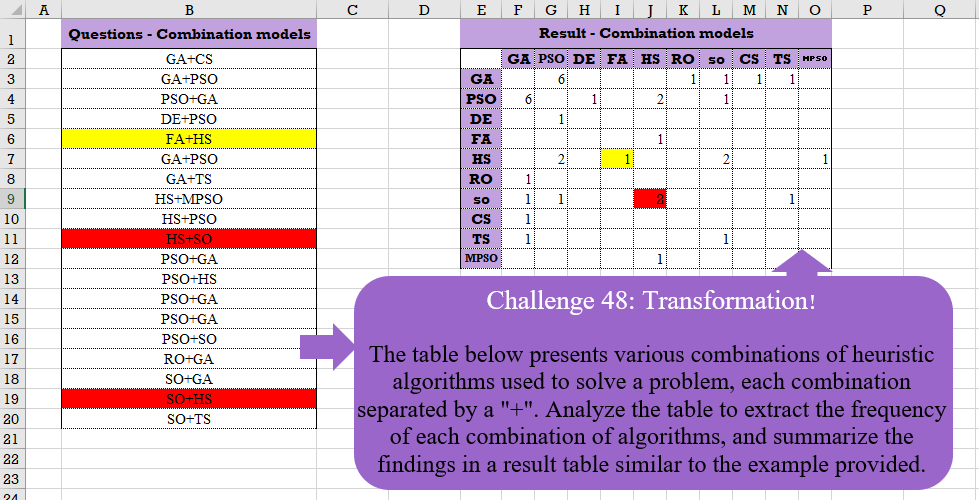
The table below presents various combinations of heuristic algorithms used to solve a problem, each combination separated by a “+”. Analyze the table to extract the frequency of each combination of algorithms, and summarize the findings in a result table similar to the example provided.
📌 Challenge Details and Links
Challenge Number: 48
Challenge Difficulty: ⭐⭐⭐⭐
📥Download Sample File
📥Link to the solutions on LinkedIn
Solving the challenge of Table Transformation! Part 7 with Power Query
Power Query solution 1 for Table Transformation! Part 7, proposed by Ramiro Ayala Chávez:
let
S = Excel.CurrentWorkbook(){[Name="Table1"]}[Content],
L = List.Transform,
a = L(S[#"Questions - Combination models"], each Text.Split(_,"+")),
b = List.Distinct(L(a, each _{0})&L(a, each _{1})),
c = List.Zip({b,b,List.Repeat({""},List.Count(b))}),
d = Table.Group(Table.FromRows(L(a, each List.Sort(_)),{"C1","C2"}),{"C1","C2"},{"G", each Table.RowCount(_)}),
e = Table.FromRows(Table.ToRows(d)&L(Table.ToRows(d), each List.Sort(_,1))&c,{"C1","C2","C3"}),
f = Table.Pivot(e, List.Distinct(e[C2]),"C2","C3"),
Sol = Table.ReorderColumns(Table.Sort(f,{each List.PositionOf(b,[C1])}),b)
in
Sol
Power Query solution 2 for Table Transformation! Part 7, proposed by Aditya Kumar Darak 🇮🇳:
let
  Source = Excel.CurrentWorkbook(){[Name = "data"]}[Content]
    meta [Table = "A2:A20", Header = "False"],
  Split = List.Transform(Source[Column1], each Text.Split(_, "+")),
  Distinct = List.Distinct(List.Combine(Split)),
  Generate = List.Transform(
    Distinct,
    (x) =>
      [
        T = List.Transform(
          Distinct,
          (y) => {
            [
              s = List.Select(Split, (f) => List.ContainsAll(f, {x, y})),
              c = List.Count(s),
              r = if c = 0 or x = y then null else c
            ][r]
          }
        ),
        R = Table.FromColumns({{x}} & T, {""} & Distinct)
      ][R]
  ),
  Return = Table.Combine(Generate)
in
  Return
Power Query solution 3 for Table Transformation! Part 7, proposed by Alejandro Simón 🇵🇦 🇪🇸:
let
  Source = Excel.CurrentWorkbook(){[Name = "Table1"]}[Content],
  Add = Table.AddColumn(Source, "A", each Text.Split([#"Questions - Combination models"], "+"))[A],
  Lista = List.Distinct(List.Transform(Add, each _{0}) & List.Transform(Add, each _{1})),
  Sol = List.Accumulate(
    Lista,
    Table.FromColumns({Lista}),
    (s, c) =>
      Table.AddColumn(
        s,
        c,
        (y) => List.Count(List.Select(Add, (x) => x = {y[Column1], c} or x = {c, y[Column1]}))
      )
  )
in
  Sol
Power Query solution 4 for Table Transformation! Part 7, proposed by Alexis Olson:
let
  Source = Excel.CurrentWorkbook(){[Name = "Table1"]}[Content],
  Combinations = List.Transform(Source[Column1], each Text.Split(_, "+")),
  Models = List.Union(Combinations),
  CrossProduct = List.Transform(Models, (x) => List.Transform(Models, (y) => {x, y})),
  Counts = List.Transform(
    CrossProduct,
    (row) =>
      List.Transform(
        row,
        (pair) => List.Count(List.Select(Combinations, each (pair = _) or (pair = List.Reverse(_))))
      )
  ),
  Result = Table.FromColumns({Models} & Counts, {"Model"} & Models)
in
  Result
Power Query solution 5 for Table Transformation! Part 7, proposed by Masoud Karami:
let
  Source = Excel.CurrentWorkbook(){[Name = "Table1"]}[Content],
  tb = Table.SplitColumn(
    Source,
    "Questions - Combination models",
    Splitter.SplitTextByDelimiter("+", QuoteStyle.Csv),
    {"Col1", "Col2"}
  ),
  #"Added Custom" = Table.AddColumn(
    tb,
    "Custom",
    each Text.Combine(List.Reverse(Record.ToTable(_)[Value]), "+")
  ),
  #"Split Column by Delimiter1" = Table.SplitColumn(
    #"Added Custom",
    "Custom",
    Splitter.SplitTextByDelimiter("+", QuoteStyle.Csv),
    {"col1", "col2"}
  ),
  #"Removed Columns" = Table.RemoveColumns(#"Split Column by Delimiter1", {"Col1", "Col2"}),
  #"Renamed Columns" = Table.RenameColumns(#"Removed Columns", {{"col1", "Col1"}, {"col2", "Col2"}}),
  #"Appended Query" = Table.Combine({tb, #"Renamed Columns"}),
  #"Added Custom1" = Table.AddColumn(#"Appended Query", "Custom", each 1),
  #"Pivoted Column" = Table.Pivot(
    #"Added Custom1",
    List.Distinct(List.Sort(#"Added Custom1"[Col1])),
    "Col1",
    "Custom",
    List.Sum
  )
in
  #"Pivoted Column"
Power Query solution 6 for Table Transformation! Part 7, proposed by 🇮🇷 Navid Esmaeilzadeh اسماعیل زاده:
let
  S = Excel.CurrentWorkbook(){[Name = "Table1"]}[Content],
  A = Table.AddColumn(
    S,
    "C",
    each Text.Combine(
      List.Sort(Splitter.SplitTextByDelimiter("+")([#"Questions - Combination models"])),
      ","
    )
  ),
  B = Table.SplitColumn(A, "C", Splitter.SplitTextByDelimiter(",", QuoteStyle.Csv), {"C.1", "C.2"}),
  C = Table.SelectColumns(B, {"C.1", "C.2"}),
  D = Table.ReorderColumns(C, {"C.2", "C.1"}),
  E = Table.AddColumn(D, "N", each 1),
  F = Table.RenameColumns(E, {{"C.1", "C.2"}, {"C.2", "C.1"}}),
  H = Table.Combine({E, F}),
  Sol = Table.Pivot(H, List.Distinct(List.Sort(H[C.2])), "C.1", "N", List.Sum)
in
  Sol
Power Query solution 7 for Table Transformation! Part 7, proposed by Peter Tholstrup:
let
  Source    = Excel.CurrentWorkbook(){[Name = "Table1"]}[Content],
  input     = Source[#"Questions - Combination models"],
  func      = (f1, f2) => (l) => List.Transform(l, each [#" " = f1(_, "+"), p = f2(_, "+")]),
  ab        = func(Text.BeforeDelimiter, Text.AfterDelimiter)(input),
  ba        = func(Text.AfterDelimiter, Text.BeforeDelimiter)(input),
  t         = Table.FromRecords(ab & ba),
  operation = each Table.Pivot(_, List.Distinct([p]), "p", " ", List.Count),
  group     = Table.Group(t, {" "}, {{"temp", operation}}),
  result    = Table.ExpandTableColumn(group, "temp", group[#" "])
in
  result
Solving the challenge of Table Transformation! Part 7 with Excel
Excel solution 1 for Table Transformation! Part 7, proposed by Bo Rydobon 🇹🇭:
=LET(
    z,
    B2:B20,
    t,
    UNIQUE(
        TOCOL(
            TEXTSPLIT(
                TEXTJOIN(
                    0,
                    ,
                    z
                ),
                "+",
                0
            ),
            ,
            1
        )
    ),
    u,
    TOROW(
        t
    ),
    c,
    COUNTIF(
        z,
        t&"+"&u
    ),
    VSTACK(
        HSTACK(
            "",
            u
        ),
        HSTACK(
            t,
            c+TRANSPOSE(
                c
            )
        )
    )
)
Excel solution 2 for Table Transformation! Part 7, proposed by محمد حلمي:
=LET(
    b,
    B2:B20,
    e,
    "+",
    j,
    UNIQUE(
        TOCOL(
            TEXTSPLIT(

                TEXTAFTER(
                    e&b,
                    "+",
                    {1,
                    2}
                ),
                "+"
            ),
            ,
            1
        )
    ),
    v,
    TOROW(
        j
    ),    y,
    e&j&e,
    x,
    MAP(
        y&v&y,
        LAMBDA(
            a,

            SUM(
                IFERROR(
                    FIND(
                        e&b&e,
                        a
                    )^0,

                )
            )
        )
    ),    VSTACK(
        HSTACK(
            "",
            v
        ),
        HSTACK(
            j,
            IF(
                x,
                x,
                ""
            )
        )
    )
)
Excel solution 3 for Table Transformation! Part 7, proposed by 🇵🇪 Ned Navarrete C.:
=LET(
    m,
    B2:B20,
    f,
    UNIQUE(
        TOCOL(
            TEXTSPLIT(
                CONCAT(
                    m&"-"
                ),
                "+",
                "-",
                1
            ),
            ,
            1
        )
    ),
    c,
    TOROW(
        f
    ),
    r,
    COUNTIF(
        m,
        f&"+"&c
    )+COUNTIF(
        m,
        c&"+"&f
    ),
    IF(
        r,
        r,
        ""
    )
)
Excel solution 4 for Table Transformation! Part 7, proposed by Oscar Mendez Roca Farell:
=LET(
    b,
     B2:B20,
     s,
     "+",
     a,
     TEXTBEFORE(
         b,
          s
     ),
     d,
     TEXTAFTER(
         b,
          s
     ),
     u,
     UNIQUE(
         VSTACK(
             a,
              d
         )
     ),
     f,
     TOROW(
         u
     ),
     m,
     COUNTIF(
         b,
          u&s&f
     )+COUNTIF(
         b,
          f&s&u
     ),
     VSTACK(
         HSTACK(
             "",
              f
         ),
          HSTACK(
              u,
               IF(
                   m,
                    m,
                    ""
               )
          )
     )
)
Excel solution 5 for Table Transformation! Part 7, proposed by Julian Poeltl:
=LET(
    C,
    B2:B20,
    B,
    TEXTBEFORE(
        C,
        "+"
    ),
    A,
    TEXTAFTER(
        C,
        "+"
    ),
    U,
    UNIQUE(
        VSTACK(
            B,
            A
        )
    ),
    TU,
    TRANSPOSE(
        U
    ),
    R,
    COUNTIF(
        C,
        U&"+"&TU
    )+COUNTIF(
        C,
        TU&"+"&U
    ),
    VSTACK(
        HSTACK(
            "",
            TU
        ),
        HSTACK(
            U,
            IF(
                R=0,
                "",
                R
            )
        )
    )
)
Excel solution 6 for Table Transformation! Part 7, proposed by Julian Poeltl:
=LET(C,
    B2:B20,
    B,
    TEXTBEFORE(
        C,
        "+"
    ),
    A,
    TEXTAFTER(
        C,
        "+"
    ),
    U,
    UNIQUE(
        VSTACK(
            B,
            A
        )
    ),
    NU,
    COUNTA(
        U
    ),
    TU,
    TRANSPOSE(
        U
    ),
    AR,
    LAMBDA(Cr,
    ((ISNUMBER(
        SEARCH(
            "+"&U&"|",
            Cr&"|"
        )
    )+ISNUMBER(
        SEARCH(
            "|"&TU&"+",
            "|"&Cr
        )
    )=2)*(TU<>U))+((ISNUMBER(
        SEARCH(
            "|"&U&"+",
            "|"&Cr
        )
    )+ISNUMBER(
        SEARCH(
            "+"&TU&"|",
            Cr&"|"
        )
    )=2)*(TU<>U))),
    F,
    REDUCE(
        SEQUENCE(
            NU,
            NU,
            0,
            0
        ),
        C,
        LAMBDA(
            A,
            B,
            A+AR(
                B
            )
        )
    ),
    HSTACK(
        VSTACK(
            "",
            U
        ),
        VSTACK(
            TU,
            IF(
                F>0,
                F,
                ""
            )
        )
    ))
Excel solution 7 for Table Transformation! Part 7, proposed by Kris Jaganah:
=LET(a,
    B2:B20,
    b,
    TEXTSPLIT(
        a,
        "+"
    ),
    c,
    TEXTAFTER(
        a,
        "+"
    ),
    d,
    IF(
        b
Excel solution 8 for Table Transformation! Part 7, proposed by John Jairo Vergara Domínguez:
=LET(
    r,
    B2:B20,
    a,
    TEXTSPLIT(
        r,
        "+"
    ),
    b,
    TEXTAFTER(
        r,
        "+"
    ),
    v,
    VSTACK,
    y,
    v(
        a,
        b
    ),
    z,
    v(
        b,
        a
    ),
    PIVOTBY(
        y,
        z,
        y&z,
        ROWS,
        ,
        0,
        ,
        0
    )
)
Excel solution 9 for Table Transformation! Part 7, proposed by Sunny Baggu:
=LET(     z,
     B2:B20,     a,
     TEXTAFTER(
         z,
          "+"
     ),     b,
     TEXTBEFORE(
         z,
          "+"
     ),     c,
     VSTACK(
         z,
          a & "+" & b
     ),     _b,
     UNIQUE(
         VSTACK(
             b,
              a
         )
     ),     _c,
     TOROW(
         _b
     ),     tbl,
     IF(
         _b = _c,
          0,
          _b & "+" & _c
     ),     v,
     MAP(
         tbl,
          LAMBDA(
              x,
               SUM(
                   N(
                       c = x
                   )
               )
          )
     ),     VSTACK(
         HSTACK(
             "",
              _c
         ),
          HSTACK(
              _b,
               IF(
                   v,
                    v,
                    ""
               )
          )
     ))
Excel solution 10 for Table Transformation! Part 7, proposed by Andy Heybruch:
=LET(
    _comb,
    B2:B20,    _u,
    UNIQUE(
        VSTACK(
            TEXTBEFORE(
                B2:B20,
                "+"
            ),
            TEXTAFTER(
                B2:B20,
                "+"
            )
        )
    ),    _v1,
    _u&"+"&TOROW(
        _u
    ),    _v2,
    TOROW(
        _u
    )&"+"&_u,    _array,
    MAP(
        _v1,
        LAMBDA(
            a,
            COUNTIFS(
                _comb,
                a
            )
        )
    )+MAP(
        _v2,
        LAMBDA(
            a,
            COUNTIFS(
                _comb,
                a
            )
        )
    ),    HSTACK(
        VSTACK(
            "",
            _u
        ),
        VSTACK(
            TOROW(
        _u
    ),
            _array
        )
    )
)
Excel solution 11 for Table Transformation! Part 7, proposed by Ankur Sharma:
=LET(a,
     MAP(
         B2:B20,
          LAMBDA(
              z,
               SUBSTITUTE(
                   z,
                    "+",
                    ""
               )
          )
     ),b,
     MAP(
         a,
          LAMBDA(
              y,
               TEXTJOIN(
                   "",
                    ,
                    SORT(
                        MID(
                            y,
                             SEQUENCE(
                                 LEN(
                                     y
                                 )
                             ),
                             1
                        )
                    )
               )
          )
     ),TEXTSPLIT(TEXTJOIN("@",
     FALSE,
     MAP(E3:E12,
     LAMBDA(x,
     LET(c,
     F2:O2,
     TEXTJOIN(", ",
     FALSE,
     MAP(c,
     LAMBDA(w,
     LET(d,
     SUM(--(TEXTJOIN(
         "",
          ,
          SORT(
              MID(
                  w & x,
                   SEQUENCE(
                       LEN(
                           w & x
                       )
                   ),
                   1
              )
          )
     ) = b)),
     IF(
         d = 0,
          "",
          d
     ))))))))),
     ", ",
     "@"))
Excel solution 12 for Table Transformation! Part 7, proposed by Diego Pérez:
=COUNTIF(
    $B$2:$B$20;
    $D3&"+"&E$2
)+COUNTIF(
    $B$2:$B$20;
    E$2&"+"&$D3
)
Excel solution 13 for Table Transformation! Part 7, proposed by ferhat CK:
=LET(
    a,
    UNIQUE(
        HSTACK(
            MAP(
                B2:B20,
                LAMBDA(
                    x,
                    TEXTBEFORE(
                        x,
                        "+"
                    )
                )
            ),
            MAP(
                B2:B20,
                LAMBDA(
                    x,
                    TEXTAFTER(
                        x,
                        "+"
                    )
                )
            )
        )
    ),
    b,
    TOROW(
        a
    ),
    c,
    MAKEARRAY(
        COUNTA(
        a
    ),
        COUNTA(
        a
    ),
        LAMBDA(
            r,
            c,
            COUNTIF(
                B2:B20,
                İNDEX(
                    a,
                    r
                )&"+"&İNDEX(
                    b,
                    ,
                    c
                )
            )+COUNTIF(
                B2:B20,
                İNDEX(
                    b,
                    ,
                    c
                )&"+"&İNDEX(
                    a,
                    r
                )
            )
        )
    ),
    d,
    TOCOL(
        TEXTSPLIT(
            REDUCE(
                "",
                a,
                LAMBDA(
                    x,
                    y,
                    x&","&y
                )
            ),
            ","
        )
    ),
    VSTACK(
        d,
        HSTACK(
            b,
            c
        )
    )
)
Excel solution 14 for Table Transformation! Part 7, proposed by Henk-Jan van Well:
=LET(
    a,
    TEXTSPLIT(
        TEXTJOIN(
            0,
            ,
            B2:B20
        ),
        "+",
        0
    ),
    b,
    VSTACK(
        a,
        CHOOSECOLS(
            a,
            2,
            1
        )
    ),
    c,
    TAKE(
        b,
        ,
        1
    ),
    PIVOTBY(
        c,
        TAKE(
            b,
            ,
            -1
        ),
        c,
        COUNTA,
        0,
        0,
        1,
        0
    )
)
Excel solution 15 for Table Transformation! Part 7, proposed by Hussein SATOUR:
=LET(a,
    B2:B20,
    b,
    UNIQUE(
        VSTACK(
            TEXTBEFORE(
                a,
                "+"
            ),
            TEXTAFTER(
                a,
                "+"
            )
        )
    ),
    c,
    TRANSPOSE(
        b
    ),
    HSTACK(VSTACK(
        "",
        b
    ),
    VSTACK(c,
    MAP(b&"+"&c,
    c&"+"&b,
    LAMBDA(x,
    y,
    SUM((a=x)+(a=y)))))))
Excel solution 16 for Table Transformation! Part 7, proposed by Nicolas Micot:
=LET(
    _data;
    $B$2:$B$20;    _comb1;
    E3:E12&"+"&F2:O2;    _comb2;
    F2:O2&"+"&E3:E12;    NB.SI(
        _data;
        _comb1
    )+NB.SI(
        _data;
        _comb2
    )
)
Excel solution 17 for Table Transformation! Part 7, proposed by Rick Rothstein:
=LET(
    q,
    UNIQUE(
        VSTACK(
            TEXTBEFORE(
                B2:B20,
                "+"
            ),
            TEXTAFTER(
                B2:B20,
                "+"
            )
        )
    ),
    a,
    COUNTA(
        q
    ),
    m,
    MAKEARRAY(
        a,
        a,
        LAMBDA(
            r,
            c,
            LET(
                xr,
                INDEX(
                    q,
                    r
                ),
                xc,
                INDEX(
                    q,
                    c
                ),
                COUNTIF(
                    B2:B20,
                    xc&"+"&xr
                )+COUNTIF(
                    B2:B20,
                    xr&"+"&xc
                )
            )
        )
    ),
    HSTACK(
        VSTACK(
            "",
            q
        ),
        VSTACK(
            TRANSPOSE(
        q
    ),
            IF(
                m=0,
                "",
                m
            )
        )
    )
)
Excel solution 18 for Table Transformation! Part 7, proposed by Tyler Cameron:
=LET(
    b,
    B2:B20,
    a,
    UNIQUE(
        VSTACK(
            TEXTBEFORE(
                b,
                "+"
            ),
            TEXTAFTER(
                b,
                "+"
            )
        )
    ),
    d,
    TOROW(
        a
    ),
    e,
    DROP(
        REDUCE(
            "",
            a,
            LAMBDA(
                x,
                y,
                VSTACK(
                    x,
                    COUNTIF(
                        b,
                        y&"+"&d
                    )
                )
            )
        ),
        1
    ),
    f,
    e+TRANSPOSE(
        e
    ),
    VSTACK(
        HSTACK(
            "",
            d
        ),
        HSTACK(
            a,
            IF(
                f=0,
                "",
                f
            )
        )
    )
)
Excel solution 19 for Table Transformation! Part 7, proposed by Will Freestone:
=LET(
    data,
    $B$2:$B$20,    a,
     UNIQUE(
         TEXTBEFORE(
             $B$2:$B$20,
             "+"
         )
     ),
     b,
     TOROW(
         a
     ),    n,
     LET(
         calc,
          COUNTIFS(
              data,
              a&"+"&b
          )+COUNTIFS(
              data,
              b&"+"&a
          ),
          IF(
              calc=0,
              "",
              calc
          )
     ),    VSTACK(
        HSTACK(
            "",
            b
        ),
        HSTACK(
            a,
            n
        )
    )
)
Solving the challenge of Table Transformation! Part 7 with Python
Python solution 1 for Table Transformation! Part 7, proposed by Konrad Gryczan, PhD:
import pandas as pd

input = pd.read_excel("CH-048 Transformation.xlsx", usecols = "B", nrows = 20)
test = pd.read_excel("CH-048 Transformation.xlsx",  usecols="E:O", nrows=10, skiprows=1)
test = test.set_index(test.columns[0])
test = test.fillna(0)

input = input["Questions - Combination models"].str.split("+").tolist()
input = input + [x[::-1] for x in input]
input = pd.DataFrame(input, columns=["Model 1", "Model 2"]).assign(Count=1)

result = input.pivot_table(index="Model 1", columns="Model 2", values="Count", aggfunc="sum")
result = result.reindex(input["Model 1"].unique(), columns=input["Model 1"].unique(), fill_value=0)
result = result.fillna(0)

# compare result with test
print(result.values.tolist() == test.values.tolist()) # True
Python solution 2 for Table Transformation! Part 7, proposed by Abdallah Ally:
import pandas as pd

# Read the Excel file
file_path = 'CH-048 Transformation.xlsx'
df = pd.read_excel(file_path, usecols='B')

# Perform data transformation and cleansing
c = df.columns[0]
models1 = df[c].apply(lambda x: x[ :x.find('+')]).unique()
models2 = df[c].apply(lambda x: x[x.find('+') + 1: ]).unique()
models = list(models1) + [x for x in models2 if x not in models1]

values = []
for i in models:
 value = []
 for j in models:
 if i == j:
 value.append('')
 else:
 value.append(df[c].apply(lambda x: (i in x.split('+')) & (j in x.split('+'))).sum())
 values.append(value)

df = pd.DataFrame(values, columns=models, index=models)
df = df.astype(str).replace('0', '')

# Display final results
df
Solving the challenge of Table Transformation! Part 7 with R
R solution 1 for Table Transformation! Part 7, proposed by Konrad Gryczan, PhD:
library(tidyverse)
library(readxl)

input = read_excel("files/CH-048 Transformation.xlsx", range = "B1:B20")
test = read_excel("files/CH-048 Transformation.xlsx", range = "E2:O12") %>%
 column_to_rownames('...1')


r1 = input %>%
 separate(`Questions - Combination models`, into = c("first", "second"), sep = "\+")

r2 = data.frame(first = r1$second, second = r1$first)

r3 = rbind(r1, r2) %>%
 mutate(value = 1) %>%
 pivot_wider(names_from = second, values_from = value, values_fn = sum) %>%
 select(first, GA, PSO, DE, FA, HS, RO, SO, CS, TS, MPSO) %>%
 column_to_rownames('first')
Solving the challenge of Table Transformation! Part 7 with Google Sheets
Google Sheets solution 1 for Table Transformation! Part 7, proposed by Ziad Ahmed:
=MAKEARRAY(10,10,LAMBDA(i,j,IF(i=j,,IFERROR(1/(1/SUMPRODUCT(REGEXMATCH(B2:B,"(?i)b"&INDEX(F2:O2,i)&"b")*REGEXMATCH(B2:B,"(?i)b"&INDEX(E3:E12,j)&"b")))))))