
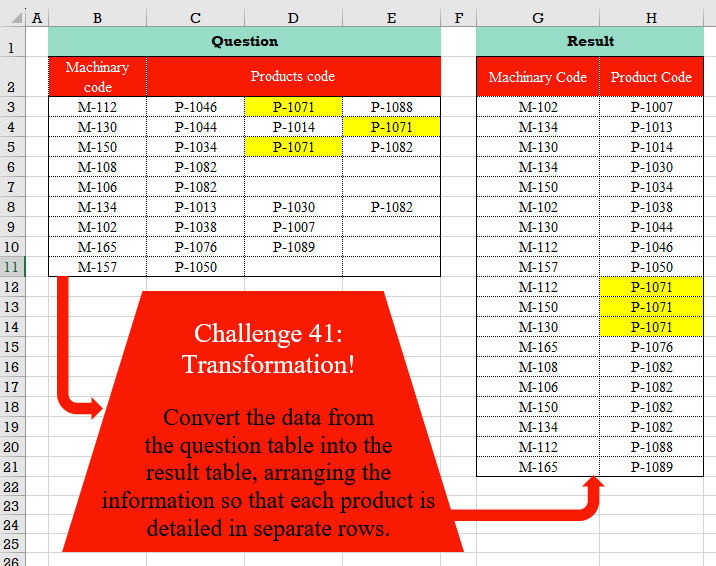
Convert the data from the question table into the result table, arranging the information so that each product is detailed in separate rows.
📌 Challenge Details and Links
Challenge Number: 41
Challenge Difficulty: ⭐⭐
📥Download Sample File
📥Link to the solutions on LinkedIn
Solving the challenge of Table Transformation! Part 6 with Power Query
Power Query solution 1 for Table Transformation! Part 6, proposed by Omid Motamedisedeh:
let
  Source  = Excel.CurrentWorkbook(){[Name = "Table1"]}[Content],
  Unpivot = Table.UnpivotOtherColumns(Source, {"Machinary code"}, "Attribute", "Value"),
  Removed = Table.RemoveColumns(Unpivot, {"Attribute"})
in
  Removed
Power Query solution 2 for Table Transformation! Part 6, proposed by Omid Motamedisedeh:
let
  S = Excel.CurrentWorkbook(){[Name = "Table1"]}[Content],
  Merged = Table.ExpandListColumn(
    Table.CombineColumns(
      S,
      {"Products code", "Column1", "Column2"},
      each List.RemoveNulls(_),
      "Product"
    ),
    "Product"
  )
in
  Merged
Power Query solution 3 for Table Transformation! Part 6, proposed by Omid Motamedisedeh:
let
  Source = Excel.CurrentWorkbook(){[Name = "Table1"]}[Content],
  Merged = Table.CombineColumns(
    Source,
    {"Products code", "Column1", "Column2"},
    Combiner.CombineTextByDelimiter(",", QuoteStyle.None),
    "Merged"
  ),
  Split = Table.TransformColumns(Merged, {"Merged", each Text.Split(_, ",")}),
  Expand = Table.ExpandListColumn(Split, "Merged"),
  Filtered = Table.SelectRows(Expand, each ([Merged] <> ""))
in
  Filtered
Power Query solution 4 for Table Transformation! Part 6, proposed by Omid Motamedisedeh:
let
  Source = Excel.CurrentWorkbook(){[Name = "Table1"]}[Content],
  Table = Table.FromRows(
    List.Combine(
      List.Transform(Table.ToRows(Source), each {{_{0}, _{1}}, {_{0}, _{2}}, {_{0}, _{3}}})
    )
  ),
  Filter = Table.SelectRows(Table, each ([Column2] <> null))
in
  Filter
Power Query solution 5 for Table Transformation! Part 6, proposed by Omid Motamedisedeh:
let
  S = Excel.CurrentWorkbook(){[Name = "Table1"]}[Content],
  Grouped = Table.Group(
    S,
    {"Machinary code"},
    {"Detail", each List.RemoveNulls(List.Skip(Table.ToRows(_){0}))}
  ),
  Expanded = Table.ExpandListColumn(Grouped, "Detail")
in
  Expanded
Power Query solution 6 for Table Transformation! Part 6, proposed by Brian Julius:
let
  Source = Excel.CurrentWorkbook(){[Name = "Table1"]}[Content],
  UnpivOther = Table.Sort(
    Table.RemoveColumns(
      Table.UnpivotOtherColumns(Source, {"Machinary code"}, "Attribute", "Product code"),
      "Attribute"
    ),
    {{"Product code", Order.Ascending}, {"Machinary code", Order.Ascending}}
  )
in
  UnpivOther
Power Query solution 7 for Table Transformation! Part 6, proposed by Cristobal Salcedo Beltran:
let
  ImportedData = Excel.CurrentWorkbook(){[Name = "Tabla1"]}[Content],
  UnpivotedData = Table.UnpivotOtherColumns(
    ImportedData,
    {"Machinary code"},
    "Attribute",
    "Product Code"
  )[[Machinary code], [Product Code]],
  SortedData = Table.Sort(
    Table.AddColumn(
      UnpivotedData,
      "SortKey",
      each Text.AfterDelimiter([Product Code], "-"),
      type text
    ),
    {{"SortKey", Order.Ascending}}
  )[[Machinary code], [Product Code]]
in
  SortedData
Power Query solution 8 for Table Transformation! Part 6, proposed by Eric Laforce:
let
  Source = Excel.CurrentWorkbook(){[Name = "Table1"]}[Content],
  TransformRows = Table.TransformRows(
    Source,
    each
      let
        L = List.RemoveNulls(Record.ToList(_)),
        M = L{0}
      in
        List.Transform(List.Skip(L), each {M, _})
  ),
  ToTable = Table.FromRows(List.Combine(TransformRows), {"Machine Code", "Product Code"}),
  Sort = Table.Sort(ToTable, "Product Code")
in
  Sort
Power Query solution 9 for Table Transformation! Part 6, proposed by Luan Rodrigues:
let
  Fonte = Tabela1,
  add = Table.AddColumn(Fonte, "Product Code", each List.RemoveFirstN(Record.FieldValues(_), 1)),
  exp = Table.ExpandListColumn(add, "Product Code"),
  fil = Table.SelectRows(exp, each ([Product Code] <> null)),
  res = Table.Sort(fil, {each Number.From(Text.Range([Product Code], 1)), 1})[
    [Machinary code],
    [Product Code]
  ]
in
  res
Power Query solution 10 for Table Transformation! Part 6, proposed by Aditya Kumar Darak 🇮🇳:
let
  Source = Excel.CurrentWorkbook(){[Name = "data"]}[Content],
  Unpivot = Table.UnpivotOtherColumns(Source, {"Machinary code"}, "H", "Product Code")[
    [Machinary code],
    [Product Code]
  ],
  Return = Table.Sort(Unpivot, each Number.From(Text.AfterDelimiter([Product Code], "-")))
in
  Return
Power Query solution 11 for Table Transformation! Part 6, proposed by Alejandro Simón 🇵🇦 🇪🇸:
let
  Source = Excel.CurrentWorkbook(){[Name = "Table1"]}[Content],
  Unpivot = Table.UnpivotOtherColumns(Source, {"Machinary code"}, "A", "Product Code"),
  Sol = Table.Sort(
    Table.RemoveColumns(Table.Sort(Unpivot, {"Product Code"}), "A"),
    {"Product Code"}
  )
in
  Sol
Power Query solution 12 for Table Transformation! Part 6, proposed by Nelson Mwangi:
let
  Source = Excel.CurrentWorkbook(){[Name = "Table1"]}[Content],
  UnpivotSort = Table.Sort(
    Table.RemoveColumns(
      Table.UnpivotOtherColumns(Source, {"Machinary code"}, "Attribute", "Product Code"),
      "Attribute"
    ),
    {"Product Code"}
  )
in
  UnpivotSort
Power Query solution 13 for Table Transformation! Part 6, proposed by Masoud Karami:
let
  Source                     = Excel.CurrentWorkbook(){[Name = "Table1"]}[Content],
  #"Unpivoted Other Columns" = Table.UnpivotOtherColumns(Source, {"Column1"}, "Attribute", "Value"),
  #"Removed Columns"         = Table.RemoveColumns(#"Unpivoted Other Columns", {"Attribute"}),
  #"Sorted Rows"             = Table.Sort(#"Removed Columns", {{"Value", Order.Ascending}})
in
  #"Sorted Rows"
Power Query solution 14 for Table Transformation! Part 6, proposed by 🇮🇷 Navid Esmaeilzadeh اسماعیل زاده:
let
  Source = Excel.CurrentWorkbook(){[Name = "Table1"]}[Content],
  #"Changed Type" = Table.TransformColumnTypes(
    Source,
    {
      {"Machinary code", type text},
      {"Products code", type text},
      {"Column1", type text},
      {"Column2", type text}
    }
  ),
  #"Added Custom" = Table.AddColumn(
    #"Changed Type",
    "Product Code",
    each List.Skip(Record.ToList(_), 1)
  ),
  #"Removed Other Columns" = Table.SelectColumns(
    #"Added Custom",
    {"Machinary code", "Product Code"}
  ),
  #"Expanded list" = Table.ExpandListColumn(#"Removed Other Columns", "Product Code"),
  #"Filtered Rows" = Table.SelectRows(#"Expanded list", each ([Product Code] <> null))
in
  #"Filtered Rows"
Power Query solution 15 for Table Transformation! Part 6, proposed by Glyn Willis:
let
  Source = Excel.CurrentWorkbook(){[Name = "Table1"]}[Content],
  Custom1 = List.Transform(
    Table.ToRows(Source),
    (ol) =>
      Record.FromList(
        List.Repeat({ol{0}}, 3),
        List.Transform({1 .. 3}, (il) => ol{il} ?? Text.From(il))
      )
  ),
  #"Removed Columns" = Table.FromRows(
    List.Combine(
      List.Transform(
        List.Distinct(
          List.RemoveNulls(
            List.Combine(Table.ToColumns(Table.RemoveColumns(Source, {"Machinary code"})))
          )
        ),
        (ol) =>
          let
            l  = List.RemoveNulls(List.Transform(Custom1, (il) => Record.FieldOrDefault(il, ol))),
            lc = List.Count(l)
          in
            List.Zip({l, List.Repeat({ol}, lc)})
      )
    ),
    type table [Machinery Code = text, Product Code = text]
  ),
  #"Sorted Rows" = Table.Sort(
    #"Removed Columns",
    {{"Machinery Code", Order.Ascending}, {"Product Code", Order.Ascending}}
  )
in
  #"Sorted Rows"
Power Query solution 16 for Table Transformation! Part 6, proposed by MASOTO LAZARUS KANYANE:
let
  Source = Excel.CurrentWorkbook(){[Name = "Table1"]}[Content],
  #"Changed Type" = Table.TransformColumnTypes(
    Source,
    {{"Column1", type text}, {"Column2", type text}, {"Column3", type text}, {"Column4", type text}}
  ),
  #"Unpivoted Other Columns" = Table.UnpivotOtherColumns(
    #"Changed Type",
    {"Column1"},
    "Attribute",
    "Value"
  ),
  #"Removed Columns" = Table.RemoveColumns(#"Unpivoted Other Columns", {"Attribute"}),
  #"Sorted Rows" = Table.Sort(
    #"Removed Columns",
    {{"Column1", Order.Ascending}, {"Value", Order.Ascending}}
  )
in
  #"Sorted Rows"
Power Query solution 17 for Table Transformation! Part 6, proposed by Theerapun Maneethap:
let
  Source = Excel.CurrentWorkbook(){[Name = "Table1"]}[Content],
  #"Changed Type" = Table.TransformColumnTypes(
    Source,
    {
      {"Machinary code", type text},
      {"Products code", type text},
      {"Products code2", type text},
      {"Products code3", type text}
    }
  ),
  #"Unpivoted Columns" = Table.UnpivotOtherColumns(
    #"Changed Type",
    {"Machinary code"},
    "Attribute",
    "Value"
  ),
  #"Removed Columns" = Table.RemoveColumns(#"Unpivoted Columns", {"Attribute"}),
  #"Renamed Columns" = Table.RenameColumns(#"Removed Columns", {{"Value", "Product Code"}}),
  #"Sorted Rows" = Table.Sort(#"Renamed Columns", {{"Product Code", Order.Ascending}})
in
  #"Sorted Rows"
Solving the challenge of Table Transformation! Part 6 with Excel
Excel solution 1 for Table Transformation! Part 6, proposed by محمد حلمي:
=SORT(
    HSTACK(
        TOCOL(
            IFS(
                C3:E11>0,
                B3:B11
            ),
            2,
            1
        ),
        TOCOL(
            C3:E11,
            1,
            1
        )
    ),
    2
)
Excel solution 2 for Table Transformation! Part 6, proposed by Oscar Mendez Roca Farell:
=VSTACK(
    B2:C2,
     SORT(
         MID(
             TOCOL(
                 IFS(
                     C3:E11>"",
                      B3:B11&C3:E11
                 ),
                  2,
                  1
             ),
              {1,
              6},
              {5,
              6}
         ) ,
         2
     )
)
Excel solution 3 for Table Transformation! Part 6, proposed by Julian Poeltl:
=VSTACK(
    HSTACK(
        "Machinary Code",
        "Product Code"
    ),
    LET(
        MC,
        B3:B11,
        PC,
        C3:E11,
        AR,
        HSTACK(
            VSTACK(
                MC,
                MC,
                MC
            ),
            TOCOL(
                PC,
                ,
                TRUE
            )
        ),
        SORT(
            FILTER(
                AR,
                TAKE(
                    AR,
                    ,
                    -1
                )<>0
            ),
            2
        )
    )
)
Excel solution 4 for Table Transformation! Part 6, proposed by John Jairo Vergara Domínguez:
=SORT(
    MID(
        TOCOL(
            IFS(
                C3:E11>0,
                B3:B11&C3:E11
            ),
            2
        ),
        {1,
        6},
        {5,
        6}
    ),
    2
)
Excel solution 5 for Table Transformation! Part 6, proposed by Sunny Baggu:
=SORT(
    TEXTSPLIT(
        ARRAYTOTEXT(
            TOCOL(
                IF(
                    C3:E11<>"",
                    B3:B11&"#"&C3:E11,
                    x
                ),
                3
            )
        ),
        "#",
        ","
    ),
    2,)
Excel solution 6 for Table Transformation! Part 6, proposed by Sunny Baggu:
=SORT(
    HSTACK(
        TOCOL(
            IF(
                C3:E11<>"",
                B3:B11,
                x
            ),
            3
        ),
        TOCOL(
            C3:E11,
            3
        )
    ),
    2
)
Excel solution 7 for Table Transformation! Part 6, proposed by Andy Heybruch:
=LET(
    _a,    TEXTSPLIT(        TEXTJOIN(
            ",",
            ,

            BYROW(
                B3:E11,
                LAMBDA(
                    _a,
                    TEXTJOIN(
                        ",",
                        1,
                        TAKE(
                            _a,
                            ,
                            1
                        )&";"&DROP(
                            _a,
                            ,
                            1
                        )
                    )
                )
            )
        ),
        ";",
        ","
    ),    _sort,
    SORTBY(
        _a,
        TAKE(
            _a,
            ,
            -1
        ),
        1,
        TAKE(
                            _a,
                            ,
                            1
                        ),
        1
    ),    FILTER(
        _sort,
        TAKE(
            _sort,
            ,
            -1
        )>""
    )
)
Excel solution 8 for Table Transformation! Part 6, proposed by Hussein SATOUR:
=LET(
    a,
    TOCOL(
        B3:B11&"/"&C3:E11
    ),
    b,
    TEXTAFTER(
        a,
        "/"
    ),
    SORT(
        FILTER(
            HSTACK(
                TEXTBEFORE(
                    a,
                    "/"
                ),
                b
            ),
            b<>""
        ),
        2
    )
)
Excel solution 9 for Table Transformation! Part 6, proposed by Murat Bayraktar:
=LET(     a,
     TOCOL(
         B3:E11,
          3,
          FALSE
     ),     b,
     HSTACK(
         a,
          SCAN(
              "",
               a,
               LAMBDA(
                   x,
                   y,
                    IF(
                        LEFT(
                            y,
                             1
                        ) = "M",
                         y,
                         x
                    )
               )
          )
     ),     c,
     LAMBDA(
         row,
          INDEX(
              row,
               1
          ) <> INDEX(
              row,
               2
          )
     ),     FILTER(
         b,
          BYROW(
              b,
               c
          )
     ))
Excel solution 10 for Table Transformation! Part 6, proposed by Oscar Javier Rosero Jiménez:
=SORT(TEXTSPLIT(TEXTJOIN("+",
    ,
    TOCOL(IF((B3:B11&"/"&C3:E11)<>B3:B11&"/",
    (B3:B11&"/"&C3:E11),
    1/0),
    2,
    4)),
    "/",
    "+"),
    2)
Excel solution 11 for Table Transformation! Part 6, proposed by Peter Compton:
=LET(
    maccode,
    B3:B11,
    sortm,
    TOCOL(
        CHOOSECOLS(
            maccode,
            1,
            SEQUENCE(
                COUNTA(
                    C3:E3
                )-1,
                1,
                1,
                0
            )
        )
    ),
    prodcode,
    TOCOL(
        C3:E11
    ),
    combine,
    HSTACK(
        sortm,
        prodcode
    ),
    FILTER(
        combine,
        prodcode<>0
    )
)
Excel solution 12 for Table Transformation! Part 6, proposed by Rayan Saud:
=LET(
    m,
    B3:B11,
    p,
    TOCOL(
        C3:E11
    ),
    s,
    HSTACK(
        INDEX(
            m,
            ROUNDUP(
                SEQUENCE(
                    COUNTA(
                        p
                    )
                )/3,
                0
            )
        ),
        p
    ),
    SORT(
        FILTER(
            s,
            TAKE(
                s,
                ,
                -1
            )<>0
        ),
        2
    )
)
Excel solution 13 for Table Transformation! Part 6, proposed by Thang Van:
=LET(
    a,
    B3:B11,
    b,
    VSTACK(
        HSTACK(
            a,
            C3:C11
        ),
        HSTACK(
            a,
            D3:D11
        ),
        HSTACK(
            a,
            E3:E11
        )
    ),
    c,
    FILTER(
        b,
        INDEX(
            b,
            ,
            2
        )<>0
    ),
    SORT(
        c,
        2,
        1
    )
)
Solving the challenge of Table Transformation! Part 6 with Python
Python solution 1 for Table Transformation! Part 6, proposed by Konrad Gryczan, PhD:
import pandas as pd

input = pd.read_excel("CH-041 Transformation.xlsx", usecols="B:E", skiprows=1, nrows = 9)
test = pd.read_excel("CH-041 Transformation.xlsx", usecols="G:H", skiprows=1, nrows = 20)

result = input.copy()
# name columns
result.columns = ["Machinary Code", "Col1", "Col2", "Col3"]
result = result.melt(id_vars=["Machinary Code"], var_name="col", value_name="Product Code").dropna(subset=["Product Code"])
result = result.sort_values(by=["Product Code", "col"])
result = result.drop(columns=["col"]).reset_index(drop=True)

print(result.equals(test)) # True
Python solution 2 for Table Transformation! Part 6, proposed by Luan Rodrigues:
import pandas as pd

df = pd.read_excel('PY/CH-041 Transformation/CH-041 Transformation.xlsx',usecols='B:E',skiprows=1)

df['record'] = df.to_records()
df['record'] = df['record'].apply(lambda x: x[2:])
df = df[['Machinary code','record']].explode('record')
df = df[df['record'].fillna('0') != '0' ]
df = df.sort_values(['record'])

print(df)
Python solution 3 for Table Transformation! Part 6, proposed by Raphael Okoye:
import pandas as pd
data = pd.read_excel('ch5.xlsx')
data.rename(columns ={'Unnamed: 3':'Products code1','Unnamed: 3':'Products code2','Unnamed: 4':'Products code3'}, inplace=True)
data = data.drop(columns=['Unnamed: 0'])


# Read the Excel file into a DataFrame
df = data

# Melting the DataFrame to combine 'Products code', 'Products code2', and 'Products code3' into one column
melted_df = pd.melt(df, id_vars=['Machinary code'], value_vars=['Products code', 'Products code2', 'Products code3'], value_name='Product code')

# Drop rows with NaN values in the 'Product code' column
melted_df = melted_df.dropna(subset=['Product code'])

# Select only the 'Machinary code' and 'Product code' columns
final_df = melted_df[['Machinary code', 'Product code']]


df = final_df

# Sort the DataFrame by 'Product code' to group similar product codes together
df_sorted = df.sort_values(by='Product code')

hashtag
#df_sorted
# Write the sorted DataFrame to an Excel file
df_sorted.to_excel('output_ch5.xlsx', index=False)
Solving the challenge of Table Transformation! Part 6 with R
R solution 1 for Table Transformation! Part 6, proposed by Konrad Gryczan, PhD:
library(tidyverse)
library(readxl)

input = read_excel("files/CH-041 Transformation.xlsx", range = "B2:E11")
test = read_excel("files/CH-041 Transformation.xlsx", range = "G2:H21")

result = input %>%
 select(`Machinary Code` = 1, Col1 = 2, Col2 = 3, Col3 = 4) %>%
 pivot_longer(cols = -c(1), names_to = "col", values_to = "Product Code", values_drop_na = TRUE) %>%
 arrange(str_extract(`Product Code`, "\d+"), col) %>%
 select(-col)