
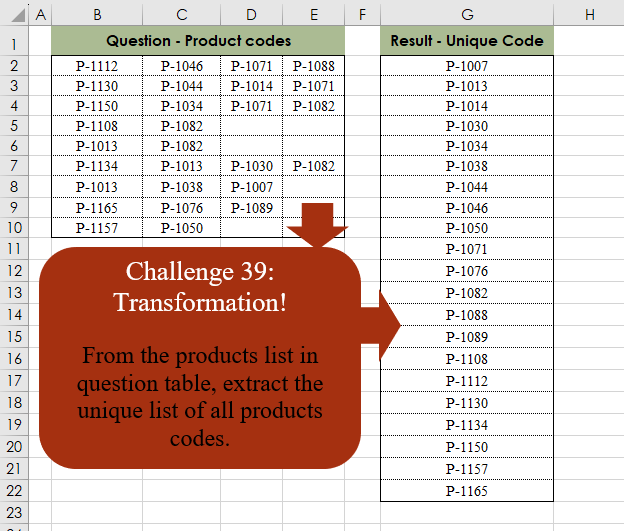
From the products list in the question table, extract the unique list of all product codes.
📌 Challenge Details and Links
Challenge Number: 39
Challenge Difficulty: ⭐
📥Download Sample File
📥Link to the solutions on LinkedIn
📥Link to the solution on YouTube
Solving the challenge of Table Transformation! Part 5 with Power Query
Power Query solution 1 for Table Transformation! Part 5, proposed by Brian Julius:
let
  Source = Excel.CurrentWorkbook(){[Name = "Table1"]}[Content],
  T = Table.FromList(
    List.RemoveNulls(List.Distinct(List.Combine(Table.ToRows(Source)))),
    Splitter.SplitByNothing(),
    {"Result"},
    null,
    ExtraValues.Error
  )
in
  T
Power Query solution 2 for Table Transformation! Part 5, proposed by Cristobal Salcedo Beltran:
let
  Source = Excel.CurrentWorkbook(){[Name = "Table2"]}[Content],
  #"Unpivoted Other Columns" = Table.FromList(
    List.Sort(List.Distinct(Table.UnpivotOtherColumns(Source, {}, "Attribute", "Value")[Value])),
    null,
    {"Result - Unique Code"}
  )
in
  #"Unpivoted Other Columns"
Power Query solution 3 for Table Transformation! Part 5, proposed by Luan Rodrigues:
let
  Fonte = Tabela1,
  res   = List.Distinct(List.RemoveNulls(List.Union(Table.ToColumns(Fonte))))
in
  res
Power Query solution 4 for Table Transformation! Part 5, proposed by Ramiro Ayala Chávez:
let
S = Excel.CurrentWorkbook(){[Name="Table1"]}[Content],
a = List.Sort(List.Distinct(List.RemoveNulls(List.Combine(Table.ToColumns(S))))),
Sol = Table.FromColumns({a},{"Result - Unique Code"})
in
Sol
Power Query solution 5 for Table Transformation! Part 5, proposed by Alejandro Simón 🇵🇦 🇪🇸:
let
  Source = Excel.CurrentWorkbook(){[Name = "Table2"]}[Content],
  Sol    = List.Distinct(List.Sort(List.RemoveNulls(List.Combine(Table.ToColumns(Source)))))
in
  Sol
Power Query solution 6 for Table Transformation! Part 5, proposed by Alexis Olson:
let
  Source               = Excel.CurrentWorkbook(){[Name = "Table1"]}[Content],
  #"Unpivoted Columns" = Table.UnpivotOtherColumns(Source, {}, "Attribute", "Value"),
  #"Grouped Rows"      = Table.Group(#"Unpivoted Columns", {"Value"}, {}),
  #"Sorted Rows"       = Table.Sort(#"Grouped Rows", {{"Value", Order.Ascending}})
in
  #"Sorted Rows"
Power Query solution 7 for Table Transformation! Part 5, proposed by Nelson Mwangi:
let
  Source = Excel.CurrentWorkbook(){[Name = "Table1"]}[Content],
  Unpivot = List.Sort(
    List.Distinct(Table.UnpivotOtherColumns(Source, {}, "Attribute", "Value")[Value])
  ),
  Table = Table.FromList(Unpivot, Splitter.SplitByNothing(), {"Result-Unique Code"})
in
  Table
Power Query solution 8 for Table Transformation! Part 5, proposed by Masoud Karami:
let
  Source = Excel.CurrentWorkbook(){[Name = "Table1"]}[Content],
  #"Added Index" = Table.AddIndexColumn(Source, "Index", 0, 1, Int64.Type),
  #"Unpivoted Other Columns" = Table.UnpivotOtherColumns(
    #"Added Index",
    {"Index"},
    "Attribute",
    "Value"
  ),
  #"Sorted Rows" = Table.Sort(#"Unpivoted Other Columns", {{"Value", Order.Ascending}}),
  #"Removed Other Columns" = Table.SelectColumns(#"Sorted Rows", {"Value"}),
  #"Removed Duplicates" = Table.Distinct(#"Removed Other Columns")
in
  #"Removed Duplicates"
Power Query solution 9 for Table Transformation! Part 5, proposed by 🇮🇷 Navid Esmaeilzadeh اسماعیل زاده:
let
  S                        = Excel.CurrentWorkbook(){[Name = "Table1"]}[Content],
  #"Added Custom"          = Table.AddColumn(S, "List", each Record.ToList(_)),
  #"Removed Other Columns" = Table.SelectColumns(#"Added Custom", {"List"}),
  #"Expanded List"         = Table.ExpandListColumn(#"Removed Other Columns", "List"),
  #"Removed Duplicates"    = Table.Distinct(#"Expanded List"),
  #"Sorted Rows"           = Table.Sort(#"Removed Duplicates", {{"List", Order.Ascending}}),
  #"Filtered Rows"         = Table.SelectRows(#"Sorted Rows", each ([List] <> null))
in
  #"Filtered Rows"
Power Query solution 10 for Table Transformation! Part 5, proposed by Amit Patel:
let
  Source = Excel.CurrentWorkbook(){[Name = "Table1"]}[Content],
  Lists = List.Distinct(List.Select(List.Combine(Table.ToColumns(Source)), each _ <> null)),
  Final = Table.FromList(ListColumn, Splitter.SplitByNothing(), null, null, ExtraValues.Ignore),
  #"Sorted Rows" = Table.Sort(Final, {{"Column1", Order.Ascending}})
in
  #"Sorted Rows"
Power Query solution 11 for Table Transformation! Part 5, proposed by Cindy C.:
let
  Source = Excel.CurrentWorkbook(){[Name = "Table1"]}[Content],
  Custom1 = Table.CombineColumns(
    Source,
    {"Column1", "Column2", "Column3", "Column4"},
    Combiner.CombineTextByDelimiter("|", QuoteStyle.None),
    "Result"
  ),
  #"Split Column by Delimiter" = Table.ExpandListColumn(
    Table.TransformColumns(
      Custom1,
      {
        {
          "Result",
          Splitter.SplitTextByDelimiter("|", QuoteStyle.None),
          let
            itemType = (type nullable text) meta [Serialized.Text = true]
          in
            type {itemType}
        }
      }
    ),
    "Result"
  ),
  #"Removed Blank Rows" = Table.SelectRows(
    #"Split Column by Delimiter",
    each not List.IsEmpty(List.RemoveMatchingItems(Record.FieldValues(_), {"", null}))
  ),
  #"Sorted Rows" = Table.Sort(#"Removed Blank Rows", {{"Result", Order.Ascending}}),
  #"Removed Duplicates" = Table.Distinct(#"Sorted Rows")
in
  #"Removed Duplicates"
Power Query solution 12 for Table Transformation! Part 5, proposed by Glyn Willis:
let
 //Source Table
 Source = Excel.CurrentWorkbook(){[Name="Table1"]}[Content],

 //Option 1
 #"Grouped Rows" = Table.Group(Source, {}, {{"Products",each List.Sort(List.Union(List.Transform(Table.ColumnNames(_),(x)=> List.Distinct(List.RemoveNulls(Table.Column(_,x)))))), type {text} }}),
 #"Expanded Products" = Table.ExpandListColumn(#"Grouped Rows", "Products"),

 //Option 2
 Custom1 = Table.Distinct(Table.Combine(List.Transform(Table.CombineColumnsToRecord(Source,"Products",Table.ColumnNames(Source))[Products], each Record.ToTable(_)[[Value]]))),
 #"Filtered Rows" = Table.SelectRows(Custom1, each ([Value] <> null)),
 #"Sorted Rows" = Table.Sort(#"Filtered Rows",{{"Value", Order.Ascending}})
in
 #"Sorted Rows"
Power Query solution 13 for Table Transformation! Part 5, proposed by MASOTO LAZARUS KANYANE:
let
  Source = Excel.CurrentWorkbook(){[Name = "Table1"]}[Content],
  #"Demoted Headers" = Table.DemoteHeaders(Source),
  #"Changed Type" = Table.TransformColumnTypes(
    #"Demoted Headers",
    {{"Column1", type text}, {"Column2", type text}, {"Column3", type text}, {"Column4", type text}}
  ),
  #"Unpivoted Columns" = Table.UnpivotOtherColumns(#"Changed Type", {}, "Attribute", "Value"),
  #"Removed Columns" = Table.RemoveColumns(#"Unpivoted Columns", {"Attribute"}),
  #"Removed Duplicates" = Table.Distinct(#"Removed Columns"),
  #"Sorted Rows" = Table.Sort(#"Removed Duplicates", {{"Value", Order.Ascending}})
in
  #"Sorted Rows"
Power Query solution 14 for Table Transformation! Part 5, proposed by Theerapun Maneethap:
let
  Source = Excel.CurrentWorkbook(){[Name = "Table3"]}[Content],
  #"Changed Type" = Table.TransformColumnTypes(
    Source,
    {{"Column1", type text}, {"Column2", type text}, {"Column3", type text}, {"Column4", type text}}
  ),
  #"Unpivoted Columns" = Table.UnpivotOtherColumns(#"Changed Type", {}, "Attribute", "Value"),
  #"Removed Columns" = Table.RemoveColumns(#"Unpivoted Columns", {"Attribute"}),
  #"Sorted Rows" = Table.Sort(#"Removed Columns", {{"Value", Order.Ascending}}),
  #"Removed Duplicates" = Table.Distinct(#"Sorted Rows"),
  #"Renamed Columns" = Table.RenameColumns(
    #"Removed Duplicates",
    {{"Value", "Result - Unique Code"}}
  )
in
  #"Renamed Columns"
Solving the challenge of Table Transformation! Part 5 with Excel
Excel solution 1 for Table Transformation! Part 5, proposed by محمد حلمي:
=SORT(
    UNIQUE(
        TOCOL(
            B2:E10,
            1
        )
    )
)
Excel solution 2 for Table Transformation! Part 5, proposed by Oscar Mendez Roca Farell:
=SORT(
    UNIQUE(
        TOCOL(
            B2:E10,
             1
        )
    )
)
Excel solution 3 for Table Transformation! Part 5, proposed by Julian Poeltl:
=SORT(
    UNIQUE(
        TOCOL(
            B2:E10,
            1
        )
    )
)
Excel solution 4 for Table Transformation! Part 5, proposed by John Jairo Vergara Domínguez:
=SORT(
    UNIQUE(
        TOCOL(
            B2:E10,
            1
        )
    )
)
Excel solution 5 for Table Transformation! Part 5, proposed by Iván Cortinas Rodríguez:
=UNIQUE(
    SORT(
        FILTER(
            TOCOL(
                B2:E10
            ),
            TOCOL(
                UNIQUE(
                B2:E10
            )
            )<>""
        )
    )
)
Excel solution 6 for Table Transformation! Part 5, proposed by Sunny Baggu:
=SORT(
    UNIQUE(
        TOCOL(
            B2:E10,
             3
        )
    )
)
Excel solution 7 for Table Transformation! Part 5, proposed by Bilal Mahmoud kh.:
=BYROW(
    SORT(
        TEXTSPLIT(
            TEXTJOIN(
                "|",
                ,
                TOCOL(
                    B3:E11,
                    TRUE()
                )
            ),
            "-",
            "|"
        ),
        2
    ),
    LAMBDA(
        x,
        TEXTJOIN(
            "-",
            ,
            x
        )
    )
)
Excel solution 8 for Table Transformation! Part 5, proposed by Mey Tithveasna:
=SORT(
    UNIQUE(
        TOCOL(
            B2:E10,
            3
        )
    )
)
Excel solution 9 for Table Transformation! Part 5, proposed by Nicolas Micot:
=TRIER(
    UNIQUE(
        DANSCOL(
            B2:E10;
            1
        )
    )
)
Solving the challenge of Table Transformation! Part 5 with Python
Python solution 1 for Table Transformation! Part 5, proposed by Cristobal Salcedo Beltran:
import pandas as pd
file_path = "/lakehouse/default/Files/ChallengeOmid/CH-039 Transformation.xlsx"
df = pd.read_excel(file_path, usecols=[1, 2, 3, 4], nrows=8)
df_melted = df.melt(var_name='Attribute', value_name='Result - Unique Code')
unique_values = pd.Series(df_melted['Result - Unique Code'].dropna()
 .unique()).sort_values().tolist()
result_df = pd.DataFrame({"Result - Unique Code": unique_values})
print(result_df)
Python solution 2 for Table Transformation! Part 5, proposed by Cristobal Salcedo Beltran:
import SparkSession
from pyspark.sql.functions import col, explode, collect_set, array
import pandas as pd

spark = SparkSession.builder.appName("UniqueValuesExtraction").getOrCreate()
file_path = "/lakehouse/default/Files/ChallengeOmid/CH-039 Transformation.xlsx"
pandas_df = pd.read_excel(file_path, usecols=[1, 2, 3, 4], nrows=8)

df = spark.createDataFrame(pandas_df)
df_exploded = df.withColumn("Result - Unique Code", explode(array(*df.columns)))

unique_values = df_exploded.select("Result - Unique Code").na.drop()
 .distinct().sort("Result - Unique Code")
unique_values.show()
Python solution 3 for Table Transformation! Part 5, proposed by Konrad Gryczan, PhD:
import pandas as pd

input = pd.read_excel("CH-039 Transformation.xlsx", sheet_name="Sheet1", usecols="B:E", nrows=9)
test  = pd.read_excel("CH-039 Transformation.xlsx", sheet_name="Sheet1", usecols="G",  nrows=22)

input = input.stack().reset_index(drop=True)
input = input.sort_values().drop_duplicates().reset_index(drop=True)
input = pd.DataFrame(input, columns=['result'])

print(input['result'].equals(test['Result - Unique Code'])) # True
Python solution 4 for Table Transformation! Part 5, proposed by Luan Rodrigues:
import pandas as pd

df = pd.read_excel(r'PY/CH-039 Transformation.xlsx',usecols='B:E')

lista_dicionarios = df.to_dict(orient='records').copy()

valores = []
for dicionario in lista_dicionarios:
 valores.extend(list(dicionario.values()))

df1 = pd.DataFrame(valores)
df2= df1.dropna().drop_duplicates()

print(df2)
Solving the challenge of Table Transformation! Part 5 with R
R solution 1 for Table Transformation! Part 5, proposed by Konrad Gryczan, PhD:
library(tidyverse)
library(readxl)

input = read_excel("files/CH-039 Transformation.xlsx", range = 'B2:E10', col_names = F)
test = read_excel("files/CH-039 Transformation.xlsx", range = 'G1:G22')


result = input %>%
 pivot_longer(everything(), names_to = NULL) %>%
 arrange(value) %>%
 na.omit() %>%
 distinct()