
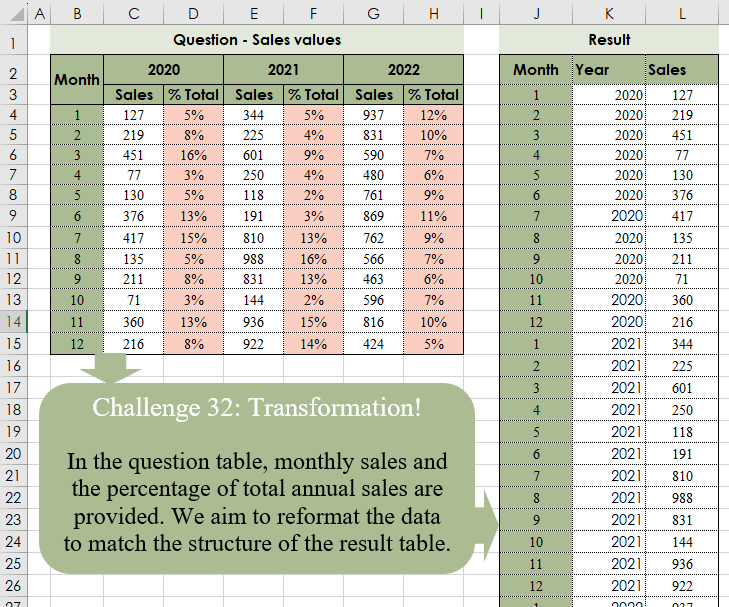
In the question table, monthly sales and the percentage of total annual sales are provided. We aim to reformat the data to match the structure of the result table.
📌 Challenge Details and Links
Challenge Number: 32
Challenge Difficulty: ⭐⭐
📥Download Sample File
📥Link to the solutions on LinkedIn
Solving the challenge of Table Transformation! Part 4 with Power Query
Power Query solution 1 for Table Transformation! Part 4, proposed by Brian Julius:
let
  Source = Excel.CurrentWorkbook(){[Name = "Table1"]}[Content],
  Clean = Table.SelectRows(
    Table.RemoveColumns(
      Source,
      List.Select(Table.ColumnNames(Source), each Text.StartsWith(_, "Column"))
    ),
    each [Month] <> null
  ),
  UnpivOther = Table.Sort(
    Table.UnpivotOtherColumns(Clean, {"Month"}, "Year", "Sales"),
    {{"Year", Order.Ascending}, {"Month", Order.Ascending}}
  )
in
  UnpivOther
Power Query solution 2 for Table Transformation! Part 4, proposed by Cristobal Salcedo Beltran:
let
  LoadedTable = Excel.CurrentWorkbook(){0}[Content],
  SelectedColumnsList = List.Select(
    Table.ColumnNames(LoadedTable),
    each Text.Contains(_, "20") or Text.Contains(_, "Mont")
  ),
  FilteredTable = Table.SelectRows(
    Table.SelectColumns(LoadedTable, SelectedColumnsList),
    each ([Month] <> null)
  ),
  UnpivotedColumns = Table.UnpivotOtherColumns(FilteredTable, {"Month"}, "Year", "Value"),
  SortedRows = Table.Sort(
    UnpivotedColumns,
    {{"Year", Order.Ascending}, {"Month", Order.Descending}}
  )
in
  SortedRows
Power Query solution 3 for Table Transformation! Part 4, proposed by Luan Rodrigues:
let
  Fonte = Table.DemoteHeaders(Tabela1),
  res = Table.Combine(
    List.Transform(
      List.Alternate(List.RemoveFirstN(Table.ToColumns(Fonte)), 1, 1, 1),
      each
        let
          a = List.RemoveFirstN(_, 2),
          b = List.Repeat({List.First(_)}, List.Count(a)),
          c = {1 .. List.Count(a)}
        in
          Table.FromRows(List.Zip({c, b, a}), {"Month", "Year", "Sales"})
    )
  )
in
  res
Power Query solution 4 for Table Transformation! Part 4, proposed by Ramiro Ayala Chávez:
let
Source = Excel.CurrentWorkbook(){[Name="Table1"]}[Content],
R = List.Repeat,
S = List.Skip,
C = Table.TransformColumnNames(Source, each Text.Start(_,1)&Text.End(_,1))[[C1],[C2],[C4],[C6]],
a = Table.Skip(Table.TransformColumns(C,{"C1", each if _=null then "Month" else _})),
b = Record.TransformFields(a{0},{{"C4", each null},{"C6", each null}}),
c = Table.RemoveRows(Table.InsertRows(a,1,{b}),0),
d = {c[C1]&S(c[C1])&S(c[C1])},
e = {List.InsertRange(R({C[C2]{0}},12)&R({C[C4]{0}},12)&R({C[C6]{0}},12),0,{"Year"})},
f = List.Transform({c[C2]&c[C4]&c[C6]}, each List.RemoveNulls(_)),
Sol = Table.PromoteHeaders(Table.FromColumns(d&e&f))
in
Sol
Power Query solution 5 for Table Transformation! Part 4, proposed by Aditya Kumar Darak 🇮🇳:
let

 // table = B2:H15, headers = false
 Source = Excel.CurrentWorkbook(){[ Name = "data" ]}[Content],
 Promote = Table.PromoteHeaders ( Source ),
 Remove = Table.Skip ( Promote ),
 Cols  = List.Select ( Table.ColumnNames ( Remove ), each Text.Start ( _, 6 ) = "Column" ),
 Select = Table.RemoveColumns ( Remove, Cols ),
 Unpivot = Table.UnpivotOtherColumns ( Select, { "Month" }, "Year", "Sales" ),
 Return = Table.Sort ( Unpivot, { "Year", "Month" } )
in
 Return
Power Query solution 6 for Table Transformation! Part 4, proposed by Nelson Mwangi:
let
  Source   = Excel.CurrentWorkbook(){[Name = "Table2"]}[Content],
  ColNames = List.Select(Table.ColumnNames(Source), each not Text.StartsWith(_, "Col")),
  SkipR1   = Table.Skip(Table.SelectColumns(Source, ColNames), 1),
  Unpivot  = Table.UnpivotOtherColumns(SkipR1, {"Month"}, "Year", "Sales"),
  Sort     = Table.Sort(Unpivot, {{"Year", Order.Ascending}, {"Month", Order.Ascending}})
in
  Sort
Power Query solution 7 for Table Transformation! Part 4, proposed by 🇮🇷 Navid Esmaeilzadeh اسماعیل زاده:
let
  Source = Excel.CurrentWorkbook(){[Name = "Table2"]}[Content],
  A = Table.TransformColumnTypes(
    Source,
    {
      {"Column1", type any},
      {"Column2", type any},
      {"Column3", type any},
      {"Column4", type any},
      {"Column5", type any},
      {"Column6", type any},
      {"Column7", type any}
    }
  ),
  B = Table.Transpose(A),
  C = Table.PromoteHeaders(B, [PromoteAllScalars = true]),
  D = Table.FillDown(C, {"Month"}),
  E = Table.SelectRows(D, each not Text.Contains([Column2], "% Total")),
  Un = Table.UnpivotOtherColumns(E, {"Month", "Column2"}, "Attribute", "Value"),
  R = Table.RenameColumns(Un, {{"Month", "Year"}, {"Attribute", "Month"}, {"Value", "Sales"}}),
  Sol = Table.SelectColumns(R, {"Month", "Year", "Sales"})
in
  Sol
Power Query solution 8 for Table Transformation! Part 4, proposed by An Nguyen:
let
  Dataset = Excel.CurrentWorkbook(){[Name = "Dataset"]}[Content],
  RemovedFirstRow = Table.RemoveFirstN(Dataset, 1),
  SalesColumnsName = List.Alternate(Table.ColumnNames(RemovedFirstRow), 1, 1, 2),
  RemovedPercentTotal = Table.SelectColumns(RemovedFirstRow, SalesColumnsName),
  UnpivotedTable = Table.Unpivot(
    RemovedPercentTotal,
    List.Skip(SalesColumnsName, 1),
    "Year",
    "Sales"
  ),
  Result = Table.Sort(UnpivotedTable, {{"Year", Order.Ascending}, {"Month", Order.Ascending}})
in
  Result
Power Query solution 9 for Table Transformation! Part 4, proposed by Glyn Willis:
let
  Source = Excel.CurrentWorkbook(){[Name = "Table1"]}[Content],
  #"Demoted Headers" = Table.SplitAt(Table.DemoteHeaders(Source), 2),
  Custom1 = Table.CombineColumns(
    Table.FillDown(
      Table.ReplaceValue(
        Table.Transpose(#"Demoted Headers"{0}),
        each [Column1],
        each if Text.StartsWith([Column1], "Column") then null else [Column1],
        Replacer.ReplaceValue,
        {"Column1"}
      ),
      {"Column1"}
    ),
    {"Column1", "Column2"},
    each Text.Combine(_, "|"),
    "Column1"
  )[Column1],
  Custom2 = Table.RenameColumns(
    #"Demoted Headers"{1},
    List.Zip({Table.ColumnNames(#"Demoted Headers"{1}), Custom1})
  ),
  #"Unpivoted Other Columns" = Table.UnpivotOtherColumns(Custom2, {"Month"}, "Attribute", "Value"),
  #"Split Column by Delimiter" = Table.SplitColumn(
    #"Unpivoted Other Columns",
    "Attribute",
    Splitter.SplitTextByDelimiter("|", QuoteStyle.Csv),
    {"Year", "Attribute.2"}
  ),
  #"Filtered Rows" = Table.SelectRows(#"Split Column by Delimiter", each ([Attribute.2] = "Sales")),
  #"Changed Type" = Table.TransformColumnTypes(
    #"Filtered Rows",
    {{"Month", Int64.Type}, {"Year", Int64.Type}, {"Value", type number}}
  ),
  #"Sorted Rows" = Table.Sort(
    #"Changed Type",
    {{"Year", Order.Ascending}, {"Month", Order.Ascending}}
  )
in
  #"Sorted Rows"
Solving the challenge of Table Transformation! Part 4 with Excel
Excel solution 1 for Table Transformation! Part 4, proposed by Bo Rydobon 🇹🇭:
=LET(
    y,
    C2:H2,
    m,
    B4:B15,
    L,
    LAMBDA(
        x,
        TOCOL(
            IFS(
                m*y,
                x
            ),
            3,
            1
        )
    ),
    HSTACK(
        L(
            m
        ),
        L(
            y
        ),
        L(
            C4:H15
        )
    )
)
Excel solution 2 for Table Transformation! Part 4, proposed by 🇰🇷 Taeyong Shin:
=LET(a,
    C4:H15,
    b,
    a/(a>1),
    f,
    LAMBDA(
        x,
        TOCOL(
            IF(
                b,
                x
            ),
            2,
            1
        )
    ),
    HSTACK(
        f(
            B4:B15
        ),
        f(
            C2:H2
        ),
        f(
            b
        )
    ))
Excel solution 3 for Table Transformation! Part 4, proposed by Oscar Mendez Roca Farell:
=--TEXTSPLIT(
    CONCAT(
        TOCOL(
            IFS(
                C2:H2,
                 B4:B15&"|"&C2:G2&"|"&C4:H15
            ),
             2,
             1
        )&"/"
    ),
     "|",
     "/",
     1
)
Excel solution 4 for Table Transformation! Part 4, proposed by Owen Price:
=LET(    sales,
    TOCOL(
        CHOOSECOLS(
            C4:G15,
            {1,
            3,
            5}
        ),
        ,
        TRUE
    ),    seq,
    SEQUENCE(
        36,
        ,
        0
    ),    months,
    MOD(
        seq,
        12
    )+1,    years,
    SORT(
        MOD(
            seq,
            3
        )
    )+C2,    VSTACK(
        {"Month",
        "Year",
        "Sales"},
         HSTACK(
             years,
             months,
             sales
         )
    ))
Excel solution 5 for Table Transformation! Part 4, proposed by Julian Poeltl:
=LET(
    T,
    B2:H15,
    UYS,
    DROP(
        UNIQUE(
            TRANSPOSE(
                CHOOSEROWS(
                    T,
                    1
                )
            )
        ),
        1
    ),
    UY,
    FILTER(
        UYS,
        UYS<>0
    ),
    CY,
    COUNTA(
        UY
    ),
    M,
    MOD(
        SEQUENCE(
            CY*12
        )-1,
        12
    )+1,
    Y,
    ROUNDDOWN(
        SEQUENCE(
            CY*12,
            ,
            0
        )/12,
        0
    )+CHOOSEROWS(
        UY,
        1
    ),
    S,
    TOCOL(
        TRANSPOSE(
            CHOOSECOLS(
                DROP(
                    T,
                    2
                ),
                SEQUENCE(
                    CY,
                    ,
                    2,
                    2
                )
            )
        )
    ),
    VSTACK(
        HSTACK(
            "Month",
            "Year",
            "Sales"
        ),
         HSTACK(
             M,
             Y,
             S
         )
    )
)
Excel solution 6 for Table Transformation! Part 4, proposed by Julian Poeltl:
=LET(
    T,
    B2:H15,
    TT,
    CHOOSEROWS(
        T,
        1,
        SEQUENCE(
            12,
            ,
            3
        )
    ),
    UYS,
    DROP(
        UNIQUE(
            TRANSPOSE(
                CHOOSEROWS(
                    T,
                    1
                )
            )
        ),
        1
    ),
    UY,
    FILTER(
        UYS,
        UYS<>0
    ),
    CY,
    COUNTA(
        UY
    ),
    TTT,
    CHOOSECOLS(
        TT,
        1,
        SEQUENCE(
            CY,
            ,
            2,
            2
        )
    ),
    VSTACK(
        HSTACK(
            "Month",
            "Year",
            "Sales"
        ),
        SORT(
            L_Flattena2DTableintoColumns(
                TTT
            ),
            2,
            1
        )
    )
)

L_Flattena2DTableintoColumns: =LAMBDA(Table,
    LET(ROWS,
    ROWS(
        DROP(
            Table,
            1,
            1
        )
    ),
    COLUMNS,
    COLUMNS(
        DROP(
            Table,
            1,
            1
        )
    ),
    HRows,
    CHOOSEROWS(TAKE(
        Table,
        -ROWS,
        1
    ),
    (ROUNDDOWN(
        SEQUENCE(
            ROWS*COLUMNS,
            ,
            0
        )/COLUMNS,
        0
    )+1)),
    HColumn,
    CHOOSEROWS(
        TOCOL(
            TAKE(
                Table,
                1,
                -COLUMNS
            )
        ),
        L_RepeatingNumberSequence(
            COLUMNS,
            ROWS
        )
    ),
    Data,
    TOCOL(
        DROP(
            Table,
            1,
            1
        )
    ),
    HSTACK(
        HRows,
        HColumn,
        Data
    ))) L_RepeatingNumberSequence:
=LAMBDA(
    Numbers,
    Repetitions,
    IF(
        MOD(
            SEQUENCE(
                Numbers*Repetitions
            ),
            Numbers
        )=0,
        Numbers,
        MOD(
            SEQUENCE(
                Repetitions*Numbers
            ),
            Numbers
        )
    )
)
Excel solution 7 for Table Transformation! Part 4, proposed by Kris Jaganah:
=LET(
    a,
    B2:H15,
    b,
    B2:H2,
    c,
    TOCOL(
        TAKE(
            a,
            -12,
            1
        )&"-"&FILTER(
            b,
            B3:H3="Sales"
        ),
        ,
        1
    ),
    d,
    --TEXTBEFORE(
        c,
        "-"
    ),
    e,
    TEXTAFTER(
        c,
        "-"
    ),
    VSTACK(
        {"Month",
        "Year",
        "Sales"},
        HSTACK(
            d,
            --e,
            MAP(
                d,
                e,
                LAMBDA(
                    x,
                    y,
                    XLOOKUP(
                        x,
                        TAKE(
                            a,
                            ,
                            1
                        ),
                        XLOOKUP(
                            y,
                            b,
                            a
                        )
                    )
                )
            )
        )
    )
)
Excel solution 8 for Table Transformation! Part 4, proposed by John Jairo Vergara Domínguez:
=LET(
    m,
    B4:B15,
    y,
    C2:H2,
    f,
    LAMBDA(
        r,
        TOCOL(
            IF(
                m/y,
                r
            ),
            2,
            1
        )
    ),
    HSTACK(
        f(
            m
        ),
        f(
            y
        ),
        f(
            C4:H15
        )
    )
)
Excel solution 9 for Table Transformation! Part 4, proposed by Sunny Baggu:
=HSTACK(     TOCOL(
         IF(
             SEQUENCE(
                 ,
                  COUNTA(
                      C2:H2
                  )
             ),
              B4:B15
         ),
          ,
          1
     ),     TOCOL(
         INDEX(
             IF(
                 B4:B15,
                  C2:H2,
                  x
             ),
              B4:B15,
              {1,
              3,
              5}
         ),
          ,
          1
     ),     TOCOL(
         IF(
             C2:H2,
              C4:H15,
              x
         ),
          3,
          1
     ))
Excel solution 10 for Table Transformation! Part 4, proposed by An Nguyen:
=LET(     years,
     UNIQUE(
         TOCOL(
             C2:H2,
              1
         )
     ),     make_series,
     LAMBDA(
         column,
         length,          TEXTSPLIT(
              REPT(
                  TEXTJOIN(
                      ";",
                       ,
                       column
                  ) & ";",
                   length
              ),
               ,
               ";",
               1
          )     ),     sales,
     TOCOL(
         CHOOSECOLS(
             C4:H15,
              {1,
             3,
             5}
         ),
         ,
         1
     ),     HSTACK(
         make_series(
             B4:B15,
              3
         ),
          SORT(
              make_series(
                  years,
                   12
              )
          ),
          sales
     ))
Excel solution 11 for Table Transformation! Part 4, proposed by Asheesh Pahwa:
=LET(yr,
    C2:H2,
    sc,
    SCAN(
        ,
        yr,
        LAMBDA(
            a,
            v,
            IF(
                v='"',a,v))),r,DROP(REDUCE('"',
                UNIQUE(
                    sc,
                    TRUE
                ),
                LAMBDA(
                    x,
                    y,

                    VSTACK(
                        x,
                        LET(
                            a,
                            INDEX(
                                C4:H15,
                                ,
                                XMATCH(
                                    y,
                                    sc
                                )
                            ),
                            b,
                            SEQUENCE(
                                ROWS(
                                    a
                                )
                            ),
                            c,
                            b&"-"&y&"-"&a,
                            c
                        )
                    )
                )
            ),
            1
        ),
        DROP(
            REDUCE(
                ,
                r,
                LAMBDA(
                    a,
                    v,
                    VSTACK(
                        a,
                        TEXTSPLIT(
                            v,
                            "-"
                        )
                    )
                )
            ),
            1
        )
    )
Excel solution 12 for Table Transformation! Part 4, proposed by Gabriel Raigosa:
=LET(s,EDATE("01-01-2020",SEQUENCE(36,,0)),HSTACK(MONTH(s),YEAR(s),TOCOL(CHOOSECOLS(C4:H15,1,3,5))))Excel solution 13 for Table Transformation! Part 4, proposed by Gabriel Raigosa:
=LET(s,EDATE(43831,SEQUENCE(36,,0)),HSTACK(MONTH(s),YEAR(s),TOCOL(CHOOSECOLS(C4:H15,1,3,5))))Excel solution 14 for Table Transformation! Part 4, proposed by Hussein SATOUR:
=LET(
    a,
    TOCOL(
        CHOOSECOLS(
            BASE(
                B4:B15,
                10,
                2
            )&C2:H2&C4:H15,
            1,
            3,
            5
        ),
        ,
        1
    ),
    --HSTACK(
        LEFT(
            a,
            2
        ),
        MID(
            a,
            3,
            4
        ),
        RIGHT(
            a,
            LEN(
                a
            )-6
        )
    )
)
Excel solution 15 for Table Transformation! Part 4, proposed by Rick Rothstein:
=VSTACK(
    {"Month",
    "Year",
    "Sales"},
    0+TEXTSPLIT(
        TEXTJOIN(
            "|",
            ,
            TOCOL(
                B4:B15&"*"&TOROW(
                    C2:G2,
                    1
                )&"*"&CHOOSECOLS(
                    C4:H15,
                    1,
                    3,
                    5
                ),
                ,
                1
            )
        ),
        "*",
        "|"
    )
)
Solving the challenge of Table Transformation! Part 4 with Python
Python solution 1 for Table Transformation! Part 4, proposed by Konrad Gryczan, PhD:
import pandas as pd

input = pd.read_excel("CH-032 Transformation.xlsx", usecols="B:H", skiprows=1, nrows= 14, header=None)
test  = pd.read_excel("CH-032 Transformation.xlsx", usecols="J:L", skiprows=1, nrows=38)
test.columns = ["Month", "Year", "Sales"]

input.columns = input.iloc[0].astype("str").fillna('') + '' + input.iloc[1].fillna('')
input = input.drop([0,1], axis=0).reset_index(drop=True)
input = input.loc[:, ~input.columns.str.contains('%')]
input = input.melt(id_vars=["Month"], var_name="Year", value_name="Sales")
input["Year"] = input["Year"].str.extract('(d+)').astype("int")
input["Month"] = input["Month"].astype("int")
input["Sales"] = input["Sales"].astype("int")

print(input == test) # all True
Solving the challenge of Table Transformation! Part 4 with R
R solution 1 for Table Transformation! Part 4, proposed by Konrad Gryczan, PhD:
library(tidyverse)
library(readxl)

input = read_excel("files/CH-032 Transformation.xlsx", range = "B2:H15", col_names = FALSE)
test = read_excel("files/CH-032 Transformation.xlsx", range = "J2:L38")

input_header = input %>%
 filter(!...1 %in% c(1:12)) %>%
 t() %>%
 as.data.frame() %>%
 fill(1, .direction = "down") %>%
 unite("header", V1, V2, sep = "_", na.rm = T) %>%
 pull()

colnames(input) = input_header

input_table = input %>%
 filter(Month %in% c(1:12)) %>%
 pivot_longer(cols = c(2,4,6), names_to = "Year", values_to = "Sales") %>%
 select(-c(2,3,4)) %>%
 separate(col = "Year", into = c("Year", "M")) %>%
 mutate(across(everything(), as.numeric)) %>%
 select(-M) %>%
 arrange(Year, Month)