
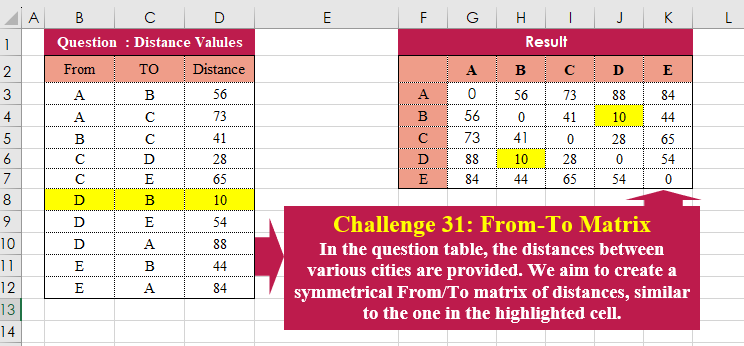
In the question table, the distances between various cities are provided. We aim to create a symmetrical From/To matrix of distances, similar to the one in the highlighted cell.
📌 Challenge Details and Links
Challenge Number: 31
Challenge Difficulty: ⭐⭐
📥Download Sample File
📥Link to the solutions on LinkedIn
Solving the challenge of From-To Matrix with Power Query
Power Query solution 1 for From-To Matrix, proposed by Omid Motamedisedeh:
let
  Source = Excel.CurrentWorkbook(){[Name = "Table1"]}[Content],
  Calc = [
    a = {"A" .. "E"},
    b = {a}
      & List.Transform(
        a,
        each List.Transform(
          a,
          (x) =>
            try
              Source{[From = x, TO = _]}[Distance]
            otherwise
              (try Source{[From = _, TO = x]}[Distance] otherwise 0)
        )
      )
  ][b],
  tab = Table.FromColumns(Calc, {"-", "A" .. "E"})
in
  tab
Power Query solution 2 for From-To Matrix, proposed by Brian Julius:
let
  Source = Excel.CurrentWorkbook(){[Name = "Table1"]}[Content],
  ToCols = Table.ToColumns(Source),
  Combined = Source
    & Table.FromColumns({ToCols{1}, ToCols{0}, ToCols{2}}, Table.ColumnNames(Source)),
  Pivot = Table.Pivot(Combined, List.Distinct(Source[TO]), "TO", "Distance", List.Sum),
  ReplNulls = (x) => List.ReplaceMatchingItems(x, {{null, 0}}),
  Invoke = Table.FromColumns(
    List.Transform(Table.ToColumns(Pivot), each ReplNulls(_)),
    Table.ColumnNames(Pivot)
  ),
  Reorder = Table.ReorderColumns(
    Invoke,
    {List.First(Table.ColumnNames(Pivot))}
      & List.Sort(List.Skip(Table.ColumnNames(Pivot), 1), Order.Ascending)
  )
in
  Reorder
Power Query solution 3 for From-To Matrix, proposed by Ramiro Ayala Chávez:
let
S = Excel.CurrentWorkbook(){[Name="Table1"]}[Content],
a = Table.RenameColumns(Table.SelectColumns(S,{"TO","From","Distance"}),{{"TO","From"},{"From","TO"}}),
b = S&a,
c = Table.Sort(b,{{"TO",0}}),
d = Table.Pivot(c, List.Distinct(c[TO]),"TO","Distance"),
Sol = Table.ReplaceValue(d,null,0,Replacer.ReplaceValue,Table.ColumnNames(d))
in
Sol
Power Query solution 4 for From-To Matrix, proposed by Aditya Kumar Darak 🇮🇳:
let
 Source = Excel.CurrentWorkbook(){[ Name = "data" ]}[Content],
 Rename = Table.RenameColumns ( Source, { { "From", "TO" }, { "TO", "From" } } ),
 Combine = Source & Rename,
 Return = Table.Pivot (
 Combine,
 List.Distinct ( Combine[From] ),
 "From",
 "Distance",
 ( f ) => f{0}? ?? 0
 )
in
 Return


Brian Julius Sir, This one is for you
Power Query solution 5 for From-To Matrix, proposed by 🇮🇷 Navid Esmaeilzadeh اسماعیل زاده:
let
  Source = Excel.CurrentWorkbook(){[Name = "Table1"]}[Content],
  A = Table.AddColumn(Source, "T", each Text.Combine(List.Sort({[From], [TO]}), ",")),
  B = Table.SplitColumn(A, "T", Splitter.SplitTextByDelimiter(",", QuoteStyle.Csv), {"T.1", "T.2"}),
  C = Table.TransformColumnTypes(B, {{"T.1", type text}, {"T.2", type text}}),
  D = Table.SelectColumns(C, {"T.1", "T.2", "Distance"}),
  E = Table.RenameColumns(D, {{"T.1", "From"}, {"T.2", "To"}}),
  T1 = Table.Sort(E, {{"From", Order.Ascending}, {"To", Order.Ascending}}),
  F = Table.ReorderColumns(T1, {"To", "From", "Distance"}),
  T2 = Table.RenameColumns(F, {{"To", "From"}, {"From", "To"}}),
  G = Table.Combine({T1, T2}),
  H = Table.Sort(G, {{"From", Order.Ascending}, {"To", Order.Ascending}}),
  #"Pivoted Column" = Table.Pivot(H, List.Sort(List.Distinct(H[To])), "To", "Distance", List.Sum)
in
  #"Pivoted Column"
Power Query solution 6 for From-To Matrix, proposed by Glyn Willis:
let
  Source = Excel.CurrentWorkbook(){[Name = "Table1"]}[Content],
  Combine = Table.AddKey(
    Table.Combine({Source, Table.RenameColumns(Source, {{"From", "TO"}, {"TO", "From"}})}),
    {"From", "TO"},
    true
  ),
  #"Pivoted Column" = Table.Pivot(Combine, List.Distinct(Combine[TO]), "TO", "Distance"),
  #"Sorted Rows" = Table.Sort(#"Pivoted Column", {{"From", Order.Ascending}}),
  Reorder = Table.ReorderColumns(
    #"Sorted Rows",
    List.Sort(Table.ColumnNames(#"Sorted Rows"), each if _ = "From" then "0" else _)
  ),
  Replace = Table.ReplaceValue(Reorder, null, 0, Replacer.ReplaceValue, Table.ColumnNames(Reorder))
in
  Replace
Solving the challenge of From-To Matrix with Excel
Excel solution 1 for From-To Matrix, proposed by Bo Rydobon 🇹🇭:
=LET(
    a,
    SUMIFS(
        D3:D12,
        B3:B12,
        F3:F7,
        C3:C12,
        G2:K2
    ),
    a+TRANSPOSE(
        a
    )
)
Excel solution 2 for From-To Matrix, proposed by 🇰🇷 Taeyong Shin:
=XLOOKUP(
    "*"&F3:F7&G2:K2&"*",
    B3:B12&C3:C12&B3:B12,
    D3:D12,
    0,
    2
)

=LET(
    f,
    B3:B12,
    t,
    C3:C12,
    d,
    D3:D12,
    r,
    F3:F7,
    c,
    G2:K2,
    SUMIFS(
        d,
        f,
        r,
        t,
        c
    )+SUMIFS(
        d,
        t,
        r,
        f,
        c
    )
)
Excel solution 3 for From-To Matrix, proposed by Oscar Mendez Roca Farell:
=LET(
    F,
     B3:B12,
     T,
     C3:C12,
     D,
     D3:D12,
     M,
     F3:F7&G2:K2,
     X,
     LAMBDA(
         i,
          XLOOKUP(
              M,
               i,
               D,
               0
          )
     ),
     IFS(
         X(
             F&T
         ),
          X(
             F&T
         ),
          1,
          X(
              T&F
          )
     )
)
Excel solution 4 for From-To Matrix, proposed by Julian Poeltl:
=LET(ARR,
    B3:D12,
    F,
    CHOOSECOLS(
        ARR,
        1
    ),
    T,
    CHOOSECOLS(
        ARR,
        2
    ),
    CCF,
    F&T,
    CCT,
    T&F,
    Q,
    CHOOSECOLS(
        ARR,
        3
    ),
    U,
    SORT(
        UNIQUE(
            TOCOL(
                TAKE(
                    ARR,
                    ,
                    2
                )
            )
        )
    ),
    TU,
    TRANSPOSE(
        U
    ),
    X,
    (U&TU),
    L,
     IFNA(
         XLOOKUP(
             X,
             CCF,
             Q
         ),
         0
     )+IFNA(
         XLOOKUP(
             X,
             CCT,
             Q
         ),
         0
     ),
    VSTACK(
        HSTACK(
            IF(
                A1="",
                ""
            ),
            TU
        ),
        HSTACK(
            U,
            L
        )
    ))
Excel solution 5 for From-To Matrix, proposed by Kris Jaganah:
=LET(a,
    B3:B12,
    b,
    C3:C12,
    c,
    D3:D12,
    d,
    UNIQUE(
        a
    ),
    e,
    TOROW(
        d
    ),
    VSTACK(HSTACK(
        "",
        e
    ),
    HSTACK(
        d,
        IFNA(
            XLOOKUP(
                d&e,
                a&b,
                c
            ),
            XLOOKUP(
                d&e,
                b&a,
                c,
                0
            )
        )
    )
Excel solution 6 for From-To Matrix, proposed by John Jairo Vergara Domínguez:
=LET(
    a,
    PIVOTBY(
        B3:B12,
        C3:C12,
        D3:D12,
        SUM,
        ,
        0,
        ,
        0
    ),
    b,
    a&TRANSPOSE(
        a
    ),
    IFERROR(
        --b,
        LEFT(
            b
        )
    )
)
Excel solution 7 for From-To Matrix, proposed by Sunny Baggu:
=LET(
 _a,
     UNIQUE(
         B3:B12
     ), _b,
     TOROW(
         _a
     ), VSTACK(
 HSTACK(
     "",
      _b
 ), HSTACK(
 _a, MAKEARRAY(
 ROWS(
         _a
     ), ROWS(
         _a
     ), LAMBDA(r,
     c, INDEX(
 MAP(_a,
     LAMBDA(a,
     MAX(((B3:B12 = a) * (C3:C12 = INDEX(
         _b,
          ,
          c
     )) * D3:D12) + ((B3:B12 = INDEX(
         _b,
          ,
          c
     )) * (C3:C12 = a) * D3:D12)))), r
 )
 )
 )
 )
 )
)
Excel solution 8 for From-To Matrix, proposed by Sunny Baggu:
=LET(     _a,
     UNIQUE(
         B3:B12
     ),     _b,
     TOROW(
         _a
     ),     _c,
     _a & _b,     _d,
     _b & _a,     VSTACK(          HSTACK(
              "",
               _b
          ),          HSTACK(

               _a,

               IFERROR(

                    XLOOKUP(
                        _c,
                         B3:B12 & C3:C12,
                         D3:D12
                    ),

                    XLOOKUP(
                        _d,
                         B3:B12 & C3:C12,
                         D3:D12,
                         0
                    )

               )

          )     ))
Excel solution 9 for From-To Matrix, proposed by Alexandra Popoff:
= LAMBDA(In_From,
     In_To,
     In_Distance,Let(
 z_Dest,
     SORT(
         UNIQUE(
             VSTACK(
                 In_From,
                  In_To
             )
         )
     ), z_n,
     ROWS(
         z_Dest
     ), z_Arr,
     MAKEARRAY(z_n,
    z_n,
    LAMBDA(z_y,
     z_x, LET(z_From,
     INDEX(
         z_Dest,
          z_y
     ),
     // Get the n value of from possible
 z_To,
     INDEX(
         z_Dest,
          z_x
     ),
     // Get the n value of to possible
 FILTER(In_Distance,
    (In_From = z_From) * (In_To = z_To),
     // Try to find in From=>To
 FILTER(In_Distance,
     (In_From = z_To) * (In_To = z_From),
     0) // Otherwise find in To=>From
 )))),VSTACK(
    HSTACK(
        {""},
         TRANSPOSE(
         z_Dest
     )
    ),
     HSTACK(
         z_Dest,
          z_Arr
     )
)
))
Excel solution 10 for From-To Matrix, proposed by Asheesh Pahwa:
=LET(
    a,
    F3:F7,
    b,
    G2:K2,
    dis,
    D3:D12,    c,
    a&b,
    d,
    b&a,
    e,
    B3:B12&C3:C12,
    x,
    XLOOKUP(
        c,
        e,
        dis,
        0
    ),
    xl,
    XLOOKUP(
        d,
        e,
        dis,
        ""
    ),
    f,
    IF(
        x,
        x,
        xl
    ),
    IF(
        f="",
        0,
        f
    )
)
Excel solution 11 for From-To Matrix, proposed by Hussein SATOUR:
=LET(f,
    B3:B12,
    t,
    C3:C12,
    a,
    UNIQUE(
        f
    ),
    b,
    TOROW(
        a
    ),
    HSTACK(VSTACK(
        "",
        a
    ),
    VSTACK(b,
    MAP(a&b,
    LAMBDA(x,
    SUM(FILTER(D3:D12,
    (f&t=x)+(t&f=x),
    0)))))))
Excel solution 12 for From-To Matrix, proposed by Tyler Cameron:
=LET(
    a,
    B3:B12,
    b,
    C3:C12,
    c,
    D3:D12,
    VSTACK(
        TOROW(
            VSTACK(
                {""},
                UNIQUE(
                    a
                )
            )
        ),
        HSTACK(
            UNIQUE(
                    a
                ),
            MAP(
                MAKEARRAY(
                    5,
                    5,
                    LAMBDA(
                        r,
                        c,
                        CONCAT(
                            CHAR(
                                r+64
                            ),
                            CHAR(
                                c+64
                            ),
                            ",",
                            CHAR(
                                c+64
                            ),
                            CHAR(
                                r+64
                            )
                        )
                    )
                ),
                LAMBDA(
                    x,
                    XLOOKUP(
                        LEFT(
                            x,
                            2
                        ),
                        a&b,
                        c,
                        XLOOKUP(
                            RIGHT(
                            x,
                            2
                        ),
                            a&b,
                            c,
                            0
                        )
                    )
                )
            )
        )
    )
)
Solving the challenge of From-To Matrix with Python
Python solution 1 for From-To Matrix, proposed by Konrad Gryczan, PhD:
import pandas as pd

input = pd.read_excel("CH-031 Creat From-To matrix.xlsx", usecols="B:D", skiprows=1, nrows=11)
test = pd.read_excel("CH-031 Creat From-To matrix.xlsx", usecols="F:K", skiprows=1, nrows=5)
test.columns = ["From"] + test.columns[1:].tolist()
test.set_index("From", inplace=True)
test_matrix = test.to_numpy()

t1 = input.pivot(index="From", columns="TO", values="Distance").fillna(0).to_numpy()
t2 = t1.T
t = t1 + t2

print(t==test_matrix) # True for all elements
Solving the challenge of From-To Matrix with R
R solution 1 for From-To Matrix, proposed by Konrad Gryczan, PhD:
library(tidyverse)
library(readxl)

input = read_excel("files/CH-031 Creat From-To matrix.xlsx", range = "B2:D12")
test = read_excel("files/CH-031 Creat From-To matrix.xlsx", range = "F2:K7") %>%
 column_to_rownames(var = "...1") %>%
 as.matrix()

t1 = input %>%
 pivot_wider(names_from = "TO", values_from = "Distance") %>%
 select(From, A, B, C, D, E) %>%
 column_to_rownames(var = "From") %>%
 as.matrix() %>%
 replace(is.na(.), 0)

t2 = t1 %>%
 t() %>%
 replace(is.na(.), 0)

t = t1 + t2