
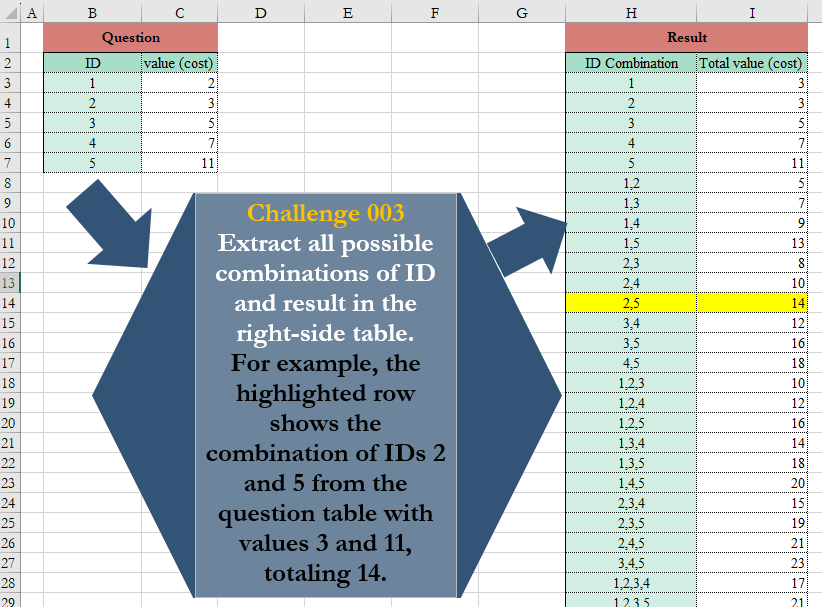
Extract all possible combinations of ID and result in the right-side table. For example, the highlighted row shows the combination of IDs 2 and 5 from the question table with values 3 and 11, totaling 14.
📌 Challenge Details and Links
Challenge Number: 3
Challenge Difficulty: ⭐⭐⭐⭐
📥Download Sample File
📥Link to the solutions on LinkedIn
📥Link to the solution on YouTube
Solving the challenge of Row Combinations with Power Query
Power Query solution 1 for Row Combinations, proposed by Ramiro Ayala Chávez:
let
Source = Excel.CurrentWorkbook(){[Name="Table1"]}[Content],
a = Source[ID],
b = List.Transform({0..Number.Power(2,List.Count(a))-1}, (i)=>List.Transform({0..List.Count(a)-1},
(j)=>if Number.Mod(Number.IntegerDivide(i,Number.Power(2,j)),2)=1 then a{j} else null)),
c = List.Skip(List.Transform(b, each List.RemoveNulls(_))),
d = List.Transform(List.Transform(c, each List.Transform(_, Text.From)), each Text.Combine(_,", ")),
e = Source[#"value (cost)"],
f = List.Transform({0..Number.Power(2,List.Count(e))-1}, (i)=>List.Transform({0..List.Count(e)-1},
(j)=>if Number.Mod(Number.IntegerDivide(i,Number.Power(2,j)),2)=1 then e{j} else null)),
g = List.Skip(List.Transform(f, each List.RemoveNulls(_))),
h = List.Transform(g, each List.Sum(_)),
Sol = Table.FromColumns({d,h},{"ID Combination", "Total value (cost)"})
in
Sol
Power Query solution 2 for Row Combinations, proposed by 🇮🇷 Navid Esmaeilzadeh اسماعیل زاده:
let
  S = Excel.CurrentWorkbook(){[Name = "Table1"]}[Content],
  C = Table.TransformColumnTypes(S, {{"ID", Int64.Type}, {"value (cost)", Int64.Type}}),
  S1 = List.Transform(
    {0 .. Number.Power(2, List.Count(C[ID])) - 1},
    (X) =>
      List.Transform(
        {0 .. List.Count(C[ID]) - 1},
        (M) =>
          if Number.Mod(Number.IntegerDivide(X, Number.Power(2, M)), 2) = 1 then C[ID]{M} else null
      )
  ),
  B1 = List.Select(
    List.Transform(
      S1,
      each
        let
          l = List.RemoveNulls(_),
          t = List.Transform(l, Text.From)
        in
          Text.Combine(t, ",")
    ),
    each _ <> ""
  ),
  S2 = List.Transform(
    {0 .. Number.Power(2, List.Count(C[#"value (cost)"])) - 1},
    (X) =>
      List.Transform(
        {0 .. List.Count(C[#"value (cost)"]) - 1},
        (M) =>
          if Number.Mod(Number.IntegerDivide(X, Number.Power(2, M)), 2) = 1 then
            C[#"value (cost)"]{M}
          else
            null
      )
  ),
  B2 = List.RemoveNulls(
    List.Transform(
      S2,
      each
        let
          F = List.RemoveNulls(_)
        in
          List.Sum(F)
    )
  ),
  Sol = Table.FromColumns(
    {B1, B2},
    type table [ID Combination = Text.Type, #"Total value (cost)" = Int64.Type]
  ),
  So2 = Table.AddColumn(Sol, "S3", each Text.Remove([ID Combination], ",")),
  So3 = Table.TransformColumnTypes(So2, {{"S3", Int64.Type}}),
  So4 = Table.Sort(So3, {{"S3", Order.Ascending}}),
  FS = Table.RemoveColumns(So4, {"S3"})
in
  FS
Solving the challenge of Row Combinations with Excel
Excel solution 1 for Row Combinations, proposed by Bo Rydobon 🇹🇭:
=LET(
    i,
    MID(
        REDUCE(
            0,
            B3:B7,
            LAMBDA(
                a,
                v,
                VSTACK(
                    a,
                    a&","&v
                )
            )
        ),
        3,
        99
    ),    DROP(
        SORTBY(
            HSTACK(
                i,
                REDUCE(
                    0,
                    C3:C7,
                    LAMBDA(
                        a,
                        v,
                        VSTACK(
                            a,
                            a+v
                        )
                    )
                )
            ),
            LEN(
                i
            )
        ),
        1
    )
)
Excel solution 2 for Row Combinations, proposed by 🇰🇷 Taeyong Shin:
=LET(
    c,
    TOCOL(
        REDUCE(
            B3:B7,
            SEQUENCE(
                4
            ),
            LAMBDA(
                a,
                i,
                HSTACK(
                    a,
                    a&","&DROP(
                        B3:B7,
                        i
                    )
                )
            )
        ),
        2
    ),
    func,
    LAMBDA(
        x,
        SUM(
            LOOKUP(
                --TEXTSPLIT(
                    @x,
                    ","
                ),
                B3:C7
            )
        )
    ),
    DROP(
        GROUPBY(
            HSTACK(
                LEN(
                    c
                ),
                c
            ),
            c,
            func,
            ,
            0,
            ,
            RIGHT(
                c,
                3
            )<>"5,5"
        ),
        ,
        1
    )
)
Excel solution 3 for Row Combinations, proposed by محمد حلمي:
=DROP(
    HSTACK(
        MID(

            REDUCE(
                "",
                B3:B7,
                LAMBDA(
                    a,
                    d,
                    VSTACK(
                        a,
                        a&","&d
                    )
                )
            ),
            2,
            99
        ),        REDUCE(
            0,
            C3:C7,
            LAMBDA(
                a,
                d,
                VSTACK(
                    a,
                    a+d
                )
            )
        )
    ),
    1
)
Excel solution 4 for Row Combinations, proposed by محمد حلمي:
=LET(v,MID(REDUCE("",B3:B7,LAMBDA(a,d,VSTACK(a,
a&","&d))),2,99),DROP(SORTBY(HSTACK(v,REDUCE(0,
C3:C7,LAMBDA(a,d,VSTACK(a,a+d)))),LEN(v),,v,),1))
Excel solution 5 for Row Combinations, proposed by محمد حلمي:
=LET(
    b,
    B3:B7,
    r,
    ROWS(
        b
    ),
    i,
    -MID(
        BASE(
            SEQUENCE(
                2^r-1
            ),

            2,
            r
        ),
        SEQUENCE(
            ,
            r
        ),
        1
    ),
    j,
    BYROW(
        IF(
            i,
            TOROW(
        b
    ),
            ""
        ),        LAMBDA(
            a,
            TEXTJOIN(
                ",",
                ,
                a
            )
        )
    ),
    SORTBY(
        HSTACK(
            j,
            BYROW(

                IF(
                    i,
                    TOROW(
                        C3:C7
                    )
                ),
                LAMBDA(
                    a,
                    SUM(
                        a
                    )
                )
            )
        ),
        LEN(
            j
        ),
        ,
        j,    )
)
Excel solution 6 for Row Combinations, proposed by Julian Poeltl:
=LET(
    ID,
    B3:B7,
    Value,
    C3:C7,
    HSTACK(
        BYROW(
            SUBSTITUTE(
                TRANSPOSE(
                    ID
                )*MID(
                    DEC2BIN(
                        SEQUENCE(
                            2^COUNTA(
                    ID
                )-1
                        ),
                        COUNTA(
                    ID
                )
                    ),
                    SEQUENCE(
                        1,
                        COUNTA(
                    ID
                )
                    ),
                    1
                )*1,
                0,
                ""
            ),
            LAMBDA(
                Array,
                TEXTJOIN(
                    ",",
                    TRUE,
                    Array
                )
            )
        ),
         BYROW(
             TRANSPOSE(
                 Value
             )*MID(
                    DEC2BIN(
                        SEQUENCE(
                            2^COUNTA(
                    ID
                )-1
                        ),
                        COUNTA(
                    ID
                )
                    ),
                    SEQUENCE(
                        1,
                        COUNTA(
                    ID
                )
                    ),
                    1
                )*1,
             LAMBDA(
                 Array,
                 SUM(
                     Array
                 )
             )
         )
    )
)
Excel solution 8 for Row Combinations, proposed by John Jairo Vergara Domínguez:
=LET(
    b,
    DROP(
        HSTACK(
            MID(
                REDUCE(
                    0,
                    B3:B7,
                    LAMBDA(
                        a,
                        v,
                        VSTACK(
                            a,
                            a&","&v
                        )
                    )
                ),
                3,
                99
            ),
            REDUCE(
                0,
                C3:C7,
                LAMBDA(
                    a,
                    v,
                    VSTACK(
                        a,
                        a+v
                    )
                )
            )
        ),
        1
    ),
    SORTBY(
        b,
        --SUBSTITUTE(
            TAKE(
                b,
                ,
                1
            ),
            ",",

        )
    )
)
Excel solution 9 for Row Combinations, proposed by Sunny Baggu:
=LET(     _id,
     DROP(          TEXTAFTER(
              REDUCE(
                  "",
                   B3:B7,
                   LAMBDA(
                       a,
                        v,
                        SORT(
                            VSTACK(
                                a,
                                 a & "," & v
                            )
                        )
                   )
              ),
               ","
          ),          1     ),     _idsort,
     SORTBY(
         _id,
          LEN(
              _id
          )
     ),     HSTACK(          _idsort,          MAP(
              _idsort,
               LAMBDA(
                   a,
                    SUM(
                        XLOOKUP(
                            TEXTSPLIT(
                                a,
                                 ,
                                 ","
                            ) + 0,
                             B3:B7,
                             C3:C7
                        )
                    )
               )
          )     ))
Excel solution 10 for Row Combinations, proposed by Bhavya Gupta:
=LET(p,
    B3:B7,
    s,
    C3:C7,t,
    ROWS(
        p
    ),
    k,
    2^SEQUENCE(
        ,
        t
    ),combs,
    QUOTIENT(
        MOD(
            SEQUENCE(
                MAX(
                    k
                )-1
            ),
            k
        ),
        k/2
    )*TOROW(
        p
    ),j,
    DROP(SORT(HSTACK(BYROW(
        combs>0,
        LAMBDA(
            i,
            SUM(
                --i
            )
        )
    ),
    combs/(combs>0)),
    SEQUENCE(
        ,
        t+1
    )),
    ,
    1),g,
     BYROW(
         j,
         LAMBDA(
             x,
             ARRAYTOTEXT(
                 TOCOL(
                     x,
                     3
                 )
             )
         )
     ),f,
    HSTACK(
        g,
        BYROW(
            j,
            LAMBDA(
                x,
                SUM(
                    XLOOKUP(
                        TOCOL(
                     x,
                     3
                 ),
                        p,
                        s
                    )
                )
            )
        )
    ),
    f)
Excel solution 11 for Row Combinations, proposed by Charles Roldan:
=LET(
    ID,
     B3:B7,
     Cost,
     C3:C7,
     n,
     ROWS(
         ID
     ),    Mat,
     --MID(
         BASE(
             SEQUENCE(
                 2 ^ n - 1
             ),
              2,
              n
         ),
          SEQUENCE(
              ,
               n
          ),
          1
     ),    Set,
     BYROW(
         Mat,
          LAMBDA(
              Row,
               ARRAYTOTEXT(
                   FILTER(
                       TRANSPOSE(
         ID
     ),
                        Row
                   )
               )
          )
     ),    SORTBY(
        HSTACK(
            Set,
             MMULT(
                 Mat,
                  Cost
             )
        ),
         LEN(
             Set
         ),
         ,
         --LEFT(
             Set
         ),    )
)
Excel solution 12 for Row Combinations, proposed by Diarmuid Early:
=LET(
    IDs,
    B3:B7,
    val,
    C3:C7,
    cnt,
    ROWS(
        IDs
    ),     comb,
    REDUCE(
        "",
        SEQUENCE(
            cnt
        ),
        LAMBDA(
            a,
            v,
            VSTACK(
                a,
                a&","&INDEX(
                    IDs,
                    v
                )
            )
        )
    ),     totVal,
    REDUCE(
        0,
        SEQUENCE(
            cnt
        ),
        LAMBDA(
            a,
            v,
            VSTACK(
                a,
                a+INDEX(
                    val,
                    v
                )
            )
        )
    ),     DROP(
         SORTBY(
             HSTACK(
                 MID(
                     comb,
                     2,
                     99
                 ),
                 totVal
             ),
             LEN(
                 comb
             ),
             ,
             comb,
             1
         ),
         1
     )
)
Excel solution 13 for Row Combinations, proposed by LUIS FLORENTINO COUTO CORTEGOSO:
=LET(
    id,
    B3:B7,
    v,
    C3:C7,
    n,
    ROWS(
        id
    ),
    b,
    DEC2BIN(
        SEQUENCE(
            2^n-1
        ),
        n
    ),
    r,
    REDUCE(
        "",
        b,
        LAMBDA(
            a,
            x,
            VSTACK(
                a,
                LET(
                    m,
                    TOROW(
                        UNIQUE(
                            FIND(
                                "1",
                                x,
                                SEQUENCE(
                                    ,
                                    n
                                )
                            ),
                            TRUE
                        ),
                        2
                    ),
                    s,
                    SUM(
                        INDEX(
                            v,
                            m
                        )
                    ),
                    HSTACK(
                        TEXTJOIN(
                            ",",
                            ,
                            m
                        ),
                        s,
                        COLUMNS(
                            m
                        ),
                        m
                    )
                )
            )
        )
    ),
    DROP(
        SORT(
            r,
            SEQUENCE(
                n+1
            )+2
        ),
        -1,
        -(
                n+1
            )
    )
)
Excel solution 14 for Row Combinations, proposed by Pieter de B.:
=LET(
    p,
    BASE(
        SEQUENCE(
            2^5-1
        ),
        2,
        5
    ),
    s,
    SEQUENCE(
        5
    ),
    MAKEARRAY(
        ROWS(
            p
        ),
        2,
        LAMBDA(
            x,
            y,
            LET(
                z,
                MID(
                    INDEX(
                        p,
                        x
                    ),
                    s,
                    1
                )*s,
                IF(
                    y-1,
                    SUM(
                        INDEX(
                            C3:C7,
                            FILTER(
                                z,
                                z
                            )
                        )
                    ),
                    ARRAYTOTEXT(
                        FILTER(
                                z,
                                z
                            )
                    )
                )
            )
        )
    )
)

Or sorted:
=LET(
    p,
    BASE(
        SEQUENCE(
            2^5-1
        ),
        2,
        5
    ),
    s,
    SEQUENCE(
        5
    ),
    m,
    MAKEARRAY(
        ROWS(
            p
        ),
        2,
        LAMBDA(
            x,
            y,
            LET(
                z,
                MID(
                    INDEX(
                        p,
                        x
                    ),
                    6-s,
                    1
                )*s,
                IF(
                    y-1,
                    SUM(
                        INDEX(
                            C3:C7,
                            FILTER(
                                z,
                                z
                            )
                        )
                    ),
                    ARRAYTOTEXT(
                        FILTER(
                                z,
                                z
                            )
                    )
                )
            )
        )
    ),
    SORTBY(
        m,
        LEN(
            TAKE(
                m,
                ,
                1
            )
        )
    )
)
Excel solution 15 for Row Combinations, proposed by Surendra Reddy:
=LET(
    a,
    COUNT(
        B3:B7
    ),
    b,
    --MID(
        BASE(
            SEQUENCE(
                2^a,
                ,
                0
            ),
            2,
            a
        ),
        SEQUENCE(
            ,
            a
        ),
        1
    ),
    d,
    b*INDEX(
        B3:B7,
        SEQUENCE(
            ,
            a
        )
    ),
    e,
    IF(
        d=0,
        "",
        d
    ),
    f,
    b*INDEX(
        C3:C7,
        SEQUENCE(
            ,
            a
        )
    ),
    r,
    BYROW(
        e,
        LAMBDA(
            x,
            TEXTJOIN(
                ",",
                ,
                x
            )
        )
    ),
    s,
    BYROW(
        f,
        LAMBDA(
            x,
            SUM(
                x
            )
        )
    ),
    t,
    DROP(
        HSTACK(
            r,
            s
        ),
        1
    ),
    sol,
    SORT(
        t,
        1
    ),
    SORTBY(
        sol,
        LEN(
            INDEX(
                sol,
                ,
                1
            )
        )
    )
)
Excel solution 16 for Row Combinations, proposed by Surendra Reddy:
=LET(
    i,
    B3:B7,
    a,
    TEXTAFTER(
        DROP(
            REDUCE(
                "",
                i,
                LAMBDA(
                    x,
                    y,
                    VSTACK(
                        x,
                        x&","&y
                    )
                )
            ),
            1
        ),
        ",",
        1
    ),
    b,
    SORTBY(
        a,
        LEN(
            a
        )
    ),
    d,
    MAP(
        b,
        LAMBDA(
            x,
            SUM(
                XLOOKUP(
                    TOCOL(
                        TEXTSPLIT(
                            x,
                            ","
                        )
                    )*1,
                    i,
                    C3:C7
                )
            )
        )
    ),
    HSTACK(
        b,
        d
    )
)
Solving the challenge of Row Combinations with Python
Python solution 1 for Row Combinations, proposed by Jan Willem Van Holst:
import itertools
my_dict = {'1':2, '2':3, '3':5, '4':7, '5':11}
for i in range(1,6):
 *res, = itertools.combinations('12345', i)
 for inner in res:
 to_sum = sum([my_dict[x] for x in inner])
 print(f"{','.join(inner):<15} {to_sum}")
Python solution 2 for Row Combinations, proposed by Raphael Okoye:
import pandas as pd
from itertools import combinations


df = pd.read_excel('ch4.xlsx', sheet_name='Sheet1')

# Function to calculate total value for a given combination of IDs
def calculate_total(ids, df):
 total = df[df['ID'].isin(ids)]['value (cost)'].sum()
 return total

# Initialize new DataFrame to store results
new_df = pd.DataFrame(columns=['ID', 'Total value'])

# Iterate through combinations of IDs
max_combinations = 5
for num_ids in range(2, max_combinations + 1):
 for comb in combinations(df['ID'], num_ids):
 new_id = ','.join(map(str, comb))
 total_value = calculate_total(comb, df)
 new_df = new_df.append({'ID': new_id, 'Total value': total_value}, ignore_index=True)

# Write the new DataFrame to an Excel file
new_df.to_excel('output_ch4.xlsx', index=False)
Solving the challenge of Row Combinations with Python in Excel
Python in Excel solution 1 for Row Combinations, proposed by Alejandro Campos:
import itertools
df = xl("B2:C7", headers=True)

combinations_df = pd.DataFrame([
 (', '.join(str(item.ID) for item in combo), sum(item._1 for item in combo))
 for r in range(1, len(df) + 1)
 for combo in itertools.combinations(df.itertuples(index=False), r)
], columns=['IDs Combination', 'Total value (cost)'])

combinations_df