
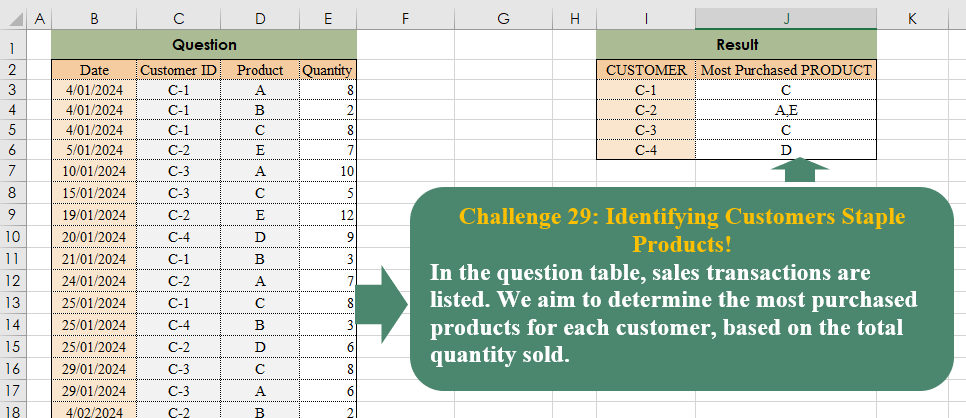
In the question table, sales transactions are listed. We aim to determine the most purchased products for each customer, based on the total quantity sold.
📌 Challenge Details and Links
Challenge Number: 29
Challenge Difficulty: ⭐⭐⭐
📥Download Sample File
📥Link to the solutions on LinkedIn
Solving the challenge of Identifying Customers Staple Products! with Power Query
Power Query solution 1 for Identifying Customers Staple Products!, proposed by Brian Julius:
let
  S = Table.RemoveColumns(Excel.CurrentWorkbook(){[Name = "Table1"]}[Content], "Date"),
  G1a = Table.Group(
    Table.Group(S, {"Customer ID", "Product"}, {{"TotalQuantity", each List.Sum([Quantity])}}),
    {"Customer ID"},
    {{"MaxQ", each List.Max([TotalQuantity])}, {"All", each _}}
  ),
  Exp = Table.RemoveColumns(
    Table.SelectRows(
      Table.ExpandTableColumn(
        G1a,
        "All",
        {"Product", "TotalQuantity"},
        {"Product", "TotalQuantity"}
      ),
      each [MaxQ] = [TotalQuantity]
    ),
    {"MaxQ", "TotalQuantity"}
  ),
  G2 = Table.Group(
    Exp,
    {"Customer ID"},
    {"MostPurchasedProd", each List.Sort([Product], Order.Ascending)}
  ),
  Extr = Table.TransformColumns(
    G2,
    {"MostPurchasedProd", each Text.Combine(List.Transform(_, Text.From), ",")}
  )
in
  Extr
Power Query solution 2 for Identifying Customers Staple Products!, proposed by Luan Rodrigues:
let
  Fonte = Tabela1,
  res = Table.Group(
    Fonte,
    {"Customer ID"},
    {
      {
        "Contagem",
        each
          let
            a = Table.Group(_, {"Product"}, {"count", each List.Sum(_[Quantity])}),
            b = Table.SelectRows(a, each [count] = List.Max(a[count]))[Product]
          in
            Text.Combine(b, ", ")
      }
    }
  )
in
  res
Power Query solution 3 for Identifying Customers Staple Products!, proposed by Ramiro Ayala Chávez:
let
S = Excel.CurrentWorkbook(){[Name="Table1"]}[Content],
T = Table.TransformColumns,
G = Table.Group,
a = G(S,{"Customer ID"},{"G", each G([[Product],[Quantity]],{"Product"},{"H", each List.Sum([Quantity])})}),
b = T(a,{"G", each Table.MaxN(G(_,{"H"},{"J", each _}),"H",1)}),
c = Table.ExpandTableColumn(b,"G",{"J"},{"J"}),
d = T(c,{"J", each Text.Combine(List.Sort([Product]),",")}),
Sol = Table.RenameColumns(d,{{"Customer ID","CUSTOMER"},{"J","Most Purchased PRODUCT"}})
in
Sol
Power Query solution 4 for Identifying Customers Staple Products!, proposed by Aditya Kumar Darak 🇮🇳:
let
  Source = Excel.CurrentWorkbook(){[Name = "data"]}[Content],
  Group = Table.Group(Source, {"Customer ID", "Product"}, {"Total", each List.Sum([Quantity])}),
  Return = Table.Group(
    Group,
    "Customer ID",
    {
      "Most Product Purchased",
      each [
        M = Table.Max(_, "Total")[Total],
        F = Table.SelectRows(_, (f) => f[Total] = M)[Product],
        R = Text.Combine(List.Sort(F), ", ")
      ][R]
    }
  )
in
  Return
Power Query solution 5 for Identifying Customers Staple Products!, proposed by 🇮🇷 Navid Esmaeilzadeh اسماعیل زاده:
let
  Source = Excel.CurrentWorkbook(){[Name = "Table1"]}[Content],
  A = Table.Group(
    Source,
    {"Customer ID", "Product"},
    {{"TotalQty", each List.Sum([Quantity]), type number}}
  ),
  B = Table.Group(A, {"Customer ID"}, {{"Max", each List.Max([TotalQty]), type number}}),
  C = Table.AddColumn(
    B,
    "Most Perchased Product",
    each Text.Combine(
      List.Sort(
        Table.SelectRows(A, (X) => X[Customer ID] = [Customer ID] and X[TotalQty] = [Max])[Product]
      ),
      ","
    )
  ),
  Sol = Table.SelectColumns(C, {"Customer ID", "Most Perchased Product"})
in
  Sol
Power Query solution 6 for Identifying Customers Staple Products!, proposed by Glyn Willis:
let
  Source = Excel.CurrentWorkbook(){[Name = "Table1"]}[Content],
  #"Changed Type" = Table.TransformColumnTypes(
    Source,
    {
      {"Date", type date},
      {"Customer ID", type text},
      {"Product", type text},
      {"Quantity", Int64.Type}
    }
  ),
  #"Grouped Rows" = Table.Group(
    #"Changed Type",
    {"Customer ID"},
    {
      {
        "Most Purchased",
        each
          let
            Grp = Table.Group(_, {"Product"}, {{"Quantity", each List.Sum([Quantity])}}),
            m   = List.Max(Grp[Quantity])
          in
            Text.Combine(List.Sort(Table.SelectRows(Grp, (x) => x[Quantity] = m)[Product]), ", "),
        type nullable text
      }
    }
  )
in
  #"Grouped Rows"
Solving the challenge of Identifying Customers Staple Products! with Excel
Excel solution 1 for Identifying Customers Staple Products!, proposed by Bo Rydobon 🇹🇭:
=LET(
    g,
    GROUPBY(
        C3:D36,
        E3:E36,
        SUM,
        ,
        0
    ),
    h,
    GROUPBY(
        CHOOSECOLS(
            g,
            1,
            3
        ),
        INDEX(
            g,
            ,
            2
        ),
        ARRAYTOTEXT,
        ,
        0,
        -2
    ),
    GROUPBY(
        TAKE(
            h,
            ,
            1
        ),
        DROP(
            h,
            ,
            2
        ),
        SINGLE,
        ,
        0
    )
)
Excel solution 2 for Identifying Customers Staple Products!, proposed by 🇰🇷 Taeyong Shin:
=LET(     c,
     C3:C36,
     p,
     D3:D36,     func,
     LAMBDA(
         x,
          ARRAYTOTEXT(
              SORT(
                  UNIQUE(
                      FILTER(
                          UNPACK(
                              x,
                               1
                          ),
                           UNPACK(
                               x,
                                2
                           ) = UNPACK(
                               x,
                                2,
                                MAX
                           )
                      )
                  )
              )
          )
     ),     GROUPBY(
         c,
          PACK(
              HSTACK(
                  p,
                   SUMIFS(
                       E3:E36,
                        c,
                        c,
                        p,
                        p
                   )
              )
          ),
          func,
          ,
          0
     ))
Excel solution 3 for Identifying Customers Staple Products!, proposed by Oscar Mendez Roca Farell:
=LET(
    C,
     C3:C36,
     D,
     D3:D36,
     UC,
     UNIQUE(
         C
     ),
     UD,
     TOROW(
         SORT(
             UNIQUE(
                 D
             )
         )
     ),
     HSTACK(
         UC,
          BYROW(
              SUMIFS(
                  E3:E36,
                   C,
                   UC,
                   D,
                   UD
              ),
               LAMBDA(
                   r,
                    TEXTJOIN(
                        ",",
                         ,
                         REPT(
                             UD,
                              r=MAX(
                                  r
                              )
                         )
                    )
               )
          )
     )
)
Excel solution 4 for Identifying Customers Staple Products!, proposed by Julian Poeltl:
=LET(
    T,
    B2:E36,
    TT,
    DROP(
        T,
        1
    ),
    ID,
    CHOOSECOLS(
        TT,
        2
    ),
    P,
    CHOOSECOLS(
        TT,
        3
    ),
    Q,
    CHOOSECOLS(
        TT,
        4
    ),
    UID,
    UNIQUE(
        ID
    ),
    UP,
    UNIQUE(
        P
    ),
    Umix,
    UNIQUE(
        ID&P
    ),
    C,
    MAP(
        Umix,
        LAMBDA(
            A,
            SUM(
                FILTER(
                    Q,
                    ID&P=A
                )
            )
        )
    ),
    IDCUM,
    LEFT(
        Umix,
        3
    ),
    PCUM,
    RIGHT(
        Umix,
        1
    ),
    R,
    MAP(
        UID,
        LAMBDA(
            A,
            LET(
                F,
                FILTER(
                    HSTACK(
                        PCUM,
                        C
                    ),
                    IDCUM=A
                ),
                M,
                MAX(
                    CHOOSECOLS(
                        F,
                        2
                    )
                ),
                TEXTJOIN(
                    ",",
                    ,
                    SORT(
                        FILTER(
                            CHOOSECOLS(
                                F,
                                1
                            ),
                            CHOOSECOLS(
                        F,
                        2
                    )=M
                        )
                    )
                )
            )
        )
    ),
    VSTACK(
        HSTACK(
            "CUSTOMER",
            "Most Purchased PRODUCT"
        ),
        HSTACK(
            UID,
            R
        )
    )
)
Excel solution 5 for Identifying Customers Staple Products!, proposed by Kris Jaganah:
=LET(a,
    C3:C36,
    b,
    D3:D36,
    c,
    E3:E36,
    d,
    UNIQUE(
        a&b
    ),
    e,
    MAP(d,
    LAMBDA(x,
    SUM((a&b=x)*c))),
    f,
    LEFT(
        d,
        3
    ),
    g,
    RIGHT(
        d
    ),
    h,
    MAP(f,
    LAMBDA(y,
    MAX((f=y)*e))),
    i,
    UNIQUE(
        f
    ),
    HSTACK(i,
    DROP(REDUCE("",
    i,
    LAMBDA(x,
    y,
    VSTACK(x,
    TEXTJOIN(",",
    ,
    SORT(FILTER(g,
    (e=h)*(f=y))))))),
    1)))
Excel solution 6 for Identifying Customers Staple Products!, proposed by John Jairo Vergara Domínguez:
=LET(i,
    C3:C36,
    p,
    D3:D36,
    v,
    SUMIFS(
        E3:E36,
        i,
        i,
        p,
        p
    ),
    u,
    UNIQUE(
        i
    ),
    HSTACK(u,
    MAP(u,
    LAMBDA(x,
    TEXTJOIN(",",
    ,
    SORT(UNIQUE(REPT(p,
    v*(i=x)=MAX(v*(i=x))))))))))
Excel solution 7 for Identifying Customers Staple Products!, proposed by JvdV –:
=LET(C,
    C3:C36,
    P,
    D3:D36,
    Q,
    SUMIFS(
        E3:E36,
        C,
        C,
        P,
        P
    ),
    U,
    UNIQUE(
        C
    ),
    HSTACK(U,
    MAP(U,
    LAMBDA(Y,
    TEXTJOIN(",",
    ,
    UNIQUE(FILTER(P,
    (C=Y)*(Q=MAX(Q*(C=Y))))))))))
Excel solution 8 for Identifying Customers Staple Products!, proposed by Sunny Baggu:
=LET(
 _c,
     UNIQUE(
         C3:C36
     ), _up,
     TOROW(
         UNIQUE(
             D3:D36
         )
     ), HSTACK(
 _c, MAP(
 _c, LAMBDA(a, LET(
 _a,
     BYCOL((C3:C36 = a) * (D3:D36 = _up) * E3:E36,
     LAMBDA(
         a,
          SUM(
              a
          )
     )), ARRAYTOTEXT(
     FILTER(
         _up,
          _a = MAX(
              _a
          )
     )
 )
 )
 )
 )
 )
)
Excel solution 9 for Identifying Customers Staple Products!, proposed by CA Raghunath Gundi:
=LET(c,
     C3:C36,
     p,
     D3:D36,
     up,
     SUMIFS(
         E3:E36,
         c,
         c,
         p,
         p
     ),
     uc,
     SORT(
         UNIQUE(
              c
         )
     ),
     HSTACK(uc,
    MAP(uc,
    LAMBDA(a,
     TEXTJOIN(", ",
    ,
    UNIQUE(FILTER(p,
    (c=a)*(up=MAX(up*(c=a))))))))))
Excel solution 10 for Identifying Customers Staple Products!, proposed by Charles Roldan:
=LET(pList, {"A";"B";"C";"D";"E"}, REDUCE(I2:J2, I3:I6, LAMBDA(_,c, VSTACK(_, HSTACK(c, ARRAYTOTEXT(FILTER(pList, LAMBDA(x, x = MAX(x))(MAP(pList, LAMBDA(p, SUM(E3:E36 * (C3:C36 = c) * (D3:D36 = p))))))))))))Excel solution 11 for Identifying Customers Staple Products!, proposed by Hussein SATOUR:
=LET(
    a,
    GROUPBY(
        C3:D36,
        E3:E36,
        SUM
    ),
    MAP(
        I3:I6,
        LAMBDA(
            x,
            ARRAYTOTEXT(
                FILTER(
                    INDEX(
                        a,
                        ,
                        2
                    ),
                    INDEX(
                        a,
                        ,
                        3
                    )=MAX(
                        FILTER(
                            INDEX(
                        a,
                        ,
                        3
                    ),
                            INDEX(
                                a,
                                ,
                                1
                            )=x
                        )
                    )
                )
            )
        )
    )
)
Excel solution 12 for Identifying Customers Staple Products!, proposed by Pieter de B.:
=LET(c,C3:C36,p,D3:D36,q,E3:E36,u,UNIQUE(c),HSTACK(u,MAP(u,LAMBDA(m,LET(x,FILTER(p,c=m),y,MMULT(N(TOROW(x)=UNIQUE(x)),FILTER(q,c=m)),ARRAYTOTEXT(FILTER(UNIQUE(x),y=MAX(y))))))))Solving the challenge of Identifying Customers Staple Products! with Python
Python solution 1 for Identifying Customers Staple Products!, proposed by Konrad Gryczan, PhD:
import pandas as pd

input = pd.read_excel("CH-029 Identifying Customers Staple Products.xlsx", sheet_name="Sheet1", usecols="B:E", skiprows=1)
test = pd.read_excel("CH-029 Identifying Customers Staple Products.xlsx", sheet_name="Sheet1", usecols="I:J", skiprows=1, nrows = 4)

result = input.groupby(["Customer ID", "Product"]).agg(total_quantity=("Quantity", "sum")).reset_index()
result["rank"] = result.groupby("Customer ID")["total_quantity"].rank(ascending=False)
result["lowest_rank"] = result.groupby("Customer ID")["rank"].transform("min")
result = result[result["rank"] == result["lowest_rank"]]
result = result.groupby("Customer ID").agg({"Product": lambda x: ",".join(sorted(x))}).reset_index()
result = result.rename(columns={"Product": "Most Purchased PRODUCT"})

print(result["Most Purchased PRODUCT"].equals(test["Most Purchased PRODUCT"])) # True
Python solution 2 for Identifying Customers Staple Products!, proposed by Luan Rodrigues:
import pandas as pd

file_path = r'CH-029 Identifying Customers Staple Products.xlsx'

df = pd.read_excel(file_path,header=0,usecols='c:e')
df.columns = ['Customer ID','Product','Quantity']


filtro = df.groupby('Customer ID').apply(
 lambda x: x.groupby('Product')['Quantity'].sum().max()
).reset_index(name='max')

filtro['chave'] = filtro['Customer ID'].astype(str) + filtro['max'].astype(str)

group_df = df.groupby(['Customer ID','Product'])['Quantity'].sum().reset_index()
group_df['chave'] = group_df['Customer ID'].astype(str) + group_df['Quantity'].astype(str)

filter_gp = group_df.merge(filtro, left_on='chave',right_on='chave',how='inner')

def concatenate_values(group):
 return ','.join(group)

res = filter_gp.groupby('chave')['Product'].apply(concatenate_values)


print(res)
Python solution 3 for Identifying Customers Staple Products!, proposed by Abdallah Ally:
import pandas as pd

# Create functions to generate the required results
# Function to get the maximum values for each row given a list of columns
def maximum_value(*values):
 return max(values)

# Function to get column names where values match 'maximum value' per row
def get_products(row):
 products = [col for col in df2.columns[1:-1] if row[col] == row['maximum_value']]
 return ','.join(products)

# Read the Excel file
file_path = 'CH-029 Identifying Customers Staple Products.xlsx'
df1 = pd.read_excel(file_path, usecols='I:J', nrows=4, skiprows=1) # Original data frame
df2 = pd.read_excel(file_path, usecols='B:E', skiprows=1) # Data frame for computation
df2 = df2.pivot_table(values='Quantity', index='Customer ID', columns='Product', aggfunc='sum').fillna(0)
df2 = df2.reset_index()

# Add columns to the dataset and print the output
df2['maximum_value'] = df2.apply(lambda x: maximum_value(x['A'], x['B'], x['C'], x['D'], x['E']), axis=1)
df2['Most Purchased PRODUCT'] = df2.apply(get_products, axis=1)
df2 = df2.rename_axis(None, axis=1).rename(columns={'Customer ID': 'Customer'})

print(f'nExpected Answer:n{df1} nnMy Answer: n{df2.iloc[:, [0, -1]]}')
Solving the challenge of Identifying Customers Staple Products! with R
R solution 1 for Identifying Customers Staple Products!, proposed by Konrad Gryczan, PhD:
library(tidyverse)
library(readxl)

input = read_excel("files/CH-029 Identifying Customers Staple Products.xlsx", range = "B2:E36")
test = read_excel("files/CH-029 Identifying Customers Staple Products.xlsx", range = "I2:J6")

result = input %>%
 summarise(total_quantity = sum(Quantity), .by = c("Customer ID", "Product")) %>%
 group_by(`Customer ID`) %>%
 mutate(rank = rank(-total_quantity),
 lowest_rank = min(rank)) %>%
 filter(rank == lowest_rank) %>%
 summarise(`Most Purchased PRODUCT` = paste0(sort(Product), collapse = ","))