
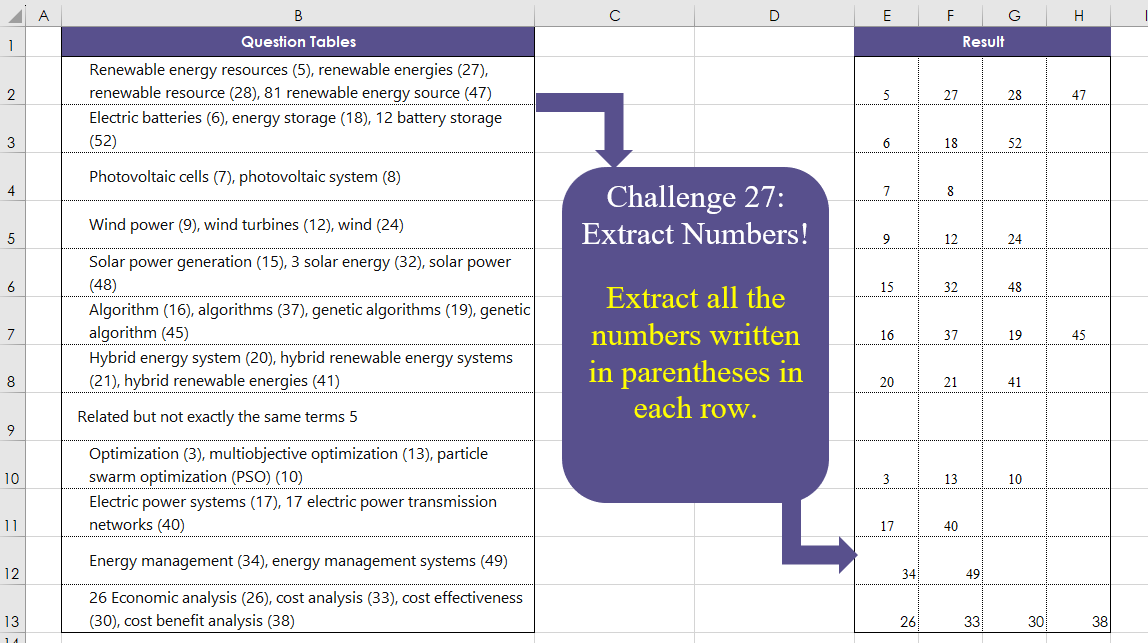
Extract all the numbers written in parentheses in each row.
📌 Challenge Details and Links
Challenge Number: 27
Challenge Difficulty: ⭐⭐
📥Download Sample File
📥Link to the solutions on LinkedIn
Solving the challenge of Extract Numbers! with Power Query
Power Query solution 1 for Extract Numbers!, proposed by Brian Julius:
let
 Source = RawData,
 RScript = R.Execute("library(stringr)#(lf)df <- dataset#(lf)df$nums <- sapply(str_extract_all(df$'Question Tables', ""\(\d+\)""), function(x) paste(x, collapse = "", ""))",[dataset=Source]),
 df =Table.TransformColumns( RScript{[Name="df"]}[Value], {"nums", each Text.Remove( _, {")","("})}),
 Clean = Table.TransformColumns(df,{{"nums", Text.Lower, type text}}),
 SplitToCols = Table.SplitColumn(Clean, "nums", Splitter.SplitTextByDelimiter(",", QuoteStyle.Csv), {"nums.1", "nums.2", "nums.3", "nums.4"})
in
 SplitToCols

Method 2
hashtag
#powerquery only using Text.BetweenDelimiters

let
 Source = RawData,
 Numbers = Table.AddColumn(Source, "Numbers", each [
 a = Text.Split([Question Tables], "),"),
 b = List.Transform(a, each Text.BetweenDelimiters(_, "(", ")")),
 c = List.RemoveNulls(List.Transform(b, each try Number.FromText(_) otherwise null))
 ][c]),
 Extract = Table.TransformColumns(Numbers, {"Numbers", each Text.Combine(List.Transform(_, Text.From), ","), type text}),
 SplitToCols = Table.SplitColumn(Extract, "Numbers", Splitter.SplitTextByDelimiter(",", QuoteStyle.Csv), {"Numbers.1", "Numbers.2", "Numbers.3", "Numbers.4"})
in
 SplitToCols
Power Query solution 2 for Extract Numbers!, proposed by Ramiro Ayala Chávez:
let
S = Excel.CurrentWorkbook(){[Name="Table1"]}[Content],
Fx = (x)=> let
a = x,
b = List.Generate(()=>[i=0], each [i]<= Text.Length(a),
each [i=[i]+1], each Text.BetweenDelimiters(a,"(",")",[i],0)),
c = List.RemoveNulls(List.Transform(List.Select(b, each _<>""), each try Number.From(_) otherwise null))
in c,
d = {"1".."4"},
e = List.Accumulate(d,S,(s,c)=> Table.AddColumn(s,c, each Fx([Question Tables]){Number.From(c)-1})),
Sol = Table.ReplaceErrorValues(e,{{"1",null},{"2",null},{"3",null},{"4",null}})
in
Sol
Power Query solution 3 for Extract Numbers!, proposed by Aditya Kumar Darak 🇮🇳:
let
  Source = Excel.CurrentWorkbook(){[Name = "data"]}[Content],
  Table = Table.AddColumn(
    Source,
    "Split",
    each [
      S  = Text.SplitAny([Question Tables], "()"),
      T  = List.Transform(S, (f) => try Number.From(f) otherwise null),
      F  = List.RemoveNulls(T),
      C  = List.Count(F),
      Cl = List.Transform({1 .. C}, (f) => "Column" & Text.From(f)),
      R  = Record.FromList(F, Cl)
    ][R]
  ),
  Columns = Record.FieldNames(List.Max(Table[Split], null, Record.FieldCount)),
  Return = Table.FromRecords(Table[Split], Columns, MissingField.UseNull)
in
  Return
Power Query solution 4 for Extract Numbers!, proposed by Alejandro Simón 🇵🇦 🇪🇸:
let
 Source = Excel.CurrentWorkbook(){[Name="Table1"]}[Content],
 Sol = Table.FromColumns(List.Zip(Table.AddColumn(Source, "A", each
let
a = Text.SplitAny([Question Tables], "()"),
b = List.RemoveNulls(List.Transform(a, each try Number.From(_) otherwise null))
in b)[A]))
in
 Sol
Power Query solution 5 for Extract Numbers!, proposed by 🇮🇷 Navid Esmaeilzadeh اسماعیل زاده:
let
  S = Excel.CurrentWorkbook(){[Name = "Table1"]}[Content],
  A = Table.AddColumn(S, "T1", each Text.Remove(Text.Lower([Question Tables]), {"a" .. "z"})),
  B = Table.AddColumn(
    A,
    "Tbl",
    each Table.FromColumns(
      {Text.PositionOf([T1], "(", Occurrence.All), Text.PositionOf([T1], ")", Occurrence.All)},
      {"S", "E"}
    )
  ),
  C = Table.ExpandTableColumn(B, "Tbl", {"S", "E"}, {"S", "E"}),
  D = Table.AddColumn(C, "No", each try Text.Middle([T1], [S] + 1, [E] - [S] - 1) otherwise null),
  E = Table.Group(
    D,
    {"Question Tables"},
    {
      {
        "Tbl",
        each _,
        type table [
          Question Tables = text,
          T1 = text,
          S = nullable number,
          E = nullable number,
          No = nullable text
        ]
      }
    }
  ),
  F = Table.AddColumn(E, "No", each Text.Combine(List.Select([Tbl][No], each _ <> ""), "-")),
  G = Table.SplitColumn(
    F,
    "No",
    Splitter.SplitTextByDelimiter("-", QuoteStyle.Csv),
    {"No.1", "No.2", "No.3", "No.4"}
  ),
  H = Table.TransformColumnTypes(
    G,
    {{"No.1", Int64.Type}, {"No.2", Int64.Type}, {"No.3", Int64.Type}, {"No.4", Int64.Type}}
  ),
  Sol = Table.RemoveColumns(H, {"Question Tables", "Tbl"})
in
  Sol
Power Query solution 6 for Extract Numbers!, proposed by Glyn Willis:
let
  Source = Excel.CurrentWorkbook(){[Name = "Table1"]}[Content],
  #"Changed Type" = Table.TransformColumnTypes(Source, {{"Question Tables", type text}}),
  #"Added Custom" = Table.AddColumn(
    #"Changed Type",
    "Custom",
    each
      let
        q = [Question Tables],
        pos = List.Accumulate(
          Text.PositionOfAny(q, {"0" .. "9"}, Occurrence.All),
          [p = {}, prv = null],
          (s, c) => [p = if (s[prv] + 1 = c) then s[p] else s[p] & {c}, prv = c]
        )[p]
      in
        List.Transform(
          Splitter.SplitTextByPositions(pos)(q),
          (x) =>
            Splitter.SplitTextByCharacterTransition(
              {"0" .. "9"},
              (c) => not List.Contains({"0" .. "9"}, c)
            )(x){0}
        )
  )[Custom],
  Custom1 = Table.FromRows(
    let
      m = List.Max(List.Transform(#"Added Custom", (x) => List.Count(x)))
    in
      List.Transform(
        #"Added Custom",
        (y) =>
          let
            lc = List.Count(y),
            ld = m - lc,
            lr = List.Repeat({null}, ld)
          in
            y & lr
      )
  )
in
  Custom1
Power Query solution 7 for Extract Numbers!, proposed by Theerapun Maneethap:
let
 Source = Excel.CurrentWorkbook(){[Name="Table1"]}[Content],
 #"Changed Type" = Table.TransformColumnTypes(Source,{{"Question Tables", type text}}),
 #"Replaced Value" = Table.ReplaceValue(#"Changed Type","(PSO)","PSO",Replacer.ReplaceText,{"Question Tables"}),
 #"Inserted Text Between Delimiters" = Table.AddColumn(#"Replaced Value", "Text Between Delimiters", each Text.BetweenDelimiters([Question Tables], "(", ")"), type text),
 #"Inserted Text Between Delimiters1" = Table.AddColumn(#"Inserted Text Between Delimiters", "Text Between Delimiters.1", each Text.BetweenDelimiters([Question Tables], "(", ")", 1, 0), type text),
 #"Inserted Text Between Delimiters2" = Table.AddColumn(#"Inserted Text Between Delimiters1", "Text Between Delimiters.2", each Text.BetweenDelimiters([Question Tables], "(", ")", 2, 0), type text),
 #"Inserted Text Between Delimiters3" = Table.AddColumn(#"Inserted Text Between Delimiters2", "Text Between Delimiters.3", each Text.BetweenDelimiters([Question Tables], "(", ")", 3, 0), type text),
Solving the challenge of Extract Numbers! with Excel
Excel solution 1 for Extract Numbers!, proposed by Bo Rydobon 🇹🇭:
=IFNA(
    --TEXTSPLIT(
        TEXTAFTER(
            B2:B13,
            "(",
            SEQUENCE(
                ,
                5
            )
        ),
        ")"
    ),
    ""
)
Excel solution 2 for Extract Numbers!, proposed by 🇰🇷 Taeyong Shin:
=LET(     d,
     B2:B13,     n,
     MAX(
         LEN(
             d
         ) - LEN(
             SUBSTITUTE(
                 d,
                  ",",

             )
         ) + 1
     ),     IFERROR(
         -TEXT(
             TEXTAFTER(
                 TEXTBEFORE(
                     d & ", ",
                      ", ",
                      SEQUENCE(
                          ,
                           n
                      )
                 ),
                  " ",
                  -1
             ),
              ";(0);0;"
         ),
          ""
     ))
Excel solution 3 for Extract Numbers!, proposed by Aditya Kumar Darak 🇮🇳:
=LET(
 _d,
     B2:B13, _e,
     LAMBDA(
         a,
          b,          LET(

               s,
               TEXTSPLIT(
                   b,
                    {"(",
                    ")"},
                    ,
                    1
               ),

               f,
               FILTER(
                   --s,
                    ISNUMBER(
                        -s
                    ),
                    ""
               ),

               r,
               VSTACK(
                   a,
                    f
               ),

               r

          )     ), _c,
     REDUCE(
         "",
          _d,
          _e
     ), _r,
     (IFNA(
         DROP(
             _c,
              1
         ),
          ""
     )), _r
)
Excel solution 4 for Extract Numbers!, proposed by Oscar Mendez Roca Farell:
=LET(
    _t,
     TEXTBEFORE(
         TEXTAFTER(
             B2:B13,
              "(",
             SEQUENCE(
                 ,
                  4
             )
         ),
          ")"
     ),
     IFERROR(
         --_t,
          ""
     )
)
Excel solution 5 for Extract Numbers!, proposed by Julian Poeltl:
=TEXTSPLIT(
    TEXTJOIN(
        "; ",
        FALSE,
        MAP(
            B2:B13,
            LAMBDA(
                Q,
                TEXTJOIN(
                    ", ",
                    ,
                    LET(
                        SP,
                        TEXTSPLIT(
                            Q,
                            ")"
                        ),
                        R,
                        RIGHT(
                            SP,
                            LEN(
                                SP
                            )-SEARCH(
                                "(",
                                SP
                            )
                        ),
                        N,
                        IF(
                            ISNUMBER(
                                R*1
                            ),
                            R*1,
                            ""
                        ),
                        IFERROR(
                            FILTER(
                                N,
                                N<>""
                            ),
                            ""
                        )
                    )
                )
            )
        )
    ),
    ", ",
    "; ",
    FALSE,
    ,
    ""
)
Excel solution 6 for Extract Numbers!, proposed by Kris Jaganah:
=DROP(
    IFNA(
        REDUCE(
            "",
            B2:B13,
            LAMBDA(
                x,
                y,
                VSTACK(
                    x,
                    IFERROR(
                        TOROW(
                            --DROP(
                                TEXTSPLIT(
                                    y,
                                    ")",
                                    "(",
                                    1,
                                    ,
                                    ""
                                ),
                                1,
                                -1
                            ),
                            3
                        ),
                        ""
                    )
                )
            )
        ),
        ""
    ),
    1
)
Excel solution 7 for Extract Numbers!, proposed by John Jairo Vergara Domínguez:
=IFNA(
    REDUCE(
        "Result",
        B2:B13,
        LAMBDA(
            a,
            v,
            VSTACK(
                a,
                IFERROR(
                    TOROW(
                        --TEXTSPLIT(
                            v,
                            {"(";")"}
                        ),
                        2
                    ),
                    ""
                )
            )
        )
    ),
    ""
)
Excel solution 8 for Extract Numbers!, proposed by Sunny Baggu:
=IFNA(     DROP(          REDUCE(

               "",

               B2:B13,

               LAMBDA(
                   a,
                    v,
                    VSTACK(
                        a,
                         IFERROR(
                             TOROW(
                                 TEXTSPLIT(
                                     v,
                                      {"(",
                                      ")"}
                                 ) + 0,
                                  3
                             ),
                              ""
                         )
                    )
               )

          ),          1     ),     "")
Excel solution 9 for Extract Numbers!, proposed by Asheesh Pahwa:
=IFNA(DROP(REDUCE('"',B2:B13,LAMBDA(x,y,
VSTACK(x,LET(a,--TEXTSPLIT(y,{"(",")"}),
FILTER(a,ISNUMBER(a),'"'))))),
    1),
    '"')
Excel solution 10 for Extract Numbers!, proposed by Bilal Mahmoud kh.:
=IFERROR(
    TEXTSPLIT(
        TEXTJOIN(
            "-",
            ,
            MAP(
                B2:B13,
                LAMBDA(
                    n,
                    TEXTJOIN(
                        "|",
                        TRUE,
                        TEXTSPLIT(
                            TEXTJOIN(
                                "",
                                TRUE,
                                SCAN(
                                    "",
                                    MID(
                                        n,
                                        SEQUENCE(
                                            LEN(
                                                n
                                            )
                                        ),
                                        1
                                    ),
                                    LAMBDA(
                                        a,
                                        b,
                                        IF(
                                            ISNUMBER(
                                                1*b
                                            ),
                                            b,
                                            "-"
                                        )
                                    )
                                )
                            ),
                            "-",
                            ,
                            TRUE
                        )
                    )
                )
            ),
            "|"
        ),
        "|",
        "-",
        TRUE
    ),
    ""
)
Excel solution 11 for Extract Numbers!, proposed by Crispo Mwangi:
=IFERROR(    TRANSPOSE(        FILTERXML(
            "<t><s>"&SUBSTITUTE(
                SUBSTITUTE(
                    B2,
                    "(",
                    "</s><s>"
                ),
                ")",
                "</s><s>"
            )&"</s></t>",
            "//s[.*0=0]"
        )
    ),
    " "
)
Excel solution 12 for Extract Numbers!, proposed by Hussein SATOUR:
=IFERROR(
    DROP(
        REDUCE(
            "",
            B2:B13,
            LAMBDA(
                x,
                y,
                VSTACK(
                    x,
                    IFERROR(
                        LET(
                            a,
                            --TEXTSPLIT(
                                y,
                                {"(",
                                ")"}
                            ),
                            FILTER(
                                a,
                                NOT(
                                    ISERR(
                                        a
                                    )
                                )
                            )
                        ),
                        ""
                    )
                )
            )
        ),
        1
    ),
    ""
)
Excel solution 13 for Extract Numbers!, proposed by Rick Rothstein:
=IFERROR(
    TOROW(
        0+TEXTSPLIT(
            B2,
            {"(",
            ")"}
        ),
        2
    ),
    ""
)
Solving the challenge of Extract Numbers! with Python
Python solution 1 for Extract Numbers!, proposed by Konrad Gryczan, PhD:
import pandas as pd

input = pd.read_excel("CH-027 Extract Numbers.xlsx", sheet_name="Sheet1", usecols="B", nrows = 13)
test = pd.read_excel("CH-027 Extract Numbers.xlsx", sheet_name="Sheet1", usecols="E:H", nrows = 13)
test.columns = ['Number_1', 'Number_2', 'Number_3', 'Number_4']

extracted_numbers = input["Question Tables"].str.extractall(r'((d+))').groupby(level=0)[0].apply(list)
extracted_numbers = extracted_numbers.apply(pd.Series)
extracted_numbers.columns = [f"Number_{i+1}" for i in extracted_numbers.columns]

result = pd.concat([input, extracted_numbers], axis=1)
result = result.iloc[:, 1:]
result = result.astype(float)

print(result.equals(test)) # True
Python solution 2 for Extract Numbers!, proposed by Abdallah Ally:
import pandas as pd
import re

# Read the Excel file
file_path = 'CH-027 Extract Numbers.xlsx'
df = pd.read_excel(file_path, usecols='B')

# Create a function to extract numbers in parentheses from a string
def extract_numbers(col):
 return ', '.join(re.findall('((d+))', col))

# Create the results column using the above function
df['Result Tables'] = df['Question Tables'].apply(extract_numbers)
df = df['Result Tables'].str.split(', ', expand=True)
df = df.fillna('')

# Print the output
print(df)
Solving the challenge of Extract Numbers! with R
R solution 1 for Extract Numbers!, proposed by Konrad Gryczan, PhD:
library(tidyverse)
library(readxl)

input = read_excel("files/CH-027 Extract Numbers.xlsx", range = "B1:B13")
test = read_excel("files/CH-027 Extract Numbers.xlsx", range = "E1:h13", col_names = T)
colnames(test) = c("V1", "V2", "V3", "V4")

result = input %>%
 mutate(strings = str_extract_all(`Question Tables`, "\((\d+)\)")) %>%
 unnest_wider(strings, names_sep = "") %>%
 mutate(across(-`Question Tables`, ~ str_remove_all(., "\(|\)") %>% as.numeric())) %>%
 select(-`Question Tables`)

colnames(result) = c("V1", "V2", "V3", "V4")