
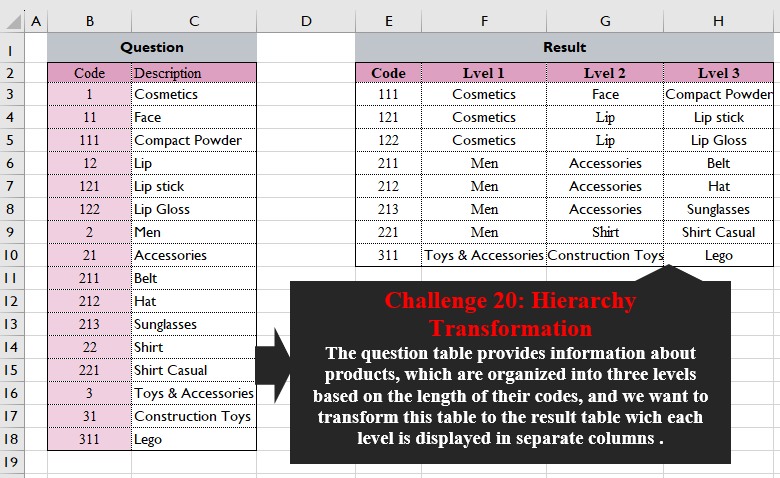
The question table provides information about products, which are organized into three levels based on the length of their codes, and we want to transform this table into the result table wich each level is displayed in separate columns.
📌 Challenge Details and Links
Challenge Number: 20
Challenge Difficulty: ⭐⭐⭐⭐⭐
📥Download Sample File
📥Link to the solutions on LinkedIn
📥Link to the solution on YouTube
Solving the challenge of Hierarchy Transformation with Power Query
Power Query solution 1 for Hierarchy Transformation, proposed by Ramiro Ayala Chávez:
let
S = Excel.CurrentWorkbook(){[Name="Table1"]}[Content],
a = Table.TransformColumnTypes(S,{{"Code",type text}}),
b = List.Select(a[Code], each Text.Length(_)=3),
c = List.Transform(b, each Text.Start(_,1)),
d = List.Transform(b, each Text.Start(_,2)),
e = Table.FromColumns({c&d&b},{"C"}),
f = Table.AddColumn(e,"D",each a[Description]{List.PositionOf(a[Code],[C])}),
g = List.Transform(Table.Split(f,8), each [D]),
h = List.InsertRange(g,0,{b}),
Sol = Table.FromColumns(h,{"Code","Lvel 1","Lvel 2","Lvel 3"})
in
Sol
Power Query solution 2 for Hierarchy Transformation, proposed by Alejandro Simón 🇵🇦 🇪🇸:
let
  Source = Excel.CurrentWorkbook(){[Name = "Table1"]}[Content],
  Code = List.Select(List.Transform(Source[Code], Text.From), each Text.Length(_) = 3),
  List = List.Transform(
    Code,
    each List.Transform({1 .. Text.Length(_)}, (x) => Number.From(Text.Range(_, 0, x)))
  ),
  Levels = List.Transform(
    List,
    each Table.FromRows(
      {List.ReplaceMatchingItems(_, List.Zip(Table.ToColumns(Source)))},
      {"Lvel 1", "Lvel 2", "Lvel 3"}
    )
  ),
  Tbl = Table.FromColumns({Code, Levels}, {"Code", "B"}),
  Sol = Table.ExpandTableColumn(Tbl, "B", Table.ColumnNames(Tbl[B]{0}))
in
  Sol
Power Query solution 3 for Hierarchy Transformation, proposed by 🇮🇷 Navid Esmaeilzadeh اسماعیل زاده:
let
  Source = Excel.CurrentWorkbook(){[Name = "Table1"]}[Content],
  A = Table.DuplicateColumn(Source, "Code", "C"),
  B = Table.SplitColumn(
    Table.TransformColumnTypes(A, {{"C", type text}}, "en-US"),
    "C",
    Splitter.SplitTextByRepeatedLengths(1),
    {"C1", "C2", "C3"}
  ),
  C = Table.AddColumn(B, "Level1", each if [C2] = null and [C3] = null then [Description] else null),
  D = Table.FillDown(C, {"Level1"}),
  E = Table.AddColumn(
    D,
    "Level2",
    each if [C1] <> null and [C2] <> null and [C3] <> null then null else [Description]
  ),
  F = Table.FillDown(E, {"Level2"}),
  G = Table.RenameColumns(F, {{"Description", "Level3"}}),
  H = Table.SelectRows(G, each ([C2] <> null) and ([C3] <> null)),
  Sol = Table.SelectColumns(H, {"Code", "Level1", "Level2", "Level3"})
in
  Sol
Power Query solution 4 for Hierarchy Transformation, proposed by Glyn Willis:
let
 lvl= Text.Length(Text.From(List.MaxN(S[Code],1,(x)=> Text.Length(Text.From(x))){0})),
 col=Table.ColumnNames(M),
 S = Excel.CurrentWorkbook(){[Name="Table1"]}[Content],
 C = Table.AddColumn(S, "lvl", each Text.Length(Text.From([Code]))),
 SP = Table.SplitColumn(Table.TransformColumnTypes(C, {{"Code", type text}}, "en-GB"), "Code", Splitter.SplitTextByPositions({0..lvl-1}), List.Transform({1..lvl},(x)=> "L|"&Text.From(x))),
 G = Table.Group(SP, {"lvl"}, {{"d", each _, type table}})[[d]],
Solving the challenge of Hierarchy Transformation with Excel
Excel solution 1 for Hierarchy Transformation, proposed by Bo Rydobon 🇹🇭:
=LET(
    c,
    B3:B18,
    d,
    FILTER(
        c,
        c>99
    ),
    HSTACK(
        d,
        XLOOKUP(
            --LEFT(
                d,
                {1,
                2,
                3}
            ),
            c,
            C3:C18
        )
    )
)
Excel solution 2 for Hierarchy Transformation, proposed by 🇰🇷 Taeyong Shin:
=LET(
    c,
    B3:B18,
    d,
    FILTER(
        c,
        LEN(
            c
        )=3
    ),
    a,
    {1,
    2,
    3},
    f,
    MAP(
        a,
        LAMBDA(
            n,
            LAMBDA(
                x,
                INDEX(
                    XLOOKUP(
                        LEFT(
                            x,
                            a
                        ),
                        c&"",
                        C3:C18
                    ),
                    n
                )
            )
        )
    ),
    DROP(
        GROUPBY(
            d,
            d,
            f,
            0,
            0
        ),
        1
    )
)
Excel solution 3 for Hierarchy Transformation, proposed by Oscar Mendez Roca Farell:
=LET(
    _d,
     B3:B18,
    _n,
     INT(
         FILTER(
             _d,
              LEN(
                  _d
              )=3
         )/10^{2,
          1,
          0}
     ),
     HSTACK(
         TAKE(
             _n,
              ,
             -1
         ),
          XLOOKUP(
              _n,
              _d,
               C3:C18
          )
     )
)
Excel solution 4 for Hierarchy Transformation, proposed by Julian Poeltl:
=LET(
    AR,
    B2:C18,
    ARO,
    TAKE(
        AR,
        ,
        1
    ),
    ART,
    DROP(
        AR,
        ,
        1
    ),
    Code3,
    FILTER(
        ARO,
        LEN(
            ARO
        )=3
    ),
    HSTACK(
        Code3,
        XLOOKUP(
            --LEFT(
                Code3,
                1
            ),
            ARO,
            ART
        ),
        XLOOKUP(
            --LEFT(
                Code3,
                2
            ),
            ARO,
            ART
        ),
        XLOOKUP(
            Code3,
            ARO,
            ART
        )
    )
)
Excel solution 5 for Hierarchy Transformation, proposed by Abdallah Ally:
=LET(
    a,
    B3:B18,
    b,
    C3:C18,
    c,
    FILTER(
        a,
        LEN(
            a
        )=3
    ),
    VSTACK(
        HSTACK(
            "Code",
             "Level "&SEQUENCE(
                 ,
                 3
             )
        ),
        HSTACK(
            c,
            XLOOKUP(
                --LEFT(
                    c,
                    SEQUENCE(
                 ,
                 3
             )
                ),
                a,
                 b
            )
        )
    )
)
Excel solution 6 for Hierarchy Transformation, proposed by Kris Jaganah:
=LET(
    a,
    B3:B18,
    b,
    C3:C18,
    c,
    VSTACK(
        HSTACK(
            "Code",
            "Lvel "&{1,
            2,
            3}
        ),
        GROUPBY(
            HSTACK(
                a,
                XLOOKUP(
                    --LEFT(
                        a,
                        {1,
                        2}
                    ),
                    a,
                    b
                )
            ),
            b,
            CONCAT,
            0,
            0,
            ,
            LEN(
                a
            )=3
        )
    ),
    c
)
Excel solution 7 for Hierarchy Transformation, proposed by John Jairo Vergara Domínguez:
=LET(
    c,
    B3:B18,
    f,
    FILTER(
        c,
        LEN(
            c
        )=3
    ),
    HSTACK(
        f,
        XLOOKUP(
            --LEFT(
                f,
                {1,
                2,
                3}
            ),
            c,
            C3:C18
        )
    )
)
Excel solution 8 for Hierarchy Transformation, proposed by Sunny Baggu:
=LET(     _c,
     FILTER(
         B3:B18,
          LEN(
              B3:B18
          ) = 3
     ),     _v,
     DROP(          REDUCE(

               "",

               _c,

               LAMBDA(
                   a,
                    v,
                    VSTACK(
                        a,
                         TOROW(
                             --LEFT(
                                 v,
                                  SEQUENCE(
                                      3
                                  )
                             )
                         )
                    )
               )

          ),          1     ),     HSTACK(
         _c,
          XLOOKUP(
              _v,
               B3:B18,
               C3:C18
          )
     ))
Excel solution 9 for Hierarchy Transformation, proposed by CA Raghunath Gundi:
=LET(
    _code,
     $B$3:$B$18,
      _desc,
     $C$3:$C$18,     _unq,
     SORT(
        FILTER(
            _code,
            LEN(
                _code
            )=MAX(
                LEN(
                _code
            )
            )
        )
    ),     HSTACK(
         _unq,          XLOOKUP(
              --LEFT(
                  _unq,
                  SEQUENCE(
                      ,
                      MAX(
                          LEN(
                              _unq
                          )
                      )
                  )
              ),
              _code,
              _desc
          )
     )
)
Excel solution 10 for Hierarchy Transformation, proposed by Hussein SATOUR:
=LET(
    a,
    B3:B18,
    b,
    FILTER(
        a,
        a>99
    ),
    TEXTSPLIT(
        CONCAT(
            MAP(
                b,
                LAMBDA(
                    x,
                    x&"/"&TEXTJOIN(
                        "/",
                        ,
                        XLOOKUP(
                            --LEFT(
                                x,
                                {1,
                                2,
                                3}
                            ),
                            a,
                            C3:C18
                        )
                    )&"|"
                )
            )
        ),
        "/",
        "|",
        1
    )
)
Excel solution 11 for Hierarchy Transformation, proposed by Nicolas Micot:
=FILTRE(
    B3:B18;
    NBCAR(
        B3:B18
    )=MAX(
        NBCAR(
        B3:B18
    )
    )
)

F3 Formula:
=LET(
    _lvls;
    STXT(
        E3#;
        1;
        SEQUENCE(
            1;
            NBCAR(
                E3
            )
        )
    )+0;    RECHERCHEX(
        _lvls;
        $B$3:$B$18;
        $C$3:$C$18;    )
)
Excel solution 12 for Hierarchy Transformation, proposed by Tyler Cameron:
=LET(
    a,
    B3:B18,
    b,
    FILTER(
        a,
        LEN(
            a
        )>2
    ),
    c,
    {"Code",
    "Lvel 1",
    "Lvel 2",
    "Lvel 3"},
    d,
    MAKEARRAY(
        COUNT(
            b
        ),
        3,
        LAMBDA(
            r,
            c,
            XLOOKUP(
                INT(
                    LEFT(
                        INDEX(
                            b,
                            r
                        ),
                        c
                    )
                ),
                a,
                C3:C18
            )
        )
    ),
    VSTACK(
        c,
        HSTACK(
            b,
            d
        )
    )
)
Solving the challenge of Hierarchy Transformation with Python
Python solution 1 for Hierarchy Transformation, proposed by Abdallah Ally:
import pandas as pd

# Read the Excel file
file_path = 'CH-020 Transform Higherarchey format.xlsx'
df = pd.read_excel(file_path, usecols='B:C', skiprows=1) # Data frame for transformation

# Data transformation and cleansing
df1 = df[df['Code'] > 99]
df1 = df1[['Code']].astype(str)
for i in range(1, 4):
 df1[i] = df1['Code'].str[: i]
df['Code'] = df['Code'].astype(str)
df1 = df1.drop(columns='Code')
for i in [x for x in df1.columns if x < 5]:
 df1 = pd.merge(df1, df, left_on=i, right_on='Code', how='inner')
df = df1[['Code', 'Description_x', 'Description_y', 'Description']]
df = df.rename(columns={'Description_x': 'Level 1', 'Description_y': 'Level 2', 'Description': 'Level 3'})

# Print the required output
print(f'n{df}')
Solving the challenge of Hierarchy Transformation with R
R solution 1 for Hierarchy Transformation, proposed by Konrad Gryczan, PhD:
library(tidyverse)
library(readxl)

input = read_excel("files/CH-020 Transform Higherarchey format.xlsx", range = "B2:C18")
test = read_excel("files/CH-020 Transform Higherarchey format.xlsx", range = "E2:H10")

result = input %>%
 mutate(level = str_length(Code),
 first_digit = str_sub(Code, 1,1)) %>%
 pivot_wider(names_from = level, values_from = Description) %>%
 group_by(first_digit) %>%
 fill(everything(), .direction = "down") %>%
 ungroup() %>%
 filter(str_length(Code) == 3) %>%
 select(Code, `Lvel 1` = `1`, `Lvel 2` = `2`, `Lvel 3` = `3`)