
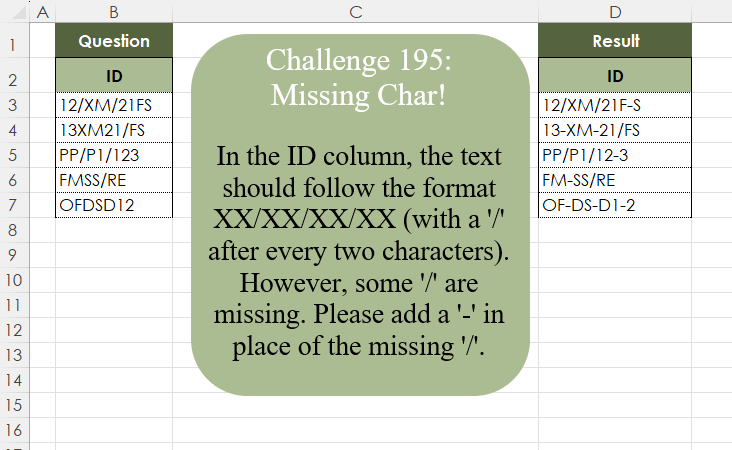
In the ID column, the text should follow the format XX/XX/XX/XX (with a ‘/’ after every two characters). However, some ‘/’ are missing. Please add a ‘-‘ in place of the missing ‘/’.
📌 Challenge Details and Links
Challenge Number: 195
Challenge Difficulty: ⭐⭐
📥Download Sample File
📥Link to the solutions on LinkedIn
Solving the challenge of Missing Characters! with Power Query
Power Query solution 1 for Missing Characters!, proposed by Zoran Milokanović:
let
  Source = Excel.CurrentWorkbook(){[Name = "Input"]}[Content][ID],
  _ = List.Transform(
    Source,
    each List.Accumulate(
      Text.ToList(_),
      "",
      (b, n) =>
        b
          & {"", "-"}{Byte.From(Text.PositionOfAny(Text.End(" " & b & n, 3), {"/", "-", " "}) < 0)}
          & n
    )
  )
in
  _
Power Query solution 2 for Missing Characters!, proposed by Luan Rodrigues:
let
  Fonte = Table.TransformColumns(
    Tabela1,
    {
      "ID",
      each
        let
          a = Text.Split(_, "/"),
          b = List.Transform(
            a,
            (x) =>
              if Text.Length(x) > 2 then
                Text.Combine(List.Transform(List.Split(Text.ToList(x), 2), Text.Combine), "-")
              else
                x
          ),
          c = Text.Combine(b, "/")
        in
          c
    }
  )
in
  Fonte
Power Query solution 3 for Missing Characters!, proposed by Alejandro Simón 🇵🇦 🇪🇸:
let
  Source = Excel.CurrentWorkbook(){[Name = "Table1"]}[Content],
  Sol = Table.TransformColumns(
    Source,
    {
      "ID",
      each try
        Text.Combine(
          let
            a = Text.Split(_, "/"),
            b = List.Transform(
              a,
              each
                if Text.Length(_) > 2 then
                  Text.Combine(Splitter.SplitTextByRepeatedLengths(2)(_), "-")
                else
                  _
            )
          in
            b,
          "/"
        )
      otherwise
        [ID]
    }
  )
in
  Sol
Power Query solution 4 for Missing Characters!, proposed by Krzysztof Kominiak:
let
  Source = Table.FromRows(
    Json.Document(
      Binary.Decompress(
        Binary.FromText(
          "i45WMjTSj/DVNzJ0C1aK1QFyjSN8jQz1obyAAP0AQ31DI2Mwz803OFg/yBXM9ndzCXYxNFKKjQUA",
          BinaryEncoding.Base64
        ),
        Compression.Deflate
      )
    ),
    let
      _t = ((type nullable text) meta [Serialized.Text = true])
    in
      type table [ID = _t]
  ),
  Result = Table.AddColumn(
    Source,
    "Result",
    each Text.Combine(
      List.Transform(
        Text.Split([ID], "/"),
        each
          if Text.Length(_) > 2 then
            Text.Combine(Splitter.SplitTextByRepeatedLengths(2)(_), "-")
          else
            _
      ),
      "/"
    )
  )[[Result]]
in
  Result
Power Query solution 5 for Missing Characters!, proposed by Abdallah Ally:
let
  Source = Excel.CurrentWorkbook(){[Name = "Table1"]}[Content],
  Result = Table.TransformColumns(
    Source,
    {
      "ID",
      each List.Accumulate(
        Text.ToList(Text.Middle(_, 2)),
        Text.Start(_, 2),
        (s, c) =>
          s & Text.Repeat("-", Byte.From(Number.Mod(Text.Length(s) + 1, 3) = 0 and c <> "/")) & c
      )
    }
  )
in
  Result
Power Query solution 6 for Missing Characters!, proposed by Kris Jaganah:
let
  A = Excel.CurrentWorkbook(){[Name = "Table1"]}[Content],
  B = Table.AddColumn(
    A,
    "Ans",
    each List.Accumulate(
      Text.Split([ID], "/"),
      null,
      (x, y) =>
        Text.Combine(
          {
            x,
            (
              if Text.Length(y) > 2 then
                Text.Combine(
                  List.Transform(
                    List.Alternate({0 .. Text.Length(y) - 1}, 1, 1, 1),
                    (z) => Text.Middle(y, z, 2)
                  ),
                  "-"
                )
              else
                y
            )
          },
          "/"
        )
    )
  )
in
  B
Power Query solution 7 for Missing Characters!, proposed by Meganathan Elumalai:
let
  Source = Excel.CurrentWorkbook(){[Name = "Table1"]}[Content],
  Result = Table.TransformColumns(
    Source,
    {},
    each Text.Combine(
      List.Transform(
        Text.Split(_, "/"),
        (f) => Text.Combine(Splitter.SplitTextByRepeatedLengths(2)(f), "-")
      ),
      "/"
    )
  )
in
  Result
Power Query solution 8 for Missing Characters!, proposed by Seokho MOON:
let
  Source = Excel.CurrentWorkbook(){[Name = "Table1"]}[Content],
  Res = Table.TransformColumns(Source, {"ID", Fun}),
  Fun = (x) =>
    if Text.Length(x) < 3 then
      x
    else if Text.At(x, 2) = "/" then
      Text.Start(x, 3) & @Fun(Text.Range(x, 3))
    else
      Text.Start(x, 2) & "-" & @Fun(Text.Range(x, 2))
in
  Res
Power Query solution 9 for Missing Characters!, proposed by Peter Krkos:
let a = Text.At([ID], c) in if Number.Mod(Text.Length(s)+1, 3) <> 0 then a else if a = "/" then a else "-" & a )), type text)Power Query solution 10 for Missing Characters!, proposed by Sahan Jayasuriya:
let
  Source = Excel.CurrentWorkbook(){[Name = "Data"]}[Content],
  ColTransform = Table.TransformColumns(
    Source,
    {},
    each [
      a = Text.Length(_),
      b = List.Count(List.Select(Text.ToList(_), (x) => x = "/")),
      c = a - b,
      d = if c / 2 = Number.IntegerDivide(c, 2) then (c / 2) - 1 else Number.IntegerDivide(c, 2),
      e = d - b,
      f = List.Generate(() => 2, (x) => x < a + e, (x) => x + 3),
      g = List.Accumulate(
        f,
        _,
        (start, curr) =>
          if Text.ToList(start){curr} <> "/" then Text.Insert(start, curr, "-") else start
      )
    ][g]
  )
in
  ColTransform
Power Query solution 11 for Missing Characters!, proposed by Vida Vaitkunaite:
let
 Source = Excel.CurrentWorkbook(){[Name="Table1"]}[Content],
 Final = Table.TransformColumns(Source, {"ID", each let
fx = List.Transform,
a = fx(Text.Split(_, "/"),
(x)=> Splitter.SplitTextByPositions({0, 2, 4, 6})(x)),
b = fx(a, (x)=> List.Select(x, each _ <>"")),
c = fx(b, (x)=> Text.Combine(x, "-")),
d = Text.Combine(c, "/")
in d})
in
 Final
Solving the challenge of Missing Characters! with Excel
Excel solution 1 for Missing Characters!, proposed by 🇰🇷 Taeyong Shin:
=REGEXREPLACE(
    B3:B7,
    "w{2}(?!/|$)",
    "$0-"
)
Excel solution 2 for Missing Characters!, proposed by Oscar Mendez Roca Farell:
=MAP(
    B3:B7,
    LAMBDA(
        a,
        LET(
            r,
            REGEXEXTRACT(
                a,
                "w{2}/|w{,2}",
                1
            ),
            c,
            CONCAT(
                r&IF(
                    LEN(
                        r
                    )<3,
                    "-",
                    ""
                )
            ),
            LEFT(
                c,
                LEN(
                    c
                )-2
            )
        )
    )
)
Excel solution 3 for Missing Characters!, proposed by Julian Poeltl:
=MAP(
    B3:B7,
    LAMBDA(
        I,
        TEXTJOIN(
            "/",
            ,
            MAP(
                TEXTSPLIT(
                    I,
                    "/"
                ),
                LAMBDA(
                    A,
                    TEXTJOIN(
                        "-",
                        ,
                        MID(
                            A,
                            SEQUENCE(
                                ROUNDUP(
                                    LEN(
                                        A
                                    )/2,
                                    0
                                ),
                                ,
                                ,
                                2
                            ),
                            2
                        )
                    )
                )
            )
        )
    )
)
Excel solution 4 for Missing Characters!, proposed by Kris Jaganah:
=MAP(
    B3:B7,
    LAMBDA(
        v,
        REDUCE(
            "",
            TEXTSPLIT(
                v,
                ,
                "/"
            ),
            LAMBDA(
                x,
                y,
                TEXTJOIN(
                    "/",
                    ,
                    x,
                    IF(
                        LEN(
                            y
                        )>2,
                        TEXTJOIN(
                            "-",
                            ,
                            MID(
                                y,
                                {1;3;5;7},
                                2
                            )
                        ),
                        y
                    )
                )
            )
        )
    )
)
Excel solution 5 for Missing Characters!, proposed by Ivan William:
=MAP(
    B3:B7,
    LAMBDA(
        v,
        LET(
            a,
            MID(
                v,
                SEQUENCE(
                    LEN(
                        v
                    )
                ),
                1
            ),
            b,
            TEXTSPLIT(
                CONCAT(
                    IF(
                        a="/",
                        a,
                        a&","
                    )
                ),
                ,
                ",",
                1
            ),
            SUBSTITUTE(
                MID(
                    CONCAT(
                        IF(
                            MOD(
                                SEQUENCE(
                                    ROWS(
                                        b
                                    )
                                ),
                                2
                            ),
                            "-"&b,
                            b
                        )
                    ),
                    2,
                    99
                ),
                "-/",
                "/"
            )
        )
    )
)
Excel solution 6 for Missing Characters!, proposed by Sunny Baggu:
=MAP(     B3:B7,     LAMBDA(
         t,          LET(

               _a,
               TEXTSPLIT(
                   t,
                    ,
                    "/"
               ),

               _b,
               ROUND(
                   LEN(
                       _a
                   ) / 2 - 1,
                    0
               ),

               _c,
               MAP(

                    _a,

                    _b,

                    LAMBDA(
                        x,
                         y,

                         IFERROR(

                              REDUCE(

                                   x,

                                   SEQUENCE(
                                       y,
                                        ,
                                        3,
                                        3
                                   ),

                                   LAMBDA(
                                       a,
                                        v,
                                        REPLACE(
                                            a,
                                             v,
                                             0,
                                             "-"
                                        )
                                   )

                              ),

                              x

                         )

                    )

               ),

               TEXTJOIN(
                   "/",
                    ,
                    _c
               )

          )     ))
Excel solution 7 for Missing Characters!, proposed by Asheesh Pahwa:
=REDUCE(
    C2,
    B3:B7,
    LAMBDA(
        x,
        y,
        VSTACK(
            x,
            LET(
                t,
                TEXTSPLIT(
                    y,
                    ,
                    "/"
                ),

                TEXTJOIN(
                    "/",
                    ,
                    MAP(
                        t,
                        LAMBDA(
                            a,

                            IF(
                                LEN(
                                    a
                                )>2,
                                TEXTJOIN(
                                    "-",
                                    ,
                                    MID(
                                        a,
                                        {1;3;5;7},
                                        2
                                    )
                                ),
                                a
                            )
                        )
                    )
                )
            )
        )
    )
)
Excel solution 8 for Missing Characters!, proposed by Hamidi Hamid:
=LET(
    x,
    MID(
        SUBSTITUTE(
            B3:B7,
            "/",

        ),
        SEQUENCE(
            ,
            15,
            1,
            2
        ),
        2
    ),
    y,
    DROP(
        MID(
            B3:B7,
            SEQUENCE(
            ,
            15,
            1,
            2
        ),
            2
        ),
        ,
        1
    ),
    z,
    IFERROR(
        SEARCH(
            "/",
            y,
            1
        ),
        "-"
    ),
    w,
    IF(
        ISNUMBER(
            z
        ),
        "/",
        "-"
    ),
    g,
    DROP(
        IF(
            x="",
            "",
            x&w
        ),
        ,
        -1
    ),
    f,
    BYROW(
        g,
        CONCAT
    ),
    MAP(
        f,
        LAMBDA(
            a,
            MID(
                a,
                1,
                LEN(
                    a
                )-1
            )
        )
    )
)
Excel solution 9 for Missing Characters!, proposed by Hussein SATOUR:
=MAP(
    B3:B7,
    LAMBDA(
        z,
        REDUCE(
            LEFT(
                z,
                2
            ),
            MID(
                z,
                SEQUENCE(
                    LEN(
                        z
                    )-2,
                    ,
                    3
                ),
                1
            ),
            LAMBDA(
                x,
                y,
                x&IF(
                    y="/",
                    "/",
                    IF(
                        SUM(
                            IFERROR(
                                FIND(
                                    {"/",
                                    "-"},
                                    RIGHT(
                                        x,
                                        2
                                    )
                                ),
                                0
                            )
                        )=0,
                        "-",
                        ""
                    )&y
                )
            )
        )
    )
)
Excel solution 10 for Missing Characters!, proposed by Md. Zohurul Islam:
=MAP(
    B3:B7,
    LAMBDA(
        x,
        LET(

            a,
            TEXTSPLIT(
                x,
                ,
                "/"
            ),

            b,
            MAP(
                a,
                LAMBDA(
                    y,
                    IF(
                        LEN(
                            y
                        )=2,
                        y,
                        TEXTJOIN(
                            "-",
                            ,
                            MID(
                                y,
                                SEQUENCE(
                                    ,
                                    99,
                                    1,
                                    2
                                ),
                                2
                            )
                        )
                    )
                )
            ),

            d,
            TEXTJOIN(
                "/",
                ,
                b
            ),
            d
        )    )
)
Excel solution 11 for Missing Characters!, proposed by Meganathan Elumalai:
=MAP(B3:B7,LAMBDA(y,TEXTJOIN("/",,MAP(TEXTSPLIT(y,"/"),LAMBDA(x,IF(LEN(x)>2,TEXTJOIN("-",,MID(x,SEQUENCE(1+LEN(x)/2,,,2),2)),x))))))Excel solution 12 for Missing Characters!, proposed by Pieter de B.:
=MAP(B3:B7,
    LAMBDA(b,
    REDUCE(LEFT(
        b,
        2
    ),
    MID(
        b,
        SEQUENCE(
            ,
            LEN(
                b
            )-2,
            3
        ),
        1
    ),
    LAMBDA(x,
    y,
    x&IF((LEN(
        TEXTAFTER(
            "/"&x,
            {"/",
            "-"},
            -1
        )
    )=2)*(y<>"/"),
    "-"&y,
    y)))))
Excel solution 13 for Missing Characters!, proposed by Rick Rothstein:
=MAP(
    B3:B7,
    LAMBDA(
        r,
        TEXTJOIN(
            "/",
            ,
            MAP(
                TEXTSPLIT(
                    r,
                    "/"
                ),
                LAMBDA(
                    x,
                    IF(
                        LEN(
                            x
                        )=2,
                        x,
                        TEXTJOIN(
                            "-",
                            ,
                            MID(
                                x,
                                SEQUENCE(
                                    1+LEN(
                            x
                        )/2,
                                    ,
                                    ,
                                    2
                                ),
                                2
                            )
                        )
                    )
                )
            )
        )
    )
)
Excel solution 14 for Missing Characters!, proposed by Seokho MOON:
=LAMBDA(
    x,
    IF(
        LEN(
            x
        )<3,
        x,
        IF(
            MID(
                x,
                3,
                1
            )="/",
            LEFT(
                x,
                3
            )&mc(
                MID(
                    x,
                    4,
                    LEN(
            x
        )
                )
            ),
            LEFT(
                x,
                2
            )&"-"&mc(
                MID(
                    x,
                    3,
                    LEN(
            x
        )
                )
            )
        )
    )
)
Then =MAP(
    B3:B7,
    LAMBDA(
        x,
        mc(
            x
        )
    )
)
Solving the challenge of Missing Characters! with Python
Python solution 1 for Missing Characters!, proposed by Konrad Gryczan, PhD:
import pandas as pd

path = "CH-195 Missing Char.xlsx"
input = pd.read_excel(path, usecols="B", skiprows=1, nrows=6)
test = pd.read_excel(path, usecols="D", skiprows=1, nrows=6).rename(columns=lambda x: x.split('.')[0])

def transform_text(text):
 chars = text[:2]

 for i in range(2, len(text)):
 char = text[i]
 cond = ((len(chars) + 1) % 3 == 0) and (char != "/")
 chars += ('-' if cond else '') + char

 return chars

input['result'] = input.iloc[:, 0].apply(transform_text)

result = input['result'].tolist()
expected = test.iloc[:, 0].tolist()

print(result == expected) # True
Python solution 2 for Missing Characters!, proposed by Luan Rodrigues:
import pandas as pd

file = r"CH-195 Missing Char.xlsx"
df = pd.read_excel(file, usecols="B",skiprows=1)

df['ID'] = df['ID'].str.split('/').apply(
 lambda x: '/'.join([
 '-'.join([
 ''.join(list(i)[y:y + 2])
 for y in range(0, len(i), 2)
 ]) if len(i) > 2 else i
 for i in x
 ])
)
print(df)
Python solution 3 for Missing Characters!, proposed by Abdallah Ally:
import pandas as pd

# Create a function to transform text
def transform_text(text):
 chars = text[:2]
 for char in text[2:]:
 cond = (len(chars) + 1) % 3 == 0 and char != '/'
 chars += '-' * int(cond) + char
 return chars

# Load the Excel file
file_path = 'CH-195 Missing Char.xlsx'
df = pd.read_excel(io=file_path, usecols='B', skiprows=1)

# Perform data transformation
df['ID'] = df['ID'].map(transform_text)

# Display the final results
df
Solving the challenge of Missing Characters! with Python in Excel
Python in Excel solution 1 for Missing Characters!, proposed by Alejandro Campos:
import re
ids = xl("B3:B7")[0]
df = pd.DataFrame({'Original ID': ids, 'Normalized ID': ['/'.join(
 ['-'.join(re.findall('..?', p)) for p in i.split('/')]) for i in ids]})
Solving the challenge of Missing Characters! with R
R solution 1 for Missing Characters!, proposed by Konrad Gryczan, PhD:
library(tidyverse)
library(readxl)
path = "files/CH-195 Missing Char.xlsx"
input = read_excel(path, range = "B2:B7")
test  = read_excel(path, range = "D2:D7")
transform_text <- function(text) {
 chars <- substr(text, 1, 2)

 for (i in seq(3, nchar(text))) {
 char <- substr(text, i, i)
 cond <- ((nchar(chars) + 1) %% 3 == 0) && (char != "/")
 chars <- paste0(chars, ifelse(cond, "-", ""), char)
 }

 return(chars)
}
result = input %>%
 mutate(result = map_chr(ID, transform_text))
all.equal(result$result, test$ID, check.attributes = FALSE)