
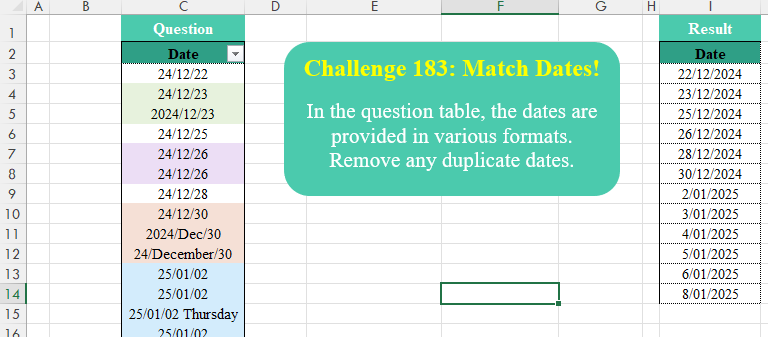
In the question table, the dates are provided in various formats. Remove any duplicate dates.
📌 Challenge Details and Links
Challenge Number: 183
Challenge Difficulty: ⭐⭐⭐
📥Download Sample File
📥Link to the solutions on LinkedIn
Solving the challenge of Match Dates! with Power Query
Power Query solution 1 for Match Dates!, proposed by Luan Rodrigues:
let
  Fonte = Table.TransformColumns(
    Data,
    {
      "Date",
      each
        let
          a = if Text.Contains(_, "/") then Text.Split(_, " "){0} else _,
          b = Date.From(Text.Combine(List.Reverse(Text.SplitAny(a, " /-")), "/"))
        in
          b
    }
  ),
  dup = Table.Distinct(Fonte)
in
  dup
Power Query solution 2 for Match Dates!, proposed by Kris Jaganah:
let
  A = Excel.CurrentWorkbook(){[Name = "Data"]}[Content],
  B = Table.Distinct(
    Table.TransformColumns(
      A,
      {
        "Date",
        each
          let
            a = Text.SplitAny(_, "/- ")
          in
            Date.From(a{2} & "/" & a{1} & "/" & a{0})
      }
    )
  )
in
  B
Power Query solution 3 for Match Dates!, proposed by Abdallah Ally:
let
  Source = Excel.CurrentWorkbook(){[Name = "Data"]}[Content],
  Result = Table.Distinct(
    Table.TransformColumns(
      Source,
      {
        "Date",
        each [
          a = List.Accumulate({" ", "-"}, _, (s, c) => Text.Replace(s, c, "/")),
          b = List.FirstN(Text.Split(a, "/"), 3),
          c = Text.PadStart(b{2}, 2, "0"),
          d = Text.PadStart(Text.From(Date.Month(Date.From("1" & "/" & b{1}))), 2, "0"),
          e = "20" & Text.End(b{0}, 2),
          f = Date.From(Text.Combine({c, d, e}, "/"))
        ][f],
        type date
      }
    )
  )
in
  Result
Power Query solution 4 for Match Dates!, proposed by Gerson Pineda:
let
  Origen = Excel.CurrentWorkbook(){[Name = "Data"]}[Content],
  T1 = Table.TransformColumns(
    Origen,
    {
      {
        "Date",
        each
          let
            a = _,
            b = "/",
            c = Date.From(Text.Combine(List.Reverse(Text.Split(Text.Replace(a, "-", b), b)), b))
          in
            c
      }
    }
  )
in
  Table.Distinct(Table.RemoveRowsWithErrors(T1))
Power Query solution 5 for Match Dates!, proposed by Meganathan Elumalai:
let
  Source = Excel.CurrentWorkbook(){[Name = "Data"]}[Content],
  Result = Table.Distinct(
    Table.TransformColumns(
      Source,
      {
        "Date",
        each try
          if Text.PositionOfAny(_, {"/", "-"}) = 2 then Date.From("20" & _) else Date.From(_)
        otherwise
          Date.From(Text.Start(_, Text.PositionOf(_, " ")))
      }
    )
  )
in
  Result
Power Query solution 6 for Match Dates!, proposed by Vida Vaitkunaite:
let
 Source = Excel.CurrentWorkbook(){[Name="Data"]}[Content],
 Transform = Table.Distinct(Table.TransformColumns(Source, {"Date", each
let
a = List.FirstN(Text.SplitAny(_, " / -"), 3),
b = a{2} & "/" & a{1} & "/" & a{0},
c = Date.From(b)
in c}))
in
 Transform
Solving the challenge of Match Dates! with Excel
Excel solution 1 for Match Dates!, proposed by 🇰🇷 Taeyong Shin:
=LET(
    d,
    C3:C29,
    R,
    REGEXEXTRACT,
    S,
    SUBSTITUTE,
    x,
    R(
        d,
        ".*(?<=d)"
    ),
    t,
    R(
        x,
        "pl+"
    ),
    UNIQUE(
        IFERROR(
            INT(
                IFNA(
                    S(
                        d,
                        t,
                        TEXT(
                            1&t,
                            "m"
                        )
                    ),
                    x
                )
            ),
            --S(
                d,
                " ",
                "/"
            )
        )
    )
)
Excel solution 2 for Match Dates!, proposed by Oscar Mendez Roca Farell:
=LET(F,
    TEXTAFTER,
    G,
    TEXTBEFORE,
    d,
    C3:C29,
    s,
    {"/",
    "-",
    " "},
    e,
    F(
        d,
        s
    ),
    m,
    G(
        e,
        s
    ),
    UNIQUE(--(LEFT(
        F(
        e,
        s
    ),
        2
    )&-IFERROR(
        --m,
        XMATCH(
            m&"*",
            TEXT(
                ROW(
                    1:12
                )&-25,
                "b1mmmm"
            ),
            2
        )
    )&-G(
        d,
        s
    ))))
Excel solution 3 for Match Dates!, proposed by Kris Jaganah:
=UNIQUE(
    MAP(
        Data[Date],
        LAMBDA(
            x,
            LET(
                a,
                TEXTSPLIT(
                    x,
                    {"-",
                    "/",
                    " "}
                ),
                b,
                INDEX,
                DATEVALUE(
                    b(
                        a,
                        ,
                        3
                    )&"/"&b(
                        a,
                        ,
                        2
                    )&"/"&b(
                        a,
                        ,
                        1
                    )
                )
            )
        )
    )
)
Excel solution 4 for Match Dates!, proposed by Abdallah Ally:
=UNIQUE(
    MAP(
        C3:C29,
        LAMBDA(
            x,
            LET(
                a,
                TEXTSPLIT(
                    x,
                    {" ",
                    "-",
                    "/"}
                ),
                --TEXTJOIN(
                    "/",
                    ,
                    CHOOSECOLS(
                        a,
                        3,
                        2,
                        1
                    )
                )
            )
        )
    )
)
Excel solution 5 for Match Dates!, proposed by Abdallah Ally:
=UNIQUE(
    MAP(
        C3:C29,
        LAMBDA(
            x,
            --TEXTJOIN(
                "/",
                ,
                CHOOSECOLS(
                     TEXTSPLIT(
                         x,
                         {" ",
                         "-",
                         "/"}
                     ),
                    3,
                    2,
                    1
                )
            )
        )
    )
)
Excel solution 6 for Match Dates!, proposed by Kris Jaganah:
=UNIQUE(MAP(Data[Date],
    LAMBDA(x,
    LET(a,
    TEXTSPLIT(
        x,
        {"-",
        "/",
        " "}
    ),
    b,
    INDEX,
    --(b(
        a,
        ,
        3
    )&"/"&b(
        a,
        ,
        2
    )&"/"&b(
        a,
        ,
        1
    ))))))
Excel solution 7 for Match Dates!, proposed by Sunny Baggu:
=UNIQUE(     MAP(          Data[Date],          LAMBDA(
              a,

               LET(

                    _s,
                    SORTBY(

                         TAKE(
                             TEXTSPLIT(
                                 a,
                                  ,
                                  {"-",
                                  "/",
                                  " "}
                             ),
                              3
                         ),

                         {3; 2; 1}

                    ),

                    _d,
                    --INDEX(
                        _s,
                         1,

                    ),

                    _m,
                    INDEX(
                        _s,
                         2,

                    ),

                    _mm,
                    IF(
                        LEN(
                            _m
                        ) > 2,
                         MONTH(
                             1 & _m
                         ),
                         --_m
                    ),

                    _y,
                    --INDEX(
                        _s,
                         3,

                    ),

                    _yy,
                    IF(
                        _y > 2000,
                         _y,
                         2000 + _y
                    ),

                    TEXTJOIN(
                        "/",
                         ,
                         _mm,
                         _d,
                         _yy
                    )

               )

          )     ))
Excel solution 8 for Match Dates!, proposed by Alejandro Campos:
=UNIQUE(     MAP(          C3:C29,          LAMBDA(
              x,

               LET(

                    a,
                    TEXTSPLIT(
                        x,
                         {" ",
                         "-",
                         "/"}
                    ),

                    e,
                    CHOOSECOLS(
                        a,
                         3,
                         2,
                         1
                    ),

                    c,
                    SWITCH(
                        e,
                         "Dec",
                         12,
                         "December",
                         12,
                         "January",
                         1,
                         e
                    ),

                    TEXT(
                        TEXTJOIN(
                            "/",
                             ,
                             c
                        ),
                         "dd/mm/aaaa"
                    )
               )
          )
     )
)
Excel solution 9 for Match Dates!, proposed by Bilal Mahmoud kh.:
=2,
    "20"&n,
    n)),
    IFNA(
        MATCH(
            INDEX(
                a,
                1,
                2
            ),
             {"Jan",
            "Feb",
            "Mar",
            "Apr",
            "May",
            "Jun",
            "Jul",
            "Aug",
            "Sep",
            "Oct",
            "Nov",
            "Dec"},
            0
        ),
         INDEX(
                a,
                1,
                2
            )
    ),
    INDEX(
        a,
        1,
        3
    )))))),
    0))
Excel solution 10 for Match Dates!, proposed by Craig Hatmaker:
=LET(     Rows,
     BYROW(
         Data,          LAMBDA(
              Text,

               LET(

                    Split,
                    TEXTSPLIT(
                         Text,
                         {"/",
                        " ",
                        "-"}
                    ),

                    MMDDYY,
                    CHOOSECOLS(
                        Split,
                         2,
                         3,
                         1
                    ),

                    DATEVALUE(
                         TEXTJOIN(
                              "/",
                              ,
                              MMDDYY
                         )
                    )

               )

          )     ),     UNIQUE(
          FILTER(
               Rows,
               NOT(
                    ISERR(
                         Rows
                    )
               )
          )
     ))
Excel solution 11 for Match Dates!, proposed by Gerson Pineda:
=UNICOS(
    ENCOL(
        MAP(
            C3:C29,
            LAMBDA(
                x,
                --UNIRCADENAS(
                    "/",
                    ,
                    INDICE(
                        DIVIDIRTEXTO(
                            x,
                            {"-",
                            "/",
                            " "}
                        ),
                        {3,
                        2,
                        1}
                    )
                )
            )
        ),
        2
    )
)
Excel solution 12 for Match Dates!, proposed by Hussein SATOUR:
=LET(d,
    "/",
    S,
    SUBSTITUTE,
    TB,
    TEXTBEFORE,
    TA,
    TEXTAFTER,
    a,
    S(
        S(
            C3:C29,
            " ",
            d
        ),
        "-",
        d
    ),
    b,
    IFERROR(
        TB(
            a,
            d,
            3
        ),
        a
    ),
    UNIQUE(--(TA(
        b,
        d,
        -1
    )&d&TB(
        TA(
            b,
            d
        ),
        d
    )&d&TB(
            b,
            d
        ))))
Excel solution 13 for Match Dates!, proposed by Md. Zohurul Islam:
=LET(    z,
    Data[Date],    u,
    MAP(
        z,
        LAMBDA(
            x,
            LET(

                 a,
                TEXTSPLIT(
                    x,
                    {"/",
                    "-",
                    " "}
                ),

                 b,
                CHOOSECOLS(
                    a,
                    3,
                    2,
                    1
                ),

                 c,
                TEXTJOIN(
                    "/",
                    ,
                    b
                ),

                 d,
                DATEVALUE(
                    c
                ),

                 d
            )
        )
    ),    v,
    VSTACK(
        "Date",
        UNIQUE(
            u
        )
    ),    v
)
Excel solution 14 for Match Dates!, proposed by Meganathan Elumalai:
=UNIQUE(
    MAP(
        C3:C29,
        LAMBDA(
            x,
            1*TEXTJOIN(
                "/",
                ,
                INDEX(
                    TEXTSPLIT(
                        x,
                        {"/",
                        "-",
                        " "}
                    ),
                    {3,
                    2,
                    1}
                )
            )
        )
    )
)
Excel solution 15 for Match Dates!, proposed by Michael D. Newby:
=LET(     RegEx,
    {"/",
    "-",
    " "},     Data,
     Data[Date],     Year,
     TEXTSPLIT(
         Data,
         RegEx
     ),     Month,
     LET(          months,
         TEXTBEFORE(
             TEXTAFTER(
                 Data[Date],
                 Year & RegEx
             ),
             RegEx
         ),          IFERROR(
              SWITCH(
                  LEFT(
                      months,
                      3
                  ),
                  "Jan",
                   1,
                   "Feb",
                   2,
                  "Mar",
                   3,
                   "Apr",
                   4,
                   "May",
                   5,
                   "Jun",
                   6,
                   "Jul",
                   7,
                   "Aug",
                   8,
                   "Sep",
                   9,
                   "Oct",
                   10,
                   "Nov",
                   11,
                   "Dec",
                   12
              ),
              months
          )
     ),     Day,
     LET(
         days,
         TEXTAFTER(
             TEXTAFTER(
                 Data,
                 RegEx & Month
             ),
             RegEx
         ),
         IFERROR(
             IFERROR(
                 TEXTBEFORE(
                     days,
                     RegEx
                 ),
                 days
             ),
             TEXTAFTER(
                 Data,
                 RegEx,
                 -1
             )
         )
     ),     UNIQUE(
         DATE(
             VALUE(
                 IF(
                     LEN(
                         Year
                     )=2,
                     "20" & Year,
                      Year
                 )
             ),
             VALUE(
                 Month
             ),
             VALUE(
                 Day
             )
         )
     ))
Excel solution 16 for Match Dates!, proposed by Pieter de B.:
=UNIQUE(MAP(C3:C29,
    LAMBDA(d,
    LET(s,
    TEXTSPLIT(
        d,
        {"-",
        "/",
        " "}
    ),
    i,
    INDEX,
    L,
    LAMBDA(x,
    y,
    z,
    --(i(
        s,
        x
    )&"-"&i(
        s,
        y
    )&-i(
        s,
        z
    ))),
    IFERROR(
        L(
            2,
            3,
            1
        ),
        L(
            3,
            2,
            1
        )
    )))))
Solving the challenge of Match Dates! with Python
Python solution 1 for Match Dates!, proposed by Konrad Gryczan, PhD:
import pandas as pd
from dateutil.parser import parse
path = "CH-183 Match the Dates.xlsx"
input = pd.read_excel(path, usecols="C", skiprows=1, nrows=28)
test = pd.read_excel(path, usecols="I", skiprows=1, nrows=12).rename(columns=lambda x: x.split('.')[0])
def parse_date(date_str):
 try:
 return parse(date_str, fuzzy=True, yearfirst=True)
 except ValueError:
 return None
input['Parsed Date'] = input.iloc[:, 0].apply(parse_date).dt.date
result = pd.DataFrame(input['Parsed Date'].drop_duplicates().unique(), columns=['Date'])
print(all(result['Date'] == test['Date'])) # True
Python solution 2 for Match Dates!, proposed by Luan Rodrigues:
import pandas as pd
import numpy as np
file = r"CH-183 Match the Dates.xlsx"
df = pd.read_excel(file, usecols="C",skiprows=1)
df['Date'] = np.where(df['Date'].str.contains('/'),df['Date'].str.split(" ").str[0],df['Date'])
df['Date'] = df['Date'].str.split(r'[-/ ]').apply(lambda x: x[::-1]).str.join('/')
rep = {
 'January': '01',
 'December': '12',
 'Dec': '12'}
df['Date'] = df['Date'].replace(rep, regex=True)
df['Date1'] = pd.to_datetime(df['Date'],format=f'%d/%m/%Y',errors='coerce')
df['Date2'] = pd.to_datetime(df['Date'],format=f'%d/%m/%y',errors='coerce')
df['Date1'] = df['Date1'].fillna(df['Date2'])
df = df['Date1'].drop_duplicates()
print(df)
Python solution 3 for Match Dates!, proposed by Abdallah Ally:
import pandas as pd
# Create a function to transform date string
def transform_date_string(str_date):
 ds = str_date.replace(' ', '/').replace('-', '/').split('/')
 ds = '20' + ds[0][-2:] + '/' + ds[1].zfill(2) + '/' + ds[2].zfill(2)
 return ds
# Load the Excel file
file_path = 'CH-183 Match the Dates.xlsx'
df = pd.read_excel(io=file_path, usecols='C', skiprows=1)
# Perform data transformation
df['Date'] = pd.to_datetime(df['Date'].map(transform_date_string), format='mixed')
df = df.drop_duplicates(subset='Date', ignore_index=True)
# Display the final results
df
Solving the challenge of Match Dates! with Python in Excel
Python in Excel solution 1 for Match Dates!, proposed by Alejandro Campos:
import re
df = xl("Data[[
hashtag
#Todo];[Date]]", headers=True)
def date_string(str):
 parts = re.sub(r'[-s]', '/', str).split('/')
 return f"20{parts[0][-2:] if len(parts[0]) == 2 else parts[0]}/{parts[1].zfill(2)}/{parts[2].zfill(2)}"
df['Date'] = pd.to_datetime(df['Date'].map(date_string), errors='coerce')
df = df.dropna(subset=['Date'])
df = df.drop_duplicates(subset='Date', ignore_index=True)
Solving the challenge of Match Dates! with R
R solution 1 for Match Dates!, proposed by Konrad Gryczan, PhD:
library(tidyverse)
library(readxl)
library(anytime)
path = "files/CH-183 Match the Dates.xlsx"
input = read_excel(path, range = "C2:C29")
test = read_excel(path, range = "I2:I14")
result = input %>%
 mutate(date = anytime(Date),
 dateymd = ymd(Date),
 result = coalesce(date, dateymd)) %>%
 select(result) %>%
 distinct()
all.equal(anydate(result$result), anydate(test$Date))
# [1] TRUE
Solving the challenge of Match Dates! with Google Sheets
Google Sheets solution 1 for Match Dates!, proposed by Peter Krkos:
PowerQuery solution:
https://docs.google.com/spreadsheets/d/1zR5IZLz8OT76vhaPEHfsPrw8-RDKnLyyqS49IJjdhFk/edit?pli=1&gid=1988457794#gid=1988457794