
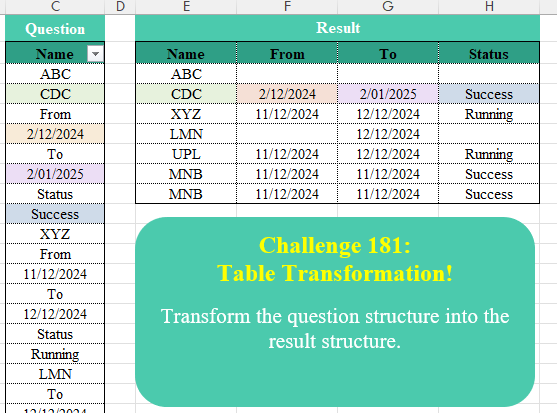
Transform the question structure into the result structure.
📌 Challenge Details and Links
Challenge Number: 181
Challenge Difficulty: ⭐⭐
📥Download Sample File
📥Link to the solutions on LinkedIn
Solving the challenge of Table Transformation! Part 22 with Power Query
Power Query solution 1 for Table Transformation! Part 22, proposed by Ramiro Ayala Chávez:
let
S = Excel.CurrentWorkbook(){[Name="Table1"]}[Content],
a = Table.TransformColumnTypes(S,{"Name",type text}),
b = Table.Group(a,"Name",{"G", each [Name]},0,(x,y)=>Number.From(Text.Length(x)=3 and Text.Length(y)=3))[G],
c = List.Transform(b, each if not List.Contains(_,"From") then List.InsertRange(_,1,{null,null}) else _),
d = List.Transform(c, each if not List.Contains(_,"To") then List.InsertRange(_,3,{null,null}) else _),
e = Table.ToColumns(Table.Combine(List.Transform(d, each Table.FromRows({_})))),
f = {"Name"}&List.Transform(List.Alternate(e,1,1), each List.Last(List.RemoveNulls(_))),
g = Table.FromColumns(List.Alternate(e,1,1,1)),
Sol = Table.RenameColumns(g,List.Zip({Table.ColumnNames(g),f}))
in
Sol
Power Query solution 2 for Table Transformation! Part 22, proposed by Alejandro Simón 🇵🇦 🇪🇸:
let
Source = Excel.CurrentWorkbook(){[Name="Data"]}[Content],
Grp = Table.Group(Source, "Name", {"A", each
 let
 a = Table.Skip(_),
 b = Table.ToColumns(a){0},
 c = List.Split(b,2),
 d = Table.FromColumns(c),
 e = Table.PromoteHeaders(d)
 in e},0, (x,y)=> Number.From(try List.ContainsAll({"A".."Z"}, Text.ToList(y)) otherwise false)),
Sol = Table.ExpandTableColumn(Grp, "A", Table.ColumnNames(Table.Combine(Grp[A])))
in
Sol
Power Query solution 3 for Table Transformation! Part 22, proposed by Krzysztof Kominiak:
let
  Source = Table.TransformColumnTypes(
    Excel.CurrentWorkbook(){[Name = "Data2"]}[Content],
    {{"Name", type text}}
  ),
  GetTabs = Table.Group(
    Source,
    "Name",
    {
      {
        "tmp",
        each [
          a = List.Skip([Name]),
          b = List.Alternate,
          c = b(a, 1, 1, 1),
          d = b(a, 1, 1, 0),
          e = try Table.FromRows({d}, c) otherwise null
        ][e]
      }
    },
    0,
    (x, y) =>
      Number.From(
        List.AllTrue(
          {
            List.AllTrue(List.Transform(Text.ToList(y), (q) => Value.Equals(q, Text.Upper(q)))),
            try not Value.Is(DateTime.From(y), type datetime) otherwise true
          }
        )
      )
  ),
  Result = Table.ExpandTableColumn(GetTabs, "tmp", {"From", "To", "Status"})
in
  Result
Power Query solution 4 for Table Transformation! Part 22, proposed by Kris Jaganah:
able.Combine(
  Table.Group(
    Excel.CurrentWorkbook(){[Name = "Data"]}[Content],
    "Name",
    {
      "All",
      (v) =>
        Table.FromList(
          {List.Alternate(v[Name], 1, 1, 1)},
          (u) => u,
          {"Name"} & List.Distinct(List.Alternate(v[Name], 1, 1))
        )
    },
    0,
    (x, y) => Number.From(Text.Length(Text.From(y)) = 3)
  )[All]
)
Power Query solution 5 for Table Transformation! Part 22, proposed by CA Raghunath Gundi:
let
  Source = Excel.CurrentWorkbook(){[Name = "Data"]}[Content],
  Custom = Table.AddColumn(
    Source,
    "Custom",
    each if Text.Length(Text.From([Name])) = 3 then [Name] else null
  ),
  FillD1 = Table.FillDown(Custom, {"Custom"}),
  Cols = Table.AddColumn(
    FillD1,
    "Cols",
    each
      if [Name] = "From" then
        "From"
      else if [Name] = "To" then
        "To"
      else if [Name] = "Status" then
        "Status"
      else if [Name] = [Custom] then
        "Name"
      else
        null
  ),
  FillD2 = Table.FillDown(Cols, {"Cols"}),
  Index = Table.AddIndexColumn(FillD2, "Index", 1, 1, Int64.Type),
  ForPivot = Table.FillDown(
    Table.AddColumn(Index, "ForPivot", each if [Cols] = "Name" then [Index] else null),
    {"ForPivot"}
  ),
  RemRows = Table.SelectRows(
    ForPivot,
    each ([Name] <> "From" and [Name] <> "Status" and [Name] <> "To")
  ),
  RemCols = Table.RemoveColumns(RemRows, {"Custom", "Index"}),
  Pivot = Table.Pivot(RemCols, List.Distinct(RemCols[Cols]), "Cols", "Name"),
  Result = Table.RemoveColumns(Pivot, {"ForPivot"})
in
  Result
Power Query solution 6 for Table Transformation! Part 22, proposed by Meganathan Elumalai:
let
  Source = Excel.CurrentWorkbook(){[Name = "Data"]}[Content],
  Group = Table.Group(
    Source,
    "Name",
    {
      {
        "New",
        each [
          Lst = List.Zip(List.Split(List.Skip(_[Name]), 2)),
          fin = try Table.FromRows({Lst{1}}, Lst{0}) otherwise null
        ][fin]
      }
    },
    0,
    (x, y) => Number.From(y is text and Text.Upper(y) = y)
  ),
  Result = Table.TransformColumnTypes(
    Table.ExpandTableColumn(Group, "New", {"From", "To", "Status"}),
    {{"From", type date}, {"To", type date}}
  )
in
  Result
Power Query solution 7 for Table Transformation! Part 22, proposed by Seokho MOON:
let
  Source = Excel.CurrentWorkbook(){[Name = "Data"]}[Content],
  Group = Table.Group(
    Source,
    "Name",
    {"Lst", Func},
    0,
    (x, y) => try Number.From(Text.Length(y) = 3) otherwise 0
  )[Lst],
  Func = each [
    A = Table.DemoteHeaders(_)[Column1],
    B = Table.FromRows({List.Alternate(A, 1, 1, 0)}, List.Alternate(A, 1, 1, 1))
  ][B],
  Res = Table.Combine(Group)
in
  Res
Power Query solution 8 for Table Transformation! Part 22, proposed by Alexandre Garcia:
let
A = Excel.CurrentWorkbook(){[Name="Data"]}[Content],
B = Table.Group(A, "Name", {"x", each [
 a = [Name = [Name]{0}],
 b = List.Zip(List.Split(List.Skip([Name]),2)),
 c = {try a & Record.FromList(b{1},b{0}) otherwise a}][c]}, 0, (x,y)=> try Byte.From(Text.Length(y) = 3) otherwise 0)[x],
C = Table.Combine(List.Transform(B, Table.FromRecords))
in C
Power Query solution 9 for Table Transformation! Part 22, proposed by Vida Vaitkunaite:
let
  Source = Excel.CurrentWorkbook(){[Name = "Data"]}[Content],
  Headers = {"Name", "From", "To", "Status"},
  Index = Table.AddIndexColumn(Source, "Index"),
  Custom = Table.AddColumn(
    Index,
    "Custom",
    each try
      if List.ContainsAny(Headers, Text.Split([Name], " ")) then [Name] else "Name"
    otherwise
      "Name"
  ),
  Shift = Table.AddColumn(Custom, "Shifted", each try Custom[Custom]{[Index] - 1} otherwise "Name")[
    [Name],
    [Index],
    [Shifted]
  ],
  Filter = Table.SelectRows(
    Shift,
    each not (try List.ContainsAny(Headers, Text.Split([Name], " ")) otherwise null)
      or Value.Is([Name], type datetime)
  ),
  FillDown = Table.FillDown(
    Table.ReplaceValue(
      Filter,
      each if [Shifted] = "Name" then null else [Index],
      null,
      Replacer.ReplaceValue,
      {"Index"}
    ),
    {"Index"}
  ),
  Final = Table.Pivot(FillDown, List.Distinct(FillDown[Shifted]), "Shifted", "Name")[
    [Name],
    [From],
    [To],
    [Status]
  ]
in
  Final
Power Query solution 10 for Table Transformation! Part 22, proposed by Zain Shah:
let
 Source = Excel.CurrentWorkbook(){[Name="Data"]}[Content],
 Group = Table.Group(Source, "Name", {"All", each
let
a = _,
b = {List.Alternate(a[Name], 1, 1, 1)},
c = {"Name"} & List.Distinct(List.Alternate(a[Name], 1, 1 , 0)),
d = Table.FromRows(b, c) in d},
 0, (x,y) => Number.From(Text.Length(Text.From(y))=3)),
 Combine = Table.Combine(Group[All])
in
 Combine

Big 'Thank you' to Kris Jaganah. I'm learning a lot from his solutions to these challenges.
Solving the challenge of Table Transformation! Part 22 with Excel
Excel solution 1 for Table Transformation! Part 22, proposed by 🇰🇷 Taeyong Shin:
=LET(
    d,
    C3:C41,
    h,
    {"Name",
    "From",
    "To",
    "Status"},
    r,
    REGEXEXTRACT(
        d,
        "[A-Z]{3}"
    ),
    REDUCE(
        h,
        TOCOL(
            r,
            2
        ),
        LAMBDA(
            a,
            v,
            LET(
                f,
                VSTACK(
                    @h,
                    FILTER(
                        d,
                        SCAN(
                            ,
                            r,
                            LAMBDA(
                                a,
                                v,
                                IFNA(
                                    v,
                                    a
                                )
                            )
                        )=v
                    )
                ),
                VSTACK(
                    a,
                    IFNA(
                        INDEX(
                            f,
                            XMATCH(
                                h,
                                f
                            )+1
                        ),
                        ""
                    )
                )
            )
        )
    )
)
Excel solution 2 for Table Transformation! Part 22, proposed by Oscar Mendez Roca Farell:
=LET(
    d,
    C3:C41,
    e,
    {"From",
    "To",
    "Status"},
    f,
    FILTER(
        d,
        LEN(
            d
        )=3
    ),
    G,
    TEXTSPLIT,
     H,
    IFERROR,
    r,
    REDUCE(
        e,
        G(
            CONCAT(
                d&"|"
            ),
            ,
            f,
            1
        ),
        LAMBDA(
            i,
            x,
            LET(
                w,
                WRAPCOLS(
                    G(
                        x,
                        "|",
                        ,
                        1
                    ),
                    2
                ),
                VSTACK(
                    i,
                    H(
                        IF(
                            XMATCH(
                                e,
                                TAKE(
                                    w,
                                    1
                                )
                            ),
                            DROP(
                                    w,
                                    1
                                )
                        ),
                        ""
                    )
                )
            )
        )
    ),
    HSTACK(
        VSTACK(
            C2,
            f
        ),
        H(
            --r,
            r
        )
    )
)
Excel solution 3 for Table Transformation! Part 22, proposed by Kris Jaganah:
=LET(
    a,
    Data[Name],
    b,
    SCAN(
        ,
        N(
            LEN(
                a
            )=3
        ),
        SUM
    ),
    c,
    VSTACK(
        "",
        DROP(
            a,
            -1
        )
    ),
    d,
    UNIQUE(
        b
    ),
    e,
    {"From",
    "To",
    "Status"},
    VSTACK(
        HSTACK(
            "Name",
            e
        ),
        HSTACK(
            XLOOKUP(
                d,
                b,
                a
            ),
            XLOOKUP(
                d&e,
                b&c,
                a,
                ""
            )
        )
    )
)
Excel solution 4 for Table Transformation! Part 22, proposed by Imam Hambali:
=LET(    n,
     Data[Name],    nn,
     SCAN(
         "",
         IF(
             LEN(
                 n
             )=3,
             n&"-"&SEQUENCE(
                 ROWS(
                 n
             )
             ),
             ""
         ),
         LAMBDA(
             x,
             y,
              IF(
                  y="",
                  x,
                  y
              )
         )
     ),    nu,
     UNIQUE(
         nn
     ),    l,
     LAMBDA(
         z,
          INDEX(
              n,
               BYROW(
                   nu&z,
                    LAMBDA(
                        x,
                         XMATCH(
                             x,
                             nn&n
                         )
                    )
               )+1
          )
     ),    IFNA(
        VSTACK(
            {"Name",
            "From",
            "To",
            "Status"},
             HSTACK(
                 TEXTBEFORE(
                     nu,
                     "-"
                 ),
                 l(
                     "From"
                 ),
                 l(
                     "To"
                 ),
                 l(
                     "Status"
                 )
             )
        ),
        ""
    ))
Excel solution 5 for Table Transformation! Part 22, proposed by Sunny Baggu:
=LET(
 _t,
     {"From",
     "To",
     "Status"}, _rng,
     Data[Name], _s,
     SEQUENCE(
         ROWS(
             _rng
         )
     ), _c,
     LEN(
             _rng
         ) = 3, _n,
     FILTER(
         _rng,
          _c
     ), _a,
     FILTER(
         _s,
          _c
     ), _b,
     VSTACK(
         DROP(
             _a,
              1
         ),
          1 + TAKE(
              _s,
               -1
          )
     ), HSTACK(
 VSTACK(
     "Name",
      _n
 ), REDUCE(
 _t, SEQUENCE(
     ROWS(
         _n
     )
 ), LAMBDA(x,
     y, VSTACK(
 x, LET(
 _a1,
     INDEX(
         _a,
          y,
          1
     ), _b1,
     INDEX(
         _b,
          y,
          1
     ), _d,
     WRAPCOLS(
 INDEX(
 _rng, TOCOL(IF((_s > _a1) * (_s < _b1),
     _s,
     1 / 0),
     3)
 ), 2
 ), _e,
     IFNA(
         IFERROR(
             _d,
              VSTACK(
                  _t,
                   EXPAND(
                       "",
                        ,
                        3
                   )
              )
         ),
          ""
     ), IFERROR(
     XLOOKUP(
         _t,
          TAKE(
              _e,
               1
          ),
          TAKE(
              _e,
               -1
          )
     ),
      ""
 )
 )
 )
 )
 )
 )
)
Excel solution 6 for Table Transformation! Part 22, proposed by Asheesh Pahwa:
=LET(
    s,
    SCAN(
        0,
        N(
            LEN(
                C3:C41
            )=3
        ),
        LAMBDA(
            x,
            y,
            x+y
        )
    ),
    u,
    UNIQUE(
        s
    ),
    REDUCE(
        E2:H2,
        u,
        LAMBDA(
            x,
            y,
            VSTACK(
                x,
                LET(
                    f,
                    FILTER(
                        C3:C41,
                        s=y
                    ),
                    t,
                    TAKE(
                        f,
                        1
                    ),
                    i,
                    IF(
                        COUNTA(
                            f
                        )>1,
                        DROP(
                        f,
                        1
                    ),
                        f
                    ),
                    w,
                    WRAPROWS(
                        i,
                        2
                    ),
                    HSTACK(
                        t,
                        XLOOKUP(
                            {"From",
                            "To",
                            "Status"},
                            TAKE(
                                w,
                                ,
                                1
                            ),
                            TAKE(
                                w,
                                ,
                                -1
                            ),
                            ""
                        )
                    )
                )
            )
        )
    )
)
Excel solution 7 for Table Transformation! Part 22, proposed by Md. Zohurul Islam:
=LET(
    u,
    Data[Name],
    v,
    SEQUENCE(
        ROWS(
            u
        )
    ),    w,
    HSTACK(
        "From",
        "To",
        "Status",
        "Running",
        "Success"
    ),    z,
    ABS(
        BYROW(
            HSTACK(
                ISTEXT(
            u
        ),
                u<>w
            ),
            AND
        )
    ),    a,
    IF(
        z>0,
        u&"-"&v,
        u
    ),    b,
    FILTER(
        a,
        z
    ),    c,
    MAP(
        b,
        LAMBDA(
            x,
            TEXTBEFORE(
                x,
                "-"
            )
        )
    ),    d,
    TAKE(
        w,
        ,
        3
    ),    e,
    SCAN(
        "",
        IF(
            z>0,
            a,
            0
        ),
        LAMBDA(
            x,
            y,
            IF(
                y=0,
                x,
                y
            )
        )
    ),    p,
    DROP(
        REDUCE(
            "",
            b,
            LAMBDA(
                x,
                y,
                LET(
                    f,
                    FILTER(
                        a,
                        e=y
                    ),
                    g,
                    MAP(
                        d,
                        LAMBDA(
                            x,
                            IFNA(
                                INDEX(
                                    f,
                                    MATCH(
                                        x,
                                        f,
                                        0
                                    )+1
                                ),
                                ""
                            )
                        )
                    ),
                    h,
                    VSTACK(
                        x,
                        g
                    ),
                    h
                )
            )
        ),
        1
    ),    q,
    HSTACK(
        c,
        p
    ),    r,
    VSTACK(
        HSTACK(
            "Name",
            d
        ),
        q
    ),    r
)
Excel solution 8 for Table Transformation! Part 22, proposed by Pieter de B.:
=LET(
    d,
    C3:C41,
    s,
    SCAN(
        0,
        LEN(
            d
        )=3,
        SUM
    ),
    x,
    {"Name",
    "From",
    "To",
    "Status"},
    REDUCE(
        x,
        UNIQUE(
            s
        ),
        LAMBDA(
            a,
            b,
            LET(
                c,
                FILTER(
                    d,
                    s=b
                ),
                VSTACK(
                    a,
                    HSTACK(
                        XLOOKUP(
                            b,
                            s,
                            d
                        ),
                        IFERROR(
                            MAP(
                                DROP(
                                    x,
                                    ,
                                    1
                                ),
                                LAMBDA(
                                    y,
                                    LET(
                                        z,
                                        CONCAT(
                                            TOCOL(
                                                REPT(
                                                    DROP(
                                                        c,
                                                        1
                                                    ),
                                                    DROP(
                                                        c,
                                                        -1
                                                    )=y
                                                ),
                                                2
                                            )
                                        ),
                                        IFERROR(
                                            --TEXTBEFORE(
                                                z,
                                                "."
                                            ),
                                            z
                                        )
                                    )
                                )
                            ),
                            ""
                        )
                    )
                )
            )
        )
    )
)
Solving the challenge of Table Transformation! Part 22 with Python in Excel
Python in Excel solution 1 for Table Transformation! Part 22, proposed by Alejandro Campos:
xl("Data[[
hashtag
#Todo];[Name]]", headers=True)['Name']
transformed_data = []
i = 0
while i < len(data):
 name = data[i]
 i += 1
 from_date, to_date, status = "", "", ""
 while i < len(data) and data[i] not in ['ABC', 'CDC', 'XYZ', 'LMN', 'UPL', 'MNB']:
 if data[i] == 'From': from_date, i = data[i+1], i+2
 elif data[i] == 'To': to_date, i = data[i+1], i+2
 elif data[i] == 'Status': status, i = data[i+1], i+2
 else: i += 1
 transformed_data.append({"Name": name, "From": from_date, "To": to_date, "Status": status})
df = pd.DataFrame(transformed_data)
Python in Excel solution 2 for Table Transformation! Part 22, proposed by Seokho MOON:
df =xl("Data[[
hashtag
#All],[Name]]", headers=True)
def flight_table(flight_data_column):
 flights = []
 current_flight = []
 for cell in flight_data_column:
 if isinstance(cell, str) and len(cell) == 3:
 if current_flight:
 flights.append(current_flight)
 current_flight = [cell]
 else:
 current_flight.append(cell)
 if current_flight:
 flights.append(current_flight)

 result = []
 for flight in flights:
 flight_dict = {"Name": flight[0]}
 keys, values = flight[1::2], flight[2::2]
 flight_dict.update(dict(zip(keys, values)))
 result.append(flight_dict)
 return pd.DataFrame(result).replace({pd.NaT: None}).fillna("")

flight_df = flight_table(df["Name"])
flight_df
Solving the challenge of Table Transformation! Part 22 with R
R solution 1 for Table Transformation! Part 22, proposed by Konrad Gryczan, PhD:
library(tidyverse)
library(readxl)
library(janitor)

path = "files/CH-181 Table Transformation.xlsx"
input = read_excel(path, range = "C2:C41", col_types = "text")
test = read_excel(path, range = "E2:H9") %>%
 mutate(From = as.Date(From),
 To = as.Date(To))

result = input %>%
 mutate(row = cumsum(str_detect(Name, "^[A-Z]{3}$"))) %>%
 fill(row, .direction = "down") %>%
 group_by(row) %>%
 mutate(Name1 = first(Name[str_detect(Name, "^[A-Z]{3}$")]),
 prop = ifelse(Name %in% c("From", "To", "Status"), Name, NA)) %>%
 fill(prop, .direction = "down") %>%
 filter(Name != prop | is.na(prop)) %>%
 pivot_wider(names_from = prop, values_from = Name) %>%
 mutate(From = excel_numeric_to_date(as.numeric(From)),
 To = excel_numeric_to_date(as.numeric(To))) %>%
 ungroup() %>%
 select(Name = Name1, From, To, Status)

all.equal(result, test)
# [1] TRUE
Solving the challenge of Table Transformation! Part 22 with Google Sheets
Google Sheets solution 1 for Table Transformation! Part 22, proposed by Peter Krkos:
PowerQuery solution:
https://docs.google.com/spreadsheets/d/1zR5IZLz8OT76vhaPEHfsPrw8-RDKnLyyqS49IJjdhFk/edit?pli=1&gid=1526432356#gid=1526432356