
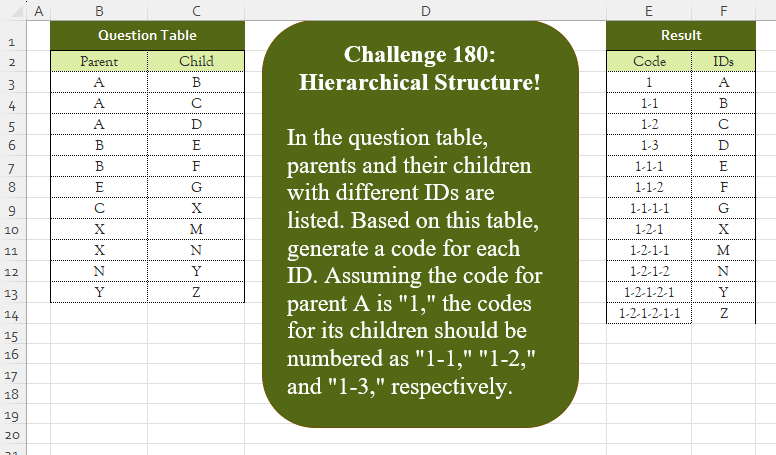
In the question table, parents and their children with different IDs are listed. Based on this table, generate a code for each ID. Assuming the code for parent A is “1,” the codes for its children should be numbered as “1-1,” “1-2,” and “1-3,” respectively.
📌 Challenge Details and Links
Challenge Number: 180
Challenge Difficulty: ⭐⭐⭐⭐
📥Download Sample File
📥Link to the solutions on LinkedIn
Solving the challenge of Hierarchical Structure! with Power Query
Power Query solution 1 for Hierarchical Structure!, proposed by Kris Jaganah:
let
  A = Excel.CurrentWorkbook(){[Name = "Table1"]}[Content],
  B = Table.ToColumns(A),
  C = [Code = "1", IDs = B{0}{0}],
  D = List.Transform(
    List.Zip({B{0}, List.Positions(B{0})}),
    each {B{0}{_{1}}, B{1}{_{1}}, Text.From(_{1} - List.PositionOf(B{0}, _{0}) + 1)}
  ),
  E = List.Accumulate(
    {0 .. 4},
    D,
    (x, y) =>
      List.Transform(
        x,
        each {
          _{0},
          _{1},
          _{2},
          if _{0} = C[IDs] then
            C[Code] & "-" & _{2}
          else
            List.Last(x{List.PositionOf(List.Zip(x){1}, _{0})}) & "-" & _{2}
        }
      )
  ),
  F = Table.FromRecords({C} & List.Transform(E, each [Code = _{3}, IDs = _{1}]))
in
  F
Power Query solution 2 for Hierarchical Structure!, proposed by Seokho MOON:
let
  Source = Excel.CurrentWorkbook(){[Name = "Table1"]}[Content],
  Group = Table.Group(Source, "Parent", {"tbl", each Table.AddIndexColumn(_, "Idx", 1)})[tbl],
  Rec = List.Accumulate(
    Table.ToRows(Table.Combine(Group)),
    [A = "1"],
    (a, v) => Record.AddField(a, v{1}, Record.Field(a, v{0}) & "-" & Text.From(v{2}))
  ),
  Res = Table.FromColumns({Record.ToList(Rec), Record.FieldNames(Rec)}, {"Code", "IDs"})
in
  Res
Power Query solution 3 for Hierarchical Structure!, proposed by Vida Vaitkunaite:
let
  Source = Excel.CurrentWorkbook(){[Name = "Table1"]}[Content],
  Group = Table.Group(
    Source,
    {"Parent"},
    {{"All", each Table.RenameColumns(Table.AddIndexColumn(_, "Index", 1, 1), {{"Child", "IDs"}})}}
  ),
  Reverse = Table.ReverseRows(
    Table.TransformColumnTypes(Table.Combine(Group[All]), {{"Index", type text}})
  ),
  Replacements = {{"A", "1"}} & List.Zip({Reverse[IDs]} & {Reverse[Index]}),
  Accumulate = Table.AddColumn(
    Reverse,
    "Code",
    each Text.Combine(
      List.ReplaceMatchingItems(
        Text.ToList(
          Text.Reverse(
            List.Accumulate(
              {0 .. List.Count(Reverse[IDs]) - 1},
              [IDs] & [Parent],
              (Text, No) =>
                Text.Combine(
                  List.Distinct(
                    Text.ToList(
                      Text.Replace(Text, Reverse[IDs]{No}, Reverse[IDs]{No} & Reverse[Parent]{No})
                    )
                  )
                )
            )
          )
        ),
        Replacements
      ),
      "-"
    )
  ),
  Selected = Table.SelectColumns(Accumulate, {"Code", "IDs"}),
  Reverse2 = Table.ReverseRows(Selected),
  Final = Table.InsertRows(Reverse2, 0, {[IDs = "A", Code = "1"]})
in
  Final
Solving the challenge of Hierarchical Structure! with Excel
Excel solution 1 for Hierarchical Structure!, proposed by Bo Rydobon 🇹🇭:
=SORT(
    REDUCE(
        HSTACK(
            B3,
            1
        ),
        C3:C13,
        LAMBDA(
            a,
            v,
            LET(
                x,
                TAKE(
                    B3:v,
                    ,
                    1
                ),
                p,
                TAKE(
                    x,
                    -1
                ),
                VSTACK(
                    a,
                    HSTACK(
                        v,
                        VLOOKUP(
                            p,
                            a,
                            2,

                        )&-COUNTIF(
                            x,
                            p
                        )
                    )
                )
            )
        )
    ),
    ,
    ,
    1
)
Excel solution 2 for Hierarchical Structure!, proposed by Oscar Mendez Roca Farell:
=SORT(
    REDUCE(
        HSTACK(
            B3,
            1
        ),
        B3:B13,
        LAMBDA(
            i,
            x,
            LET(
                c,
                OFFSET(
                    x,
                    ,
                    1
                ),
                VSTACK(
                    i,
                    HSTACK(
                        c,
                        VLOOKUP(
                            XLOOKUP(
                                c,
                                C3:C13,
                                B3:B13
                            ),
                            i,
                            2,

                        )&-COUNTIF(
                            B3:x,
                            x
                        )
                    )
                )
            )
        )
    ),
    ,
    ,
    1
)
Excel solution 3 for Hierarchical Structure!, proposed by Kris Jaganah:
=LET(
    a,
    "A"&","&1,
    b,
    B3:B13,
    c,
    MAP(
        b,
        LAMBDA(
            x,
            COUNTIF(
                B3:x,
                x
            )
        )
    ),
    d,
    TEXTSPLIT(
        CONCAT(
            VSTACK(
                a,
                SCAN(
                    a,
                    SEQUENCE(
                        5
                    ),
                    LAMBDA(
                        x,
                        y,
                        TEXTJOIN(
                            "#",
                            ,
                            MAP(
                                TEXTSPLIT(
                                    x,
                                    ,
                                    "#",
                                    1
                                ),
                                LAMBDA(
                                    w,
                                    TEXTJOIN(
                                        "#",
                                        ,
                                        FILTER(
                                            C3:C13&","&TEXTAFTER(
                                                w,
                                                ","
                                            )&"-"&c,
                                            b=LEFT(
                                                w
                                            ),
                                            ""
                                        )
                                    )
                                )
                            )
                        )
                    )
                )
            )&"*"
        ),
        ",",
        {"#",
        "*"},
        1
    ),
    VSTACK(
        {"Code",
        "IDs"},
        HSTACK(
            TAKE(
                d,
                ,
                -1
            ),
            TAKE(
                d,
                ,
                1
            )
        )
    )
)
Excel solution 4 for Hierarchical Structure!, proposed by Kris Jaganah:
=LET(
    a,
    B3:B13,
    b,
    REDUCE(
        {"A",
        1},
        SEQUENCE(
            20
        ),
        LAMBDA(
            x,
            y,
            VSTACK(
                x,
                FILTER(
                    HSTACK(
                        C3:C13,
                        INDEX(
                            x,
                            y,
                            2
                        )&"-"&MAP(
                            a,
                            LAMBDA(
                                x,
                                COUNTIF(
                                    B3:x,
                                    x
                                )
                            )
                        )
                    ),
                    a=INDEX(
                        x,
                        y,
                        1
                    ),
                    ""
                )
            )
        )
    ),
    c,
    TAKE(
        b,
        ,
        1
    ),
    HSTACK(
        TOCOL(
            TAKE(
                b,
                ,
                -1
            ),
            3
        ),
        FILTER(
            c,
            c<>""
        )
    )
)
Excel solution 5 for Hierarchical Structure!, proposed by Hussein SATOUR:
=LET(
    V,
    VSTACK,
    X,
    XLOOKUP,
    I,
    INDEX,
    W,
    XMATCH,
    t,
    V(
        {"",
        "A"},
        SORT(
            B3:C13,
            1,
            1,
            2
        )
    ),
    a,
    I(
        t,
        ,
        2
    ),
    b,
    I(
        t,
        ,
        1
    ),
    HSTACK(
        REDUCE(
            1,
            DROP(
                a,
                1
            ),
            LAMBDA(
                y,
                z,
                LET(
                    c,
                    X(
                        z,
                        a,
                        b
                    ),
                    d,
                    FILTER(
                        t,
                        b=c
                    ),
                    e,
                    W(
                        z,
                        TAKE(
                            d,
                            ,
                            -1
                        )
                    ),
                    f,
                    W(
                        z,
                        a
                    ),
                    g,
                    X(
                        c,
                        TAKE(
                            a,
                            f-1
                        ),
                        y
                    ),
                    V(
                        y,
                        g&"-"&e
                    )
                )
            )
        ),
        a
    )
)
Excel solution 6 for Hierarchical Structure!, proposed by Pieter de B.:
=LET(
    p,
    B3:B13,
    c,
    C3:C13,
    SORTBY(
        REDUCE(
            HSTACK(
                @+p,
                "1"
            ),
            c,
            LAMBDA(
                a,
                b,
                LET(
                    d,
                    XLOOKUP(
                        b,
                        c,
                        p
                    ),
                    VSTACK(
                        a,
                        HSTACK(
                            b,
                            VLOOKUP(
                                d,
                                a,
                                2,

                            )&-XMATCH(
                                b,
                                FILTER(
                                    c,
                                    p=d
                                )
                            )
                        )
                    )
                )
            )
        ),
        {2,
        1}
    )
)
Excel solution 7 for Hierarchical Structure!, proposed by Pieter de B.:
=LET(
    p,
    B3:B13,
    c,
    C3:C13,
    REDUCE(
        HSTACK(
            "1",
            @+p
        ),
        c,
        LAMBDA(
            a,
            b,
            LET(
                d,
                XLOOKUP(
                        b,
                        c,
                        p
                    ),
                VSTACK(
                    a,
                    HSTACK(
                        XLOOKUP(
                            d,
                            DROP(
                                a,
                                ,
                                1
                            ),
                            TAKE(
                                a,
                                ,
                                1
                            )
                        )&-XMATCH(
                                b,
                                FILTER(
                                    c,
                                    p=d
                                )
                            ),
                        b
                    )
                )
            )
        )
    )
)
Excel solution 8 for Hierarchical Structure!, proposed by Seokho MOON:
=LET(
 data,
     B3:C13, num_rows,
     ROWS(
         data
     ), initial_entry,
     {"",
     "1",
     "A"}, Func,
     LAMBDA(a,
     v, LET(
 parent,
     INDEX(
         data,
          v,
          1
     ), child,
     INDEX(
         data,
          v,
          2
     ), parent_code,
     INDEX(
         a,
          MATCH(
              parent,
               INDEX(
                   a,
                    ,
                    3
               ),
               0
          ),
          2
     ), child_code,
     parent_code & "-" &
 SUM(--(parent = INDEX(
     a,
      ,
      1
 ))) + 1, new_entry,
     HSTACK(
         parent,
          child_code,
          child
     ), VSTACK(
     a,
      new_entry
 )
 )
 ), res,
     REDUCE(
         initial_entry,
          SEQUENCE(
              num_rows
          ),
          Func
     ), DROP(
     res,
      ,
      1
 )
)
Solving the challenge of Hierarchical Structure! with Python in Excel
Python in Excel solution 1 for Hierarchical Structure!, proposed by Alejandro Campos:
df = xl("B2:C13", headers=True)

def generate_codes(df):
 codes, counter = {"A": "1"}, {}
 for _, row in df.iterrows():
 parent, child = row['Parent'], row['Child']
 counter[parent] = counter.get(parent, 0) + 1
 codes[child] = f"{codes[parent]}-{counter[parent]}"
 return pd.DataFrame(list(codes.items()), columns=["IDs", "Code"])[["Code", "IDs"]].reset_index(drop=True)

generate_codes(df)
Python in Excel solution 2 for Hierarchical Structure!, proposed by Seokho MOON:
df = xl("Table1[
hashtag
#All]", headers=True)
res = {"A": ["1", None]}
for parent, child in df.itertuples(index=False):
 parent_value = res[parent][0]
 serial_number = sum(1 for k, v in res.items() if v[1] == parent) + 1
 res[child] = [f"{parent_value}-{serial_number}", parent]
res_df = pd.DataFrame([(v[0], k) for k, v in res.items()], columns=["Code", "IDs"])
res_df
Solving the challenge of Hierarchical Structure! with R
R solution 1 for Hierarchical Structure!, proposed by Konrad Gryczan, PhD:
library(tidyverse)
library(readxl)
library(igraph)
path <- "files/CH-180 Hierarchical Structure.xlsx"
input <- read_excel(path, range = "B2:C13")
test <- read_excel(path, range = "E2:F14") %>% arrange(Code)
in2 <- input %>% mutate(code = row_number(), .by = Parent)
g <- graph_from_data_frame(in2, directed = TRUE)
all_paths <- all_simple_paths(g, from = "A", to = V(g))
df <- map_df(all_paths, ~ data.frame(paths = paste(names(.x), collapse = "-")))
result <- df %>%
 mutate(IDs = str_extract(paths, "\w$"), rn = row_number()) %>%
 mutate(path = str_replace_all(paths, "\d", ~ in2$code[as.numeric(.x)])) %>%
 separate_rows(paths, sep = "-") %>%
 left_join(in2 %>% add_row(Parent = NA, Child = "A", code = 1), by = c("paths" = "Child")) %>%
 summarise(Code = paste0(code, collapse = "-"), .by = IDs) %>%
 select(Code, IDs) %>%
 add_row(Code = "1", IDs = "A") %>%
 arrange(Code)
all.equal(result, test, check.attributes = FALSE)
# [1] TRUE
Solving the challenge of Hierarchical Structure! with Google Sheets
Google Sheets solution 1 for Hierarchical Structure!, proposed by Peter Krkos:
PowerQuery solution:
https://docs.google.com/spreadsheets/d/1zR5IZLz8OT76vhaPEHfsPrw8-RDKnLyyqS49IJjdhFk/edit?pli=1&gid=911883962#gid=911883962