
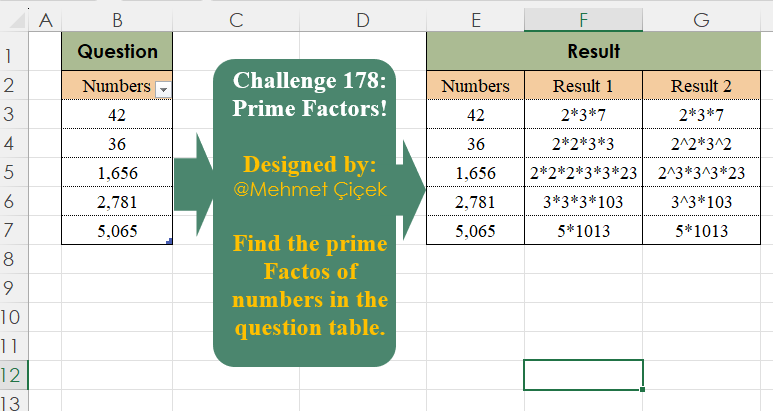
Find the prime Factors of numbers in the question table
📌 Challenge Details and Links
Challenge Number: 178
Challenge Difficulty: ⭐⭐⭐
Designed by: Mehmet Çiçek
📥Download Sample File
📥Link to the solutions on LinkedIn
Solving the challenge of Prime Factors! with Power Query
Power Query solution 1 for Prime Factors!, proposed by Alejandro Simón 🇵🇦 🇪🇸:
let
Source = Excel.CurrentWorkbook(){[Name="Table1"]}[Content],
Sol = Table.AddColumn(Source, "Result", (x)=>
 let
 a = {2..Int64.From(Number.Sqrt(x[Numbers]))},
 b = List.Select(a, each Number.Mod(x[Numbers], _)=0),
 c = List.Distinct(List.Combine(List.Transform(b, each {_} & {x[Numbers]/_}))),
 d = List.Select(c, (t)=> List.AllTrue(List.Transform({2..Int64.From(Number.Sqrt(t))},
 (y)=> Number.Mod(t, y)<>0))),
 e = List.Skip(List.Generate(()=>[z = 0, y = x[Numbers], k = 2],
 each [k]>1,
 each [f = d{[z]},
 y = [y]/f,
 z = if Number.Mod(y,f)=0 then [z] else [z]+1,
 k = [y] ],
 each [f])),
 g = Text.Combine(List.Transform(e, Text.From), "*")
 in g)
in
 Sol
Power Query solution 2 for Prime Factors!, proposed by Kris Jaganah:
let
  A = Excel.CurrentWorkbook(){[Name = "Table1"]}[Content][Numbers],
  F = List.Transform(
    A,
    (w) =>
      [
        B = List.RemoveNulls(
          List.Transform(
            {2, 3, 5, 7},
            (v) =>
              [
                a = List.Count(List.Generate(() => w / v, each Number.Mod(_, 1) <= 0, each _ / v)),
                b = if a > 0 then {v, a} else null
              ][b]
          )
        ),
        C = List.Product(List.Transform(B, each Number.Power(_{0}, _{1}))),
        D = {if C = w then null else Text.From(w / C)},
        Result 1 = Text.TrimEnd(
          Text.Combine(List.Transform(B, each Text.Repeat(Text.From(_{0}) & "*", _{1})) & D),
          "*"
        ),
        Result 2 = Text.Combine(
          List.Transform(
            B,
            each if _{1} = 1 then Text.From(_{0}) else Text.From(_{0}) & "^" & Text.From(_{1})
          )
            & D,
          "*"
        ),
        Numbers = w
      ][[Numbers], [Result 1], [Result 2]]
  ),
  G = Table.FromRecords(F)
in
  G
Power Query solution 3 for Prime Factors!, proposed by Seokho MOON:
let
  Source = Excel.CurrentWorkbook(){[Name = "Table1"]}[Content],
  F1 = (n, d, s) => if Number.Mod(n, d) = 0 then @F1(n / d, d, s & {d}) else [num = n, fcts = s],
  F2 = (n) => [
    A = List.Accumulate(
      {2 .. Number.RoundDown(Number.Sqrt(n))},
      [num = n, fcts = {}],
      (a, v) => F1(a[num], v, a[fcts])
    ),
    B = if A[num] = 1 then A[fcts] else A[fcts] & {A[num]},
    C = List.Transform(B, each Text.From(_)),
    D = Text.Combine(C, "*"),
    E = Table.Group(Table.FromList(C), "Column1", {"Count", each Table.RowCount(_)}),
    F = Table.AddColumn(
      E,
      "Temp",
      each if [Count] = 1 then [Column1] else [Column1] & "^" & Text.From([Count])
    ),
    G = Text.Combine(F[Temp], "*")
  ],
  Res = Table.ExpandRecordColumn(
    Table.AddColumn(Source, "Rec", each [Result 1 = F2([Numbers])[D], Result 2 = F2([Numbers])[G]]),
    "Rec",
    {"Result 1", "Result 2"}
  )
in
  Res
Solving the challenge of Prime Factors! with Excel
Excel solution 1 for Prime Factors!, proposed by Oscar Mendez Roca Farell:
=REDUCE(E2:G2,
    E3:E7,
    LAMBDA(k,
    y,
    LET(F,
    LAMBDA(F,
    n,
    LET(s,
    SEQUENCE(
        n,
        ,
        2
    ),
    i,
    @TOCOL(s/(MOD(
        n,
        s
    )=0),
    2),
    a,
    n/i,
    IF(
        ISERR(
            a
        ),
        0,
        VSTACK(
            i,
            F(
                F,
                a
            )
        )
    ))),
    m,
    DROP(
        F(
            F,
            y
        ),
        -1
    ),
    H,
    LAMBDA(
        j,
        TEXTJOIN(
            "*",
            ,
            j
        )
    ),
    g,
    GROUPBY(
        m,
        m,
        ROWS,
        ,
        0
    ),
    e,
    DROP(
        g,
        ,
        1
    ),
    t,
    TAKE(
        g,
        ,
        1
    ),
    VSTACK(
        k,
        HSTACK(
            y,
            H(
                m
            ),
            H(
                IF(
                    e-1,
                    t&"^"&e,
                    t
                )
            )
        )
    ))))
Excel solution 2 for Prime Factors!, proposed by Kris Jaganah:
=REDUCE({"Numbers",
    "Result 1",
    "Result 2"},
    Table1[Numbers],
    LAMBDA(c,
    d,
    VSTACK(c,
    LET(p,
    {2;3;5;7},
    q,
    MAP(p,
    LAMBDA(z,
    LET(a,
    SCAN(
        d,
        SEQUENCE(
            10
        ),
        LAMBDA(
            x,
            y,
            IF(
                MOD(
                    x,
                    1
                )=0,
                ROUNDUP(
                    x,
                    0
                )/z,
                x
            )
        )
    ),
    ROWS(TOCOL(a/(INT(
        a
    )=a),
    3))))),
    r,
    FILTER(
        HSTACK(
            p,
            q
        ),
        -ISERR(
            q
        )=0
    ),
    s,
    TAKE(
        r,
        ,
        1
    ),
    t,
    TAKE(
        r,
        ,
        -1
    ),
    u,
    d/PRODUCT(
        s^t
    ),
    v,
    CONCAT(
        REPT(
            s&"*",
            t
        )
    )&u,
    w,
    IF(
        u=1,
        TEXTBEFORE(
            v,
            "*",
            -1
        ),
        v
    ),
    l,
    TEXTJOIN(
        "*",
        ,
        IF(
            t>1,
            s&"^"&t,
            s
        ),
        u
    ),
    m,
    IF(
        RIGHT(
            l
        )="1",
        TEXTBEFORE(
            l,
            "*",
            -1
        ),
        l
    ),
    HSTACK(
        d,
        w,
        m
    )))))
Excel solution 3 for Prime Factors!, proposed by Ivan William:
=MAP(
    B3:B7,
    LAMBDA(
        z,
        LET(
            u,
            DROP(
                REDUCE(
                    {1,
                    0},
                    SEQUENCE(
                        z
                    ),
                    LAMBDA(
                        x,
                        y,
                        IFERROR(
                            VSTACK(
                                x,
                                LET(
                                    a,
                                    z/PRODUCT(
                                        TAKE(
                                            x,
                                            ,
                                            1
                                        )^TAKE(
                                            x,
                                            ,
                                            -1
                                        ),

                                    ),
                                    b,
                                    LOG(
                                        a,
                                        y
                                    ),
                                    c,
                                    XMATCH(
                                        0,
                                        MOD(
                                            a,
                                            y^SEQUENCE(
                                                b
                                            )
                                        ),
                                        0,
                                        -1
                                    ),
                                    HSTACK(
                                        y,
                                        c
                                    )
                                )
                            ),
                            x
                        )
                    )
                ),
                1
            ),
            h,
            CONCAT(
                REPT(
                    INDEX(
                        u,
                        ,
                        1
                    )&"*",
                    INDEX(
                        u,
                        ,
                        2
                    )
                )
            ),
            LEFT(
                h,
                LEN(
                    h
                )-1
            )
        )
    )
)
Excel solution 4 for Prime Factors!, proposed by Fausto Bier:
=TEXTSPLIT(
    TEXTJOIN(
        ".",
        ,
        MAP(
            B3:B7,
            LAMBDA(
                k,
                LET(
                    q,
                    SQRT(
                        k
                    )*3,
                    p,
                    TOCOL(
                        VSTACK(
                            {2,
                            3},
                            SEQUENCE(
                                q
                            )*6+{-1,
                            1}
                        )
                    ),
                    f,
                    FILTER(
                        p,
                        NOT(
                            MOD(
                                k,
                                p
                            )
                        )
                    ),
                    m,
                    MAP(
                        f,
                        LAMBDA(
                            y,
                            COUNT(
                                SCAN(
                                    k,
                                    SEQUENCE(
                                        q,
                                        ,
                                        y,
                                        0
                                    ),
                                    LAMBDA(
                                        a,
                                        v,
                                        IF(
                                            MOD(
                                                a,
                                                v
                                            )=0,
                                            a/v,
                                            1/0
                                        )
                                    )
                                )
                            )
                        )
                    ),
                    r,
                    CONCAT(
                        REPT(
                            f&"*",
                            m
                        )
                    ),
                    s,
                    SUBSTITUTE(
                        TEXTJOIN(
                            "*",
                            1,
                            f&"^"&m
                        ),
                        "^1",
                        ""
                    ),
                    k&"|"&LEFT(
                        r,
                         LEN(
                             r
                         ) - 1
                    )&"|"&s
                )
            )
        )
    ),
    "|",
    "."
)
Solving the challenge of Prime Factors! with Python
Python solution 1 for Prime Factors!, proposed by Konrad Gryczan, PhD:
import pandas as pd
import numpy as np

path = "CH-178 Prime Factors.xlsx"
input = pd.read_excel(path, usecols="B", skiprows=1, nrows=6)
test = pd.read_excel(path, usecols="F:G", skiprows=1, nrows=6)

def find_prime_factors(n):
 factors = []
 for divisor in range(2, int(n**0.5) + 1):
 while n % divisor == 0:
 factors.append(divisor)
 n //= divisor
 if n > 1:
 factors.append(n)
 return "*".join(map(str, factors))

input['prime_factors'] = input.iloc[:, 0].apply(find_prime_factors)

print(all(input["prime_factors"] == test['Result 1'])) # True
Solving the challenge of Prime Factors! with Python in Excel
Python in Excel solution 1 for Prime Factors!, proposed by Alejandro Campos:
import primefactors, factorint
numbers = xl("Table1[Numbers]")[0]
def format_prime_factors(n):
 factors = primefactors(n)
 factor_counts = {factor: 0 for factor in factors}
 for factor in factors:
 while n % factor == 0:
 factor_counts[factor] += 1
 n //= factor
 return '*'.join([f"{factor}" + (f"*{factor}" * (count - 1)) for factor, count in factor_counts.items()])
df_1 = pd.DataFrame({'Result 1': [format_prime_factors(num) for num in numbers]})
def format_prime_factors_2(n):
 factors = factorint(n)
 return '*'.join([f"{factor}^{count}" if count > 1 else f"{factor}" for factor, count in factors.items()])
df_2 = pd.DataFrame({'Result 2': [format_prime_factors_2(num) for num in numbers]})
df_result = pd.concat([df_1, df_2], axis=1)
Python in Excel solution 2 for Prime Factors!, proposed by Seokho MOON:
df =xl("Table1[[
hashtag
#All],[Numbers]]", headers=True)
def prime_factors(n):
 primes = {}
 for i in range(2, int(n**0.5) + 1):
 while n % i == 0:
 primes[i] = primes.get(i, 0) + 1
 n //= i
 if n > 1:
 primes[n] = primes.get(n, 1)

 result_1 = "*".join([str(k) for k, v in primes.items() for _ in range(v)])
 result_2 = "*".join([f"{k}^{v}" if v > 1 else str(k) for k, v in primes.items()])

 return [result_1, result_2]
df[["Result 1", "Result 2"]] = df["Numbers"].apply(prime_factors).apply(pd.Series)
df
Solving the challenge of Prime Factors! with R
R solution 1 for Prime Factors!, proposed by Konrad Gryczan, PhD:
library(tidyverse)
library(readxl)
path = "files/CH-178 Prime Factors.xlsx"
input = read_excel(path, range = "B2:B7")
test = read_excel(path, range = "F2:G7")
find_prime_factors <- function(n) {
 factors <- c()
 for (divisor in 2:n) {
 while (n %% divisor == 0) {
 factors <- c(factors, divisor)
 n <- n / divisor
 }
 }
 str_c(factors, collapse = "*")
}
result = input %>%
 mutate(prime_factors = map_chr(Numbers, find_prime_factors))
all.equal(result$prime_factors, test$`Result 1`)
# [1] TRUE
R solution 2 for Prime Factors!, proposed by Seokho MOON:
prime_factors <- function(n) {
 factors <- c()
 for (i in 2:floor(sqrt(n))) {
 while (n %% i == 0) {
 factors <- c(factors, i)
 n <- n / i
 }
 }
 if (n > 1) {
 factors <- c(factors, n)
 }
 result_1 <- paste(factors, collapse = "*")
 result_2 <- paste(sapply(unique(factors), function(x) {
 count <- sum(factors == x)
 if (count > 1) paste0(x, "^", count) else x
 }), collapse = "*")
 return(list(result_1 = result_1, result_2 = result_2))
}
df %>%
 mutate(
 `Result 1` = map_chr(Numbers, ~ prime_factors(.x)$result_1),
 `Result 2` = map_chr(Numbers, ~ prime_factors(.x)$result_2)
 )
Solving the challenge of Prime Factors! with Google Sheets
Google Sheets solution 1 for Prime Factors!, proposed by Peter Krkos:
PowerQuery solution:
https://docs.google.com/spreadsheets/d/1zR5IZLz8OT76vhaPEHfsPrw8-RDKnLyyqS49IJjdhFk/edit?pli=1&gid=1982313751#gid=1982313751