
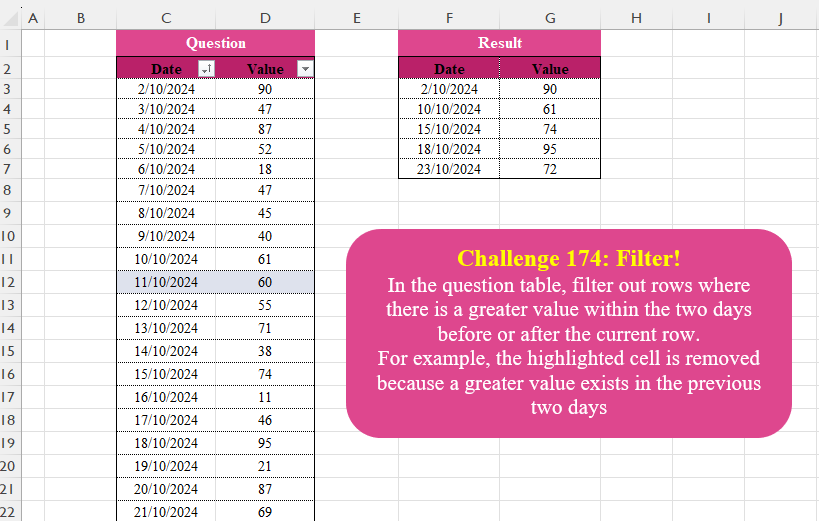
In the question table, filter out rows where there is a greater value within the two days before or after the current row.For example, the highlighted cell is removed because a greater value exists in the previous two days
📌 Challenge Details and Links
Challenge Number: 174
Challenge Difficulty: ⭐⭐⭐
📥Download Sample File
📥Link to the solutions on LinkedIn
Solving the challenge of Filter! with Power Query
Power Query solution 1 for Filter!, proposed by Zoran Milokanović:
let
  Source = Excel.CurrentWorkbook(){[Name = "Data"]}[Content],
  _ = Table.SelectRows(
    Source,
    each
      let
        p = Table.PositionOf(Source, _),
        v = Source[Value],
        f = {v{p}, v{p}}
      in
        List.PositionOf(List.Sort(List.Range(f & v & f, p, 5)), v{p}, 1) = 4
  )
in
  _
Power Query solution 2 for Filter!, proposed by Zoran Milokanović:
let
  Source = Excel.CurrentWorkbook(){[Name = "Data"]}[Content],
  _ = Table.SelectRows(
    Source,
    each
      let
        d = (_, s) => Date.AddDays([Date], s),
        v = each [Value]
      in
        List.Max(v(Table.SelectRows(Source, (r) => d(r, 0) > d(_, - 3) and d(r, 0) < d(_, 3))))
          <= v(_)
  )
in
  _
Power Query solution 3 for Filter!, proposed by Luan Rodrigues:
let
  Fonte = Table.SelectRows(
    Data,
    each
      let
        data  = [Date],
        Valor = [Value],
        a     = Table.LastN(Table.SelectRows(Data, each Date.AddDays([Date], 1) <= data), 2),
        b     = Table.FirstN(Table.SelectRows(Data, each Date.AddDays([Date], - 1) >= data), 2),
        c     = List.NonNullCount(List.Select((a & b)[Value], (x) => x > Valor))
      in
        c = 0
  )
in
  Fonte
Power Query solution 4 for Filter!, proposed by Alejandro Simón 🇵🇦 🇪🇸:
let
Source = Excel.CurrentWorkbook(){[Name="Data"]}[Content],
Idx = Table.AddIndexColumn(Source, "Idx", 1),
Sol = Table.RemoveColumns(Table.SelectRows(Idx, (x)=>
 let
 a = List.Range(Idx[Value],x[Idx], 2),
 b = List.LastN(List.FirstN(Idx[Value], x[Idx]-1),2),
 c = List.AnyTrue(List.Transform(b&a, each _ > x[Value]))
 in c = false), "Idx")
in
Sol
Power Query solution 5 for Filter!, proposed by Kris Jaganah:
let
  A = Excel.CurrentWorkbook(){[Name = "Data"]}[Content]
in
  Table.SelectRows(
    A,
    each List.Max(
      Table.SelectRows(
        A,
        (x) =>
          x[Date]
            >= [Date]
            - #duration(2, 0, 0, 0) and x[Date] <= [Date]
            + #duration(2, 0, 0, 0) and x[Date] <> [Date]
      )[Value]
    )
      < [Value]
  )
Power Query solution 6 for Filter!, proposed by CA Raghunath Gundi:
let
  Source = Excel.CurrentWorkbook(){[Name = "Data"]}[Content],
  Datetype = Table.TransformColumnTypes(Source, {{"Date", type date}}),
  Logic = Table.AddColumn(
    Datetype,
    "Logic",
    each [
      a = [Date] - #duration(1, 0, 0, 0),
      b = Table.SelectRows(Datetype, each [Date] = a)[Value]{0},
      c = a - #duration(1, 0, 0, 0),
      d = Table.SelectRows(Datetype, each [Date] = c)[Value]{0},
      e = [Date] + #duration(1, 0, 0, 0),
      f = Table.SelectRows(Datetype, each [Date] = e)[Value]{0},
      g = e + #duration(1, 0, 0, 0),
      h = Table.SelectRows(Datetype, each [Date] = g)[Value]{0}
    ]
  ),
  ExpLogic = Table.ExpandRecordColumn(Logic, "Logic", {"b", "d", "f", "h"}, {"b", "d", "f", "h"}),
  NOErrors = Table.ReplaceErrorValues(ExpLogic, {{"b", 0}, {"d", 0}, {"f", 0}, {"h", 0}}),
  Result = Table.SelectRows(NOErrors, each [Value] >= List.Max(List.Skip(Record.ToList(_), 2)))[
    [Date],
    [Value]
  ]
in
  Result
Power Query solution 7 for Filter!, proposed by Seokho MOON:
let
  Source = Excel.CurrentWorkbook(){[Name = "Data"]}[Content],
  Res = Table.SelectRows(Source, F),
  F = each [
    A = List.PositionOf(Source[Date], [Date]),
    B = List.Max({A - 2, 0}),
    C = List.Min({A + 2, List.Count(Source[Value]) - 1}),
    D = List.Range(Source[Value], B, C - B + 1),
    E = [Value] >= List.Max(D)
  ][E]
in
  Res
Power Query solution 8 for Filter!, proposed by Alexandre Garcia:
let
A = Excel.CurrentWorkbook(){[Name="Data"]}[Content],
B = Date.AddDays,
C = Table.SelectRows,
D = C(A,(x)=> x[Value] >= List.Max (C(A, each [Date] >= B(x[Date] ,-2) and [Date] <= B(x[Date] ,2))[Value]))
in D
Power Query solution 9 for Filter!, proposed by Vida Vaitkunaite:
let
 Source = Excel.CurrentWorkbook(){[Name="Data"]}[Content],
 Index = Table.AddIndexColumn(Source, "Index"),
 List = Table.AddColumn(Index, "Custom", each let
a = List.Transform({[Index]-2 ..[Index]+2}, (x)=> try Index[Value]{x} otherwise null),
b = List.Transform(a, (x)=> x - [Value]),
c = List.ReplaceValue(b, null, -1, Replacer.ReplaceValue),
d = List.AllTrue(List.Transform(c, (x)=> x<=0))
in d),
 Filter = Table.SelectRows(List, each ([Custom] = true))[[Date],[Value]]
in
 Filter
Solving the challenge of Filter! with Excel
Excel solution 1 for Filter!, proposed by Bo Rydobon 🇹🇭:
=LET(
    d,
    C3:C25,
    v,
    D3:D25,
    FILTER(
        C3:D25,
        MAXIFS(
            v,
            d,
            ">"&d-3,
            d,
            "<"&d+3
        )=v
    )
)
Excel solution 2 for Filter!, proposed by 🇰🇷 Taeyong Shin:
=LET(
    d,
    C2:C17,
    c,
    D2:D17,
    g,
    CHOOSECOLS(
        GROUPBY(
            c,
            d,
            VSTACK(
                MIN,
                MEDIAN,
                MAX
            ),
            3,
            0
        ),
        3,
        1
    ),
    HSTACK(
        g,
        XLOOKUP(
            BYROW(
                g,
                CONCAT
            ),
            d&c,
            E2:E17
        )
    )
)
Excel solution 3 for Filter!, proposed by Julian Poeltl:
=LET(T,Data,V,DROP(T,,1),FILTER(T,MAP(V,LAMBDA(A,MAX(OFFSET(A,-2,,5))))=V))Excel solution 4 for Filter!, proposed by Kris Jaganah:
=FILTER(C3:D25,
    BYROW(--(D3:D25>XLOOKUP(
        C3:C25+{1,
        2,
        -1,
        -2},
        C3:C25,
        D3:D25,
        0
    )),
    MIN))
Excel solution 5 for Filter!, proposed by Sunny Baggu:
=FILTER(     Data,     MAP(          Data[Value],          LAMBDA(
              a,

               1 -
               OR(

                    OR(
                        a < TOCOL(
                            --OFFSET(
                                a,
                                 -1,
                                 ,
                                 -2
                            ),
                             3
                        )
                    ),

                    OR(
                        a < OFFSET(
                            a,
                             1,
                             ,
                             2
                        )
                    )

               )

          )     ))
Excel solution 6 for Filter!, proposed by Sunny Baggu:
=FILTER(     Data,     NOT(          MAP(

               Data[Value],

               LAMBDA(
                   a,
                    MAX(
                        OFFSET(
                            a,
                             -2,
                             ,
                             5
                        )
                    ) > a
               )

          )     ))
Excel solution 7 for Filter!, proposed by Asheesh Pahwa:
=LET(
    v,
    D3:D25,
    d,
    DROP(
        REDUCE(
            "",
            SEQUENCE(
                ROWS(
                    v
                )
            ),
            LAMBDA(
                x,
                y,

                VSTACK(
                    x,
                    LET(
                        I,
                        INDEX(
                            v,
                            y,
                            0
                        ),
                        MAX(
                            IFERROR(
                                INDEX(
                                    v,
                                    SEQUENCE(
                                        5,
                                        ,
                                        y-2
                                    )
                                ),
                                I
                            )
                        )>I
                    )
                )
            )
        ),
        1
    ),
    FILTER(
        C3:D25,
        NOT(
            d
        )
    )
)
Excel solution 8 for Filter!, proposed by Asheesh Pahwa:
=FILTER(
    C3:D25,
    NOT(
        MAP(
            D3:D25,
            LAMBDA(
                x,
                MAX(
                    OFFSET(
                        x,
                        -2,
                        ,
                        5
                    )
                )>x
            )
        )
    )
)
Excel solution 9 for Filter!, proposed by Eddy Wijaya:
=LET(
r,
    IFERROR(--MAP(Data[Value],
    LAMBDA(m,LET(d_l,
    OFFSET(
        m,
        1,
        ,
        2,
        1
    ),d_u,
    OFFSET(
        m,
        -1,
        ,
        -2,
        1
    ),mrg,
    VSTACK(
        d_u,
        d_l
    ),TEXTJOIN(",",
    ,
    IF(FILTER(mrg,
    (mrg>m)*(NOT(
        ISTEXT(
            mrg
        )
    )),
    "")="",
    m,
    ""))))),
    0),VSTACK(
    F2:G2,
    FILTER(
        Data,
        Data[Value]=r
    )
))
Excel solution 10 for Filter!, proposed by Hamidi Hamid:
=LET(f,
    D3:D25,
    x,
    DROP(f-(IFERROR(
        D1:D25*1,
        0
    )),
    -2),
    y,
    DROP(
        f-IFERROR(
            D2:D25*1,
            0
        ),
        -1
    ),
    FILTER(C3:D25,
    (x>0)*(y>0)))
Excel solution 11 for Filter!, proposed by Hussein SATOUR:
=FILTER(
    C3:D25,
    MAP(
        D3:D25,
        LAMBDA(
            x,
            x-MAX(
                OFFSET(
                    x,
                    -1,
                    ,
                    -2
                ),
                OFFSET(
                    x,
                    1,
                    ,
                    2
                )
            )
        )
    )>0
)
Excel solution 12 for Filter!, proposed by Nicolas Micot:
=LET(_values;
    D3:D25;_indexes;
    SEQUENCE(
        LIGNES(
            _values
        )
    );FILTRE(C3:D25;
    MAP(_indexes;
    _values;
    LAMBDA(l_index;
    l_value;l_value=MAX(FILTRE(_values;
    (_indexes>=l_index-2)*(_indexes<=l_index+2)))))))
Excel solution 13 for Filter!, proposed by Pieter de B.:
=FILTER(
    Data,
    MAP(
        Data[Value],
        LAMBDA(
            v,
            MAX(
                OFFSET(
                    v,
                    -2,
                    ,
                    5
                )
            )=v
        )
    )
)

Or ranges:
=FILTER(
    C3:D25,
    MAP(
        D3:D25,
        LAMBDA(
            v,
            MAX(
                OFFSET(
                    v,
                    -2,
                    ,
                    5
                )
            )=v
        )
    )
)
Excel solution 14 for Filter!, proposed by Rick Rothstein:
=FILTER(
    C3:D25,
    MAP(
        D3:D25,
        LAMBDA(
            x,
            MAX(
                OFFSET(
                    x,
                    -2,
                    ,
                    5
                )
            )=x
        )
    )
)
Excel solution 15 for Filter!, proposed by Tomasz Jakóbczyk:
=SORT(VSTACK(FILTER(C5:C25,
    (D5:D25>D4:D24)*(D5:D25>D3:D23)),
    FILTER(C3:C23,
    (D3:D23>D4:D24)*(D3:D23>D5:D25))))

F3:
=LET(x,
    I2#,
    VSTACK(IF(AND(AND(
        D3>D4,
        D3>D5
    ),
    (AND(
        D4>D5,
        D4>D6
    ))),
    C3:D4,
    IF(
        AND(
        D3>D4,
        D3>D5
    ),
        C3:D3,
        IF(
            AND(
        D4>D5,
        D4>D6
    ),
            C4:D4,
            ""
        )
    )),
    FILTER(
        Data,
        ISNUMBER(
            MATCH(
                Data[Date],
                UNIQUE(
                    FILTER(
                        x,
                        COUNTIF(
                            x,
                            x
                        )=2
                    )
                ),
                0
            )
        )
    ),
    IF(AND(AND(
        D25>D24,
        D25>D23
    ),
    (AND(
        D24>D23,
        D24>D22
    ))),
    C24:D25,
    IF(
        AND(
        D25>D24,
        D25>D23
    ),
        C25:D25,
        IF(
            AND(
        D24>D23,
        D24>D22
    ),
            C24:D24,
            ""
        )
    ))))
Solving the challenge of Filter! with Python
Python solution 1 for Filter!, proposed by Konrad Gryczan, PhD:
import pandas as pd
path = "CH-174 Filtering.xlsx"
input = pd.read_excel(path, usecols="C:D", skiprows=1, nrows=24, names=['Index', 'Value'])
test = pd.read_excel(path, usecols="F:G", skiprows=1, nrows=5, names=['Index', 'Value'])
def filter_values(df):
 df['All_Lagged_Lead_Lower'] = (df['Value'].shift(1, fill_value=0) < df['Value']) &
 (df['Value'].shift(2, fill_value=0) < df['Value']) &
 (df['Value'].shift(-1, fill_value=0) < df['Value']) &
 (df['Value'].shift(-2, fill_value=0) < df['Value'])
 return df[df['All_Lagged_Lead_Lower']][['Index', 'Value']]
result = filter_values(input).reset_index(drop=True)
print(result.equals(test)) # True
Python solution 2 for Filter!, proposed by Seokho MOON:
def local_max(idx, values):
 s = max(0, idx - 2)
 e = min(len(values), idx + 3)
 return max(values[s:e])

res = df[df["Value"] >= df.index.map(lambda x: local_max(x, df["Value"]))]
res.reset_index(drop=True)
Solving the challenge of Filter! with Python in Excel
Python in Excel solution 1 for Filter!, proposed by Aditya Kumar Darak 🇮🇳:
df = xl("Data[
hashtag
#All]", True)

result = df[df["Value"].rolling(5, 1, True).max() == df["Value"]].reset_index(drop=True)

result
Python in Excel solution 2 for Filter!, proposed by Alejandro Campos:
df = xl("Data[
hashtag
#Todo]", headers=True)
df['Date'] = pd.to_datetime(df['Date'], dayfirst=True)
filtered_df = df[[df.iloc[i]['Value'] >= df.iloc[max(i-2, 0):min(i+3, len(df))]
 ['Value'].max() for i in range(len(df))]].reset_index(drop=True)
Solving the challenge of Filter! with R
R solution 1 for Filter!, proposed by Konrad Gryczan, PhD:
library(tidyverse)
library(readxl)

path = "files/CH-174 Filtering.xlsx"
input = read_excel(path, range = "C2:D25")
test = read_excel(path, range = "F2:G7")

result = input %>%
 filter(!pmax(lag(Value,1, default = 0) > Value,
 lag(Value,2,default = 0) > Value,
 lead(Value,1, default = 0) > Value,
 lead(Value,2, default = 0) > Value))

all.equal(result, test, check.attributes = FALSE)
# [1] TRUE
R solution 2 for Filter!, proposed by Seokho MOON:
 Solution
df %>%
 filter(Value >= map(
 1:n(),
 ~ {
 s <- max(1, .x - 2)
 e <- min(n(), .x + 2)
 max(Value[s:e])
 }
 ))
Solving the challenge of Filter! with Google Sheets
Google Sheets solution 1 for Filter!, proposed by Peter Krkos:
PowerQuery solution: https://docs.google.com/spreadsheets/d/1zR5IZLz8OT76vhaPEHfsPrw8-RDKnLyyqS49IJjdhFk/edit?pli=1&gid=1806226560#gid=1806226560