
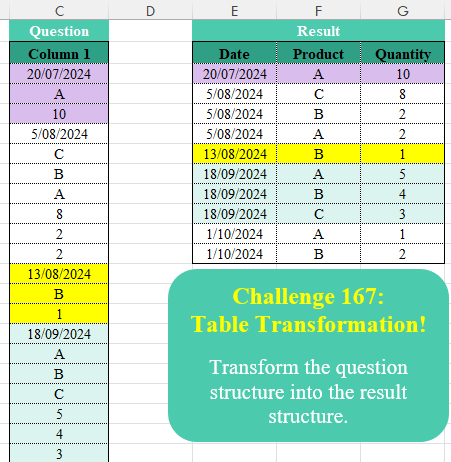
Transform the question structure into the result structure.
📌 Challenge Details and Links
Challenge Number: 167
Challenge Difficulty: ⭐
📥Download Sample File
📥Link to the solutions on LinkedIn
Solving the challenge of Table Transformation! Part 19 with Power Query
Power Query solution 1 for Table Transformation! Part 19, proposed by Luan Rodrigues:
let
  Fonte = Table.Group(
    Tabela1,
    {"Column 1"},
    {
      {
        "tab",
        each
          let
            a = Table.Skip(_)[Column 1],
            b = Table.FromColumns(List.Split(a, List.Count(a) / 2), {"Product", "Quantity"})
          in
            b
      }
    },
    0,
    (a, b) => Number.From(b[Column 1] is datetime)
  ),
  res = Table.ExpandTableColumn(Fonte, "tab", Table.ColumnNames(Fonte[tab]{0})),
  ren = Table.RenameColumns(res, {{"Column 1", "Date"}})
in
  ren
Power Query solution 2 for Table Transformation! Part 19, proposed by Alejandro Simón 🇵🇦 🇪🇸:
let
Source = Excel.CurrentWorkbook(){[Name="Table1"]}[Content],
Group = Table.Group(Source, "Column 1", {"A", each
 let
 a = _,
 b = Table.Skip(_)[Column 1],
 c = List.Select(b, each _ is text),
 d = List.Select(b, each _ is number),
 e = Table.FromColumns({c,d})
 in e},0 , (a,b)=> Number.From(b is datetime)),
Exp = Table.ExpandTableColumn(Group, "A", {"Column1", "Column2"}),
Names = List.Zip({Table.ColumnNames(Exp),{"Date", "Product", "Quality"}}),
Sol = Table.RenameColumns(Exp, Names)
in
Sol
Power Query solution 3 for Table Transformation! Part 19, proposed by Krzysztof Kominiak:
let
  Source = Table.FromRows(
    Json.Document(
      Binary.Decompress(
        Binary.FromText(
          "ZY1LCoAwDETvkrWBTFoxLq3HCL3/NQqJYsDNg2F+7qSineVgFZqb0xVEivSMZQ95B0fJWcYqnwpaCaNYJ8PKwijL+dKD7atAWPCr4D2dCw==",
          BinaryEncoding.Base64
        ),
        Compression.Deflate
      )
    ),
    let
      _t = ((type nullable text) meta [Serialized.Text = true])
    in
      type table [Column1 = _t]
  ),
  GroupRows = Table.Group(
    Source,
    {"Column1"},
    {
      {
        "NT",
        each Table.FromColumns(
          List.Transform({List.Skip(_[Column1])}, (x) => List.Split(x, List.Count(x) / 2)){0},
          {"Product", "Quantity"}
        )
      }
    },
    0,
    (x, y) => Number.From(Text.Length(y[Column1]) = 10)
  ),
  RenCol = Table.RenameColumns(GroupRows, {{"Column1", "Date"}}),
  Result = Table.ExpandTableColumn(RenCol, "NT", {"Product", "Quantity"}, {"Product", "Quantity"})
in
  Result
Power Query solution 4 for Table Transformation! Part 19, proposed by Kris Jaganah:
let
  A = Excel.CurrentWorkbook(){[Name = "Table1"]}[Content],
  B = Table.Combine(
    Table.Group(
      A,
      "Column 1",
      {
        "All",
        (x) =>
          [
            a = x[Column 1],
            b = List.Zip(List.Split(List.Skip(a), (List.Count(a) - 1) / 2)),
            c = Table.FromList(b, each {a{0}, _{0}, _{1}}, {"Date", "Product", "Quantity"})
          ][c]
      },
      0,
      (x, y) => Number.From(y is datetime)
    )[All]
  )
in
  B
Power Query solution 5 for Table Transformation! Part 19, proposed by Abdallah Ally:
let
  Source = Excel.CurrentWorkbook(){[Name = "Table1"]}[Content],
  AddCol = Table.AddColumn(Source, "Date", each if [Column 1] is datetime then [Column 1] else null),
  Group = Table.Group(
    Table.FillDown(AddCol, {"Date"}),
    {"Date"},
    {
      "Data",
      each [
        a = List.Skip([Column 1]),
        b = List.Split(a, List.Count(a) / 2),
        c = Table.FromRows(List.Zip(b), {"Product", "Quantity"})
      ][c]
    }
  ),
  Expand = Table.ExpandTableColumn(Group, "Data", {"Product", "Quantity"}),
  Result = Table.TransformColumnTypes(Expand, {{"Date", type date}, {"Quantity", Int64.Type}})
in
  Result
Power Query solution 6 for Table Transformation! Part 19, proposed by Abdallah Ally:
let
  Source = Excel.CurrentWorkbook(){[Name = "Table1"]}[Content],
  AddCol = Table.AddColumn(Source, "Date", each if [Column 1] is datetime then [Column 1] else null),
  FillDown = Table.FillDown(AddCol, {"Date"}),
  Group = Table.Group(
    FillDown,
    {"Date"},
    {
      "Data",
      each [
        a = List.Transform(List.Skip([Column 1]), Text.From),
        b = List.Split(a, Number.IntegerDivide(List.Count(a), 2)),
        c = List.Transform(List.Zip(b), (x) => Text.Combine(x, ","))
      ][c]
    }
  ),
  Expand = Table.ExpandListColumn(Group, "Data"),
  Split = Table.SplitColumn(Expand, "Data", each Text.Split(_, ","), {"Product", "Quantity"}),
  Result = Table.TransformColumnTypes(Split, {{"Date", type date}, {"Quantity", Int64.Type}})
in
  Result
Power Query solution 7 for Table Transformation! Part 19, proposed by 🇮🇷 Navid Esmaeilzadeh اسماعیل زاده:
let
Source = Excel.CurrentWorkbook(){[Name="Table1"]}[Content],
A = Table.AddColumn(Source, "Date", each if Value.Is([Column 1],type datetime)=true then Date.From([Column 1]) else null),
B = Table.FillDown(A,{"Date"}),
C = Table.Group(B, {"Date"}, {{"T", each _, type table [Column 1=any, Date=date]}}),
D = Table.AddColumn(C, "T2", each let
N=(List.Count([T][#"Column 1"])-1)/2,
A=List.Split(List.Skip([T][#"Column 1"],1),N),
C=List.Repeat({[T][Date]{0}},N),
B=Table.FromColumns({C}&A,{"Date","Product","Quantity"})
in
B),
E = Table.Combine(D[T2])
in
E
Power Query solution 8 for Table Transformation! Part 19, proposed by 🇮🇷 Navid Esmaeilzadeh اسماعیل زاده:
let
Source = Excel.CurrentWorkbook(){[Name="Table1"]}[Content],
A = Table.AddColumn(Source, "Date", each if Value.Is([Column 1],type datetime)=true then Date.From([Column 1]) else null),
B = Table.FillDown(A,{"Date"}),
C = Table.Group(B, {"Date"}, {{"C", each (Table.RowCount(_)-1)/2}, {"T", each Table.FromColumns({List.Repeat({_[Date]{0}},(Table.RowCount(_)-1)/2)} & List.Split(Table.RemoveFirstN(_,1)[#"Column 1"],(Table.RowCount(_)-1)/2),{"Date","Product","Quatity"})}}),
D = Table.Combine(C[T])
in
D
Power Query solution 9 for Table Transformation! Part 19, proposed by Seokho MOON:
let
  Source = Excel.CurrentWorkbook(){[Name = "Table1"]}[Content],
  Group = Table.Group(
    Source,
    "Column 1",
    {
      "All",
      each [
        n = List.Count([Column 1]),
        Cols = {
          List.Range([Column 1], 0, 1),
          List.Range([Column 1], 1, (n - 1) / 2),
          List.Range([Column 1], 1 + (n - 1) / 2)
        },
        ColNames = {"Date", "Product", "Quantity"},
        Tbl = Table.FromColumns(Cols, ColNames)
      ][Tbl]
    },
    0,
    (x, y) => Number.From(y is datetime)
  )[All],
  Res = Table.FillDown(Table.Combine(Group), {"Date"})
in
  Res
Power Query solution 10 for Table Transformation! Part 19, proposed by Vida Vaitkunaite:
let
  Source = Excel.CurrentWorkbook(){[Name = "Table1"]}[Content],
  Date = Table.AddColumn(
    Source,
    "Date",
    each if Type.Is(Value.Type([Column 1]), type datetime) then [Column 1] else null
  ),
  Group = Table.Group(
    Table.FillDown(Date, {"Date"}),
    {"Date"},
    {
      {
        "All",
        each
          let
            a = List.Skip(_[Column 1], 1),
            b = List.Split(a, List.Count(a) / 2),
            c = List.Zip(b),
            d = Table.Transpose(Table.FromColumns(c), {"Product", "Quantity"})
          in
            d
      }
    }
  ),
  Final = Table.ExpandTableColumn(Group, "All", {"Product", "Quantity"})
in
  Final
Solving the challenge of Table Transformation! Part 19 with Excel
Excel solution 1 for Table Transformation! Part 19, proposed by 🇰🇷 Taeyong Shin:
=LET(
    d,
    C3:C27,
    s,
    SCAN(
        ,
        d,
        MAX
    ),
    HSTACK(
        FILTER(
            s,
            d>""
        ),
        FILTER(
            d,
            d>""
        ),
        FILTER(
            d,
            d<@s
        )
    )
)
Excel solution 2 for Table Transformation! Part 19, proposed by Oscar Mendez Roca Farell:
=LET(
    F,
    FILTER,
    d,
    C3:C27,
    HSTACK(
        TAKE(
            WRAPROWS(
                DROP(
                    F(
                        SCAN(
                            ,
                            d,
                            MAX
                        ),
                        LEN(
                            d
                        )<4
                    ),
                    1
                ),
                2
            ),
            ,
            1
        ),
        F(
            d,
            d>""
        ),
        F(
            d,
            d<11
        )
    )
)
Excel solution 3 for Table Transformation! Part 19, proposed by Julian Poeltl:
=LET(A,
    C3:C27,
    I,
    ISTEXT(
        A
    ),
    S,
    SEQUENCE(
        ROWS(
        A
    )
    ),
    F,
    FILTER(
        S,
        I
    ),
    D,
    SCAN(0,
    A,
    LAMBDA(A,
    B,
    IF(ISNUMBER(
        B
    )*(B>40000),
    B,
    A))),
    VSTACK(
        HSTACK(
            "Date",
            "Product",
            "Quantity"
        ),
        HSTACK(
            INDEX(
                D,
                F
            ),
            INDEX(
                A,
                F
            ),
            FILTER(
                A,
                A<99
            )
        )
    ))
Excel solution 4 for Table Transformation! Part 19, proposed by Ivan William:
=LET(
    a,
    C3:C27,
    HSTACK(
        FILTER(
            SCAN(
                ,
                a,
                MAX
            ),
            a>""
        ),
        TOCOL(
            IFS(
                a>"",
                a
            ),
            2
        ),
        TOCOL(
            IFS(
                a<99,
                a
            ),
            2
        )
    )
)
Excel solution 5 for Table Transformation! Part 19, proposed by Sunny Baggu:
=LET(     _a,
     SCAN(
         0,
          --IFERROR(
              YEAR(
                  C3:C27
              ) > 1900,
               0
          ),
          LAMBDA(
              a,
               v,
               a + v
          )
     ),     _ua,
     UNIQUE(
         _a
     ),     REDUCE(          {"Date",
          "Product",
          "Quantity"},          _ua,          LAMBDA(
              x,
               y,

               VSTACK(

                    x,

                    LET(

                         _b,
                         FILTER(
                             C3:C27,
                              _a = y
                         ),

                         _c,
                         TAKE(
                             _b,
                              1
                         ),

                         _d,
                         DROP(
                             _b,
                              1
                         ),

                         _r,
                         ROWS(
                             _d
                         ),

                         IFNA(
                             HSTACK(
                                 _c,
                                  TAKE(
                                      _d,
                                       _r / 2
                                  ),
                                  TAKE(
                                      _d,
                                       -_r / 2
                                  )
                             ),
                              _c
                         )

                    )

               )

          )     ))
Excel solution 6 for Table Transformation! Part 19, proposed by Sunny Baggu:
=LET(
 rng, C3:C27,
 _a, FILTER(
 SCAN(
 "",
 rng,
 LAMBDA(a, v, IF(IFERROR(--v > 1900, 0), v, a))
 ),
 ISTEXT(rng)
 ),
 _b, FILTER(rng, (CODE(rng) >= 65) * (CODE(rng) <= 90)),
 _c, FILTER(rng, IFERROR(--(YEAR(rng) <= 1900), 0)),
 HSTACK(_a, _b, _c)
)
Excel solution 7 for Table Transformation! Part 19, proposed by Asheesh Pahwa:
=LET(
    s,
    SCAN(
        0,
        SCAN(
            "",
            C3:C27,
            LAMBDA(
                x,
                y,
                IF(
                    ISTEXT(
                        OFFSET(
                            y,
                            1,
                            0
                        )
                    ),
                    OFFSET(
                        y,
                        0,
                        0
                    ),
                    ""
                )
            )
        ),
        LAMBDA(
            x,
            y,
            IF(
                ISNUMBER(
                    y
                ),
                y,
                x
            )
        )
    ),
    REDUCE(
        E2:G2,
        UNIQUE(
            s
        ),
        LAMBDA(
            x,
            y,
            VSTACK(
                x,
                LET(
                    f,
                    DROP(
                        FILTER(
                            C3:C27,
                            s=y
                        ),
                        1
                    ),
                    IFNA(
                        HSTACK(
                            y,
                            WRAPCOLS(
                                f,
                                COUNTA(
                                    f
                                )/2
                            )
                        ),
                        y
                    )
                )
            )
        )
    )
)
Excel solution 8 for Table Transformation! Part 19, proposed by Hamidi Hamid:
=LET(x,IF(ISERROR(C4:C27*1),C3:C26,""),HSTACK(SCAN(,IFERROR(FILTER(x,x<>"")*1,""),LAMBDA(a,b,IF(b<>"",b,a))),FILTER(C3:C27,ISTEXT(C3:C27)),FILTER(C3:C27,ISNUMBER(C3:C27)*(C3:C27<45000))))Excel solution 9 for Table Transformation! Part 19, proposed by Hussein SATOUR:
=LET(
    F,
    FILTER,
    a,
    C3:C27,
    HSTACK(
        F(
            SCAN(
                ,
                a,
                MAX
            ),
            a<99
        ),
        F(
            a,
            ISTEXT(
                a
            )
        ),
        F(
            a,
            a<99
        )
    )
)
Excel solution 10 for Table Transformation! Part 19, proposed by Md. Zohurul Islam:
=LET(
    z,
    C3:C27,    u,
    SCAN(
        ,
        IF(
            ISNUMBER(
                z
            ),
            z,
            0
        ),
        MAX
    ),    hdr,
    HSTACK(
        "Date",
        "Product",
        "Quanity"
    ),    unq,
    UNIQUE(
        u
    ),    v,
    REDUCE(
        hdr,
        unq,
        LAMBDA(
            x,
            y,
            LET(
                a,
                DROP(
                    FILTER(
                        z,
                        u=y
                    ),
                    1
                ),
                b,
                ISNUMBER(
                    a
                ),

                d,
                FILTER(
                    a,
                    b
                ),
                e,
                FILTER(
                    a,
                    NOT(
                        b
                    )
                ),
                f,
                IFNA(
                    HSTACK(
                        y,
                        e,
                        d
                    ),
                    y
                ),
                g,
                VSTACK(
                    x,
                    f
                ),
                g
            )
        )
    ),    v
)
Solving the challenge of Table Transformation! Part 19 with Python
Python solution 1 for Table Transformation! Part 19, proposed by Konrad Gryczan, PhD:
import pandas as pd
import numpy as np
import re

path = "CH-167 Table Transformation.xlsx"
input = pd.read_excel(path, usecols="C", skiprows=1, nrows=25)
test = pd.read_excel(path, usecols="E:G", skiprows=1, nrows=10)

def classify_type(value):
 str_val = str(value)
 if re.match(r'^d{4}-d{2}-d{2} d{2}:d{2}:d{2}$', str_val):
 return 'date'
 if re.match(r'^[A-Za-z]+$', str_val):
 return 'letter'
 if re.match(r'^d+$', str_val):
 return 'digit'
 return 'unknown'

input['type'] = input.iloc[:, 0].apply(classify_type)
input['group'] = (input['type'] == 'date').cumsum()

result = input.groupby(['group', 'type'])[input.columns[0]].apply(list).unstack().reset_index()
result = result.explode(['letter', 'digit']).reset_index(drop=True)
result.columns.name = None

result = result[['date', 'letter', 'digit']]
result.columns = ['Date', 'Product', 'Quantity']

result['Date'] = pd.to_datetime(result['Date'].apply(lambda x: x[0] if isinstance(x, list) else x), errors='coerce')
result['Quantity'] = pd.to_numeric(result['Quantity'], errors='coerce').astype('int64')

print(result.equals(test)) # True
Python solution 2 for Table Transformation! Part 19, proposed by Luan Rodrigues:
import pandas as pd
import numpy as np

file = "CH-167 Table Transformation.xlsx"

df = pd.read_excel(file,usecols="C",skiprows=1)
df['Column 1'] = df['Column 1'].astype('str')
df['Date'] = df['Column 1'].where(df['Column 1'].str.contains('-')).ffill()
def tab(x):
 a = list(x['Column 1'])[1:]
 b = np.array(a).reshape(-1, len(a) // 2)
 c = pd.DataFrame(b.T, columns=['Product', 'Quantity']).reset_index(drop=True)
 return c
grp = df.groupby(['Date']).apply(tab).reset_index()
del grp['level_1']

print(grp)
Solving the challenge of Table Transformation! Part 19 with Python in Excel
Python in Excel solution 1 for Table Transformation! Part 19, proposed by Alejandro Campos:
import re

df = pd.DataFrame([x for x in xl("C3:C27")[0]], columns=['value'])
df['type'] = df['value'].apply(lambda v: 'date' if re.match(r'b(?:d{2}[-/])?(?:d{2}[-/])?d{4}b', str(v)) else 'char' if re.match(r'b[a-zA-Z]+b', str(v)) else 'number' if re.match(r'bd+(.d+)?b', str(v)) else 'unknown')
df['group'] = (df['type'] == 'date').cumsum()
res = df.groupby(['group', 'type'])['value'].apply(list).unstack(fill_value=None).reset_index()
res = res[['date', 'char', 'number']].explode(['char', 'number'], ignore_index=True)
res.columns = ['Date', 'Product', 'Quantity']
res['Date'] = pd.to_datetime(res['Date'].apply(lambda x: x[0] if isinstance(x, list) else x), errors='coerce')
res['Quantity'] = pd.to_numeric(res['Quantity'], errors='coerce').astype('Int64')
res
Solving the challenge of Table Transformation! Part 19 with R
R solution 1 for Table Transformation! Part 19, proposed by Konrad Gryczan, PhD:
library(tidyverse)
library(readxl)

path = "files/CH-167 Table Transformation.xlsx"
input = read_excel(path, range = "C2:C27")
test = read_excel(path, range = "E2:G12")

result = tibble(raw = input$`Column 1`) %>%
 mutate(
 type = case_when(
 str_detect(raw, "^\d{5}$") ~ "date",
 str_detect(raw, "^[A-Za-z]+$") ~ "letter",
 str_detect(raw, "^\d+$") ~ "digit",
 TRUE ~ "unknown"
 ),
 group = cumsum(type == "date")
 ) %>%
 pivot_wider(names_from = type, values_from = raw, values_fn = list(raw = list)) %>%
 unnest(cols = c(date, letter, digit)) %>%
 select(Date = date, Product = letter, Quantity = digit) %>%
 mutate(Date = as.POSIXct(as.Date(as.numeric(Date), origin = "1899-12-30")),
 Quantity = as.numeric(Quantity))

all.equal(result, test, check.attributes = FALSE)
#> [1] TRUE
Solving the challenge of Table Transformation! Part 19 with Google Sheets
Google Sheets solution 1 for Table Transformation! Part 19, proposed by Peter Krkos:
PowerQuery solution:
https://docs.google.com/spreadsheets/d/1zR5IZLz8OT76vhaPEHfsPrw8-RDKnLyyqS49IJjdhFk/edit?pli=1&gid=1164065285#gid=1164065285