
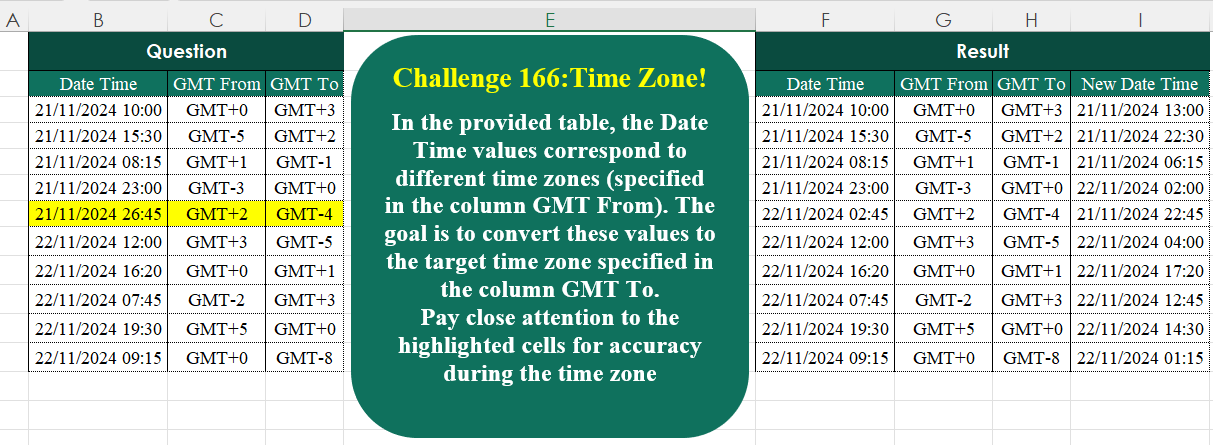
In the provided table, the Date Time values correspond to different time zones (specified in the column GMT From). The goal is to convert these values to the target time zone specified in the column GMT To. Pay close attention to the highlighted cells for accuracy during the time zone
📌 Challenge Details and Links
Challenge Number: 166
Challenge Difficulty: ⭐
📥Download Sample File
📥Link to the solutions on LinkedIn
Solving the challenge of Time Zone! with Power Query
Power Query solution 1 for Time Zone!, proposed by Alejandro Simón 🇵🇦 🇪🇸:
let
Source = Excel.CurrentWorkbook(){[Name="Table1"]}[Content],
Sol = Table.AddColumn(Source, "New Date Time", each
 let
 A = try DateTime.FromText([Date Time], [Format = "dd/MM/yyyy' 'HH:mm"]) otherwise
 let
 a = [Date Time],
 b = List.Transform(Text.Split(Text.End(a,5), ":"), Number.From),
 c = Number.IntegerDivide(b{0},24),
 d = b{0}-24,
 e = DateTime.From(DateTime.FromText(Text.RemoveRange(a, 10, 6),
 [Format = "dd/MM/yyyy"])+
hashtag
#duration(c,d,b{1},0))
 in e,
 B = List.Transform(List.Skip(Record.ToList(_)), each
 Number.From(Text.Remove(_, {"G","M","T"}))),
 C = A +
hashtag
#duration(0,B{1}-B{0},0,0)
 in C)
in
Sol
Power Query solution 2 for Time Zone!, proposed by Kris Jaganah:
let
A = Excel.CurrentWorkbook(){[Name="Table1"]}[Content],
B = Table.TransformColumns( A , {"Date Time", each [
 a = List.Transform ( {0,3,8,11,14} ,(x)=> Number.From( Text.Middle(_,x,2))),
 b = DateTime.From( Number.From(
hashtag
#date(2000+a{2},a{1},a{0})) +
 Number.From(
hashtag
#duration(0,a{3},a{4},0)))][b] , type datetime }),
C = Table.AddColumn(B, "New Date Time", each [
 a = (y)=> Duration.From( Number.From( Text.Middle(y,3,3))/24),
 b =  [Date Time] + ((a([GMT To])-a([GMT From])))][b] , type datetime )
in C
Power Query solution 3 for Time Zone!, proposed by Seokho MOON:
let
  Source = Excel.CurrentWorkbook(){[Name = "Table1"]}[Content],
  AddCol = Table.AddColumn(
    Source,
    "Temp",
    each [
      DF = "dd/MM/yyyy",
      DTF = DF & " " & "HH:mm",
      F1 = (x) => Number.From(Text.AfterDelimiter(x, "GMT")),
      F2 = (x) => DateTime.ToText(x, [Format = DTF]),
      G = F1([GMT To]) - F1([GMT From]),
      S = List.Transform(
        Text.SplitAny([Date Time], " :"),
        each try DateTime.FromText(_, [Format = DF]) otherwise Number.From(_)
      ),
      DT = S{0} + #duration(0, S{1}, S{2}, 0),
      NDT = S{0} + #duration(0, S{1} + G, S{2}, 0),
      R = Record.Combine({_, [Date Time = F2(DT), New Date Time = F2(NDT)]})
    ][R]
  ),
  Res = Table.FromRecords(AddCol[Temp])
in
  Res
Power Query solution 4 for Time Zone!, proposed by Vida Vaitkunaite:
let
 Source = Excel.CurrentWorkbook(){[Name="Table1"]}[Content],
 Replace = Table.ReplaceValue(Source, each [Date Time], each let
a = Text.From(Date.AddDays(Date.From(Text.Start([Date Time], 10)), 1)),
b = Text.End([Date Time],5),
c = Text.Start(b, 2),
d = Text.PadStart(Text.From(Number.From(c) - 24),2, "0"),
e = if Number.From(c)>=24 then a & " " & Text.Replace(b, c, d) else [Date Time]
in e, Replacer.ReplaceText,{"Date Time"}),
 Final = Table.AddColumn(Replace, "New Date Time", each let
a = Duration.From(Text.PadStart(Text.End([GMT From],1), 2, "0") & ":00:00"),
b = Duration.From(Text.PadStart(Text.End([GMT To],1), 2, "0") & ":00:00"),
c = Text.Start(Text.End([GMT From], 2),1),
d = Text.Start(Text.End([GMT To], 2),1),
e = DateTime.From([Date Time]),
f = if c = "+" then e - a else e + a,
g = if d = "+" then f + b else f - b
in g)
in
 Final
Solving the challenge of Time Zone! with Excel
Excel solution 1 for Time Zone!, proposed by Oscar Mendez Roca Farell:
=LET(d,
     B3:B12,
     g,
     C3:D12,
     b,
     BYROW(
         RIGHT(
             g,
             2
         )*{-1,
         1},
         SUM
     )/24,
     HSTACK(d,
     g,
     d+b-(d>b)+1))
Excel solution 2 for Time Zone!, proposed by Julian Poeltl:
=HSTACK(B2:D12,
    VSTACK("New Date Time",
    B3:B12+(-RIGHT(
        C3:C12,
        2
    )+RIGHT(
        D3:D12,
        2
    ))/24))
Excel solution 3 for Time Zone!, proposed by Kris Jaganah:
=B3:B12+MMULT(-RIGHT(C3:D12,2),{1;-1})Excel solution 4 for Time Zone!, proposed by John Jairo Vergara Domínguez:
=HSTACK(
    --B3:B12,
    C3:D12,
    B3:B12+BYROW(
        RIGHT(
            C3:D12,
            2
        )*{-1,
        1}/24,
        SUM
    )
)
Excel solution 5 for Time Zone!, proposed by Imam Hambali:
=LET(    dt,
    B3:B12*1,    gt,
     LAMBDA(
         x,
          RIGHT(
              x,
              2
          )*1
     ),    df,
     gt(
         D3:D12
     )-gt(
         C3:C12
     ),    VSTACK(
        HSTACK(
            B2:D2,
            "New Date Time"
        ),
         HSTACK(
             dt,
              C3:D12,
              IF(
                  df<0,
                  dt-TIME(
                      ABS(
                          df
                      ),
                      0,
                      0
                  ),
                   dt+TIME(
                       df,
                       0,
                       0
                   )
              )
         )
    ))
Excel solution 6 for Time Zone!, proposed by Ivan William:
=HSTACK(
    B2:D12,
    IFERROR(
        BYROW(
            RIGHT(
                C2:D12,
                2
            )*{-1,
            1},
            SUM
        )/24+B2:B12,
        "New Date Time"
    )
)
Excel solution 7 for Time Zone!, proposed by Sunny Baggu:
=LET(     _a,
     TIMEVALUE(
         TEXTAFTER(
             B3:B12,
              " "
         )
     ),     _b,
     BYROW(
         TEXTAFTER(
             C3:D12,
              "T"
         ) * {-1,
          1} / 24,
          LAMBDA(
              a,
               SUM(
                   a
               )
          )
     ),     _c,
     _a + _b,     _r,
     TEXT(
         IF(
             _c < 0,
              1 + _c,
              _c
         ),
          "hh:mm"
     ),     _d,
     DATEVALUE(          MAP(

               TEXTBEFORE(
                   B3:B12,
                    " "
               ),

               LAMBDA(
                   a,
                    TEXTJOIN(
                        "-",
                         ,
                         RIGHT(
                             a,
                              4
                         ),
                         MID(
                             a,
                              4,
                              2
                         ),
                         LEFT(
                             a,
                              2
                         )
                    )
               )

          )     ),     _s,
     TEXT(
         IF(
             _c < 0,
              1 + _d,
              _d
         ),
          "dd/mm/yyy"
     ),     HSTACK(
         B3:D12,
          _s & " " & _r
     ))
Excel solution 8 for Time Zone!, proposed by Hamidi Hamid:
=LET(f,
    (B3:B12+HOUR(
        TEXTAFTER(
            B3:B12,
            " ",
            1
        )*1/24
    ))*1-INT(
        TEXTAFTER(
            B3:B12,
            " ",
            1
        )*24/24
    ),
    g,
    (TEXTAFTER(
        C3:C12,
        "GMT",
        1
    )*1)/24,
    h,
    f-g,
    i,
    (TEXTAFTER(
        D3:D12,
        "GMT",
        1
    )*1)/24,
    r,
    (TEXTAFTER(
        C3:C12,
        "GMT",
        1
    )*1)/24,
    z,
    h+i+INT(
        TEXTAFTER(
            B3:B12,
            " ",
            1
        )*24/24
    )+(BYROW(
        INT(
            TEXTAFTER(
                B3:B12,
                " ",
                1
            )*24
        )-24,
        LAMBDA(
            a,
            MAX(
                0,
                a
            )
        )
    ))/24,
    HSTACK(
        f,
        C3:C12,
        D3:D12,
        z
    ))
Excel solution 9 for Time Zone!, proposed by Meni Porat:
=B3:B12+(MID(
    D3:D12,
    4,
    2
)-MID(
    C3:C12,
    4,
    2
))
Excel solution 10 for Time Zone!, proposed by Pieter de B.:
=HSTACK(B3:D12,
    TEXT(MAP(BYROW(
        B3:D12&" ",
        CONCAT
    ),
    LAMBDA(b,
    LET(i,
    INDEX,
    s,
    LAMBDA(
        x,
        --TEXTSPLIT(
            x,
            ,
            {"/",
            " ",
            "GMT"},
            1
        )
    ),
    a,
    s(
        b
    ),
    --(i(
        a,
        2
    )&-i(
        a,
        1
    )&-i(
        a,
        3
    ))+i(
        a,
        4
    )-i(
        a,
        5
    )/24+i(
        a,
        6
    )/24))),
    "dd/mm/yyyy hh:mm"))
Solving the challenge of Time Zone! with Python
Python solution 1 for Time Zone!, proposed by Konrad Gryczan, PhD:
import pandas as pd
from datetime import datetime, timedelta

path = "CH-166 Time Zone.xlsx"
input = pd.read_excel(path, usecols="B:D", skiprows=1, nrows=10)
test = pd.read_excel(path, usecols="I:I", skiprows=1, nrows=10)

input[['Day', 'Month', 'Year', 'Hour', 'Minute']] = input['Date Time'].str.extract(r'(d+)/(d+)/(d+) (d+):(d+)').astype(int)
input['Day'] += (input['Hour'] >= 24).astype(int)
input['Hour'] %= 24
input['Date Time'] = pd.to_datetime(input[['Year', 'Month', 'Day', 'Hour', 'Minute']])
input['GMT From'] = input['GMT From'].str.replace('GMT', '').astype(int)
input['GMT To'] = input['GMT To'].str.replace('GMT', '').astype(int)
input['New Date Time'] = input['Date Time'] + pd.to_timedelta(input['GMT To'] - input['GMT From'], unit='h')
input['New Date Time'] = input['New Date Time'].dt.strftime('%d/%m/%Y %H:%M')
result = input[['New Date Time']]

print(result == test) # False, Discrepancy on one row. Index 4.
Solving the challenge of Time Zone! with Python in Excel
Python in Excel solution 1 for Time Zone!, proposed by Alejandro Campos:
import datetime, timedelta
df = xl("B2:D12", headers=True)
df.loc[4, 'Date Time'] = '22/11/2024 02:45'
df['New Date Time'] = df.apply(lambda r: (datetime.strptime(r["Date Time"], "%d/%m/%Y %H:%M") +
 timedelta(hours=int(r["GMT To"].replace("GMT", "")) -
 int(r["GMT From"].replace("GMT", "")))).strftime("%d/%m/%Y %H:%M"), axis=1)
df
Solving the challenge of Time Zone! with R
R solution 1 for Time Zone!, proposed by Konrad Gryczan, PhD:
library(tidyverse)
library(readxl)

path = "files/CH-166 Time Zone.xlsx"
input = read_excel(path, range = "B2:D12")
test = read_excel(path, range = "F2:I12")

result = input %>%
 separate(`Date Time`, into = c("Day", "Month", "Year", "Hour", "Minute"), sep = " |:|/", convert = TRUE) %>%
 mutate(Day = Day + if_else(Hour >= 24, 1, 0),
 Hour = Hour %% 24) %>%
 mutate(`Date Time` = make_datetime(year = Year, month = Month, day = Day, hour = Hour, min = Minute), .keep = "unused") %>%
 mutate(`GMT From` = str_remove(`GMT From`, "GMT") %>% as.numeric(),
 `GMT To` = str_remove(`GMT To`, "GMT") %>% as.numeric()) %>%
 mutate(`New Date Time` = `Date Time` + hours(`GMT To` - `GMT From`)) %>%
 select(`New Date Time`) %>%
 mutate(`New Date Time` = format(`New Date Time`, "%d/%m/%Y %H:%M"))


all.equal(result$`New Date Time`, test$`New Date Time`, check.attributes = FALSE)
# False, one discrepancy on 5th row.
Solving the challenge of Time Zone! with Google Sheets
Google Sheets solution 1 for Time Zone!, proposed by Peter Krkos:
PowerQuery solution:
https://docs.google.com/spreadsheets/d/1zR5IZLz8OT76vhaPEHfsPrw8-RDKnLyyqS49IJjdhFk/edit?pli=1&gid=537730970#gid=537730970