
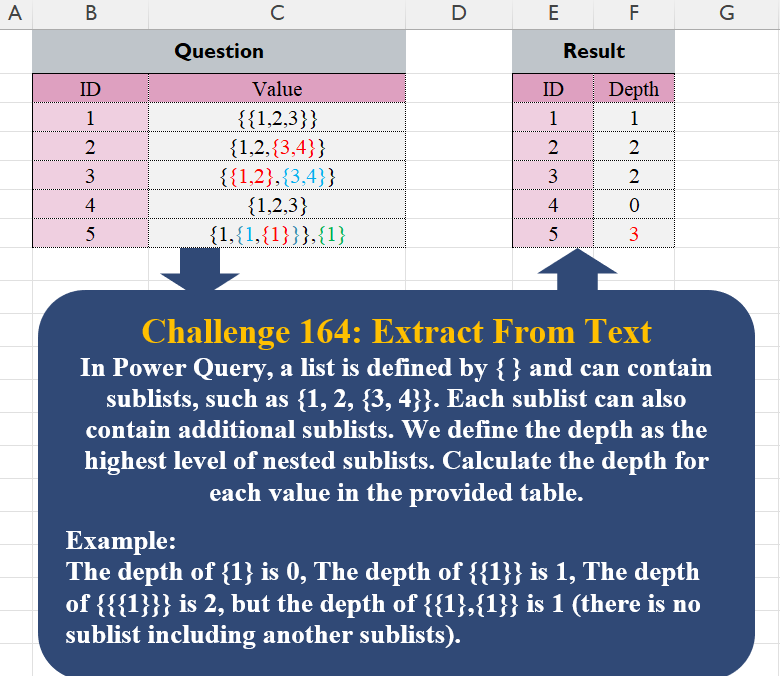
In Power Query, a list is defined by { } and can contain sublists, such as {1, 2, {3, 4}}. Each sublist can also contain additional sublists. We define the depth as the highest level of nested sublists. Calculate the depth for each value in the provided table. Example: The depth of {1} is 0, The depth of {{1}} is 1, The depth of {{{1}}} is 2, but the depth of {{1},{1}} is 1 (there is no sublist including another sublist).
📌 Challenge Details and Links
Challenge Number: 164
Challenge Difficulty: ⭐⭐⭐
📥Download Sample File
📥Link to the solutions on LinkedIn
Solving the challenge of Extract From Text! Part 6 with Power Query
Power Query solution 1 for Extract From Text! Part 6, proposed by Seokho MOON:
let
  Source = Excel.CurrentWorkbook(){[Name = "Table1"]}[Content],
  Func = (x as list) => List.Max(List.Transform(x, each if _ is list then @Func(_) + 1 else 0)),
  Res = Table.AddColumn(
    Source,
    "Depth",
    each try
      Func(Expression.Evaluate([Value]))
    otherwise
      Func(Expression.Evaluate("{" & [Value] & "}")) - 1
  )[[ID], [Depth]]
in
  Res
Solving the challenge of Extract From Text! Part 6 with Excel
Excel solution 1 for Extract From Text! Part 6, proposed by Bo Rydobon 🇹🇭:
=MAP(C3:C7,LAMBDA(a,MAX(SCAN(,-1^(REGEXEXTRACT(a,"{|}",1)="}"),SUM))-1))Excel solution 2 for Extract From Text! Part 6, proposed by Julian Poeltl:
=BYROW(
    C3:C7=SUBSTITUTE(
        C3:C7,
        REPT(
            "}",
            SEQUENCE(
                ,
                5
            )
        ),
        ""
    ),
    LAMBDA(
        A,
        XMATCH(
            1,
            --A
        )
    )
)
Excel solution 3 for Extract From Text! Part 6, proposed by JvdV –:
=--REDUCE(
    C3:C7,
    ROW(
        1:99
    )-1,
    LAMBDA(
        x,
        y,
        REGEXREPLACE(
            x,
            ",?d*{[^{}]*},?d*",
            y
        )
    )
)
Excel solution 4 for Extract From Text! Part 6, proposed by Md. Zohurul Islam:
=LET(
    id,
    B3:B7,
    v,
    C3:C7,
    chk,
    HSTACK(
        ",{",
        "}}",
        "}}}"
    ),
    hdr,
    HSTACK(
        "ID",
        "Depth"
    ),
    a,
    MAP(
        v,
        LAMBDA(
            x,
            SUM(
                --ISNUMBER(
                    SEARCH(
                        chk,
                        x
                    )
                )
            )
        )
    ),    b,
    VSTACK(
        hdr,
        HSTACK(
            id,
            a
        )
    ),
    b
)
Excel solution 5 for Extract From Text! Part 6, proposed by Md. Zohurul Islam:
=MAP(
    C3:C7,
    LAMBDA(
        x,
        SUM(
            --ISNUMBER(
                SEARCH(
                    HSTACK(
                        ",{",
                        "}}",
                        "}}}"
                    ),
                    x
                )
            )
        )
    )
)
Excel solution 6 for Extract From Text! Part 6, proposed by Pieter de B.:
=LET(
    v,
    C3:C7,
    a,
    TEXTAFTER,
    b,
    TEXTBEFORE,
    z,
    LAMBDA(
        u,
        w,
        x,
        y,
        n,
        LET(
            t,
            IFNA(
                u(
                    w(
                        v,
                        x,
                        SEQUENCE(
                            ,
                            MAX(
                                LEN(
                                    v
                                )-LEN(
                                    SUBSTITUTE(
                                        v,
                                        x,

                                    )
                                )
                            )
                        )
                    ),
                    y,
                    n
                ),
                ""
            ),
            BYROW(
                LEN(
                    t
                )-LEN(
                    SUBSTITUTE(
                        t,
                        x,

                    )
                ),
                MAX
            )
        )
    ),
    BYROW(
        HSTACK(
            z(
                a,
                b,
                "}",
                "{",
                -1
            ),
            z(
                b,
                a,
                "{",
                "}",
                1
            )
        ),
        MAX
    )
)
Solving the challenge of Extract From Text! Part 6 with Python
Python solution 1 for Extract From Text! Part 6, proposed by Konrad Gryczan, PhD:
import pandas as pd
import re

path = "CH-164 Extract from Text.xlsx"
input = pd.read_excel(path, usecols="B:C", skiprows=1, nrows=6)
test = pd.read_excel(path, usecols="E:F", skiprows=1, nrows=6)

def max_depth(S):
 get_chars = lambda string: pd.DataFrame({'pos': range(1, len(string) + 1), 'char': list(string)})

 check = -1 if re.match(r'^[{]+[0-9,]+[}]+$', S) else 0
 df = get_chars(S)

 df['cum_sum'] = df['char'].apply(lambda x: 1 if x == '{' else (-1 if x == '}' else 0)).cumsum()

 max_depth = df['cum_sum'].max() + check

 return max_depth

input['depth'] = input['Value'].apply(max_depth)

print(input['depth'].equals(test['Depth'])) # True
Solving the challenge of Extract From Text! Part 6 with R
R solution 1 for Extract From Text! Part 6, proposed by Konrad Gryczan, PhD:
library(tidyverse)
library(readxl)

path = "files/CH-164 Extract from Text.xlsx"
input = read_excel(path, range = "B2:C7")
test = read_excel(path, range = "E2:F7")

maxDepth = function(S) {
 get_chars = function(str) {
 tibble(pos = 1:nchar(str), char = strsplit(str, "")[[1]])
 }

 check = if_else(str_detect(S, "^[{]+[0-9,]+[}]+$"), -1, 0)
 df = get_chars(S)

 df = df %>%
 mutate(count = ifelse(char == "{", 1, ifelse(char == "}", -1, 0)),
 cum_sum = cumsum(count))

 max_depth = max(df$cum_sum) + check

 return(max_depth)
}

result = input %>%
 mutate(Depth = map_dbl(Value, maxDepth))

all.equal(result$Depth, test$Depth)
#> [1] TRUE
Solving the challenge of Extract From Text! Part 6 with Google Sheets
Google Sheets solution 1 for Extract From Text! Part 6, proposed by Peter Krkos:
PowerQuery solution:
https://docs.google.com/spreadsheets/d/1zR5IZLz8OT76vhaPEHfsPrw8-RDKnLyyqS49IJjdhFk/edit?pli=1&gid=512779768#gid=512779768