
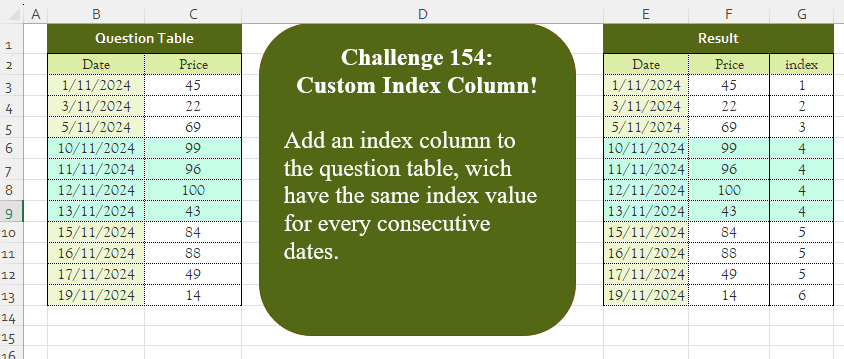
Add an index column to the question table, which has the same index value for every consecutive date.
📌 Challenge Details and Links
Challenge Number: 154
Challenge Difficulty: ⭐⭐
📥Download Sample File
📥Link to the solutions on LinkedIn
Solving the challenge of Add Index Column! Part 5 with Power Query
Power Query solution 1 for Add Index Column! Part 5, proposed by Zoran Milokanović:
let
  Source = Excel.CurrentWorkbook(){[Name = "Input"]}[Content],
  S = Table.FromRows(
    List.Accumulate(
      Table.ToRows(Source),
      {},
      (b, n) =>
        let
          d = Duration.From(1),
          l = List.Last(b, {n{0} - d, 0, 1})
        in
          b & {n & {l{2} + 1 - Byte.From(l{0} + d = n{0})}}
    ),
    Table.ColumnNames(Source) & {"index"}
  )
in
  S
Power Query solution 2 for Add Index Column! Part 5, proposed by Brian Julius:
let
  Source = Table.TransformColumnTypes(
    Excel.CurrentWorkbook(){[Name = "Table1"]}[Content],
    {{"Date", Date.Type}}
  ),
  Sorted = Table.Sort(Source, {{"Date", Order.Ascending}}),
  AddIndexColumn = Table.AddIndexColumn(Sorted, "RowIndex", 1),
  AddCustom = Table.AddColumn(
    AddIndexColumn,
    "index",
    (currentRow) =>
      List.Accumulate(
        {1 .. currentRow[RowIndex]},
        [Count = 1, PrevDate = Sorted{0}[Date]],
        (state, x) =>
          let
            CurrentDate = AddIndexColumn{x - 1}[Date],
            NewCount =
              if Duration.Days(CurrentDate - state[PrevDate]) > 1 then
                state[Count] + 1
              else
                state[Count]
          in
            [Count = NewCount, PrevDate = CurrentDate]
      )[Count]
  ),
  Result = Table.RemoveColumns(AddCustom, {"RowIndex"})
in
  Result
Power Query solution 3 for Add Index Column! Part 5, proposed by Brian Julius:
let
  Source = Table.TransformColumnTypes(
    Excel.CurrentWorkbook(){[Name = "Table1"]}[Content],
    {{"Date", Date.Type}}
  ),
  Prev = {null} & List.RemoveLastN(Source[Date], 1),
  ToCols = Table.ToColumns(Source) & {Prev},
  FromCols = Table.FromColumns(ToCols, {"Date", "Price", "Prev"}),
  AddIncr = Table.AddColumn(
    FromCols,
    "Increment",
    each if [Prev] = null then 1 else if Number.From([Date]) - Number.From([Prev]) = 1 then 0 else 1
  ),
  AddCustIdx = Table.AddColumn(
    AddIncr,
    "Index",
    each [
      pos        = List.PositionOf(AddIncr[Date], _[Date]),
      runningSum = List.Sum(List.FirstN(AddIncr[Increment], pos + 1))
    ][runningSum]
  ),
  RemCol = Table.RemoveColumns(AddCustIdx, {"Prev", "Increment"})
in
  RemCol
Power Query solution 4 for Add Index Column! Part 5, proposed by Eric Laforce:
let
  Source = Excel.CurrentWorkbook(){[Name = "Table1"]}[Content],
  CType = Table.TransformColumnTypes(Source, {"Date", type date}),
  Index = List.Accumulate(
    CType[Date],
    [i = 0, pDate = #date(1900, 1, 1), r = {}],
    (s, c) =>
      [i = s[i] + Number.From((Duration.Days(c - s[pDate]) <> 1)), pDate = c, r = s[r] & {i}]
  )[r],
  Result = Table.FromColumns(Table.ToColumns(CType) & {Index}, Table.ColumnNames(CType) & {"Index"})
in
  Result
Power Query solution 5 for Add Index Column! Part 5, proposed by Aditya Kumar Darak 🇮🇳:
let
  Source = Excel.CurrentWorkbook(){[Name = "data"]}[Content],
  Generate = List.Generate(
    () => [a = 0, b = Source{a}, c = b[Date], d = 1],
    each [a] < Table.RowCount(Source),
    each [
      a = [a] + 1,
      b = Source{a},
      c = b[Date],
      d = if [c] + #duration(1, 0, 0, 0) = c then [d] else [d] + 1
    ],
    each [b] & [Index = [d]]
  ),
  Return = Table.FromRecords(Generate)
in
  Return
Power Query solution 6 for Add Index Column! Part 5, proposed by Alejandro Simón 🇵🇦 🇪🇸:
let
  Source = Excel.CurrentWorkbook(){[Name = "Table1"]}[Content],
  Idx = Table.AddIndexColumn(Source, "Idx", 0),
  Group = Table.Group(
    Idx,
    "Idx",
    {{"A", each Table.RemoveColumns(_, "Idx")}},
    0,
    (a, b) => Number.From(Number.From(Idx[Date]{b} - Idx[Date]{b - 1}) > 1)
  ),
  Index = Table.AddIndexColumn(Group, "Index", 1)[[A], [Index]],
  Sol = Table.ExpandTableColumn(Index, "A", Table.ColumnNames(Index[A]{0}))
in
  Sol
Power Query solution 7 for Add Index Column! Part 5, proposed by Alejandro Simón 🇵🇦 🇪🇸:
let
Source = Excel.CurrentWorkbook(){[Name="Table1"]}[Content],
LG = List.Generate(()=>[x = 1, y = 1],
 each [y] <= Table.RowCount(Source),
 each [x = [x] + Number.From(Number.From(Source[Date]{[y]}) -
 Number.From(Source[Date]{[y]-1})>1),
 y = [y]+1],
 each [x]),
Sol = Table.FromColumns(Table.ToColumns(Source)&{LG},
 Table.ColumnNames(Source)&{"Index"})
in
Sol
Power Query solution 8 for Add Index Column! Part 5, proposed by Abdallah Ally:
let
  Source = Excel.CurrentWorkbook(){[Name = "Table1"]}[Content],
  Dates = Source[Date],
  Columns = Table.ColumnNames(Source),
  Index = List.Generate(
    () => [r = 0, i = 1],
    each [r] < Table.RowCount(Source),
    each [r = [r] + 1, i = [i] + Byte.From(Dates{r} <> Date.AddDays(Dates{[r]}, 1))],
    each [i]
  ),
  FromCols = Table.FromColumns(Table.ToColumns(Source) & {Index}, Columns & {"Index"}),
  Result = Table.TransformColumnTypes(FromCols, {"Date", type date})
in
  Result
Power Query solution 9 for Add Index Column! Part 5, proposed by Kris Jaganah:
let
  A = Excel.CurrentWorkbook(){[Name = "Table1"]}[Content],
  B = Table.AddColumn(
    A,
    "Pos",
    each Number.From(
      Number.From(try A[Date]{List.PositionOf(A[Date], [Date]) - 1} - [Date] otherwise 0) <> - 1
    )
  ),
  C = Table.AddColumn(
    B,
    "Index",
    each List.Sum(List.FirstN(B[Pos], List.PositionOf(A[Date], [Date]) + 1))
  )[[Date], [Price], [Index]]
in
  C
Power Query solution 10 for Add Index Column! Part 5, proposed by 🇮🇷 Navid Esmaeilzadeh اسماعیل زاده:
let
Source = Excel.CurrentWorkbook(){[Name="Table1"]}[Content],
A = Table.TransformColumnTypes(Source,{{"Date", type date}, {"Price", Int64.Type}}),
B = Table.AddIndexColumn(A, "I", 0, 1),
C = Table.AddColumn(B, "T", each let
a=try Duration.TotalDays([Date]-B[Date]{[I]-1}) otherwise null,
b=if a>1 or a=null then [I] else null
in
b),
D = Table.FillDown(C,{"T"}),
E = Table.Group(D, {"T"}, {{"T2", each _}}),
F = Table.AddIndexColumn(E, "Index", 1, 1, Int64.Type),
G = Table.ExpandTableColumn(F, "T2", {"Date", "Price"}, {"Date", "Price"}),
H = Table.SelectColumns(G,{"Date", "Price", "Index"})
in
H
Power Query solution 11 for Add Index Column! Part 5, proposed by Ahmed Ariem:
let
f=(x)=> Table.AddIndexColumn(
Table.Group(
Table.FillDown(
Table.AddColumn(x, "durat", each [
 a = Duration.Days([Date]- List.Max( List.RemoveLastN(Types[Date],(x)=>x>=[Date]),[Date])),
 b= if a =1 then null else [Date]][b]),{"durat"}),"durat",{"tmp",(x)=>x}), "Indx", 1, 1, Int64.Type)[[tmp],[Indx]],
 Source = Excel.CurrentWorkbook(){[Name="Table1"]}[Content],
 Types = Table.TransformColumnTypes(Source,{{"Date", type date}, {"Price", Int64.Type}}),
 Group= f(Types),
 Expand = Table.ExpandTableColumn( Group, "tmp", {"Date", "Price"})
in
 Expand
Power Query solution 12 for Add Index Column! Part 5, proposed by CA Raghunath Gundi:
let
  Source = Excel.CurrentWorkbook(){[Name = "Table1"]}[Content],
  Index1 = Table.AddIndexColumn(Source, "Index", 0, 1, Int64.Type),
  Key = Table.AddColumn(Index1, "Custom", each Number.From([Date]) - [Index]),
  Group = Table.Group(Key, {"Custom"}, {{"D", each _}}),
  Index2 = Table.AddIndexColumn(Group, "Index", 1, 1, Int64.Type),
  Expand = Table.ExpandTableColumn(Index2, "D", {"Date", "Price"}, {"Date", "Price"})[
    [Date],
    [Price],
    [Index]
  ]
in
  Expand
Power Query solution 13 for Add Index Column! Part 5, proposed by Meganathan Elumalai:
let
  Source = Excel.CurrentWorkbook(){[Name = "Table1"]}[Content],
  Lst = List.Transform(
    List.Skip(
      List.Accumulate(
        Source[Date],
        {{0, 0}},
        (s, c) =>
          s
            & (
              if Number.From(c) - 1 > Number.From(List.Last(s){0}) then
                {{c, List.Last(s){1} + 1}}
              else
                {{c, List.Last(s){1}}}
            )
      )
    ),
    each _{1}
  ),
  Result = Table.FromColumns(Table.ToColumns(Source) & {Lst}, Table.ColumnNames(Source) & {"Index"})
in
  Result
Power Query solution 14 for Add Index Column! Part 5, proposed by Seokho MOON:
let
  Source = Excel.CurrentWorkbook(){[Name = "Table1"]}[Content],
  Date = Source[Date],
  Group = List.Generate(
    () => [idx = 0, gp = 1],
    each [idx] < List.Count(Date),
    each [
      idx = [idx] + 1,
      gp  = if Date.AddDays(Date{[idx]}, 1) = Date{[idx] + 1} then [gp] else [gp] + 1
    ],
    each [gp]
  ),
  Cols = Table.ToColumns(Source) & {Group},
  ColNames = Table.ColumnNames(Source) & {"index"}
in
  Table.FromColumns(Cols, ColNames)
Power Query solution 15 for Add Index Column! Part 5, proposed by Seokho MOON:
let
  Source = Excel.CurrentWorkbook(){[Name = "Table1"]}[Content],
  AddedIndex = Table.AddColumn(
    Source,
    "index",
    each
      let
        Date = Source[Date],
        idx  = List.PositionOf(Source[Date], [Date])
      in
        List.Accumulate(
          {1 .. idx},
          1,
          (a, v) => if Date{v} = Date.AddDays(Date{v - 1}, 1) then a else a + 1
        )
  )
in
  AddedIndex
Power Query solution 16 for Add Index Column! Part 5, proposed by Vida Vaitkunaite:
let
  Source = Excel.CurrentWorkbook(){[Name = "Table1"]}[Content],
  Index = Table.AddIndexColumn(Source, "Index", 0, 1),
  Down = Table.AddColumn(
    Index,
    "Down",
    each if [Index] - 1 >= 0 then Source[Date]{[Index] - 1} else null
  ),
  Groups = Table.FillDown(
    Table.AddColumn(
      Down,
      "Gr Start",
      each
        if (Number.From([Date]) - Number.From([Down])) > 1 or [Down] = null then
          [Index] + 1
        else
          null
    ),
    {"Gr Start"}
  ),
  Group = Table.Group(Groups, {"Gr Start"}, {{"All", each _, type table}}),
  Index2 = Table.AddIndexColumn(Group, "index", 1, 1),
  Final = Table.RemoveColumns(
    Table.ExpandTableColumn(Index2, "All", {"Date", "Price"}, {"Date", "Price"}),
    {"Gr Start"}
  )
in
  Final
Solving the challenge of Add Index Column! Part 5 with Excel
Excel solution 1 for Add Index Column! Part 5, proposed by 🇰🇷 Taeyong Shin:
=SCAN(
    ,
    1-COUNTIF(
        B3:B13,
        B3:B13-1
    ),
    SUM
)
Excel solution 2 for Add Index Column! Part 5, proposed by Aditya Kumar Darak 🇮🇳:
=SCAN(     0,     SEQUENCE(
         ROWS(
             B3:B13
         )
     ),     LAMBDA(
         a,
          b,
          IF(
              AND(
                  INDEX(
                      B3:B13,
                       b
                  ) - INDEX(
                      B3:B13,
                       b - 1
                  ) = 1
              ),
               a,
               a + 1
          )
     ))
Excel solution 3 for Add Index Column! Part 5, proposed by Oscar Mendez Roca Farell:
=LET(
    d,
    B3:B13,
    XMATCH(
        d,
        TOCOL(
            d/ISNA(
                XMATCH(
                    d,
                    d+1
                )
            ),
            2
        ),
        -1
    )
)
Excel solution 4 for Add Index Column! Part 5, proposed by Julian Poeltl:
=LET(
    T,
    B2:C13,
    TD,
    DROP(
        T,
        1,
        -1
    ),
    HSTACK(
        T,
        VSTACK(
            "Index",
            SCAN(
                0,
                IF(
                    VSTACK(
                        2,
                        DROP(
                            DROP(
                                TD,
                                1
                            )-TD,
                            -1
                        )
                    )=1,
                    0,
                    1
                ),
                SUM
            )
        )
    )
)
Excel solution 5 for Add Index Column! Part 5, proposed by Kris Jaganah:
=HSTACK(
    B3:C13,
    SCAN(
        ,
        N(
            B3:B13-VSTACK(
                0,
                DROP(
                    B3:B13,
                    -1
                )
            )<>1
        ),
        SUM
    )
)
Excel solution 6 for Add Index Column! Part 5, proposed by Sunny Baggu:
=HSTACK(     B3:C13,     SCAN(          0,          N(
              VSTACK(
                  0,
                   B4:B13 - B3:B12
              ) = 1
          ),          LAMBDA(
              a,
               v,
               IF(
                   v = 1,
                    a,
                    a + 1
               )
          )     ))
Excel solution 7 for Add Index Column! Part 5, proposed by Ankur Sharma:
=SCAN(0, --(B3:B13 - VSTACK(0, B3:B12) > 1), LAMBDA(iv, ar, (ar = 1) + iv))Excel solution 8 for Add Index Column! Part 5, proposed by Asheesh Pahwa:
=LET(
    d,
    B3:B13,
    I,
    IFERROR(
        SCAN(
            0,
            d,
            LAMBDA(
                x,
                y,
                y-OFFSET(
                    y,
                    -1,
                    0
                )
            )
        ),
        2
    ),
    SCAN(
        0,
        N(
            I>1
        ),
        LAMBDA(
            x,
            y,
            y+x
        )
    )
)
Excel solution 9 for Add Index Column! Part 5, proposed by ferhat CK:
=HSTACK(
    B3:C13,
    SCAN(
        0,
        B3:B13,
        LAMBDA(
            a,
            v,
            IF(
                IFERROR(
                    v-OFFSET(
                        v,
                        -1,

                    )=1,
                    0
                ),
                a,
                a+1
            )
        )
    )
)
Excel solution 10 for Add Index Column! Part 5, proposed by Gabriel Pugliese:
=LET(
    d,
    B3:B13,    s,
    DROP(
        d,
        1
    ),    n,
    VSTACK(
        0,
        DROP(
            s-d,
            -1
        )
    ),    i,
    SCAN(
        0,
        n,
        LAMBDA(
            a,
            v,
            IF(
                v=1,
                a,
                a+1
            )
        )
    ),    i
)
Excel solution 11 for Add Index Column! Part 5, proposed by Hussein SATOUR:
=LET(
    d,
    B3:B13,
    SCAN(
        ,
        d,
        LAMBDA(
            x,
            y,
            x+IF(
                y=OFFSET(
                    y,
                    -1,
                    0
                )+1,
                0,
                1
            )
        )
    )-@d+1
)
Excel solution 12 for Add Index Column! Part 5, proposed by Nicolas Micot:
=ASSEMB.V(
    1;
    SCAN(
        1;
        B4:B13=B3:B12+1;
        LAMBDA(
            l_index;
            l_nextDay;
            SI(
                l_nextDay;
                l_index;
                l_index+1
            )
        )
    )
)
Excel solution 13 for Add Index Column! Part 5, proposed by Pieter de B.:
=LET(
    z,
    B3:B13,
    SCAN(
        0,
        z,
        LAMBDA(
            x,
            y,
            x+ISNA(
                XMATCH(
                    y-1,
                    B3:y
                )
            )
        )
    )
)
Excel solution 14 for Add Index Column! Part 5, proposed by Rick Rothstein:
=REDUCE(
    1,
    SEQUENCE(
        ROWS(
            B4:B13
        ),
        ,
        2
    ),
    LAMBDA(
        a,
        x,
        VSTACK(
            a,
            IF(
                INDEX(
                    B3:B13,
                    x
                )=1+INDEX(
                    B3:B13,
                    x-1
                ),
                TAKE(
                    a,
                    -1
                ),
                TAKE(
                    a,
                    -1
                )+1
            )
        )
    )
)
Solving the challenge of Add Index Column! Part 5 with Python
Python solution 1 for Add Index Column! Part 5, proposed by Konrad Gryczan, PhD:
import pandas as pd

path = "CH-154 Custom Index Column.xlsx"
input = pd.read_excel(path, usecols="B:C", skiprows=1, nrows=11)
test = pd.read_excel(path, usecols="E:G", skiprows=1, nrows=11)

input['Date'] = pd.to_datetime(input['Date'])
input['index'] = (input['Date'].diff() != pd.Timedelta(days=1)).cumsum().astype('int64')

print(all(input['index'] == test['index'])) # True
Solving the challenge of Add Index Column! Part 5 with Python in Excel
Python in Excel solution 1 for Add Index Column! Part 5, proposed by Alejandro Campos:
df = xl("B2:C13", headers=True)
df['Date'] = pd.to_datetime(df['Date'], format='%d/%m/%Y')
df['Index'] = (df['Date'].diff().dt.days > 1).cumsum() + 1
df
Solving the challenge of Add Index Column! Part 5 with R
R solution 1 for Add Index Column! Part 5, proposed by Konrad Gryczan, PhD:
library(tidyverse)
library(readxl)

path = "files/CH-154 Custom Index Column.xlsx"
input = read_excel(path, range = "B2:C13")
test = read_excel(path, range = "E2:G13")

result = input %>%
 mutate(index = cumsum(c(0, diff(Date)) != 1))

all.equal(result$index, test$index)
#> [1] TRUE
Solving the challenge of Add Index Column! Part 5 with Google Sheets
Google Sheets solution 1 for Add Index Column! Part 5, proposed by Peter Krkos:
PowerQuery solution:
https://docs.google.com/spreadsheets/d/1zR5IZLz8OT76vhaPEHfsPrw8-RDKnLyyqS49IJjdhFk/edit?pli=1&gid=1479940578#gid=1479940578