
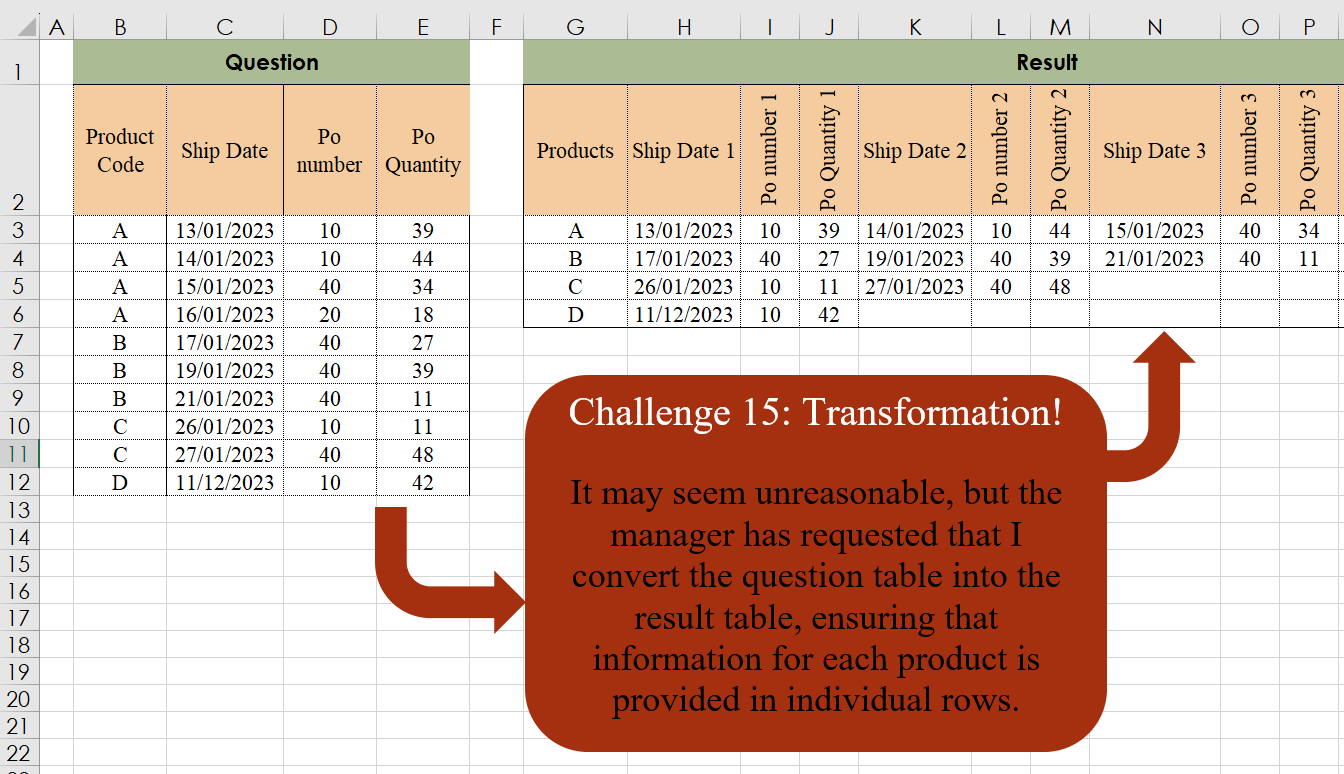
It may seem unreasonable, but the manager has requested that I convert the question table into the result table, ensuring that information for each product is provided in individual rows.
📌 Challenge Details and Links
Challenge Number: 15
Challenge Difficulty: ⭐⭐
📥Download Sample File
📥Link to the solutions on LinkedIn
Solving the challenge of Table Transformation! Part 2 with Power Query
Power Query solution 1 for Table Transformation! Part 2, proposed by Alejandro Simón 🇵🇦 🇪🇸:
let
 Source = Excel.CurrentWorkbook(){[Name="Table1"]}[Content],
 Group = Table.Group(Source, {"Product Code"}, {{"A", (x)=>
let
a = Table.RemoveColumns(x, "Product Code"),
b = List.Combine(Table.ToRows(a)),
c = List.Combine(List.Transform({1..List.Count(List.Combine(Table.ToRows(a)))/3}, each {"Ship Date "&Text.From(_), "Po number "&Text.From(_), "Po Quantity "&Text.From(_)})),
d = Table.FromRows({b}, c)
in d}}),
 Sol = Table.ExpandTableColumn(Group, "A", Table.ColumnNames(Group[A]{0}))
in
 Sol
Power Query solution 2 for Table Transformation! Part 2, proposed by Kris Jaganah:
let
  Source = Excel.CurrentWorkbook(){[Name = "Table1"]}[Content],
  ChangeType = Table.TransformColumnTypes(Source, {{"Ship Date", type date}}),
  Group = Table.Group(ChangeType, {"Product Code"}, {"All", each _}),
  Index = Table.AddColumn(Group, "Idx", each Table.AddIndexColumn([All], "Idx", 1, 1)),
  Remove = Table.RemoveColumns(Index, {"All"}),
  Xpand = Table.ExpandTableColumn(
    Remove,
    "Idx",
    {"Ship Date", "Po number", "Po Quantity", "Index", "Idx"},
    {"Ship Date", "Po number", "Po Quantity", "Index", "Idx"}
  ),
  Unpivot = Table.UnpivotOtherColumns(Xpand, {"Idx", "Product Code"}, "Attribute", "Value"),
  Merge = Table.CombineColumns(
    Table.TransformColumnTypes(Unpivot, {{"Idx", type text}}, "en-AU"),
    {"Attribute", "Idx"},
    Combiner.CombineTextByDelimiter(" ", QuoteStyle.None),
    "Merged"
  ),
  Pivot = Table.Pivot(Merge, List.Distinct(Merge[Merged]), "Merged", "Value")
in
  Pivot
Power Query solution 3 for Table Transformation! Part 2, proposed by 🇮🇷 Navid Esmaeilzadeh اسماعیل زاده:
let
  Source = Excel.CurrentWorkbook(){[Name = "Table1"]}[Content],
  A = Table.AddColumn(Source, "List", each List.Skip(Record.ToList(_), 1)),
  R = Table.SelectColumns(A, {"Product Code", "List"}),
  E = Table.ExpandListColumn(R, "List"),
  C2 = Table.TransformColumnTypes(E, {{"List", type text}}),
  G = Table.Group(C2, {"Product Code"}, {{"Count", each Text.Combine([List], ","), type any}}),
  S = Table.SplitColumn(
    G,
    "Count",
    Splitter.SplitTextByDelimiter(",", QuoteStyle.Csv),
    {"C.1", "C.2", "C.3", "C.4", "C.5", "C.6", "C.7", "C.8", "C.9", "C.10", "C.11", "C.12"}
  ),
  C3 = Table.TransformColumnTypes(
    S,
    {
      {"C.1", type datetime},
      {"C.2", Int64.Type},
      {"C.3", Int64.Type},
      {"C.4", type datetime},
      {"C.5", Int64.Type},
      {"C.6", Int64.Type},
      {"C.7", type datetime},
      {"C.8", Int64.Type},
      {"C.9", Int64.Type},
      {"C.10", type datetime},
      {"C.11", Int64.Type},
      {"C.12", Int64.Type}
    }
  ),
  Sol = Table.RenameColumns(
    C3,
    {
      {"C.1", "Ship Date1"},
      {"C.2", "Po number1"},
      {"C.3", "Po Quantity1"},
      {"C.4", "Ship Date2"},
      {"C.5", "Po number2"},
      {"C.6", "Po Quantity2"},
      {"C.7", "Ship Date3"},
      {"C.8", "Po number3"},
      {"C.9", "Po Quantity3"},
      {"C.10", "Ship Date4"},
      {"C.11", "Po number4"},
      {"C.12", "Po Quantity4"}
    }
  )
in
  Sol
Power Query solution 4 for Table Transformation! Part 2, proposed by Glyn Willis:
let
  Source = Excel.CurrentWorkbook(){[Name = "Table1"]}[Content],
  #"Changed Type" = Table.TransformColumnTypes(
    Source,
    {
      {"Product Code", type text},
      {"Ship Date", type datetime},
      {"Po number", Int64.Type},
      {"Po Quantity", Int64.Type}
    }
  ),
  #"Grouped Rows" = Table.Group(
    #"Changed Type",
    {"Product Code"},
    {
      {
        "a",
        each [
          t = _[[#"Ship Date"], [#"Po number"], [#"Po Quantity"]],
          c = Table.RowCount(t),
          cn = List.Combine(
            List.Transform(
              {1 .. c},
              (x) => {
                "Ship Date " & Text.From(x),
                "PO Number " & Text.From(x),
                "PO Quantity " & Text.From(x)
              }
            )
          ),
          2c = Table.FromColumns(
            List.Combine(List.Transform(Table.ToRows(t), (x) => List.Split(x, 1))),
            cn
          )
        ][2c],
        type table
      }
    }
  ),
  #"Expanded a" = Table.ExpandTableColumn(
    #"Grouped Rows",
    "a",
    List.Distinct(List.Union(List.Transform(#"Grouped Rows"[a], each Table.ColumnNames(_))))
  )
in
  #"Expanded a"
Solving the challenge of Table Transformation! Part 2 with Excel
Excel solution 1 for Table Transformation! Part 2, proposed by 🇰🇷 Taeyong Shin:
=LET(
    p,
    B2:B12,
    pv,
    PIVOTBY(
        p,
        MAP(
            p,
            LAMBDA(
                x,
                COUNTIF(
                    B2:x,
                    x
                )
            )
        ),
        C2:E12,
        SINGLE,
        3,
        0,
        ,
        0
    ),
    VSTACK(
        BYCOL(
            CHOOSEROWS(
                pv,
                3,
                2
            ),
            CONCAT
        ),
        DROP(
            pv,
            3
        )
    )
)
Excel solution 2 for Table Transformation! Part 2, proposed by محمد حلمي:
=REDUCE(
    G2:S2,
    UNIQUE(
        B3:B12
    ),
    LAMBDA(
        a,
        d,
        IFNA(
            VSTACK(
                a,
                HSTACK(
                    d,
                    TOROW(
                        FILTER(
                            C3:E12,
                            B3:B12=d
                        )
                    )
                )
            ),
            ""
        )
    )
)
Excel solution 3 for Table Transformation! Part 2, proposed by محمد حلمي:
=LET(
    b,
    B3:B12,
    u,
    UNIQUE(
        b
    ),    REDUCE(
        HSTACK(
            G2,
            TOROW(
                C2:E2&" "&
                SEQUENCE(
                    ROWS(
                        u
                    )
                )
            )
        ),
        u,
        LAMBDA(
            a,
            d,
            IFNA(

                VSTACK(
                    a,
                    HSTACK(
                        d,
                        TOROW(
                            FILTER(
                                C3:E12,
                                b=d
                            )
                        )
                    )
                ),
                ""
            )
        )
    )
)
Excel solution 4 for Table Transformation! Part 2, proposed by Julian Poeltl:
=LET(
    Area,
    B3:E12,
    Headers,
    G2:S2,
    AreaC,
    DROP(
        Area,
        ,
        1
    ),
    U,
    TAKE(
        Area,
        ,
        1
    ),
    UNI,
    UNIQUE(
        U
    ),
    REDUCE(
        Headers,
        UNI,
        LAMBDA(
            IN,
            AK,
            IFERROR(
                VSTACK(
                    IN,
                    HSTACK(
                        AK,
                        TOROW(
                            FILTER(
                                AreaC,
                                U=AK
                            )
                        )
                    )
                ),
                ""
            )
        )
    )
)
Excel solution 5 for Table Transformation! Part 2, proposed by Kris Jaganah:
=LET(
    a,
    B3:B12,
    b,
    C3:E12,
    c,
    UNIQUE(
        a
    ),
    d,
    HSTACK(
        B2,
        TOROW(
            C2:E2&" "&SEQUENCE(
                ROWS(
                    c
                )
            )
        )
    ),
    IFNA(
        REDUCE(
            d,
            c,
            LAMBDA(
                x,
                y,
                VSTACK(
                    x,
                    HSTACK(
                        y,
                        TOROW(
                            FILTER(
                                b,
                                a=y
                            )
                        )
                    )
                )
            )
        ),
        ""
    )
)
Excel solution 6 for Table Transformation! Part 2, proposed by John Jairo Vergara Domínguez:
=LET(
    p,
    B3:B12,
    c,
    MAP(
        p,
        LAMBDA(
            x,
            COUNTIF(
                B3:x,
                x
            )
        )
    ),
    b,
    PIVOTBY(
        p,
        c,
        C3:E12,
        SINGLE,
        ,
        0,
        ,
        0
    ),
    s,
    SEQUENCE(
        MAX(
            c
        )
    ),
    VSTACK(
        HSTACK(
            "Products",
            TOROW(
                IF(
                    s,
                    C2:E2&" "&s
                )
            )
        ),
        DROP(
            b,
            1
        )
    )
)
Excel solution 7 for Table Transformation! Part 2, proposed by Sunny Baggu:
=LET(     _u,
     UNIQUE(
         B3:B12
     ),     HSTACK(          _u,          IFNA(

               DROP(

                    REDUCE(

                         "",

                         _u,

                         LAMBDA(
                             a,
                              v,
                              VSTACK(
                                  a,
                                   TOROW(
                                       FILTER(
                                           C3:E12,
                                            B3:B12 = v
                                       )
                                   )
                              )
                         )

                    ),

                    1

               ),

               ""

          )     ))
Excel solution 8 for Table Transformation! Part 2, proposed by Sunny Baggu:
=LET(     _u,
     UNIQUE(
         B3:B12
     ),     _r,
     IFERROR(          MAKEARRAY(

               ROWS(
                   _u
               ),

               15,

               LAMBDA(
                   r,
                    c,
                    INDEX(
                        TOROW(
                            FILTER(
                                C3:E12,
                                 B3:B12 = INDEX(
                                     _u,
                                      r,
                                      1
                                 )
                            )
                        ),
                         c
                    )
               )

          ),          ""     ),     _cr,
     BYCOL(
         _r,
          LAMBDA(
              x,
               AND(
                   x = ""
               )
          )
     ),     HSTACK(
         _u,
          FILTER(
              _r,
               NOT(
                   _cr
               )
          )
     ))
Excel solution 9 for Table Transformation! Part 2, proposed by Crispo Mwangi:
=COUNTIF($B$3:B3,B3)Excel solution 10 for Table Transformation! Part 2, proposed by Diarmuid Early:
=LET(
    prods,
    B3:B12,
    data,
    C3:E12,     maxCnt,
    MAX(
        COUNTIF(
            prods,
            prods
        )
    ),     hdrs,
    HSTACK(
        "Products",
        TOROW(
            C2:E2&" "&SEQUENCE(
                maxCnt
            )
        )
    ),     REDUCE(
         hdrs,
         UNIQUE(
             prods
         ),          LAMBDA(
              a,
              v,
              IFNA(
                  VSTACK(
                      a,

                       HSTACK(
                           v,
                           TOROW(
                               FILTER(
                                   data,
                                   prods=v
                               )
                           )
                       )
                  ),
                  ""
              )
          )
     )
)
Excel solution 11 for Table Transformation! Part 2, proposed by Hussein SATOUR:
=LET(a,UNIQUE(B3:B12),b,TEXTSPLIT(CONCAT(a&"/"&MAP(a,LAMBDA(y,TEXTJOIN("/",,FILTER(C3:E12,B3:B12=y))))&"|"),"/","|",1,,""),IFERROR(--b,b))Excel solution 12 for Table Transformation! Part 2, proposed by Mey Tithveasna:
=LET(u,
    UNIQUE(
        B3:B12
    ),
    h,
    HSTACK(        "Products",
        TOROW(
            C2:E2 &" "&
            SEQUENCE(
                MAX(
                    COUNTIF(
                        B3:B12,
                        B3:B12
                    )
                )
            )
        ),
        REDUCE(
            h,
            u,
            LAMBDA(
                x,
                y,

                IFERROR(
                    VSTACK(
                        x,
                        HSTACK(
                            y,

                            TOROW(
                                FILTER(
                                    C3:E12,
                                    B3:B12=y
                                )
                            )
                        )
                    ),
                    ""
                )
            )
        )
    )
Solving the challenge of Table Transformation! Part 2 with R
R solution 1 for Table Transformation! Part 2, proposed by Konrad Gryczan, PhD:
library(tidyverse)
library(readxl)

input = read_excel("files/CH-015.xlsx", range = "B2:E12")
test = read_excel("files/CH-015.xlsx", range = "G2:S6")

result = input %>%
 group_by(`Product Code`) %>%
 mutate(nr = row_number()) %>%
 pivot_wider(names_from = nr,
 values_from = c(`Ship Date`, `Po number`, `Po Quantity`),
 names_sort = FALSE,
 names_sep = " ") %>%
 ungroup() %>%
 select(Products = `Product Code`, ends_with("1"), ends_with("2"), ends_with("3"), ends_with("4"))