
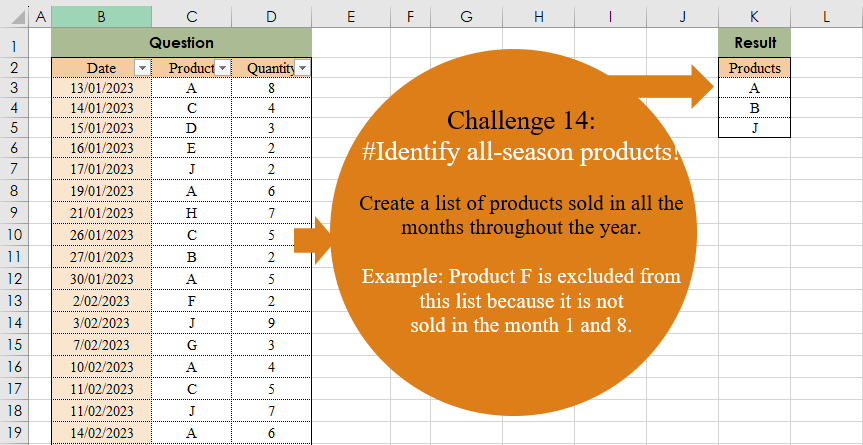
Create a list of products sold in all the months throughout the year. Example: Product F is excluded from this list because it is not sold in the month 1 and 8.
📌 Challenge Details and Links
Challenge Number: 14
Challenge Difficulty: ⭐⭐
📥Download Sample File
📥Link to the solutions on LinkedIn
📥Link to the solution on YouTube
Solving the challenge of Identify All-Season Products! with Power Query
Power Query solution 1 for Identify All-Season Products!, proposed by Brian Julius:
let
  Source = Excel.CurrentWorkbook(){[Name = "Table1"]}[Content],
  SplitMonth = Table.Distinct(
    Table.RemoveColumns(
      Table.SplitColumn(
        Table.TransformColumnTypes(Source, {{"Date", type text}}, "en-US"),
        "Date",
        Splitter.SplitTextByEachDelimiter({"/"}, QuoteStyle.Csv, false),
        {"Date.1", "Date.2"}
      ),
      {"Date.2", "Quantity"}
    )
  ),
  Group = Table.Sort(
    Table.RemoveColumns(
      Table.SelectRows(
        Table.Group(SplitMonth, {"Product"}, {{"Count", each Table.RowCount(_), Int64.Type}}),
        each [Count] = 12
      ),
      "Count"
    ),
    {"Product", Order.Ascending}
  )
in
  Group
Power Query solution 2 for Identify All-Season Products!, proposed by Eric Laforce:
let
  Source = Excel.CurrentWorkbook(){[Name = "Table1"]}[Content],
  Group = Table.Group(
    Source,
    {"Product"},
    {"Count", each List.Count(List.Distinct(List.Transform([Date], Date.Month)))}
  ),
  Filter = Table.SelectRows(Group, each ([Count] = 12))[[Product]]
in
  Filter
Power Query solution 3 for Identify All-Season Products!, proposed by Luan Rodrigues:
let
  Fonte = Tabela1,
  m = Table.TransformColumns(Fonte, {"Date", each Date.Month(_)}),
  gp = [
    a = List.Combine(
      Table.Group(m, {"Date"}, {{"Contagem", each List.Distinct(_[Product])}})[Contagem]
    ),
    b = List.Select(
      List.Transform(List.Distinct(a), each List.Select(a, (x) => _ = x)),
      each List.Count(_) = 12
    ),
    c = List.Sort(List.Transform(b, each _{0}), 0)
  ][c]
in
  gp
Power Query solution 4 for Identify All-Season Products!, proposed by Ramiro Ayala Chávez:
let
S = Excel.CurrentWorkbook(){[Name="Table1"]}[Content],
a = Table.AddColumn(S,"M", each Date.Month([Date])),
b = Table.Group(a,{"M"},{{"G", each List.Sort(List.Distinct([Product]))}})[G],
c = Table.FromColumns({List.Combine(b)},{"Products"}),
Sol = Table.SelectRows(Table.Group(c,{"Products"},{{"H",each List.Count(_)}}), each [H]=12)[[Products]]
in
Sol
Power Query solution 5 for Identify All-Season Products!, proposed by Alejandro Simón 🇵🇦 🇪🇸:
let
  Source = Excel.CurrentWorkbook(){[Name = "Table1"]}[Content],
  Group = Table.Group(
    Source,
    {"Product"},
    {{"A", each List.Count(List.Distinct(List.Transform([Date], Date.Month)))}}
  ),
  Sol = Table.Sort(Table.SelectRows(Group, each [A] = 12)[[Product]], "Product")
in
  Sol
Power Query solution 6 for Identify All-Season Products!, proposed by John Jairo Vergara Domínguez:
let
 S = Excel.CurrentWorkbook(){0}[Content],
 G = Table.Group(S, "Product", {"C", each List.Sum(List.Distinct(List.Transform([Date], Date.Month)))})
in
 List.Sort(Table.SelectRows(G, each [C] = 78)[Product])

Blessings!
Power Query solution 7 for Identify All-Season Products!, proposed by Mahmoud Bani Asadi:
let
  Source = Excel.CurrentWorkbook(){[Name = "Data"]}[Content],
  Group = Table.Group(
    Source,
    {"Product"},
    {{"Count", each [a = List.Transform([Date], Date.Month), b = List.Count(List.Distinct(a))][b]}}
  ),
  Filter = Table.SelectRows(Group, each ([Count] = 12))[[Product]]
in
  Filter
Power Query solution 8 for Identify All-Season Products!, proposed by Mahmoud Bani Asadi:
let
  Source = Excel.CurrentWorkbook(){[Name = "Data"]}[Content],
  Filter = List.Sort(
    List.Distinct(
      Table.SelectRows(
        Source,
        each List.Count(
          List.Distinct(
            List.Transform(
              Table.SelectRows(Source, (x) => (x[Product] = [Product]))[Date],
              each Date.Month(_)
            )
          )
        )
          = 12
      )[Product]
    )
  )
in
  Filter
Power Query solution 9 for Identify All-Season Products!, proposed by 🇮🇷 Navid Esmaeilzadeh اسماعیل زاده:
let
  S1 = Excel.CurrentWorkbook(){[Name = "Table1"]}[Content],
  C = Table.TransformColumnTypes(S1, {{"Date", type date}}),
  A = Table.AddColumn(C, "Month-Year", each Date.ToText([Date], "yyyy-MMM")),
  G1 = Table.Group(A, {"Month-Year"}, {{"Count", each Table.RowCount(_), Int64.Type}}),
  ListMonth = G1[#"Month-Year"],
  MaxMonthNo = List.NonNullCount(List.Distinct(ListMonth)),
  BT = A,
  G2 = Table.Group(
    BT,
    {"Product"},
    {{"Count", each List.Count(List.Distinct([#"Month-Year"])), Int64.Type}}
  ),
  A2 = Table.AddColumn(G2, "T/F", each [Count] = MaxMonthNo),
  F = Table.SelectRows(A2, each ([#"T/F"] = true)),
  S = Table.Sort(F, {{"Product", Order.Ascending}}),
  Sol = Table.SelectColumns(S, {"Product"})
in
  Sol
Power Query solution 10 for Identify All-Season Products!, proposed by An Nguyen:
let
  Dataset = Excel.CurrentWorkbook(){[Name = "RawData"]}[Content],
  DateToYear = Table.TransformColumns(Dataset, {"Date", each DateTime.ToText(_, [Format = "MMM"])}),
  Groupby = Table.Group(
    DateToYear,
    "Product",
    {"Count of Months", each List.Count(List.Distinct(_[Date]))}
  ),
  Result = Table.Sort(
    Table.SelectRows(Groupby, each [Count of Months] = 12),
    {"Product", Order.Ascending}
  )[Product]
in
  Result
Power Query solution 11 for Identify All-Season Products!, proposed by Glyn Willis:
let
  Source = Excel.CurrentWorkbook(){[Name = "Table1"]}[Content],
  #"Changed Type" = Table.TransformColumnTypes(
    Source,
    {{"Date", type date}, {"Product", type text}, {"Quantity", Int64.Type}}
  ),
  #"Inserted Year" = Table.AddColumn(#"Changed Type", "Year", each Date.Year([Date]), Int64.Type),
  #"Grouped Rows" = Table.ExpandListColumn(
    Table.Group(
      #"Inserted Year",
      {"Year"},
      {{"Months", each List.Distinct(List.Transform([Date], (x) => Date.MonthName(x))), type list}}
    ),
    "Months"
  ),
  Custom1 = Table.Group(
    #"Inserted Year",
    {"Product", "Year"},
    {
      {
        "Months",
        each List.IsEmpty(
          List.RemoveMatchingItems(
            Table.SelectRows(#"Grouped Rows", (x) => x[Year] = [Year]{0})[Months],
            List.Distinct(List.Transform([Date], (x) => Date.MonthName(x)))
          )
        ),
        type logical
      }
    }
  ),
  #"Filtered Rows" = Table.SelectRows(Custom1, each ([Months] = true))[[Product]],
  #"Sorted Rows" = Table.Sort(#"Filtered Rows", {{"Product", Order.Ascending}})
in
  #"Sorted Rows"
Solving the challenge of Identify All-Season Products! with Excel
Excel solution 1 for Identify All-Season Products!, proposed by Bo Rydobon 🇹🇭:
=TOCOL(
    BYROW(
        PIVOTBY(
            C3:C133,
            MONTH(
                B3:B133
            ),
            D3:D133,
            SUM,
            0,
            0
        ),
        LAMBDA(
            a,
            IFS(
                COUNT(
                    a
                )=13,
                @a
            )
        )
    ),
    3
)
Excel solution 2 for Identify All-Season Products!, proposed by Bo Rydobon 🇹🇭:
=TOCOL(
    MAP(
        SORT(
            UNIQUE(
                C3:C133
            )
        ),
        LAMBDA(
            u,
            IF(
                AND(
                    XMATCH(
                        u&SEQUENCE(
                            ,
                            12
                        ),
                        C3:C133&MONTH(
                            B3:B133
                        )
                    )
                ),
                u
            )
        )
    ),
    3
)
Excel solution 3 for Identify All-Season Products!, proposed by محمد حلمي:
=LET(
    p,
    C3:C133,
    u,
    UNIQUE(
        p
    ),
    SORT(
        FILTER(
            u,
            MAP(
                u,
                LAMBDA(
                    c,
                    ROWS(
                        UNIQUE(
                            MONTH(
                                FILTER(
                                    B3:B133,
                                    p=c
                                )
                            )
                        )
                    )=12
                )
            )
        )
    )
)
Excel solution 4 for Identify All-Season Products!, proposed by 🇵🇪 Ned Navarrete C.:
=REDUCE(
    0,
    SEQUENCE(
        12
    ),
    LAMBDA(
        c,
        v,
         c+ISNUMBER(
             XMATCH(
                 u,
                 FILTER(
                     p,
                     d=v
                 )
             )
         )
    )
)))
Excel solution 5 for Identify All-Season Products!, proposed by Oscar Mendez Roca Farell:
=TOCOL(
    BYROW(
        XLOOKUP(
            UNIQUE(
                C3:C133
            )&TOROW(
                ROW(
                    1:12
                )
            ),
             C3:C133&MONTH(
                 B3:B133
             ),
             C3:C133,
            ""
        ),
         LAMBDA(
             r,
              IF(
                  12-SUM(
                      N(
                          r>""
                      )
                  ),
                   1/0,
                   @r
              )
         )
    ),
     2
)
Excel solution 6 for Identify All-Season Products!, proposed by Julian Poeltl:
=LET(
    Dat,
    B3:B133,
    PRD,
    C3:C133,
    MNT,
    MONTH(
        Dat
    ),
    UNI,
    SORT(
        UNIQUE(
            PRD
        )
    ),
    SbyPRD,
    BYROW(
        UNI,
        LAMBDA(
            U,
            COUNTA(
                UNIQUE(
                    FILTER(
                        MNT,
                        PRD=U
                    )
                )
            )
        )
    ),
    FILTER(
        UNI,
        SbyPRD=12
    )
)
Excel solution 7 for Identify All-Season Products!, proposed by Kris Jaganah:
=LET(
    a,
    C3:C133,
    b,
    SORT(
        UNIQUE(
            a
        )
    ),
    c,
    MAP(
        b,
        LAMBDA(
            x,
            COUNT(
                UNIQUE(
                    FILTER(
                        MONTH(
                            B3:B133
                        ),
                        a=x
                    )
                )
            )
        )
    ),
    TOCOL(
        IFS(
            c=12,
            b
        ),
        3
    )
)
Excel solution 8 for Identify All-Season Products!, proposed by John Jairo Vergara Domínguez:
=LET(
    m,
    MONTH(
        B3:B133
    ),
    b,
    PIVOTBY(
        C3:C133,
        m,
        m,
        MIN,
        ,
        0
    ),
    FILTER(
        TAKE(
            b,
            ,
            1
        ),
        BYROW(
            b,
            SUM
        )=79
    )
)
Excel solution 9 for Identify All-Season Products!, proposed by Mahmoud Bani Asadi:
=LET(    a,
    GROUPBY(
        C3:C133,
        MONTH(
            B3:B133
        ),
        LAMBDA(
            x,
            COUNT(
                UNIQUE(
                    x
                )
            )
        ),
        ,
        0
    ),    FILTER(
        TAKE(
            a,
            ,
            1
        ),
        TAKE(
            a,
            ,
            -1
        )=12
    )
)
Excel solution 10 for Identify All-Season Products!, proposed by Mahmoud Bani Asadi:
=LET(    u,
    SORT(
        UNIQUE(
            C3:C133
        )
    ),    FILTER(
        u,
        MAP(
            u,
            LAMBDA(
                x,
                COUNT(
                    UNIQUE(
                        FILTER(
                            MONTH(
                                B3:B133
                            ),
                            C3:C133=x
                        )
                    )
                )=12
            )
        )
    )
)
Excel solution 11 for Identify All-Season Products!, proposed by Sunny Baggu:
=LET(
 _P,
     TOROW(
         SORT(
             UNIQUE(
                 C3:C133
             )
         )
     ), _t,
     (C3:C133 = _P) * MONTH(
         B3:B133
     ), TOCOL(
     FILTER(
         _P,
          BYCOL(
              _t,
               LAMBDA(
                   a,
                    SUM(
                        UNIQUE(
                            a
                        )
                    ) = 78
               )
          )
     )
 )
)
Excel solution 12 for Identify All-Season Products!, proposed by Sunny Baggu:
=LET(     _p,
     SORT(
         UNIQUE(
             C3:C133
         )
     ),     FILTER(          _p,          MAP(
              _p,
               LAMBDA(
                   a,
                    ROWS(
                        UNIQUE(
                            FILTER(
                                MONTH(
                                    B3:B133
                                ),
                                 C3:C133 = a
                            )
                        )
                    ) = 12
               )
          )     ))
Excel solution 13 for Identify All-Season Products!, proposed by An Nguyen:
=LET(
    a,
    GROUPBY(
        C3:C133,
        TEXT(
            B3:B133,
            "MMM"
        ),
        LAMBDA(
            a,
            COUNTA(
                UNIQUE(
                    a
                )
            )
        ),
        0,
        0
    ),
    FILTER(
        INDEX(
            a,
            ,
            1
        ),
        INDEX(
            a,
            ,
            2
        )=12
    )
)
Excel solution 14 for Identify All-Season Products!, proposed by Asheesh Pahwa:
=LET(
    p,
    C3:C133,    dt,
    B3:B133,
    mn,
    MONTH(
        dt
    ),    u,
    UNIQUE(
        p
    ),
    um,
    UNIQUE(
        mn
    ),    m,
    MAP(
        u,
        LAMBDA(
            x,
            LET(

                a,
                p=x,
                b,
                FILTER(
                    mn,
                    a
                ),

                COUNT(
                    UNIQUE(
                        b
                    )
                )>11
            )
        )
    ),    FILTER(
        u,
        m
    )
)
Excel solution 15 for Identify All-Season Products!, proposed by Burhan Cesur:
=LET(
    a,
    DROP(
        TRANSPOSE(
            PIVOTBY(
                MONTH(
                    A3:A133
                ),
                B3:B133,
                C3:C133,
                COUNTA,
                ,
                0,
                ,
                0,
                ,

            )
        ),
        1
    ),
    b,
    BYROW(
        MAP(
            DROP(
                a,
                ,
                1
            ),
            LAMBDA(
                x,
                IF(
                    ISNUMBER(
                        x
                    ),
                    1,
                    0
                )
            )
        ),
        SUM
    ),
    FILTER(
        TAKE(
                a,
                ,
                1
            ),
        b=12
    )
)
Excel solution 16 for Identify All-Season Products!, proposed by Thang Van:
=LET(
    _p,
    UNIQUE(
        C3:C133
    ),
    _a,
    UNIQUE(
        HSTACK(
            C3:C133,
            MONTH(
                B3:B133
            )
        )
    ),
    TEXTSPLIT(
        TEXTJOIN(
            ",",
            ,
            SORT(
                MAP(
                    _p,
                    LAMBDA(
                        _each,
                        IF(
                            COUNT(
                                FILTER(
                                    _a,
                                    CHOOSECOLS(
                                        _a,
                                        1
                                    )=_each
                                )
                            )=12,
                            _each,
                            ""
                        )
                    )
                )
            )
        ),
        ,
        ","
    )
)
Solving the challenge of Identify All-Season Products! with R
R solution 1 for Identify All-Season Products!, proposed by Konrad Gryczan, PhD:
library(tidyverse)
library(readxl)

input = read_excel("files/CH-014.xlsx", range = "B2:D133")
test = read_excel("files/CH-014.xlsx", range = "K2:K5")

result = input %>%
 mutate(month = month(Date)) %>%
 group_by(Product) %>%
 summarise(nm = n_distinct(month)) %>%
 filter(nm == 12) %>%
 ungroup() %>%
 select(Products = Product)