
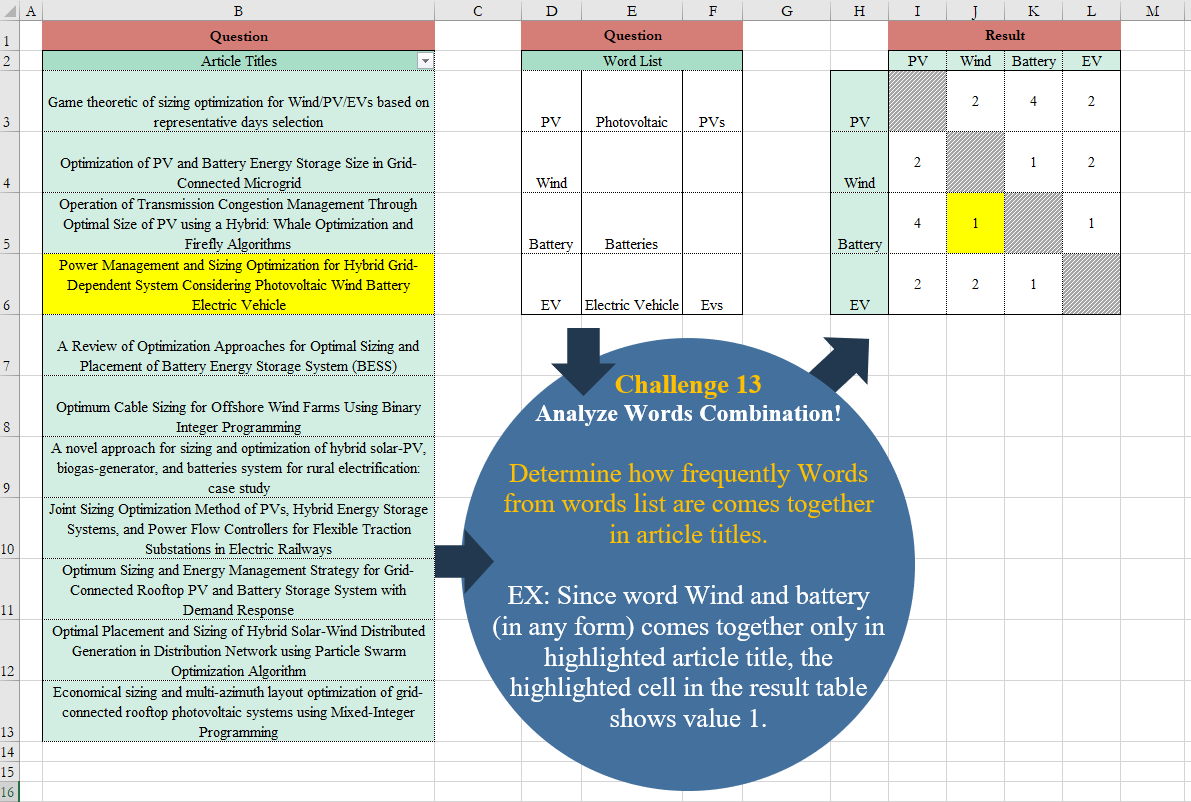
Determine how frequently Words from words list are comes together in article titles. EX: Since word Wind and battery (in any form) comes together only in highlighted article title, the highlighted cell in the result table shows value 1.
📌 Challenge Details and Links
Challenge Number: 13
Challenge Difficulty: ⭐⭐⭐
📥Download Sample File
📥Link to the solutions on LinkedIn
Solving the challenge of Analyze Words Combination! with Power Query
Power Query solution 1 for Analyze Words Combination!, proposed by Alejandro Simón 🇵🇦 🇪🇸:
let
Source = Excel.CurrentWorkbook(){[Name="Table2"]}[Content],
Rows = List.Combine(List.Transform(List.Transform(Table.ToRows(Source), List.RemoveNulls), each List.Transform(_, (x)=> {x,_{0}}))),
Article = Excel.CurrentWorkbook(){[Name="Table1"]}[Content],
Acc = Table.AddColumn(Article, "A", each List.Accumulate(Rows, Text.Lower([Article Titles]), (s,c)=> Text.Replace(s, Text.Lower(c{0}), Text.Lower(c{1}))))[[A]],
Sol = List.Accumulate(Source[Column1],Source[[Column1]], (s,c)=> Table.AddColumn(s,c, (x)=> if x[Column1]=c then null else
let
a = Acc,
b = List.Sum(Table.AddColumn(a, "B", each if Text.Contains([A], Text.Lower(x[Column1])) and Text.Contains([A], Text.Lower(c)) then 1 else null)[B])
in b))
in
 Sol
Power Query solution 2 for Analyze Words Combination!, proposed by 🇮🇷 Navid Esmaeilzadeh اسماعیل زاده:
let
 S2 = Excel.CurrentWorkbook(){[Name="WordList"]}[Content],
 D = Table.DuplicateColumn(S2, "Column1", "Cat"),
 R = Table.ReorderColumns(D,{"Cat", "Column1", "Column2", "Column3"}),
 U = Table.UnpivotOtherColumns(R, {"Cat"}, "Attribute", "Sub"),
 Re = Table.RemoveColumns(U,{"Attribute"}),
 UP1 = Table.TransformColumns(Re,{{"Sub", Text.Upper, type text}}),
 S1 = Excel.CurrentWorkbook(){[Name="Table1"]}[Content],
 Up2 = Table.TransformColumns(S1,{{"Article Titles", Text.Upper, type text}}),
 A = Table.AddColumn(Up2, "Article", each List.Accumulate(
 List.Numbers(0, Table.RowCount(UP1)),
 [Article Titles],
 (state, current) =>
 Text.Replace(state,
 UP1[Sub]{current},
 UP1[Cat]{current}))),
 C = Table.FromList(List.Distinct(UP1[Cat]),null,{"Cat1"}),
 A1 = Table.AddColumn(C, "Cat2", each C[Cat1]),
 E = Table.ExpandListColumn(A1, "Cat2"),
 A2 = Table.AddColumn(E, "T", each if [Cat1] = [Cat2] then null else "T"),
 F = Table.SelectRows(A2, each ([T] = "T")),
 A3 = Table.AddColumn(F, "So", each List.Sort({[Cat1],[Cat2]})),
 E2 = Table.TransformColumns(A3, {"So", each Text.Combine(List.Transform(_, Text.From)), type text}),
 R2 = Table.Distinct(E2, {"So"}),
 Tb1 = Table.SelectColumns(A,{"Article"}),
 Up3 = Table.TransformColumns(Tb1,{{"Article", Text.Upper, type text}}),
 A4 = Table.AddColumn(Up3, "C", each R2),
 E3 = Table.ExpandTableColumn(A4, "C", {"Cat1", "Cat2"}, {"Cat1", "Cat2"}),
 Up4 = Table.TransformColumns(E3,{{"Cat1", Text.Upper, type text}, {"Cat2", Text.Upper, type text}}),
 A5 = Table.AddColumn(Up4, "N", each if Text.Contains([Article],[Cat1]) and Text.Contains([Article],[Cat2]) then 1 else null),
 F2 = Table.SelectRows(A5, each ([N] = 1)),
 Sf = Table.SelectColumns(F2,{"Cat1", "Cat2", "N"}),
 Reo = Table.ReorderColumns(Sf,{"Cat2", "Cat1", "N"}),
 Ren = Table.RenameColumns(Reo,{{"Cat1", "Cat2"}, {"Cat2", "Cat1"}}),
 AM=Table.Combine({Sf,Ren}),
 So = Table.Sort(AM,{{"Cat1", Order.Ascending}, {"Cat2", Order.Ascending}}),
 Sol = Table.Pivot(So, List.Distinct(List.Sort(So[Cat1])), "Cat2", "N", List.Sum)
in
 Sol
Power Query solution 4 for Analyze Words Combination!, proposed by Glyn Willis:
let
 Words=
 let
 Source = Excel.CurrentWorkbook(){[Name="Table2"]}[Content],
 CT = Table.TransformColumnTypes(Source,{{"Word List", type text}, {"Column1", type text}, {"Column2", type text}}),
 UP = Table.ReplaceValue(Table.UnpivotOtherColumns(Table.DuplicateColumn(CT, "Word List", "KeyWord"), {"KeyWord"}, "Attribute", "Value")," ","|",Replacer.ReplaceText,{"Value"})
 in
 UP,
 Source = Excel.CurrentWorkbook(){[Name="Table1"]}[Content],
 Type = Table.TransformColumnTypes(Source,{{"Article Titles", type text}}),
Solving the challenge of Analyze Words Combination! with Excel
Excel solution 1 for Analyze Words Combination!, proposed by Bo Rydobon 🇹🇭:
=MAKEARRAY(
    4,
    4,
    LAMBDA(
        i,
        j,
        LET(
            t,
            B3:B13,
            l,
            LAMBDA(
                n,
                t>TEXTSPLIT(
                    t,
                    TOROW(
                        INDEX(
                            D3:F6,
                            n,

                        ),
                        3
                    )
                )
            ),
            IF(
                i=j,
                "",
                SUM(
                    l(
                        i
                    )*l(
                        j
                    )
                )
            )
        )
    )
)
Excel solution 2 for Analyze Words Combination!, proposed by محمد حلمي:
=MAP(
    D3:D6&"-"&TOROW(
        D3:D6
    ),    LAMBDA(
        x,
        SUM(
            2*MAP(
                B3:B13,

                LAMBDA(
                    b,
                    LEN(
                        SUBSTITUTE(
                            x,
                            "-",

                        )
                    )=LEN(
                        b
                    )-LEN(
                        CONCAT(

                            TEXTSPLIT(
                                b,
                                @TEXTSPLIT(
                                    x,
                                    "-"
                                ),
                                TEXTAFTER(
                                    x,
                                    "-"
                                ),
                                ,
                                ,
                                ""
                            )
                        )
                    )
                )
            )
        )
    )
)
Excel solution 3 for Analyze Words Combination!, proposed by Oscar Mendez Roca Farell:
=MAKEARRAY(
    4,
     4,
     LAMBDA(
         r,
          c,
          IF(
              r<>c,
               LET(
                   _f,
                    LAMBDA(
                        i,
                         BYROW(
                             SEARCH(
                                 TOROW(
                                     INDEX(
                                         D3:F6,
                                          i,

                                     ),
                                      1
                                 ),
                                  B3:B13
                             ),
                              LAMBDA(
                                  r,
                                   COUNT(
                                       r
                                   )
                              )
                         )
                    ),
                    COUNT(
                        IFS(
                            _f(
                                       r
                                   )*_f(
                                       c
                                   ),
                             1
                        )
                    )
               ),
               ""
          )
     )
)
Excel solution 4 for Analyze Words Combination!, proposed by Julian Poeltl:
=WRAPROWS(MAP(TRANSPOSE(
    ROUNDDOWN(
        SEQUENCE(
            16,
            ,
            0
        )/4,
        0
    )+1
),
    TRANSPOSE(
        IF(
            MOD(
                SEQUENCE(
                    16
                ),
                4
            )=0,
            4,
            MOD(
                SEQUENCE(
                    16
                ),
                4
            )
        )
    ),
    LAMBDA(a,
    b,
    LET(Titles,
    TRANSPOSE(
        $B$3:$B$13
    ),
    WordList,
    $D$3:$F$6,
    WordCol,
    FILTER(
        TOCOL(
            WordList
        ),
        TOCOL(
            WordList
        )<>""
    ),
    RCat,
    CHOOSECOLS(
        WordList,
        1
    ),
    CAT,
    XLOOKUP(
        LEFT(
            WordCol,
            1
        )&"*",
        RCat,
        RCat,
        ,
        2
    ),
    MCount,
    IFERROR(
        IF(
            FIND(
                WordCol,
                Titles
            )>0,
            1
        ),
        0
    ),
    MCountbyRCat,
    VSTACK(
        BYCOL(
            CHOOSEROWS(
                MCount,
                SEQUENCE(
                    3
                )
            ),
            LAMBDA(
                ARR,
                SUM(
                    ARR
                )
            )
        ),
        BYCOL(
            CHOOSEROWS(
                MCount,
                SEQUENCE(
                    1,
                    ,
                    4
                )
            ),
            LAMBDA(
                ARR,
                SUM(
                    ARR
                )
            )
        ),
        BYCOL(
            CHOOSEROWS(
                MCount,
                SEQUENCE(
                    2,
                    ,
                    5
                )
            ),
            LAMBDA(
                ARR,
                SUM(
                    ARR
                )
            )
        ),
        BYCOL(
            CHOOSEROWS(
                MCount,
                SEQUENCE(
                    3,
                    ,
                    7
                )
            ),
            LAMBDA(
                ARR,
                SUM(
                    ARR
                )
            )
        )
    ),
    MCRC1,
    IF(
        MCountbyRCat>0,
        1,
        0
    ),
    RESinString,
    SUM(BYCOL(CHOOSEROWS (MCRC1,
    a,
    b),
    LAMBDA(
        ARR,
        IF(
            a=b,
            0,
            IF(
                AND(
                    CHOOSEROWS(
                        ARR,
                        1
                    )=CHOOSEROWS(
                        ARR,
                        2
                    ),
                    CHOOSEROWS(
                        ARR,
                        1
                    )=1
                ),
                1,
                0
            )
        )
    ))),
    IF(
        RESinString=0,
        "",
        RESinString
    )))),
    4)
Excel solution 5 for Analyze Words Combination!, proposed by Kris Jaganah:
=LET(a,
    D3:E6,
    b,
    TOROW(
        a,
        3
    ),
    c,
    TAKE(
        a,
        ,
        1
    ),
    d,
    SCAN(
        ,
        XLOOKUP(
            b,
            c,
            c,
            ""
        ),
        LAMBDA(
            v,
            w,
            IF(
                w="",
                v,
                w
            )
        )
    ),
    e,
    DROP(
        REDUCE(
            "",
            PROPER(
                B3:B13
            ),
            LAMBDA(
                x,
                y,
                VSTACK(
                    x,
                    IF(
                        ISERR(
                            FIND(
                                PROPER(
                                    b
                                ),
                                y
                            )
                        ),
                        ff,
                        d
                    )
                )
            )
        ),
        1
    ),
    f,
    TEXTSPLIT(
        ARRAYTOTEXT(
            BYROW(
                e,
                LAMBDA(
                    z,
                    LET(
                        b,
                        TOROW(
                            z,
                            3
                        ),
                        c,
                        ARRAYTOTEXT(
                            b&"-"&TOCOL(
                                b,
                                3
                            )
                        ),
                        c
                    )
                )
            )
        ),
        ,
        ", "
    ),
    g,
    UNIQUE(
        f
    ),
    h,
    MAP(g,
    LAMBDA(u,
    SUM(--(u=f)))),
    i,
    TOROW(
        c
    ),
    VSTACK(
        HSTACK(
            "",
            i
        ),
        HSTACK(
            c,
            IF(
                c=i,
                "",
                XLOOKUP(
                    c&"-"&i,
                    g,
                    h
                )
            )
        )
    ))
Excel solution 6 for Analyze Words Combination!, proposed by John Jairo Vergara Domínguez:
=MAKEARRAY(
    4,
    4,
    LAMBDA(
        r,
        c,
        LET(
            f,
            LAMBDA(
                w,
                BYROW(
                    SEARCH(
                        TOROW(
                            INDEX(
                                D3:F6,
                                w,

                            ),
                            1
                        ),
                        B3:B13
                    ),
                    COUNT
                )
            ),
            IF(
                r=c,
                "",
                COUNT(
                    1/f(
                        r
                    )/f(
                        c
                    )
                )
            )
        )
    )
)
Solving the challenge of Analyze Words Combination! with R
R solution 1 for Analyze Words Combination!, proposed by Konrad Gryczan, PhD:
library(tidyverse)
library(readxl)

input1 = read_excel("files/CH-013.xlsx", range = "B2:B13")
input2 = read_excel("files/CH-013.xlsx", range = "D3:F6", col_names = FALSE) %>%
 unite("new", 1:3, sep = "|", remove = T, na.rm = T)

test = read_excel("files/CH-013.xlsx", range = "H2:L6") %>%
 select(2:5) %>%
 as.matrix(.) %>%
 replace(is.na(.), 0)

colnames(test) = c("pv", "wind", "bat", "ev")

result = input1 %>%
 mutate(pv = str_detect(`Article Titles`, input2$new[[1]]),
 wind = str_detect(`Article Titles`, input2$new[[2]]),
 bat = str_detect(`Article Titles`, input2$new[[3]]),
 ev = str_detect(`Article Titles`, input2$new[[4]])) %>%
 mutate(across(pv:ev, ~ifelse(. == TRUE, 1, 0))) %>%
 mutate(pv_ev = ifelse(pv == 1 & ev == 1, 1, 0),
 wind_bat = ifelse(wind == 1 & bat == 1, 1, 0),
 pv_wind = ifelse(pv == 1 & wind == 1, 1, 0),
 bat_ev = ifelse(bat == 1 & ev == 1, 1, 0),
 pv_bat = ifelse(bat == 1 & pv == 1, 1, 0),
 wind_ev = ifelse(wind == 1 & ev == 1, 1, 0)) %>%
 select(-c(pv, wind, bat, ev)) %>%

to be continued...