
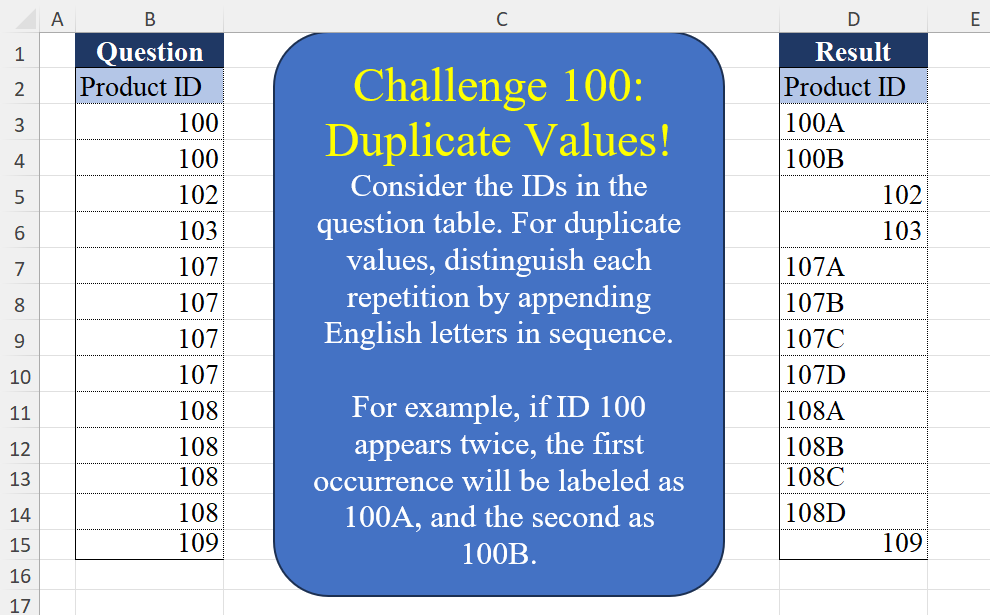
Consider the IDs in the question table. For duplicate values, distinguish each repetition by appending English letters in sequence. For example, if ID 100 appears twice, the first occurrence will be labeled as 100A, and the second as 100B.
📌 Challenge Details and Links
Challenge Number: 100
Challenge Difficulty: ⭐⭐⭐⭐
📥Download Sample File
📥Link to the solutions on LinkedIn
Solving the challenge of Duplicate Values! Part 1 with Power Query
Power Query solution 1 for Duplicate Values! Part 1, proposed by Zoran Milokanović:
let
  Source = Excel.CurrentWorkbook(){[Name = "Input"]}[Content],
  S = List.TransformMany(
    Table.ToRows(Table.Group(Source, "Product ID", {"R", Table.RowCount})),
    each List.FirstN({"A" .. "Z"}, _{1}),
    (i, _) => {Text.From(i{0}) & _, i{0}}{Byte.From(i{1} = 1)}
  )
in
  S
Power Query solution 2 for Duplicate Values! Part 1, proposed by Brian Julius:
let
  Source = Excel.CurrentWorkbook(){[Name = "Table1"]}[Content],
  Group = Table.Group(Source, {"Product ID"}, {{"Count", each Table.RowCount(_), Int64.Type}}),
  AddLetter = Table.AddColumn(
    Group,
    "Letter",
    each if [Count] < 2 then null else List.FirstN({"A" .. "Z"}, [Count])
  ),
  Expand = Table.RemoveColumns(Table.ExpandListColumn(AddLetter, "Letter"), "Count"),
  Merge = Table.CombineColumns(
    Table.TransformColumnTypes(Expand, {{"Product ID", type text}}),
    {"Product ID", "Letter"},
    Combiner.CombineTextByDelimiter(""),
    "Product ID"
  )
in
  Merge
Power Query solution 3 for Duplicate Values! Part 1, proposed by Rafael González B.:
let
Source = Table,
Group = Table.Group(Source, {"Product ID"}, {{"All", each Table.RowCount(_), Int64.Type}}),
Result = Table.FromColumns(
{
List.Combine(
Table.AddColumn(Group, "Dev", each
if [All] = 1
then {[Product ID]}
else List.TransformMany(
{[Product ID]},
(x) => List.FirstN({"A".."Z"},[All]),
(x,y) => Text.From(x) & y))[Dev])
},
{"Product ID"})
in
Result
🧙🏻♂️🧙🏻♂️🧙🏻♂️Power Query solution 4 for Duplicate Values! Part 1, proposed by Ramiro Ayala Chávez:
let
S = Excel.CurrentWorkbook(){[Name="Table1"]}[Content],
a = Table.TransformColumnTypes(S,{"Product ID", type text}),
b = Table.Group(a,{"Product ID"},{"G", each [Product ID]})[G],
c = List.Transform(b, each if List.Count(_)>1 then _&List.FirstN({"A".."Z"},List.Count(_)) else _),
d = List.Transform(c, each try List.Split(_,List.Count(_)/2) otherwise {_}),
e = Table.Combine(List.Transform(d, each Table.FromColumns(_))),
f = Table.ReplaceValue(e,null,"",Replacer.ReplaceValue,{"Column2"}),
Sol = Table.AddColumn(f,Table.ColumnNames(S){0}, each [Column1]&[Column2])[[Product ID]]
in
Sol
Power Query solution 5 for Duplicate Values! Part 1, proposed by Aditya Kumar Darak 🇮🇳:
let
  Source = Excel.CurrentWorkbook(){[Name = "data"]}[Content],
  Group = Table.Group(
    Source,
    "Product ID",
    {
      "T",
      each [
        C = Table.RowCount(_),
        V = Table.FirstValue(_),
        T = List.Transform({1 .. C}, (f) => Text.From(V) & Character.FromNumber(f + 64)),
        R = if C = 1 then {V} else T
      ][R]
    }
  ),
  Return = List.Combine(Group[T])
in
  Return
Power Query solution 6 for Duplicate Values! Part 1, proposed by Alejandro Simón 🇵🇦 🇪🇸:
let
Source = Excel.CurrentWorkbook(){[Name="Table1"]}[Content],
Sol = Table.Combine(Table.Group(Source, {"Product ID"}, {{"A", each
 let
 a = _,
 b = a[Product ID],
 c = if List.Count(b)>1
 then List.Transform(List.Zip({b, List.FirstN({"A".."Z"}, List.Count(b))}),
 each Text.From(_{0})&_{1})
 else b,
 d = Table.FromColumns({c}, {"Product ID"})
 in d}})[A])
in
Sol
Power Query solution 7 for Duplicate Values! Part 1, proposed by Abdallah Ally:
let
  Source = Excel.CurrentWorkbook(){[Name = "Table1"]}[Content],
  Numbers = Source[Product ID],
  Indices = {0 .. List.Count(Numbers) - 1},
  Result = List.Transform(
    Indices,
    each [
      a = List.Select(Indices, (x) => Numbers{x} = Numbers{_}),
      b =
        if List.Count(a) = 1 then
          Numbers{_}
        else
          Text.From(Numbers{_}) & {"A" .. "Z"}{List.PositionOf(a, _)}
    ][b]
  )
in
  Result
Power Query solution 8 for Duplicate Values! Part 1, proposed by Kris Jaganah:
let
  Source = Excel.CurrentWorkbook(){[Name = "Table1"]}[Content],
  Index = Table.AddIndexColumn(Source, "Index", 1, 1, Int64.Type),
  Ans = Table.AddColumn(
    Index,
    "Result",
    each
      let
        a = [Product ID],
        b = Source[Product ID],
        c = [Index] - List.PositionOf(b, a),
        d = List.Count(List.Select(b, each _ = a)),
        e = if d > 1 then Text.From(a) & Character.FromNumber(c + 64) else a
      in
        e
  ),
  Keep = Table.SelectColumns(Ans, {"Result"})
in
  Keep
Power Query solution 9 for Duplicate Values! Part 1, proposed by Kris Jaganah:
let
  Source = Excel.CurrentWorkbook(){[Name = "Table1"]}[Content],
  Group = Table.Group(
    Source,
    {"Product ID"},
    {
      "Ans",
      each
        let
          a = Table.ToColumns(_){0},
          b = List.Count(a),
          c = List.Zip({a, List.Transform({0 .. b - 1}, each Character.FromNumber(_ + 65))}),
          d = List.Transform(c, each if b = 1 then Text.From(_{0}) else Text.From(_{0}) & _{1})
        in
          d
    }
  ),
  Xpa = Table.ExpandListColumn(Group, "Ans")
in
  Xpa
Power Query solution 10 for Duplicate Values! Part 1, proposed by 🇮🇷 Navid Esmaeilzadeh اسماعیل زاده:
let
AL={"A".."Z"},
S = Excel.CurrentWorkbook(){[Name="Table1"]}[Content],
A = Table.Group(S, {"Product ID"}, {{"Tbl", each _, type table [Product ID=number]}, {"C", each Table.RowCount(_), Int64.Type}}),
B = Table.AddColumn(A, "Tbl2", each Table.AddIndexColumn([Tbl],"Ind",1,1)),
C = Table.SelectColumns(B,{"C", "Tbl2"}),
D = Table.ExpandTableColumn(C, "Tbl2", {"Product ID", "Ind"}, {"Product ID", "Ind"}),
E = Table.AddColumn(D, "C.1", each if [C]=1 then [Product ID] else Text.From([Product ID])&AL{[Ind]-1}),
F = Table.SelectColumns(E,{"C.1"}),
G = Table.RenameColumns(F,{{"C.1", "Product ID"}})
in
 G
Power Query solution 11 for Duplicate Values! Part 1, proposed by Ahmed Ariem:
let
  Source = Excel.CurrentWorkbook(){[Name = "tbl"]}[Content],
  Group = Table.Group(
    Source,
    {"Product ID"},
    {
      {
        "tmp",
        (x) =>
          [
            a = List.Transform(x[Product ID], Text.From),
            b = List.Transform(
              List.Generate(() => 65, (x) => x < 65 + List.Count(a), (x) => x + 1),
              Character.FromNumber
            ),
            c =
              if List.Count(a) > 1 then
                List.Transform(List.Zip({a, b}), Text.Combine)
              else
                x[Product ID]
          ][c]
      }
    }
  ),
  Expand = Table.ExpandListColumn(Group, "tmp")
in
  Expand
Power Query solution 12 for Duplicate Values! Part 1, proposed by Shirley Moreman:
letter to ALL products even if not duplicates.

let
 Source = Excel.CurrentWorkbook(){[Name="tCodes"]}[Content],
 GroupIndex = Table.Combine (Table.Group(Source, {"MyCodes"}, {{"All", each Table.AddIndexColumn(_, "Index",0)}})[All]),
 MergeNumToChar = Table.NestedJoin(GroupIndex, {"Index"}, NumToChar, {"Pos"}, "NumToChar", JoinKind.LeftOuter),
 Expand = Table.ExpandTableColumn(MergeNumToChar, "NumToChar", {"Column1"}, {"Column1"}),
 NewCodeCol = Table.CombineColumns(Expand,{"MyCodes", "Column1"},Combiner.CombineTextByDelimiter("", QuoteStyle.None),"NewCode"),
 SelectCol = Table.SelectColumns(NewCodeCol,{"NewCode"})
in
 SelectCol
Solving the challenge of Duplicate Values! Part 1 with Excel
Excel solution 1 for Duplicate Values! Part 1, proposed by Bo Rydobon 🇹🇭:
=LET(
    i,
    B3:B15,
    MAP(
        i,
        LAMBDA(
            a,
            IF(
                COUNTIF(
                    i,
                    a
                )>1,
                a&CHAR(
                    COUNTIF(
                        B3:a,
                        a
                    )+64
                ),
                a
            )
        )
    )
)
Excel solution 2 for Duplicate Values! Part 1, proposed by محمد حلمي:
=SCAN(
    0,
    B3:B15,
    LAMBDA(
        a,
        v,
        LET(
            i,
            OFFSET(
                v,
                -1,

            ),
            IFS(
                AND(
                    v<>i,
                    v=OFFSET(
                        v,
                        1,

                    )
                ),
                v&"A",
                v=i,
                v&CHAR(
                    CODE(
                        RIGHT(
                            a
                        )
                    )+1
                ),
                1,
                v
            )
        )
    )
)
Excel solution 3 for Duplicate Values! Part 1, proposed by Aditya Kumar Darak 🇮🇳:
=MAP(B3:B15,
     LAMBDA(a,
     IF(COUNTIFS(
         B3:B15,
          a
     ) > 1,
     a & CHAR(64 + COUNTIFS((@B3:B15):a,
     a)),
     a)))
Excel solution 4 for Duplicate Values! Part 1, proposed by Oscar Mendez Roca Farell:
=MAP(
    B2:B15,
     LAMBDA(
         b,
          IF(
              COUNTIF(
                  B2:B15,
                  b
              )>1,
               b&CHAR(
                   64+COUNTIF(
                       B2:b,
                        b
                   )
               ),
               b
          )
     )
)
Excel solution 5 for Duplicate Values! Part 1, proposed by Julian Poeltl:
=LET(
    I,
    B3:B15,
    REDUCE(
        "Product ID",
        IF(
            MAP(
                I,
                LAMBDA(
                    A,
                    ROWS(
                        FILTER(
                            I,
                            I=A
                        )
                    )
                )
            )>1,
            I&"A",
            B3:I
        ),
        LAMBDA(
            A,
            B,
            VSTACK(
                A,
                LET(
                    N,
                    XMATCH(
                        LEFT(
                            B,
                            3
                        ),
                        LEFT(
                            A,
                            3
                        ),
                        ,
                        -1
                    ),
                    IF(
                        ISNUMBER(
                            N
                        ),
                        LEFT(
                            B,
                            3
                        )&CHAR(
                            CODE(
                                RIGHT(
                                    INDEX(
                                        A,
                                        N
                                    )
                                )
                            )+1
                        ),
                        B
                    )
                )
            )
        )
    )
)
Excel solution 6 for Duplicate Values! Part 1, proposed by Kris Jaganah:
=LET(
    a,
    B3:B15,
    IF(
        COUNTIF(
            a,
            a
        )>1,
        a&CHAR(
            MAP(
                a,
                LAMBDA(
                    x,
                    COUNTIF(
                        B3:x,
                        x
                    )
                )
            )+64
        ),
        a
    )
)
Excel solution 7 for Duplicate Values! Part 1, proposed by Imam Hambali:
=LET(
prd,
     B3:B15,IF(COUNTIFS(
    prd,
    prd
)>1,
     prd&CHAR(SCAN(0,
     --(prd=VSTACK(
         0,
          DROP(
              prd,
              -1
          )
     )),
     LAMBDA(
         x,
         y,
          IF(
              y=0,
              65,
               x+y
          )
     ))),
    prd)
)
Excel solution 8 for Duplicate Values! Part 1, proposed by Sunny Baggu:
=LET(     _u,
     UNIQUE(
         B3:B15
     ),     _s,
     MAP(
         _u,
          LAMBDA(
              a,
               SUM(
                   N(
                       B3:B15 = a
                   )
               )
          )
     ),     TOCOL(          _u &
          DROP(

               REDUCE(

                    "",

                    _s,

                    LAMBDA(
                        a,
                         v,
                         VSTACK(
                             a,
                              IF(
                                  v > 1,
                                   CHAR(
                                       SEQUENCE(
                                           ,
                                            v,
                                            65
                                       )
                                   ),
                                   ""
                              )
                         )
                    )

               ),

               1

          ),          3     ))
Excel solution 9 for Duplicate Values! Part 1, proposed by Sunny Baggu:
=LET(     t,
     B3:B15,     _a,
     MAP(
         t,
          LAMBDA(
              a,
               COUNTIF(
                   B3:a,
                    a
               )
          )
     ),     _b,
     COUNTIFS(
         t,
          t
     ),     t & IF(
         _b > 1,
          CHAR(
              _a + 64
          ),
          ""
     ))
Excel solution 10 for Duplicate Values! Part 1, proposed by Andy Heybruch:
=DROP(
    REDUCE(
        "",
        UNIQUE(
            B3:B15
        ),
        LAMBDA(
            a,
            v,
            VSTACK(
                a,
                LET(
                    _c,
                    COUNTIFS(
                        B3:B15,
                        v
                    ),
                    IF(
                        _c=1,
                        v,
                        v&CHAR(
                            SEQUENCE(
                                _c,
                                ,
                                65
                            )
                        )
                    )
                )
            )
        )
    ),
    1
)
Excel solution 11 for Duplicate Values! Part 1, proposed by Asheesh Pahwa:
=DROP(
    REDUCE(
        "",
        UNIQUE(
            B3:B15
        ),
        LAMBDA(
            x,
            y,
            VSTACK(
                x,

                LET(
                    f,
                    FILTER(
                        B3:B15,
                        B3:B15=y
                    ),
                    c,
                    COUNT(
                        f
                    ),
                    s,
                    IF(
                        c>1,
                        CHAR(
                            SEQUENCE(
                                c,
                                ,
                                65
                            )
                        ),
                        ""
                    ),
                    f&s
                )
            )
        )
    ),
    1
)
Excel solution 12 for Duplicate Values! Part 1, proposed by Bilal Mahmoud kh.:
=REDUCE(
    "Product ID",
    UNIQUE(
        B3:B15
    ),
    LAMBDA(
        x,
        y,
        LET(
            a,
            FILTER(
                B3:B15,
                B3:B15=y
            ),
            IF(
                COUNT(
                    a
                )=1,
                VSTACK(
                    x,
                    y
                ),
                VSTACK(
                    x,
                    y&CHAR(
                        SEQUENCE(
                            COUNT(
                    a
                ),
                            ,
                            65
                        )
                    )
                )
            )
        )
    )
)
Excel solution 13 for Duplicate Values! Part 1, proposed by CA Raghunath Gundi:
=LET(a,COUNTIFS(A$2:A2,A2),
b,COUNTIFS($A$2:$A$14,A2),
IF((a=1)*(b=1),
A2,
A2&CHAR(64+a)))
Excel solution 14 for Duplicate Values! Part 1, proposed by Eddy Wijaya:
=LET(
p,
    B3:B15,list_p,
    UNIQUE(
        p
    ),ID,
    SCAN(
        0,
        p,
        LAMBDA(
            a,
            v,
            IF(
                v<>OFFSET(
                    v,
                    -1,
                    0
                ),
                0*a+1,
                a+1
            )
        )
    ),count,
    HSTACK(
        list_p,
        MAP(
            list_p,
            LAMBDA(
                m,
                ROWS(
                    FILTER(
                        p,
                        p=m
                    )
                )
            )
        )
    ),IF(VLOOKUP(
    p,
    count,
    2,
    0
)>1,
    p&(CHAR(
        64+ID
    )),
    p))
Excel solution 15 for Duplicate Values! Part 1, proposed by El Badlis Mohd Marzudin:
=LET(
    d,
    B3:B15,
    b,
    BYROW(
        d,
        LAMBDA(
            a,
            COUNTIFS(
                INDEX(
                    d,
                    1
                ):a,
                a
            )
        )
    ),
    IF(
        ISNUMBER(
            XMATCH(
                d,
                UNIQUE(
                    d,
                    ,
                    1
                )
            )
        ),
        d,
        d&CHAR(
            64+b
        )
    )
)
Excel solution 16 for Duplicate Values! Part 1, proposed by ferhat CK:
=LET(
    a,
    B3:B11,
    b,
    MAP(
        a,
        LAMBDA(
            x,
            MATCH(
                1,
                FIND(
                    {"X-",
                    "Y-",
                    "M-"},
                    x,
                    1
                ),
                0
            )
        )
    ),
    MAP(
        B3:B11,
        b,
        LAMBDA(
            x,
            y,
            INDEX(
                {"P1",
                "P2",
                "P3"},
                ,
                y
            )&FILTER(
                TEXTSPLİT(
                    x,
                    {"X-",
                    "Y-",
                    "M-"}
                ),
                TEXTSPLIT(
                    x,
                    {"X-",
                    "Y-",
                    "M-"}
                )<>""
            )
        )
    )
)
Excel solution 17 for Duplicate Values! Part 1, proposed by Gerson Pineda:
=MAP(
    B2:B15,
    LAMBDA(
        x,
        IF(
            COUNTIF(
                B:B,
                x
            )>1,
            LEFT(
                x&ADDRESS(
                    1,
                    COUNTIF(
                        x:B2,
                        x
                    ),
                    4
                ),
                4
            ),
            x
        )
    )
)
Excel solution 18 for Duplicate Values! Part 1, proposed by Hussein SATOUR:
=LET(ID,B3:B15,CountID,MAP(ID,LAMBDA(x,COUNTIF(B3:x,x))),Alpha,CHAR(SEQUENCE(26)+64),IF(COUNTIF(ID,ID)=1,ID,ID&INDEX(Alpha,CountID)))Excel solution 19 for Duplicate Values! Part 1, proposed by Mey Tithveasna:
=MAP(
    B3:B15,
    LAMBDA(
        g,
        IF(

            COUNTIF(
                B3:B15,
                g
            )>1,
            g&CHAR(
                64+
                COUNTIF(
                    B3:g,
                    g
                )
            ),
            g
        )
    )
)
Excel solution 20 for Duplicate Values! Part 1, proposed by Milan Shrimali:
=X)))),
    ALPHA,
    ARRAYFORMULA(
        CHAR(
            SEQUENCE(
                26,
                1,
                65,
                1
            )
        )
    ),
    ALPHAFNL,
    TOCOL(
        BYROW(
            SPLT,
            LAMBDA(
                X,
                IF(
                    COUNT(
                        X
                    )=1,
                    "",
                    TOROW(
                        CHOOSEROWS(
                            ALPHA,
                            SEQUENCE(
                                COUNTA(
                        X
                    ),
                                1,
                                1,
                                1
                            )
                        )
                    )
                )
            )
        )
    ),
    STCK,
    BYROW(
        HSTACK(
            TOCOL(
                SPLT
            ),
            ALPHAFNL
        ),
        LAMBDA(
            X,
            JOIN(
                "",
                X
            )
        )
    ),
    FILTER(
        STCK,
        STCK<>""
    ))
Excel solution 21 for Duplicate Values! Part 1, proposed by Pieter de B.:
=LET(b,B3:B15,MAP(b,LAMBDA(x,IF(COUNTIF(b,x)-1,x&CHAR(64+SUM(N(B3:x=x))),x))))Excel solution 22 for Duplicate Values! Part 1, proposed by Rick Rothstein:
=MAP(
    B3:B15,
    LAMBDA(
        x,
        IF(
            COUNTIF(
                B3:B15,
                x
            )=1,
            x,
            x&CHAR(
                64+COUNTIF(
                    B3:x,
                    x
                )
            )
        )
    )
)
Excel solution 23 for Duplicate Values! Part 1, proposed by sathish kumar:
=IF(
    AND(
        COUNTIF(
            $B$2:B2,
            B2
        )=1,
        COUNTIF(
            $B$2:$B$14,
            B2
        )>1
    ),
    B2&CHAR(
        64+COUNTIF(
            $B$2:B2,
            B2
        )
    ),
    B2
)

How It Works:

First Occurrence:
 COUNTIF(
     $B$2:B2,
      B2
 )=1 checks if the ID appears for the first time.

Duplicates Present:
COUNTIF(
    $B$2:$B$14,
     B2
)>1 confirms the ID is duplicated.

Appending Letters:
If both conditions are true,
     the formula appends a letter (A,
     B,
     C,
     etc.) to the ID using CHAR(
         64 + COUNTIF(
     $B$2:B2,
      B2
 )
     )
Solving the challenge of Duplicate Values! Part 1 with Python
_x000D_
Python solution 1 for Duplicate Values! Part 1, proposed by Konrad Gryczan, PhD:
import pandas as pd
import numpy as np

path = "CH-100 Manage Duplicate Values.xlsx"
input = pd.read_excel(path, usecols="B", skiprows=1, dtype=str)
test  = pd.read_excel(path, usecols="D", skiprows=1, dtype=str)
test.columns = test.columns.str.replace('.1', '')

result = input.copy()
result['row'] = result.groupby('Product ID').cumcount()
result['nrows'] = result.groupby('Product ID')['Product ID'].transform('size')
result['letter'] = np.where(result['nrow