
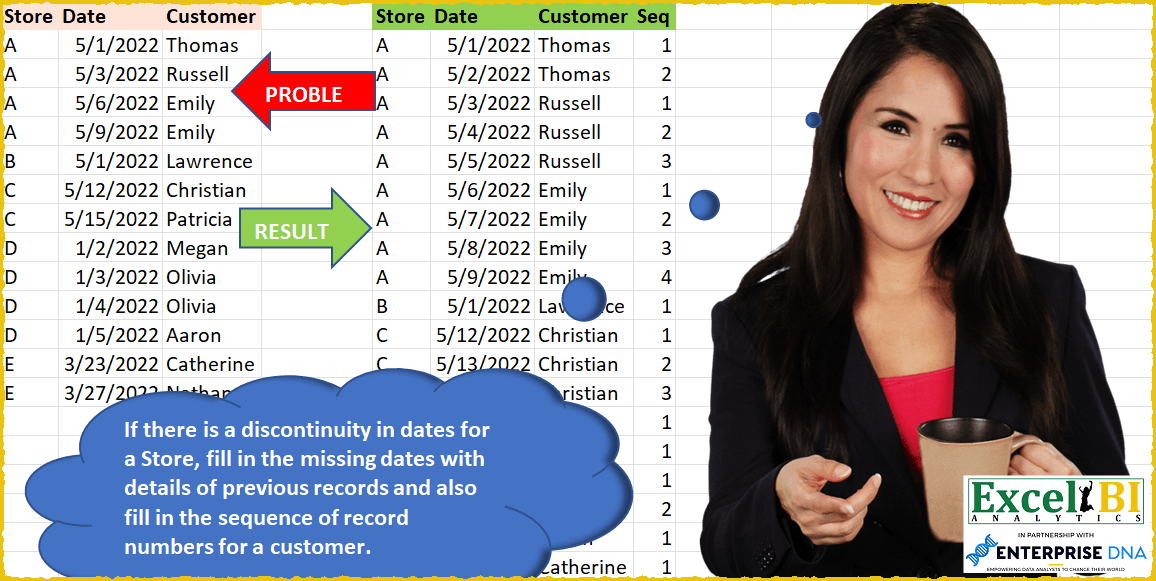
If there is a discontinuity in dates for a Store, fill in the missing dates with details of previous records and also fill in the sequence of record numbers for a customer in that store. Hence row 2 has date of 5/1/22 and row 3 has date of 5/3/22 for Store A. Hence, row 2 will be repeated with the date of 5/2/22 and sequence numbers for these will be 1 & 2. For Russell, the sequence number will be 1 as sequence number is for a Store & Customer.
📌 Challenge Details and Links
ExcelBI Power Query Challenge Number: 50
Challenge Difficulty: ⭐️⭐️⭐️
📥Download Sample File
📥Link to the solutions on LinkedIn
Solving the challenge of Fill Missing Store Dates with Power Query
Power Query solution 1 for Fill Missing Store Dates, proposed by Bo Rydobon 🇹🇭:
let
  Source = Excel.CurrentWorkbook(){[Name = "Table1"]}[Content],
  Grouped = Table.Group(
    Source,
    {"Store"},
    {
      "R",
      (T) =>
        List.Generate(
          () => T{0} & [Seq = 1],
          (g) => g[Date] <= List.Max(T[Date]),
          each
            let
              D = Date.AddDays([Date], 1),
              C = List.Last(Table.SelectRows(T, (t) => t[Date] <= D)[Customer])
            in
              [
                Store    = [Store],
                Date     = D,
                Customer = C,
                Seq      = if C = [Customer] then [Seq] + 1 else 1
              ]
        )
    }
  ),
  Comb = Table.FromRecords(List.Combine(Grouped[R]))
in
  Comb
Power Query solution 2 for Fill Missing Store Dates, proposed by Bo Rydobon 🇹🇭:
let
  Source = Excel.CurrentWorkbook(){[Name = "Table1"]}[Content],
  Change = Table.TransformColumnTypes(Source, {{"Date", type number}}),
  ColN = Table.ColumnNames(Change),
  Group = Table.Group(
    Change,
    {"Store"},
    {
      {
        "C",
        each
          let
            A = Table.ExpandListColumn(
              Table.AddColumn(
                Table.FromValue({[Store]{0}}),
                "D",
                (t) => {List.Min([Date]) .. List.Max([Date])}
              ),
              "D"
            ),
            B = Table.FillDown(
              Table.Sort(Table.Join(A, {"Value", "D"}, Change, List.FirstN(ColN, 2), 1), {"D", 0}),
              ColN
            ),
            C = Table.AddColumn(
              B,
              "Seq",
              each 1 + [D] - Table.SelectRows(B, (b) => b[Customer] = [Customer])[Date]{0}
            )
          in
            Table.SelectColumns(
              Table.RenameColumns(Table.RemoveColumns(C, "Date"), {"D", "Date"}),
              ColN & {"Seq"}
            )
      }
    }
  ),
  Combine = Table.TransformColumnTypes(Table.Combine(Group[C]), {{"Date", type date}})
in
  Combine
Power Query solution 3 for Fill Missing Store Dates, proposed by Rick de Groot:
let
  Source = Excel.CurrentWorkbook(){[Name = "Table1"]}[Content],
  Skip = Table.Skip(Source[[Store], [Date]], 1),
  Combine = Table.FromColumns(
    Table.ToColumns(Source) & Table.ToColumns(Skip),
    {"Store", "From", "Customer", "PrevStore", "To"}
  ),
  Repl = Table.ReplaceValue(
    Combine,
    each [To],
    each if [Store] = [PrevStore] then Date.AddDays([To], - 1) else [From],
    Replacer.ReplaceValue,
    {"To"}
  ),
  Group = Table.Group(
    Repl,
    {"Store", "Customer"},
    {
      {"From", each List.Min([From]), type nullable date},
      {
        "Details",
        each _,
        type table [
          Store = nullable text,
          From = nullable date,
          Customer = nullable text,
          PrevStore = nullable text,
          To = nullable date
        ]
      },
      {"To", each List.Max([To]), type nullable date}
    }
  ),
  #"Dates/Seq" = Table.AddColumn(
    Group,
    "Date",
    each
      let
        StartDate = [From],
        EndDate   = [To]
      in
        List.Generate(
          () => [x = StartDate, y = 1],
          each [x] <= EndDate,
          each [x = Date.AddDays([x], 1), y = [y] + 1],
          each [[x], [y]]
        )
  ),
  ExpList = Table.ExpandListColumn(#"Dates/Seq", "Date"),
  ExpRecord = Table.ExpandRecordColumn(ExpList, "Date", {"x", "y"}, {"Date", "Seq"}),
  DelColumns = Table.SelectColumns(ExpRecord, {"Store", "Date", "Customer", "Seq"})
in
  DelColumns
Power Query solution 4 for Fill Missing Store Dates, proposed by Aditya Kumar Darak 🇮🇳:
let
  MyFunction = (table) =>
    let
      Min = List.Min(table[Date]),
      Max = List.Max(table[Date]),
      Calc = List.Generate(
        () => [a = 0, b = table[Date]{a}, c = table[Customer]{a}, d = 1, e = table[Store]{0}],
        each [a] <= Number.From(Max - Min),
        each [
          a = [a] + 1,
          b = Date.AddDays([b], 1),
          c = try table{[Date = b]}[Customer] otherwise [c],
          d = if [c] = c then [d] + 1 else 1,
          e = [e]
        ],
        each [Store = [e], Date = [b], Customer = [c], Seq = [d]]
      )
    in
      Calc,
  Source = Excel.CurrentWorkbook(){[Name = "data"]}[Content],
  Group = Table.Group(Source, {"Store"}, {{"Calc", each MyFunction(_)}}),
  Result = Table.FromRecords(List.Combine(Group[Calc]))
in
  Result
Power Query solution 5 for Fill Missing Store Dates, proposed by Alejandro Simón 🇵🇦 🇪🇸:
let
  Source = Excel.CurrentWorkbook(){[Name = "Table1"]}[Content],
  #"Changed Type" = Table.TransformColumnTypes(Source, {{"Date", type date}}),
  GroupedStore = Table.Group(
    #"Changed Type",
    {"Store"},
    {
      {
        "Count",
        each
          let
            b = Table.AddIndexColumn(_, "Idx", 0, 1, Int64.Type),
            c = Table.AddColumn(
              b,
              "Custom",
              each try Number.From(b[Date]{[Idx] + 1}) - Number.From([Date]) otherwise 0
            ),
            d = Table.AddColumn(
              c,
              "Dates",
              each
                if [Custom] <> 0 then
                  List.Transform(
                    {Number.From([Date]) .. Number.From(Date.AddDays([Date], [Custom] - 1))},
                    Date.From
                  )
                else
                  {[Date]}
            ),
            e = Table.ExpandListColumn(d, "Dates")
          in
            e
      }
    }
  )[[Count]],
  Expanded = Table.ExpandTableColumn(
    GroupedStore,
    "Count",
    {"Store", "Dates", "Customer"},
    {"Store", "Date", "Customer"}
  ),
  GroupedCust = Table.Group(
    Expanded,
    {"Customer"},
    {{"Count", each Table.AddIndexColumn(_, "Seq", 1, 1)}}
  )[[Count]],
  Sol = Table.ExpandTableColumn(
    GroupedCust,
    "Count",
    {"Store", "Date", "Customer", "Seq"},
    {"Store", "Date", "Customer", "Seq"}
  )
in
  Sol
Power Query solution 6 for Fill Missing Store Dates, proposed by Luan Rodrigues:
let
  Fonte = Tabela1,
  tipo = Table.TransformColumnTypes(Fonte, {{"Date", type date}}, "en-US"),
  gp = Table.Group(
    tipo,
    {"Store"},
    {
      {
        "Contagem",
        each [
          a = _,
          b = {
            List.Min(List.Transform(_[Date], Number.From)) .. List.Max(
              List.Transform(_[Date], Number.From)
            )
          },
          c = List.Transform(b, Date.From)
        ][c]
      }
    }
  ),
  exp = Table.ExpandListColumn(gp, "Contagem"),
  bs = tipo,
  mesc = Table.NestedJoin(
    exp,
    {"Store", "Contagem"},
    bs,
    {"Store", "Date"},
    "exp",
    JoinKind.LeftOuter
  ),
  exp1 = Table.ExpandTableColumn(mesc, "exp", {"Date", "Customer"}),
  class = Table.Sort(exp1, {{"Store", Order.Ascending}, {"Contagem", Order.Ascending}}),
  pb = Table.FillDown(class, {"Date", "Customer"}),
  gp1 = Table.Group(
    pb,
    {"Store", "Customer"},
    {{"Contagem", each Table.AddIndexColumn(_, "Seq", 1, 1)}}
  )[[Contagem]],
  result = Table.ExpandTableColumn(gp1, "Contagem", {"Store", "Contagem", "Customer", "Seq"}),
  tipo1 = Table.TransformColumnTypes(result, {{"Contagem", type date}}, "en-US")
in
  tipo1
Power Query solution 7 for Fill Missing Store Dates, proposed by Bhavya Gupta:
let
  Source = Excel.CurrentWorkbook(){[Name = "Table1"]}[Content],
  ChangedType = Table.TransformColumnTypes(Source, {{"Date", type date}}),
  Fn = (tbl as table) =>
    let
      I_0 = Table.AddIndexColumn(tbl, "Index-0", 0, 1, Int64.Type),
      I_1 = Table.AddIndexColumn(I_0, "Index-1", 1, 1, Int64.Type),
      Merge = Table.NestedJoin(I_1, {"Index-1"}, I_1, {"Index-0"}, "Tbl", JoinKind.LeftOuter),
      C_1 = Table.AddColumn(
        Merge,
        "Custom_1",
        each
          if Table.IsEmpty([Tbl]) then
            {1}
          else
            {1 .. (Number.From([Tbl][Date]{0}) - Number.From([Date]))}
      ),
      C_2 = Table.AddColumn(
        C_1,
        "Custom_2",
        each Table.FromColumns(
          {List.Transform([Custom_1], (n) => Date.AddDays([Date], n - 1)), [Custom_1]},
          {"Date", "Seq"}
        )
      )
    in
      Table.ExpandTableColumn(
        Table.SelectColumns(C_2, {"Store", "Customer", "Custom_2"}),
        "Custom_2",
        {"Date", "Seq"},
        {"Date", "Seq"}
      )[[Store], [Date], [Customer], [Seq]],
  ExpectedOutput = Table.Combine(Table.Group(ChangedType, {"Store"}, {{"All", each Fn(_)}})[All])
in
  ExpectedOutput
Power Query solution 8 for Fill Missing Store Dates, proposed by Eric Laforce:
let
  Source = Excel.CurrentWorkbook(){[Name = "tData50"]}[Content],
  DToN = Table.TransformColumnTypes(Source, {{"Date", type number}}),
  Group = Table.Group(
    DToN,
    {"Store"},
    {
      "Data",
      each
        let
          _AllDates = Table.FromColumns({{List.Min(_[Date]) .. List.Max(_[Date])}}, {"Date2"}),
          _Join = Table.Join(_AllDates, "Date2", _, "Date", JoinKind.LeftOuter),
          _FillDown = Table.FillDown(_Join, {"Date", "Customer"}),
          _AddSeqByGroup = Table.Group(
            _FillDown,
            {"Customer"},
            {{"Data", each Table.AddIndexColumn(_, "Seq", 1, 1)}}
          )[[Data]],
          _Expand = Table.ExpandTableColumn(
            _AddSeqByGroup,
            "Data",
            {"Date2", "Customer", "Seq"},
            {"Date", "Customer", "Seq"}
          )
        in
          _Expand
    }
  ),
  Expand = Table.ExpandTableColumn(Group, "Data", {"Date", "Customer", "Seq"}),
  NToD = Table.TransformColumnTypes(Expand, {{"Date", type date}})
in
  NToD
Power Query solution 9 for Fill Missing Store Dates, proposed by Matthias Friedmann:
let
  Source = Excel.CurrentWorkbook(){[Name = "Discontinuity"]}[Content],
  #"Changed Type" = Table.TransformColumnTypes(Source, {{"Date", Int64.Type}}),
  #"Grouped Rows" = Table.Group(
    #"Changed Type",
    {"Store"},
    {
      {
        "Data",
        each Table.AddColumn(
          Table.FromColumns(
            Table.ToColumns(_) & {List.RemoveFirstN(_[Date], 1)},
            Table.ColumnNames(_) & {"Shifted"}
          ),
          "Dates",
          each try {[Date] .. [Shifted] - 1} otherwise {[Date]}
        )[[Dates], [Customer]]
      }
    }
  ),
  #"Expanded Data" = Table.ExpandTableColumn(
    #"Grouped Rows",
    "Data",
    {"Dates", "Customer"},
    {"Date", "Customer"}
  ),
  #"Expanded Date" = Table.ExpandListColumn(#"Expanded Data", "Date"),
  #"Grouped Rows1" = Table.Group(
    #"Expanded Date",
    {"Store", "Customer"},
    {{"Data", each Table.AddIndexColumn([[Date]], "Seq", 1, 1)}}
  ),
  Expanded = Table.ExpandTableColumn(#"Grouped Rows1", "Data", {"Date", "Seq"}, {"Date", "Seq"}),
  #"Changed Type1" = Table.TransformColumnTypes(Expanded, {{"Date", type date}}),
  #"Reordered" = Table.ReorderColumns(#"Changed Type1", {"Store", "Date", "Customer", "Seq"})
in
  #"Reordered"
Power Query solution 10 for Fill Missing Store Dates, proposed by Krzysztof Kominiak:
let
  Source = Excel.CurrentWorkbook(){[Name = "Table1"]}[Content],
  Tab1 = Table.TransformColumnTypes(
    Source,
    {{"Store", type text}, {"Date", type date}, {"Customer", type text}}
  ),
  GroupRows = Table.Group(
    Tab1,
    {"Store"},
    {{"T1", each List.Min([Date]), type date}, {"T2", each List.Max([Date]), type date}}
  ),
  AddDateLists = Table.AddColumn(GroupRows, "Date", each {Number.From([T1]) .. Number.From([T2])}),
  RemCols = Table.RemoveColumns(AddDateLists, {"T1", "T2"}),
  Tab2 = Table.TransformColumnTypes(Table.ExpandListColumn(RemCols, "Date"), {{"Date", type date}}),
  MergeTabs = Table.NestedJoin(
    Tab2,
    {"Store", "Date"},
    Tab1,
    {"Store", "Date"},
    "Tab2",
    JoinKind.LeftOuter
  ),
  Sort = Table.FillDown(
    Table.Sort(
      Table.ExpandTableColumn(MergeTabs, "Tab2", {"Customer"}, {"Customer"}),
      {{"Store", Order.Ascending}, {"Date", Order.Ascending}}
    ),
    {"Customer"}
  ),
  Result = Table.Combine(
    Table.Group(
      Sort,
      {"Store", "Customer"},
      {{"NT", each Table.AddIndexColumn(_, "Seq", 1, 1), type table}}
    )[NT]
  )
in
  Result
Power Query solution 11 for Fill Missing Store Dates, proposed by Sandeep Marwal:
let
 Source = Excel.CurrentWorkbook(){[Name="Table1"]}[Content],
 S1 = Table.TransformColumnTypes(Source,{{"Date", type date}}),
 S2 = Table.Group(S1, {"Store"}, {{"Count", each

List.Dates(List.First(_[Date]),1+Number.From(List.Last(_[Date]))- Number.From(List.First(_[Date])),hashtag#duration(1,0,0,0)
)}}),
 S3 = Table.ExpandListColumn(S2, "Count"),
 S4 = Table.RenameColumns(S3,{{"Count", "Date"}}),
 S5 = Table.NestedJoin(S4, {"Store", "Date"}, S1, {"Store", "Date"}, "Renamed Columns", JoinKind.LeftOuter),
 S6 = Table.ExpandTableColumn(S5, "Renamed Columns", {"Customer"}, {"Customer"}),
 S7 = Table.Sort(S6,{{"Store", Order.Ascending}, {"Date", Order.Ascending}}),
 S8 = Table.FillDown(S7,{"Customer"}),
 S9 = Table.Group(S8, {"Store", "Customer"}, {{"Count", each Table.AddIndexColumn(_,"Seq",1)}}),
 S10 = Table.ExpandTableColumn(S9, "Count", {"Date", "Seq"}, {"Date", "Seq"}),
 S11 = Table.TransformColumnTypes(S10,{{"Date", type date}}),
 S12 = Table.Sort(S11,{{"Store", Order.Ascending}, {"Date", Order.Ascending}}),
 S13 = Table.ReorderColumns(S12,{"Store", "Date", "Customer", "Seq"})
in
 S13
Power Query solution 12 for Fill Missing Store Dates, proposed by Mahmoud Bani Asadi:
let
  Source = Excel.CurrentWorkbook(){[Name = "Table1"]}[Content],
  ChangedType = Table.TransformColumnTypes(Source, {{"Date", type date}}),
  Grouped = Table.Group(
    ChangedType,
    {"Store"},
    {
      {
        "Date",
        each [
          min = Number.From(List.Min([Date])),
          max = Number.From(List.Max([Date])),
          dif = Number.From(max - min),
          lst = List.Transform({min .. max}, Date.From)
        ][lst]
      }
    }
  ),
  Expanded = Table.ExpandListColumn(Grouped, "Date"),
  Merged = Table.NestedJoin(
    Expanded,
    {"Store", "Date"},
    ChangedType,
    {"Store", "Date"},
    "Expanded Date",
    JoinKind.LeftOuter
  ),
  Expanded1 = Table.ExpandTableColumn(Merged, "Expanded Date", {"Customer"}, {"Customer"}),
  Sorted = Table.Sort(Expanded1, {{"Store", Order.Ascending}, {"Date", Order.Ascending}}),
  FilledDown = Table.FillDown(Sorted, {"Customer"}),
  Grouped1 = Table.Group(
    FilledDown,
    {"Customer"},
    {{"Count", each Table.AddIndexColumn(_, "Index", 1, 1)}}
  ),
  RemoveCol = Table.SelectColumns(Grouped1, {"Count"}),
  Expanded2 = Table.ExpandTableColumn(
    RemoveCol,
    "Count",
    {"Store", "Date", "Customer", "Index"},
    {"Store", "Date", "Customer", "Index"}
  ),
  ChangedType1 = Table.TransformColumnTypes(
    Expanded2,
    {{"Date", type date}, {"Customer", type text}, {"Store", type text}, {"Index", Int64.Type}}
  )
in
  ChangedType1
Power Query solution 13 for Fill Missing Store Dates, proposed by M. Osman Ali:
let
  Source = Table.TransformColumnTypes(
    Excel.CurrentWorkbook(){[Name = "Table2"]}[Content],
    {{"Date", type number}}
  ),
  #"Grouped Rows" = Table.Group(
    Source,
    {"Store"},
    {{"Date", each {List.Min(_[Date]) .. List.Max(_[Date])}}}
  ),
  #"Expanded Date" = Table.ExpandListColumn(#"Grouped Rows", "Date"),
  #"Merged Queries" = Table.NestedJoin(
    #"Expanded Date",
    {"Date", "Store"},
    #"Table2 (3)",
    {"Date", "Store"},
    "Table2 (3)",
    JoinKind.LeftOuter
  ),
  #"Expanded Table" = Table.TransformCo&lumnTypes(
    Table.FillDown(
      Table.ExpandTableColumn(#"Merged Queries", "Table2 (3)", {"Customer"}, {"Customer"}),
      {"Customer"}
    ),
    {{"Date", type date}}
  ),
  #"Grouped Rows1" = Table.Group(
    #"Expanded Table",
    {"Customer"},
    {
      {
        "Count",
        each _,
        type table [Store = nullable text, Date = nullable date, Customer = nullable text]
      }
    }
  ),
  #"Added Custom" = Table.SelectColumns(
    Table.AddColumn(#"Grouped Rows1", "Custom", each Table.AddIndexColumn([Count], "Seq", 1, 1)),
    "Custom"
  ),
  #"Expanded Custom" = Table.ExpandTableColumn(
    #"Added Custom",
    "Custom",
    {"Store", "Date", "Customer", "Seq"},
    {"Store", "Date", "Customer", "Seq"}
  )
in
  #"Expanded Custom"
Solving the challenge of Fill Missing Store Dates with Excel
Excel solution 1 for Fill Missing Store Dates, proposed by Bo Rydobon 🇹🇭:
=LET(s,A2:A14,d,B2:B14,t,C2:C14,REDUCE(HSTACK(A1:C1,"Seq"),UNIQUE(s),LAMBDA(a,v,LET(k,IF(s=v,d),m,MIN(k),
REDUCE(a,SEQUENCE(MAX(k)-m+1,,m),LAMBDA(c,w,LET(x,LOOKUP(w,k,t),
VSTACK(c,HSTACK(v,w,x,1+w-XLOOKUP(v&x,s&t,d))))))))))
Excel solution 2 for Fill Missing Store Dates, proposed by Bo Rydobon 🇹🇭:
=REDUCE(HSTACK(A1:C1,"Seq"),UNIQUE(A2:A14),LAMBDA(a,v,LET(s,A2:A14,d,B2:B14,t,C2:C14,m,MINIFS(d,s,v),
REDUCE(a,SEQUENCE(MAXIFS(d,s,v)-m+1,,m),LAMBDA(c,w,LET(x,XLOOKUP(v&w,s&d,t,,-1),
VSTACK(c,HSTACK(v,w,x,1+w-XLOOKUP(v&x,s&t,d)))))))))
Excel solution 3 for Fill Missing Store Dates, proposed by محمد حلمي:
=REDUCE(HSTACK(A1:C1,"Seq"),A2:A14,LAMBDA(a,v,LET(
i,OFFSET(v,,2),j,OFFSET(v,,1),
x,SEQUENCE(OFFSET(v,1,1)-j,,j),k,i=OFFSET(v,-1,2),
VSTACK(a,IFNA(IF(v=OFFSET(v,1,),
HSTACK(v,x,i,x-j+1+k*(v=OFFSET(v,-1,))),OFFSET(v,,,,3)),
HSTACK(v,0,i,1+k*TAKE(a,-1,-1)))))))
Excel solution 4 for Fill Missing Store Dates, proposed by محمد حلمي:
=REDUCE(HSTACK(A1:C1,"Seq"),A2:A14,LAMBDA(a,v,LET(r,LAMBDA(w,[e],[c],OFFSET(v,w,e,,c)),i,r(,2),j,r(,1),
x,SEQUENCE(r(1,1)-j,,j),k,i=r(-1,2),VSTACK(a,
IFNA(IF(v=r(1),HSTACK(v,x,i,x-j+1+k*(v=r(-1))),r(,,3)),
HSTACK(v,0,i,1+k*TAKE(a,-1,-1)))))))
Excel solution 5 for Fill Missing Store Dates, proposed by محمد حلمي:
=REDUCE(A1:C1,UNIQUE(A2:A14),LAMBDA(a,d,LET(i,FILTER(B2:C14,A2:A14=d),s,SEQUENCE(MAX(i)-@i+1,,@i),
r,XLOOKUP(s,TAKE(i,,1),DROP(i,,1),,-1),IFNA(VSTACK(a,HSTACK(IF(s,d),s,r,MAP(SEQUENCE(ROWS(r)),LAMBDA(x,SUM(--(INDEX(r,x)=TAKE(r,x))))))),"Seq"))))
Excel solution 6 for Fill Missing Store Dates, proposed by محمد حلمي:
=REDUCE(HSTACK(A1:C1,"Seq"),UNIQUE(A2:A14),
LAMBDA(acc,store,LET(
e,FILTER(B2:C14,A2:A14=store),
rr,TAKE(e,,1),
m,MIN(rr),
date,SEQUENCE(MAX(rr)-m+1,,m),
Customer,INDEX(DROP(e,,1),XMATCH(date,rr,-1)),
seq,IFERROR(SCAN(0,SEQUENCE(ROWS(Customer)),
LAMBDA(a,d,
IF(INDEX(VSTACK(1,DROP(Customer,-1) ),d)<>INDEX(Customer,d),1,1+a))),1),
VSTACK(acc,
IFNA(HSTACK(store,date,Customer,seq),store)))))
Excel solution 7 for Fill Missing Store Dates, proposed by 🇰🇷 Taeyong Shin:
=LET(F,LAMBDA(a,v,LET(z,FILTER(B2:C14,A2:A14=v),d,TAKE(z,,1),s,SEQUENCE(MAX(d)-@+d+1,,@+d),l,LOOKUP(s,d,DROP(z,,1)),VSTACK(a,CHOOSE({1,2,3,4},v,s,l,SEQUENCE(ROWS(l))-(XMATCH(l,l)-1))))),REDUCE(HSTACK(A1:C1,"Seq"),UNIQUE(A2:A14),F))Excel solution 8 for Fill Missing Store Dates, proposed by 🇰🇷 Taeyong Shin:
=LET(
 store, A2:A14,
 d, REDUCE({"Store","Date","Customer"}, UNIQUE(store), LAMBDA(a,b,
 LET(
 f, FILTER(B2:C14, store = b),
 dt, TAKE(f, , 1),
 cu, TAKE(f, , -1),
 mn, MIN(dt),
 sdt, SEQUENCE(MAX(dt) - mn + 1, , mn),
 c, XLOOKUP(sdt, dt, cu, , -1),
 VSTACK(a, HSTACK(IF(sdt, b), sdt, c))
 )
 )),
 cust, DROP(d, 1, 2),
 HSTACK(d,
 VSTACK("Seq",
 SCAN(0, VSTACK(1, DROP(cust, 1) = DROP(cust, -1)), LAMBDA(a,b, b * a + 1))
 )
 )
)
Excel solution 9 for Fill Missing Store Dates, proposed by Kris Jaganah:
=LET(a,A2:A14,b,B2:B14,c,C2:C14,d,UNIQUE(a),e,MINIFS(b,a,d),f,MAXIFS(b,a,d)-e+1,g,CONCAT(REPT(d,f)),h,MID(g,SEQUENCE(LEN(g)),1),i,DROP(TRIM(TEXTSPLIT(CONCAT(MAP(f,LAMBDA(x,ARRAYTOTEXT(SEQUENCE(,x))))&","),,","))/1,-1),j,SCAN(,IF(i=1,XLOOKUP(h,a,b),""),LAMBDA(x,y,IF(y="",x+1,y))),k,SCAN(,XLOOKUP(h&j,a&b,c),LAMBDA(x,y,IFNA(y,x))),VSTACK({"Store","Date","Customer","Seq"},HSTACK(h,j,k,MAP(SEQUENCE(ROWS(k)),LAMBDA(x,SUM(--(TAKE(k,x)=CHOOSEROWS(k,x))))))))Excel solution 10 for Fill Missing Store Dates, proposed by Kris Jaganah:
=LET(a,A2:A14,b,B2:B14,c,C2:C14,d,UNIQUE(a),e,BYROW(d,LAMBDA(x,LET(m,IF(a=x,b,""),n,MAX(m)-MIN(m)+1,n))),f,MID(CONCAT(MAP(d,e,LAMBDA(x,y,CONCAT(RIGHT(SEQUENCE(y)&x))))),SEQUENCE(SUM(e)),1),g,MAP(SEQUENCE(ROWS(f)),LAMBDA(x,SUM(--(TAKE(f,x)=CHOOSEROWS(f,x))))),h,SCAN(,IF(g=1,XLOOKUP(f,a,b),""),LAMBDA(x,y,IF(y="",x+1,y))),i,SCAN(,XLOOKUP(f&h,a&b,c),LAMBDA(x,y,IFNA(y,x))),j,MAP(SEQUENCE(ROWS(i)),LAMBDA(x,SUM(--(TAKE(i,x)=CHOOSEROWS(i,x))))),VSTACK({"Store","Date","Customer","Seq"},HSTACK(f,h,i,j)))Excel solution 11 for Fill Missing Store Dates, proposed by Aditya Kumar Darak 🇮🇳:
=LET(
 _d, A2:C14,
 _st, TAKE(_d, , 1),
 _h, HSTACK(A1:C1, "Seq"),
 _e, LAMBDA(a, b,
 LET(
 f, FILTER(_d, _st = b),
 dt, INDEX(f, , 2),
 mx, MAX(dt),
 mn, MIN(dt),
 df, mx - mn + 1,
 sq, SEQUENCE(df, , mn),
 fcu, XLOOKUP(sq, dt, TAKE(f, , -1), , -1),
 c, DROP(fcu, 1) = DROP(fcu, -1),
 fsq, VSTACK(1, SCAN(1, c, LAMBDA(x, y, IF(y, x + 1, 1)))),
 r, VSTACK(a, IFNA(HSTACK(b, sq, fcu, IFERROR(fsq, 1)), b)),
 r
 )
 ),
 _r, REDUCE(_h, UNIQUE(_st), _e),
 _r
)
Excel solution 12 for Fill Missing Store Dates, proposed by Duy Tùng:
=LET(a,A2:A14,b,B2:B14,c,REDUCE(A1:C1,UNIQUE(a),LAMBDA(x,y,LET(h,FILTER(b,a=y),k,SEQUENCE(MAX(h)-MIN(h)+1,,MIN(h)),VSTACK(x,IFNA(HSTACK(y,k,XLOOKUP(y&k,a&b,C2:C14,,-1)),y))))),d,TAKE(c,,1)&TAKE(c,,-1),e,SEQUENCE(ROWS(d)),HSTACK(c,VSTACK("Seq",DROP(BYROW((d=TOROW(d))*(e>=TOROW(e)),SUM),1))))Solving the challenge of Fill Missing Store Dates with SQL
SQL solution 1 for Fill Missing Store Dates, proposed by Zoran Milokanović:
WITH /* Microsoft SQL Server 2019 */
DATA_PREP
AS
(
 SELECT
 D.STORE
 ,CAST(D.DATE AS DATE) AS DATE
 ,D.CUSTOMER
 ,MIN(CAST(D.DATE AS DATE)) OVER (PARTITION BY D.STORE) AS DATE_START
 ,MAX(CAST(D.DATE AS DATE)) OVER (PARTITION BY D.STORE) AS DATE_END
 FROM DATA D
),
CALC
AS
(
 SELECT
 DP.STORE
 ,DP.CUSTOMER
 ,DP.DATE_START
 ,DP.DATE_END
 ,1 AS SEQ
 FROM DATA_PREP DP
 WHERE
 DP.DATE = DP.DATE_START
 UNION ALL
 SELECT
 C.STORE
 ,DATEADD(DAY, 1, C.DATE_START) AS DATE_START
 ,C.DATE_END
 ,CASE
 FROM CALC C
 WHERE
 DATEADD(DAY, 1, C.DATE_START) <= C.DATE_END
)
SELECT
 C.STORE
,CAST(MONTH(C.DATE_START) AS VARCHAR) + '/'
 + CAST(DAY(C.DATE_START) AS VARCHAR) + '/'
 + CAST(YEAR(C.DATE_START) AS VARCHAR) AS DATE
,C.CUSTOMER
,C.SEQ
FROM CALC C
ORDER BY
 1, C.DATE_START
;
&&