
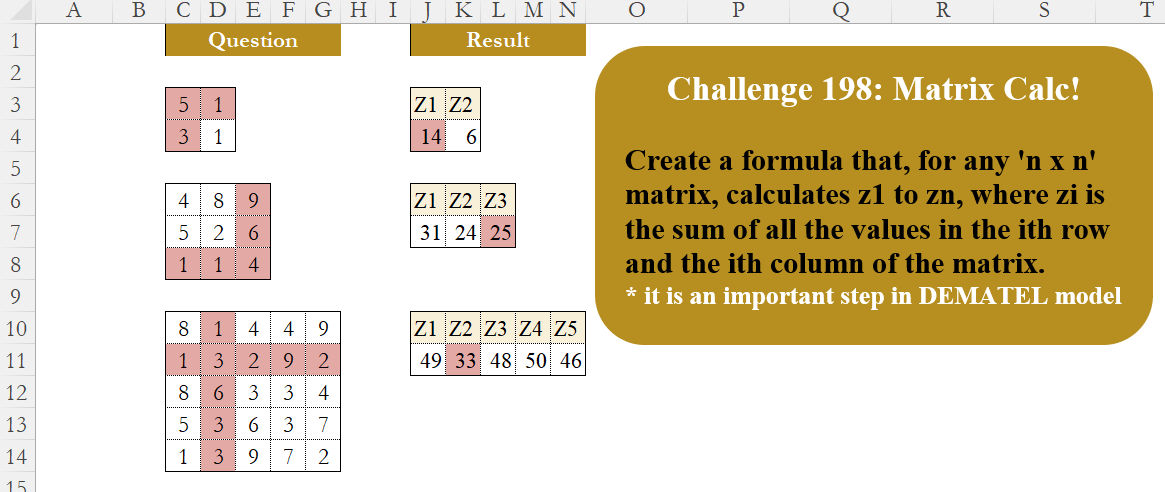
Create a formula that, for any ‘n x n’ matrix, calculates z1 to zn, where zi is the sum of all the values in the ith row and the ith column of the matrix. * it is an important step in DEMATEL model
📌 Challenge Details and Links
Challenge Number: 198
Challenge Difficulty: ⭐⭐⭐
📥Download Sample File
📥Link to the solutions on LinkedIn
Solving the challenge of Matrix Calculation! Part 2 with Power Query
Power Query solution 1 for Matrix Calculation! Part 2, proposed by Zoran Milokanović:
let
  Source = Table.ToRows(Excel.CurrentWorkbook(){[Name = "Input"]}[Content]),
  L = List.Zip(
    List.TransformMany(
      List.Positions(Source),
      each {List.Sum(Source{_} & List.Zip(Source){_})},
      (i, _) => {_, "Z" & Text.From(i + 1)}
    )
  ),
  _ = Table.FromRows({L{0}}, L{1})
in
  _
Power Query solution 2 for Matrix Calculation! Part 2, proposed by Ramiro Ayala Chávez:
let
S = Excel.CurrentWorkbook(){[Name="Table2"]}[Content],
a = Table.ToRows(S),
b = Table.ToColumns(S),
c = List.Transform(List.Zip({a,b}), each List.Sum(List.Combine(_))),
d = Table.FromRows({c}),
Sol = Table.TransformColumnNames(d, each Text.Replace(_,"Column","Z"))
in
Sol
Power Query solution 3 for Matrix Calculation! Part 2, proposed by Alejandro Simón 🇵🇦 🇪🇸:
let
  Source = Excel.CurrentWorkbook(){[Name = "Table3"]}[Content],
  N = Table.RowCount(Source),
  Cols = List.Transform(
    {0 .. N - 1},
    each List.Sum(List.Combine({Table.ToRows(Source){_}, Table.ToColumns(Source){_}}))
  ),
  Sol = Table.FromRows({Cols}, List.Transform({1 .. N}, each "Z" & Text.From(_)))
in
  Sol
Power Query solution 4 for Matrix Calculation! Part 2, proposed by Kris Jaganah:
let
  A = Excel.CurrentWorkbook(){[Name = "Table1"]}[Content],
  B = Table.ToRows(A),
  C = List.Transform(
    List.Positions(B),
    each {"Z" & Text.From(_ + 1), List.Sum(B{_} & List.Zip(B){_})}
  ),
  D = Table.PromoteHeaders(Table.FromColumns(C))
in
  D
Power Query solution 5 for Matrix Calculation! Part 2, proposed by Meganathan Elumalai:
let
  Source = Excel.CurrentWorkbook(){[Name = "Table1"]}[Content],
  ColNames = Table.ColumnNames(Source),
  Result = Table.FromColumns(
    List.Transform(
      {0 .. Table.ColumnCount(Source) - 1},
      each {List.Sum(List.Combine({Table.Column(Source, ColNames{_}), Record.ToList(Source{_})}))}
    ),
    List.Transform(Table.ColumnNames(Source), each Text.Replace(_, "Column", "Z"))
  )
in
  Result
Power Query solution 6 for Matrix Calculation! Part 2, proposed by Seokho MOON:
let
  Source = Excel.CurrentWorkbook(){[Name = "Table1"]}[Content],
  Row    = List.Transform(Table.ToColumns(Source & Table.Transpose(Source)), each List.Sum(_)),
  Res    = Table.TransformColumnNames(Table.FromRows({Row}), each Text.Replace(_, "Column", "Z"))
in
  Res
Power Query solution 7 for Matrix Calculation! Part 2, proposed by Alexandre Garcia:
let
A = Excel.CurrentWorkbook(){[Name="Table3"]}[Content],
B = {0..Table.RowCount(A)-1},
C = Table.FromRows({List.Transform(B, each List.Sum(Table.ToRows(A){_}) + List.Sum(Table.ToColumns(A){_}))}, List.Transform(B, each "Z" & Text.From(_+1)))
in C
Power Query solution 8 for Matrix Calculation! Part 2, proposed by Sahan Jayasuriya:
let
  Source = Excel.CurrentWorkbook(){[Name = "T_3"]}[Content],
  tabletorows = Table.ToRows(Source),
  tabletocolumns = Table.ToColumns(Source),
  colcount = List.Count(tabletorows),
  resultformat = List.Transform(
    {1 .. colcount},
    each {"Z" & Text.From(_)} & {List.Sum(tabletorows{_ - 1}) + List.Sum(tabletocolumns{_ - 1})}
  ),
  final = Table.PromoteHeaders(Table.FromColumns(resultformat))
in
  final
Power Query solution 9 for Matrix Calculation! Part 2, proposed by Tyler N.:
let i=Text.End(_,1),l={"Z"&i,List.Sum(Table.Column(x,_))+List.Sum(Table.ToRows(x){Int8.From(i)-1})} in l)))Power Query solution 10 for Matrix Calculation! Part 2, proposed by Vida Vaitkunaite:
let
  Source = Excel.CurrentWorkbook(){[Name = "TTT"]}[Content],
  Fx = List.Transform,
  Sum = Fx(
    List.Zip(
      {
        Fx(Table.ToColumns(Source), (x) => List.Sum(x)),
        Fx(Table.ToRows(Source), (x) => List.Sum(x))
      }
    ),
    (x) => List.Sum(x)
  ),
  Result = Table.FromRows({Sum}, Fx({1 .. Table.RowCount(Source)}, (x) => "Z" & Text.From(x)))
in
  Result
Solving the challenge of Matrix Calculation! Part 2 with Excel
Excel solution 1 for Matrix Calculation! Part 2, proposed by Oscar Mendez Roca Farell:
=LET(
    m,
    C10:G14,
    F,
     LAMBDA(
         i,
          BYCOL(
              i,
              SUM
          )
     ),
     VSTACK(
         "Z"&SEQUENCE(
             ,
              ROWS(
                  m
              )
         ),
          F(
                  m
              )+F(
              TRANSPOSE(
                  m
              )
          )
     )
)
Excel solution 2 for Matrix Calculation! Part 2, proposed by Kris Jaganah:
=LET(a,
    C10:G14,
    b,
    SEQUENCE(
        ROWS(
            a
        )
    ),
    c,
    TOROW(
        b
    ),
    VSTACK("Z"&c,
    BYCOL(c,
    LAMBDA(x,
    SUM(IF((b=x)+(c=x),
    a,
    0),
    (b=x)*(c=x)*a)))))
Excel solution 3 for Matrix Calculation! Part 2, proposed by John Jairo Vergara Domínguez:
=LET(
    m,
    C10:G14,
    c,
    COLUMN(
                m
            ),
    VSTACK(
        "Z"&1+c-@c,
        BYCOL(
            m+TRANSPOSE(
                m
            ),
            SUM
        )
    )
)
Excel solution 4 for Matrix Calculation! Part 2, proposed by John Jairo Vergara Domínguez:
=LET(
    m,
    C10:G14,
    c,
    COLUMN(
                m
            ),
    VSTACK(
        "Z"&1+c-@c,
        MMULT(
            c^0,
            m+TRANSPOSE(
                m
            )
        )
    )
)
Excel solution 5 for Matrix Calculation! Part 2, proposed by John Jairo Vergara Domínguez:
=LET(
    m,
    C10:G14,
    VSTACK(
        "Z"&SEQUENCE(
            ,
            ROWS(
                m
            )
        ),
        BYCOL(
            m+TRANSPOSE(
                m
            ),
            SUM
        )
    )
)
Excel solution 6 for Matrix Calculation! Part 2, proposed by JvdV –:
=BYCOL(
    C10:G14+TRANSPOSE(
        C10:G14
    ),
    SUM
)
Excel solution 7 for Matrix Calculation! Part 2, proposed by Imam Hambali:
=VSTACK(
    "Z"&SEQUENCE(
        ,
        ROWS(
            C10:G14
        )
    ),
    BYCOL(
        C10:G14,
        SUM
    )+TOROW(
        BYROW(
        C10:G14,
        SUM
    )
    )
)
Excel solution 8 for Matrix Calculation! Part 2, proposed by Sunny Baggu:
=LET(     rng,
     C10:G14,     _r,
     ROWS(
         rng
     ),     _c,
     SEQUENCE(
         ,
          _r
     ),     VSTACK(          "Z" & _c,          MAP(

               _c,

               LAMBDA(
                   a,

                    SUM(
                        CHOOSECOLS(
                            rng,
                             a
                        ) + TOCOL(
                            CHOOSEROWS(
                            rng,
                             a
                        )
                        )
                    )

               )

          )     ))
Excel solution 9 for Matrix Calculation! Part 2, proposed by Sunny Baggu:
=LET(     rng,
     C10:G14,     _r,
     ROWS(
         rng
     ),     _c,
     SEQUENCE(
         ,
          _r
     ),     VSTACK(          "Z" & _c,          BYCOL(
              WRAPROWS(
                  TOCOL(
                      rng,
                       ,
                       1
                  ),
                   _r
              ) + rng,
               LAMBDA(
                   a,
                    SUM(
                        a
                    )
               )
          )     ))
Excel solution 10 for Matrix Calculation! Part 2, proposed by Sunny Baggu:
=LET(     rng,
     C10:G14,     _r,
     ROWS(
         rng
     ),     _c,
     SEQUENCE(
         ,
          _r
     ),     VSTACK(          "Z" & _c,          MAP(

               _c,

               LAMBDA(
                   a,

                    SUM(
                        INDEX(
                            C10:G14,
                             a,
                             0
                        ) + TOROW(
                            INDEX(
                                C10:G14,
                                 0,
                                 a
                            )
                        )
                    )

               )

          )     ))
Excel solution 11 for Matrix Calculation! Part 2, proposed by Andy Heybruch:
=LET(
    _m,
    C10:G14,    VSTACK(
        "Z"&SEQUENCE(
            ,
            ROWS(
                _m
            )
        ),         BYCOL(
             _m,
             SUM
         )+TOROW(
             BYROW(
             _m,
             SUM
         )
         )
    )
)
Excel solution 12 for Matrix Calculation! Part 2, proposed by Eddy Wijaya:
=LET(
    arr,
    C3:D4,    n,
    COLUMNS(
        arr
    ),    db,
    DROP(
        REDUCE(
            0,
            SEQUENCE(
                n
            ),
            LAMBDA(
                a,
                v,
                HSTACK(
                    a,
                    VSTACK(
                        "Z"&v,

                        SUM(
                            CHOOSECOLS(
                                arr,
                                v
                            ),
                            CHOOSEROWS(
                                arr,
                                v
                            )
                        )
                    )
                )
            )
        ),
        ,
        1
    ),    IF(
        ISERR(
            db
        ),
        "Ensure Square array",
        db
    )
)
Excel solution 13 for Matrix Calculation! Part 2, proposed by Fausto Bier:
=LET(r,
    C10:G14,
    z,
    ROW(
        r
    )^0,
    VSTACK("Z"&SEQUENCE(
        ,
        SUM(
            z
        )
    ),
    TRANSPOSE(MMULT((r+TRANSPOSE(
        r
    )),
    z))))
Excel solution 14 for Matrix Calculation! Part 2, proposed by Hamidi Hamid:
=LET(x,
    C10:G14,
    BYCOL((SEQUENCE(
        LIGNES(
            x
        )
    )=SEQUENCE(
        ,
        LIGNES(
            x
        )
    ))*(BYROW(
        x,
        SOMME
    )+BYCOL(
        x,
        SOMME
    )),
    SOMME))
Excel solution 15 for Matrix Calculation! Part 2, proposed by Hussein SATOUR:
=LET(
    n,
    C10:G14,
    VSTACK(
        "Z"&SEQUENCE(
            ,
            ROWS(
                n
            )
        ),
        BYCOL(
            n,
            SUM
        )+TOROW(
            BYROW(
            n,
            SUM
        )
        )
    )
)
Excel solution 16 for Matrix Calculation! Part 2, proposed by Meganathan Elumalai:
=LET(
    rng,
    C6:E8,
    r,
    ROWS(
        rng
    ),
    s,
    SEQUENCE(
        ,
        r
    ),
    VSTACK(
        "Z"&s,
        MAP(
            s,
            LAMBDA(
                x,
                SUM(
                    INDEX(
                        rng,
                        x,

                    ),
                    INDEX(
                        rng,
                        ,
                        x
                    )
                )
            )
        )
    )
)
Excel solution 17 for Matrix Calculation! Part 2, proposed by Nicolas Micot:
=LAMBDA(
    l_tableau;
     LET(
         _dimension;
         LIGNES(
             l_tableau
         );
          _sommes;
         MAP(
             SEQUENCE(
                 1;
                 _dimension
             );
             LAMBDA(
                 l_z;
                 SOMME(
                     CHOISIRLIGNES(
                         l_tableau;
                         l_z
                     )
                 )+SOMME(
                     CHOISIRCOLS(
                         l_tableau;
                         l_z
                     )
                 )
             )
         );
          ASSEMB.V(
              "Z" & SEQUENCE(
                 1;
                 _dimension
             );
              _sommes
          )
     )
)

And then you can do =f_calculerZ(
    C3:D4
)
Excel solution 18 for Matrix Calculation! Part 2, proposed by Peter Bartholomew:
= TOROW(
    BYROW(
        array,
         SUM
    )
) + BYCOL(
        array,
         SUM
    )
Excel solution 19 for Matrix Calculation! Part 2, proposed by Pieter de B.:
=LET(
    a,
    C10:G14,
    MAP(
        SEQUENCE(
            ,
            ROWS(
                a
            )
        ),
        LAMBDA(
            b,
            SUM(
                INDEX(
                    +a,
                    b
                ),
                INDEX(
                    +a,
                    ,
                    b
                )
            )
        )
    )
)

Or:
=LET(
    a,
    C10:G14,
    BYCOL(
        VSTACK(
            a,
            TRANSPOSE(
                a
            )
        ),
        SUM
    )
)
Excel solution 20 for Matrix Calculation! Part 2, proposed by Rick Rothstein:
=LET(g,C10:G14,s,SEQUENCE(,ROWS(g)),VSTACK("Z"&s,MAP(s,LAMBDA(x,SUM(INDEX(+C10:G14,x),INDEX(+C10:G14,,x))))))Solving the challenge of Matrix Calculation! Part 2 with Python
Python solution 1 for Matrix Calculation! Part 2, proposed by Konrad Gryczan, PhD:
import pandas as pd
import numpy as np

path = "CH-198 Matrix Calculation.xlsx"

input1 = pd.read_excel(path,usecols="C:D", skiprows=2, nrows=2, header=None).values
input2 = pd.read_excel(path,usecols="C:E", skiprows=5, nrows=3, header=None).values
input3 = pd.read_excel(path,usecols="C:G", skiprows=9, nrows=5, header=None).values
test1  = pd.read_excel(path,usecols="J:K", skiprows=2, nrows=1)
test2  = pd.read_excel(path,usecols="J:L", skiprows=5, nrows=1)
test3  = pd.read_excel(path,usecols="J:N", skiprows=9, nrows=1)

def process(mat):
 result = {}
 for i in range(mat.shape[0]):
 colname = f"Z{i+1}"
 result[colname] = [np.sum(mat[i, :]) + np.sum(mat[:, i])]
 return pd.DataFrame(result)

output1 = process(input1)
print(output1.equals(test1)) # True

output2 = process(input2)
print(output2.equals(test2)) # True

output3 = process(input3)
print(output3.equals(test3)) # True
Solving the challenge of Matrix Calculation! Part 2 with Python in Excel
Python in Excel solution 1 for Matrix Calculation! Part 2, proposed by Alejandro Campos:
def calculate_z_scores(matrix):
 return pd.DataFrame([matrix.sum(1) + matrix.sum(0)],
 columns=[f'Z{i+1}' for i in range(matrix.shape[0])])
matrix = xl("C6:E8").values
result_df = calculate_z_scores(matrix)
Solving the challenge of Matrix Calculation! Part 2 with R
R solution 1 for Matrix Calculation! Part 2, proposed by Konrad Gryczan, PhD:
library(tidyverse)
library(readxl)

path = "files/CH-198 Matrix Calculation.xlsx"
input1 = read_excel(path, range = "C3:D4", col_names = FALSE) %>% as.matrix()
input2 = read_excel(path, range = "C6:E8", col_names = FALSE) %>% as.matrix()
input3 = read_excel(path, range = "C10:G14", col_names = FALSE) %>% as.matrix()
test1 = read_excel(path, range = "J3:K4")
test2 = read_excel(path, range = "J6:L7")
test3 = read_excel(path, range = "J10:N11")

process <- function(mat) {
 map_dfc(seq_len(nrow(mat)), ~{
 colname <- paste0("Z", .x)
 tibble(!!colname := sum(mat[.x, ]) + sum(mat[, .x]))
 })
}

output1 = process(input1)
all(output1 == test1) # TRUE

output2 = process(input2)
all(output2 == test2) # TRUE

output3 = process(input3)
all(output3 == test3) # TRUE
Solving the challenge of Matrix Calculation! Part 2 with Google Sheets
Google Sheets solution 1 for Matrix Calculation! Part 2, proposed by Peter Krkos:
PowerQuery solution:
https://docs.google.com/spreadsheets/d/1zR5IZLz8OT76vhaPEHfsPrw8-RDKnLyyqS49IJjdhFk/edit?pli=1&gid=697238083#gid=697238083