
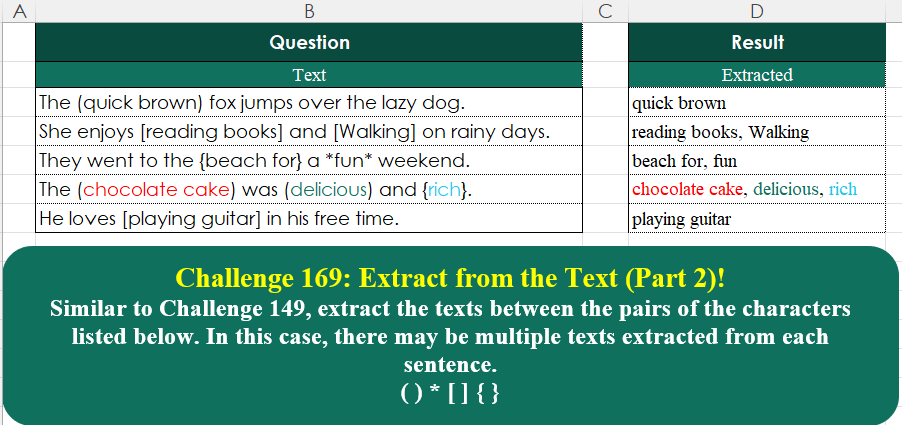
Similar to Challenge 149, extract the texts between the pairs of the characters listed below. In this case, there may be multiple texts extracted from each sentence. ( ) * [ ] { }
📌 Challenge Details and Links
Challenge Number: 169
Challenge Difficulty: ⭐⭐
📥Download Sample File
📥Link to the solutions on LinkedIn
Solving the challenge of Extract From Text! Part 7 with Power Query
Power Query solution 1 for Extract From Text! Part 7, proposed by Rafael González B.:
let
Source = Question_Table,
Add = Table.AddColumn(Source, "Resultado", each
let
Delim = Text.PositionOfAny([Text], {"[","]", "(", ")", "*", "{", "}"}, 2),
Pos = List.Split(Delim, 2),
Split = List.Accumulate(
{0..List.Count(Pos) - 1},
{},
(a, d) =>
let
o = Pos{d}{0} + 1,
p = Pos{d}{1},
q = Splitter.SplitTextByRanges({{o , p - o}})([Text]),
r = a & {q}
in
r),
Comb = Text.Combine(List.Combine(Split), ", ")
in
Comb)
in
Add
🧙🏻♂️🧙🏻♂️🧙🏻♂️Power Query solution 2 for Extract From Text! Part 7, proposed by Ramiro Ayala Chávez:
let
S = Excel.CurrentWorkbook(){[Name="Table1"]}[Content],
R =
hashtag
#table({"O","N"},{{"(","|"},{")","|"},{"[","|"},{"]","|"},{"{","|"},{"}","|"},{"*","|"}}),
n = R[N],
o = R[O],
p = List.Accumulate(List.Positions(n),S,(s,c)=>Table.ReplaceValue(s,o{c},n{c},Replacer.ReplaceText,{"Text"})),
q = p[Text],
Fx = (x)=> let
a = Splitter.SplitTextByCharacterTransition({" "},{"|"})(x),
b = List.Transform(a,Splitter.SplitTextByCharacterTransition({"|"},{" "})),
c = List.FindText(List.Combine(b),"|"),
d = List.Transform(c, each Text.Remove(Text.Remove(_,"|"),".")),
e = Text.Combine(d,", ")
in e,
Sol = Table.FromColumns({List.Transform(q, each Fx(_))},{"Extracted"})
in
Sol
Power Query solution 3 for Extract From Text! Part 7, proposed by Kris Jaganah:
let
  A = Excel.CurrentWorkbook(){[Name = "Table1"]}[Content],
  B = Table.AddColumn(
    A,
    "Extracted",
    each
      let
        a = Text.PositionOfAny([Text], {"(", ")", "*", "{", "}", "[", "]"}, Occurrence.All),
        b = List.Split(a, 2),
        c = List.Transform(b, (x) => {x{0} + 1, x{1} - x{0} - 1}),
        d = Text.Combine(List.Transform(c, (y) => Text.Middle([Text], y{0}, y{1})), ", ")
      in
        d
  )
in
  B
Power Query solution 4 for Extract From Text! Part 7, proposed by Abdallah Ally:
let
 Source = Excel.CurrentWorkbook(){[Name = "Table1"]}[Content],
 f = (txt) =>
 [
 a = {0 .. Text.Length(txt) - 3},
 b = "*[({",
 c = "**[](){}",
 d = List.Transform(
 a,
 each [
 m = Text.At(txt, _),
 n = Text.PositionOf(b, m),
 o = Text.PositionOf(c, m),
 p = if n > - 1 then Text.At(c, Text.PositionOf(c, m) + 1) else null,
 q = Text.PositionOf(Text.Middle(txt, _ + 1), p),
 r = if n > - 1 and q > - 1 then q else - 1,
 s = if r > - 1 then Text.Middle(txt, _ + 1, r) else null,
 // Exclude text enclosed in brackets if it contains characters from other types of brackets
 t = if s = null or List.ContainsAny(Text.ToList(s ?? ""), Text.ToList(c)) then null else s
 ][t]
 ),
 e = Text.Combine(List.RemoveNulls(d), ", ")
 ][e],
 Result = Table.AddColumn(Source, "Extracted", each f([Text]))[[Extracted]]
in
 Result
Power Query solution 5 for Extract From Text! Part 7, proposed by 🇮🇷 Navid Esmaeilzadeh اسماعیل زاده:
let
Source = Excel.CurrentWorkbook(){[Name="Table1"]}[Content],
A = Table.AddColumn(Source, "D", each Table.FromColumns(List.Zip( List.Split(Text.PositionOfAny([Text],List.Distinct(Text.ToList(Text.Remove(Text.Lower([Text]),{"a".."z"," ","."}))),Occurrence.All),2)),{"From","To"})),
B = Table.ExpandTableColumn(A, "D", {"From", "To"}, {"From", "To"}),
C = Table.AddColumn(B, "T", each Text.Middle([Text],[From]+1,[To]-[From]-1)),
D = Table.Group(C, {"Text"}, {{"Extracted", each Text.Combine([T],", "), type text}})
in
D
Power Query solution 6 for Extract From Text! Part 7, proposed by Ahmed Ariem:
let
f = (W)=> [
 a =List.Split(Text.PositionOfAny(W,{"(",")","*","{","}","[","]"},3),2),
 b = List.Transform(a, (x)=> {x{0}+1, x{1}-x{0}-1}),
 c = Text.Combine(Splitter.SplitTextByRanges(b)(W),", ")][c],
 Source = Excel.CurrentWorkbook(){[Name="Table1"]}[Content],
 to= Table.TransformColumns(Source,{"Text",f})
 in
 to
Power Query solution 7 for Extract From Text! Part 7, proposed by Seokho MOON:
let
  Source = Excel.CurrentWorkbook(){[Name = "Table1"]}[Content],
  AddCol = Table.AddColumn(Source, "Extracted", F),
  F = each [
    A = Text.PositionOfAny([Text], Text.ToList("()*[]{}"), Occurrence.All),
    B = List.Transform(List.Split(A, 2), (x) => Text.Range([Text], x{0} + 1, x{1} - x{0} - 1)),
    C = Text.Combine(B, ", ")
  ][C],
  Res = AddCol[[Extracted]]
in
  Res
Power Query solution 8 for Extract From Text! Part 7, proposed by Alexandre Garcia:
let
H = Excel.CurrentWorkbook(){[Name="Table1"]}[Content],
P = Text.ToList,
L = (x)=> Text.Combine(List.Accumulate(List.Split(List.PositionOfAny(P(x{0}), P("()*[]{}"),2),2), {}, (s,c)=> s & {Text.Range(x{0},c{0} + 1, c{1}-c{0}-1)}), ", "),
C = Table.FromColumns({Table.ToList(H, L)}, {"Extracted"})
in C
Power Query solution 9 for Extract From Text! Part 7, proposed by Vida Vaitkunaite:
let
 Source = Excel.CurrentWorkbook(){[Name="Table1"]}[Content],
 Final = Table.AddColumn(Source, "Extracted", each let
a = {"(", ")", "[", "]", "{", "}", "*"},
b = List.Count(List.Combine(List.Transform(a, (x)=> Text.PositionOf([Text], x, Occurrence.All))))/2,
c = List.Transform(List.Transform({1..b}, each 2 * _ - 1), (x)=> Text.SplitAny([Text], "()[]{}*"){x}),
d = Text.Combine(c, ", ")
in d)
in
 Final
Solving the challenge of Extract From Text! Part 7 with Excel
Excel solution 1 for Extract From Text! Part 7, proposed by 🇰🇷 Taeyong Shin:
=MAP(
    B3:B7,
    LAMBDA(
        x,
        ARRAYTOTEXT(
            REGEXEXTRACT(
                x,
                "(?<=p{Ps}|*).+?(?=p{Pe}|*)",
                1
            )
        )
    )
)
Excel solution 2 for Extract From Text! Part 7, proposed by Oscar Mendez Roca Farell:
=MAP(
    B3:B7,
    LAMBDA(
        b,
        LET(
            d,
            {"(",
            ")",
            "{",
            "}",
            "[",
            "]",
            "*"},
            ARRAYTOTEXT(
                TOROW(
                    TEXTBEFORE(
                        TEXTAFTER(
                            b,
                            d,
                            {1,
                            3,
                            5}
                        ),
                        d
                    ),
                    2
                )
            )
        )
    )
)
Excel solution 3 for Extract From Text! Part 7, proposed by Julian Poeltl:
=MAP(
    B3:B7,
    LAMBDA(
        A,
        TEXTJOIN(
            ",",
            ,
            TOCOL(
                TEXTBEFORE(
                    TEXTAFTER(
                        A,
                        {"(",
                        "[",
                        "{"},
                        SEQUENCE(
                            10
                        )
                    ),
                    {"}",
                    "]",
                    ")"}
                ),
                3
            )
        )
    )
)
Excel solution 4 for Extract From Text! Part 7, proposed by Kris Jaganah:
=MAP(
    B3:B7,
    LAMBDA(
        x,
        ARRAYTOTEXT(
            REGEXEXTRACT(
                x,
                "(?<=[{([*])[^{}()[]*]+(?=[})]*])",
                1
            )
        )
    )
)
Excel solution 5 for Extract From Text! Part 7, proposed by Abdallah Ally:
=MAP(
    B3:B7,
    LAMBDA(
        x,
        REGEXREPLACE(
            TEXTJOIN(
                ", ",
                ,
                REGEXEXTRACT(
                    x,
                    "((.*?))|[(.*?)]|{(.*?)}|*(.*?)*",
                    1
                )
            ),
            "[()[]{}*]",
            ""
        )
    )
)
Excel solution 6 for Extract From Text! Part 7, proposed by JvdV -:
=REGEXREPLACE(
    B3:B7,
    ".*?[[{(*](.*?)[]})*][^[{(*]*($)?",
    "$1${2:+:, }"
)

If you DO want to be strict and want to make sure all groupings are correct (thus (..),
     {..},
     [..] and *..*) you can use:

=REGEXREPLACE(
    B3:B7,
    ".*?((([^[{(*]})]*))|[((?2))]|{((?2))}|*((?2))*).*?(?=(?1)|($))",
    "$2$3$4$5${6:+:, }"
)

The latter would rule out false positives from something like:

*Test1)The (chocolate cake) was (delicious)
Excel solution 7 for Extract From Text! Part 7, proposed by Yaroslav Drohomyretskyi:
=TEXTJOIN(
    ", ",
    ,
    REGEXEXTRACT(
        B3,
        "(?<={).*?(?=})|(?<=().*?(?=))|(?<=*).*?(?=*)|(?<=[).*?(?=])",
        1
    )
)
Excel solution 8 for Extract From Text! Part 7, proposed by Sunny Baggu:
=MAP(
 B3:B7,
 LAMBDA(a,
 ARRAYTOTEXT(
 TOROW(
 TEXTBEFORE(
 TEXTAFTER(
 a,
 {"(", "*", "[", "{"},
 SEQUENCE(10)
 ),
 {")", "*", "]", "}"}
 ),
 3
 )
 )
 )
)
Excel solution 9 for Extract From Text! Part 7, proposed by Albert Cid Cañigueral:
=MAP(
    B3:B7,
    LAMBDA(
        e,
        TEXTJOIN(
            ", ",
            1,
            REGEXREPLACE(
                REGEXEXTRACT(
                    e,
                    "[({[*](.+?)[)}]*]",
                    1
                ),
                "[(){}[]*]",
                ""
            )
        )
    )
)
Excel solution 10 for Extract From Text! Part 7, proposed by Gerson Pineda:
=MAP(
    B3:B7,
    LAMBDA(
        x,
        TEXTJOIN(
            ", ",
            ,
            INDEX(
                TEXTSPLIT(
                    x,
                    {"{",
                    "[",
                    "*",
                    "("},
                    {"}",
                    "]",
                    "*",
                    ")"},
                    1,
                    ,

                ),
                ,
                2
            )
        )
    )
)
Excel solution 11 for Extract From Text! Part 7, proposed by Gerson Pineda:
=MAP(
    B3:B7,
    LAMBDA(
        x,
        ARRAYTOTEXT(
            REGEXEXTRACT(
                x,
                "(?<={|[|(|*)(.*?)(?=}|]|)|*)",
                1
            )
        )
    )
)
Excel solution 12 for Extract From Text! Part 7, proposed by Hussein SATOUR:
=MAP(
    B3:B7,
    LAMBDA(
        x,
        TEXTJOIN(
            ", ",
            ,
            INDEX(
                TEXTSPLIT(
                    x,
                    {"(",
                    "*",
                    "[",
                    "{"},
                    {")",
                    "*",
                    "]",
                    "}"},
                    ,
                    ,
                    ""
                ),
                ,
                2
            )
        )
    )
)
Excel solution 13 for Extract From Text! Part 7, proposed by Pieter de B.:
=MAP(
    B3:B7,
    LAMBDA(
        x,
        ARRAYTOTEXT(
            TOCOL(
                TEXTBEFORE(
                    TEXTAFTER(
                        x,
                        {"(",
                        "{",
                        "[",
                        "*"},
                        {1,
                        2,
                        3}
                    ),
                    {"*",
                    "]",
                    "}",
                    ")"}
                ),
                2
            )
        )
    )
)

Or
=MAP(
    B3:B7,
    LAMBDA(
        x,
        TEXTJOIN(
            ", ",
            ,
            TEXTBEFORE(
                TEXTAFTER(
                    x,
                    {"(",
                    "{",
                    "[",
                    "*"},
                    {1,
                    2,
                    3},
                    ,
                    ,
                    ""
                ),
                {"*",
                "]",
                "}",
                ")"},
                ,
                ,
                ,
                ""
            )
        )
    )
)
Excel solution 14 for Extract From Text! Part 7, proposed by Shariful Islam:
=TEXTJOIN(
    ", ",
    TRUE,
    REGEXEXTRACT(
        B3,
         "(?<=(|{|[|*)([^)}]*]+)(?=)|}|]|*)",
        1
    )
)
Solving the challenge of Extract From Text! Part 7 with Python
Python solution 1 for Extract From Text! Part 7, proposed by Konrad Gryczan, PhD:
import pandas as pd
import re
path = "CH-169 Extract From Text Part 2.xlsx"
input = pd.read_excel(path, usecols="B", skiprows=1, nrows=6)
test = pd.read_excel(path, usecols="D", skiprows=1, nrows=6)
def extract_text(text):
 pattern = r"(?<={)[^{}]+(?=})|(?<=[)[^]]+(?=])|(?<=()[^)]+(?=))|(?<=*)[^*]+(?=*)"
 matches = re.findall(pattern, text)
 return ", ".join(matches)
input['result'] = input['Text'].apply(extract_text)

print(input["result"].equals(test["Extracted"])) # True
Solving the challenge of Extract From Text! Part 7 with Python in Excel
Python in Excel solution 1 for Extract From Text! Part 7, proposed by Alejandro Campos:
import re

def extract_texts_by_sentence(texts):
 return [', '.join(sum([re.findall(p, t) for p in [
 r'((.*?))', r'*(.*?)*',
 r'[(.*?)]',
 r'{(.*?)}']], [])) for t in texts if sum([re.findall(p, t)
 for p in [r'((.*?))', r'*(.*?)*', r'[(.*?)]', r'{(.*?)}']], [])]

df = xl("B2:B7", headers=True)
result_df = pd.DataFrame(extract_texts_by_sentence(df['Text']), columns=['Extracted Texts'])
Solving the challenge of Extract From Text! Part 7 with R
R solution 1 for Extract From Text! Part 7, proposed by Konrad Gryczan, PhD:
library(tidyverse)
library(readxl)
path = "files/CH-169 Extract From Text Part 2.xlsx"
input = read_excel(path, range = "B2:B7")
test = read_excel(path, range = "D2:D7")
result = input %>%
 mutate(result = str_match_all(Text, "(?<=\{)[^{}]+(?=\})|(?<=\[)[^\]]+(?=\])|(?<=\()[^\)]+(?=\))|(?<=\*)[^\*]+(?=\*)")) %>%
 mutate(result = map_chr(result, ~paste(., collapse = ", ")))
all.equal(result$result, test$Extracted, check.attributes = FALSE)
#> [1] TRUE
Solving the challenge of Extract From Text! Part 7 with Google Sheets
Google Sheets solution 1 for Extract From Text! Part 7, proposed by Peter Krkos:
PowerQuery solution:
https://docs.google.com/spreadsheets/d/1zR5IZLz8OT76vhaPEHfsPrw8-RDKnLyyqS49IJjdhFk/edit?pli=1&gid=1532886132#gid=1532886132