
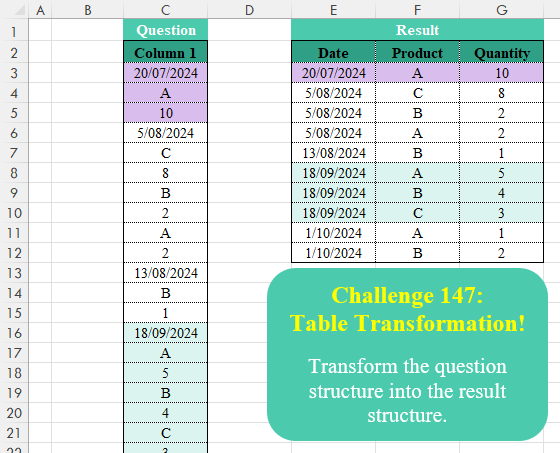
Transform the question structure into the result structure.
📌 Challenge Details and Links
Challenge Number: 147
Challenge Difficulty: ⭐⭐⭐
📥Download Sample File
📥Link to the solutions on LinkedIn
Solving the challenge of Table Transformation! Part 16 with Power Query
Power Query solution 1 for Table Transformation! Part 16, proposed by Zoran Milokanović:
let
  Source = Excel.CurrentWorkbook(){[Name = "Input"]}[Content][Column 1],
  S = Table.FromRows(
    List.Accumulate(
      Source,
      {},
      (b, n) =>
        let
          l = List.Last(b)
        in
          if n is datetime then
            b & {{n}}
          else if n is text and List.Count(l) = 3 then
            b & {{l{0}, n}}
          else
            List.RemoveLastN(b) & {l & {n}}
    ),
    {"Date", "Product", "Quantity"}
  )
in
  S
Power Query solution 2 for Table Transformation! Part 16, proposed by Zoran Milokanović:
let
  Source = Excel.CurrentWorkbook(){[Name = "Input"]}[Content],
  S = Table.FromRows(
    List.Combine(
      Table.Group(
        Source,
        "Column 1",
        {
          "R",
          each List.TransformMany(
            {List.Skip([Column 1])},
            each List.Split(_, 2),
            (i, o) => {[Column 1]{0}} & o
          )
        },
        0,
        (b, n) => Byte.From(n is datetime)
      )[R]
    ),
    {"Date", "Product", "Quantity"}
  )
in
  S
Power Query solution 3 for Table Transformation! Part 16, proposed by Brian Julius:
let
  Source = Table.TransformColumnTypes(
    Excel.CurrentWorkbook(){[Name = "Table1"]}[Content],
    {"Column 1", Text.Type}
  ),
  AddDate = Table.SelectRows(
    Table.FillDown(
      Table.AddColumn(
        Source,
        "Date",
        each if Text.Contains([Column 1], "/") then Text.BeforeDelimiter([Column 1], " ") else null
      ),
      {"Date"}
    ),
    each Text.Contains([Column 1], "/") = false
  ),
  AddCol = Table.AddColumn(
    AddDate,
    "Col",
    each try
      if Value.Is(Number.From([Column 1]), Number.Type) then "Quantity" else "product"
    otherwise
      "Product"
  ),
  AddIdx = Table.TransformColumns(
    Table.AddIndexColumn(AddCol, "Index", 0, 1, Int64.Type),
    {"Index", each Number.IntegerDivide(_, 2)}
  ),
  TabP = Table.SelectRows(AddIdx, each ([Col] = "Product")),
  TabQ = Table.PrefixColumns(Table.SelectRows(AddIdx, each ([Col] = "Quantity")), "X"),
  Join = Table.Join(TabP, "Index", TabQ, "X.Index"),
  Select = Table.SelectColumns(Join, {"Column 1", "Date", "X.Column 1"}),
  Ren = Table.RenameColumns(Select, {{"Column 1", "Product"}, {"X.Column 1", "Quantity"}}),
  Reord = Table.ReorderColumns(Ren, {"Date", "Product", "Quantity"})
in
  Reord
Power Query solution 4 for Table Transformation! Part 16, proposed by Cristobal Salcedo Beltran:
let
  Origen = Excel.CurrentWorkbook(){[Name = "Tabla1"]}[Content],
  AgregarColumna = Table.AddColumn(
    Origen,
    "Columns",
    each [
      Date     = try Date.From(Value.As([Column 1], type datetime)) otherwise null,
      Product  = try Value.As([Column 1], type text) otherwise null,
      Quantity = try Value.As([Column 1], type number) otherwise null
    ]
  ),
  ExpandirColumnas = Table.ExpandRecordColumn(
    AgregarColumna,
    "Columns",
    {"Date", "Product", "Quantity"},
    {"Date", "Product", "Quantity"}
  ),
  RellenarValores = Table.FillDown(ExpandirColumnas, {"Date", "Product"}),
  AgruparFilas = Table.Group(
    RellenarValores,
    {"Date", "Product"},
    {{"Quantity", each List.Max([Quantity]), type nullable number}}
  ),
  FiltrarFilas = Table.SelectRows(AgruparFilas, each ([Quantity] <> null)),
  OrdenarFilas = Table.Sort(FiltrarFilas, {{"Date", Order.Ascending}})
in
  OrdenarFilas
Power Query solution 5 for Table Transformation! Part 16, proposed by Luan Rodrigues:
let
  Fonte = Tabela1,
  grp = Table.Group(
    Fonte,
    "Column 1",
    {{"tab", each Table.FromRows(List.Split(Table.Skip(_)[Column 1], 2), {"Product", "Quantity"})}},
    0,
    (a, b) => Number.From(b is datetime)
  ),
  exp = Table.ExpandTableColumn(grp, "tab", Table.ColumnNames(grp[tab]{0}))
in
  exp
Power Query solution 6 for Table Transformation! Part 16, proposed by Rafael González B.:
let
Source = Table,
CheckValue = Table.AddColumn(
Source, "Check",
each try Value.Is(Date.From([Column 1]), type date) otherwise false),
IndexCol = Table.AddIndexColumn(CheckValue, "Index", 0, 1, Int64.Type),
ForGroup = Table.AddColumn(
IndexCol, "Id",
each if [Check] then [Index] else null),
FillDown = Table.FillDown(ForGroup,{"Id"})[[Id], [Column 1]],
Grouping = Table.Group(
FillDown, {"Id"},
{{"Group", each _, type table [Id=number, Column 1=nullable text]}})[Group],
Transf = List.Transform(Grouping, each
let
Sou = _[Column 1],
LF = List.First(Sou),
LD = {List.Repeat({LF}, (List.Count(Sou) - 1) / 2)} & List.Zip(List.Split(List.Skip(Sou),2)),
TF = Table.FromColumns(LD, {"Date" , "Product", "Quantity"})
in
TF),
Comb = Table.Combine(Transf),
Result = Table.TransformColumnTypes(Comb,{{"Date", type date}, {"Product", type text}, {"Quantity", Int64.Type}})
in
Result
🧙🏻♂️🧙🏻♂️🧙🏻♂️Power Query solution 7 for Table Transformation! Part 16, proposed by Rafael González B.:
let
  Source = Table,
  Group = Table.Group(
    Source,
    "Column 1",
    {
      "All",
      each
        let
          a  = Table.ToColumns(_){0},
          aa = a{0},
          b  = List.Transform(List.Split(List.Skip(a), 2), each {aa} & _),
          c  = Table.FromRows(b, {"Date", "Product", "Quantity"})
        in
          c
    },
    0,
    (x, y) => Number.From(y is date)
  ),
  Answer = Table.Combine(Group[All])
in
  Answer
Power Query solution 8 for Table Transformation! Part 16, proposed by Aditya Kumar Darak 🇮🇳:
let
  Source = Excel.CurrentWorkbook(){[Name = "data"]}[Content],
  Group = Table.Group(
    Source,
    "Column 1",
    {"A", each Table.FromRows(List.Split(List.Skip([Column 1]), 2), {"Product", "Qty"})},
    0,
    (x, y) => Number.From(y is datetime)
  ),
  Expand = Table.ExpandTableColumn(Group, "A", {"Product", "Qty"}),
  Return = Table.RenameColumns(Expand, {{"Column 1", "Date"}})
in
  Return
Power Query solution 9 for Table Transformation! Part 16, proposed by Alejandro Simón 🇵🇦 🇪🇸:
let
 Source = Excel.CurrentWorkbook(){[Name="Table1"]}[Content],
 Group = Table.Group(Source, "Column 1", {"A", each
let
a = Table.ToColumns(_){0},
b = List.Split(List.Skip(a),2),
c = Table.FromRows(b, {"Product","Quantity"})
in c},0, (x,y)=> Number.From(y is datetime)),
 Sol = Table.ExpandTableColumn(Group, "A", Table.ColumnNames(Group[A]{0}))
in
 Sol

Tambien se puede "utilizar Value.Type(y) = DateTime.Type" en lugar de "y is datetime" en caso que no recuerden el uso de "is"
Power Query solution 10 for Table Transformation! Part 16, proposed by Kris Jaganah:
let
  Source = Excel.CurrentWorkbook(){[Name = "Table1"]}[Content],
  B = Table.Combine(
    Table.Group(
      Source,
      "Column 1",
      {
        "All",
        (x) =>
          let
            a = x[Column 1],
            b = List.Skip(a),
            c = Table.FromList(
              {0 .. List.Count(b) / 2 - 1},
              each {a{0}, List.Alternate(b, 1, 1, 1){_}, List.Alternate(b, 1, 1){_}},
              {"Date", "Product", "Quantity"}
            )
          in
            c
      },
      GroupKind.Local,
      (x, y) => Number.From(y is datetime)
    )[All]
  )
in
  B
Power Query solution 11 for Table Transformation! Part 16, proposed by Abdallah Ally:
let
  Source = Excel.CurrentWorkbook(){[Name = "Table1"]}[Content],
  AddCol1 = Table.AddColumn(
    Source,
    "Date",
    each if [Column 1] is datetime then Date.From([Column 1]) else null
  ),
  AddCol2 = Table.AddColumn(
    AddCol1,
    "Data",
    each if [Date] is null then Text.From([Column 1]) else null
  ),
  Select = Table.SelectRows(Table.FillDown(AddCol2, {"Date"}), each [Data] <> null),
  Transf = (t, s) => List.Transform(List.Split(t, s), each Text.Combine(_, ",")),
  Group = Table.Group(Select, "Date", {"Data", each Transf([Data], 2)}),
  Expand = Table.ExpandListColumn(Group, "Data"),
  Split = Table.SplitColumn(Expand, "Data", each Text.Split(_, ","), {"Product", "Quantity"}),
  Result = Table.TransformColumnTypes(Split, {{"Date", type date}, {"Quantity", type number}})
in
  Result
Power Query solution 12 for Table Transformation! Part 16, proposed by Nelson Mwangi:
let
  Source = Excel.CurrentWorkbook(){[Name = "Table1"]}[Content],
  DateCol = Table.AddColumn(
    Source,
    "Date",
    each if Value.Type([Column 1]) = type datetime = true then [Column 1] else null
  ),
  ProductCol = Table.AddColumn(
    DateCol,
    "Product",
    each if Value.Type([Column 1]) = type text = true then [Column 1] else null
  ),
  QuantityCol = Table.AddColumn(
    ProductCol,
    "Quantity",
    each if Value.Type([Column 1]) = type number = true then [Column 1] else null
  ),
  FDown = Table.FillDown(QuantityCol, {"Date", "Product", "Quantity"}),
  FilterCol1 = Table.SelectRows(
    FDown,
    each Value.Type([Column 1]) <> type datetime and Value.Type([Column 1]) <> type text
  ),
  DelCol = Table.RemoveColumns(FilterCol1, {"Column 1"})
in
  DelCol
Power Query solution 13 for Table Transformation! Part 16, proposed by 🇮🇷 Navid Esmaeilzadeh اسماعیل زاده:
let
S = Excel.CurrentWorkbook(){[Name="Table1"]}[Content],
A = Table.AddIndexColumn(S, "I", 1, 1),
B = Table.AddColumn(A, "I2", each if Value.Is([Column 1],type datetime) then [I] else null),
C =Table.FillDown(B,{"I2"}),
D = Table.Group(C, {"I2"}, {{"T", each _}}),
E = Table.AddColumn(D, "T2", each let
a=[T][#"Column 1"]{0},
b=List.Alternate(List.Skip([T][#"Column 1"],1),1,1,1),
c=List.Alternate(List.Skip([T][#"Column 1"],1),1,1),
d=Table.FillDown(Table.FromColumns({{a},b,c},{"Date","Product","Qty"}),{"Date"})
in
d),
 F = Table.Combine(E[T2]),
 G = Table.TransformColumnTypes(F,{{"Date", type date}})
in
G
Power Query solution 14 for Table Transformation! Part 16, proposed by Ahmed Ariem:
let
  Source = Excel.CurrentWorkbook(){[Name = "Table1"]}[Content],
  gr = Table.Group(
    Source,
    "Column 1",
    {
      "tmp",
      (x) =>
        [
          a = Table.Skip(x),
          b = Table.AddColumn(a, "Quantity", each if [Column 1] is number then [Column 1] else null),
          c = Table.SelectRows(Table.FillUp(b, {"Quantity"}), (x) => x[Quantity] <> x[Column 1])
        ][c]
    },
    0,
    (x, y) => Number.From(y is datetime)
  ),
  Expand = Table.ExpandTableColumn(gr, "tmp", {"Column 1", "Quantity"}, {"Product", "Quantity"})
in
  Expand
Power Query solution 15 for Table Transformation! Part 16, proposed by Seokho MOON:
let
  Source = Excel.CurrentWorkbook(){[Name = "Table1"]}[Content][Column 1],
  lst = List.Accumulate(
    Source,
    {},
    (a, v) =>
      if v is datetime then
        a & {{v}}
      else if List.Last(List.Last(a)) is number then
        a & {{List.Last(a){0}} & {v}}
      else
        List.RemoveLastN(a) & {List.Last(a) & {v}}
  )
in
  Table.FromRows(lst, {"Date", "Product", "Quality"})
Power Query solution 16 for Table Transformation! Part 16, proposed by Vida Vaitkunaite:
let
  Source = Excel.CurrentWorkbook(){[Name = "Table2"]}[Content],
  Dates = Table.FillDown(
    Table.AddColumn(
      Source,
      "Date",
      each
        if Value.Is(Value.FromText([Column 1]), type datetime)
          or Value.Is(Value.FromText([Column 1]), type date)
        then
          [Column 1]
        else
          null
    ),
    {"Date"}
  ),
  SelectRows = Table.SelectRows(
    Dates,
    each Value.Is(Value.FromText([Column 1]), type text)
      or Value.Is(Value.FromText([Column 1]), type number)
  ),
  Category = Table.AddColumn(
    SelectRows,
    "Category",
    each if Value.Is(Value.FromText([Column 1]), type text) then "Product" else "Quantity"
  ),
  Index = Table.AddIndexColumn(Category, "Index", 1, 1),
  Pivot = Table.Pivot(Index, List.Distinct(Index[Category]), "Category", "Column 1"),
  Final = Table.RemoveColumns(
    Table.SelectRows(Table.FillDown(Pivot, {"Product"}), each [Quantity] <> null),
    "Index"
  )
in
  Final
Solving the challenge of Table Transformation! Part 16 with Excel
Excel solution 1 for Table Transformation! Part 16, proposed by 🇰🇷 Taeyong Shin:
=LET(
    d,
    C3:C17,
    FILTER(
        HSTACK(
            SCAN(
                ,
                d,
                MAX
            ),
            REGEXEXTRACT(
                d,
                {"[A-Z]",
                "d+"}
            )
        ),
        d>""
    )
)
Excel solution 2 for Table Transformation! Part 16, proposed by Oscar Mendez Roca Farell:
=LET(
    d,
    C3:C27,
    F,
    LAMBDA(
        i,
        WRAPROWS(
            FILTER(
                i,
                LEN(
                    d
                )<3
            ),
            2
        )
    ),
    HSTACK(
        DROP(
            F(
                SCAN(
                    ,
                    d,
                    MAX
                )
            ),
            ,
            1
        ),
        F(
                    d
                )
    )
)
Excel solution 3 for Table Transformation! Part 16, proposed by Julian Poeltl:
=LET(
    C,
    C3:C27,
    T,
    ISTEXT(
        C
    ),
    S,
    SCAN(
        0,
        C,
        LAMBDA(
            A,
            B,
            IF(
                IFERROR(
                    --B,
                    0
                )>40000,
                B,
                A
            )
        )
    ),
    HSTACK(
        FILTER(
            S,
            T
        ),
        FILTER(
            C,
            T
        ),
        FILTER(
            C,
            C<99
        )
    )
)
Assuming Ascending Order of Dates:
=LET(
    C,
    C3:C27,
    T,
    ISTEXT(
        C
    ),
    S,
    SCAN(
        0,
        C,
        MAX
    ),
    HSTACK(
        FILTER(
            S,
            T
        ),
        FILTER(
            C,
            T
        ),
        FILTER(
            C,
            C<99
        )
    )
)
Excel solution 4 for Table Transformation! Part 16, proposed by Kris Jaganah:
=LET(
    a,
    C3:C27,
    b,
    IF(
        ISTEXT(
            a
        ),
        a,
        ""
    ),
    FILTER(
        HSTACK(
            SCAN(
                ,
                a,
                MAX
            ),
            b,
            DROP(
                a,
                1
            )
        ),
        b<>""
    )
)
Excel solution 5 for Table Transformation! Part 16, proposed by John Jairo Vergara Domínguez:
=LET(
    i,
    C3:C26,
    FILTER(
        HSTACK(
            SCAN(
                ,
                i,
                MAX
            ),
            i,
            C4:C27
        ),
        i>""
    )
)
Excel solution 6 for Table Transformation! Part 16, proposed by Imam Hambali:
=LET(    a,
     C3:C27,    b,
     SCAN(
         ,
          a,
          MAX
     ),    c,
     IF(
         ISTEXT(
             a
         ),
         a,
         0
     ),    d,
     IF(
         a<100,
         a,
         0
     ),    HSTACK(
        FILTER(
            HSTACK(
                b,
                c
            ),
            c<>0
        ),
         FILTER(
             d,
             d>0
         )
    ))
Excel solution 7 for Table Transformation! Part 16, proposed by Sunny Baggu:
=LET(
 _s, SEQUENCE(ROWS(C3:C27)),
 _a, --ISTEXT(C3:C27),
 _b, FILTER(_s, _a) + {0, 1},
 _c, FILTER(_s, IFERROR(N((--C3:C27) > 1900), 0)),
 _d, XLOOKUP(TAKE(_b, , 1), _c, _c, , -1),
 INDEX(C3:C27, HSTACK(_d, _b))
)
Excel solution 8 for Table Transformation! Part 16, proposed by Asheesh Pahwa:
=LET(
    c,
    C3:C27,
    I,
    IFERROR(
        IF(
            --c>1900,
            c,
            0
        ),
        0
    ),    s,
    SCAN(
        0,
        I,
        LAMBDA(
            x,
            y,
            IF(
                y,
                y,
                x
            )
        )
    ),
    u,
    UNIQUE(
        s
    ),
    REDUCE(
        E2:G2,
        u,
        LAMBDA(
            x,
            y,
            VSTACK(
                x,
                LET(
                    f,
                    FILTER(
                        c,
                        s=y
                    ),
                    IFNA(
                        HSTACK(
                            y,
                            WRAPROWS(
                                DROP(
                                    f,
                                    1
                                ),
                                2
                            )
                        ),
                        y
                    )
                )
            )
        )
    )
)
Excel solution 9 for Table Transformation! Part 16, proposed by ferhat CK:
=LET(
    a,
    SCAN(
        ,
        C3:C27,
        LAMBDA(
            a,
            v,
            IF(
                N(
                    v
                )>45000,
                v,
                a
            )
        )
    ),
    b,
    XMATCH(
        a,
        a
    ),
    REDUCE(
        E2:G2,
        UNIQUE(
            b
        ),
        LAMBDA(
            x,
            y,
            VSTACK(
                x,
                LET(
                    f,
                    FILTER(
                        C3:C27,
                        b=y
                    ),
                    IFERROR(
                        HSTACK(
                            TAKE(
                                f,
                                1
                            ),
                            WRAPROWS(
                                DROP(
                                f,
                                1
                            ),
                                2
                            )
                        ),
                        TAKE(
                                f,
                                1
                            )
                    )
                )
            )
        )
    )
)
Excel solution 10 for Table Transformation! Part 16, proposed by Hamidi Hamid:
=LET(
    x,
    MAP(
        C3:C27,
        LAMBDA(
            a,
            LOOKUP(
                "zzz",
                C3:a
            )
        )
    ),
    y,
    SCAN(
        0,
        C3:C27,
        MAX
    ),
    z,
    IF(
        C3:C27=x,
        "",
        IF(
            C3:C27=y,
            "",
            C3:C27
        )
    ),
    f,
    DROP(
        HSTACK(
            y,
            x,
            z
        ),
        1
    ),
    VSTACK(
        E2:G2,
        FILTER(
            f,
            TAKE(
                f,
                ,
                -1
            )<>""
        )
    )
)
Excel solution 11 for Table Transformation! Part 16, proposed by Tomasz Jakóbczyk:
=HSTACK(
    LET(
        c,
        C3:C27,
        s,
        SCAN(
            C3,
            c,
            LAMBDA(
                t,
                v,
                IF(
                    AND(
                        v>40000,
                        ISNUMBER(
                            v
                        )=TRUE
                    ),
                    v,
                    t
                )
            )
        ),
        FILTER(
            HSTACK(
                s,
                c
            ),
            ISTEXT(
                c
            )
        )
    ),
    FILTER(
        C4:C28,
        ISTEXT(
            C3:C27
        )
    )
)
Solving the challenge of Table Transformation! Part 16 with Python
Python solution 1 for Table Transformation! Part 16, proposed by Konrad Gryczan, PhD:
import pandas as pd

path = "CH-147 Table Transformation.xlsx"
input = pd.read_excel(path, usecols="C", skiprows=1, nrows=25, dtype=str)
test = pd.read_excel(path, usecols="E:G", skiprows=1, nrows=10, parse_dates=['Date'])

input['Date'] = pd.to_datetime(input['Column 1'], errors='coerce').ffill()

input['Group_Index'] = input.groupby('Date').cumcount()
input = input[input['Group_Index'] != 0].reset_index()

input['clmn'] = ['Product', 'Quantity'] * (len(input) // 2) + ['Product'] * (len(input) % 2)
input['group'] = (input['clmn'] == 'Product').cumsum()

result = input.pivot_table(index=['Date', 'group'], columns='clmn', values='Column 1', aggfunc='first').reset_index()
result = result.drop(columns=['group'])
result.columns.name = None
result['Quantity'] = result['Quantity'].astype('int64')

print(result.equals(test)) # True
Python solution 2 for Table Transformation! Part 16, proposed by Luan Rodrigues:
import pandas as pd

file = "CH-147 Table Transformation.xlsx"
df = pd.read_excel(file,usecols="C",skiprows=1)

df['Column 1'] = df['Column 1'].astype('str')
df['grp'] = df['Column 1'].where(df['Column 1'].str.contains('-')).ffill()

def trf(group):
 values = group['Column 1'].iloc[1:].tolist()
 div_tab = [values[i:i + 2] for i in range(0, len(values), 2)]
 result = pd.DataFrame(div_tab, columns=["Product", "Quantity"])
 result['Date'] = group.name
 return result

df = df.groupby('grp').apply(trf)
df.reset_index(drop=True, inplace=True)
df = df[['Date','Product', 'Quantity']]

print(df)
Solving the challenge of Table Transformation! Part 16 with Python in Excel
Python in Excel solution 1 for Table Transformation! Part 16, proposed by Alejandro Campos:
df = xl("C2:C27", headers=True).astype(str)
df['Date'] = pd.to_datetime(df['Column 1'], errors='coerce', dayfirst=True).ffill()
df = df[df['Column 1'].apply(lambda x: str(x).isdigit() or str(x).isalpha())].reset_index(drop=True)
df['col'] = ['Product' if i % 2 == 0 else 'Quantity' for i in range(len(df))]
df['pal'] = df.groupby('Date').cumcount() // 2
result = df.pivot(index=['Date', 'pal'], columns='col', values='Column 1').reset_index(drop=False)
result['Quantity'] = result['Quantity'].astype(int)
result = result.drop(columns='pal')
result.columns.name = None
result
Solving the challenge of Table Transformation! Part 16 with R
R solution 1 for Table Transformation! Part 16, proposed by Konrad Gryczan, PhD:
library(tidyverse)
library(readxl)
library(janitor)

path = "files/CH-147 Table Transformation.xlsx"
input = read_excel(path, range = "C2:C27", col_types = "text")
test = read_excel(path, range = "E2:G12") %>%
 mutate(Date = as.Date(Date, format = "%Y-%m-%d"))


result = input %>%
 mutate(Date = str_extract(`Column 1`, "\d{5}")) %>%
 fill(Date, .direction = "down") %>%
 filter(`Column 1` != Date) %>%
 mutate(clmn = rep(c("Product", "Quantity"), length.out = n()),
 group = cumsum(clmn == "Product")) %>%
 pivot_wider(names_from = clmn, values_from = `Column 1`) %>%
 select(-group) %>%
 mutate(Quantity = as.numeric(Quantity),
 Date = excel_numeric_to_date(as.numeric(Date)))

all.equal(result, test, check.attributes = FALSE)
#> [1] TRUE