
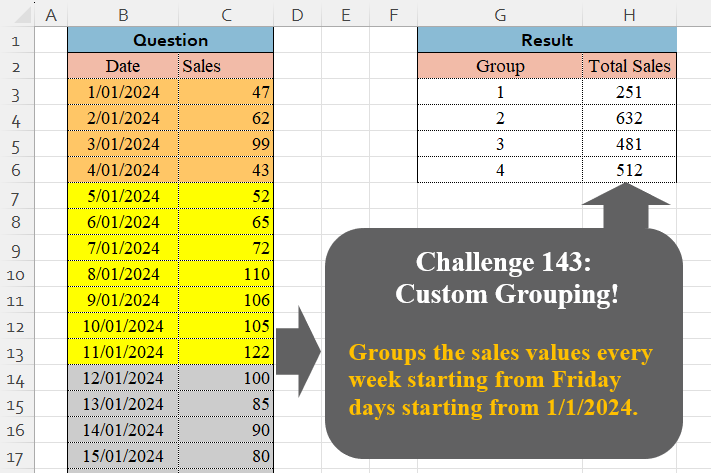
Groups the sales values every week starting from Friday days starting from 1/1/2024.
📌 Challenge Details and Links
Challenge Number: 143
Challenge Difficulty: ⭐⭐⭐
📥Download Sample File
📥Link to the solutions on LinkedIn
Solving the challenge of Custom Grouping! Part 9 with Power Query
Power Query solution 1 for Custom Grouping! Part 9, proposed by Zoran Milokanović:
let
  Source = Excel.CurrentWorkbook(){[Name = "Input"]}[Content],
  S = Table.AddIndexColumn(
    Table.Group(
      Source,
      "Date",
      {"Total Sales", each List.Sum([Sales])},
      0,
      (b, n) => Byte.From(Date.DayOfWeek(n, 1) = 4)
    ),
    "Group",
    1
  )[[Group], [Total Sales]]
in
  S
Power Query solution 2 for Custom Grouping! Part 9, proposed by Brian Julius:
let
 Group = Table.Group( Table.AddColumn( Excel.CurrentWorkbook(){[Name = "Table1"]}[Content], "Group", each Date.WeekOfYear([Date], Day.Friday)
 ), {"Group"}, {{"Total Sales", each List.Sum([Sales])}} )
in
 Group

Note: if there's a potential culture issue with Day.Friday, you can just sub in 5 as the enumerator value, and the formula works equally well, but is less transparent IMO...
Power Query solution 3 for Custom Grouping! Part 9, proposed by Luan Rodrigues:
let
  Fonte = Tabela1,
  Ind = Table.AddIndexColumn(Fonte, "Ind", 1, 1, Int64.Type),
  Add = Table.AddColumn(
    Ind,
    "Personalizar",
    each if Date.DayOfWeek([Date]) = 5 then [Ind] else null
  ),
  pb = Table.FillDown(Add, {"Personalizar"}),
  grp = Table.AddIndexColumn(
    Table.Group(pb, {"Personalizar"}, {{"Total Sales", each List.Sum(_[Sales])}}),
    "Group",
    1,
    1
  )[[Group], [Total Sales]]
in
  grp
Power Query solution 4 for Custom Grouping! Part 9, proposed by Ramiro Ayala Chávez:
let
S = Excel.CurrentWorkbook(){[Name="Table1"]}[Content],
a = Table.AddColumn(S,"D", each if Date.DayOfWeek([Date],Day.Friday)=0 then 0 else 1),
b = Table.Group(a,{"D"},{"G", each [Sales]},0)[G],
c = List.Distinct(List.Generate(()=>[i=0], each [i]
Power Query solution 5 for Custom Grouping! Part 9, proposed by Aditya Kumar Darak 🇮🇳:
let
  Source = Excel.CurrentWorkbook(){[Name = "data"]}[Content],
  Group = Table.Group(
    Source,
    "Date",
    {"Total Sales", each List.Sum([Sales])},
    1,
    (x, y) => Value.Compare(Date.WeekOfYear(x, 5), Date.WeekOfYear(y, 5))
  ),
  Return = Table.AddIndexColumn(Group, "Group", 1)[[Group], [Total Sales]]
in
  Return
Power Query solution 6 for Custom Grouping! Part 9, proposed by Alejandro Simón 🇵🇦 🇪🇸:
let
  Origen = Excel.CurrentWorkbook(){[Name = "Tabla1"]}[Content],
  Tbl = Table.Group(
    Origen,
    "Date",
    {{"Total Sales", each List.Sum([Sales])}},
    0,
    (x, y) => Number.From(Date.DayOfWeek(y) = 5)
  ),
  Sol = Table.AddIndexColumn(Tbl, "Group", 1, 1)[[Group], [Total Sales]]
in
  Sol
Power Query solution 7 for Custom Grouping! Part 9, proposed by Kris Jaganah:
let
  A = Excel.CurrentWorkbook(){[Name = "Table1"]}[Content],
  B = Table.AddColumn(A, "Group", each Date.WeekOfYear([Date], 5)),
  C = Table.Group(B, {"Group"}, {"Total Sales", each List.Sum([Sales])})
in
  C
Power Query solution 8 for Custom Grouping! Part 9, proposed by Abdallah Ally:
let
  Source = Excel.CurrentWorkbook(){[Name = "Table1"]}[Content],
  AddCol = Table.AddColumn(Source, "Group", each Date.WeekOfMonth([Date], Day.Friday)),
  Result = Table.Group(AddCol, "Group", {"Total Sales", each List.Sum([Sales])})
in
  Result
Power Query solution 9 for Custom Grouping! Part 9, proposed by 🇮🇷 Navid Esmaeilzadeh اسماعیل زاده:
let
  S = Excel.CurrentWorkbook(){[Name = "Table1"]}[Content],
  A = Table.AddIndexColumn(S, "Index", 1, 1, Int64.Type),
  B = Table.AddColumn(A, "Day Name", each Date.DayOfWeekName([Date]), type text),
  C = Table.AddColumn(B, "I2", each if [Day Name] = "Friday" or [Index] = 1 then [Index] else null),
  D = Table.FillDown(C, {"I2"}),
  E = Table.Group(D, {"I2"}, {{"TotalSales", each List.Sum([Sales])}}),
  F = Table.AddIndexColumn(E, "Group", 1, 1, Int64.Type),
  G = Table.SelectColumns(F, {"Group", "TotalSales"})
in
  G
Power Query solution 10 for Custom Grouping! Part 9, proposed by abdelaziz allam:
t
 Source = Excel.CurrentWorkbook(){[Name="Table1"]}[Content],
 #"Changed Type" = Table.TransformColumnTypes(Source,{{"Date", type date}}),
 #"Added Custom" = Table.AddColumn(#"Changed Type", "week", each Date.WeekOfMonth([Date],5)),
 #"Removed Columns" = Table.RemoveColumns(#"Added Custom",{"Date"}),
 #"Reordered Columns" = Table.ReorderColumns(#"Removed Columns",{"week", "Sales"}),
 #"Grouped Rows" = Table.Group(#"Reordered Columns", {"week"}, {{"Count", each List.Sum([Sales]), type number}})
in
 #"Grouped Rows"
Power Query solution 11 for Custom Grouping! Part 9, proposed by Ahmed Ariem:
let
f =(x)=> Date.WeekOfYear(x,5),
 Source = Excel.CurrentWorkbook(){[Name="Table1"]}[Content],
 Types = Table.TransformColumnTypes(Source,{{"Date", type date}, {"Sales", Int64.Type}}),
 Group = Table.TransformColumns( Table.Group(Types, "Date", {"Sales", (x)=>List.Sum(x[Sales])},0,(a,b)=> Number.From(f(a)<>f(b))),{"Date",f})
in
 Group
Power Query solution 12 for Custom Grouping! Part 9, proposed by Vida Vaitkunaite:
let
  Source = Excel.CurrentWorkbook(){[Name = "Table1"]}[Content],
  Group  = Table.AddColumn(Source, "Group", each Date.WeekOfYear(Date.From([Date]), Day.Friday)),
  Sales  = Table.Group(Group, {"Group"}, {{"Total Sales", each List.Sum([Sales]), type number}})
in
  Sales
Solving the challenge of Custom Grouping! Part 9 with Excel
Excel solution 1 for Custom Grouping! Part 9, proposed by Aditya Kumar Darak 🇮🇳:
=GROUPBY(WEEKNUM(+B3:B26, 15), C3:C26, SUM, 0, 0)Excel solution 2 for Custom Grouping! Part 9, proposed by Oscar Mendez Roca Farell:
=GROUPBY(
    WEEKNUM(
        +B3:B26,
        15
    ),
    C3:C26,
    SUM,
    ,
    0
)
Excel solution 3 for Custom Grouping! Part 9, proposed by Julian Poeltl:
=GROUPBY(
    SCAN(
        1,
        WEEKDAY(
            B3:B26,
            2
        ),
        LAMBDA(
            A,
            B,
            IF(
                B=5,
                A+1,
                A
            )
        )
    ),
    C3:C26,
    SUM,
    ,
    0
)
Excel solution 4 for Custom Grouping! Part 9, proposed by Kris Jaganah:
=VSTACK(
    {"Group",
    "Total Sales"},
    GROUPBY(
        SCAN(
            1,
            WEEKDAY(
                B3:B26,
                15
            ),
            LAMBDA(
                x,
                y,
                IF(
                    y=1,
                    x+1,
                    x
                )
            )
        ),
        C3:C26,
        SUM,
        0,
        0
    )
)
Excel solution 5 for Custom Grouping! Part 9, proposed by Abdallah Ally:
=LET(
    a,
    B2:C26,
    GROUPBY(
        IFERROR(
            WEEKNUM(
                --TAKE(
                    a,
                    ,
                    1
                ),
                15
            ),
            "Date"
        ),
         TAKE(
             a,
             ,
             -1
         ),
        SUM,
        3
    )
)
Excel solution 6 for Custom Grouping! Part 9, proposed by Imam Hambali:
=VSTACK(
    {"Group",
    "Total Sales"},
    GROUPBY(
        WEEKNUM(
            --B3:B26,
            15
        ),
        C3:C26,
        SUM,
        0,
        0
    )
)
Excel solution 7 for Custom Grouping! Part 9, proposed by Ivan William:
=GROUPBY(
    MAP(
        B3:B26,
        LAMBDA(
            x,
            WEEKNUM(
                x,
                15
            )
        )
    ),
     C3:C26,
    SUM,
    ,
    0
)
Excel solution 8 for Custom Grouping! Part 9, proposed by Sunny Baggu:
=LET(
 _a,
     WEEKNUM(
         --B3:B26,
          15
     ), _b,
     UNIQUE(
         _a
     ), HSTACK(
 _b, MAP(_b,
     LAMBDA(a,
     SUM((_a = a) * C3:C26)))
 )
)
Excel solution 9 for Custom Grouping! Part 9, proposed by abdelaziz allam:
=LET(x,
    UNIQUE(MAP(B3:B26,
    LAMBDA(a,
    (SUMIFS(
        H3:H6,
        G3:G6,
        WEEKNUM(
            a
        )
    ))))),
    xx,
    UNIQUE(
        MAP(
            B3:B26,
            LAMBDA(
                v,
                WEEKNUM(
                    v
                )
            )
        )
    ),
    HSTACK(
        xx,
        x
    ))
Excel solution 10 for Custom Grouping! Part 9, proposed by Ahmed Ariem:
=VSTACK(
    B2:C2,
    GROUPBY(
        WEEKNUM(
            --B2:B26,
            15
        ),
        C2:C26,
        SUM
    )
)
Excel solution 11 for Custom Grouping! Part 9, proposed by Alejandro Campos:
=LET(
 sem,
     WEEKNUM(
         +B3:B26,
          15
     ), u,
     UNIQUE(
         sem
     ), tot,
     BYROW(u,
     LAMBDA(r,
     SUM((sem = r) * C3:C26))), VSTACK(
     {"Group",
      "Total Sales"},
      HSTACK(
          u,
           tot
      )
 )
)
Excel solution 12 for Custom Grouping! Part 9, proposed by Asheesh Pahwa:
=LET(dt,
    B3:B26,
    s,
    C3:C26,
    t,
    TEXT(
        dt,
        "ddd"
    ),
    x,
    IFNA(
        XMATCH(
            t,
            "Fri"
        ),
        0
    ),
    sc,
    SCAN(
        0,
        x,
        LAMBDA(
            a,
            v,
            IF(
                v,
                a+1,
                a
            )
        )
    )+1,
    u,
    UNIQUE(
        sc
    ),
    HSTACK(u,
    MAP(u,
    LAMBDA(x,
    SUM((sc=x)*(s))))))
Excel solution 13 for Custom Grouping! Part 9, proposed by Eddy Wijaya:
=GROUPBY(
    WEEKNUM(
        --B3:B26,
        15
    ),
    C3:C26,
    SUM,
    ,
    0
)
Excel solution 14 for Custom Grouping! Part 9, proposed by ferhat CK:
=LET(
    a,
    SCAN(
        1,
        WEEKDAY(
            B3:B26,
            1
        ),
        LAMBDA(
            x,
            y,
            IF(
                WEEKDAY(
                    y,
                    1
                )=6,
                x+1,
                x
            )
        )
    ),
    GROUPBY(
        a,
        C3:C26,
        SUM,
        ,
        0
    )
)
Excel solution 15 for Custom Grouping! Part 9, proposed by Hamidi Hamid:
=LET(x,
    MAP(
        B3:B26,
        LAMBDA(
            a,
            WEEKNUM(
                a,
                15
            )
        )
    ),
    s,
    UNIQUE(
        MAP(
            B3:B26,
            LAMBDA(
                a,
                WEEKNUM(
                    a,
                    1
                )
            )
        )
    ),
    t,
    HSTACK(s,
    MAP(s,
    LAMBDA(a,
    SUMPRODUCT((x=a)*C3:C26)))),
    t)
Excel solution 16 for Custom Grouping! Part 9, proposed by Hussein SATOUR:
=GROUPBY(WEEKNUM(+B3:B26,15),C3:C26,SUM)Excel solution 17 for Custom Grouping! Part 9, proposed by Philippe Brillault:
=GROUPBY(
    BYROW(
        _T[Date],
        LAMBDA(
            x,
            WEEKNUM(
                x,
                15
            )
        )
    ),
    _T[Sales],
    SUM,
    0,
    0
)
Solving the challenge of Custom Grouping! Part 9 with Python
Python solution 1 for Custom Grouping! Part 9, proposed by Konrad Gryczan, PhD:
import pandas as pd

path = "CH-143 Custom Grouping.xlsx"
input = pd.read_excel(path, usecols="B:C", skiprows=1, nrows=25)
test = pd.read_excel(path, usecols="G:H", skiprows=1, nrows=4)

input['Group'] = (input['Date'] - pd.to_timedelta((input['Date'].dt.weekday - 4) % 7, unit='d')).diff().dt.days.ne(0).cumsum().astype("int64")
result = input.groupby('Group')['Sales'].sum().reset_index(name='Total Sales')

print(result.equals(test)) # True
Solving the challenge of Custom Grouping! Part 9 with Python in Excel
Python in Excel solution 1 for Custom Grouping! Part 9, proposed by Alejandro Campos:
import datetime

df = xl("B2:C26", headers=True)
df['Date'] = pd.to_datetime(df['Date'], format='%d/%m/%Y')
start_date = datetime(2024, 1, 5)

weekly_sales = df.assign(Week=((df['Date'] - start_date).dt.days // 7) + 2)
 .groupby('Week')['Sales'].sum().reset_index()
 .rename(columns={'Week': 'Group', 'Sales': 'Total Sales'})
weekly_sales
Solving the challenge of Custom Grouping! Part 9 with R
R solution 1 for Custom Grouping! Part 9, proposed by Konrad Gryczan, PhD:
library(tidyverse)
library(readxl)

path = "files/CH-143 Custom Grouping.xlsx"
input = read_excel(path, range = "B2:C26")
test = read_excel(path, range = "G2:H6")

result = input %>%
 mutate(wday = floor_date(Date, unit = "week", week_start = 5)) %>%
 mutate(Group = cumsum(c(1, diff(wday) != 0))) %>%
 summarize(`Total Sales` = sum(Sales), .by = Group)

all.equal(result, test)
#> [1] TRUE
Solving the challenge of Custom Grouping! Part 9 with Google Sheets
Google Sheets solution 1 for Custom Grouping! Part 9, proposed by Peter Krkos:
PowerQuery solution:
https://docs.google.com/spreadsheets/d/1zR5IZLz8OT76vhaPEHfsPrw8-RDKnLyyqS49IJjdhFk/edit?gid=1082432282#gid=1082432282