
_x000D_
Excel solution 19 for Matching Tables!, proposed by Gerardo Gomez:
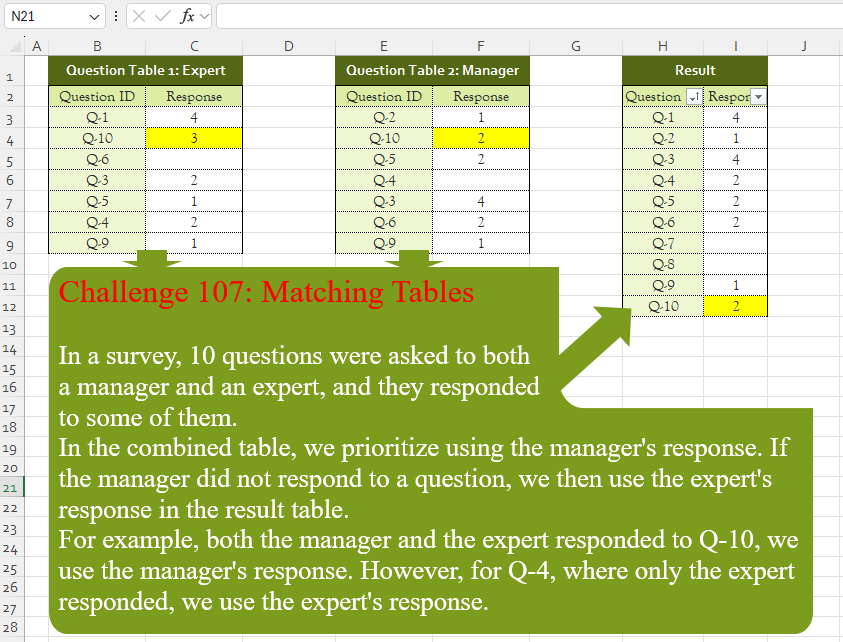
=IFNA(VLIn a survey, 10 questions were asked to both
a manager and an expert, and they responded
to some of them.
In the combined table, we prioritize using the manager’s response. If the manager did not respond to a question, we then use the expert’s response in the result table.
For example, both the manager and the expert responded to Q-10, we use the manager’s response. However, for Q-4, where only the expert responded, we use the expert’s response.
📌 Challenge Details and Links
Challenge Number: 107
Challenge Difficulty: ⭐
📥Download Sample File
📥Link to the solutions on LinkedIn
Solving the challenge of Matching Tables! with Power Query
_x000D_
Power Query solution 1 for Matching Tables!, proposed by Zoran Milokanović:
let
  Source = each Excel.CurrentWorkbook(){[Name = _]}[Content],
  E = List.Transform({1 .. 10}, each "Q-" & Text.From(_)),
  T = Table.SelectRows(Source("Table2") & Source("Table1"), each [Response] <> null),
  S = Table.Sort(
    Table.Distinct(
      Table.Buffer(T & Table.FromList(E, each {_, null}, Table.ColumnNames(T))),
      "Question ID"
    ),
    each List.PositionOf(E, [Question ID])
  )
in
  S
_x000D_
_x000D_
Power Query solution 2 for Matching Tables!, proposed by Brian Julius:
let
  Source = Table.Combine(
    {
      Table.RenameColumns(
        Excel.CurrentWorkbook(){[Name = "Table1"]}[Content],
        {"Response", "EResp"}
      ),
      Table.RenameColumns(
        Excel.CurrentWorkbook(){[Name = "Table2"]}[Content],
        {"Response", "MResp"}
      ),
      Table.FromList(
        List.Transform({1 .. 10}, each "Q-" & Text.From(_)),
        Splitter.SplitByNothing(),
        {"Question ID"}
      )
    }
  ),
  AddResp = Table.RemoveColumns(
    Table.AddColumn(Source, "Response", each if [MResp] <> null then [MResp] else [EResp]),
    {"EResp", "MResp"}
  ),
  Group = Table.Sort(
    Table.Group(AddResp, {"Question ID"}, {{"Response", each List.Max([Response])}}),
    {each Number.From(Text.AfterDelimiter([Question ID], "-"))}
  )
in
  Group
_x000D_
_x000D_
Power Query solution 3 for Matching Tables!, proposed by Brian Julius:
let
  Source = Table.Combine(
    {
      Table.RenameColumns(
        Excel.CurrentWorkbook(){[Name = "Table1"]}[Content],
        {"Response", "EResp"}
      ),
      Table.RenameColumns(
        Excel.CurrentWorkbook(){[Name = "Table2"]}[Content],
        {"Response", "MResp"}
      ),
      Table.FromList(
        List.Transform({"1" .. "9", "10"}, each "Q-" & _),
        Splitter.SplitByNothing(),
        {"Question ID"}
      )
    }
  ),
  Group = Table.Group(
    Source,
    {"Question ID"},
    {{"EResp", each List.Max([EResp])}, {"MResp", each List.Max([MResp])}}
  ),
  AddResp = Table.RemoveColumns(
    Table.AddColumn(Group, "Responnse", each if [MResp] = null then [EResp] else [MResp]),
    {"EResp", "MResp"}
  ),
  Sort = Table.Sort(AddResp, {each Number.From(Text.AfterDelimiter([Question ID], "-"))})
in
  Sort
_x000D_
_x000D_
Power Query solution 4 for Matching Tables!, proposed by Rafael González B.:
let
  Nested = Table.NestedJoin(
    Excel.CurrentWorkbook(){1}[Content],
    "Question ID",
    Excel.CurrentWorkbook(){0}[Content],
    "Question ID",
    "All",
    3
  ),
  Exp = Table.ExpandTableColumn(
    Nested,
    "All",
    {"Question ID", "Response"},
    {"Question ID.1", "Response.1"}
  ),
  Qt = Table.AddColumn(Exp, "Q.ID", each [Question ID] ?? [Question ID.1]),
  Rep = Table.AddColumn(Qt, "R", each [Response] ?? [Response.1])[[Q.ID], [R]],
  Q = Table.FromColumns(
    {List.Accumulate({1 .. 10}, {}, (s, c) => s & {"Q-" & Text.From(c)})},
    {"Question ID"}
  ),
  R = Table.Sort(
    Table.Join(Q, "Question ID", Rep, "Q.ID", 1)[[Question ID], [R]],
    each Number.From(Text.AfterDelimiter([Question ID], "-"))
  ),
  Final = Table.RenameColumns(R, {{"R", "Response"}})
in
  Final
_x000D_
_x000D_
Power Query solution 5 for Matching Tables!, proposed by Ramiro Ayala Chávez:
let
t1 = Excel.CurrentWorkbook(){[Name="Table1"]}[Content],
t2 = Excel.CurrentWorkbook(){[Name="Table2"]}[Content],
a = Table.FromColumns({List.Transform(List.Transform({1..10},Text.From), each "Q-"&_)},{"Question ID"}),
b = Table.AddColumn(a,"M",each try t2[Response]{List.PositionOf(t2[Question ID],[Question ID])} otherwise null),
c = Table.AddColumn(b,"E",each try t1[Response]{List.PositionOf(t1[Question ID],[Question ID])} otherwise null),
Sol = Table.AddColumn(c,"Response", each if [M]=null then [E] else [M])[[Question ID],[Response]]
in
Sol
_x000D_
_x000D_
Power Query solution 6 for Matching Tables!, proposed by Aditya Kumar Darak 🇮🇳:
let
  Questions = 10,
  Expert    = Excel.CurrentWorkbook(){[Name = "Expert"]}[Content],
  Manager   = Excel.CurrentWorkbook(){[Name = "Manager"]}[Content],
  Combine   = Table.SelectRows(Manager & Expert, each [Response] <> null),
  Table     = Table.FromList({1 .. Questions}, each {Number.ToText(_, "Q-0")}, {"Question ID"}),
  Join      = Table.AddJoinColumn(Table, "Question ID", Combine, "Question ID", "Response"),
  Return    = Table.TransformColumns(Join, {"Response", each [Response]{0}?})
in
  Return
_x000D_
_x000D_
Power Query solution 7 for Matching Tables!, proposed by Alejandro Simón 🇵🇦 🇪🇸:
let
  T1 = Excel.CurrentWorkbook(){[Name = "Table1"]}[Content],
  T2 = Excel.CurrentWorkbook(){[Name = "Table2"]}[Content],
  Join = T2 & T1,
  List1 = List.Transform(Join[Question ID], each Number.From(Text.RemoveRange(_, 0, 2))),
  List2 = List.Transform({1 .. List.Max(List1)}, each "Q-" & Text.From(_)),
  Sol = Table.FromRows(
    List.Transform(
      List2,
      (x) => {x, List.RemoveNulls(Table.SelectRows(Join, each [Question ID] = x)[Response]){0}?}
    ),
    {"Question ID", "Response"}
  )
in
  Sol
_x000D_
_x000D_
Power Query solution 8 for Matching Tables!, proposed by Abdallah Ally:
let
  f = (x) => Excel.CurrentWorkbook(){[Name = x]}[Content],
  Select = Table.SelectRows(f("Table2") & f("Table1"), each [Response] <> null),
  Unique = Table.Distinct(Select, {"Question ID"}),
  Transform = List.TransformMany(
    {"1" .. "9", "10"},
    each {"Q-" & _},
    (x, y) => {y, try Unique[Response]{List.PositionOf(Unique[Question ID], y)} otherwise null}
  ),
  Result = Table.FromRows(Transform, Table.ColumnNames(Unique))
in
  Result
_x000D_
_x000D_
Power Query solution 9 for Matching Tables!, proposed by Kris Jaganah:
[
  A = (x) => Excel.CurrentWorkbook(){[Name = x]}[Content],
  B = List.Transform({1 .. 10}, each "Q-" & Text.From(_)),
  C = Table.FromColumns({B}, {"Question ID"}),
  D = Table.SelectRows(A("Table2"), each ([Response] <> null)),
  E = Table.Distinct(D & A("Table1") & C, "Question ID"),
  F = Table.Sort(E, {each List.PositionOf(B, [Question ID]), 0})
][F]
_x000D_
_x000D_
Power Query solution 10 for Matching Tables!, proposed by Nelson Mwangi:
let
  AllQuestions = Table.TransformColumns(
    Table.FromList({1 .. 10}, Splitter.SplitByNothing(), {"Question ID"}),
    {"Question ID", each "Q-" & Text.From(_)}
  ),
  Expert = Excel.CurrentWorkbook(){[Name = "Expert"]}[Content],
  Manager = Table.SelectRows(
    Excel.CurrentWorkbook(){[Name = "Manager"]}[Content],
    each [Response] <> null
  ),
  LeftAntiJoin = Table.RemoveColumns(
    Table.NestedJoin(
      Expert,
      {"Question ID"},
      Manager,
      {"Question ID"},
      "Custom1",
      JoinKind.LeftAnti
    ),
    "Custom1"
  ),
  Table = Table.Combine({Manager, LeftAntiJoin}),
  Merge = Table.NestedJoin(
    AllQuestions,
    {"Question ID"},
    Table,
    {"Question ID"},
    "Custom1",
    JoinKind.LeftOuter
  ),
  Expand = Table.ExpandTableColumn(Merge, "Custom1", {"Response"}),
  Sort = Table.Sort(Expand, each List.PositionOf(AllQuestions[Question ID], [Question ID]))
in
  Sort
_x000D_
_x000D_
Power Query solution 11 for Matching Tables!, proposed by Yaroslav Drohomyretskyi:
let
  Source = Table.FromList(
    List.Transform({1 .. 10}, each "Q-" & Text.From(_)),
    Splitter.SplitByNothing(),
    {"Question ID"},
    null,
    ExtraValues.Error
  ),
  Response = Table.AddColumn(
    Source,
    "Response",
    each try
      Table.SelectRows(
        Excel.CurrentWorkbook(){[Name = "Table2"]}[Content]
          & Excel.CurrentWorkbook(){[Name = "Table1"]}[Content],
        (x) => [Question ID] = x[Question ID] and x[Response] <> null
      ){0}[Response]
    otherwise
      null
  )
in
  Response
_x000D_
_x000D_
Power Query solution 12 for Matching Tables!, proposed by 🇮🇷 Navid Esmaeilzadeh اسماعیل زاده:
let
Mng = Excel.CurrentWorkbook(){[Name="ManagerTbl"]}[Content],
Exp = Excel.CurrentWorkbook(){[Name="ExpertTbl"]}[Content],
QueTbl = Table.FromList(List.Transform({1..10},each "Q-"& Text.From(_)),null,{"Question ID"}),
M = Table.AddColumn(QueTbl, "M", each Table.SelectRows(Mng,(x)=> x[Question ID]=[Question ID])[Response]),
M1 = Table.ExpandListColumn(M, "M"),
E = Table.AddColumn(M1, "Answer", each try if [M]=null then Table.SelectRows(Exp,(y)=> y[Question ID]=[Question ID])[Response]{0} else [M] otherwise null),
E1 = Table.SelectColumns(E,{"Question ID", "Answer"})
in
E1
_x000D_
_x000D_
Power Query solution 13 for Matching Tables!, proposed by Ahmed Ariem:
let
 Expert = Table.AddColumn( Excel.CurrentWorkbook(){[Name="Expert"]}[Content],"Status", each 1),
 Manager = Table.AddColumn(Excel.CurrentWorkbook(){[Name="Manager"]}[Content],"Status", each 2),
 Q = List.Transform( {1..10}, (x)=> "Q-"&Text.From(x)),
 tbl = Table.SelectRows(Manager &Expert,each ([Response] <> null)) & Table.FromList(Q,(x)=>{x},{"Question ID"}),
 Group = Table.Group(tbl , {"Question ID"},
 {{"tmp", (x)=> Table.FromRecords({ Table.Max(x,"Status")})[Response]{0}
}}),
 Sort = Table.Sort( Group , each List.PositionOf(Q, [Question ID]))
in
 Sort

----
file attaches
https://1drv.ms/x/s!AiUZ0Ws7G26RkEam6_ZZaGPU1xvL?e=qGOrPF
_x000D_
_x000D_
Power Query solution 14 for Matching Tables!, proposed by Vinesh Kumar:
let
  Source = Table.Combine({QUESTION, Append1}),
  #"Sorted Rows" = Table.Sort(Source, {{"Response", Order.Descending}}),
  #"Removed Duplicates" = Table.Distinct(#"Sorted Rows", {"Question ID"}),
  #"Sorted Rows1" = Table.Sort(#"Removed Duplicates", {{"Question ID", Order.Ascending}}),
  #"Duplicated Column" = Table.DuplicateColumn(#"Sorted Rows1", "Question ID", "Question ID - Copy"),
  #"Split Column by Delimiter" = Table.SplitColumn(
    #"Duplicated Column",
    "Question ID - Copy",
    Splitter.SplitTextByDelimiter("-", QuoteStyle.Csv),
    {"Question ID - Copy.1", "Question ID - Copy.2"}
  ),
  #"Changed Type" = Table.TransformColumnTypes(
    #"Split Column by Delimiter",
    {{"Question ID - Copy.1", type text}, {"Question ID - Copy.2", Int64.Type}}
  ),
  #"Sorted Rows2" = Table.Sort(#"Changed Type", {{"Question ID - Copy.2", Order.Ascending}}),
  #"Removed Columns" = Table.RemoveColumns(
    #"Sorted Rows2",
    {"Question ID - Copy.1", "Question ID - Copy.2"}
  )
in
  #"Removed Columns"
_x000D_
_x000D_
Power Query solution 15 for Matching Tables!, proposed by Glyn Willis:
let
  Expert = Excel.CurrentWorkbook(){[Name = "Expert"]}[Content],
  Manager = Excel.CurrentWorkbook(){[Name = "Manager"]}[Content],
  QuestionIDs = Table.FromColumns(
    {List.Transform({1 .. 10}, each "Q-" & Text.From(_))},
    type table [Question ID = text]
  ),
  #"Added Custom" = Table.AddColumn(
    QuestionIDs,
    "Response",
    each Manager{[Question ID = [Question ID]]}?[Response]?
      ?? Expert{[Question ID = [Question ID]]}?[Response]?,
    Int64.Type
  )
in
  #"Added Custom"
_x000D_
_x000D_
Power Query solution 16 for Matching Tables!, proposed by Szabolcs Phraner:
let
  Source = List.Accumulate(
    {1 .. 10},
    Table.Skip(#table({"Question ID", "Response"}, {{null, null}})),
    (s, c) =>
      let
        id = "Q-" & Text.From(c),
        getResponse = (tbl) =>
          Record.FieldOrDefault(
            Table.First(Table.SelectRows(tbl, each [Question ID] = id)),
            "Response",
            null
          ),
        response =
          if getResponse(ManagerResponse) is null then
            getResponse(ExpertResponse)
          else
            getResponse(ManagerResponse)
      in
        Table.InsertRows(s, Table.RowCount(s), {[Question ID = id, Response = response]})
  )
in
  Source
_x000D_
Solving the challenge of Matching Tables! with Excel
_x000D_
Excel solution 1 for Matching Tables!, proposed by Bo Rydobon 🇹🇭:
=LET(
    v,
    VSTACK(
        FILTER(
            E3:F9,
            F3:F9
        ),
        B3:C9
    ),
    q,
    "Q-"&SEQUENCE(
        10
    ),
    HSTACK(
        q,
        IFNA(
            VLOOKUP(
                q,
                v,
                2,

            ),

        )
    )
)

Vary Max Q

=LET(
    v,
    VSTACK(
        FILTER(
            E3:F9,
            F3:F9
        ),
        B3:C9
    ),
    q,
    "Q-"&SEQUENCE(
        MAX(
            -MID(
                TAKE(
                    v,
                    ,
                    1
                ),
                2,
                9
            )
        )
    ),
    HSTACK(
        q,
        IFNA(
            VLOOKUP(
                q,
                v,
                2,

            ),

        )
    )
)
_x000D_
_x000D_
Excel solution 2 for Matching Tables!, proposed by محمد حلمي:
=LET(
    q,
    "Q"&-SEQUENCE(
        10
    ),    HSTACK(
        q,
        MAP(
            q,
            LAMBDA(
                a,
                LET(
                    i,
                    FILTER(
                        VSTACK(
                            F3:F9,

                            C3:C9
                        ),
                        VSTACK(
                            E3:E9,
                            B3:B9
                        )=a,
                        ""
                    ),
                    IF(
                        @i>0,
                        @i,
                        SUM(
                            i
                        )
                    )
                )
            )
        )
    )
)
_x000D_
_x000D_
Excel solution 3 for Matching Tables!, proposed by Aditya Kumar Darak 🇮🇳:
=LET(     _q,
     10,     _seq,
     "Q-" & SEQUENCE(
         _q
     ),     _rng,
     VSTACK(
         E3:F9,
          B3:C9
     ),     _frng,
     FILTER(
         _rng,
          INDEX(
              _rng,
               0,
               2
          ) <> ""
     ),     _lkp,
     IFNA(
         VLOOKUP(
             _seq,
              _frng,
              2,
              0
         ),
          ""
     ),     _r,
     HSTACK(
         _seq,
          _lkp
     ),     _r)
_x000D_
_x000D_
Excel solution 4 for Matching Tables!, proposed by Oscar Mendez Roca Farell:
=LET(e,
     B3:C9,
     m,
     E3:F9,
     q,
     "Q-"&ROW(
         1:10
     ),
     HSTACK(q,
     IFNA(IFERROR((1/VLOOKUP(
         q,
          m,
          2,     ))^-1,
     VLOOKUP(
         q,
          e,
          2,     )),
     "")))
_x000D_
_x000D_
Excel solution 5 for Matching Tables!, proposed by Julian Poeltl:
=LET(
    Q,
    "Q-"&SEQUENCE(
        10
    ),
    HSTACK(
        Q,
        MAP(
            Q,
            LAMBDA(
                A,
                LET(
                    E,
                    XLOOKUP(
                        A,
                        B3:B9,
                        C3:C9,
                        ""
                    ),
                    X,
                    XLOOKUP(
                        A,
                        E3:E9,
                        F3:F9,
                        E
                    ),
                    IF(
                        X=0,
                        E,
                        X
                    )
                )
            )
        )
    )
)
_x000D_
_x000D_
Excel solution 6 for Matching Tables!, proposed by Abdallah Ally:
=LET(
    a,
    ""&VSTACK(
        E3:F9,
        B3:C9
    ),
    b,
    FILTER(
        a,
        TAKE(
            a,
            ,
            -1
        )>""
    ),
    c,
    "Q-"&SEQUENCE(
        10
    ),
    HSTACK(
        c,
        IFNA(
            VLOOKUP(
                c,
                b,
                2,
                0
            ),
            ""
        )
    )
)
_x000D_
_x000D_
Excel solution 7 for Matching Tables!, proposed by Kris Jaganah:
=LET(
    a,
    "Q-"&SEQUENCE(
        10
    ),
    b,
    IFNA(
        VLOOKUP(
            a,
            E3:F9,
            2,
            0
        ),
        0
    ),
    c,
    VLOOKUP(
        a,
        B3:C9,
        2,
        0
    ),
    HSTACK(
        a,
        IFNA(
            IF(
                b,
                b,
                c
            ),
            ""
        )
    )
)
_x000D_
_x000D_
Excel solution 8 for Matching Tables!, proposed by Imam Hambali:
=LET(    q,
     "Q-"&SEQUENCE(
         10
     ),    lr,
     LAMBDA(
         x,
         y,
         z,
          XLOOKUP(
              q,
               x,
               y,
               z
          )
     ),    mr,
     lr(
         E3:E9,
          F3:F9,
          0
     ),    er,
     lr(
         B3:B9,
          C3:C9,
          ""
     ),    HSTACK(
        q,
         IF(
             mr>0,
              mr,
              er
         )
    ))
_x000D_
_x000D_
Excel solution 9 for Matching Tables!, proposed by Sunny Baggu:
=LET(     s,
     "Q-" & SEQUENCE(
         10
     ),     _a,
     FILTER(
         E3:F9,
          F3:F9 <> ""
     ),     _b,
     FILTER(
         B3:C9,
          C3:C9 <> ""
     ),     _c,
     FILTER(
         _b,
          ISNA(
              XMATCH(
                  TAKE(
                      _b,
                       ,
                       1
                  ),
                   TAKE(
                       _a,
                        ,
                        1
                   )
              )
          )
     ),     _d,
     VSTACK(
         _a,
          _c
     ),     HSTACK(
         s,
          XLOOKUP(
              s,
               TAKE(
                   _d,
                    ,
                    1
               ),
               TAKE(
                   _d,
                    ,
                    -1
               ),
               ""
          )
     ))
_x000D_
_x000D_
Excel solution 10 for Matching Tables!, proposed by Alejandro Campos:
=LET(     apV,
     VSTACK(
         _expert[Question ID],
          _manager[Question ID]
     ),     mxQ,
     MAX(
         --MID(
             apV,
              3,
              1000
         )
     ),     sq,
     "Q-" & SEQUENCE(
         mxQ
     ),     res,
     IFNA(          VLOOKUP(
              sq,
               FILTER(
                   _manager,
                    _manager[Response] > 0
               ),
               2,
               0
          ),          XLOOKUP(
              sq,
               _expert[Question ID],
               _expert[Response],
               ""
          )     ),     HSTACK(
         sq,
          IF(
              res > 0,
               res,
               ""
          )
     )
)
_x000D_
_x000D_
Excel solution 11 for Matching Tables!, proposed by Alison Manuel:
=if(
    $f3,
    "*",
    $f3,
    $c3
)
_x000D_
_x000D_
Excel solution 12 for Matching Tables!, proposed by Andy Heybruch:
=LET(
    _q,
    "Q-"&SEQUENCE(
        10
    ),
    HSTACK(
        _q,
        BYROW(
            _q,
            LAMBDA(
                a,
                XLOOKUP(
                    a,
                    E3:E9,
                    F3:F9,
                    XLOOKUP(
                        a,
                        B3:B9,
                        C3:C9,
                        0,
                        0
                    ),
                    0
                )
            )
        )
    )
)
_x000D_
_x000D_
Excel solution 13 for Matching Tables!, proposed by Asheesh Pahwa:
=LET(
    s,
    "Q-"&SEQUENCE(
        10
    ),    v,
    VLOOKUP(
        s,
        E3:F9,
        2,
        0
    ),
    i,
    IF(
        v=0,
        NA(),
        v
    ),
    HSTACK(
        s,
        IFNA(
            i,
            XLOOKUP(
                s,
                B3:B9,
                C3:C9,
                ""
            )
        )
    )
)
_x000D_
_x000D_
Excel solution 14 for Matching Tables!, proposed by Bilal Mahmoud kh.:
=REDUCE(
    {"Q ID",
    "Response"},
    "Q-"&SEQUENCE(
        10
    ),
    LAMBDA(
        x,
        y,
        VSTACK(
            x,
            FILTER(
                E2:F9,
                E2:E9=y,
                FILTER(
                    B2:C9,
                    B2:B9=y,
                    HSTACK(
                        y,
                        ""
                    )
                )
            )
        )
    )
)
_x000D_
_x000D_
Excel solution 15 for Matching Tables!, proposed by Bilal Mahmoud kh.:
=LET(
    a,
    "Q-"&SEQUENCE(
        10
    ),
    b,
    MAP(
        a,
        LAMBDA(
            x,
            IFNA(
                IFNA(
                    VLOOKUP(
                        x,
                        E2:F9,
                        2,
                        0
                    ),
                    VLOOKUP(
                        x,
                        B2:C9,
                        2,
                        0
                    )
                ),
                ""
            )
        )
    ),
    VSTACK(
        {"Question ID",
        "Response"},
        HSTACK(
            a,
            b
        )
    )
)
_x000D_
_x000D_
Excel solution 16 for Matching Tables!, proposed by Eddy Wijaya:
=LET(    exp,
    B3:C9,    mgr,
    E3:F9,    total,
    VSTACK(
        exp,
        mgr
    ),    genSeq,
    UNIQUE(
        LEFT(
            CHOOSECOLS(
                total,
                1
            ),
            2
        )
    )&SEQUENCE(
        MAX(
            --MID(
                CHOOSECOLS(
                total,
                1
            ),
                3,
                999
            )
        )
    ),    f,
    LAMBDA(
        db,
        LET(

            tab,
            FILTER(
                db,
                CHOOSECOLS(
                    db,
                    -1
                )<>0
            ),

            VLOOKUP(
                genSeq,
                tab,
                2,
                0
            )
        )
    ),    VSTACK(
        E2:F2,        HSTACK(
            genSeq,
            IFNA(
                IFERROR(
                    f(
                        mgr
                    ),
                    f(
                        exp
                    )
                ),
                ""
            )
        )
    )
)
_x000D_
_x000D_
Excel solution 17 for Matching Tables!, proposed by El Badlis Mohd Marzudin:
=LET(a,"Q-"&ROW(1:10),HSTACK(a,IFNA(VLOOKUP(a,FILTER(E3:F9,F3:F9>0), 2,0),XLOOKUP(a,B3:B9,C3:C9,""))))
_x000D_
_x000D_
Excel solution 18 for Matching Tables!, proposed by ferhat CK:
=LET(
    n,
    UNIQUE(
        VSTACK(
            B3:B9,
            E3:E9
        )
    ),
    v,
    --TEXTAFTER(
        n,
        "-"
    ),
    s,
    "Q-"&SEQUENCE(
        MAX(
            v
        )
    ),
    r,
    SORTBY(
        n,
        v
    ),
    x,
    XLOOKUP(
        s,
        E3:E9,
        F3:F9
    ),
    y,
    XLOOKUP(
        s,
        B3:B9,
        C3:C9
    ),
    HSTACK(
        s,
        IFERROR(
            IFERROR(
                IF(
                    x>0,
                    x,
                    y
                ),
                y
            ),
            ""
        )
    )
)
_x000D_
_x000D_
Excel solution 19 for Matching Tables!, proposed by Gerardo Gomez:
=IFNA(VL