
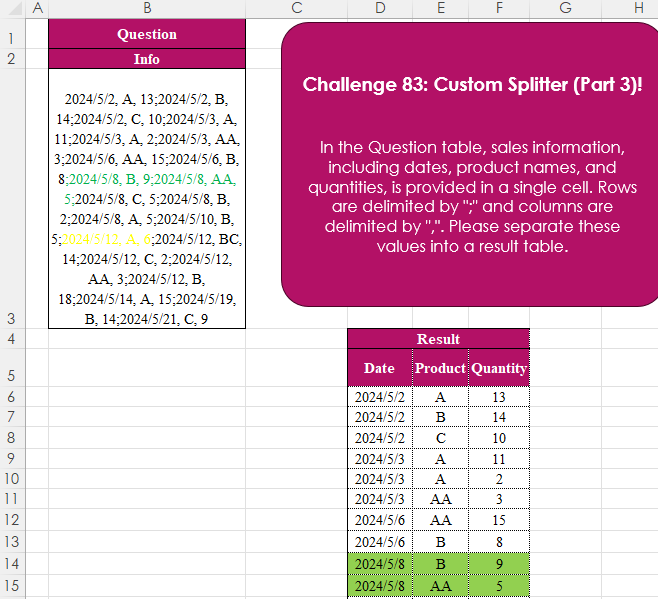
In the Question table, sales information, including dates, product names, and quantities, is provided in a single cell. Rows are delimited by “;” and columns are delimited by “,”. Please separate these values into a result table.
📌 Challenge Details and Links
Challenge Number: 83
Challenge Difficulty: ⭐⭐
📥Download Sample File
📥Link to the solutions on LinkedIn
📥Link to the solution on YouTube
Solving the challenge of Custom Splitter (Part 3)! with Power Query
Power Query solution 1 for Custom Splitter (Part 3)!, proposed by Zoran Milokanović:
let
  Source = Excel.CurrentWorkbook(){[Name = "Input"]}[Content][Info],
  S = Table.FromRows(
    List.TransformMany(Source, each Text.Split(_, ";"), (i, _) => Text.Split(_, ", ")),
    {"Date", "Product", "Quantity"}
  )
in
  S
Power Query solution 2 for Custom Splitter (Part 3)!, proposed by Brian Julius:
let
  Source = Excel.CurrentWorkbook(){[Name = "Table1"]}[Content],
  SplToRows = Table.TransformColumns(
    Source,
    {{"Info", Splitter.SplitTextByDelimiter(";", QuoteStyle.Csv)}}
  ),
  Expand = Table.ExpandListColumn(SplToRows, "Info"),
  SplToCols = Table.SplitColumn(
    Expand,
    "Info",
    Splitter.SplitTextByDelimiter(",", QuoteStyle.Csv),
    {"Date", "Product", "Quantity"}
  ),
  ReType = Table.TransformColumnTypes(SplToCols, {{"Date", type date}, {"Quantity", Int64.Type}})
in
  ReType
Power Query solution 3 for Custom Splitter (Part 3)!, proposed by Luan Rodrigues:
let
  Fonte = Tabela1,
  res = Table.TransformColumns(
    Fonte,
    {
      "Info",
      each Table.FromRows(
        List.Transform(Text.Split(_, ";"), (x) => Text.Split(x, ",")),
        {"Date", "Product", "Quantity"}
      )
    }
  )[Info]{0}
in
  res
Power Query solution 4 for Custom Splitter (Part 3)!, proposed by Ramiro Ayala Chávez:
let
S = Excel.CurrentWorkbook(){[Name="Table1"]}[Content],
a = Table.FromColumns(List.Transform(S[Info], each Text.Split(_,";"))),
b = Table.SplitColumn(a,"Column1",Splitter.SplitTextByDelimiter(", "),{"Date","Product","Quantity"}),
Sol = Table.TransformColumnTypes(b,{"Date",type date})
in
Sol
Power Query solution 5 for Custom Splitter (Part 3)!, proposed by Aditya Kumar Darak 🇮🇳:
let
  Source = Excel.CurrentWorkbook(){[Name = "data"]}[Content]{0}[Info],
  Split = Text.Split(Source, ";"),
  Return = Table.FromList(
    Split,
    each [S = Text.Split(_, ", "), D = Date.From(S{0}), Q = Number.From(S{2}), R = {D, S{1}, Q}][R],
    type table [Date = date, Product = text, Quantity = number]
  )
in
  Return
Power Query solution 6 for Custom Splitter (Part 3)!, proposed by Alejandro Simón 🇵🇦 🇪🇸:
let
Origen = Excel.CurrentWorkbook(){[Name="Tabla1"]}[Content],
Tbl = Table.Combine(Table.AddColumn(Origen, "A", each
let
a = Text.Split([Info], ";"),
b = List.Transform(a, each Text.Split(_, ", ")),
c = Table.FromRows(b, {"Date", "Product", "Quantity"})
in c)[A])
in
Tbl
Power Query solution 7 for Custom Splitter (Part 3)!, proposed by Abdallah Ally:
let
  Source = Excel.CurrentWorkbook(){[Name = "Table1"]}[Content],
  Split1 = List.Combine(List.Transform(Source[Info], each Text.Split(_, ";"))),
  Split2 = List.Transform(Split1, each Text.Split(_, ", ")),
  Result = Table.FromRows(Split2, {"Date", "Product", "Quantity"})
in
  Result
Power Query solution 8 for Custom Splitter (Part 3)!, proposed by Masoud Karami:
let
  Source = Excel.CurrentWorkbook(){[Name = "Table1"]}[Content],
  Split1 = Table.SplitColumn(
    Source,
    "Info",
    Splitter.SplitTextByDelimiter(";", QuoteStyle.Csv),
    {
      "Info.1",
      "Info.2",
      "Info.3",
      "Info.4",
      "Info.5",
      "Info.6",
      "Info.7",
      "Info.8",
      "Info.9",
      "Info.10",
      "Info.11",
      "Info.12",
      "Info.13",
      "Info.14",
      "Info.15",
      "Info.16",
      "Info.17",
      "Info.18",
      "Info.19",
      "Info.20",
      "Info.21",
      "Info.22"
    }
  ),
  Transposed = Table.Transpose(Split1),
  Split2 = Table.SplitColumn(
    Transposed,
    "Column1",
    Splitter.SplitTextByDelimiter(",", QuoteStyle.Csv),
    {"Date", "Product", "Quantity"}
  ),
  Changed = Table.TransformColumnTypes(Split2, {{"Quantity", Int64.Type}, {"Date", type date}}),
  Sort = Table.Sort(Changed, {{"Date", Order.Ascending}})
in
  Sort
Power Query solution 9 for Custom Splitter (Part 3)!, proposed by 🇮🇷 Navid Esmaeilzadeh اسماعیل زاده:
let
  Source = Excel.CurrentWorkbook(){[Name = "Table1"]}[Content],
  #"Added Custom" = Table.AddColumn(
    Source,
    "Row",
    each Table.FromColumns(List.Zip(List.Split(Text.Split([Info], ";"), 1)))
  ),
  #"Removed Other Columns" = Table.SelectColumns(#"Added Custom", {"Row"}),
  #"Expanded Row" = Table.ExpandTableColumn(
    #"Removed Other Columns",
    "Row",
    {"Column1"},
    {"Column1"}
  ),
  #"Split Column by Delimiter" = Table.SplitColumn(
    #"Expanded Row",
    "Column1",
    Splitter.SplitTextByDelimiter(", ", QuoteStyle.Csv),
    {"Column1.1", "Column1.2", "Column1.3"}
  ),
  #"Changed Type" = Table.TransformColumnTypes(
    #"Split Column by Delimiter",
    {{"Column1.1", type date}, {"Column1.2", type text}, {"Column1.3", Int64.Type}}
  ),
  #"Renamed Columns" = Table.RenameColumns(
    #"Changed Type",
    {{"Column1.1", "Date"}, {"Column1.2", "Product"}, {"Column1.3", "Quantity"}}
  )
in
  #"Renamed Columns"
Power Query solution 10 for Custom Splitter (Part 3)!, proposed by Ahmed Ariem:
let
  Source = Excel.CurrentWorkbook(){[Name = "tbl_1"]}[Content],
  from = Table.TransformColumnTypes(Source, {{"Info", type text}}),
  f = (x) =>
    Table.FromRows(
      List.Split(Splitter.SplitTextByAnyDelimiter({";", ","})(x), 3),
      {"Date", "Product", "Quantity"}
    ),
  trans = Table.TransformColumns(from, {"Info", f}),
  Expand = Table.ExpandTableColumn(
    trans,
    "Info",
    {"Date", "Product", "Quantity"},
    {"Date", "Product", "Quantity"}
  )
in
  Expand
Power Query solution 11 for Custom Splitter (Part 3)!, proposed by CA Raghunath Gundi:
let
  Source = Excel.CurrentWorkbook(){[Name = "Table1"]}[Content],
  Split_into_Rows = Table.ExpandListColumn(
    Table.TransformColumns(
      Source,
      {
        {
          "Info",
          Splitter.SplitTextByDelimiter(";", QuoteStyle.Csv),
          let
            itemType = (type nullable text) meta [Serialized.Text = true]
          in
            type {itemType}
        }
      }
    ),
    "Info"
  ),
  Split_into_Columns = Table.SplitColumn(
    Split_into_Rows,
    "Info",
    Splitter.SplitTextByDelimiter(",", QuoteStyle.Csv),
    {"Info.1", "Info.2", "Info.3"}
  )
in
  Split_into_Columns
Power Query solution 12 for Custom Splitter (Part 3)!, proposed by Mohammad Ashooryan:
let
  Source = Excel.CurrentWorkbook(){[Name = "Table1"]}[Content],
  #"Split Rows by ';' Delimiter" = Table.ExpandListColumn(
    Table.TransformColumns(
      Source,
      {
        {
          "info",
          Splitter.SplitTextByDelimiter(";", QuoteStyle.Csv),
          let
            itemType = (type nullable text) meta [Serialized.Text = true]
          in
            type {itemType}
        }
      }
    ),
    "info"
  ),
  #"Split Column by ',' Delimiter" = Table.SplitColumn(
    #"Split Rows by ';' Delimiter",
    "info",
    Splitter.SplitTextByDelimiter(",", QuoteStyle.Csv),
    {"Date", "Product", "Quantity"}
  )
in
  #"Split Column by ',' Delimiter"
Power Query solution 13 for Custom Splitter (Part 3)!, proposed by Szabolcs Phraner:
let
Text = ...,
SplitRows = Text.Split( Text,";" ),
 SplitColumns = List.Transform( SplitRows, Splitter.SplitTextByDelimiter(", ") ),
 TableFromRows = Table.FromRows( SplitColumns, {"Date","Product", "Quantity"} )
in
TableFromRows
Solving the challenge of Custom Splitter (Part 3)! with Excel
Excel solution 1 for Custom Splitter (Part 3)!, proposed by محمد حلمي:
=LET(
    d,
    TEXTSPLIT(
        B3,
        ", ",
        ";"
    ),
    IFERROR(
        --d,
        d
    )
)
Excel solution 2 for Custom Splitter (Part 3)!, proposed by Aditya Kumar Darak 🇮🇳:
=LET(
    _d,
     B3,
     _s,
     TEXTSPLIT(
         _d,
          ", ",
          ";"
     ),
     _r,
     IFERROR(
         --_s,
          _s
     ),
     _r
)
Excel solution 3 for Custom Splitter (Part 3)!, proposed by Julian Poeltl:
=LET(
    R,
    WRAPROWS(
        TRIM(
            TEXTSPLIT(
                B3,
                {",",
                ";"}
            )
        ),
        3
    ),
    IFERROR(
        R*1,
        R
    )
)
Excel solution 4 for Custom Splitter (Part 3)!, proposed by Kris Jaganah:
=WRAPROWS(
    REGEXEXTRACT(
        B3,
        "[0-9/A-Z]+",
        1
    ),
    3
)
Excel solution 5 for Custom Splitter (Part 3)!, proposed by Abdallah Ally:
=REDUCE(
    {"Date",
    "Product",
    "Quantity"},
    TEXTSPLIT(
        B3,
        ";"
    ),
    LAMBDA(
        x,
         y,
        VSTACK(
            x,
            TEXTSPLIT(
                y,
                ", "
            )
        )
    )
)
Excel solution 6 for Custom Splitter (Part 3)!, proposed by Abdallah Ally:
=VSTACK(
    {"Date",
    "Product",
    "Quantity"},
    TEXTSPLIT(
        B3,
        ", ",
        ";"
    )
)
Excel solution 7 for Custom Splitter (Part 3)!, proposed by Abdallah Ally:
=VSTACK(
    {"Date",
    "Product",
    "Quantity"},
    WRAPROWS(
        TEXTSPLIT(
            B3,
            {", ",
            ";"}
        ),
        3
    )
)
Excel solution 8 for Custom Splitter (Part 3)!, proposed by JvdV –:
=LET(
    x,
    TEXTSPLIT(
        B3,
        ", ",
        ";"
    ),
    IFERROR(
        x*1,
        x
    )
)
Excel solution 9 for Custom Splitter (Part 3)!, proposed by Imam Hambali:
=LET(    a,
     VSTACK(
         {"Date",
         "Product",
         "Quantity"},
         TEXTSPLIT(
             B3,
             ",",
             ";"
         )
     ),    IFERROR(
        a-0,
        a
    ))
Excel solution 10 for Custom Splitter (Part 3)!, proposed by Sunny Baggu:
=TEXTSPLIT(
    B3,
    ", ",
    ";"
)
or
=LET(     ▶,
     TEXTSPLIT(
         B3,
          ", ",
          ";"
     ),     IFERROR(
         --▶,
          ▶
     ))
Excel solution 11 for Custom Splitter (Part 3)!, proposed by CA Raghunath Gundi:
=TEXTSPLIT(B3,", ",";")Excel solution 12 for Custom Splitter (Part 3)!, proposed by Eddy Wijaya:
=LET(
_t,TRIM(TEXTSPLIT(B3,",",";")),
_h,{"Date","Product","Quantity"},
_ctv,VSTACK(_h,HSTACK(TAKE(_t,,2),VALUE(TAKE(_t,,-1)))),
_ctv)
Excel solution 13 for Custom Splitter (Part 3)!, proposed by El Badlis Mohd Marzudin:
=LET(
    a,
    TEXTSPLIT(
        B3,
        ", ",
        ";"
    ),
    VSTACK(
        {"Date",
        "Product",
        "Quantity"},
        IFERROR(
            a+0,
            a
        )
    )
)
Excel solution 14 for Custom Splitter (Part 3)!, proposed by ferhat CK:
=LET(
    a,
    WRAPROWS(
        TEXTSPLIT(
            C3,
            ,
            {",";";"}
        ),
        3
    ),
    VSTACK(
        {"Date",
        "Product",
        "Quantity"},
        HSTACK(
            --CHOOSECOLS(
                a,
                1
            ),
            CHOOSECOLS(
                a,
                2
            ),
            --CHOOSECOLS(
                a,
                3
            )
        )
    )
)
Excel solution 15 for Custom Splitter (Part 3)!, proposed by Hamidi Hamid:
=VSTACK(
    D5:F5,
    WRAPROWS(
        LET(
            t,
            TEXTSPLIT(
                TEXTJOIN(
                    ";",
                    ,
                    LET(
                        t,
                        TEXTSPLIT(
                            TEXTJOIN(
                                ",",
                                ,
                                B3:B8
                            ),
                            ,
                            ";"
                        ),
                        t
                    )
                ),
                ,
                ","
            ),
            t
        ),
        3,
        1
    )
)
Excel solution 16 for Custom Splitter (Part 3)!, proposed by Hussein SATOUR:
=LET(
    a,
    WRAPROWS(
        TEXTSPLIT(
            B3,
            {", ",
            ";"}
        ),
        3
    ),
    IFERROR(
        --a,
        a
    )
)
Excel solution 17 for Custom Splitter (Part 3)!, proposed by Md. Zohurul Islam:
=VSTACK(
    {"Date",
    "Product",
    "Quantity"},
    LET(
        a,
        B3,
        x,
        TEXTSPLIT(
            a,
            ", ",
            ";"
        ),
        IFERROR(
            ABS(
                x
            ),
            x
        )
    )
)
Excel solution 18 for Custom Splitter (Part 3)!, proposed by Mey Tithveasna:
=TEXTSPLIT(
    B3,
    ", ",
    ";"
)
Excel solution 19 for Custom Splitter (Part 3)!, proposed by Nicolas Micot:
=FRACTIONNER.TEXTE(
    B3;
    ",";
    ";"
)
Excel solution 20 for Custom Splitter (Part 3)!, proposed by Peter Tholstrup:
=LET(     data,
     TRIM(
         TEXTSPLIT(
             B3,
              ",",
              ";"
         )
     ),     VSTACK(          {"Date",
          "Product",
          "Quantity"},          IFERROR(
              --data,
               data
          )     ))
Excel solution 21 for Custom Splitter (Part 3)!, proposed by Songglod Petchamras:
=VSTACK(
    {"Date",
    "Product",
    "Quantity"},
    TEXTSPLIT(
        B3,
        ", ",
        ";"
    )
)
Solving the challenge of Custom Splitter (Part 3)! with Python
Python solution 1 for Custom Splitter (Part 3)!, proposed by Konrad Gryczan, PhD:
import pandas as pd

path = "CH-083 Custom splitter 3.xlsx"
input = pd.read_excel(path, usecols="B", nrows = 1, skiprows = 1)
test = pd.read_excel(path, usecols="D:F", skiprows = 4)

result = input['Info'].str.split(';', expand=True).stack().str.split(", ", expand=True)
 .rename(columns={0: 'Date', 1: 'Product', 2: "Quantity"}).reset_index(drop=True)
result['Quantity'] = result['Quantity'].astype('int64')

print(result.equals(test)) # True
Solving the challenge of Custom Splitter (Part 3)! with Python in Excel
Python in Excel solution 1 for Custom Splitter (Part 3)!, proposed by Abdallah Ally:
xl("B3")

# Perform data wrangling
values = [x.split(", ") for x in rng.split(";")]
df = pd.DataFrame(
 data=values,
 columns=['Date', 'Product', 'Quantity']
)
# Display the final results
df
Solving the challenge of Custom Splitter (Part 3)! with R
R solution 1 for Custom Splitter (Part 3)!, proposed by Konrad Gryczan, PhD:
library(tidyverse)
library(readxl)

path = "files/CH-083 Custom splitter 3.xlsx"
input = read_excel(path, range = "B2:B3")
test = read_excel(path, range = "D5:F27")

result = input %>%
 separate_rows(Info, sep = ";") %>%
 separate(Info, into = c("Date","Product","Quantity"), sep = ", ") %>%
 mutate(Quantity = as.numeric(Quantity))

identical(result, test)
#> [1] TRUE
Solving the challenge of Custom Splitter (Part 3)! with SQL
SQL solution 1 for Custom Splitter (Part 3)!, proposed by Imam Hambali:
WITH datas AS
(
 SELECT string_split(UNNEST(string_split(Info,';')),',') AS c
 FROM st_read('C:Userspathexcel_challenge_om_83.xlsx',
 open_options=['HEADERS=FORCE'])
)
SELECT c[1]::DATE AS _date,
 c[2] AS _product,
 c[3]::INT AS _quantity
FROM datas


hashtag
#sql
hashtag
#duckdb