
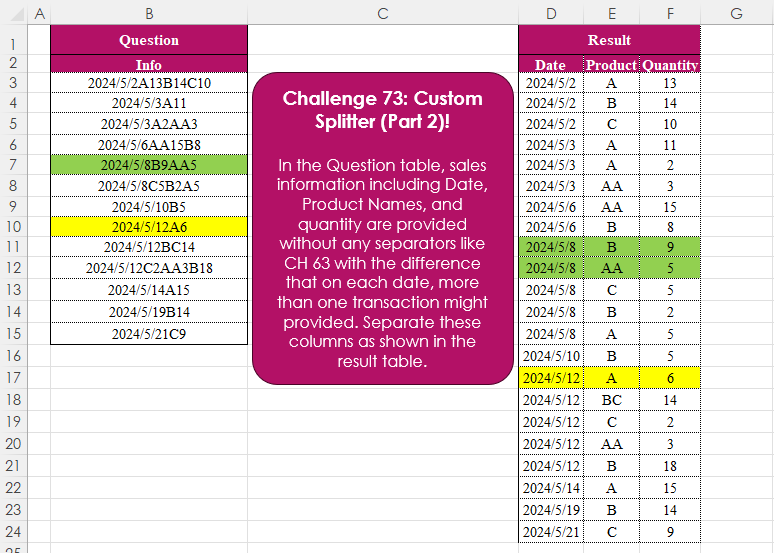
In the Question table, sales information including Date, Product Names, and quantity are provided without any separators like CH 63 with the difference that on each date, more than one transaction might provided. Separate these columns as shown in the result table.
📌 Challenge Details and Links
Challenge Number: 73
Challenge Difficulty: ⭐⭐⭐
📥Download Sample File
📥Link to the solutions on LinkedIn
📥Link to the solution on YouTube
Solving the challenge of Custom Splitter (Part 2)! with Power Query
Power Query solution 1 for Custom Splitter (Part 2)!, proposed by Zoran Milokanović:
let
  Source = Excel.CurrentWorkbook(){[Name = "Input"]}[Content],
  S = Table.FromRows(
    List.TransformMany(
      Table.TransformRows(
        Source,
        (r) =>
          let
            e = each List.RemoveItems(Text.SplitAny(r[Info], Text.Combine(_)), {""})
          in
            {e({"0" .. "9", "/"}), e({"A" .. "Z"})}
      ),
      each List.Zip({_{0}, List.Skip(_{1})}),
      (i, _) => {i{1}{0}} & _
    ),
    {"Date", "Product", "Quantity"}
  )
in
  S
Power Query solution 2 for Custom Splitter (Part 2)!, proposed by Brian Julius:
let
  Source = Excel.CurrentWorkbook(){[Name = "Table1"]}[Content],
  SplitByCharTrans = Table.RenameColumns(
    Table.SplitColumn(
      Source,
      "Info",
      Splitter.SplitTextByCharacterTransition(
        {"0" .. "9"},
        (c) => not List.Contains({"0" .. "9", "/"}, c)
      )
    ),
    {"Info.1", "Date"}
  ),
  UnpivOther = Table.RemoveColumns(
    Table.UnpivotOtherColumns(SplitByCharTrans, {"Date"}, "Attribute", "Value"),
    "Attribute"
  ),
  SplitByCharTrans2 = Table.SplitColumn(
    UnpivOther,
    "Value",
    Splitter.SplitTextByCharacterTransition((c) => not List.Contains({"0" .. "9"}, c), {"0" .. "9"}),
    {"Product", "Quantity"}
  ),
  ReType = Table.TransformColumnTypes(
    SplitByCharTrans2,
    {{"Date", type date}, {"Quantity", Int64.Type}}
  )
in
  ReType
Power Query solution 3 for Custom Splitter (Part 2)!, proposed by Ramiro Ayala Chávez:
let
Source = Excel.CurrentWorkbook(){[Name="Table1"]}[Content],
Fx = (x)=> let
S = Splitter.SplitTextByCharacterTransition,
L = List.Transform,
a = x,
b = S({"0".."9"},{"A".."Z"})(a),
c = L(b, S({"A".."Z"},{"0".."9"})),
d = List.Skip(L(List.Positions(c), each c{0}&c{_})),
e = Table.FromRows(d,{"Date","Product","Quantity"}),
f = Table.TransformColumnTypes(e,{"Date",type date})
in f,
g = Table.AddColumn(Source,"T", each Fx([Info]))[[T]],
Sol = Table.ExpandTableColumn(g,"T",{"Date","Product","Quantity"})
in
Sol
Power Query solution 4 for Custom Splitter (Part 2)!, proposed by Aditya Kumar Darak 🇮🇳:
let
  Source = Excel.CurrentWorkbook(){[Name = "data"]}[Content],
  Generate = List.TransformMany(
    Source[Info],
    (x) => List.Skip(Splitter.SplitTextByCharacterTransition({"0" .. "9"}, {"A" .. "Z"})(x)),
    (x, y) =>
      [
        S = Splitter.SplitTextByCharacterTransition({"A" .. "Z"}, {"0" .. "9"})(y),
        D = Date.From(Splitter.SplitTextByAnyDelimiter({"A" .. "Z"})(x){0}),
        R = [Date = D, Product = S{0}, Quantity = Number.From(S{1})]
      ][R]
  ),
  Return = Table.FromRecords(Generate, type table [Date = date, Product = text, Quantity = number])
in
  Return
Power Query solution 5 for Custom Splitter (Part 2)!, proposed by Alejandro Simón 🇵🇦 🇪🇸:
let
 Source = Excel.CurrentWorkbook(){[Name="Table1"]}[Content],
 Sol = Table.Combine(Table.AddColumn(Source, "A", each
let
a = Splitter.SplitTextByCharacterTransition({"0".."9"},{"A".."Z"})([Info]),
b = List.Transform(a, each Splitter.SplitTextByCharacterTransition({"A".."Z"}, {"0".."9"})(_)),
c = Table.Combine(List.Transform(List.Skip(b), each Table.FromRows({b{0}&_}, {"Date", "Product", "Quantity"})))
in c)[A])
in
 Sol
Power Query solution 6 for Custom Splitter (Part 2)!, proposed by 🇮🇷 Navid Esmaeilzadeh اسماعیل زاده:
let
  Source = Excel.CurrentWorkbook(){[Name = "Table1"]}[Content],
  A = Table.AddColumn(
    Source,
    "Date",
    each List.First(Splitter.SplitTextByCharacterTransition({"0" .. "9"}, {"A" .. "Z"})([Info]))
  ),
  B = Table.AddColumn(
    A,
    "Product/Qty",
    each List.RemoveFirstN(
      Splitter.SplitTextByCharacterTransition({"0" .. "9"}, {"A" .. "Z"})([Info]),
      1
    )
  ),
  C = Table.ExpandListColumn(B, "Product/Qty"),
  D = Table.SplitColumn(
    C,
    "Product/Qty",
    Splitter.SplitTextByCharacterTransition((c) => not List.Contains({"0" .. "9"}, c), {"0" .. "9"}),
    {"Product/Qty.1", "Product/Qty.2"}
  ),
  F = Table.RenameColumns(D, {{"Product/Qty.1", "Product"}, {"Product/Qty.2", "Qty"}}),
  G = Table.SelectColumns(F, {"Date", "Product", "Qty"})
in
  G
Power Query solution 7 for Custom Splitter (Part 2)!, proposed by Arnaud Duvernois:
let
  Source = Excel.CurrentWorkbook(){[Name = "Tableau2"]}[Content],
  Split = Table.AddColumn(
    Source,
    "Products",
    each [
      str = Splitter.SplitTextByCharacterTransition(
        {"0" .. "9"},
        (c) => not List.Contains({"0" .. "9", "/"}, c)
      )([Info]),
      Products = Table.Combine(
        List.TransformMany(
          List.Skip(str),
          (s) => {
            Splitter.SplitTextByCharacterTransition(
              (c) => not List.Contains({"0" .. "9"}, c),
              {"0" .. "9"}
            )(s)
          },
          (s, y) => Table.FromRows({y}, {"Product", "Quantity"})
        )
      ),
      Date = Table.AddColumn(Products, "Date", each str{0})
    ][Date]
  ),
  Combine = Table.Combine(Split[Products]),
  Permute = Table.ReorderColumns(Combine, {"Date", "Product", "Quantity"})
in
  Permute
Power Query solution 8 for Custom Splitter (Part 2)!, proposed by Szabolcs Phraner:
let
  Source = Table.FromRows(
    Json.Document(
      Binary.Decompress(
        Binary.FromText(
          "Vc27CcAwEIPhXVwHYp0f2KXuxjDef40kTbBKfSD+tZJlq3e7jSiOGshpX78WArqNLKd0Es3HScMn2USiuSkhu25j1+2BqhJf3CEx1LcvMF1/hphp7wc=",
          BinaryEncoding.Base64
        ),
        Compression.Deflate
      )
    ),
    let
      _t = ((type nullable text) meta [Serialized.Text = true])
    in
      type table [Info = _t]
  ),
  SplitItems = List.Transform(
    Source[Info],
    each [
      Split  = Splitter.SplitTextByCharacterTransition({"1" .. "9"}, {"A" .. "Z"})(_),
      Record = [Date = List.First(Split), Products = List.Skip(Split)]
    ][Record]
  ),
  FlattenList = List.TransformMany(
    SplitItems,
    each [Products],
    (date, product) => [
      Date     = Date.From(date[Date]),
      Product  = Text.Select(product, {"A" .. "Z"}),
      Quantity = Int64.From(Text.Select(product, {"0" .. "9"}))
    ]
  ),
  TableFromRecords = Table.FromRecords(
    FlattenList,
    type table [Date = date, Product = text, Quantity = Int64.Type]
  )
in
  TableFromRecords
Solving the challenge of Custom Splitter (Part 2)! with Excel
Excel solution 1 for Custom Splitter (Part 2)!, proposed by Bo Rydobon 🇹🇭:
=LET(
    a,
    B3:B15,
    d,
    "^([/d]+)",
    b,
    TEXTSPLIT(
        TRIM(
            CONCAT(
                SUBSTITUTE(
                    REGEXREPLACE(
                        a,
                        d&"|([A-Z]+)(d+)",
                        "${2:+_$2-$3 }"
                    ),
                    "_",
                    REGEXEXTRACT(
                        a,
                        d
                    )&"-"
                )
            )
        ),
        "-",
        " "
    ),
    IFERROR(
        --b,
        b
    )
)
Excel solution 2 for Custom Splitter (Part 2)!, proposed by محمد حلمي:
=REDUCE(
    D2:F2,
    B3:B15,
    LAMBDA(
        a,
        v,
        LET(

            i,
            TEXTSPLIT(
                v,
                ,
                {"A",
                "B",
                "C"},
                1
            ),

            VSTACK(
                a,
                CHOOSE(
                    {1,
                    2,
                    3},
                    --@i,

                    TEXTSPLIT(
                        v,
                        "/",
                        SEQUENCE(
                            10
                        )-1,
                        1
                    ),
                    --DROP(
                        i,
                        1
                    )
                )
            )
        )
    )
)
Excel solution 3 for Custom Splitter (Part 2)!, proposed by Oscar Mendez Roca Farell:
=REDUCE(
    D2:F2,
     B3:B15,
     LAMBDA(
         i,
          x,
          LET(
              s,
               TEXTSPLIT(
                   x,
                    "/",
                    ROW(
                        1:10
                    )-1,
                    1
               ),
               t,
               TEXTSPLIT(
                   x,
                    ,
                    s
               ),
               d,
               DROP(
                   t,
                    1
               ),
               VSTACK(
                   i,
                    HSTACK(
                        --REPT(
                            @t ,
                            d^0
                        ),
                         s,
                         --d
                    )
               )
          )
     )
)
Excel solution 4 for Custom Splitter (Part 2)!, proposed by Julian Poeltl:
=LET(
    I,
    VSTACK(
        HSTACK(
            "Date",
            "Product",
            "Quantity"
        ),
        TEXTSPLIT(
            TEXTJOIN(
                ",",
                ,
                MAP(
                    B3:B15,
                    LAMBDA(
                        I,
                        LET(
                            L,
                            LEN(
                                I
                            ),
                            AZ,
                            CHAR(
                                SEQUENCE(
                                    26
                                )+64
                            ),
                            DX,
                            MIN(
                                IFERROR(
                                    XMATCH(
                                        AZ,
                                        MID(
                                            I,
                                            SEQUENCE(
                                                L
                                            ),
                                            1
                                        )
                                    ),
                                    100
                                )
                            ),
                            D,
                            LEFT(
                                I,
                                DX-1
                            ),
                            ND,
                            RIGHT(
                                I,
                                LEN(
                                I
                            )-DX+1
                            ),
                            SPP,
                            TEXTSPLIT(
                                ND,
                                SEQUENCE(
                                    10,
                                    ,
                                    0
                                )
                            ),
                            P,
                            FILTER(
                                SPP,
                                SPP<>""
                            ),
                            SPQ,
                            TEXTSPLIT(
                                ND,
                                AZ
                            ),
                            Q,
                            FILTER(
                                SPQ,
                                SPQ<>""
                            ),
                            TEXTJOIN(
                                ",",
                                ,
                                D&"|"&P&"|"&Q
                            )
                        )
                    )
                )
            ),
            "|",
            ","
        )
    ),
    IFERROR(
        I*1,
        I
    )
)
Excel solution 5 for Custom Splitter (Part 2)!, proposed by Kris Jaganah:
=REDUCE(
    {"Date",
    "Product",
    "Quantity"},
    B3:B15,
    LAMBDA(
        x,
        y,
        VSTACK(
            x,
            LET(
                a,
                REGEXEXTRACT(
                    y,
                    "[0-9/]+",
                    1
                ),
                b,
                REGEXEXTRACT(
                    y,
                    "[A-Z]+",
                    1
                ),
                c,
                TAKE(
                    a,
                    1
                ),
                IFNA(
                    HSTACK(
                        c,
                        b,
                        --DROP(
                    a,
                    1
                )
                    ),
                    c
                )
            )
        )
    )
)
Excel solution 6 for Custom Splitter (Part 2)!, proposed by Sunny Baggu:
=REDUCE(     {"Date",
     "Product",
     "Quantity"},     B3:B15,     LAMBDA(
         a,
          v,          VSTACK(

               a,

               LET(

                    _d,
                    TEXTBEFORE(
                        v,
                         CHAR(
                             SEQUENCE(
                                 26,
                                  ,
                                  65
                             )
                         )
                    ),

                    _da,
                    TEXTAFTER(
                        v,
                         _d
                    ),

                    _p,
                    TEXTSPLIT(
                        _da,
                         ,
                         SEQUENCE(
                             10,
                              ,
                              0
                         ),
                         1
                    ),

                    _q,
                    TEXTSPLIT(
                        _da,
                         ,
                         _p,
                         1
                    ),

                    IFNA(
                        HSTACK(
                            _d,
                             _p,
                             _q
                        ),
                         _d
                    )

               )

          )     ))
Excel solution 7 for Custom Splitter (Part 2)!, proposed by Asheesh Pahwa:
=LET(
    alp,
    CHAR(
        SEQUENCE(
            26,
            ,
            65
        )
    ),    sq,
    SEQUENCE(
        10,
        ,
        0
    ),
    t,
    DROP(
        REDUCE(
            "",
            B3:B15,
            LAMBDA(
                x,
                y,
                VSTACK(
                    x,

                    LET(
                        ts,
                        TEXTSPLIT(
                            y,
                            alp
                        ),
                        d,
                        DROP(
                            ts,
                            ,
                            1
                        ),
                        tc,
                        TOCOL(
                            d,
                            1
                        ),
                        f,
                        FILTER(
                            tc,
                            tc<>""
                        ),
                        _ts2,
                        TEXTSPLIT(
                            y,
                            "/",
                            sq
                        ),
                        _tc2,
                        TOCOL(
                            _ts2,
                            3
                        ),
                        _f2,
                        FILTER(
                            _tc2,
                            _tc2<>""
                        ),

                        tk,
                        TAKE(
                            ts,
                            ,
                            1
                        ),
                        IFNA(
                            HSTACK(
                                tk,
                                _f2,
                                f
                            ),
                            tk
                        )
                    )
                )
            )
        ),
        1
    ),
    t
)
Excel solution 8 for Custom Splitter (Part 2)!, proposed by Bilal Mahmoud kh.:
=REDUCE(
    {"date",
    "Product",
    "QTY"},
    B3:B15,
    LAMBDA(
        s,
        v,
        VSTACK(
            s,
            LET(
                n,
                TEXTSPLIT(
                    SUBSTITUTE(
                        CONCAT(
                            LET(
                                a,
                                MID(
                                    v,
                                    SEQUENCE(
                                        LEN(
                                            v
                                        )
                                    ),
                                    1
                                ),
                                b,
                                IF(
                                    a ="/",
                                    a,
                                    IF(
                                        ISNUMBER(
                                            --a
                                        ),
                                        a,
                                        "-"&a&"-"
                                    )
                                ),
                                b
                            )
                        ),
                        "--",
                        ""
                    ),
                    "-"
                ),
                m,
                TAKE(
                    n,
                    ,
                    1
                ),
                o,
                WRAPROWS(
                    DROP(
                    n,
                    ,
                    1
                ),
                    2
                ),
                p,
                MAKEARRAY(
                    ROWS(
                        o
                    ),
                    COLUMNS(
                        o
                    )+1,
                    LAMBDA(
                        r,
                        c,
                        IF(
                            c=1,
                            m,
                            INDEX(
                                o,
                                r,
                                c-1
                            )
                        )
                    )
                ),
                p
            )
        )
    )
)
Excel solution 9 for Custom Splitter (Part 2)!, proposed by Burhan Cesur:
=REDUCE(D2:F2,B3:B15,LAMBDA(s,v,VSTACK(s,LET(a,REGEXEXTRACT(v,"[A-Z]+",1),b,REGEXEXTRACT(v,"d+/d+/d+"),c,REGEXEXTRACT(v,"[A-Z]+d+",1),HSTACK(INDEX(b,(SEQUENCE(ROWS(a))^0)),a,REGEXEXTRACT(c,"d+"))))))Excel solution 10 for Custom Splitter (Part 2)!, proposed by Diarmuid Early:
=REDUCE(
    D2:F2,
     B3:B15,     LAMBDA(
         a,
          v ,
         VSTACK(
             a,

              LET(
                  splt,
                   REGEXEXTRACT(
                       v,
                        "([d/]+)|([A-Z]+)",
                        1
                   ),

                   prodQuan,
                   WRAPROWS(
                       DROP(
                           splt,
                            1
                       ),
                        2
                   ),

                   IFERROR(
                       HSTACK(
                           @splt,
                            prodQuan
                       ),
                        @splt
                   )
              )
         )
     )
)

And here's the logic:
* The core part is REGEXEXTRACT to split the text between parts that are numbers or slashes,
     and parts that are letters - this is stored as 'splt':
REGEXEXTRACT(
    v,
     "([d/]+)|([A-Z]+)",
     1
)
(e.g. for the first row,
     this gives 2024/5/2,
     A,
     13,
     B,
     14,
     C,
     10)
* Each match except the first (which are product / quantity pairs) is wrapped in rows of two - this is stored as 'prodQuan':
WRAPROWS(
                       DROP(
                           splt,
                            1
                       ),
                        2
                   )
* The first match from the REGEX,
     which is the date,
     is added as the first column:
IFERROR(
                       HSTACK(
                           @splt,
                            prodQuan
                       ),
                        @splt
                   ))))
* Then REDUCE applies this operation to each input,
     and stacks the result (starting from D2:F2,
     which is the headers)
Excel solution 11 for Custom Splitter (Part 2)!, proposed by Hussein SATOUR:
=DROP(REDUCE("",
    B3:B15,
    LAMBDA(x,
    y,
    VSTACK(x,
    LET(a,
    REGEXEXTRACT(
        y,
        "(d+/d+/d+)|([A-Z]+)|(d+)",
        1
    ),
    HSTACK(TEXT(SEQUENCE((COUNTA(
        a
    )-1)/2),
    "")&TAKE(
        a,
        1
    ),
    WRAPROWS(
        DROP(
        a,
        1
    ),
        2
    )))))),
    1)
Excel solution 12 for Custom Splitter (Part 2)!, proposed by Milan Shrimali:
=DROP(
    REDUCE(
        "",
        B2:B15,
        LAMBDA(
            X,
            Y,
            LET(
                A,
                TEXTJOIN(
                    ";",
                    ,
                    SUBSTITUTE(
                        TEXTSPLIT(
                            Y,
                            CHAR(
                                SEQUENCE(
                                    10,
                                    1,
                                    48,
                                    1
                                )
                            )
                        ),
                        "/",
                        ""
                    )
                ),
                B,
                TEXTSPLIT(
                    TEXTJOIN(
                        ";",
                        ,
                        TEXTSPLIT(
                            Y,
                            CHAR(
                                SEQUENCE(
                                    26,
                                    1,
                                    65,
                                    1
                                )
                            )
                        )
                    ),
                    ,
                    ";"
                ),
                VSTACK(
                    X,
                    IFERROR(
                        HSTACK(
                            TAKE(
                                B,
                                1
                            ),
                            IFERROR(
                                HSTACK(
                                    TEXTSPLIT(
                                        A,
                                        ,
                                        ";"
                                    ),
                                    IFERROR(
                                        DROP(
                                            TEXTSPLIT(
                                                B,
                                                ,
                                                ";"
                                            ),
                                            1
                                        ),
                                        ""
                                    )
                                ),
                                ""
                            )
                        ),
                        HSTACK(
                            TAKE(
                                B,
                                1
                            )
                        )
                    )
                )
            )
        )
    ),
    1
)
Excel solution 13 for Custom Splitter (Part 2)!, proposed by Rayan Saud:
=LET(
    tbl,
    TEXTSPLIT(
        TEXTJOIN(
            ";",
            ,
            MAP(
                B3:B15,
                LAMBDA(
                    x,
                    LET(
                        arr,
                        x,
                         date,
                         REGEXEXTRACT(
                             arr,
                              "^d{4}/d{1,2}/d{1,2}"
                         ),
                         rest,
                         RIGHT(
                             arr,
                              LEN(
                                  arr
                              ) - LEN(
                                  date
                              )
                         ),
                         prod,
                         TEXTJOIN(
                             ",",
                              ,
                              TEXTSPLIT(
                                  rest,
                                   SEQUENCE(
                                       10,
                                        ,
                                        0
                                   )
                              )
                         ),
                         quant,
                         TEXTJOIN(
                             ",",
                              ,
                              TEXTSPLIT(
                                  rest,
                                   UNICHAR(
                                       SEQUENCE(
                                           52,
                                            ,
                                            6