
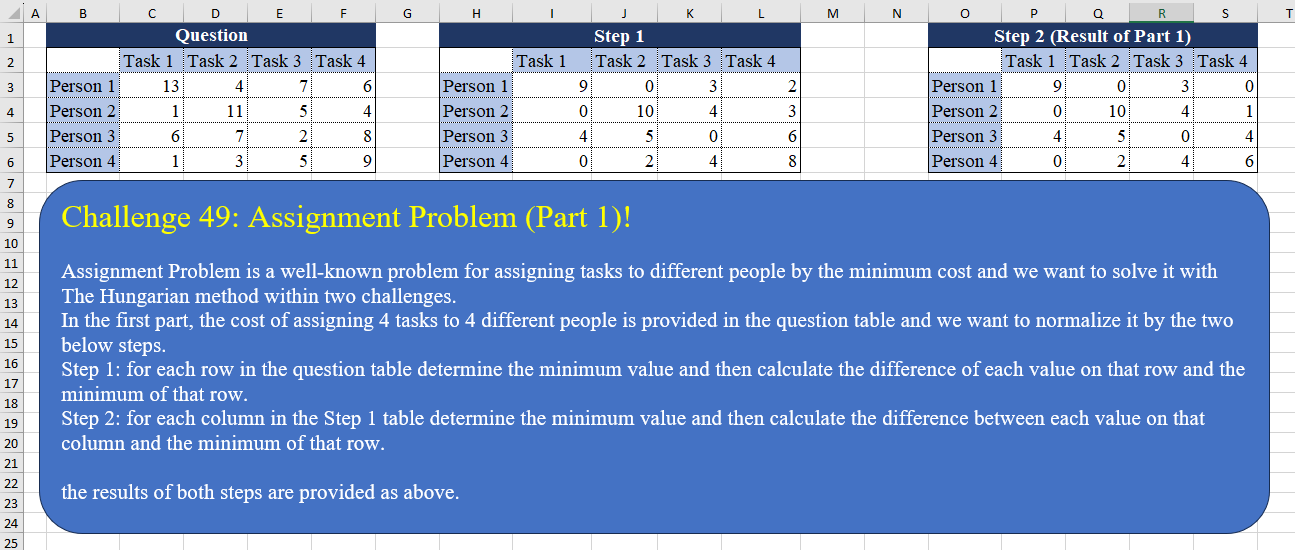
Assignment Problem is a well-known problem for assigning tasks to different people by the minimum cost and we want to solve it with The Hungarian method within two challenges. In the first part, the cost of assigning 4 tasks to 4 different people is provided in the question table and we want to normalize it by the two below steps. Step 1: for each row in the question table determine the minimum value and then calculate the difference of each value on that row and the minimum of that row. Step 2: for each column in the Step 1 table determine the minimum value and then calculate the difference between each value on that column and the minimum of that row. the results of both steps are provided as above.
📌 Challenge Details and Links
Challenge Number: 49
Challenge Difficulty: ⭐⭐
📥Download Sample File
📥Link to the solutions on LinkedIn
Solving the challenge of Assignment Problem (Part 1)! with Power Query
Power Query solution 1 for Assignment Problem (Part 1)!, proposed by Omid Motamedisedeh:
let
  Source = Excel.CurrentWorkbook(){[Name = "Table1"]}[Content],
  Name = List.Skip(Table.ColumnNames(Source)),
  S1 = Table.ExpandRecordColumn(
    Table.CombineColumns(
      Source,
      Name,
      each Record.FromList(List.Transform(_, (x) => x - List.Min(_)), Name),
      "M"
    ),
    "M",
    Name,
    Name
  ),
  S2 = List.Accumulate(
    Name,
    S1,
    (x, y) => Table.TransformColumns(x, {y, each _ - List.Min(Table.Column(S1, y))})
  )
in
  S2
Power Query solution 2 for Assignment Problem (Part 1)!, proposed by Brian Julius:
let
  Source = Excel.CurrentWorkbook(){[Name = "Table1"]}[Content],
  ToRows = Table.AddIndexColumn(
    Table.FromColumns(List.Transform(Table.ToRows(Source), each List.Skip(_, 1))),
    "Index",
    1,
    1
  ),
  ProcessTable = (x as table) =>
    [
      Head = Table.ColumnNames(Source),
      UnpivOther = Table.UnpivotOtherColumns(ToRows, {"Index"}, "Column", "Value"),
      Group = Table.Group(
        UnpivOther,
        {"Column"},
        {{"Min", each List.Min([Value]), type number}, {"All", each _}}
      ),
      AddStep = Table.SelectColumns(
        Table.AddColumn(
          Group,
          "Step",
          each [
            a = [All],
            b = [Min],
            c = [Column],
            d = Text.Replace(c, "Column", "Person"),
            e = Table.AddColumn(a, "MinusMin", each [Value] - b),
            f = {d} & e[MinusMin]
          ][f]
        ),
        {"Step"}
      ),
      Result = Table.FromRows(AddStep[Step], Head)
    ][Result],
  Step1 = ProcessTable(ToRows),
  ToCols = Table.AddIndexColumn(
    Table.FromColumns(List.Skip(Table.ToColumns(Step1), 1)),
    "Index",
    1,
    1
  ),
  Step2 = ProcessTable(ToCols)
in
  Step2
Power Query solution 3 for Assignment Problem (Part 1)!, proposed by Eric Laforce:
let
  Source = Excel.CurrentWorkbook(){[Name = "Table1"]}[Content],
  CN = Table.ColumnNames(Table.RenameColumns(Source, {"Column1", "Person"})),
  fxListDiffFromMin = (l as list) as list =>
    let
      lMin = List.Min(l)
    in
      List.Transform(l, each _ - lMin),
  Step1 = Table.FromRows(
    List.Transform(Table.ToRows(Source), each {_{0}} & fxListDiffFromMin(List.Skip(_))),
    CN
  ),
  Step2 = Table.FromColumns(
    {Step1[Person]} & List.Transform(List.Skip(Table.ToColumns(Step1)), fxListDiffFromMin),
    CN
  )
in
  Step2
Power Query solution 4 for Assignment Problem (Part 1)!, proposed by Ramiro Ayala Chávez:
let
Source = Excel.CurrentWorkbook(){[Name="Table1"]}[Content],
Z = List.Zip,
C = List.Combine,
T = List.Transform,
R = List.Repeat,
M = List.Min,
P = List.Positions,
S = List.Split,
a = Z(List.Skip(Table.ToColumns(Source))),
b = C(a),
c = T(a, each R({M(_)},4)),
d = C(c),
e = T(P(d), each b{_}-d{_}),
f = Z(S(e,4)),
g = C(f),
h = T(f, each R({M(_)},4)),
i = C(h),
j = T(P(i), each g{_}-i{_}),
Sol = Table.FromRows(Z({Source[Column1]}&S(j,4)),Table.ColumnNames(Source))
in
Sol
Power Query solution 5 for Assignment Problem (Part 1)!, proposed by Aditya Kumar Darak 🇮🇳:
let
  Source = Excel.CurrentWorkbook(){[Name = "data"]}[Content],
  ColNames = Table.ColumnNames(Source),
  Step1 = [
    TR = Table.ToRows(Source),
    C = List.Transform(TR, each List.Transform(_, (f) => try f - List.Min(List.Skip(_)) otherwise f)),
    T = Table.FromRows(C, ColNames)
  ][T],
  Step2 = [
    TC = Table.ToColumns(Step1),
    C  = List.Transform(TC, each List.Transform(_, (f) => try f - List.Min(_) otherwise f)),
    T  = Table.FromColumns(C, ColNames)
  ][T]
in
  Step2
Power Query solution 6 for Assignment Problem (Part 1)!, proposed by Alejandro Simón 🇵🇦 🇪🇸:
let
Source = Excel.CurrentWorkbook(){[Name="Table1"]}[Content],
Group = Table.Group(Source, {"Column1"}, {{"A", each
let
a = _,
b = List.Skip(Table.ToRows(a){0}),
c = List.Transform(b, each _-List.Min(b)),
d = Table.FromRows({c}, List.Skip(Table.ColumnNames(_)))
in d}}),
Step1 = Table.ExpandTableColumn(Group, "A", Table.ColumnNames(Group[A]{0})),
Col = List.Skip(Table.ToColumns(Step1)),
Step2 = Table.FromColumns({Step1[Column1]}&List.Transform({0..List.Count(Col)-1}, each List.Transform(Col{_}, (x)=> x-List.Min(Col{_}))), Table.ColumnNames(Source))
in
Step2 //or Step1
Power Query solution 7 for Assignment Problem (Part 1)!, proposed by Alexis Olson:
let
  Source = Excel.CurrentWorkbook(){[Name = "Table1"]}[Content],  /*Define functions*/
  SubtractMin = (T as table) =>
    Table.FromRecords(
      Table.TransformRows(
        T,
        (row) =>
          [
            ValueCols  = List.Skip(Table.ColumnNames(T)),
            MinValue   = List.Min(List.Skip(Record.FieldValues(row))),
            fx         = (x) => x - MinValue,
            Transforms = List.Transform(ValueCols, (col) => {col, fx}),
            Result     = Record.TransformFields(row, Transforms)
          ][Result]
      )
    ),
  Transpose = (T as table) => Table.PromoteHeaders(Table.Transpose(Table.DemoteHeaders(T))),  /*Use functions*/
  Step1 = SubtractMin(Source),
  Step2 = Transpose(SubtractMin(Transpose(Step1)))
in
  Step2
Power Query solution 8 for Assignment Problem (Part 1)!, proposed by 🇮🇷 Navid Esmaeilzadeh اسماعیل زاده:
let
  S = Excel.CurrentWorkbook(){[Name = "Table1"]}[Content],
  A = Table.AddColumn(
    S,
    "T",
    each
      let
        A = List.Min(List.Skip(Record.ToList(_), 1)),
        N = Table.FromColumns(
          {{[Task 1] - A}, {[Task 2] - A}, {[Task 3] - A}, {[Task 4] - A}},
          {"T1", "T2", "T3", "T4"}
        )
      in
        N
  ),
  B = Table.SelectColumns(A, {"Column1", "T"}),
  C = Table.ExpandTableColumn(B, "T", {"T1", "T2", "T3", "T4"}, {"T1", "T2", "T3", "T4"}),
  D = Table.AddColumn(
    C,
    "T2.1",
    each Table.FromColumns(
      {
        {[T1] - List.Min(C[T1])},
        {[T2] - List.Min(C[T2])},
        {[T3] - List.Min(C[T3])},
        {[T4] - List.Min(C[T4])}
      },
      {"Task 1", "Task 2", "Task 3", "Task 4"}
    )
  ),
  E = Table.SelectColumns(D, {"Column1", "T2.1"}),
  F = Table.ExpandTableColumn(
    E,
    "T2.1",
    {"Task 1", "Task 2", "Task 3", "Task 4"},
    {"Task 1", "Task 2", "Task 3", "Task 4"}
  )
in
  F
Power Query solution 9 for Assignment Problem (Part 1)!, proposed by Peter Tholstrup:
let
  Source      = Excel.CurrentWorkbook(){[Name = "Table1"]}[Content],
  f_transform = (l) => List.Transform(l, each try _ - List.Min(l) otherwise _),
  transform1  = List.Transform(Table.ToRows(Source), f_transform),
  transform2  = List.Transform(List.Zip(transform1), f_transform),
  f_get_table = (l, f) => f(l, Table.ColumnNames(Source)),
  step1       = f_get_table(transform1, Table.FromRows),
  step2       = f_get_table(transform2, Table.FromColumns)
in
  step2
Power Query solution 10 for Assignment Problem (Part 1)!, proposed by Venkata Rajesh:
let
 Source = Data,
 Remove = Table.RemoveColumns(Source,"Person"),
 fx = (table) => let
 x = Table.AddColumn(table, "Custom", each
 [x1 = Record.ToList(_),
 x2 = List.Min(x1),
 x3 = List.Transform(x1, each _ - x2)][x3]),
 y = Table.FromColumns(x[Custom])
 in y,
 Output = Table.FromColumns({Source[Person]} & Table.ToColumns(fx(fx(Remove))), Table.ColumnNames(Source))
in
Output
Solving the challenge of Assignment Problem (Part 1)! with Excel
Excel solution 1 for Assignment Problem (Part 1)!, proposed by Bo Rydobon 🇹🇭:
=REDUCE(C3:F6,HSTACK(BYROW,BYCOL),LAMBDA(a,b,LET(c,b(a,MIN),a-c)))Excel solution 2 for Assignment Problem (Part 1)!, proposed by Bo Rydobon 🇹🇭:
=LET(
    z,
    C3:F6,
    y,
    z-BYROW(
        z,
        MIN
    ),
    y-BYCOL(
        y,
        MIN
    )
)
Excel solution 3 for Assignment Problem (Part 1)!, proposed by 🇰🇷 Taeyong Shin:
=LET(
 λ,
     LAMBDA(f,
     LAMBDA(x,
     x - f(
         MIN
     )(x))), PIPE(C3:F6,
     VSTACK(λ(BYROWλ),
     λ(BYCOLλ)))
)
Excel solution 4 for Assignment Problem (Part 1)!, proposed by محمد حلمي:
=C3:F6-BYROW(
    C3:F6,
    LAMBDA(
        a,
        MIN(
            a
        )
    )
)

With Headers

=LET(
    b,
    B2:F6,
    IFERROR(
        b-BYROW(
            b,
            LAMBDA(
        a,
        MIN(
            a
        )
    )
        ),
        b
    )
)

Step2:

=LET(
    c,
    C3:F6,
    d,
    c-BYROW(
        c,
        LAMBDA(
        a,
        MIN(
            a
        )
    )
    ),    d-BYCOL(
        d,
        LAMBDA(
        a,
        MIN(
            a
        )
    )
    )
)

With Headers

=LET(
    b,
    B2:F6,
    x,
    IFERROR(
        b-BYROW(
            b,
            LAMBDA(
        a,
        MIN(
            a
        )
    )
        ),
        b
    ),    IFERROR(
        x-BYCOL(
            x,
            LAMBDA(
        a,
        MIN(
            a
        )
    )
        ),
        b
    )
)
Excel solution 5 for Assignment Problem (Part 1)!, proposed by 🇵🇪 Ned Navarrete C.:
=LET(
    s,
    C3:F6-BYROW(
        C3:F6,
        LAMBDA(
            r,
            MIN(
                r
            )
        )
    ),
    s-BYCOL(
        s,
        LAMBDA(
            c,
            MIN(
                c
            )
        )
    )
)
Excel solution 6 for Assignment Problem (Part 1)!, proposed by Oscar Mendez Roca Farell:
=LET(
    s,
     C3:F6-BYROW(
         C3:F6,
          LAMBDA(
              r,
               MIN(
                   r
               )
          )
     ),
     VSTACK(
         HSTACK(
             "",
              C2:F2
         ),
          HSTACK(
              B3:B6,
               s-BYCOL(
                   s,
                    LAMBDA(
                        c,
                         MIN(
                             c
                         )
                    )
               )
          )
     )
)

Or alternatively:

=LET(
    F,
     LAMBDA(
         i,
          TRANSPOSE(
              i-BYROW(
                  i,
                   LAMBDA(
              r,
               MIN(
                   r
               )
          )
              )
          )
     ),
     VSTACK(
         HSTACK(
             "",
              C2:F2
         ),
          HSTACK(
              B3:B6,
               F(
                   F(
                       C3:F6
                   )
               )
          )
     )
)
Excel solution 7 for Assignment Problem (Part 1)!, proposed by Julian Poeltl:
=LET(
    T,
    B2:F6,
    Q,
    DROP(
        T,
        1,
        1
    ),
    O,
    Q-BYROW(
        Q,
        LAMBDA(
            A,
            MIN(
                A
            )
        )
    ),
    R,
    O-BYCOL(
        O,
        LAMBDA(
            A,
            MIN(
                A
            )
        )
    ),
    VSTACK(
        HSTACK(
            "",
            TAKE(
                T,
                1,
                -4
            )
        ),
        HSTACK(
            TAKE(
                T,
                -4,
                1
            ),
            R
        )
    )
)
Excel solution 8 for Assignment Problem (Part 1)!, proposed by Kris Jaganah:
=LET(
    a,
    C3:F6,
    b,
    a-BYROW(
        a,
        MIN
    ),
    c,
    b-BYCOL(
        b,
        MIN
    ),
    VSTACK(
        HSTACK(
            "",
            C2:F2
        ),
        HSTACK(
            B3:B6,
            c
        )
    )
)
Excel solution 9 for Assignment Problem (Part 1)!, proposed by Abdallah Ally:
=LET(
    a,
    C3:F6,
    b,
    a-BYROW(
        a,
        MIN
    ),
    b-BYCOL(
        b,
        MIN
    )
)
Excel solution 10 for Assignment Problem (Part 1)!, proposed by John Jairo Vergara Domínguez:
=LET(
    r;
    C3:F6;
    a;
    r-BYROW(
        r;
        MIN
    );
    a-BYCOL(
        a;
        MIN
    )
)
Excel solution 11 for Assignment Problem (Part 1)!, proposed by Sunny Baggu:
=LET(     _s1,
     C3:F6 - BYROW(
         C3:F6,
          LAMBDA(
              a,
               MIN(
                   a
               )
          )
     ),     _s2,
     _s1 - BYCOL(
         _s1,
          LAMBDA(
              b,
               MIN(
                   b
               )
          )
     ),     l,
     LAMBDA(
         arr,
          HSTACK(
              VSTACK(
                  "",
                   B3:B6
              ),
               VSTACK(
                   C2:F2,
                    arr
               )
          )
     ),     HSTACK(
         l(
             _s1
         ),
          IF(
              {1,
               2},
               "",
               SEQUENCE(
                   ROWS(
                       B2:B6
                   )
               )
          ),
          l(
              _s2
          )
     ))
Excel solution 12 for Assignment Problem (Part 1)!, proposed by Andy Heybruch:
=LET(
    _rng,
    C3:F6,    _step1,
    _rng-BYROW(
        _rng,
        LAMBDA(
            _r,
            MIN(
                _r
            )
        )
    ),    _step2,
    _step1-BYROW(
        _step1,
        LAMBDA(
            _c,
            MIN(
                _c
            )
        )
    ),    HSTACK(
        VSTACK(
            "",
            B3:B6
        ),
        VSTACK(
            C2:F2,
            _step2
        )
    )
)
Excel solution 13 for Assignment Problem (Part 1)!, proposed by Ankur Sharma:
=LET(
    a,
     C3:F6,
     b,
     TEXTSPLIT(
         TEXTJOIN(
             "@",
              ,
              BYROW(
                  a,
                   LAMBDA(
                       z,
                        TEXTJOIN(
                            ", ",
                             ,
                             z - MIN(
                                 z
                             )
                        )
                   )
              )
         ),
          ", ",
          "@"
     ),
     WRAPCOLS(
         TEXTSPLIT(
             TEXTJOIN(
                 ", ",
                  ,
                  BYCOL(
                      VALUE(
                          b
                      ),
                       LAMBDA(
                           y,
                            TEXTJOIN(
                                ", ",
                                 ,
                                 y - MIN(
                                     y
                                 )
                            )
                       )
                  )
             ),
              ", "
         ),
          4
     )
)
Excel solution 14 for Assignment Problem (Part 1)!, proposed by Daniel Madhadha:
=C3:F6-BYROW(C3:F6,LAMBDA(a,MIN(a)))Excel solution 15 for Assignment Problem (Part 1)!, proposed by Hussein SATOUR:
=C3:F6-BYROW(
    C3:F6,
    MIN
)
Step2 : =I3#-BYCOL(
    I3#,
    MIN
)
Excel solution 16 for Assignment Problem (Part 1)!, proposed by Rayan Saud:
=LET(     arr,
     C3:F6,     sO,
     arr - BYROW(
         arr,
          LAMBDA(
              x,
               MIN(
                   x
               )
          )
     ),     HSTACK(          sO,          TRANSPOSE(
              TRANSPOSE(
                  sO
              ) - TRANSPOSE(
                  BYCOL(
                      sO,
                       LAMBDA(
              x,
               MIN(
                   x
               )
          )
                  )
              )
          )     ))
Solving the challenge of Assignment Problem (Part 1)! with Python
Python solution 1 for Assignment Problem (Part 1)!, proposed by Konrad Gryczan, PhD:
import pandas as pd

input = pd.read_excel("CH-049 Assignment Problem Part 1.xlsx", usecols="C:F", skiprows=1).values
test = pd.read_excel("CH-049 Assignment Problem Part 1.xlsx", usecols="P:S", skiprows=1).values

input = [[val - min(row) for val in row] for row in input]
input = list(map(list, zip(*input)))
input = [[val - min(row) for val in row] for row in input]
input = list(map(list, zip(*input)))

print(input == test)    # True
Python solution 2 for Assignment Problem (Part 1)!, proposed by Abdallah Ally:
import pandas as pd

# Read the Excel file
file_path = 'CH-049 Assignment Problem Part 1.xlsx'
df = pd.read_excel(file_path, usecols='B:F', skiprows=1, index_col=0)

# Perform data transformation and cleansing
df = df.apply(lambda x: x - min(x), axis=1).apply(lambda x: x - min(x))

# Display the results
df
Solving the challenge of Assignment Problem (Part 1)! with R
R solution 1 for Assignment Problem (Part 1)!, proposed by Konrad Gryczan, PhD:
library(tidyverse)
library(readxl)

input = read_excel("files/CH-049 Assignment Problem Part 1.xlsx", range = "C2:F6")
step2 = read_excel("files/CH-049 Assignment Problem Part 1.xlsx", range = "P2:S6")

result = input %>%
 rowwise() %>%
 mutate(across(everything(), ~ . - min(c_across(everything())))) %>%
 ungroup() %>%
 mutate(across(everything(), ~ . - min(.)))

identical(result, step2)
# [1] TRUE