
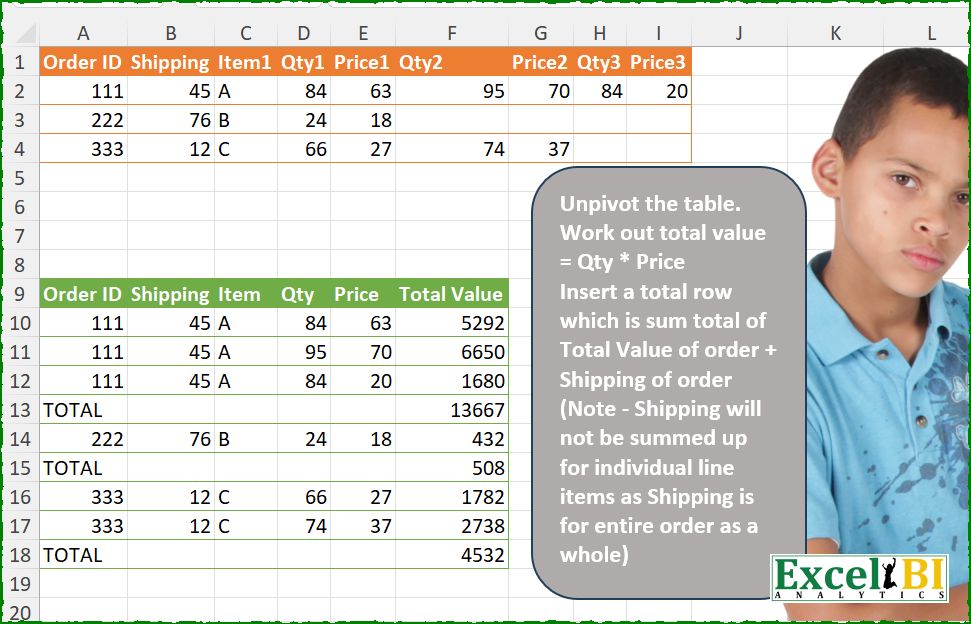
Unpivot the table. Work out total value = Qty * Price Insert a total row which is sum total of Total Value of order + Shipping of order (Note – Shipping will not be summed up for individual line items as Shipping is for entire order as a whole)
📌 Challenge Details and Links
ExcelBI Power Query Challenge Number: 276
Challenge Difficulty: ⭐️⭐️⭐️
📥Download Sample File
📥Link to the solutions on LinkedIn
Solving the challenge of Unpivot the table, add order with Power Query
Power Query solution 1 for Unpivot the table, add order, proposed by Zoran Milokanović:
let
  Source = Excel.CurrentWorkbook(){[Name = "Input"]}[Content],
  N = {null, null},
  _ = Table.FromRows(
    List.TransformMany(
      Table.ToRows(Source),
      each
        let
          r = List.Transform(
            List.Split(List.RemoveNulls(List.Skip(_, 3)), 2),
            each _ & {List.Product(_)}
          )
        in
          r & {N & {List.Sum(List.Zip(r){2})}},
      (i, _) =>
        let
          f = Byte.From(_{0} = null)
        in
          {List.FirstN(i, 3) & _, {"TOTAL"} & N & N & {_{2} + i{1}}}{f}
    ),
    {"Order ID", "Shipping", "Item", "Qty", "Price", "Total Value"}
  )
in
  _
Power Query solution 2 for Unpivot the table, add order, proposed by Kris Jaganah:
let
 A = Excel.CurrentWorkbook(){[Name="Table1"]}[Content],
 B = Table.UnpivotOtherColumns(A, {"Order ID", "Shipping", "Item1"}, "At", "V"),
 C = Table.TransformColumns( B ,{"At" , each Text.Remove( _ , {"0".."9"}) }),
 D = Table.Combine( Table.Group(C, {"Order ID", "Shipping", "Item1"}, {"All", each
 [a = Table.AddIndexColumn( _ ,"Id",1,1/2) ,
 b = Table.TransformColumns(a,{"Id", (v)=> Number.IntegerDivide(v,1)}) ,
 c = Table.Pivot(b, List.Distinct( b[At]),"At","V"  ) ,
 d = Table.RemoveColumns(c,"Id") ,
 e = Table.AddColumn(d,"Total Value", (w)=> w[Qty]*w[Price] ),
 f = e & hashtag#table( { "Order ID" , "Total Value"}, {{ "TOTAL", List.Sum(e[Total Value]&{e[Shipping]{0}})}})][f]})[All])
in D
Power Query solution 3 for Unpivot the table, add order, proposed by Alejandro Simón 🇵🇦 🇪🇸:
let
  Source = Excel.CurrentWorkbook(){[Name = "Table1"]}[Content],
  Group = Table.Group(
    Source,
    {"Order ID", "Shipping", "Item1"},
    {
      {
        "A",
        each
          let
            a = List.Skip(Table.ToRows(_){0}, 3),
            b = Table.FromRows(List.Split(List.RemoveNulls(a), 2), {"Price", "Qty"}),
            c = Table.AddColumn(b, "Total Value", each [Price] * [Qty])
          in
            c
      }
    }
  ),
  Exp = Table.ExpandTableColumn(Group, "A", Table.ColumnNames(Group[A]{0})),
  Sol = Table.Combine(
    Table.Group(
      Exp,
      {"Order ID"},
      {
        {
          "A",
          each
            let
              a = _,
              b = Table.ToRows(a),
              c = b & {{"TOTAL", null, null, null, null, List.Sum(a[Total Value]) + a[Shipping]{0}}},
              d = Table.FromRows(c, Table.ColumnNames(a))
            in
              d
        }
      }
    )[A]
  )
in
  Sol
Power Query solution 4 for Unpivot the table, add order, proposed by Luan Rodrigues:
let
 Fonte = List.Transform({1..(Table.ColumnCount(Tabela1)-1)/2},(x)=>
 let
 a = Table.SelectColumns(Tabela1,
 List.Select(Table.ColumnNames(Tabela1),(y)=>
 y = "Qty"&Text.From(x) or
 y = "Price"&Text.From(x) or
 y = "Order ID" or
 y = "Shipping" or
 y = "Item1")),
 b = Table.RenameColumns(a,List.Zip({Table.ColumnNames(a),{"Order ID","Shipping","Item1", "Qty", "Price"}}) ),
 c = Table.AddColumn(b, "Total Value", each [Qty] * [Price])
 in c ),
last = List.RemoveLastN(Fonte),
cmb = Table.Combine(last),
filtro = Table.SelectRows(cmb, each ([Qty] <> null)),
grp = Table.Group(filtro, {"Order ID", "Shipping", "Item1"}, {
 {"tab", each _ &
 hashtag#table({"Order ID","Total Value"},{{"TOTAL", List.Sum(_[Total Value]) + _[Shipping]{0} }}) }})[tab],
comb = Table.Combine(grp)
in
comb
Power Query solution 5 for Unpivot the table, add order, proposed by Eric Laforce:
let
  Source = Excel.CurrentWorkbook(){[Name = "tData276"]}[Content],
  Transform = List.Transform(
    Table.ToRows(Source),
    each
      let
        g = List.Range(_, 0, 3),
        a = List.Accumulate(
          List.Select(List.Split(List.Range(_, 3), 2), each _{0} <> null),
          [a = {}, t = g{1}],
          (s, c) =>
            let
              tv = c{0} * c{1}
            in
              [a = s[a] & {g & c & {tv}}, t = s[t] + tv]
        )
      in
        a[a] & {{"TOTAL", null, null, null, null, a[t]}}
  ),
  Result = Table.FromRows(
    List.Combine(Transform),
    {"OrderID", "Shipping", "Item", "Qty", "Price", "Total Value"}
  )
in
  Result
Power Query solution 6 for Unpivot the table, add order, proposed by Seokho MOON:
let
  Source = Excel.CurrentWorkbook(){[Name = "Table1"]}[Content],
  ColNames = List.Distinct(
    List.Transform(Table.ColumnNames(Source), each Text.Remove(_, {"1" .. "3"}))
  ),
  Res = Table.Combine(List.Transform(Table.ToRows(Source), Fun)),
  Fun = each [
    A = List.TransformMany({_}, B, (x, y) => List.FirstN(x, 3) & y),
    B = each List.Split(List.Skip(List.RemoveNulls(_), 3), 2),
    C = Table.AddColumn(Table.FromRows(A, ColNames), "Total Value", each [Qty] * [Price]),
    D = C
      & Table.FromRecords(
        {[Order ID = "TOTAL", Total Value = List.Sum(C[Total Value]) + C[Shipping]{0}]}
      )
  ][D]
in
  Res
Power Query solution 7 for Unpivot the table, add order, proposed by Meganathan Elumalai:
let
  Source = Excel.CurrentWorkbook(){[Name = "Table1"]}[Content],
  Tbl = Table.FromRecords(
    List.TransformMany(
      Table.ToRows(Source),
      (f) => List.Split(List.Skip(List.RemoveNulls(f), 3), 2),
      (x, y) =>
        Record.FromList(
          List.FirstN(x, 3) & y & {List.Product(y)},
          {"Order ID", "Shipping", "Item", "Qty", "Price", "Total Value"}
        )
    )
  ),
  TotalTbl = Table.FromRecords(
    List.Transform(
      Source[Order ID],
      (f) =>
        Record.FromList(
          {
            Text.From(f) & "-Total",
            List.Sum(
              Table.SelectRows(Tbl, (x) => x[Order ID] = f)[Total Value]
                & Table.SelectRows(Source, (x) => x[Order ID] = f)[Shipping]
            )
          },
          {"Order ID", "Total Value"}
        )
    )
  ),
  Result = Table.ReplaceValue(
    Table.Sort(Tbl & TotalTbl, each Text.From([Order ID])),
    each [Order ID],
    "",
    (x, y, z) => Text.Replace(y, Text.Start(y, Text.PositionOf(y, "-") + 1), z),
    {"Order ID"}
  )
in
  Result
Power Query solution 8 for Unpivot the table, add order, proposed by Antriksh Sharma:
let
  Source = Table,
  Rename = Table.RenameColumns(Source, {"Item1", "Item"}),
  Unpivot = Table.UnpivotOtherColumns(Rename, {"Order ID", "Shipping", "Item"}, "A", "V"),
  Transform = Table.TransformColumns(Unpivot, {"A", each Text.Remove(_, {"0" .. "9"}), type text}),
  ColNames = Table.ColumnNames(Source),
  Pivot = Table.Pivot(Transform, List.Distinct(Transform[A]), "A", "V", each _),
  CombineCols = Table.CombineColumns(
    Pivot,
    Table.ColumnNames(Pivot),
    each
      let
        a = Table.FromColumns(
          List.Transform(_, (x) => {{x}, x}{Byte.From(x is list)}),
          Table.ColumnNames(Pivot)
        ),
        b = Table.FillDown(
          Table.AddColumn(a, "Total Value", each [Qty] * [Price]),
          {"Order ID", "Shipping", "Item"}
        ),
        c = b
          & Table.FromColumns(
            {{"Total"}, {List.Sum(b[Total Value]) + b[Shipping]{0}}},
            {"Order ID", "Total Value"}
          )
      in
        c,
    "C"
  ),
  CombineTables = Table.Combine(CombineCols[C])
in
  CombineTables
Power Query solution 9 for Unpivot the table, add order, proposed by Peter Krkos:
PowerQuery solution:
= Table.FromRows(
 List.Combine(List.TransformMany(Table.ToRows(ChangedType1),
 each {List.Transform(List.Split(List.Skip(List.RemoveNulls(_), 3), 2), (x)=> x & {x{0}*x{1}})},
 (x,y)=> List.Transform(y, each List.FirstN(x, 3) & _ ) & {{"TOTAL"} & List.Repeat({null}, 4) & {List.Sum(List.Transform(y, each _{2})) + x{1}}})),
 type table[Order ID=text, Shipping=Int64.Type, Item=text, Qty=Int64.Type, Price=Int64.Type, Total Value=Int64.Type] )
Power Query solution 10 for Unpivot the table, add order, proposed by Alexandre Garcia:
let
  U = Excel.CurrentWorkbook(){[Name = "Table1"]}[Content],
  H = List.Transform,
  P = List.Distinct(H(Table.ColumnNames(U), each Text.Remove(_, {"0" .. "9"}))),
  L = ((x) => Table.Partition(U, P{0}, List.Count(x), each List.PositionOf(x, _)))(
    Table.Column(U, P{0})
  ),
  C = Table.Combine(
    H(
      L,
      each (
        (x) =>
          Table.FromRows(
            x & {{"TOTAL"} & List.Repeat({null}, 4) & {List.Sum(H(x, List.Last)) + x{0}{1}}},
            P & {"Total Value"}
          )
      )(
        List.TransformMany(
          Table.ToRows(_),
          each H(List.Split(List.RemoveNulls(List.Skip(_, 3)), 2), (x) => x & {List.Product(x)}),
          (x, y) => List.FirstN(x, 3) & y
        )
      )
    )
  )
in
  C
Power Query solution 11 for Unpivot the table, add order, proposed by Maciej Kopczyński:
let
  source = Excel.CurrentWorkbook(){[Name = "tblStart"]}[Content],
  unpvtCols = Table.TransformColumns(
    Table.UnpivotOtherColumns(source, {"Order ID", "Shipping", "Item1"}, "A", "V"),
    {{"A", each Text.Remove(_, {"0" .. "9"})}}
  ),
  X = Table.AddIndexColumn(unpvtCols, "X", 0, 1, Int64.Type),
  Y = Table.TransformColumns(
    Table.AddIndexColumn(X, "Y", 0, 1, Int64.Type),
    {{"Y", each Number.Mod(_, 2), type number}}
  ),
  pvtCol = Table.FillUp(Table.Pivot(Y, List.Distinct(Y[A]), "A", "V"), {"Price"}),
  selectRows = Table.AddColumn(
    Table.SelectRows(pvtCol, each ([Qty] <> null))[[Order ID], [Shipping], [Item1], [Qty], [Price]],
    "Total Value",
    each [Qty] * [Price],
    type number
  ),
  grouping = Table.Group(
    selectRows,
    {"Order ID", "Shipping", "Item1"},
    {
      {
        "Data",
        each
          let
            data = _,
            shipping = _[Shipping]{0},
            total = List.Sum(_[Total Value]) + shipping,
            result = Table.ToRecords(data)
              & {
                [
                  Order ID    = "Total",
                  Shipping    = null,
                  Item1       = null,
                  Qty         = null,
                  Price       = null,
                  Total Value = total
                ]
              }
          in
            result
      }
    }
  )[[Data]],
  expandRecords = Table.ExpandRecordColumn(
    Table.ExpandListColumn(grouping, "Data"),
    "Data",
    {"Order ID", "Shipping", "Item1", "Qty", "Price", "Total Value"}
  )
in
  expandRecords
Power Query solution 12 for Unpivot the table, add order, proposed by Fredson Alves Pinho:
let
  Fonte = Excel.CurrentWorkbook(){[Name = "Tabela1"]}[Content],
  fn = (id) =>
    Table.RenameColumns(Fonte, {{"Qty" & id, "Qty"}, {"Price" & id, "Price"}, {"Item1", "Item"}}),
  upvt = Table.Sort(Table.Combine({fn("1"), fn("2"), fn("3")}), {"Order ID"}),
  TValue = Table.AddColumn(upvt, "Total Value", each [Qty] * [Price]),
  id = Table.SelectRows(Table.DuplicateColumn(TValue, "Order ID", "ID"), each [Qty] <> null),
  total = Table.Group(
    id,
    "ID",
    {"Total Value", each List.Sum([Total Value]) + List.Average([Shipping])}
  ),
  comb = Table.Sort(
    Table.Combine({id, total}),
    {{"ID", Order.Ascending}, {"Order ID", Order.Descending}}
  ),
  rename = Table.ReplaceValue(comb, null, "TOTAL", Replacer.ReplaceValue, {"Order ID"})[
    [Order ID],
    [Shipping],
    [Item],
    [Qty],
    [Price],
    [Total Value]
  ]
in
  rename
Power Query solution 13 for Unpivot the table, add order, proposed by Aleksandar Kovacevic:
let
  S = Excel.CurrentWorkbook(){[Name = "Table1"]}[Content],
  C = List.Distinct(List.Transform(Table.ColumnNames(S), each Text.Remove(_, {"0" .. "9"}))),
  V = List.Transform(
    {1, 0},
    each List.Combine(List.Alternate(List.Skip(Table.ToColumns(S), 3), 1, 1, _))
  ),
  A = Table.FromColumns(
    List.Transform(List.FirstN(Table.ToColumns(S), 3), each List.Repeat(_, 3)) & V,
    C
  ),
  R = Table.Group(
    Table.AddColumn(Table.SelectRows(A, each [Qty] <> null), "Total Value", each [Qty] * [Price]),
    "Order ID",
    {
      "All",
      each _
        & Table.FromRecords(
          {[Order ID = "TOTAL", Total Value = List.Sum(_[Total Value]) + _[Shipping]{0}]}
        )
    }
  ),
  F = Table.ExpandTableColumn(
    Table.RemoveColumns(R, "Order ID"),
    "All",
    List.InsertRange(C, 5, {"Total Value"})
  )
in
  F
Power Query solution 14 for Unpivot the table, add order, proposed by Aleksandar Kovacevic:
let
  S = Excel.CurrentWorkbook(){[Name = "Table1"]}[Content],
  R = Table.RenameColumns,
  L = Table.SelectColumns,
  Tbl = Table.SelectRows(
    R(
      L(S, {"Order ID", "Shipping", "Item1", "Qty1", "Price1"}),
      {{"Qty1", "Qty"}, {"Price1", "Price"}, {"Item1", "Item"}}
    )
      & R(
        L(S, {"Order ID", "Shipping", "Item1", "Qty2", "Price2"}),
        {{"Qty2", "Qty"}, {"Price2", "Price"}, {"Item1", "Item"}}
      )
      & R(
        L(S, {"Order ID", "Shipping", "Item1", "Qty3", "Price3"}),
        {{"Qty3", "Qty"}, {"Price3", "Price"}, {"Item1", "Item"}}
      ),
    each [Qty] <> null
  ),
  Grp = Table.Group(
    Table.AddColumn(Tbl, "Total Value", each [Qty] * [Price]),
    "Order ID",
    {
      "All",
      each Table.InsertRows(
        _,
        Table.RowCount(_),
        {
          [
            Order ID    = "TOTAL",
            Shipping    = null,
            Item        = null,
            Qty         = null,
            Price       = null,
            Total Value = List.Sum(_[Total Value]) + _[Shipping]{0}
          ]
        }
      )
    }
  ),
  Res = Table.ExpandTableColumn(
    Table.RemoveColumns(Grp, "Order ID"),
    "All",
    {"Order ID", "Shipping", "Item", "Qty", "Price", "Total Value"}
  )
in
  Res
Power Query solution 15 for Unpivot the table, add order, proposed by Le Ngoc Tinh:
let
 Source = Excel.CurrentWorkbook(){[Name="Table1"]}[Content],
 tb = hashtag#table(List.Transform(List.FirstN(Table.ColumnNames(Source),5),each Text.Replace(_,"1","")) &{"Total Value"}, List.TransformMany(Table.ToRows(Source), each List.Split(List.Skip(List.RemoveNulls(_),3),2),(x,y)=>List.FirstN(x,3)&y&{List.Product(y)})),
 gr = Table.Combine(Table.Group(tb, {"Order ID"}, {"T", (g)=>g&#table(Table.ColumnNames(tb),{{"TOTAL"}&List.Repeat({null},4)&{List.Sum(g[Total Value])+g[Shipping]{0}}})})[T])
in
 gr
Solving the challenge of Unpivot the table, add order with Excel
Excel solution 1 for Unpivot the table, add order, proposed by Rick Rothstein:
=REDUCE(
    SUBSTITUTE(
        A1:E1,
        1,

    ),
    SEQUENCE(
        ROWS(
            A2:I4
        )
    ),
    LAMBDA(
        a,
        x,
        LET(
            d,
            CHOOSEROWS(
                A2:I4,
                x
            ),
            w,
            WRAPROWS(
                TRIMRANGE(
                   & CHOOSECOLS(
                        d,
                        4,
                        5,
                        6,
                        7,
                        8,
                        9
                    ),
                    ,
                    2
                ),
                2
            ),
            q,
            IF(
                SEQUENCE(
                    ROWS(
                        w
                    )
                ),
                TAKE(
                    d,
                    ,
                    3
                )
            ),
            t,
            BYROW(
                w,
                PRODUCT
            ),
            VSTACK(
                a,
                HSTACK(
                    q,
                    w,
                    t
                ),
                HSTACK(
                    "TOTAL",
                    "",
                    "",
                    "",
                    "",
                    SUM(
                        t
                    )+CHOOSECOLS(
                        d,
                        2
                    )
                )
            )
        )
    )
)
Excel solution 2 for Unpivot the table, add order, proposed by Sunny Baggu:
=DROP(

     REDUCE(

          "",

          SEQUENCE(
              ROWS(
                  A2:I4
              )
          ),

          LAMBDA(
              x,
               y,

               VSTACK(

                    x,

                    LET(

                         _a,
                         INDEX(
                             D2:I4,
                              y,

                         ),

                         _b,
                         INDEX(
                             A2:C4,
                              y,

                         ),

                         LET(

                              _v,
                              WRAPROWS(
                                  TOROW(
                                      _a,
                                       3
                                  ),
                                   2
                              ),

                              _p,
                              BYROW(
                                  _v,
                                   LAMBDA(
                                       a,
                                        PRODUCT(
                                            a
                                        )
                                   )
                              ),

                              _id,
                              IF(
                                  _p,
                                   _b
                              ),

                              VSTACK(

                                   HSTACK(
                                       _id,
                                        _v,
                                        _p
                                   ),

                                   HSTACK(

                                        "TOTAL",

                                        EXPAND(
                                            "",
                                             ,
                                             4,
                                             ""
                                        ),

                                        SUM(
                                            _p
                                        ) + TAKE(
                                            INDEX(
                                                _id,
                                                 ,
                                                 2
                                            ),
                                             1
                                        )

                                   )

                              )

                         )

                    )

               )

          )

     ),

     1

)
Excel solution 3 for Unpivot the table, add order, proposed by LEONARD OCHEA 🇷🇴:
=LET(
    t,
    A2:I4,
    n,
    ROWS(
        t
    ),
    I,
    INDEX,
    S,
    SEQUENCE,
    V,
    VSTACK,
    c,
    S(
        ,
        6
    ),
    REDUCE(
        A9:F9,
        S(
            n
        ),
        LAMBDA(
            a,
            b,
            LET(
                f,
                I(
                    t,
                    b,

                ),
                d,
                WRAPROWS(
                    TOROW(
                        DROP(
                            f,
                            ,
                            3
                        ),
                        1
                    ),
                    2
                ),
                p,
                BYROW(
                    d,
                    PRODUCT
                ),
                V(
                    a,
                    V(
                        HSTACK(
                            IF(
                                I(
                                    d,
                                    ,
                                    1
                                ),
                                I(
                                    f,
                                    S(
                                        ,
                                        3
                                    )
                                )
                            ),
                            d,
                            p
                        ),
                        IFS(
                            c=1,
                            "TOTAL",
                            c=6,
                            SUM(
                                p,
                                I(
                                    f,
                                    2
                                )
                            ),
                            1,
                            ""
                        )
                    )
                )
            )
        )
    )
)
Excel solution 4 for Unpivot the table, add order, proposed by Md. Zohurul Islam:
=LET(
    u,
    A2:C4,
    v,
    D2:I4,
    w,
    TAKE(
        u,
        ,
        1
    ),
    z,
    CHOOSECOLS(
        u,
        2
    ),

    hdr,
    HSTACK(
        "Order ID",
         "Shipping",
        "Item",
        "Qty",
        "Price",
        "TOTAL Value"
    ),

    p,
    REDUCE(
        hdr,
        w,
        LAMBDA(
            x,
            y,
            LET(

                 a,
                FILTER(
                    u,
                    w=y
                ),

                 b,
                FILTER(
                    v,
                    w=y
                ),

                 c,
                WRAPROWS(
                    FILTER(
                        b,
                        b>0
                    ),
                    2
                ),

                 d,
                TAKE(
                    c,
                    ,
                    1
                )*TAKE(
                    c,
                    ,
                    -1
                ),

                 e,
                SUM(
                    d
                )+FILTER(
                    z,
                    w=y
                ),

                 f,
                IFS(
                    LEFT(
                        hdr
                    )="O",
                    "TOTAL",
                    LEFT(
                        hdr
                    )="T",
                    e,
                    TRUE,
                    ""
                ),

                 g,
                IFNA(
                    HSTACK(
                        a,
                        c,
                        d
                    ),
                    a
                ),

                 h,
                VSTACK(
                    x,
                    g,
                    f
                ),
                h
            )
        )
    ),

    p
)
Excel solution 5 for Unpivot the table, add order, proposed by Hamidi Hamid:
=LET(
    f,
    LAMBDA(
        z,
        TAKE(
            WRAPROWS(
                TOROW(
                    IF(
                        D2:I4,
                        z,
                        0
                    )
                ),
                2
            ),
            ,
            1
        )
    ),
    qt,
    WRAPROWS(
        TOCOL(
            D2:I4
        ),
        2
    ),
    or,
    f(
        A2:A4
    ),
    sc,
    f(
        B2:B4
    ),
    it,
    f(
        C2:C4
    ),
    as,
    HSTACK(
        or,
        sc,
        it,
        qt,
        TAKE(
            qt,
            ,
            1
        )*TAKE(
            qt,
            ,
            -1
        )
    ),
    ad,
    IFERROR(
        HSTACK(
            UNIQUE(
        A2:A4
    ),
            SEQUENCE(
                ,
                COLUMNS(
                    as
                )-1
            )/0
        ),
        ""
    ),
    s,
    VSTACK(
        as,
        ad
    ),
    gg,
    SORT(
        FILTER(
            s,
            TAKE(
                s,
                ,
                1
            )<>0,

        ),
        1,
        1
    ),
    pg,
    TAKE(
        gg,
        ,
        -1
    ),
    sk,
    DROP(
        VSTACK(
            0,
            SCAN(
                0,
                pg,
                LAMBDA(
                    a,
                    b,
                    IF(
                        b="",
                        0,
                        a+b
                    )
                )
            )
        ),
        -1
    ),
    hh,
    HSTACK(
        gg,
        sk
    ),
    km,
    IF(
        pg="",
        sk,
        pg
    ),
    q,
    HSTACK(
        gg,
        km
    ),
    op,
    IF(
        CHOOSECOLS(
            gg,
            2
        )="",
        "TOTAL",
        CHOOSECOLS(
            gg,
            1
        )
    ),
    HSTACK(
        op,
        DROP(
            q,
            ,
            1
        )
    )
)
Excel solution 6 for Unpivot the table, add order, proposed by ferhat CK:
=LET(a,
    WRAPROWS(
        TOCOL(
            D2:I4
        ),
        2
    ),
    n,
    QUOTIENT(
        SEQUENCE(
            ROWS(
                a
            ),
            ,
            0
        ),
        3
    )+1,
    b,
    INDEX(
        C2:C4,
        n
    ),
    c,
    INDEX(
        A2:A4,
        n
    ),
    h,
    HSTACK,
    v,
    VSTACK,
    IFNA(REDUCE({"Order ID",
    "Shipping",
    "Item",
    "Qty",
    "Price",
    "Total Value"},
    A2:A4,
    LAMBDA(x,
    y,
    v(x,
    LET(f,
    FILTER(h(
        c,
        b,
        a
    ),
    (c=y)*(TAKE(
        a,
        ,
        1
    )>0)),
    w,
    BYROW(
        TAKE(
            f,
            ,
            -2
        ),
        PRODUCT
    ),
    h(
        v(
            f,
            "TOTAL"
        ),
        v(
            w,
            SUM(
                w
            )
        )
    ))))),
    ""))
Excel solution 7 for Unpivot the table, add order, proposed by Jaroslaw Kujawa:
=DROP(
    REDUCE(
        "";
        C2:C4;
        LAMBDA(
            a;
            x;
            LET(
                h;
                HSTACK;
                e;
                TAKE;
                o;
                OFFSET;
                z;
                WRAPROWS(
                    o(
                        x;
                        ;
                        1;
                        ;
                        6
                    );
                    2
                );
                y;
                FILTER(
                    z;
                    e(
                        z;
                        ;
                        1
                    )
                );
                v;
                e(
                    y;
                    ;
                    1
                );
                w;
                e(
                    y;
                    ;
                    -1
                );
                r;
                REPT(
                    TEXTJOIN(
                        ";";
                        1;
                        o(
                            x;
                            ;
                            -2;
                            ;
                            3
                        )
                    )&"|";
                    ROWS(
                        y
                    )
                );
                i;
                TEXTSPLIT(
                    LEFT(
                        r;
                        LEN(
                            r
                        )-1
                    );
                    ";";
                    "|"
                );
                VSTACK(
                    a;
                    h(
                        i;
                        y;
                        v*w
                    );
                    h(
                        "TOTAL";
                        "";
                        "";
                        "";
                        "";
                        SUM(
                            o(
                                x;
                                ;
                                -1
                            );
                            v*w
                        )
                    )
                )
            )
        )
    );
    1
)
Excel solution 8 for Unpivot the table, add order, proposed by Imam Hambali:
=LET(
qp,
    D2:I4,

cc,
     CHOOSECOLS,

l,
     LAMBDA(
         x,
          WRAPROWS(
              TOROW(
                  REPT(
                      x,
                      IF(
                          LEFT(
                              D1:I1
                          )="Q",
                          1,
                          NA()
                      )*IF(
                          qp>0,
                          1,
                          NA()
                      )
                  ),
                  3
              ),
              1
          )
     ),

t,
     HSTACK(
         l(
             A2:A4
         ),
         l(
             B2:B4
         ),
         l(
             C2:C4
         ),
         WRAPROWS(
             TOROW(
                 qp,
                 1
             ),
             2
         )
     ),

h,
     HSTACK(
         t,
         cc(
             t,
             -1
         )*cc(
             t,
             -2
         )
     ),

tf,
     DROP(
         GROUPBY(
             DROP(
                 h,
                 ,
                 -1
             ),
              cc(
                  h,
                  -1
              ),
             SUM,
             ,
             2
         ),
         -1
     ),

VSTACK({"Order ID",
    "Shipping",
    "Item",
    "Qty",
    "Price",
    "Total Value"},
    HSTACK(IF((cc(
        tf,
        1
    )>0)*(cc(
        tf,
        2
    )<>""),
    cc(
        tf,
        1
    ),
    "TOTAL"),
    DROP(
        tf,
        ,
        1
    )))
)
Excel solution 9 for Unpivot the table, add order, proposed by Gerson Pineda:
=LET(
    s,
    SEQUENCE,
    h,
    HSTACK,
    v,
    VSTACK,
    k,
    TAKE,
    DROP(
        REDUCE(
            1,
            A2:A4,
            LAMBDA(
                j,
                x,
                LET(
                    m,
                    FILTER(
                        A2:I4,
                        A2:A4=x
                    ),
                    a,
                    k(
                        m,
                        ,
                        -6
                    ),
                    b,
                    WRAPROWS(
                        TOROW(
                            a,
                            1
                        ),
                        2
                    ),
                    c,
                    BYROW(
                        b,
                        PRODUCT
                    ),
                    v(
                        j,
                        v(
                            h(
                                IF(
                                    s(
                                        COUNT(
                                            a
                                        )/2
                                    )^0,
                                    k(
                                        m,
                                        ,
                                        3
                                    )
                                ),
                                b,
                                c
                            ),
                            h(
                                "Total",
                                IF(
                                    s(
                                        ,
          &                              4
                                    )^0,
                                    ""
                                ),
                                SUM(
                                    c
                                )+CHOOSECOLS(
                                    m,
                                    2
                                )
                            )
                        )
                    )
                )
            )
        ),
        1
    )
)
Excel solution 10 for Unpivot the table, add order, proposed by LUIS FLORENTINO COUTO CORTEGOSO:
=REDUCE(
    A9:F9,
    A2:A4,
    LAMBDA(
        a,
        i,
        VSTACK(
            a,
            LET(
                o,
                FILTER(
                    A2:C4,
                    A2:A4=i
                ),
                q,
                WRAPROWS(
                    FILTER(
                        D2:I4,
                        A2:A4=i
                    ),
                    2
                ),
                r,
                FILTER(
                    q,
                    TAKE(
                        q,
                        ,
                        1
                    )<>0
                ),
                to,
                BYROW(
                    TAKE(
                        r,
                        ,
                        -2
                    ),
                    PRODUCT
                ),
                gt,
                VSTACK(
                    to,
                    SUM(
                        to
                    )
                ),
                g,
                IFNA(
                    HSTACK(
                        o,
                        r
                    ),
                    o
                ),
                IFNA(
                    HSTACK(
                        g,
                        gt
                    ),
                    {"TOTAL",
                    "",
                    "",
                    "",
                    ""}
                )
            )
        )
    )
)
Solving the challenge of Unpivot the table, add order with Python
Python solution 1 for Unpivot the table, add order, proposed by Luan Rodrigues:
import pandas as pd
file = r"PQ_Challenge_276.xlsx"
df = pd.read_excel(file,usecols="A:I",nrows=4)
lista = [str(i) for i in range(1, len(df.columns) // 2 + 1)]
df_select = {}
dfs = []
for i in lista[:-1]:
 df_select[i] = [col for col in df.columns if col.endswith(i) or col in ["Order ID","Shipping","Item1"]]
 df_filtrado = df[df_select[i]]
 df_filtrado.columns = ["Order ID","Shipping","Item1", "Qty", "Price"]
 dfs.append(df_filtrado)

df_final = pd.concat(dfs).dropna()
df_final['Total Value'] = df_final['Qty'] * df_final['Price']
df_final = df_final.groupby(['Order ID','Shipping','Item1']).apply(
 lambda x: pd.concat([
 x,
 pd.DataFrame({
 "Order ID":"TOTAL",
 "Total Value": [x["Total Value"].sum() + x["Shipping"].iloc[0].sum()]
 })
 ])
 ).reset_index(drop=True)
print(df_final )
Solving the challenge of Unpivot the table, add order with Python in Excel
Python in Excel solution 1 for Unpivot the table, add order, proposed by Alejandro Campos:
df = xl("A1:I4", headers=True).fillna('')
rows = []
for _, r in df.iterrows():
 v = sum(int(r[f"Qty{i}"]) * int(r[f"Price{i}"]) for i in range(1, 4) if r[f"Qty{i}"] and r[f"Price{i}"])
 for i in range(1, 4):
 q, p = r[f"Qty{i}"], r[f"Price{i}"]
 if q and p:
 rows.append({"Order ID": r["Order ID"], "Shipping": r["Shipping"], "Item": r["Item1"], "Qty": int(q), "Price": int(p), "Total Value": int(q)*int(p)})
 rows.append({"Order ID": "TOTAL", "Shipping": "", "Item": "", "Qty": "", "Price": "", "Total Value": v + r["Shipping"]})
final_df = pd.DataFrame(rows)
Python in Excel solution 2 for Unpivot the table, add order, proposed by Antriksh Sharma:
df = xl("A1:I4", headers= True)
df = df.rename(columns = {'Item1': 'Item'})
unpivot = (
 df.melt(id_vars=df.columns[:3], var_name='A', value_name='V')
 .loc[lambda d: d['V'].notna()]
 .assign(N=lambda d: d['A'].str[-1])
 .sort_values(['Order ID', 'N'])
 .assign(A=lambda d: d['A'].str.replace(r'd+', '', regex=True))
 .drop(columns='N')
 .reset_index(drop=True)
)
pivot = (
 unpivot
 .pivot_table(
 index = ['Order ID', 'Shipping', 'Item'],
 columns = 'A',
 values = 'V',
 aggfunc= lambda x: list(x)
 )
 .reset_index()
 .explode(['Price', 'Qty'])
 .reset_index(drop = True)
 .rename_axis(None, axis=1)
 .assign(**{'Total Value': lambda x: x['Price'] * x['Qty']})
)
result = pd.DataFrame()
for name, group in pivot.groupby('Order ID', sort = False):
 result = pd.concat([
 result, group,
 pd.DataFrame(
 {'Order ID': ['Total'],
 'Total Value': group['Total Value'].sum() + group['Shipping'].unique().tolist()[0]})])
result = result.fillna('').infer_objects(copy=False).reset_index(drop = True)
result = result[['Order ID', 'Shipping', 'Item', 'Qty', 'Price', 'Total Value']]
result
&