
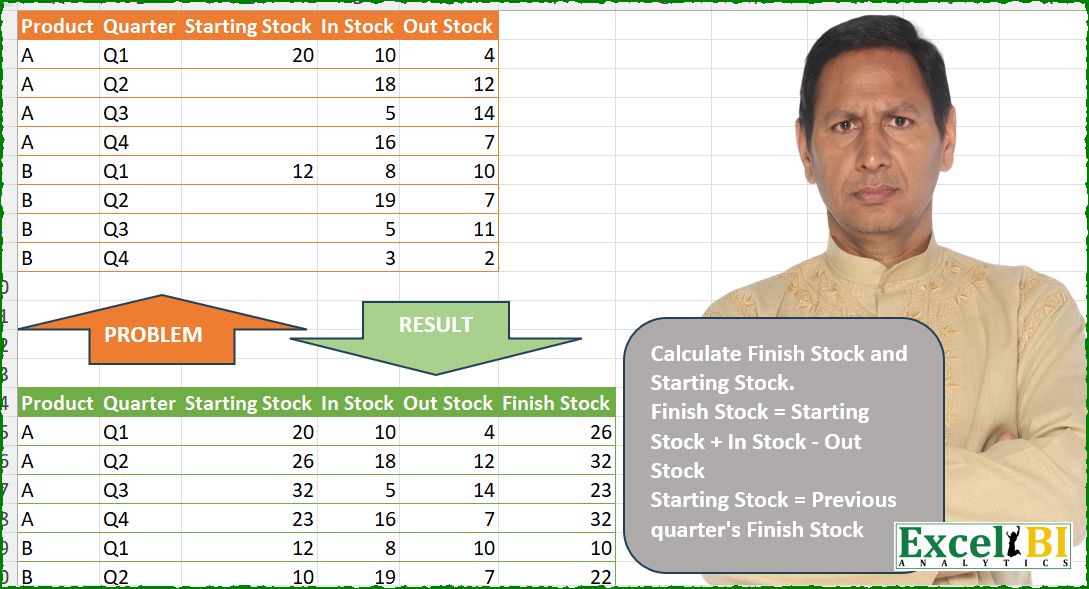
Calculate Finish Stock and Starting Stock. Finish Stock = Starting Stock + In Stock – Out Stock Starting Stock = Previous quarter’s Finish Stock
📌 Challenge Details and Links
ExcelBI Power Query Challenge Number: 250
Challenge Difficulty: ⭐️⭐️
📥Download Sample File
📥Link to the solutions on LinkedIn
Solving the challenge of Calculate Finish Stock and Starting with Power Query
Power Query solution 1 for Calculate Finish Stock and Starting, proposed by Zoran Milokanović:
let
  Source = Excel.CurrentWorkbook(){[Name = "Input"]}[Content],
  R = Table.ToRows(Source),
  _ = Table.FromRows(
    List.TransformMany(
      R,
      each
        let
          d = List.Zip(List.Select(R, (r) => r{0} = _{0} and r{1} < _{1}) & {List.Repeat({0}, 5)})
        in
          {d{2}{0} + List.Sum(d{3}) - List.Sum(d{4})},
      (i, _) => {i{0}, i{1}, i{2} ?? _, i{3}, i{4}, (i{2} ?? _) + i{3} - i{4}}
    ),
    Table.ColumnNames(Source) & {"Finish Stock"}
  )
in
  _
Power Query solution 2 for Calculate Finish Stock and Starting, proposed by Kris Jaganah:
let
  A = Excel.CurrentWorkbook(){[Name = "Table1"]}[Content],
  B = Table.ToRows(A),
  C = List.Generate(
    () => [a = 0, b = B{0}{0}, c = B{0}{2}, d = B{0}{3}, e = B{0}{4}, f = c + d - e, g = B{0}{1}],
    each [a] < List.Count(B),
    each [
      a = [a] + 1,
      b = B{a}{0},
      c = if B{a}{2} = null then [f] else B{a}{2},
      d = B{a}{3},
      e = B{a}{4},
      f = c + d - e,
      g = B{a}{1}
    ],
    each Record.ToList([[b], [g], [c], [d], [e], [f]])
  ),
  D = Table.FromRows(C, Table.ColumnNames(A) & {"Finish Stock"})
in
  D
Power Query solution 3 for Calculate Finish Stock and Starting, proposed by Alejandro Simón 🇵🇦 🇪🇸:
let
  Source = Excel.CurrentWorkbook(){[Name = "Table1"]}[Content],
  Sol = Table.Combine(
    Table.Group(
      Source,
      {"Product"},
      {
        {
          "A",
          each
            let
              a = _,
              b = List.Generate(
                () => [x = 1, y = a{0}[Starting Stock] + a{0}[In Stock] - a{0}[Out Stock]],
                each [x] <= Table.RowCount(a),
                each [x = [x] + 1, y = [y] + a{[x]}[In Stock] - a{[x]}[Out Stock]],
                each [y]
              ),
              c = {a{0}[Starting Stock]} & List.RemoveLastN(b),
              d = Table.ToColumns(a),
              e = List.FirstN(d, 2) & {c} & List.LastN(d, 2) & {b},
              f = Table.FromColumns(e, Table.ColumnNames(a) & {"Finish Stock"})
            in
              f
        }
      }
    )[A]
  )
in
  Sol
Power Query solution 4 for Calculate Finish Stock and Starting, proposed by Luan Rodrigues:
let
  Fonte = Table.AddColumn(
    Tabela1,
    "Total",
    each List.Sum({[Starting Stock], [In Stock], - [Out Stock]})
  ),
  grp = Table.Group(
    Fonte,
    {"Product"},
    {
      {
        "acc",
        each
          let
            a = {null}
              & List.RemoveLastN(
                List.RemoveFirstN(
                  List.Accumulate(_[Total], {0}, (s, c) => s & {List.Last(s) + c}),
                  1
                )
              ),
            b = Table.FromColumns(
              Table.ToColumns(_) & {a},
              Table.ColumnNames(Fonte) & {"Finish Stock"}
            )
          in
            b
      }
    }
  )[acc],
  cmb = Table.Combine(grp),
  tab = Table.FromRecords(
    Table.TransformRows(
      cmb,
      each _
        & [
          Starting Stock = if [Starting Stock] = null then [Finish Stock] else [Starting Stock],
          Finish Stock =
            if [Finish Stock] = null then
              [Total]
            else
              List.Sum({#"Starting Stock", [In Stock], - [Out Stock]})
        ]
    )
  ),
  res = Table.RemoveColumns(tab, {"Total"})
in
  res
Power Query solution 5 for Calculate Finish Stock and Starting, proposed by Hussein SATOUR:
let
  Source = Excel.CurrentWorkbook(){[Name = "Table1"]}[Content],
  GroupByProduct = Table.Group(Source, {"Product"}, {{"AllRows", each _}}),
  AddCustomTab = Table.AddColumn(
    GroupByProduct,
    "Custom",
    each
      let
        a = Table.AddIndexColumn([AllRows], "Index", 0, 1),
        b = Table.AddColumn(
          a,
          "FinishStock",
          each
            let
              theInd = [Index],
              bb     = Table.SelectRows(a, each [Index] <= theInd)
            in
              List.Sum(bb[Starting Stock]) + List.Sum(bb[In Stock]) - List.Sum(bb[Out Stock])
        ),
        c = Table.AddColumn(
          b,
          "StartStock",
          each try b[FinishStock]{[Index] - 1} otherwise [Starting Stock]
        )
      in
        c
  ),
  RemovCols = Table.RemoveColumns(AddCustomTab, {"Product", "AllRows"}),
  Result = Table.ExpandTableColumn(
    RemovCols,
    "Custom",
    {"Product", "Quarter", "StartStock", "In Stock", "Out Stock", "FinishStock"}
  )
in
  Result
Power Query solution 6 for Calculate Finish Stock and Starting, proposed by Abdallah Ally:
let
  Source = Excel.CurrentWorkbook(){[Name = "Table1"]}[Content],
  Rows = Table.ToRows(Source),
  Generate = List.Generate(
    () => [r = 0, v = Rows{0}, s = v{2}, i = v{3}, o = v{4}, f = s + i - o],
    each [r] < Table.RowCount(Source),
    each [
      r = [r] + 1,
      v = Rows{r},
      s = if v{0} = [v]{0} then [f] else v{2},
      i = v{3},
      o = v{4},
      f = s + i - o
    ],
    each Record.ToList([p = [v]{0}, q = [v]{1}] & [[s], [i], [o], [f]])
  ),
  Result = Table.FromRows(Generate, Table.ColumnNames(Source) & {"Finish Stock"})
in
  Result
Power Query solution 7 for Calculate Finish Stock and Starting, proposed by Eric Laforce:
let
  Source = Excel.CurrentWorkbook(){[Name = "tData250"]}[Content],
  TransformRows = List.Accumulate(
    Table.ToRows(Source),
    [ss = 0, fs = 0, r = {}],
    (s, c) =>
      [ss = c{2} ?? s[fs], fs = ss + c{3} - c{4}, r = s[r] & {{c{0}, c{1}, ss, c{3}, c{4}, fs}}]
  ),
  Result = Table.FromRows(TransformRows[r], Table.ColumnNames(Source) & {"Finish Stock"})
in
  Result
Power Query solution 8 for Calculate Finish Stock and Starting, proposed by 🇮🇷 Navid Esmaeilzadeh اسماعیل زاده:
let
  S = Excel.CurrentWorkbook(){[Name = "Table1"]}[Content],
  A = Table.RenameColumns(S, {{"Starting Stock", "StartingStock"}}),
  B = Table.Group(A, {"Product"}, {{"T", each _}}),
  F = (x) =>
    let
      a = Table.AddIndexColumn(x, "I", 1, 1),
      b = Table.AddColumn(
        a,
        "Finish Stock",
        each a[StartingStock]{0}
          + List.Sum(List.FirstN(a[In Stock], [I]))
          - List.Sum(List.FirstN(a[Out Stock], [I]))
      ),
      c = Table.AddColumn(
        b,
        "Start Stock",
        each try b[Finish Stock]{[I] - 2} otherwise [StartingStock]
      ),
      d = Table.SelectColumns(
        c,
        {"Product", "Quarter", "Start Stock", "In Stock", "Out Stock", "Finish Stock"}
      )
    in
      d,
  C = Table.AddColumn(B, "F", each F([T])),
  D = Table.Combine(C[F])
in
  D
Power Query solution 9 for Calculate Finish Stock and Starting, proposed by Peter Krkos:
let
 Transformed = Table.Combine(
 Table.Group(Source, {"Product"}, {{"T", each
 Table.FromRows(
 List.Accumulate(Table.ToRows(_), {}, (s,c)=> s &
 ( let a1 = List.Last(s)
 in if a1 is null
 then { c & {(c{2} + c{3} - c{4})} }
 else {{ c{0}, c{1}, List.Last(a1), c{3}, c{4}, List.Last(a1) + c{3} - c{4} }} )),
 Value.Type(_ & hashtag#table(type table[Finish Stock=Int64.Type], {}))),
 type table}}, 0)[T])
in
 Transformed
Power Query solution 10 for Calculate Finish Stock and Starting, proposed by Alexandre Garcia:
let
  A = Excel.CurrentWorkbook(){[Name = "Table1"]}[Content],
  B = List.Accumulate(
    Table.ToRows(A),
    {},
    (s, c) =>
      let
        a = List.Last(s){5}
      in
        s & {{c{0}, c{1}, c{2} ?? a, c{3}, c{4}} & {(c{2} ?? a) + c{3} - c{4}}}
  ),
  C = Table.FromRows(B, Table.ColumnNames(A) & {"Finish Stock"})
in
  C
Solving the challenge of Calculate Finish Stock and Starting with Excel
Excel solution 1 for Calculate Finish Stock and Starting, proposed by Bo Rydobon 🇹🇭:
=LET(
    z,
    A2:E9,
    f,
    SCAN(
        0,
        E2:E9,
        LAMBDA(
            a,
            v,
            IF(
                @+C9:v,
                @+C9:v,
                a
            )+@+D9:v-v
        )
    ),
    HSTACK(
        IF(
            z=0,
            DROP(
                VSTACK(
                    0,
                    f
                ),
                -1
            ),
            z
        ),
        f
    )
)
Excel solution 2 for Calculate Finish Stock and Starting, proposed by 🇰🇷 Taeyong Shin:
=LET(
    d,
    A2:E9,
    s,
    SCAN(
        0,
        C2:C9,
        LAMBDA(
            a,
            v,
            MMULT(
                IF(
                    v,
                    0,
                    a
                )+TAKE(
                    v:E9,
                    1
                ),
                {1;1;-1}
            )
        )
    ),
    HSTACK(
        IF(
            d>0,
            d,
            VSTACK(
                0,
                DROP(
                    s,
                    -1
                )
            )
        ),
        s
    )
)
Excel solution 3 for Calculate Finish Stock and Starting, proposed by Kris Jaganah:
=LET(
    a,
    C2:C9,
    b,
    SCAN(
        0,
        a,
        LAMBDA(
            x,
            y,
            IF(
                y>0,
                y,
                y+x
            )+OFFSET(
                y,
                ,
                1
            )-OFFSET(
                y,
                ,
                2
            )
        )
    ),
    c,
    A2:E9,
    HSTACK(
        IF(
            c="",
            VSTACK(
                0,
                DROP(
                    b,
                    -1
                )
            ),
            c
        ),
        b
    )
)
Excel solution 4 for Calculate Finish Stock and Starting, proposed by Julian Poeltl:
=IFNA(
    VSTACK(
        A1:E1,
        HSTACK(
            A2:B9,
            LET(
                T,
                C2:E9,
                DROP(
                    REDUCE(
                        0,
                        SEQUENCE(
                            ROWS(
                                T
                            )
                        ),
                        LAMBDA(
                            A,
                            B,
                            VSTACK(
                                A,
                                HSTACK(
                                    LET(
                                        SO,
                                        INDEX(
                                            T,
                                            B,
                                            1
                                        ),
                                        SS,
                                        IF(
                                            SO,
                                            SO,
                                            TAKE(
                                                A,
                                                -1,
                                                -1
                                            )
                                        ),
                                        I,
                                        INDEX(
                                            T,
                                            B,
                                            2
                                        ),
                                        O,
                                        INDEX(
                                            T,
                                            B,
                                            3
                                        ),
                                        HSTACK(
                                            SS,
                                            O,
                                            I,
                                            SS+I-O
                                        )
                                    )
                                )
                            )
                        )
                    ),
                    1
                )
            )
        )
    ),
    "Finish Stock"
)
Excel solution 5 for Calculate Finish Stock and Starting, proposed by Aditya Kumar Darak 🇮🇳:
=LET(

     op,
     C2:C9,

     cl,
     SCAN(

          0,

          E2:E9,

          LAMBDA(
              a,
               v,

               IF(
                   @+TAKE(
                       op,
                        -1
                   ):v,
                    @+TAKE(
                       op,
                        -1
                   ):v,
                    a
               ) +
               @+TAKE(
                   D2:D9,
                    -1
               ):v - v

          )

     ),

     HSTACK(
         A2:B9,
          IF(
              op,
               op,
               DROP(
                   VSTACK(
                       0,
                        cl
                   ),
                    -1
               )
          ),
          D2:E9,
          cl
     )

)
Excel solution 6 for Calculate Finish Stock and Starting, proposed by Oscar Mendez Roca Farell:
=LET(
    i,
    SCAN(
        0,
        C2:C9,
        LAMBDA(
            i,
            x,
            IF(
                x,
                ,
                i
            )+SUM(
                TAKE(
                    x:E9,
                    1
                )*{1,
                1,
                -1}
            )
        )
    ),
    HSTACK(
        IF(
            A2:E9>0,
            A2:E9,
            VSTACK(
                0,
                DROP(
                    i,
                    -1
                )
            )
        ),
        i
    )
)
Excel solution 7 for Calculate Finish Stock and Starting, proposed by Duy Tùng:
=LET(
    a,
    VSTACK(
        "Finish Stock",
        SCAN(
            0,
            E2:E9,
            LAMBDA(
                a,
                v,
                IF(
                    @+C9:v,
                    @+C9:v,
                    a
                )+@+D9:v-v
            )
        )
    ),
    HSTACK(
        IF(
            A1:E9>0,
            A1:E9,
            VSTACK(
                0,
                DROP(
                    a,
                    -1
                )
            )
        ),
        a
    )
)
Excel solution 8 for Calculate Finish Stock and Starting, proposed by Sunny Baggu:
=LET(

     &_f,
     SCAN(

          C2 + D2 - E2,

          SEQUENCE(
              ROWS(
                  A2:A9
              )
          ),

          LAMBDA(
              a,
               v,

               LET(

                    _c1,
                    INDEX(
                        C2:E9,
                         v,
                         1
                    ),

                    _c2,
                    INDEX(
                        C2:E9,
                         v,
                         2
                    ),

                    _c3,
                    INDEX(
                        C2:E9,
                         v,
                         3
                    ),

                    IF(
                        _c1 = "",
                         a + _c2 - _c3,
                         _c1 + _c2 - _c3
                    )

               )

          )

     ),

     _ss,
     IF(
         C2:C9 = "",
          VSTACK(
              C2,
               DROP(
                   _f,
                    -1
               )
          ),
          C2:C9
     ),

     HSTACK(
         A2:B9,
          _ss,
          D2:E9,
          _f
     )

)
Excel solution 9 for Calculate Finish Stock and Starting, proposed by LEONARD OCHEA 🇷🇴:
=LET(a,
    A2:A9,
    b,
    B2:B9,
    c,
    C2:E9,
    R,
    TOROW,
    M,
    MMULT,
    F,
    LAMBDA([x],
    M((a=R(
        a
    ))*IF(
        x,
        b>=R(
            b
        ),
        b>R(
            b
        )
    ),
    M(
        --c,
        {1;1;-1}
    ))),
    HSTACK(
        a,
        b,
        F()+TAKE(
            c,
            ,
            1
        ),
        DROP(
            c,
            ,
            1
        ),
        F(
            1
        )
    ))
Excel solution 10 for Calculate Finish Stock and Starting, proposed by Md. Zohurul Islam:
=LET(
    a,
    A2:B9,
    b,
    C2:C9,
    c,
    D2:E9,
    d,
    SCAN(
        0,
        b,
        LAMBDA(
            x,
            y,
            LET(
                p,
                IF(
                    y=0,
                    x+y,
                    y
                ),
                q,
                OFFSET(
                    y,
                    ,
                    1
                ),
                r,
                OFFSET(
                    y,
                    ,
                    2
                ),
                s,
                p+q-r,
                s
            )
        )
    ),
    e,
    VSTACK(
        "",
        DROP(
            d,
            -1
        )
    ),

    f,
    IF(
        b="",
        e,
        b
    ),
    g,
    HSTACK(
        a,
        f,
        c,
        d
    ),
    hdr,
    HSTACK(
        A1:E1,
        "Finish Stock"
    ),
    h,
    VSTACK(
        hdr,
        g
    ),
    h
)
Excel solution 11 for Calculate Finish Stock and Starting, proposed by ferhat CK:
=REDUCE(
    HSTACK(
        A1:E1,
        "Finish Stock"
    ),
    UNIQUE(
        A2:A9
    ),
    LAMBDA(
        x,
        y,
        VSTACK(
            x,
            LET(
                c,
                CHOOSECOLS,
                a,
                FILTER(
                    A2:E9,
                    A2:A9=y
                ),
                b,
                c(
                    a,
                    4
                )-c(
                    a,
                    5
                ),
                d,
                SCAN(
                    INDEX(
                        a,
                        1,
                        3
                    ),
                    b,
                    SUM
                ),
                HSTACK(
                    TAKE(
                        a,
                        ,
                        2
                    ),
                    VSTACK(
                        INDEX(
                        a,
                        1,
                        3
                    ),
                        DROP(
                            d,
                            -1
                        )
                    ),
                    c(
                        a,
                        4,
                        5
                    ),
                    d
                )
            )
        )
    )
)
Excel solution 12 for Calculate Finish Stock and Starting, proposed by Jaroslaw Kujawa:
=LET(
    tab;
    A2:E9;
    red;
    REDUCE(
        "";
        C2:C9;
        LAMBDA(
            a;
            x;
            LET(
                qtr;
                RIGHT(
                    OFFSET(
                        x;
                        ;
                        -1
                    );
                    1
                );
                fin;
                IF(
                    x="";
                    OFFSET(
                        x;
                        1-qtr;

                    )+SUM(
                        OFFSET(
                            x;
                            1-qtr;
                            1;
                            qtr;
                            1
                        )
                    )-SUM(
                        OFFSET(
                            x;
                            1-qtr;
                            2;
                            qtr;
                            1
                        )
                    );
                    x+OFFSET(
                        x;
                        ;
                        1
                    )-OFFSET(
                        x;
                        ;
                        2
                    )
                );
                start;
                IF(
                    x="";
                    TAKE(
                        a;
                        -1;
                        1
                    );
                    x
                );
                VSTACK(
                    a;
                    HSTACK(
                        fin;
                        start
                    )
                )
            )
        )
    );
    VSTACK(
        A14:F14;
        HSTACK(
            CHOOSECOLS(
                tab;
                {1;
                2}
            );
            DROP(
                red;
                1;
                1
            );
            CHOOSECOLS(
                tab;
                {4;
                5}
            );
            DROP(
                red;
                1;
                -1
            )
        )
    )
)
Excel solution 13 for Calculate Finish Stock and Starting, proposed by Mihai Radu O:
= y),

 i_o_s,
     TAKE(
         t,
          ,
          -2
     ),

 m,
     BYROW(
         i_o_s * {1,
          -1},
          SUM
     ),

 _ss0,
     @CHOOSECOLS(
         t,
          3
     ),

 fs,
     _ss0 + SCAN(
         0,
          m,
          SUM
     ),

 ss,
     fs - m,

 f,
     VSTACK(
         x,
          HSTACK(
              TAKE(
                  t,
                   ,
                   2
              ),
               ss,
               i_o_s,
               fs
          )
     ),

 f
 )
 )
)
Excel solution 14 for Calculate Finish Stock and Starting, proposed by Craig Hatmaker:
= CorkScrewλV2( C2:C9, D2:D9, E2,:E9)

I encourage others to write their solutions as LAMBDAs that can be reused, shared, and easily understood by others.

CorkScrewλV2()=LAMBDA(Opens, Adds, Subs,
 LET(
 Transactions, Adds - Subs,
 Counter, SEQUENCE(COUNTA(Transactions)),
 Closes, SCAN( 0, Counter,
 LAMBDA( Acc, n,
 LET(Open, INDEX( Opens, n),
 Val, INDEX( Transactions, n),
 IF( Open > 0, Open, Acc) + Val
 ))),
 HSTACK(Closes - Transactions, Adds, Subs, Closes)))
Solving the challenge of Calculate Finish Stock and Starting with Python
Python solution 1 for Calculate Finish Stock and Starting, proposed by Konrad Gryczan, PhD:
import pandas as pd
path = "PQ_Challenge_250.xlsx"
input = pd.read_excel(path, usecols="A:E", nrows=9)
test = pd.read_excel(path, usecols="A:F", skiprows=13, nrows=9)
def update_stocks(df):
 df["Finish Stock"] = df["Starting Stock"].where(df.index == df.index[0], 0) + df["In Stock"] - df["Out Stock"]
 df["Finish Stock"] = df["Finish Stock"].cumsum()
 df["Starting Stock"] = df["Starting Stock"].where(df.index == df.index[0], df["Finish Stock"].shift())
 return df
result = input.groupby("Product", group_keys=False).apply(update_stocks)
result = result[["Product", "Quarter", "Starting Stock", "In Stock", "Out Stock", "Finish Stock"]]
result["Starting Stock"] = result["Starting Stock"].astype('int64')
result["Finish Stock"] = result["Finish Stock"].astype('int64')
print(result.equals(test)) # True
Python solution 2 for Calculate Finish Stock and Starting, proposed by Luan Rodrigues:
PY Solution!
import pandas as pd
import numpy as np
file = "PQ_Challenge_250.xlsx"
df = pd.read_excel(file,usecols="A:E",nrows=9)
df['Total'] = sum(list([
 df['Starting Stock'].fillna(0),
 df['In Stock'].fillna(0),
 -df['Out Stock'].fillna(0)
 ]))
df['Finish Stock'] = df.groupby('Product')['Total'].cumsum()
df['Starting Stock'] = np.where(
 df['Starting Stock'].isna(),
 df['Finish Stock'] - df['Total'],
 df['Starting Stock']
)
print(df)
Python solution 3 for Calculate Finish Stock and Starting, proposed by Abdallah Ally:
import pandas as pd
file_path = 'PQ_Challenge_250.xlsx'
df = pd.read_excel(file_path, usecols='A:E', nrows=8)
# Perform data manipulation
column_names = df.columns.tolist() + ['Finish Stock']
values = []
for i, row in df.iterrows():
 row = row.tolist()
 if i != 0 and (df.iloc[i, 0] == df.iloc[i - 1, 0]):
 row[2] = values[-1][-1]
 row.append(row[2] + row[3] - row[4])
 values.append(row)
df = pd.DataFrame(data=values, columns=column_names)
df = df.map(lambda x: x if isinstance(x, str) else int(x))
df
Solving the challenge of Calculate Finish Stock and Starting with Python in Excel
Python in Excel solution 1 for Calculate Finish Stock and Starting, proposed by Alejandro Campos:
df = xl("A1:E9", headers=True)
for i in range(len(df)):
 if pd.isna(df.loc[i, 'Starting Stock']):
 df.loc[i, 'Starting Stock'] = df.loc[i-1, 'Finish Stock']
 df.loc[i, 'Finish Stock'] = df.loc[i, 'Starting Stock'] + df.loc[i, 'In Stock'] - df.loc[i, 'Out Stock']
df
Python in Excel solution 2 for Calculate Finish Stock and Starting, proposed by Aditya Kumar Darak 🇮🇳:
data = xl("A1:E9", headers=True)
data["Ending Stock"] = (
 data.groupby("Product")
 .apply(
 lambda g: (
 g["Starting Stock"].fillna(0) + g["In Stock"] - g["Out Stock"]
 ).cumsum()
 )
 .reset_index(drop=True)
)
data["Starting Stock"] = np.where(
 data["Starting Stock"].isna(), data["Ending Stock"].shift(1), data["Starting Stock"]
)
data
Solving the challenge of Calculate Finish Stock and Starting with R
R solution 1 for Calculate Finish Stock and Starting, proposed by Konrad Gryczan, PhD:
library(tidyverse)
library(readxl)
path = "Power Query/PQ_Challenge_250.xlsx"
input = read_excel(path, range = "A1:E9")
test = read_excel(path, range = "A14:F22")
result = input %>%
 group_by(Product) %>%
 mutate(`Finish Stock` = cumsum(ifelse(row_number() == 1, `Starting Stock`, 0) + `In Stock` - `Out Stock`),
 `Starting Stock` = ifelse(row_number() == 1, `Starting Stock`, lag(`Finish Stock`)))
all.equal(result, test, check.attributes = FALSE)
#> [1] TRUE
&&