
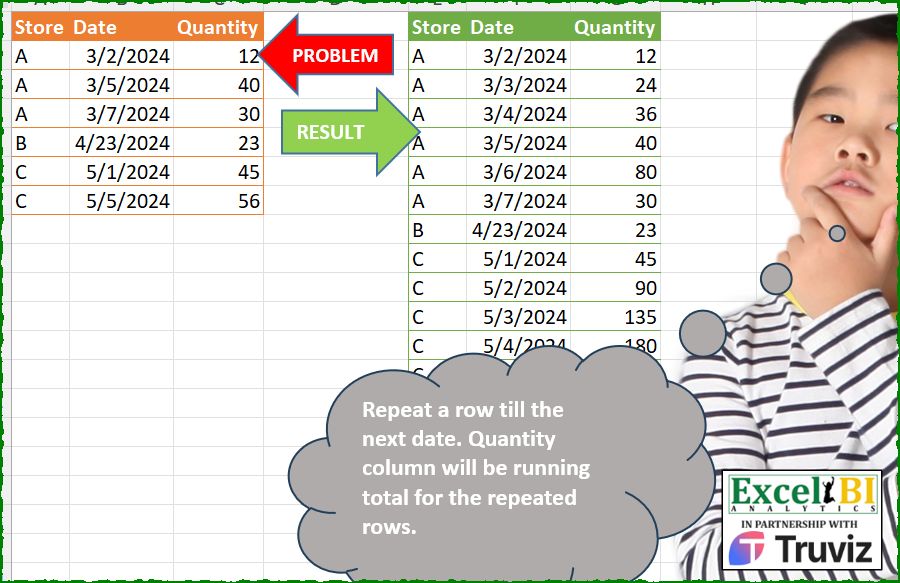
Repeat a row till the next date. Quantity column will be running total for the repeated rows.
📌 Challenge Details and Links
ExcelBI Power Query Challenge Number: 232
Challenge Difficulty: ⭐️⭐️⭐️⭐️
📥Download Sample File
📥Link to the solutions on LinkedIn
Solving the challenge of Repeat Rows Until Next Date with Power Query
Power Query solution 1 for Repeat Rows Until Next Date, proposed by Zoran Milokanović:
let
  Source = Excel.CurrentWorkbook(){[Name = "Input"]}[Content],
  R = Table.ToRows(Source),
  S = Table.FromRows(
    List.TransformMany(
      R,
      each
        let
          p = List.PositionOf(R, _)
        in
          List.DateTimes(
            _{1},
            {Number.From(R{p + 1}{1} - _{1}), 1}{Byte.From(_ = List.Last(R) or _{0} <> R{p + 1}{0})},
            Duration.From(1)
          ),
      (i, _) => {i{0}, _} & {(Number.From(_ - i{1}) + 1) * i{2}}
    ),
    Table.ColumnNames(Source)
  )
in
  S
Power Query solution 2 for Repeat Rows Until Next Date, proposed by Kris Jaganah:
let
  A = Excel.CurrentWorkbook(){[Name = "Table1"]}[Content],
  B = Table.RenameColumns(A, {{"Date", "D"}, {"Quantity", "Q"}}),
  C = Table.TransformColumnTypes(B, {{"D", Int64.Type}}),
  D = Table.AddColumn(
    C,
    "No",
    each List.Numbers(
      1,
      (Table.SelectRows(C, (x) => x[D] > [D] and x[Store] = [Store])[D]{0}? ?? [D] + 1) - [D]
    )
  ),
  E = Table.ExpandListColumn(D, "No"),
  F = Table.AddColumn(E, "Date", each Date.From([D] + [No] - 1)),
  G = Table.AddColumn(F, "Quantity", each [No] * [Q]),
  H = Table.SelectColumns(G, {"Store", "Date", "Quantity"})
in
  H
Power Query solution 3 for Repeat Rows Until Next Date, proposed by Alejandro Simón 🇵🇦 🇪🇸:
let
  Source = Excel.CurrentWorkbook(){[Name = "Table1"]}[Content],
  Type = Table.TransformColumnTypes(Source, {{"Date", type date}}),
  Group = Table.Group(
    Type,
    {"Store"},
    {
      {
        "A",
        each
          let
            a = _,
            b = List.Dates(
              Date.From(a[Date]{0}),
              Number.From(List.Last([Date]) - a[Date]{0}) + 1,
              Duration.From(1)
            ),
            c = List.Transform(Table.ToRows(a), each List.Skip(_)),
            d = List.Transform(b, each List.Select(c, (x) => x{0} = _){0}? ?? {_, null}),
            e = Table.FromRows(d, List.Skip(Table.ColumnNames(a)))
          in
            e
      }
    }
  ),
  Expand = Table.ExpandTableColumn(Group, "A", Table.ColumnNames(Group[A]{0})),
  Sol = Table.Combine(
    Table.Group(
      Expand,
      "Quantity",
      {
        {
          "B",
          each
            let
              a = _,
              b = List.Transform({1 .. List.Count([Quantity])}, each a[Quantity]{0} * _),
              c = Table.FromColumns(List.FirstN(Table.ToColumns(a), 2) & {b}, Table.ColumnNames(a))
            in
              c
        }
      },
      0,
      (a, b) => Number.From(b is number)
    )[B]
  )
in
  Sol
Power Query solution 4 for Repeat Rows Until Next Date, proposed by Luan Rodrigues:
let
  Fonte = Tabela1,
  grp = Table.Group(
    Fonte,
    {"Store"},
    {
      {
        "tab",
        each
          let
            min = Table.FromColumns(
              {{Number.From(List.Min(_[Date])) .. Number.From(List.Max(_[Date]))}},
              {"Date"}
            ),
            tab_date = Table.AddColumn(
              min,
              "valor",
              (y) =>
                try
                  Table.SelectRows(_, each Number.From([Date]) = y[Date])[Quantity]{0}
                otherwise
                  null
            ),
            fill = Table.Group(
              Table.FillDown(tab_date, {"valor"}),
              "valor",
              {"acc", each Table.AddIndexColumn(_, "Ind", 1, 1)}
            )[acc]
          in
            Table.AddColumn(Table.Combine(fill), "Quantity", each [valor] * [Ind])[
              [Date],
              [Quantity]
            ]
      }
    }
  ),
  exp = Table.ExpandTableColumn(grp, "tab", Table.ColumnNames(grp[tab]{0})),
  tipo = Table.TransformColumnTypes(exp, {{"Date", type date}})
in
  tipo
Power Query solution 5 for Repeat Rows Until Next Date, proposed by Abdallah Ally:
let
  Source = Excel.CurrentWorkbook(){[Name = "Table1"]}[Content],
  Group = Table.Group(
    Source,
    "Store",
    {
      "Date",
      each [
        a = List.Min([Date]),
        b = List.Max([Date]),
        c = List.DateTimes(a, Duration.Days(b - a) + 1, Duration.From(1))
      ][c]
    }
  ),
  Join = Table.Join(
    Table.ExpandListColumn(Group, "Date"),
    {"Store", "Date"},
    Table.PrefixColumns(Source, "T"),
    {"T.Store", "T.Date"},
    JoinKind.LeftOuter
  ),
  Sort = Table.Sort(Join, {{"Store", 0}, {"Date", 0}}),
  Accumulate = List.Accumulate(
    {0 .. Table.RowCount(Sort) - 1},
    {},
    (x, y) =>
      x
        & {
          if Sort[T.Quantity]{y} <> null then
            Sort[T.Quantity]{y}
          else if Sort[T.Quantity]{y} = null and Sort[T.Quantity]{y - 1} <> null then
            2 * Sort[T.Quantity]{y - 1}
          else
            2 * List.Last(x) - List.LastN(x, 2){0}
        }
  ),
  Columns = Table.ColumnNames(Sort) & {"Quantity"},
  FromCols = Table.FromColumns(Table.ToColumns(Sort) & {Accumulate}, Columns),
  Result = Table.TransformColumnTypes(FromCols[[Store], [Date], [Quantity]], {"Date", type date})
in
  Result
Power Query solution 6 for Repeat Rows Until Next Date, proposed by Eric Laforce:
let
 Source = Table.TransformColumnTypes(Excel.CurrentWorkbook(){[Name="tData232"]}[Content], {"Date", type date}),
 CN = Table.ColumnNames(Source),
 Group = Table.Group(Source, {"Store"}, {"G", each let
 _Rows = List.Buffer(Table.ToRows(_)),
 _Transform = List.TransformMany(_Rows,
 each List.Dates(_{1}, try Duration.Days(_Rows{List.PositionOf(_Rows,_)+1}{1}-_{1}) otherwise 1, hashtag#duration(1,0,0,0)),
 (x,_) => {x{0}, _, x{2}*(Duration.Days(_-x{1})+1)} )
 in Table.FromRows(_Transform, CN) }),
 Combine = Table.Combine(Group[G])
in
 Combine
Power Query solution 7 for Repeat Rows Until Next Date, proposed by 🇮🇷 Navid Esmaeilzadeh اسماعیل زاده:
let
  S = Excel.CurrentWorkbook(){[Name = "Table1"]}[Content],
  A = Table.TransformColumnTypes(S, {{"Date", type date}}),
  B = Table.Group(A, {"Store"}, {{"T", each _}}),
  F = (x) =>
    let
      a = Table.TransformColumnTypes(x, {{"Quantity", Int64.Type}}),
      b = Table.FromColumns(
        {{Number.From(List.Min(a[Date])) .. Number.From(List.Max(a[Date]))}},
        {"Date"}
      ),
      c = Table.TransformColumnTypes(b, {{"Date", type date}}),
      d = Table.NestedJoin(c, {"Date"}, a, {"Date"}, "N"),
      e = Table.ExpandTableColumn(d, "N", {"Quantity"}, {"Quantity"}),
      e2 = Table.Sort(e, {{"Date", Order.Ascending}}),
      f = Table.FillDown(e2, {"Quantity"}),
      g = Table.Group(f, {"Quantity"}, {{"T", each _}}),
      h = Table.AddColumn(g, "T2", each Table.AddIndexColumn([T], "In", 1, 1)),
      i = Table.ExpandTableColumn(h, "T2", {"Date", "Quantity", "In"}, {"Date", "Quantity.1", "In"}),
      j = Table.AddColumn(i, "Qty", each [Quantity.1] * [In]),
      k = Table.SelectColumns(j, {"Date", "Qty"})
    in
      k,
  C = Table.AddColumn(B, "T2", each F([T])),
  D = Table.ExpandTableColumn(C, "T2", {"Date", "Qty"}, {"Date", "Qty"}),
  E = Table.SelectColumns(D, {"Store", "Date", "Qty"})
in
  E
Power Query solution 8 for Repeat Rows Until Next Date, proposed by Alexandre Garcia:
let
  A = Excel.CurrentWorkbook(){[Name = "Table1"]}[Content],
  B = {"Date", "Quantity"},
  C = Table.Group(
    A,
    "Store",
    {
      "x",
      each [
        a = List.Transform([Date], Date.From),
        b = [Quantity],
        c = List.Skip(
          List.Generate(
            () => [i = 0, j = 0, k = - 1, Date = 0, Quantity = 0],
            each [i] <= Duration.Days(List.Last(a) - a{0}) + 1,
            each [
              i        = [i] + 1,
              Date     = Date.AddDays(a{0}, i - 1),
              k        = [k] + Byte.From(List.Contains(a, Date)),
              j        = if List.Contains(a, Date) then 1 else [j] + 1,
              Quantity = b{k} * j
            ],
            each Record.SelectFields(_, B)
          )
        )
      ][c]
    }
  ),
  D = Table.ExpandTableColumn(Table.TransformColumns(C, {"x", Table.FromRecords}), "x", B)
in
  D
Power Query solution 9 for Repeat Rows Until Next Date, proposed by Mihai Radu O:
let
 Source = Excel.CurrentWorkbook(){[Name="Table1"]}[Content],
 tip = Table.TransformColumnTypes(Source,{{"Date", type date}}),
 index = Table.AddIndexColumn(tip, "Index", 0, 1, Int64.Type),
 s = Table.Combine(Table.AddColumn(index, "r", each [
 a = try if [Store]= index[Store]{[Index]+1} then List.Dates([Date], Duration.Days(index[Date]{[Index]+1}-[Date]),hashtag#duration(1,0,0,0)) else {[Date]} otherwise {[Date]},
 b = List.Transform( {1.. List.Count(a)}, (x)=> x*[Quantity]),
 c = Table.FromColumns({List.Repeat({[Store]},List.Count(a)),a,b}, Table.ColumnNames(Source))
 ][c])[r])
in
 s
Power Query solution 10 for Repeat Rows Until Next Date, proposed by Francesco Bianchi 🇮🇹:
let
 Source = Excel.CurrentWorkbook(){[Name = "Table1"]}[Content],
 fxTransf = (Tbl as table) as table =>
let
t = Table.Combine( Table.AddColumn(Tbl, "Rec", each [n = try Number.From( Date.From(Tbl[Date]{List.PositionOf(Tbl[Date], [Date])+1}) - Date.From([Date]) ) otherwise 1,
Store = List.Repeat({[Store]}, n) ,
Date = List.Dates( Date.From( [Date]),n,hashtag#duration(1,0,0,0)),
Quant = List.Buffer(List.Repeat({[Quantity]}, n)) ,
Quantity =List.Generate (
 () => [ RT = Quant{0}, RowIndex = 0 ],
 each [RowIndex] < List.Count( Quant ),
 each [ RT = List.Sum( { [RT], Quant{[RowIndex] + 1} } ), RowIndex = [RowIndex] + 1 ],
 each [RT]
),
t = Table.FromColumns({Store,Date,Quantity},{"Store","Date","Quantity"}) ][t])[Rec])
in
t,
 Grouped = Table.Group(Source, {"Store"}, {{"T", each fxTransf (_) }}),
 Sol = Table.Combine( Grouped[T])
in
 Sol
Solving the challenge of Repeat Rows Until Next Date with Excel
Excel solution 1 for Repeat Rows Until Next Date, proposed by Bo Rydobon 🇹🇭:
=LET(
    t,
    A2:A7,
    b,
    B2:B7,
    c,
    C2:C7,

    REDUCE(
        A1:C1,
        UNIQUE(
            t
        ),
        LAMBDA(
            a,
            v,
            LET(
                f,
                FILTER(
                    b,
                    t=v
                ),
                d,
                SEQUENCE(
                    MAX(
                        f
                    )-@f+1,
                    ,
                    @f
                ),

                VSTACK(
                    a,
                    IFNA(
                        HSTACK(
                            v,
                            d,
                            SCAN(
                                0,
                                d,
                                LAMBDA(
                                    i,
                                    d,
                                    XLOOKUP(
                                        v&d,
                                        t&b,
                                        c,
                                        i+LOOKUP(
                                            v&d,
                                            t&b,
                                            c
                                        )
                                    )
                                )
                            )
                        ),
                        v
                    )
                )
            )
        )
    )
)
Excel solution 2 for Repeat Rows Until Next Date, proposed by Kris Jaganah:
=REDUCE(
    {"Store",
    "Date",
    "Quantity"},
    SEQUENCE(
        ROWS(
            A2:A7
        )
    ),
    LAMBDA(
        x,
        y,
        VSTACK(
            x,
            LET(
                a,
                A2:A7,
                b,
                B2:B7,
                c,
                C2:C7,
                d,
                DROP(
                    a,
                    1
                ),
                e,
                IFNA(
                    N(
                        a=d
                    ),
                    0
                ),
                f,
                IF(
                    e,
                    OFFSET(
                        b,
                        1,
                        0
                    ),
                    b+1
                )-b,
                g,
                SEQUENCE(
                    INDEX(
                        f,
                        y,
                        1
                    )
                ),
                HSTACK(
                    RIGHT(
                        g&INDEX(
                            a,
                            y,
                            1
                        )
                    ),
                    INDEX(
                        b,
                        y,
                        1
                    )+g-1,
                    INDEX(
                        c,
                        y,
                        1
                    )*g
                )
            )
        )
    )
)
Excel solution 3 for Repeat Rows Until Next Date, proposed by Julian Poeltl:
=LET(T,
    A2:C7,
    R,
    ROWS(
        T
    ),
    REDUCE(A1:C1,
    SEQUENCE(
        R
    ),
    LAMBDA(A,
    B,
    VSTACK(A,
    LET(S,
    IF(IFERROR((B
Excel solution 4 for Repeat Rows Until Next Date, proposed by Duy Tùng:
=LET(a,
    A2:A7,
    b,
    B2:B7,
    c,
    DROP(
        REDUCE(
            0,
            UNIQUE(
                a
            ),
            LAMBDA(
                x,
                y,
                LET(
                    u,
                    FILTER(
                        b,
                        a=y
                    ),
                    VSTACK(
                        x,
                        IF(
                            {1,
                            0},
                            y,
                            SEQUENCE(
                                MAX(
                                    u
                                )-@u+1,
                                ,
                                @u
                            )
                        )
                    )
                )
            )
        ),
        1
    ),
    HSTACK(c,
    MAP(TAKE(
        c,
        ,
        1
    ),
    DROP(
        c,
        ,
        1
    ),
    LAMBDA(v,
    y,
    (y+1-XLOOKUP(
        v&y,
        a&b,
        b,
        ,
        -1
    ))*XLOOKUP(
        v&y,
        a&b,
        C2:C7,
        ,
        -1
    )))))
Excel solution 5 for Repeat Rows Until Next Date, proposed by Sunny Baggu:
=LET(
 _m,
     MONTH(
         B2:B7
     ),

 _d,
&     DAY(
         B2:B7
     ),

 _um,
     UNIQUE(
         _m
     ),

 _st,
     XLOOKUP(
         _um,
          MONTH(
         B2:B7
     ),
          A2:A7
     ),

 _min,
     MAP(_um,
     LAMBDA(a,
     MIN(TOCOL(_d * (IF(
         _m = a,
          1,
          xx
     )),
     3)))),

 _max,
     MAP(_um,
     LAMBDA(a,
     MAX(TOCOL(_d * (IF(
         _m = a,
          1,
          xx
     )),
     3)))),

 REDUCE(

      A1:C1,

      SEQUENCE(
          ROWS(
              _st
          )
      ),

      LAMBDA(
          x,
           y,

           VSTACK(

                x,

                LET(

                     _c1,
                     INDEX(
                         _st,
                          y,
                          1
                     ),

                     _c2,
                     INDEX(
                         _um,
                          y,
                          1
                     ),

                     _c3,
                     INDEX(
                         _min,
                          y,
                          1
                     ),

                     _c4,
                     INDEX(
                         _max,
                          y,
                          1
                     ),

                     _s,
                     DATE(
                         2024,
                          _c2,
                          SEQUENCE(
                              _c4 - _c3 + 1,
                               ,
                               _c3
                          )
                     ),

                     _a,
                     XLOOKUP(
                         _s,
                          B2:B7,
                          C2:C7,
                          0
                     ),

                     _b,
                     SCAN(
                         0,
                          _a,
                          LAMBDA(
                              a,
                               v,
                               IF(
                                   v,
                                    1,
                                    a + 1
                               )
                          )
                     ),

                     _c,
                     SCAN(
                         0,
                          _a,
                          LAMBDA(
                              a,
                               v,
                               IF(
                                   v = 0,
                                    a,
                                    v
                               )
                          )
                     ),

                     _f,
                     _b * _c,

                     IFNA(
                         HSTACK(
                             _c1,
                              _s,
                              _f
                         ),
                          _c1
                     )

                )

           )

      )

 )
)
Excel solution 6 for Repeat Rows Until Next Date, proposed by Asheesh Pahwa:
=LET(
    dq,
    B2:C7,
    s,
    A2:A7,
    r,
    DROP(
        REDUCE(
            "",
            UNIQUE(
                s
            ),
            LAMBDA(
                x,
                y,

                VSTACK(
                    x,
                    LET(
                        f,
                        FILTER(
                            dq,
                            s=y
                        ),
                        t,
                        TAKE(
                            f,
                            ,
                            1
                        ),
                        mx,
                        MAX(
                            t
                        ),
                        mn,
                        MIN(
                            t
                        ),
                        sq,
                        SEQUENCE(
                            mx-mn+1,
                            ,
                            mn
                        ),
                        IFNA(
                            HSTACK(
                                y,
                                sq,
                                XLOOKUP(
                                    sq,
                                    t,
                                    TAKE(
                                        f,
                                        ,
                                        -1
                                    ),
                                    ""
                                )
                            ),
                            y
                        )
                    )
                )
            )
        ),
        1
    ),

    sc,
    SCAN(
        0,
        TAKE(
            r,
            ,
            -1
        ),
        LAMBDA(
            x,
            y,
            IF(
                ISNUMBER(
                    y
                ),
                y,
                x
            )
        )
    ),

    u,
    UNIQUE(
        sc
    ),
    d,
    DROP(
        REDUCE(
            "",
            u,
            LAMBDA(
                x,
                y,
                VSTACK(
                    x,
                    LET(
                        c,
                        COUNT(
                            FILTER(
                                sc,
                                sc=y
                            )
                        ),
                        y*SEQUENCE(
                            c
                        )
                    )
                )
            )
        ),
        1
    ),
    HSTACK(
        DROP(
            r,
            ,
            -1
        ),
        d
    )
)
Excel solution 7 for Repeat Rows Until Next Date, proposed by Jaroslaw Kujawa:
=DROP(
REDUCE("";
     UNIQUE(
         A2:A7
     );

LAMBDA(aa;
    x;

 LET(a;
     A2:A7;
     b;
     B2:B7;
     c;
     C2:C7;

 v;
     VLOOKUP;

 min;
     GROUPBY(
         a;
          b;
          MIN
     );

 max;
     GROUPBY(
         a;
          b;
          MAX
     );

 min_max;
     DROP(
         HSTACK(
             min;
              DROP(
                  max;
                   ;
                   1
              )
         );
          -1
     );

 dates;
     SEQUENCE(
         v(
             x;
              min_max;
              3;
              0
         )-v(
             x;
              min_max;
              2;
              0
         )+1;
          ;

          v(
             x;
              min_max;
              2;
              0
         )
     );

 VSTACK(aa;
     HSTACK(DROP(
         TEXTSPLIT(
             REPT(
                 x&";";
                  COUNT(
                      dates
                  )
             );
              ;
             ";"
         );
          -1
     );
     dates;
     IF(ISNUMBER(
         MATCH(
             dates;
              b;
              0
         )
     );
    v(
        dates;
         HSTACK(
             b;
              c
         );
        2;
        0
    );

v(
    dates;
     HSTACK(
             b;
              c
         );
     2;
     1
)*(1+dates-v(
    dates;
     b;
     1;
     1
))))))
));
     1)
Excel solution 8 for Repeat Rows Until Next Date, proposed by Eddy Wijaya:
=LET(

    tab,
    A2:C7,

    st,
    TAKE(
        tab,
        ,
        1
    ),

    q,
    TAKE(
        tab,
        ,
        -1
    ),

    exp_q,
    MAP(
        UNIQUE(
            st
        ),
        LAMBDA(
            m,

            TEXTJOIN(
                ",",
                ,
                IFERROR(
                    LET(

                        t,
                        FILTER(
                            tab,
                            st=m
                        ),

                        d,
                        CHOOSECOLS(
                            t,
                            2
                        ),

                        dist,
                        MAX(
                            d
                        )-MIN(
                            d
                        )+1,

                        exp,
                        SEQUENCE(
                            dist,
                            ,
                            @d
                        ),

                        rt,
                        SCAN(
                            0,
                            exp,
                            LAMBDA(
                                a,
                                v,
                                IF(
                                    IFERROR(
                                        XMATCH(
                                            v,
                                            d,
                                            0
                                        ),
                                        0
                                    )>1,
                                    1,
                                    a+1
                                )
                            )
                        ),

                        HSTACK(
                            exp,
                            rt*XLOOKUP(
                                exp,
                                d,
                                TAKE(
                                    t,
                                    ,
                                    -1
                                ),
                                ,
                                -1
                            )
                        )
                    ),
                    DROP(
                        FILTER(
                            tab,
                            st=m
                        ),
                        ,
                        1
                    )
                )
            )
        )
    ),

    me,
    HSTACK(
        UNIQUE(
            st
        ),
        exp_q
    ),

    r,
    --WRAPROWS(
        TOCOL(
            DROP(
                REDUCE(
                    0,
                    DROP(
                        me,
                        ,
                        1
                    ),
                    LAMBDA(
                        a,
                        v,
                        VSTACK(
                            a,
                            TEXTSPLIT(
                                v,
                                ","
                            )
                        )
                    )
                ),
                1
            ),
            2
        ),
        2
    ),

    HSTACK(
        XLOOKUP(
            TAKE(
                r,
                ,
                1
            ),
            CHOOSECOLS(
                tab,
                2
            ),
            st,
            ,
            -1
        ),
        r
    )
)
Excel solution 9 for Repeat Rows Until Next Date, proposed by Philippe Brillault:
=LET(
    cc,
    CHOOSECOLS,
    pi,
    PIVOTBY(
        cc(
            _T1,
            1
        ),
        ,
        cc(
            _T1,
            2
        ),
        MIN,
        0,
        0
    ),
    pm,
    PIVOTBY(
        cc(
            _T1,
            1
        ),
        ,
        cc(
            _T1,
            2
        ),
        MAX,
        0,
        0
    ),
    ACCUM(
        pi,
        pm
    )
)

reuses lambdas already developed (and adapted)
Solving the challenge of Repeat Rows Until Next Date with Python
Python solution 1 for Repeat Rows Until Next Date, proposed by Konrad Gryczan, PhD:
import pandas as pd
path = "PQ_Challenge_232.xlsx"
input = pd.read_excel(path, usecols="A:C", nrows=6)
test = pd.read_excel(path, usecols="E:G", nrows=13).rename(columns=lambda x: x.split('.')[0])
input['Date'] = pd.to_datetime(input['Date'])
input['max_date'] = input.groupby('Store')['Date'].transform('max')
input['min_date'] = input.groupby('Store')['Date'].transform('min')
date_range = pd.date_range(input['Date'].min(), input['Date'].max(), freq='D')
complete = pd.MultiIndex.from_product([input['Store'].unique(), date_range], names=['Store', 'Date']).to_frame(index=False)
result = complete.merge(input, on=['Store', 'Date'], how='left')
result[['max_date', 'min_date']] = result.groupby('Store')[['max_date', 'min_date']].ffill()
result = result.query('min_date <= Date <= max_date')
result['Quantity_has_value'] = result['Quantity'].isna().apply(lambda x: not x)
result['Cumulative'] = result.groupby('Store')['Quantity_has_value'].cumsum()
result['Quantity'] = result.groupby('Store')['Quantity'].ffill()
result['Quantity'] = result.groupby(['Store', 'Cumulative'])['Quantity'].cumsum().astype('int64')
result = result[['Store', 'Date', 'Quantity']].reset_index(drop=True)
print(result.equals(test)) # True
Solving the challenge of Repeat Rows Until Next Date with Python in Excel
Python in Excel solution 1 for Repeat Rows Until Next Date, proposed by Alejandro Campos:
from itertools import accumulate
df = xl("A1:C7", headers=True)
df['Date'] = pd.to_datetime(df['Date'], dayfirst=True)
result_rows = []
unique_stores = df['Store'].unique()
for store in unique_stores:
 store_df = df[df['Store'] == store].sort_values('Date').reset_index(drop=True)
 date_range = pd.date_range(store_df['Date'].min(), store_df['Date'].max())
 full_df = pd.DataFrame({'Store': store, 'Date': date_range})
 merged_df = full_df.merge(store_df, on=['Store', 'Date'], how='left')
 merged_df['Quantity'] = merged_df['Quantity'].ffill()
 original_dates = set(store_df['Date'])
 cumulative_quantity = 0
 for idx, row in merged_df.iterrows():
 if row['Date'] in original_dates:
 cumulative_quantity = row['Quantity']
 else:
 cumulative_quantity += row['Quantity']
 merged_df.at[idx, 'Quantity'] = cumulative_quantity
 result_rows.append(merged_df)
result_df = pd.concat(result_rows).reset_index(drop=True)
result_df['Date'] = result_df['Date'].dt.strftime('%d/%m/%Y')
result_df
Solving the challenge of Repeat Rows Until Next Date with R
R solution 1 for Repeat Rows Until Next Date, proposed by Konrad Gryczan, PhD:
library(tidyverse)
library(readxl)
path = "Power Query/PQ_Challenge_232.xlsx"
input = read_excel(path, range = "A1:C7")
test = read_excel(path, range = "E1:G13")
result = input %>%
 group_by(Store) %>%
 complete(Date = seq(min(Date), max(Date), by = "day")) %>%
 ungroup() %>%
 mutate(has_val = cumsum(!is.na(Quantity))) %>%
 fill(Quantity) %>%
 mutate(Quantity = cumsum(Quantity), .by = c(Store, has_val)) %>%
 select(-has_val)
all.equal(result, test, check.attributes = FALSE)
#> [1] TRUE
&&