
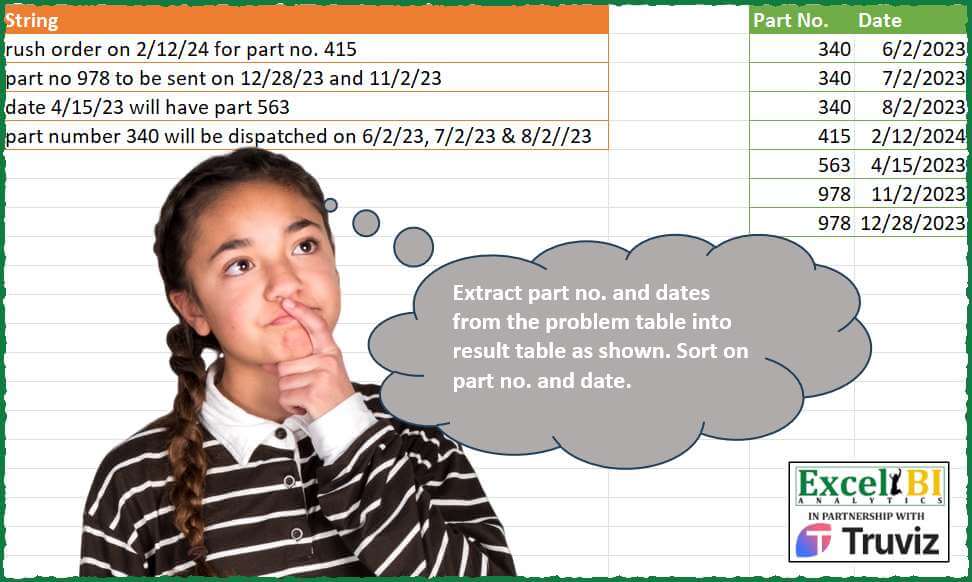
Extract part no. and dates from the problem table into result table as shown. Sort on part no. and date. (Dates are in MDY format)
📌 Challenge Details and Links
ExcelBI Power Query Challenge Number: 199
Challenge Difficulty: ⭐️⭐️⭐️
📥Download Sample File
📥Link to the solutions on LinkedIn
Solving the challenge of Extract Part and Date with Power Query
Power Query solution 1 for Extract Part and Date, proposed by Zoran Milokanović:
let
Source = Excel.CurrentWorkbook(){[Name = "Input"]}[Content],
F = (t, p) =>
Web.Page(
"<script> var t = """
& t
& """; var p = new RegExp('"
& p
& "', 'g'); document.write(t.match(p).join(';')); </script>"
)[Data]{0}[Children]{0}[Children]{1}[Text]{0},
E = (l, b) => List.Select(l, each Text.Contains(_, "/") = b),
H = {"Part No.", "Date"},
S = Table.Sort(
Table.FromRows(
List.TransformMany(
Table.TransformRows(
Table.ReplaceValue(Source, "//", "/", Replacer.ReplaceText, {"String"}),
each Text.Split(F([String], "bd{1,2}/d{1,2}/d{2,4}b|bd{3,}b"), ";")
),
each E(_, true),
(_, o) => {Number.From(E(_, false){0}), Date.From(o, "en-US")}
),
H
),
H
)
in
SPower Query solution 2 for Extract Part and Date, proposed by Kris Jaganah:
let
  Source = Excel.CurrentWorkbook(){[Name = "Table1"]}[Content],
  Ans = Table.TransformColumns(
    Source,
    {
      "String",
      each [
        a = Text.Split(Text.Replace(_, "//", "/"), " "),
        b = List.RemoveItems(
          List.Transform(a, each try DateTime.From(_, "en-US") otherwise ""),
          {""}
        ),
        c = List.Sum(List.RemoveNulls(List.Transform(a, each try Number.From(_) otherwise null)))
      ][[c], [b]]
    }
  ),
  Xpand = Table.ExpandRecordColumn(Ans, "String", {"c", "b"}, {"Part No.", "Date"}),
  XpDate = Table.ExpandListColumn(Xpand, "Date"),
  Sort = Table.Sort(XpDate, {{"Part No.", 0}, {"Date", 0}})
in
  Sort
Power Query solution 3 for Extract Part and Date, proposed by Alejandro Simón 🇵🇦 🇪🇸:
let
  Source = Excel.CurrentWorkbook(){[Name = "Table1"]}[Content],
  Sol = Table.Sort(
    Table.Combine(
      Table.AddColumn(
        Source,
        "A",
        each
          let
            a = Text.SplitAny([String], " ,"),
            b = List.RemoveNulls(List.Transform(a, each try Number.From(_) otherwise null)),
            c = List.Transform(
              List.Select(a, each Text.Contains(_, "/")),
              each Date.From(Text.Replace(_, "//", "/"))
            ),
            d = Table.FillDown(Table.FromRows(List.Zip({b, c}), {"Part No.", "Date"}), {"Part No."})
          in
            d
      )[A]
    ),
    {{"Part No.", 0}, {"Date", 0}}
  )
in
  Sol
Power Query solution 4 for Extract Part and Date, proposed by Eric Laforce:
let
  Source = Excel.CurrentWorkbook(){[Name = "tData199"]}[Content],
  CN = {"Part No.", "Date"},
  Split = List.Transform(
    Source[String],
    each
      let
        L     = Text.SplitAny(Text.Replace(_, "//", "/"), " ,"),
        pNum  = List.Select(L, each try Number.From(_) <> null otherwise false){0},
        Dates = List.Select(L, each try Date.From(_) <> null otherwise false)
      in
        Table.FromRows(List.Transform(Dates, each {pNum, _}), CN)
  ),
  T = Table.TransformColumnTypes(Table.Combine(Split), {"Date", type date}),
  Sort = Table.Sort(T, List.Zip({CN, {0, 0}}))
in
  Sort
Power Query solution 5 for Extract Part and Date, proposed by 🇮🇷 Navid Esmaeilzadeh اسماعیل زاده:
let
  S = Excel.CurrentWorkbook(){[Name = "Table1"]}[Content],
  S1 = Table.ReplaceValue(S, "//", "/", Replacer.ReplaceText, {"String"}),
  A = Table.AddColumn(S1, "T", each Text.Split([String], " ")),
  B = Table.ExpandListColumn(A, "T"),
  C = Table.DuplicateColumn(B, "T", "T1"),
  D = Table.TransformColumnTypes(C, {{"T", type date}, {"T1", Int64.Type}}),
  E = Table.ReplaceErrorValues(D, {{"T", null}, {"T1", null}}),
  F = Table.Group(
    E,
    {"String"},
    {{"Tbl", each _, type table [String = text, T = nullable date, T1 = nullable number]}}
  ),
  G = Table.AddColumn(
    F,
    "Tb",
    each Table.Distinct(Table.FillUp(Table.FillDown([Tbl], {"T", "T1"}), {"T", "T1"}))
  ),
  H = Table.SelectColumns(G, {"Tb"}),
  I = Table.ExpandTableColumn(H, "Tb", {"String", "T", "T1"}, {"String", "T", "T1"}),
  J = Table.RenameColumns(I, {{"T", "Date"}, {"T1", "PartNo"}}),
  K = Table.SelectColumns(J, {"PartNo", "Date"}),
  L = Table.TransformColumnTypes(K, {{"Date", type date}}),
  M = Table.Sort(L, {{"PartNo", Order.Ascending}, {"Date", Order.Ascending}})
in
  M
Power Query solution 6 for Extract Part and Date, proposed by Yaroslav Drohomyretskyi:
let
  Source = Excel.CurrentWorkbook(){[Name = "Table1"]}[Content],
  Replace = Table.ReplaceValue(Source, "//", "/", Replacer.ReplaceText, {"String"}),
  PartNo = Table.ExpandListColumn(
    Table.AddColumn(
      Replace,
      "Part No.",
      each List.Select(
        Text.Split([String], " "),
        each try Number.FromText(_) is number otherwise null
      )
    ),
    "Part No."
  ),
  Date = Table.TransformColumnTypes(
    Table.ExpandListColumn(
      Table.AddColumn(
        PartNo,
        "Date",
        each List.Select(Text.Split([String], " "), each try Date.FromText(_) is date otherwise null)
      ),
      "Date"
    ),
    {{"Date", type date}}
  ),
  Sort = Table.Sort(Date, {{"Part No.", Order.Ascending}, {"Date", Order.Ascending}}),
  Remove = Table.RemoveColumns(Sort, {"String"})
in
  Remove
Power Query solution 7 for Extract Part and Date, proposed by Ahmed Ariem:
let
  Source = Excel.CurrentWorkbook(){[Name = "tbl"]}[Content],
  promt = Table.PromoteHeaders(Source, [PromoteAllScalars = true]),
  AddColumn = Table.AddColumn(
    promt,
    "Custom",
    each [
      a = Text.Select([String], {"0" .. "9", "/", " "}),
      b = Text.Split(a, " "),
      c = List.Select(b, (x) => x <> ""),
      d = List.Select(c, (x) => not Text.Contains(x, "/")),
      e = List.Transform(
        List.Select(c, (x) => Text.Contains(x, "/")),
        (x) => Text.Replace(x, "//", "/")
      ),
      f = Table.FromList(List.Zip({e, List.Repeat(d, List.Count(e))}), (x) => x)
    ][f]
  ),
  #"Expanded Custom" = Table.ExpandTableColumn(
    AddColumn,
    "Custom",
    {"Column1", "Column2"},
    {"Column1", "Column2"}
  ),
  #"Changed Type with Locale" = Table.TransformColumnTypes(
    #"Expanded Custom",
    {{"Column1", type date}},
    "en-US"
  ),
  #"Changed Type" = Table.TransformColumnTypes(
    #"Changed Type with Locale",
    {{"Column2", type number}}
  ),
  #"Sorted Rows" = Table.Sort(
    #"Changed Type",
    {{"Column2", Order.Ascending}, {"Column1", Order.Ascending}}
  )
in
  #"Sorted Rows"
Solving the challenge of Extract Part and Date with Excel
Excel solution 1 for Extract Part and Date, proposed by Bo Rydobon 🇹🇭:
=LET(
    a,
    A2:A5,
    SORT(
        --TEXTSPLIT(
            CONCAT(
                REGEXREPLACE(
                    a,
                    "(d+/d+)/+(d+)|(.)",
                    "${3:+: "®EXEXTRACT(
                        a,
                        "d{3}"
                    )&"-20$2/$1}"
                )
            ),
            "-",
            " ",
            1
        )
    )
)
Excel solution 2 for Extract Part and Date, proposed by Rick Rothstein:
=SORT(
    0+TEXTSPLIT(
        TEXTJOIN(
            "|",
            ,
            MAP(
                A2:A5,
                LAMBDA(
                    x,
                    LET(
                        t,
                        TEXTSPLIT(
                            SUBSTITUTE(
                                x,
                                "//",
                                "/"
                            ),
                            {" ",
                            ","}
                        ),
                        i,
                        TOROW(
                            IFERROR(
                                0+t,
                                1/0
                            ),
                            3
                        ),
                        TEXTJOIN(
                            "|",
                            ,
                            MIN(
                                i
                            )&" "&FILTER(
                                i,
                                i>4000
                            )
                        )
                    )
                )
            )
        ),
        " ",
        "|"
    )
)
Excel solution 3 for Extract Part and Date, proposed by محمد حلمي:
=SORT(
    0+TEXTSPLIT(
        TEXTJOIN(
            "|",
            ,

            MAP(
                A2:A5,
                LAMBDA(
                    x,
                    LET(
                        i,
                        TOCOL(
                            --
                            TEXTSPLIT(
                                SUBSTITUTE(
                                    x,
                                    "//",
                                    "/"
                                ),
                                {" ",
                                ","}
                            ),
                            3
                        ),

                        TEXTJOIN(
                            "|",
                            ,
                            MIN(
                                i
                            )&" "&FILTER(
                                i,
                                i>4000
                            )
                        )
                    )
                )
            )
        ),
        " ",
        "|"
    )
)
Excel solution 4 for Extract Part and Date, proposed by محمد حلمي:
=SORT(
    DROP(
        REDUCE(
            0,
            A2:A5,
            LAMBDA(
                A,
                V,
                LET(
                    I,
                    TOCOL(

                        --TEXTSPLIT(
                            SUBSTITUTE(
                                V,
                                "//",
                                "/"
                            ),
                            " ",
                            ","
                        ),
                        2
                    ),
                    VSTACK(
                        A,

                        IF(
                            {1,
                            0},
                            FILTER(
                                I,
                                I<40000
                            ),
                            FILTER(
                                I,
                                I>40000
                            )
                        )
                    )
                )
            )
        ),
        1
    ),
    {1,
    2}
)
Excel solution 5 for Extract Part and Date, proposed by Kris Jaganah:
=VSTACK({"Part No.",
    "Date"},
    SORT(DROP(REDUCE("",
    A2:A5,
    LAMBDA(x,
    y,
    VSTACK(x,
    LET(a,
    REGEXEXTRACT(
        y,
        "[^A-z&, ]+",
        1
    ),
    b,
    TOCOL(
        IFS(
            LEN(
                a
            )>3,
            a
        ),
        3
    ),
    c,
    INDEX(TOCOL(a/(LEN(
                a
            )=3),
    3),
    SEQUENCE(
        ROWS(
            b
        ),
        ,
        ,
        0
    )),
    d,
    --TEXTSPLIT(
        ARRAYTOTEXT(
            b
        ),
        "/",
        ", ",
        1
    ),
    HSTACK(
        c,
        DATE(
            20&TAKE(
                d,
                ,
                -1
            ),
            TAKE(
                d,
                ,
                1
            ),
            CHOOSECOLS(
                d,
                2
            )
        )
    ))))),
    1),
    {1,
    2}))
Excel solution 6 for Extract Part and Date, proposed by Julian Poeltl:
=LET(
    R,
    WRAPROWS(
        TEXTSPLIT(
            TEXTJOIN(
                ",",
                ,
                MAP(
                    A2:A5,
                    LAMBDA(
                        S,
                        LET(
                            SP,
                            TEXTSPLIT(
                                S,
                                ,
                                {" ",
                                ","}
                            )*1,
                            F,
                            SORT(
                                FILTER(
                                    SP,
                                    ISNUMBER(
                                        SP
                                    )
                                ),
                                ,
                                1
                            ),
                            TEXTJOIN(
                                ",",
                                ,
                                INDEX(
                                    F,
                                    1
                                )&","&TOCOL(
                                    DROP(
                                    F,
                                    1
                                )
                                )
                            )
                        )
                    )
                )
            ),
            ","
        ),
        2
    ),
    VSTACK(
        HSTACK(
            "Part No.",
            "Date"
        ),
        SORT(
            R*1
        )
    )
)
Excel solution 7 for Extract Part and Date, proposed by Oscar Mendez Roca Farell:
=DROP(
    REDUCE(
        "",
         SUBSTITUTE(
             A2:A5,
              "//",
              "/"
         ),
         LAMBDA(
             i,
              x,
              LET(
                  t,
                   TEXTSPLIT(
                       x,
                        "/",
                        ROW(
                            1:10
                        )-1,
                        1
                   ),
                   n,
                   SORT(
                       --TEXTSPLIT(
                           x&"|",
                            "|",
                            t,
                            1
                       )
                   ),
                   SORT(
                       VSTACK(
                           i,
                            IFNA(
                                HSTACK(
                                    @n,
                                     DROP(
                                         n,
                                          1
                                     )
                                ),
                                 @n
                            )
                       )
                   )
              )
         )
    ),
     -1
)
Excel solution 8 for Extract Part and Date, proposed by Sunny Baggu:
=SORT(

     DROP(

          REDUCE(

               "",

               A2:A5,

               LAMBDA(
                   a,
                    v,

                    VSTACK(

                         a,

                         LET(

                              _ts,
                       &       TEXTSPLIT(
                                  SUBSTITUTE(
                                      v,
                                       "//",
                                       "/"
                                  ),
                                   ,
                                   {"part",
                                   " ",
                                   ".",
                                   ", "},
                                   1
                              ),

                              _f,
                              FILTER(
                                  _ts,
                                   1 - ISERR(
                                       _ts + 0
                                   )
                              ),

                              _c,
                              SEARCH(
                                  "/",
                                   _f
                              ),

                              _p,
                              FILTER(
                                  _f,
                                   ISERR(
                                       _c
                                   )
                              ),

                              _d,
                              FILTER(
                                  _f,
                                   1 - ISERR(
                                       _c
                                   )
                              ),

                              HSTACK(
                                  IF(
                                      --_d,
                                       _p
                                  ),
                                   TEXT(
                                       _d,
                                        "m/d/yyyy"
                                   )
                              )

                         )

                    )

               )

          ),

          1

     ),

     {1,
     2},

     {1,
     1}

)
Excel solution 9 for Extract Part and Date, proposed by Abdallah Ally:
=VSTACK({"Part No.",
    "Date"},
    SORT(DROP(REDUCE("",
    A2:A5,
    LAMBDA(x,
     y,
    LET(a,
    SUBSTITUTE(
        y,
        "//",
        "/"
    ),
    b,
    --REGEXEXTRACT(
        a,
        " (d+)(?!/)"
    ),
    c,
     TOCOL(
         REGEXEXTRACT(
             a,
             "(d+/d+//?d+)",
             1
         )
     ),
    VSTACK(x,
     HSTACK(EXPAND(
         b,
         COUNTA(
             c
         ),
         ,
         b
     ),
    --(TEXTBEFORE(
        TEXTAFTER(
            c,
             "/"
        ),
        "/"
    )&"/"&LEFT(
        c,
        FIND(
            "/",
            c
        )
    )&TEXTAFTER(
        c,
        "/",
        2,
        ,
        1
    ))))))),
    1),
    {1,
    2},
    {1,
    1}))
Excel solution 10 for Extract Part and Date, proposed by Md. Zohurul Islam:
=LET(
    z,
    A2:A5,

    hdr,
    HSTACK(
        "Part no.",
        "Date"
    ),

    w,
    {"no.",
    "no",
    "part",
    "part number"},

    u,
    MAP(
        z,
        LAMBDA(
            x,
            LET(

                 a,
                TEXTSPLIT(
                    SUBSTITUTE(
                        x,
                        ",",
                        ""
                    ),
                    " "
                ),

                 b,
                SUBSTITUTE(
                    FILTER(
                        a,
                        IFERROR(
                            SEARCH(
                                "/",
                                a
                            ),
                            0
                        )>0
                    ),
                    "//",
                    "/"
                ),

                 c,
                ARRAYTOTEXT(
                    MAP(
                        b,
                        LAMBDA(
                            y,
                            TEXT(
                                TEXTJOIN(
                                    "/",
                                    ,
                                    CHOOSECOLS(
                                        TEXTSPLIT(
                                            y,
                                            "/"
                                        )+0,
                                        2,
                                        1,
                                        3
                                    )
                                )+0,
                                "dd/mm/yyy"
                            )
                        )
                    )
                ),

                 d,
                FILTER(
                    a,
                    ISNUMBER(
                        ABS(
                            TEXTSPLIT(
                                a,
                                w
                            )
                        )
                    )
                ),

                 e,
                FILTER(
                    d,
                    ISERROR(
                        SEARCH(
                            "/",
                            d
                        )
                    )
                ),

                 f,
                e&", "&c,
                f
            )
        )
    ),

    v,
    DROP(
        REDUCE(
            "",
            u,
            LAMBDA(
                x,
                y,
                LET(
                    a,
                    TEXTSPLIT(
                        y,
                        ", "
                    ),
                    b,
                    ABS(
                        TAKE(
                            a,
                            ,
                            1
                        )
                    ),
                    c,
                    IFNA(
                        HSTACK(
                            b,
                            ABS(
                                TOCOL(
                                    DROP(
                            a,
                            ,
                            1
                        )
                                )
                            )
                        ),
                        b
                    ),
                    VSTACK(
                        x,
                        c
                    )
                )
            )
        ),
        1
    ),

    VSTACK(
        hdr,
        SORT(
            v,
            {1,
            2}
        )
    )

)
Excel solution 11 for Extract Part and Date, proposed by Songglod P.:
=LET(
    str,
    TEXTJOIN(
        ";",
        TRUE,
        A2:A5
    ),
    t,
    --TEXTSPLIT(
        SUBSTITUTE(
            str,
            "//",
            "/"
        ),
        {",",
        " "},
        ";",
        TRUE
    ),
    arr,
    BYROW(
        t,
        LAMBDA(
            x,
            LET(
                txt,
                SORT(
                    FILTER(
                        x,
                        ISNUMBER(
                            x
                        )
                    ),
                    ,
                    ,
                    TRUE
                ),
                ARRAYTOTEXT(
                    DROP(
                        TAKE(
                            txt,
                            ,
                            1
                        )&"|"&TOCOL(
                            txt
                        ),
                        1
                    )
                )
            )
        )
    ),
    SORT(
        --TEXTSPLIT(
            ARRAYTOTEXT(
                arr
            ),
            "|",
            ", "
        )
    )
)
Solving the challenge of Extract Part and Date with Python
Python solution 1 for Extract Part and Date, proposed by Konrad Gryczan, PhD:
import pandas as pd
import re
path = "PQ_Challenge_199.xlsx"
input = pd.read_excel(path, usecols="A", nrows = 4)
test = pd.read_excel(path, usecols="C:D", nrows = 8)
pattern_no = r"d{3}"
pattern_date = r"d{1,2}/+d{1,2}/+d{2}"
result = input.copy()
result['Part No.'] = result['String'].str.findall(pattern_no)
result['Date'] = result['String'].str.findall(pattern_date)
result = result.explode('Part No.').explode('Date')
result['Date'] = result['Date'].str.replace("//", "/")
result = result.drop(columns=['String'])
result['Part No.'] = pd.to_numeric(result['Part No.'])
result['Date'] = pd.to_datetime(result['Date'], format="%m/%d/%y")
result = result.sort_values(['Part No.', 'Date']).reset_index(drop=True)
print(result.equals(test)) # True
Solving the challenge of Extract Part and Date with Python in Excel
Python in Excel solution 1 for Extract Part and Date, proposed by Abdallah Ally:
import re
# Select a data range
df = xl("A1:A5", headers=True)
# Perform data wrangling
df['Part No.'] = df['String'].map(
lambda x: re.findall(r' (d+)(?!/)', x)[0]
)
df['Date'] = df['String'].map(
lambda x: [y.replace('//', '/') for y in re.findall(r'(d+/d+//?d+)', x)]
)
df = df.explode(column='Date')
df = df.sort_values(by=['Part No.', 'Date'], ignore_index=True)
df['Date'] = pd.to_datetime(df['Date'], format='%m/%d/%y')
df = df[['Part No.', 'Date']]
df
Solving the challenge of Extract Part and Date with R
R solution 1 for Extract Part and Date, proposed by Konrad Gryczan, PhD:
library(tidyverse)
library(readxl)
path = "Power Query/PQ_Challenge_199.xlsx"
input = read_excel(path, range = "A1:A5")
test = read_excel(path, range = "C1:D8")
pattern_no = "\d{3}"
pattern_date = "\d{1,2}/+\d{1,2}/+\d{2}"
result = input %>%
 mutate(`Part No.` = str_extract_all(String, pattern_no),
 Date = str_extract_all(String, pattern_date)) %>%
 unnest(Date, `Part No.`) %>%
 mutate(Date = str_replace_all(Date, "//", "/")) %>%
 select(-String) %>%
 mutate(`Part No.` = as.numeric(`Part No.`),
 Date = as.POSIXct(Date, format = "%m/%d/%y", tz = "UTC")) %>%
 arrange(`Part No.`, Date)


identical(result, test)
# [1] TRUE
R solution 2 for Extract Part and Date, proposed by Anil Kumar Goyal:
library(readxl)
library(tidyverse)
library(rebus)
df <- read_excel("PQ/PQ_Challenge_199.xlsx", range = cell_cols("A"))
d_rx <- MONTH_IN %R% NOT_WRD %R% DAY_IN %R% one_or_more(NOT_WRD) %R% CENTURY
df %>%
 transmute(Part = map_chr(String, ~str_match(., "part\D+(\d+)")[,2]),
 Date = str_extract_all(String, d_rx)) %>%
 unnest_longer(Date) %>%
 # Optional
 mutate(Date = mdy(Date)) %>%
 arrange(Part, Date)
&&