
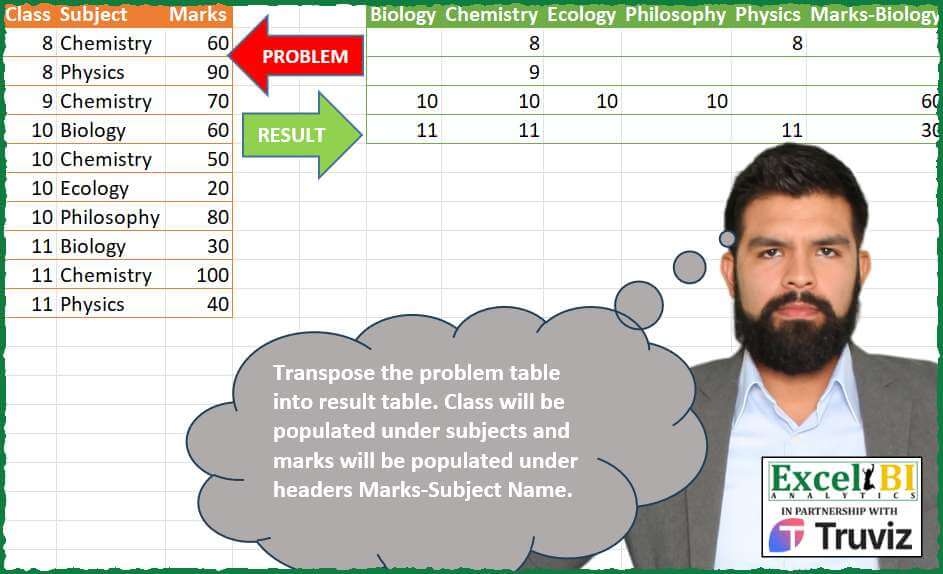
Transpose the problem table into result table. Class will be populated under subjects and marks will be populated under headers Marks-Subject Name.
📌 Challenge Details and Links
ExcelBI Power Query Challenge Number: 196
Challenge Difficulty: ⭐️⭐️⭐️
📥Download Sample File
📥Link to the solutions on LinkedIn
Solving the challenge of Transpose Marks with Subjects with Power Query
Power Query solution 1 for Transpose Marks with Subjects, proposed by Zoran Milokanović:
let
  Source = Excel.CurrentWorkbook(){[Name = "Input"]}[Content],
  H = List.Sort(List.Distinct(Source[Subject])),
  S = Table.FromRows(
    List.Transform(
      Table.Group(Source, "Class", {"A", each _})[A],
      each List.Transform(H, (h) => _{[Subject = h]}?[Class]?)
        & List.Transform(H, (h) => _{[Subject = h]}?[Marks]?)
    ),
    H & List.Transform(H, each "Marks-" & _)
  )
in
  S
Power Query solution 2 for Transpose Marks with Subjects, proposed by Kris Jaganah:
let
  Source = Excel.CurrentWorkbook(){[Name = "Table1"]}[Content],
  Pos = Table.AddColumn(Source, "Idx", each List.PositionOf(Source[Class], [Class])),
  Unpivot = Table.UnpivotOtherColumns(Pos, {"Subject", "Idx"}, "A", "Value"),
  Subj = Table.AddColumn(
    Unpivot,
    "Sub",
    each if [A] = "Marks" then "Marks-" & [Subject] else [Subject]
  ),
  Sort = Table.Sort(Subj, {{"A", 0}, {"Subject", 0}}),
  Remove = Table.RemoveColumns(Sort, {"Subject", "A"}),
  Pivot = Table.Pivot(Remove, List.Distinct(Remove[Sub]), "Sub", "Value"),
  Rmove = Table.RemoveColumns(Pivot, {"Idx"})
in
  Rmove
Power Query solution 3 for Transpose Marks with Subjects, proposed by Kris Jaganah:
Thx .List.PositionOf is similar to xmatch in excel.Power Query solution 4 for Transpose Marks with Subjects, proposed by Aditya Kumar Darak 🇮🇳:
lete UI Approach for it.

let
 Source    = Excel.CurrentWorkbook(){[ Name = "data" ]}[Content],
 Duplicate = Table.DuplicateColumn ( Source, "Class", "A" ),
 Remove1   = Table.RemoveColumns ( Duplicate, "Marks" ),
 Remove2   = Table.RemoveColumns ( Duplicate, "Class" ),
 Rename    = Table.RenameColumns ( Remove2, { "Marks", "Class" } ),
 Prefix    = Table.TransformColumns ( Rename, { "Subject", each "Marks-" & _ } ),
 Combine   = Remove1 & Prefix,
 Pivot     = Table.Pivot (
 Combine,
 List.Sort ( List.Distinct ( Combine[Subject] ) ),
 "Subject",
 "Class"
 ),
 Return    = Table.RemoveColumns ( Pivot, "A" )
in
 Return
Power Query solution 5 for Transpose Marks with Subjects, proposed by Alejandro Simón 🇵🇦 🇪🇸:
let
  Source = Excel.CurrentWorkbook(){[Name = "Table1"]}[Content],
  Group = Table.Combine(
    Table.Group(
      Source,
      {"Class"},
      {
        {
          "B",
          each
            let
              a = _,
              b = Table.AddColumn(a, "A", each "Mark-" & [Subject]),
              c = Table.ToColumns(b),
              d = Table.FromRows(
                {List.Combine(List.Alternate(c, 1, 1, 0))}
                  & {List.Combine(List.Alternate(c, 1, 1, 1))}
              ),
              e = Table.PromoteHeaders(d)
            in
              e
        }
      }
    )[B]
  ),
  Col =
    let
      a = List.Sort(List.Distinct(Source[Subject])),
      b = a & List.Transform(a, each "Mark-" & _)
    in
      b,
  Sol = Table.ReorderColumns(Group, Col)
in
  Sol
Power Query solution 6 for Transpose Marks with Subjects, proposed by Luan Rodrigues:
let
  Fonte = Tabela1,
  grp = Table.Group(
    Fonte,
    {"Class"},
    {
      {
        "tab1",
        each Table.Pivot(_[[Class], [Subject]], List.Distinct(_[Subject]), "Subject", "Class")
      },
      {
        "tab2",
        each
          let
            a = Table.TransformColumns(_[[Subject], [Marks]], {"Subject", each "Marks-" & _}),
            b = Table.Pivot(a, List.Distinct(a[Subject]), "Subject", "Marks")
          in
            b
      }
    }
  ),
  add = Table.AddColumn(
    grp,
    "tab",
    each Table.FromRecords(
      {
        Record.Combine(
          List.TransformMany(
            List.RemoveFirstN(Record.FieldValues(_), 1),
            each Table.ToRecords(_),
            (a, b) => b
          )
        )
      }
    )
  )[tab],
  tab = Table.Combine(add),
  sel =
    let
      a = List.Sort(List.Distinct(Fonte[Subject])),
      b = a & List.Transform(a, each "Marks-" & _)
    in
      b,
  res = Table.SelectColumns(tab, sel)
in
  res
Power Query solution 7 for Transpose Marks with Subjects, proposed by 🇮🇷 Navid Esmaeilzadeh اسماعیل زاده:
let
  S = Excel.CurrentWorkbook(){[Name = "Table1"]}[Content],
  A = Table.SelectColumns(S, {"Subject"}),
  B = Table.Sort(A, {{"Subject", Order.Ascending}}),
  C = Table.Distinct(B),
  D = Table.AddColumn(C, "Class", each List.Sort(List.Distinct(S[Class]))),
  E = Table.ExpandListColumn(D, "Class"),
  F = Table.NestedJoin(E, {"Subject", "Class"}, S, {"Subject", "Class"}, "N"),
  G = Table.ExpandTableColumn(F, "N", {"Class"}, {"Class.1"}),
  H = Table.Pivot(G, List.Distinct(G[Subject]), "Subject", "Class"),
  I = Table.SelectRows(H, each ([Class.1] <> null)),
  J = F,
  K = Table.ExpandTableColumn(J, "N", {"Marks"}, {"Marks"}),
  L = Table.TransformColumns(K, {{"Subject", each "Marks-" & _, type text}}),
  M = Table.Pivot(L, List.Distinct(L[Subject]), "Subject", "Marks"),
  O = Table.NestedJoin(I, {"Class.1"}, M, {"Class"}, "N"),
  P = Table.ExpandTableColumn(
    O,
    "N",
    {"Marks-Biology", "Marks-Chemistry", "Marks-Ecology", "Marks-Philosophy", "Marks-Physics"},
    {"Marks-Biology", "Marks-Chemistry", "Marks-Ecology", "Marks-Philosophy", "Marks-Physics"}
  ),
  Q = Table.RemoveColumns(P, {"Class.1"})
in
  Q
Power Query solution 8 for Transpose Marks with Subjects, proposed by Yaroslav Drohomyretskyi:
let
  Source = Excel.CurrentWorkbook(){[Name = "Table1"]}[Content],
  Classes = Table.Pivot(
    Table.TransformColumnTypes(Source, {"Class", type text}),
    List.Distinct(Table.TransformColumnTypes(Source, {"Class", type text})[Class]),
    "Class",
    "Marks",
    List.Sum
  ),
  Marks = Table.TransformColumns(Classes, {{"Subject", each "Marks-" & _, type text}}),
  Result = Table.PromoteHeaders(
    Table.Transpose(Table.Combine({Classes, Marks})),
    [PromoteAllScalars = true]
  )
in
  Result
Power Query solution 9 for Transpose Marks with Subjects, proposed by Arnaud Duvernois:
let
  Source = Excel.CurrentWorkbook(){[Name = "Tableau1"]}[Content],
  Specialite = Table.DuplicateColumn(Source[[Class], [Subject]], "Class", "Class2"),
  PivotSpecialite = Table.RemoveColumns(
    Table.Pivot(Specialite, List.Distinct(Specialite[Subject]), "Subject", "Class"),
    {"Class2"}
  ),
  Marks = Table.TransformColumns(Source, {"Subject", each _ & "-Marks"}),
  PivotMarks = Table.RemoveColumns(
    Table.Pivot(Marks, List.Distinct(Marks[Subject]), "Subject", "Marks", List.Sum),
    {"Class"}
  ),
  Table = Table.FromColumns(
    Table.ToColumns(PivotSpecialite) & Table.ToColumns(PivotMarks),
    Table.ColumnNames(PivotSpecialite) & Table.ColumnNames(PivotMarks)
  ),
  Permute = Table.ReorderColumns(
    Table,
    List.Sort(
      Table.ColumnNames(Table),
      {{each Text.Contains(_, "-Marks"), Order.Ascending}, {each _, Order.Ascending}}
    )
  )
in
  Permute
Power Query solution 10 for Transpose Marks with Subjects, proposed by Khanh Lam chi:
let
  Source = Excel.CurrentWorkbook(){[Name = "Table1"]}[Content],
  reoder = Table.ReorderColumns(Source, {"Subject", "Class", "Marks"}),
  fx = (tbl, col) =>
    let
      t = Table.Combine(
        Table.Group(
          tbl,
          {"Class"},
          {{"T", each Table.PromoteHeaders(Table.Transpose(Table.RemoveColumns(_, col)))}}
        )[T]
      )
    in
      Table.SelectColumns(t, List.Sort(Table.ColumnNames(t))),
  tbl1 = fx(reoder, "Marks"),
  tbl2 = Table.TransformColumnNames(fx(reoder, "Class"), each "Mark-" & _),
  kq = Table.FromColumns(
    Table.ToColumns(tbl1) & Table.ToColumns(tbl2),
    Table.ColumnNames(tbl1) & Table.ColumnNames(tbl2)
  )
in
  kq
Power Query solution 11 for Transpose Marks with Subjects, proposed by Masoud Karami:
let
  Source = Excel.CurrentWorkbook(){[Name = "Table1"]}[Content],
  T = Table.RemoveColumns(Source, {"Class"}),
  T2 = Source,
  T3 = Table.RemoveColumns(T2, {"Marks"}),
  T4 = Table.RenameColumns(T3, {{"Class", "Marks"}}),
  T5 = Table.TransformColumns(T4, {{"Subject", each _ & " Marks", type text}}),
  T6 = Table.Combine({T, T5}),
  T7 = Table.TransformColumnTypes(T6, {{"Marks", type text}}),
  T8 = Table.Group(
    T7,
    {"Subject"},
    {{"Count", each Text.Combine([Marks], " "), type nullable text}}
  ),
  T9 = Table.SplitColumn(
    T8,
    "Count",
    Splitter.SplitTextByDelimiter(" ", QuoteStyle.Csv),
    {"Count.1", "Count.2", "Count.3", "Count.4"}
  ),
  T10 = Table.Transpose(T9),
  T11 = Table.PromoteHeaders(T10, [PromoteAllScalars = true]),
  T12 = Table.TransformColumnTypes(
    T11,
    {
      {"Chemistry", Int64.Type},
      {"Physics", Int64.Type},
      {"Biology", Int64.Type},
      {"Ecology", Int64.Type},
      {"Philosophy", Int64.Type},
      {"Chemistry Marks", Int64.Type},
      {"Physics Marks", Int64.Type},
      {"Biology Marks", Int64.Type},
      {"Ecology Marks", Int64.Type},
      {"Philosophy Marks", Int64.Type}
    }
  )
in
  T12
Solving the challenge of Transpose Marks with Subjects with Excel
Excel solution 1 for Transpose Marks with Subjects, proposed by Julian Poeltl:
=LET(
    T,
    A2:C11,
    C,
    TAKE(
        T,
        ,
        1
    ),
    S,
    CHOOSECOLS(
        T,
        2
    ),
    M,
    TAKE(
        T,
        ,
        -1
    ),
    US,
    TRANSPOSE(
        SORT(
            UNIQUE(
                S
            )
        )
    ),
    VSTACK(
        HSTACK(
            US,
            "Marks-"&US
        ),
        MAKEARRAY(
            ROWS(
                UNIQUE(
                    C
                )
            ),
            COLUMNS(
                US
            )*2,
            LAMBDA(
                A,
                B,
                IF(
                    B<6,
                    IF(
                        ISNUMBER(
                            XMATCH(
                                A+7&INDEX(
                                    US,
                                    B
                                ),
                                C&S
                            )
                        ),
                        A+7,
                        ""
                    ),
                    XLOOKUP(
                        A+7&INDEX(
                            US,
                            B-5
                        ),
                        C&S,
                        M,
                        ""
                    )
                )
            )
        )
    )
)
Excel solution 2 for Transpose Marks with Subjects, proposed by Oscar Mendez Roca Farell:
=LET(
    c,
     A2:A11,
     s,
     B2:B11,
     u,
     TOROW(
         SORT(
             UNIQUE(
                 s
             )
         )
     ),
     F,
     LAMBDA(
         i,
          XLOOKUP(
              u&UNIQUE(
                  c
              ),
               s&c,
               i,
               ""
          )
     ),
     VSTACK(
         HSTACK(
             u,
              "Marks-"&u
         ),
          HSTACK(
              F(
                  c
              ),
               F(
                   C2:C11
               )
          )
     )
)
Excel solution 3 for Transpose Marks with Subjects, proposed by Duy Tùng:
=LET(
    a,
    DROP(
        PIVOTBY(
            A2:A11,
            B2:B11,
            HSTACK(
                A2:A11,
                C2:C11
            ),
            SINGLE,
            ,
            0,
            ,
            0
        ),
        ,
        1
    ),
    CHOOSECOLS(
        IF(
            a>"",
            IF(
                ISEVEN(
                    SEQUENCE(
                        ,
                        COLUMNS(
                            a
                        )
                    )
                ),
                "Marks-"&a,
                a
            ),
            a
        ),
        TOROW(
            SEQUENCE(
                COLUMNS(
                            a
                        )/2,
                2
            ),
            ,
            1
        )
    )
)
Excel solution 4 for Transpose Marks with Subjects, proposed by Sunny Baggu:
=LET(

     c,
     A2:A11,

     s,
     B2:B11,

     m,
     C2:C11,

     _uc,
     UNIQUE(
         c
     ),

     _us,
     TOROW(
         SORT(
             UNIQUE(
                 s
             )
         )
     ),

     VSTACK(

          HSTACK(
              _us,
               "Marks-" & _us
          ),

          HSTACK(
              XLOOKUP(
                  _uc & _us,
                   c & s,
                   c,
                   ""
              ),
               XLOOKUP(
                   _uc & _us,
                    c & s,
                    m,
                    ""
               )
          )

     )

)
Excel solution 5 for Transpose Marks with Subjects, proposed by LEONARD OCHEA 🇷🇴:
=LET(
    a,
    A2:A11,
    b,
    B2:B11,
    c,
    C2:C11,
    P,
    LAMBDA(
        x,
        y,
        DROP(
            PIVOTBY(
                a,
                x,
                y,
                SUM,
                ,
                0,
                ,
                0
            ),
            ,
            1
        )
    ),
    HSTACK(
        P(
            b,
            a
        ),
        P(
            C1&"-"&b,
            c
        )
    )
)
Excel solution 6 for Transpose Marks with Subjects, proposed by Hamidi Hamid:
=VSTACK(F1:O1,HSTACK(XLOOKUP(F1:J1&UNIQUE(A2:A11),B2:B11&A2:A11,A2:A11,""),XLOOKUP(K1:O1&UNIQUE(A2:A11),"Marks-"&TRIM(B2:B11)&A2:A11,C2:C11,"")))Excel solution 7 for Transpose Marks with Subjects, proposed by Asheesh Pahwa:
=LET(
    d,
    DROP(
        REDUCE(
            "",
            K8#,
            LAMBDA(
                x,
                y,
                HSTACK(
                    x,
                    LET(
                        f,
                        FILTER(
                            A2:A11,
                            B2:B11=y
                        ),
                        n,
                        N(
                            ISNUMBER(
                                XMATCH(
                                    UNIQUE(
                                        A2:A11
                                    ),
                                    f
                                )
                            )
                        ),

                     &   IF(
                            n,
                            UNIQUE(
                                        A2:A11
                                    )&y,
                            ""
                        )
                    )
                )
            )
        ),
        ,
        1
    ),
    HSTACK(
        REDUCE(
            d,
            UNIQUE(
                B2:B11
            ),
            LAMBDA(
                x,
                y,
                SUBSTITUTE(
                    x,
                    y,
                    ""
                )
            )
        ),
        XLOOKUP(
            d,
            A2:A11&B2:B11,
            C2:C11,
            ""
        )
    )
)
Excel solution 8 for Transpose Marks with Subjects, proposed by Dinc Doga:
=LET(

     data,
     A2:C11,

     uniqueCategories,
     UNIQUE(
         INDEX(
             data,
              ,
              1
         )
     ),

     uniqueSubcategories,
     UNIQUE(
         INDEX(
             data,
              ,
              2
         )
     ),

     combined,
     REDUCE(
         "",
          uniqueCategories,
          LAMBDA(
              acc,
               category,
               HSTACK(
                   acc,

                    IFERROR(
                        FILTER(
                            data,
                             INDEX(
             data,
              ,
              1
         ) = category
                        ),
                         ""
                    )
               )
          )
     ),

     combined

)
Solving the challenge of Transpose Marks with Subjects with Python in Excel
Python in Excel solution 1 for Transpose Marks with Subjects, proposed by Abdallah Ally:
import pandas as pd
file_path = 'DownloadsPQ_Challenge_196.xlsx'
df = pd.read_excel(file_path, usecols='A:C')
# Perform data wrangling
df1 = df.pivot(index='Class', columns='Subject', values='Class')
df2 = df.pivot(index='Class', columns='Subject', values='Marks')
df2.columns = ['Marks-' + column for column in df2.columns]
df = pd.concat([df1, df2], axis=1).reset_index(drop=True)
df = df.fillna(0).astype(int).replace(0, '')
df
&&