
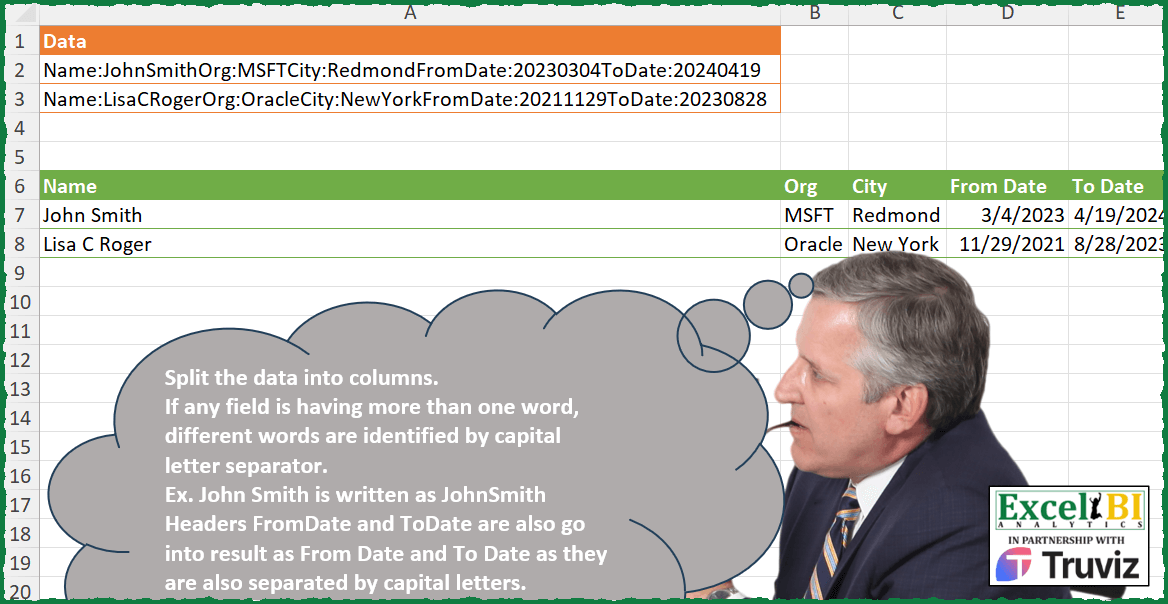
Split the data into columns. If any field is having more than one word, different words are identified by capital letter separator. Ex. John Smith is written as JohnSmith Headers FromDate and ToDate are also go into result as From Date and To Date as they are also separated by capital letters.
📌 Challenge Details and Links
ExcelBI Power Query Challenge Number: 190
Challenge Difficulty: ⭐️⭐️⭐️
📥Download Sample File
📥Link to the solutions on LinkedIn
Solving the challenge of Split Data by Capital Letters with Power Query
Power Query solution 1 for Split Data by Capital Letters, proposed by Zoran Milokanović:
let
  Source = Excel.CurrentWorkbook(){[Name = "Input"]}[Content],
  H = {"Name", "Org", "City", "From Date", "To Date"},
  S = Table.FromRows(
    Table.TransformRows(
      Source,
      each List.TransformMany(
        List.Skip(
          Text.Split(
            List.Accumulate(H, [Data], (s, c) => Text.Replace(s, Text.Remove(c, " ") & ":", ":")),
            ":"
          )
        ),
        each {Text.PositionOfAny(_, {"A" .. "Z"}, 2)},
        (i, _) =>
          let
            p = List.Skip(_),
            v = {List.Accumulate(p, i, (s, c) => Text.Insert(s, c + List.PositionOf(p, c), " ")), i}{
              Number.From(Text.Length(i) = List.Count(_))
            }
          in
            try Date.From(v) otherwise v
      )
    ),
    H
  )
in
  S
Power Query solution 2 for Split Data by Capital Letters, proposed by Kris Jaganah:
let
  Source = Excel.CurrentWorkbook(){[Name = "Table1"]}[Content],
  Proper = Table.TransformColumns(
    Source,
    {
      "Data",
      each Text.Trim(
        Text.Combine(List.Transform(Text.ToList(_), each if Text.Lower(_) <> _ then " " & _ else _))
      )
    }
  ),
  Headers = {"", "Name:", "Org:", "City:", "From Date:", "To Date:"},
  Split = Table.SplitColumn(
    Proper,
    "Data",
    Splitter.SplitTextByEachDelimiter(List.RemoveFirstN(Headers)),
    List.Transform(Headers, each Text.Trim(Text.Remove(_, ":")))
  ),
  Remove = Table.RemoveColumns(Split, {""}),
  Trim = Table.TransformRows(
    Remove,
    (x) => Record.FromList(List.Transform(Record.ToList(x), Text.Trim), Table.ColumnNames(Remove))
  ),
  Xpand = Table.ExpandRecordColumn(
    Table.FromList(Trim, Splitter.SplitByNothing()),
    "Column1",
    {"Name", "Org", "City", "From Date", "To Date"}
  ),
  Type = Table.TransformColumnTypes(Xpand, {{"From Date", type date}, {"To Date", type date}})
in
  Type
Power Query solution 3 for Split Data by Capital Letters, proposed by Aditya Kumar Darak 🇮🇳:
let
  Source = Excel.CurrentWorkbook(){[Name = "data"]}[Content],
  List = Table.AddColumn(
    Source,
    "L",
    each [
      S = Splitter.SplitTextByAnyDelimiter({"Name", ":", "Org", "City", "FromDate", "ToDate"})(
        [Data]
      ),
      RN = List.RemoveMatchingItems(S, {""}),
      T1 = List.Transform(
        List.FirstN(RN, 3),
        (f) =>
          [
            s1 = Splitter.SplitTextByCharacterTransition({"a" .. "z"}, {"A" .. "Z"})(f),
            c  = Text.Combine(s1, " "),
            s2 = Splitter.SplitTextByCharacterTransition({"A" .. "Z"}, {"A" .. "Z"})(c),
            tf = Text.Length(c) = List.Count(s2),
            r  = Text.Combine(s2, if tf then null else " ")
          ][r]
      ),
      T2 = List.Transform(List.LastN(RN, 2), Date.From),
      R = T1 & T2
    ][R]
  ),
  Return = Table.FromRows(
    List[L],
    type table [Name = text, Org = text, City = text, From Date = date, To Date = date]
  )
in
  Return
Power Query solution 4 for Split Data by Capital Letters, proposed by Alejandro Simón 🇵🇦 🇪🇸:
let
  Source = Excel.CurrentWorkbook(){[Name = "Table1"]}[Content],
  Sol = Table.Combine(
    Table.AddColumn(
      Source,
      "A",
      each
        let
          a = Text.Split([Data], ":"),
          b = {"Name", "Org", "City", "FromDate", "ToDate"},
          c = List.Transform(
            a,
            each List.RemoveNulls(
              List.Transform(b, (x) => if Text.Contains(_, x) then Text.Replace(_, x, "") else null)
            )
          ),
          d = List.Transform(List.Skip(c), each _{0}? ?? List.Last(a)),
          e = List.Transform(
            b,
            each Text.Combine(
              Splitter.SplitTextByCharacterTransition({"a" .. "z"}, {"A" .. "Z"})(_),
              " "
            )
          ),
          f = List.Transform(
            d,
            each if try Number.From(_) is number otherwise false then Date.From(_) else _
          ),
          g = Table.FromRows({f}, e)
        in
          g
    )[A]
  )
in
  Sol
Power Query solution 5 for Split Data by Capital Letters, proposed by Luan Rodrigues:
let
  Fonte = Tabela1,
  lista = {"Name:", "Org:", "City:", "FromDate:", "ToDate:"},
  add = Table.TransformColumns(
    Fonte,
    {
      "Data",
      each Table.FromRows(
        {
          List.Transform(
            {0 .. List.Count(lista) - 1},
            (x) =>
              let
                a = Text.AfterDelimiter(_, lista{x}),
                b = List.Transform(
                  {0 .. List.Count(List.RemoveFirstN(lista))},
                  (y) => Text.BeforeDelimiter(a, lista{y})
                )
              in
                List.Select(b, each not Text.Contains(_, ":")){0}
          )
        },
        List.Transform(lista, each Text.Remove(_, ":"))
      )
    }
  )[Data],
  comb = Table.Combine(add),
  res = Table.TransformColumnTypes(comb, {{"FromDate", type date}, {"ToDate", type date}})
in
  res
Power Query solution 6 for Split Data by Capital Letters, proposed by Alexis Olson:
let
  Source = Excel.CurrentWorkbook(){[Name = "Table1"]}[Content],
  Fields = {"Name", "Org", "City", "FromDate", "ToDate"},
  Record = Table.TransformColumns(
    Source,
    {
      {
        "Data",
        each [
          Positions = List.Transform(Fields, (f) => Text.PositionOf(_, f)),
          Splits    = Splitter.SplitTextByPositions(Positions)(_),
          Values    = List.Transform(Splits, each Text.AfterDelimiter(_, ":")),
          ToDate    = List.Transform(Values, each try Date.From(_) otherwise _),
          Record    = Record.FromList(ToDate, Fields)
        ][Record],
        type record
      }
    }
  ),
  Result = Table.ExpandRecordColumn(Record, "Data", Fields)
in
  Result
Power Query solution 7 for Split Data by Capital Letters, proposed by Brian Julius:
let
  S = Excel.CurrentWorkbook(){[Name = "Table1"]}[Content],
  Spl1 = Table.SplitColumn(
    S,
    "Data",
    Splitter.SplitTextByEachDelimiter({"ToDate:"}, QuoteStyle.Csv, true),
    {"Data", "To Date"}
  ),
  Spl2 = Table.SplitColumn(
    Spl1,
    "Data",
    Splitter.SplitTextByDelimiter("FromDate:", QuoteStyle.Csv),
    {"Date", "From Date"}
  ),
  Spl3 = Table.SplitColumn(
    Spl2,
    "Date",
    Splitter.SplitTextByDelimiter("City:", QuoteStyle.Csv),
    {"Date", "City"}
  ),
  Spl4 = Table.SplitColumn(
    Spl3,
    "Date",
    Splitter.SplitTextByDelimiter("Org:", QuoteStyle.Csv),
    {"Date.1", "Org"}
  ),
  Spl5 = Table.SplitColumn(
    Spl4,
    "Date.1",
    Splitter.SplitTextByEachDelimiter({"Name:"}, QuoteStyle.Csv, false),
    {"Date.1.1", "Date.1.2"}
  ),
  RC = Table.RemoveColumns(Spl5, {"Date.1.1"}),
  SpltFirst = Table.SplitColumn(
    RC,
    "Date.1.2",
    Splitter.SplitTextByCharacterTransition({"a" .. "z"}, {"A" .. "Z"}),
    {"First", "Mid"}
  ),
  SplMidLast = Table.SplitColumn(
    SpltFirst,
    "Mid",
    Splitter.SplitTextByCharacterTransition({"A" .. "Z"}, {"A" .. "Z"}),
    {"Mid", "Last"}
  ),
  Merge = Table.CombineColumns(
    SplMidLast,
    {"First", "Mid", "Last"},
    Combiner.CombineTextByDelimiter(" ", QuoteStyle.None),
    "Name"
  ),
  Z = Table.TransformColumnTypes(Merge, {{"From Date", type date}, {"To Date", type date}})
in
  Z
Power Query solution 8 for Split Data by Capital Letters, proposed by Abdallah Ally:
let
  Source = Excel.CurrentWorkbook(){[Name = "Table1"]}[Content],
  Splitters = {"Name:", "Org:", "City:", "FromDate:", "ToDate:"},
  Columns = {"Name", "Org", "City", "From Date", "To Date"},
  Values = List.Transform(
    Source[Data],
    (x) => List.Accumulate(Splitters, x, (a, b) => Text.Replace(a, b, " "))
  ),
  SplitText = List.Transform(Values, (x) => Text.Split(x, " ")),
  Filtered = List.Transform(SplitText, (x) => List.Select(x, each _ <> "")),
  Newtable = Table.FromRows(Filtered, Columns),
  f = (x) => Text.Trim(List.Accumulate({"A" .. "Z"}, x, (a, b) => Text.Replace(a, b, " " & b))),
  Results = Table.TransformColumns(
    Newtable,
    {{"Name", f}, {"City", f}, {"From Date", Date.From}, {"To Date", Date.From}}
  )
in
  Results
Power Query solution 9 for Split Data by Capital Letters, proposed by Eric Laforce:
letter)
3) then simply split  column of Source using this "material"
let
 Source = Excel.CurrentWorkbook(){[Name="tData190"]}[Content],
 CN = {"Name:", "Org:", "City:", "FromDate:", "ToDate:"},
 fxSplit = (x)=>if Text.PositionOfAny(x, {"a".."z"})=-1 then x
 else Text.Combine(Splitter.SplitTextByCharacterTransition({"a".."z","A".."Z"},{"A".."Z"})(x), " "),
 Split = Table.SplitColumn(Source, "Data", each
 List.Transform(List.Skip(Splitter.SplitTextByAnyDelimiter(CN)(_)),
 each try Date.From(_) otherwise fxSplit(_)),
 List.Transform(CN, each fxSplit(Text.BeforeDelimiter(_,":"))) )
in
 Split
Power Query solution 10 for Split Data by Capital Letters, proposed by 🇮🇷 Navid Esmaeilzadeh اسماعیل زاده:
let
 Source = Excel.CurrentWorkbook(){[Name="Table1"]}[Content],
 A = Table.AddColumn(Source, "C", each Table.FromColumns( List.Split(List.Skip(Splitter.SplitTextByAnyDelimiter({"Name:","Org:","City:","FromDate:","ToDate:"})([Data]),1),1),{"Name","Org","City","FromDate","ToDate"})),
 B = Table.SelectColumns(A,{"C"}),
 C = Table.ExpandTableColumn(B, "C", {"Name", "Org", "City", "FromDate", "ToDate"}, {"Name", "Org", "City", "FromDate", "ToDate"}),
 D = Table.SplitColumn(C, "Name", Splitter.SplitTextByCharacterTransition({"a".."z"}, {"A".."Z"}), {"N1", "N2"}),
 J = Table.AddColumn(D, "T", each Splitter.SplitTextByCharacterTransition({"A".."Z"},{"A".."Z"})([N2])),
 K = Table.TransformColumns(J, {"T", each Text.Combine(List.Transform(_, Text.From), " "), type text}),
 L = Table.CombineColumns(K,{"N1", "T"},Combiner.CombineTextByDelimiter(" ", QuoteStyle.None),"Name"),
 M = Table.RemoveColumns(L,{"N2"}),
 N = Table.ReorderColumns(M,{"Name", "Org", "City", "FromDate", "ToDate"}),
 F = Table.SplitColumn(N, "FromDate", Splitter.SplitTextByPositions({0, 4, 6}), {"F1", "F2", "F3"}),
 G = Table.CombineColumns(F,{"F1", "F2", "F3"},Combiner.CombineTextByDelimiter("/", QuoteStyle.None),"From Date"),
Power Query solution 11 for Split Data by Capital Letters, proposed by 🇮🇷 Navid Esmaeilzadeh اسماعیل زاده:
Part2:
 H = Table.SplitColumn(G, "ToDate", Splitter.SplitTextByPositions({0, 4, 6}), {"T1", "T2", "T3"}),
 I = Table.CombineColumns(H,{"T1", "T2", "T3"},Combiner.CombineTextByDelimiter("/", QuoteStyle.None),"ToDate")
in
 I
Power Query solution 12 for Split Data by Capital Letters, proposed by Yaroslav Drohomyretskyi:
let
  Source = Excel.CurrentWorkbook(){[Name = "Table1"]}[Content],
  Split = Table.RemoveColumns(
    Table.SplitColumn(
      Source,
      "Data",
      Splitter.SplitTextByAnyDelimiter(
        {"Name:", "Org:", "City:", "FromDate:", "ToDate:"},
        QuoteStyle.Csv
      ),
      {"Junk", "Name", "Org", "City", "From Date", "To Date"}
    ),
    {"Junk"}
  ),
  Transform = Table.TransformColumns(
    Split,
    {
      {
        "Name",
        each Text.Trim(
          Text.Proper(
            Text.Combine(
              List.Transform(Text.ToList(_), each if _ = Text.Upper(_) then " " & _ else _),
              ""
            )
          )
        )
      },
      {"Org", each _},
      {
        "City",
        each Text.Trim(
          Text.Proper(
            Text.Combine(
              List.Transform(Text.ToList(_), each if _ = Text.Upper(_) then " " & _ else _),
              ""
            )
          )
        )
      },
      {"From Date", each Date.FromText(_)},
      {"To Date", each Date.FromText(_)}
    }
  )
in
  Transform
Power Query solution 13 for Split Data by Capital Letters, proposed by Ahmed Ariem:
let
  LstCol = {"Name", "Org", "City", "FromDate", "ToDate"},
  f1 = (x) => List.Select(Splitter.SplitTextByAnyDelimiter(LstCol & {":"})(x), (y) => y <> ""),
  f2 = (x) =>
    Text.Combine(
      Splitter.SplitTextByCharacterTransition({"A" .. "Z"}, {"A" .. "Z"})(
        Text.Combine(Splitter.SplitTextByCharacterTransition({"a" .. "z"}, {"A" .. "Z"})(x), " ")
      ),
      " "
    ),
  Source = Excel.CurrentWorkbook(){[Name = "tbl_1"]}[Content],
  tbl = [
    trans = Table.TransformColumns(Source, {"Data", f1}),
    to    = Table.TransformColumns(trans, {"Data", (z) => Table.FromRows({z}, LstCol)})
  ][to],
  Expand = Table.ExpandTableColumn(tbl, "Data", LstCol),
  final = Table.TransformColumns(Expand, {"Name", f2})
in
  final
Power Query solution 14 for Split Data by Capital Letters, proposed by Mihai Radu O:
let
  Source = Excel.CurrentWorkbook(){[Name = "Table1"]}[Content],
  fct = (txt, del) =>
    let
      _a = Text.ToList(txt),
      f = Text.Combine(
        List.Transform(
          {0 .. List.Count(_a) - 1},
          (x) =>
            if List.ContainsAll({"A" .. "Z"}, _a) then
              _a{x}
            else if List.Contains({"A" .. "Z"}, _a{x}) then
              del & _a{x}
            else
              _a{x}
        )
      )
    in
      f,
  l = {"Name", "Org", "City", "FromDate", "ToDate"},
  hd = List.Transform(l, (x) => fct(x, " ")),
  p1 = Table.ExpandTableColumn(
    Table.AddColumn(
      Source,
      "r",
      each
        let
          a = Text.Trim(
            List.Accumulate(
              List.Transform(l, each _ & ":"),
              [Data],
              (s, c) => Text.Replace(s, c, " ")
            )
          ),
          b = Text.Split(a, " "),
          c = List.Transform(
            b,
            (x) => try Date.FromText(x, [Format = "yyyyMMdd"]) otherwise fct(x, " ")
          ),
          d = Table.FromRows({c}, hd)
        in
          d
    )[[r]],
    "r",
    hd
  )
in
  p1
Solving the challenge of Split Data by Capital Letters with Excel
Excel solution 1 for Split Data by Capital Letters, proposed by Bo Rydobon 🇹🇭:
=VSTACK(A6:E6,
    MAP(TEXTSPLIT(
        CONCAT(
            A2:A3&" "
        ),
        SUBSTITUTE(
            A6:E6,
            " ",

        )&":",
        " ",
        1
    ),
    LAMBDA(a,

LET(m,
    MID(
        a,
        SEQUENCE(
            LEN(
                a
            )
        ),
        1
    ),
    c,
    CODE(
        m
    ),
    IFERROR(--TEXT(
        a,
        "0-00-00"
    ),
    TRIM(CONCAT((REPT(" ",
    (c<91)*((DROP(
        VSTACK(
            c,
            0
        ),
        1
    )>90)+(DROP(
        VSTACK(
            0,
            c
        ),
        -1
    )>90)))&m))))))))
Excel solution 2 for Split Data by Capital Letters, proposed by Bo Rydobon 🇹🇭:
=LET(
    b,
    TEXTSPLIT(
        REGEXREPLACE(
            TEXTJOIN(
    &            "|",
                ,
                A2:A3
            ),
            "(From|To)?([A-Z][a-z]{2,3})(:)",
            " $1$2 "
        ),
        " ",
        "|",
        1
    ),

    c,
    IFNA(
        REGEXREPLACE(
            b,
            "(?<=[a-z])(?=[A-Z])|B(?=[A-Z][a-z])",
            " "
        ),
        TEXT(
            b,
            "0-00-00"
        )
    ),

    d,
    WRAPROWS(
        TOCOL(
            c
        ),
        2
    ),
    VSTACK(
        TOROW(
            UNIQUE(
                TAKE(
                    d,
                    ,
                    1
                )
            )
        ),
        WRAPROWS(
            DROP(
                    d,
                    ,
                    1
                ),
            5
        )
    )
)
Excel solution 3 for Split Data by Capital Letters, proposed by Rick Rothstein:
=LET(z,
    A2:A3,
    f,
    LAMBDA(n,
    REDUCE(n,
    SEQUENCE(
        LEN(
            n
        )-1,
        ,
        LEN(
            n
        ),
        -1
    ),
    LAMBDA(a,
    x,
    IF((CODE(
        MID(
            a,
            x,
            1
        )
    )>64)*(CODE(
        MID(
            a,
            x,
            1
        )
    )<92),
    REPLACE(
        a,
        x,
        0,
        " "
    ),
    a)))),
    k,
    {"Name",
    "Org",
    "City",
    "From Date",
    "To Date"},
    h,
    SUBSTITUTE(
        k,
        " ",
        ""
    )&":",
    c,
    {1,
    2,
    3,
    4,
    5},
    t,
    TEXTSPLIT(
        TEXTAFTER(
            z,
            h,
            c
        ),
        h
    ),
    VSTACK(
        k,
        MAKEARRAY(
            ROWS(
                z
            ),
            5,
            LAMBDA(
                r,
                c,
                LET(
                    i,
                    INDEX(
                        t,
                        r,
                        c
                    ),
                    t,
                    0+TEXT(
                        i,
                        "0000-00-00"
                    ),
                    CHOOSE(
                        c,
                        f(
                            i
                        ),
                        i,
                        f(
                            i
                        ),
                        t,
                        t
                    )
                )
            )
        )
    ))
Excel solution 4 for Split Data by Capital Letters, proposed by محمد حلمي:
=LET(
    x,
    {"Name",
    "Org",
    "City",
    "FromDate",
    "ToDate"},

    i,
    TEXTSPLIT(
        CONCAT(
            A2:A3&"-"
        ),
        x&":",
        "-",
        1
    ),

    r,
    VSTACK(
        x,
        i
    ),

    j,
    IF(
        x="org",
        r,
        TRIM(
            REDUCE(
                r,
                CHAR(
                    SEQUENCE(
                        26
                    )+64
                ),

                LAMBDA(
                    a,
                    v,
                    SUBSTITUTE(
                        a,
                        v,
                        " "&v
                    )
                )
            )
        )
    ),

    IFERROR(
        IF(
            -j,
            --TEXT(
                j,
                "0000-00-00"
            )
        ),
        j
    )
)
Excel solution 5 for Split Data by Capital Letters, proposed by Julian Poeltl:
=LET(
  N,
  WRAPROWS(
    TEXTSPLIT(
      TEXTJOIN(
        ",",
        ,
        MAP(
          A2:A3,
          LAMBDA(
            D,
            LET(
              H,
              A6:E6,
              Dt,
              LAMBDA(
                A,
                DATE(
                  LEFT(
                    A,
                    4
                  ),
                  MID(
                    A,
                    5,
                    2
                  ),
                  RIGHT(
                    A,
                    2
                  )
                )
              ),
              Sp,
              LAMBDA(
                W,
                TRIM(
                  CONCAT(
                    LET(
                      SP,
                      MID(
                        W,
                        SEQUENCE(
                          LEN(
                            W
                          )
                        ),
                        1
                      ),
                      IF(
                        MAP(
                          SP,
                          LAMBDA(
                            A,
                            SUM(
                              --ISNUMBER(
                                FIND(
                                  A,
                                  CHAR(
                                    64+SEQUENCE(
                                      26
                                    )
                                  )
                                )
                              )
                            )
                          )
                        )>0,
                        " "&SP,
                        SP
                      )
                    )
                  )
                )
              ),
              LET(
                I,
                MAP(
                  H,
                  HSTACK(
                    DROP(
                      H,
                      ,
                      1
                    ),
                    "|"
                  ),
                  LAMBDA(
                    A,
                    B,
                    TEXTBEFORE(
                      TEXTAFTER(
                        D&"|",
                        SUBSTITUTE(
                          A,
                          " ",
                          ""
                        )&":"
                      ),
                      SUBSTITUTE(
                        B,
                        " ",
                        ""
                      )
                    )
                  )
                ),
                TEXTJOIN(
                  ",",
                  ,
                  Sp(
                    INDEX(
                      I,
                      1,
                      1
                    )
                  ),
                  INDEX(
                    I,
                    ,
                    2
                  ),
                  Sp(
                    INDEX(
                      I,
                      1,
                      3
                    )
                  ),
                  Dt(
                    INDEX(
                      I,
                      ,
                      4
                    )
                  ),
                  Dt(
                    INDEX(
                      I,
                      ,
                      5
                    )
                  )
                )
              )
            )
          )
        )
      ),
      ","
    ),
    5
  ),
  IFERROR(
    N*1,
    N
  )
)
Excel solution 6 for Split Data by Capital Letters, proposed by Oscar Mendez Roca Farell:
=LET(
    t,
     DROP(
         TEXTSPLIT(
             CONCAT(
                 A2:A3&":"
             ),
              {"Na",
              "Org",
              "Ci",
              "Fr",
              "To"},
              ":"
         ),
          -1,
          -1
     ),
     VSTACK(
         A6:E6,
          DROP(
              WRAPROWS(
                  IFERROR(
                      --BYROW(
                          MID(
                              t,
                               {5,
                               7,
                               1},
                               {2,
                               2,
                               4}
                          ),
                           LAMBDA(
                               r,
                                TEXTJOIN(
                                    "/",
                                     ,
                                     r
                                )
                           )
                      ),
                       t
                  ),
                   6
              ),
               ,
               1
          )
     )
)
Excel solution 7 for Split Data by Capital Letters, proposed by LEONARD OCHEA 🇷🇴:
=LET(h,
    A6:E6,
    d,
    A2:A3,
    F,
    LAMBDA(x,
    LET(m,
    MID(
        x,
        SEQUENCE(
            LEN(
                x
            )-1
        )+1,
        1
    ),
    CONCAT(LEFT(
                x
            ),
    IF((SUM(
        N(
            EXACT(
                m,
                UPPER(
                    m
                )
            )
        )
    )
Excel solution 8 for Split Data by Capital Letters, proposed by Md. Zohurul Islam:
=LET(
    z,
    A2:A3,

    s,
    {"Name:",
    "Org:",
    "City:",
    "FromDate:",
    "ToDate:"},

    u,
    SUBSTITUTE(
        s,
        ":",
        ""
    ),

    v,
    DROP(
        REDUCE(
            "",
            z,
            LAMBDA(
                x,
                y,
                VSTACK(
                    x,
                    TEXTSPLIT(
                        y,
                        s
                    )
                )
            )
        ),
        1,
        1
    ),

    Func,
    LAMBDA(
        w,
        MAP(
            w,
            LAMBDA(
                x,
                LET(
                    a,
                    MID(
                        x,
                        SEQUENCE(
                            LEN(
                                x
                            )
                        ),
                        1
                    ),
                    b,
                    ABS(
                        EXACT(
                            a,
                            UPPER(
                                a
                            )
                        )
                    ),
                    d,
                    SCAN(
                        1,
                        VSTACK(
                            0,
                            DROP(
                                b,
                                1
                            )
                        ),
                        SUM
                    ),
                    e,
                    MAP(
                        UNIQUE(
                            d
                        ),
                        LAMBDA(
                            p,
                            CONCAT(
                                FILTER(
                                    a,
                                    d=p
                                )
                            )
                        )
                    ),
                    f,
                    TEXTJOIN(
                        " ",
                        ,
                        e
                    ),
                    f
                )
            )
        )
    ),

    za,
    Func(
        TAKE(
            v,
            ,
            3
        )
    ),

    zb,
    Func(
        u
    ),

    zc,
    MAP(
        DROP(
            v,
            ,
            3
        ),
        LAMBDA(
            x,
            DATE(
                ABS(
                    LEFT(
                        x,
                        4
                    )
                ),
                ABS(
                    MID(
                        x,
                        5,
                        2
                    )
                ),
                ABS(
                    RIGHT(
                        x,
                        2
                    )
                )
            )
        )
    ),

    zd,
    HSTACK(
        za,
        zc
    ),

    ze,
    VSTACK(
        zb,
        IF(
            zb="Org",
            v,
            zd
        )
    ),

    ze
)
Excel solution 9 for Split Data by Capital Letters, proposed by Asheesh Pahwa:
=LET(
d,
A2:A3,
dr,
DROP(
REDUCE(
"",
d,
LAMBDA(
p,
q,
VSTACK(
p,
LET(
t,
TEXTSPLIT(
q,
,
":"
),
f,
ISNUMBER(
FIND(
"Date",
t
)
),
fl,
FILTER(
t,
f
),
r,
DROP(
REDUCE(
"",
fl,
LAMBDA(
a,
v,
VSTACK(
a,
LET(
m,
MID(
v,
SEQUENCE(
LEN(
v
)
),
1
),
fn,
ISERROR(
FIND(
"D",
m
)
),
HSTACK(
v,
CONCAT(
IF(
fn,
m,
" "&m
)
)
)
)
)
)
),
1
),
xl,
XLOOKUP(
t,
TAKE(
r,
,
1
),
TAKE(
r,
,
-1
),
1
),
i,
IF(
xl=1,
t,
xl
),
tr,
TOROW(
DROP(
REDUCE(
i,
{"Name";"Org";"City";"From Date";"To Date"},
LAMBDA(
x,
y,
SUBSTITUTE(
x,
y,
""
)
)
),
1
)
),
HSTACK(
DROP(
tr,
,
-2
),
WRAPROWS(
MAP(
TOCOL(
TAKE(
tr,
,
-2
)
),
LAMBDA(
x,
TEXTJOIN(
"/",
,
MID(
x,
{5,
7,
1},
{2,
2,
& 4}
)
)
)
),
2
)
)
)
)
)
),
1
),
dr
)Excel solution 10 for Split Data by Capital Letters, proposed by Erik Oehm:
=LET(
 _Data,
     A2:A3,

 _Header,
     {"Name",
    "Org",
    "City",
    "FromDate",
    "ToDate"},

 _Split,
     TILE(
         _Data,
          LAMBDA(
              x,
               TEXTSPLIT(
                   TEXTAFTER(
                       x,
                        "Name:"
                   ),
                    _Header & ":"
               )
          )
     ),

 _Combined,
     VSTACK(
         _Header,
          _Split
     ),

 fnAddSpaces,
     LAMBDA(words,
     LET(
 _Letters,
     MID(
         words,
          SEQUENCE(
              LEN(
                  words
              )
          ),
          1
     ),

 _IsUpper,
     (CODE(
         _Letters
     ) >= CODE(
         "A"
     )) * (CODE(
         _Letters
     ) <= CODE(
         "Z"
     )),

 _AddSpace,
     IF(
         SEQUENCE(
              LEN(
                  words
              )
          ) = 1,
          0,
          _IsUpper
     ),

 _Result,
     IF(
         AND(
             _IsUpper
         ),
          words,
          CONCAT(
              IF(
                  _AddSpace = 1,
                   " ",
                   ""
              ) & _Letters
          )
     ),

 _Result
 )),

 fnToDate,
     LAMBDA(
         number,
          DATE(
              LEFT(
                  number,
                   4
              ),
               MID(
                   number,
                    5,
                    2
               ),
               RIGHT(
                   number,
                    2
               )
          )
     ),

 _Result,
     MAP(
         _Combined,
          LAMBDA(
              x,
               IF(
                   ISERR(
                       VALUE(
                           x
                       )
                   ),
                    fnAddSpaces(
                           x
                       ),
                    fnToDate(
                           x
                       )
               )
          )
     ),

 _Result
)
Solving the challenge of Split Data by Capital Letters with Python
Python solution 1 for Split Data by Capital Letters, proposed by Konrad Gryczan, PhD:
import pandas as pd
import re
input = pd.read_excel("PQ_Challenge_190.xlsx", usecols="A", nrows = 2)
test = pd.read_excel("PQ_Challenge_190.xlsx",  usecols= "A:E", nrows = 2, skiprows=5)
name_pattern = "Name:([w]+)Org:"
org_pattern = "Org:([w]+)City:"
city_pattern = "City:([w]+)FromDate:"
from_date_pattern = "FromDate:([w]+)ToDate:"
to_date_pattern = "ToDate:([w]+)"
def extract_and_space(a, pattern):
 return re.sub(r"([A-Z])", r" 1", re.search(pattern, a).group(1)).lstrip()
result = input.copy()
result["Name"] = result["Data"].apply(lambda x: extract_and_space(x, name_pattern))
result["Org"] = result["Data"].apply(lambda x: re.search(org_pattern, x).group(1))
result["City"] = result["Data"].apply(lambda x: extract_and_space(x, city_pattern))
result["From Date"] = result["Data"].apply(lambda x: re.search(from_date_pattern, x).group(1))
result["To Date"] = result["Data"].apply(lambda x: re.search(to_date_pattern, x).group(1))
result["From Date"] = pd.to_datetime(result["From Date"])
result["To Date"] = pd.to_datetime(result["To Date"])
result = result.drop(columns=["Data"])
print(result.equals(test)) # True
Solving the challenge of Split Data by Capital Letters with Python in Excel
Python in Excel solution 1 for Split Data by Capital Letters, proposed by Abdallah Ally:
import pandas as pd
import re
# Create functions to be used for data wrangling
def cap(text):
 return re.sub('([A-Z])', lambda x: ' ' + x[1], text).strip()
def date(text):
 return '/'.join(re.findall('(d{4})(d{2})(d{2})', text)[0][::-1])

file_path = 'PQ_Challenge_190.xlsx'
df = pd.read_excel(file_path, usecols='A', nrows=2)
# Perform data wrangling
columns = ['Name', 'Org', 'City', 'From Date', 'To Date']
pattern = 'Name:(w+)Org:(w+)City:(w+)FromDate:(d+)ToDate:(d+)'
df[columns] = df['Data'].map(lambda x: re.findall(pattern, x)[0]).tolist()
df[['Name', 'City']] = df.apply(lambda x: (cap(x[1]), cap(x[3])), axis=1).tolist()
df[['From Date', 'To Date']] = df.apply(lambda x: (date(x[4]), date(x[5])), axis=1).tolist()
df = df.iloc[:, 1:]
df
Solving the challenge of Split Data by Capital Letters with R
R solution 1 for Split Data by Capital Letters, proposed by Konrad Gryczan, PhD:
library(tidyverse)
library(readxl)
input = read_excel("Power Query/PQ_Challenge_190.xlsx", range = "A1:A3")
test = read_excel("Power Query/PQ_Challenge_190.xlsx", range = "A6:E8")
pattern = 'Name:(\w+)Org:(\w+)City:(\w+)FromDate:(\d+)ToDate:(\d+)'
result2 <- input %>%
 extract(Data, into = c("Name", "Org", "City", "From Date", "To Date"), regex = pattern, remove = FALSE) %>%
 mutate(across(c(`From Date`, `To Date`), ~ ymd(.x) %>% as.POSIXct())) %>%
 mutate(across(c(Name, City), ~ str_replace_all(.x, "([A-Z])", " \1") %>% trimws(which = "left"))) %>%
 select(-Data)
identical(result2, test)
# [1] TRUE
&