
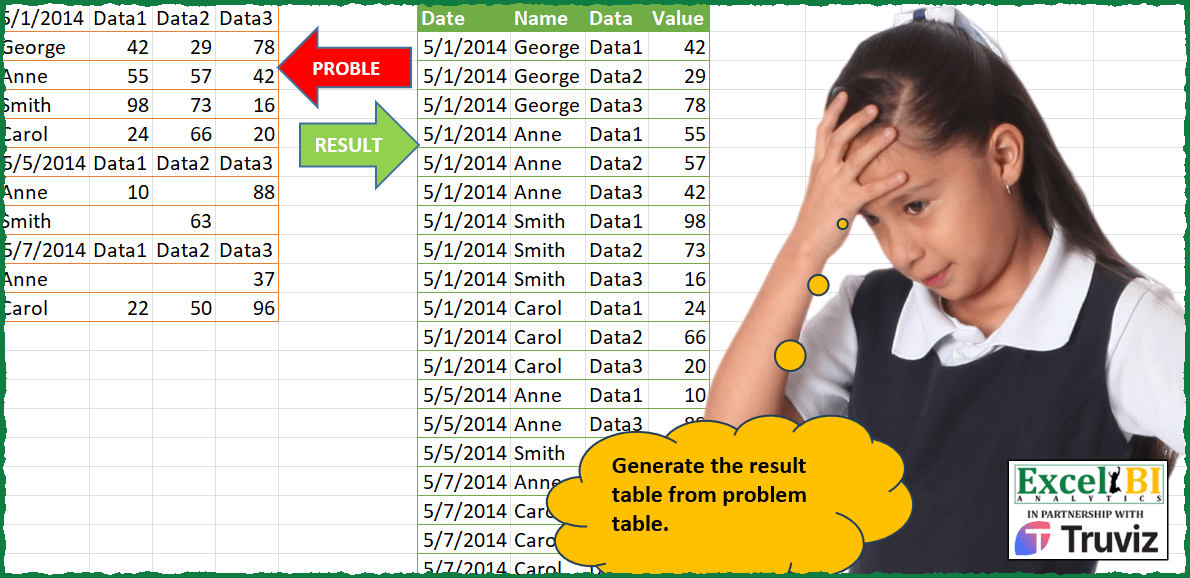
Generate the result table from problem table.
📌 Challenge Details and Links
ExcelBI Power Query Challenge Number: 181
Challenge Difficulty: ⭐️⭐️
📥Download Sample File
📥Link to the solutions on LinkedIn
Solving the challenge of Transform Input to Result Table with Power Query
Power Query solution 1 for Transform Input to Result Table, proposed by Zoran Milokanović:
let
  Source = Table.DemoteHeaders(Excel.CurrentWorkbook(){[Name = "Input"]}[Content]),
  S = Table.Combine(
    Table.Group(
      Source,
      "Column1",
      {
        {
          "T",
          each
            let
              l = Table.ToRows(_),
              h = {"Date", "Name"}
            in
              Table.UnpivotOtherColumns(
                Table.FromRows(
                  List.Transform(List.Skip(l), (r) => {Date.From([Column1]{0})} & r),
                  h & List.Skip(l{0})
                ),
                h,
                "Data",
                "Value"
              )
        }
      },
      0,
      (b, n) => Byte.From(n is datetime)
    )[T]
  )
in
  S
Power Query solution 2 for Transform Input to Result Table, proposed by Aditya Kumar Darak 🇮🇳:
let
  Source = Excel.CurrentWorkbook(){[Name = "data"]}[Content] meta [Table = "A1:D11", Header = false],
  Group = Table.Group(
    Source,
    "Column1",
    {
      "T",
      each [
        P   = Table.PromoteHeaders(_),
        CN  = Table.ColumnNames(P){0},
        RCN = Table.RenameColumns(P, {CN, "Name"}),
        R   = Table.UnpivotOtherColumns(RCN, {"Name"}, "Data", "Value")
      ][R]
    },
    0,
    (x, y) => Number.From(try Date.From(y) is date otherwise 0)
  ),
  Expand = Table.ExpandTableColumn(Group, "T", {"Name", "Data", "Value"}),
  Return = Table.RenameColumns(Expand, {{"Column1", "Date"}})
in
  Return
Power Query solution 3 for Transform Input to Result Table, proposed by Alejandro Simón 🇵🇦 🇪🇸:
let
  Source = Excel.CurrentWorkbook(){[Name = "Table1"]}[Content],
  Date = Table.AddColumn(
    Source,
    "Date",
    each try if Date.From([Column1]) is date then Date.From([Column1]) else null otherwise null
  ),
  FD = Table.FillDown(Date, {"Date"}),
  Group = Table.Group(
    FD,
    {"Date"},
    {
      {
        "A",
        each
          let
            a = Table.RemoveColumns(_, "Date"),
            b = Table.PromoteHeaders(a),
            c = Table.Unpivot(b, List.Skip(Table.ColumnNames(b)), "Data", "Value"),
            d = Table.RenameColumns(c, {Table.ColumnNames(c){0}, "Name"})
          in
            d
      }
    }
  ),
  Sol = Table.ExpandTableColumn(Group, "A", Table.ColumnNames(Group[A]{0}))
in
  Sol
Power Query solution 4 for Transform Input to Result Table, proposed by Luan Rodrigues:
let
  Fonte = Tabela1,
  add = Table.AddColumn(Fonte, "Personalizar", each List.RemoveFirstN(Record.FieldValues(_))),
  gp = Table.Group(
    add,
    {"Column1"},
    {
      {
        "tb",
        each
          let
            a = List.RemoveFirstN([Personalizar]),
            b = List.Transform(
              List.Zip({List.Repeat({List.First([Personalizar])}, List.Count(a)), a}),
              each Table.FromColumns(_, {"Data", "Value"})
            ),
            c = List.RemoveFirstN([Column1])
          in
            Table.FromRows(List.Zip({c, b}), {"Name", "tab"})
      }
    },
    0,
    (a, b) => Number.From(Text.Select(Text.From(b[Column1]), {"/"}) <> "")
  ),
  exp = Table.ExpandTableColumn(gp, "tb", Table.ColumnNames(gp[tb]{0})),
  res = Table.ExpandTableColumn(exp, "tab", Table.ColumnNames(exp[tab]{0})),
  tp = Table.TransformColumns(
    res,
    {"Column1", each if _ is text then Date.From(_, "en-US") else Date.From(_), type date}
  ),
  fil = Table.SelectRows(tp, each [Value] <> null)
in
  fil
Power Query solution 5 for Transform Input to Result Table, proposed by Brian Julius:
let
  Source = Table.DemoteHeaders(Excel.CurrentWorkbook(){[Name = "Table1"]}[Content]),
  AddDate = Table.FillDown(
    Table.AddColumn(Source, "Date", each try Date.From([Column1]) otherwise null),
    {"Date"}
  ),
  AddName = Table.SelectRows(
    Table.RemoveColumns(
      Table.AddColumn(
        AddDate,
        "Name",
        each
          if List.Contains({"A" .. "Z"}, Text.Start(Text.From([Column1]), 1)) then
            [Column1]
          else
            null
      ),
      "Column1"
    ),
    each ([Name] <> null)
  ),
  Head = Table.ColumnNames(AddName),
  Trans = List.Transform(
    Head,
    each
      if Text.StartsWith(_, "Column") then
        "Data" & Text.From(List.PositionOf(Head, _) + 1)
      else
        _
  ),
  Rename = Table.RenameColumns(AddName, List.Zip({Head, Trans})),
  Unpiv = Table.UnpivotOtherColumns(Rename, {"Date", "Name"}, "Data", "Value")
in
  Unpiv
Power Query solution 6 for Transform Input to Result Table, proposed by Ramiro Ayala Chávez:
let
  S = Excel.CurrentWorkbook(){[Name = "Table1"]}[Content],
  A = Table.AddColumn,
  a = Table.FillDown(A(S, "A", each if [Column2] is text then [Column1] else null), {"A"}),
  b = A(a, "D", each if [Column2] is text then null else [A]),
  c = Table.PromoteHeaders(
    Table.RemoveColumns(
      A(b, "N", each if [Column1] is text then [Column1] else null),
      {"Column1", "A"}
    )
  ),
  Sol = Table.RenameColumns(
    Table.UnpivotOtherColumns(
      Table.SelectRows(c, each [Column5] <> null),
      {"Column5", "Column4"},
      "Data",
      "Value"
    ),
    {{"Column4", "Date"}, {"Column5", "Name"}}
  )
in
  Sol
Power Query solution 7 for Transform Input to Result Table, proposed by 🇮🇷 Navid Esmaeilzadeh اسماعیل زاده:
let
  S = Excel.CurrentWorkbook(){[Name = "Table1"]}[Content],
  A = Table.AddColumn(S, "Date", each if [Column2] = "Data1" then [Column1] else null),
  B = Table.TransformColumnTypes(A, {{"Date", type date}}),
  C = Table.FillDown(B, {"Date"}),
  D = Table.PromoteHeaders(C, [PromoteAllScalars = true]),
  E = Table.RenameColumns(D, {{"5/1/2014", "Name"}, {"5/1/2014_1", "Date"}}),
  F = Table.SelectRows(E, each ([Data1] <> "Data1")),
  G = Table.UnpivotOtherColumns(F, {"Date", "Name"}, "Data", "Value")
in
  G
Power Query solution 8 for Transform Input to Result Table, proposed by Peter Tholstrup:
let
  Source = Excel.CurrentWorkbook(){[Name = "data"]}[Content],
  t = [
    headers = List.Zip({Table.ColumnNames(Source), {"Name", "Data1", "Data2", "Data3"}}),
    rename  = Table.RenameColumns(Source, headers),
    dates   = Table.AddColumn(rename, "Date", each try Date.From([Name]) otherwise null),
    fill    = Table.FillDown(dates, {"Date"})
  ][fill],
  f = each [
    remove  = Table.RemoveColumns(Table.Skip(_, 1), {"Date"}),
    unpivot = Table.UnpivotOtherColumns(remove, {"Name"}, "Data", "Value")
  ][unpivot],
  group = Table.Group(t, {"Date"}, {{"temp", f}}),
  result = Table.ExpandTableColumn(group, "temp", {"Name", "Data", "Value"})
in
  result
Power Query solution 9 for Transform Input to Result Table, proposed by Peter Tholstrup:
let
  Source = Excel.CurrentWorkbook(){[Name = "data"]}[Content],
  t = Table.AddColumn(Source, "Date", each try Date.From([Column1]) otherwise null),
  f = each [
    remove  = Table.PromoteHeaders(Table.RemoveColumns(_, {"Date"})),
    rename  = Table.RenameColumns(remove, {Table.ColumnNames(remove){0}, "Name"}),
    unpivot = Table.UnpivotOtherColumns(rename, {"Name"}, "Data", "Value")
  ][unpivot],
  c = (x, y) => Number.From(y[Date] is date),
  group = Table.Group(t, {"Date"}, {"temp", f}, 0, c),
  result = Table.ExpandTableColumn(group, "temp", Table.ColumnNames(group[temp]{0}))
in
  result
Power Query solution 10 for Transform Input to Result Table, proposed by Yaroslav Drohomyretskyi:
let
  Source = Excel.CurrentWorkbook(){[Name = "Table1"]}[Content],
  Date = Table.FillDown(
    Table.AddColumn(Source, "Date", each if [Column2] = "Data1" then [Column1] else null, type date),
    {"Date"}
  ),
  Unpivot = Table.UnpivotOtherColumns(
    Table.SelectRows(Date, each ([Column2] <> "Data1")),
    {"Column1", "Date"},
    "Data",
    "Value"
  ),
  Order = Table.TransformColumnTypes(
    Table.ReorderColumns(
      Table.RenameColumns(
        Table.ReplaceValue(Unpivot, "Column", "Data", Replacer.ReplaceText, {"Data"}),
        {{"Column1", "Name"}}
      ),
      {"Date", "Name", "Data", "Value"}
    ),
    {{"Date", type date}}
  )
in
  Order
Power Query solution 11 for Transform Input to Result Table, proposed by Luke Jarych:
let
  Source = Excel.CurrentWorkbook(){[Name = "Table1"]}[Content],
  DemotedHeaders = Table.DemoteHeaders(Source),
  AddedDate = Table.AddColumn(
    DemotedHeaders,
    "Date",
    each try if Date.From([Column1]) is date then Date.From([Column1]) else null otherwise null
  ),
  FilledDown = Table.FillDown(AddedDate, {"Date"}),
  #"Grouped Rows" = Table.Group(FilledDown, {"Date"}, {{"Grouped", each _}}),
  Transformed = Table.TransformColumns(
    #"Grouped Rows",
    {
      "Grouped",
      each
        let
          a = Table.RemoveColumns(_, {"Date"}),
          b = Table.PromoteHeaders(a),
          c = Table.Unpivot(b, List.Skip(Table.ColumnNames(b)), "Data", "Value"),
          d = Table.RenameColumns(c, {Table.ColumnNames(c){0}, "Name"})
        in
          d
    }
  ),
  ExpandedGrouped = Table.ExpandTableColumn(
    Transformed,
    "Grouped",
    Table.ColumnNames(Transformed[Grouped]{0})
  )
in
  ExpandedGrouped
Power Query solution 12 for Transform Input to Result Table, proposed by Venkata Rajesh:
let
  Source = Data,
  Rename = Table.RenameColumns(Source, {{"Column1", "Name"}}),
  Date = Table.AddColumn(Rename, "Date", each if [Column2] = "Data1" then [Name] else null),
  FillD = Table.FillDown(Date, {"Date"}),
  Filter = Table.SelectRows(FillD, each ([Column2] <> "Data1")),
  values = Table.AddColumn(
    Filter,
    "Data",
    each [
      x = List.RemoveLastN(List.Skip(Record.ToList(_)), 1),
      y = List.Transform({1 .. List.Count(x)}, each "Data" & Text.From(_)),
      z = Table.SelectRows(Table.FromColumns({y, x}, {"Data", "Value"}), each [Value] <> null)
    ][z]
  )[[Date], [Name], [Data]],
  Expand = Table.ExpandTableColumn(values, "Data", {"Data", "Value"})
in
  Expand
Power Query solution 13 for Transform Input to Result Table, proposed by Arnaud Duvernois:
let
  Source = Excel.CurrentWorkbook(){[Name = "data"]}[Content],
  Group = Table.Group(
    Source,
    "Date",
    {
      {
        "tbl",
        each [
          Headers = Table.PromoteHeaders(_),
          Unpivot = Table.UnpivotOtherColumns(Headers, {"Column1"}, "Data", "Value")
        ][Unpivot]
      }
    },
    GroupKind.Local,
    (i, c) => Number.From(Value.Type(c) = type datetime)
  ),
  Expand = Table.ExpandTableColumn(
    Group,
    "tbl",
    {"Column1", "Data", "Value"},
    {"Name", "Data", "Value"}
  ),
  Type = Table.TransformColumnTypes(Expand, {{"Date", type date}})
in
  Type
Solving the challenge of Transform Input to Result Table with Excel
Excel solution 1 for Transform Input to Result Table, proposed by Bo Rydobon 🇹🇭:
=LET(h,A1:A11,v,B1:D11,l,LAMBDA(x,TOCOL(IFS(v,x),3)),HSTACK(l(SCAN(,h,LAMBDA(a,v,IF(v>"a",a,v)))),l(h),l(B1:D1),l(v)))Excel solution 2 for Transform Input to Result Table, proposed by محمد حلمي:
=LET(a,A1:A11,b,B1:D11,i,LAMBDA(x,TOCOL(IFS(b,x),2)),HSTACK(i(SCAN(,a,LAMBDA(e,v,IFERROR(--v,e)))),i(a),i(B1:D1)
,i(b)))
Excel solution 3 for Transform Input to Result Table, proposed by Julian Poeltl:
=LET(T,A1:D11,IN,ISNUMBER(T),IND,TOCOL(DROP(IN,,1)),TC,TOCOL(DROP(T,,1)),V,FILTER(TC,IND),N,CHOOSEROWS(TAKE(T,,1),SEQUENCE((ROWS(T)*( COLUMNS(T)-1)),,1,1/3)+0.001),Na,FILTER(N,IND),D,TOCOL(IF(ISNUMBER(DROP(T,1,1)),TAKE(T,1,-3),NV()),3),UD,UNIQUE(FILTER(TAKE(T,,1),TAKE(IN,,1))),DA,FILTER(SCAN(0,N,LAMBDA(A,B,IF(ISNUMBER(B),B,A))),IND),VSTACK(HSTACK("Date","Name","Data","Value"),HSTACK(DA,Na,D,V)))Excel solution 4 for Transform Input to Result Table, proposed by Oscar Mendez Roca Farell:
=LET(t, TEXTSPLIT(CONCAT(TOCOL(IFS(B2:D11, SCAN(, A1:A11, LAMBDA(i, x, IF(N(x), x, i)))&"|"&A2:A11&"|"&B1:D1&"|"&B2:D11), 2)&"-"), "|", "-", 1), IFERROR(--t, t))Excel solution 5 for Transform Input to Result Table, proposed by Duy Tùng:
=LET(a,B2:D11,f,LAMBDA(x,TOCOL(IFS(a<"",x),3)),HSTACK(f(SCAN(0,A1:A11,MAX)),f(A2:A11),f(B1:D1),f(a)))Excel solution 6 for Transform Input to Result Table, proposed by Sunny Baggu:
=LET(
 _a, SCAN("", ((A1:A11 - A1:A11) + 1) * A1:A11, LAMBDA(a, v, IFERROR(v, a))),
 _d, TOCOL(IF(B2:D11, _a, x), 3),
 _e, TOCOL(IF(B2:D11, A2:A11, x), 3),
 _f, TOCOL(IF(B2:D11, B1:D1, x), 3),
 _g, TOCOL(IF(--B2:D11 > 0, B2:D11, x), 3),
 HSTACK(_d, _e, _f, _g)
)
Excel solution 7 for Transform Input to Result Table, proposed by Sunny Baggu:
=LET(
 rng, B2:D11,
 _a, DROP(
 SCAN(
 "",
 IFERROR(ISNUMBER(SEARCH("data", B1:B11)) * A1:A11, 0),
 LAMBDA(a, v, IF(v = 0, a, v))
 ),
 1
 ),
 _b, IF(ISTEXT(IF(rng, A2:A11)), IF(rng, A2:A11), x),
 _c, IF(ISTEXT(IF(rng, B1:D1)), IF(rng, B1:D1), x),
 _d, IF(--rng > 0, rng, x),
 HSTACK(TOCOL(IF(ISTEXT(_b), _a, x), 3), TOCOL(_b, 3), TOCOL(_c, 3), TOCOL(_d, 3))
)
Excel solution 8 for Transform Input to Result Table, proposed by LEONARD OCHEA 🇷🇴:
=LET(s,SCAN(,--ISNUMBER(--A1:A11),SUM),REDUCE(F1:I1,UNIQUE(s),LAMBDA(a,b,LET(m,FILTER(A1:D11,s=b),r, TEXTSPLIT(TEXTJOIN("|",,DROP(IF(--m,--@m&"*"&TAKE(m,,1)&"*"&TAKE(m,1)&"*"&m,""),1,1)),"*","|"),VSTACK(a,IFERROR(--r,r))))))Excel solution 9 for Transform Input to Result Table, proposed by Md. Zohurul Islam:
=LET(dt,A1:D11,hdr,{"Date","Name","Data","Value"},
f,LAMBDA(z,LET(a,TAKE(z,1,1),b,DROP(TAKE(z,,1),1),c,DROP(TAKE(z,1),,1),d,DROP(z,1,1),e,IFNA(HSTACK(a,TOCOL(IFNA(b,c)),TOCOL(IFNA(c,b)),TOCOL(d)),a),f,FILTER(e,TAKE(e,,-1)>0),f)),
a,SCAN(0,ABS(ISNUMBER(--TAKE(dt,,1))),SUM),
b,REDUCE(hdr,UNIQUE(a),LAMBDA(x,y,LET(p,FILTER(dt,a=y),VSTACK(x,f(p))))),
b)
=LET(arr,A1:D11,a,A1:A11,s,SCAN(,a,LAMBDA(x,y,IF(ISNUMBER(y),y,x))),
u,UNIQUE(s),d,DROP(REDUCE("",u,LAMBDA(a,v,VSTACK(a,
LET(f,FILTER(arr,s=v),c,DROP(TAKE(f,,1),1)&"-"&DROP(TAKE(f,1),,1)&"-"&DROP(f,1,1),IFNA(HSTACK(v,TOCOL(c)),v))))),1),h,HSTACK(TAKE(d,,1),DROP(REDUCE("",TAKE(d,,-1),LAMBDA(x,y,VSTACK(x,TEXTSPLIT(y,"-")))),1)),FILTER(h,TAKE(h,,-1)<>""))Excel solution 11 for Transform Input to Result Table, proposed by Luke Jarych:
= {}

for name, group in grouped:
 group = group.iloc[1:]

 sort_order = group['Name'].unique()
 sort_order_dict = {name: i for i, name in enumerate(sort_order)}

 hashtag#Unpivot the DataFrame
 unpivoted = group.melt(id_vars=['Date', 'Name'], value_vars=['Data1', 'Data2', 'Data3'], var_name='Data', value_name='Value').dropna()
 unpivoted['Date'] = unpivoted['Date'].dt.strftime('%Y-%m-%d')
 unpivoted['NameOrder'] = unpivoted['Name'].map(sort_order_dict)
 unpivoted = unpivoted.sort_values(by=['Date', 'NameOrder', 'Data'])
 unpivoted.drop(columns='NameOrder', inplace=True)

 # Convert DataFrame to list
 values_list = unpivoted.values.tolist()
 header_list = [unpivoted.columns.tolist()]
 combined_list = header_list + values_list

 df = df = pd.DataFrame(combined_list[1:], columns=combined_list[0])

 dfs[name] = df

dfs = pd.concat(dfs.values())
Excel solution 12 for Transform Input to Result Table, proposed by Pieter de Bruijn:
=LET(x,LAMBDA(y,TOCOL(REPT(y,B2:D11^0),2)),VSTACK({"Date","Name","Data","Value"},HSTACK(x(MAP(A1:A11,LAMBDA(a,XLOOKUP(9^9,A1:a,A1:a,A1,-1)))),x(A2:A11),x(B1:D1),--x(B2:D11))))

or without header:
=LET(x,LAMBDA(y,TOCOL(REPT(y,B2:D11^0),2)),HSTACK(x(MAP(A1:A11,LAMBDA(a,XLOOKUP(9^9,A1:a,A1:a,A1,-1)))),x(A2:A11),x(B1:D1),--x(B2:D11)))

using IFS instead REPT:
=LET(x,LAMBDA(y,TOCOL(IFS(B2:D11,y),2)),HSTACK(x(MAP(A1:A11,LAMBDA(a,XLOOKUP(9^9,A1:a,A1:a,A1,-1)))),x(A2:A11),x(B1:D1),x(B2:D11)))
Excel solution 13 for Transform Input to Result Table, proposed by Burhan Cesur:
=LET(e,B1:D11,f,A1:A11,g,B1:D1,
 HSTACK(TOCOL(IF(ISNUMBER(e),SCAN(0,f,LAMBDA(x,y,IF(ISNUMBER(1*y),1*y,x))),NA()),2),
 TOCOL(IFS(e,f),2),
 TOCOL(IFS(ISNUMBER(e),g),2),
 TOCOL(IFS(ISNUMBER(e),e),2)))
Solving the challenge of Transform Input to Result Table with Python
Python solution 1 for Transform Input to Result Table, proposed by Konrad Gryczan, PhD:
import pandas as pd
import re
file_path = "PQ_Challenge_181.xlsx"
input = pd.read_excel(file_path, header=None, nrows=11, usecols="A:D")
test = pd.read_excel(file_path, header=0, nrows=20, usecols="F:I").sort_values(by=["Date", "Name", "Data"]).reset_index(drop=True)
result = input.copy()
result.columns = ["Name", "Data1", "Data2", "Data3"]
result["Date"] = result["Name"].apply(lambda x: x if re.search(r"d", str(x)) else None)
result["Date"].fillna(method="ffill", inplace=True)
result = result.melt(id_vars=["Name", "Date"], var_name="Data", value_name="Value")
result["Date"] = result["Date"].apply(lambda x: pd.to_datetime(x, format="%m/%d/%Y") if re.search(r".*d{4}$", str(x)) else pd.to_datetime(x))
result["Value"] = pd.to_numeric(result["Value"], errors="coerce")
result.dropna(inplace=True)
result = result.reset_index(drop=True)
result["Value"] = result["Value"].astype("int64")
result = result[["Date", "Name", "Data", "Value"]].sort_values(by=["Date", "Name", "Data"]).reset_index(drop=True)
print(result.equals(test)) # True
Python solution 2 for Transform Input to Result Table, proposed by Luke Jarych:
import data and clean up:
import pandas as pd
import xlwings as xw
wb = xw.Book(r'PQ_Challenge_181 - groupby and pivot after.xlsx')
sh = wb.sheets[0]
table = sh.tables['Table1']
rng = sh.range(table.range.address)
df = rng.options(pd.DataFrame, header = True, index=False, numbers=int).value
headers = pd.DataFrame([df.columns.tolist()])
df.columns = range(df.shape[1])
df = pd.concat([headers, df]).reset_index(drop=True)
df.columns = df.iloc[0]
df = df.rename(columns={df.columns[0]: 'Name'})
df['Date'] = pd.to_datetime(df.iloc[:, 0], errors='coerce').fillna(method='ffill')
date = df.pop('Date')  # remove 'Date' column and store it in date
df.insert(0, 'Date', date)
grouped = df.groupby('Date')
Solving the challenge of Transform Input to Result Table with Python in Excel
Python in Excel solution 1 for Transform Input to Result Table, proposed by Abdallah Ally:
import pandas as pd
file_path = 'PQ_Challenge_181.xlsx'
df = pd.read_excel(file_path, usecols='A:D', header=None, nrows=11).astype(str)
# Perform data transformation and cleansing
df[4] = [x if any(str(y) in x for y in range(10)) else float('nan') for x in df[0]]
df[5] = df.index
df = df.ffill()[~(df[1] == 'Data1')]
df = df.melt(id_vars=[5, 0, 4], value_vars=[1, 2, 3], var_name='Data', value_name='Value')
df = df[df['Value'] != 'nan'].sort_values(by=[5, 'Data'], ignore_index=True)
df = df.astype({0: 'str', 4: 'datetime64', 'Data': 'str', 'Value': 'int'})
df = df.iloc[:, [2, 1, 3, 4]].rename(columns={0: 'Name', 4: 'Date'})
df['Data'] = 'Data' + df['Data']
# Display results
df
Solving the challenge of Transform Input to Result Table with R
R solution 1 for Transform Input to Result Table, proposed by Konrad Gryczan, PhD:
library(tidyverse)
library(openxlsx2)
file_path = "Power Query/PQ_Challenge_181.xlsx"
input = wb_read(file_path, col_names = FALSE, rows = 1:11, cols = "A:D")
test = wb_read(file_path, col_names = TRUE, rows = 1:20, cols = "F:I")
result = input %>%
 mutate(Date = ifelse(str_detect(A, "\d"), A, NA)) %>%
 fill(Date) %>%
 set_names(c("Name", "Data1", "Data2", "Data3", "Date")) %>%
 pivot_longer(-c("Name","Date"), names_to = "Data", values_to = "Value") %>%
 mutate(Date = ifelse(str_detect(Date, ".*\d{4}$"), mdy(Date), ymd(Date)) %>% as.Date(),
 Value = as.numeric(Value)) %>%
 na.omit() %>%
 select(2,1,3,4)
all.equal(result, test, check.attributes = FALSE)
# [1] TRUE
&&