
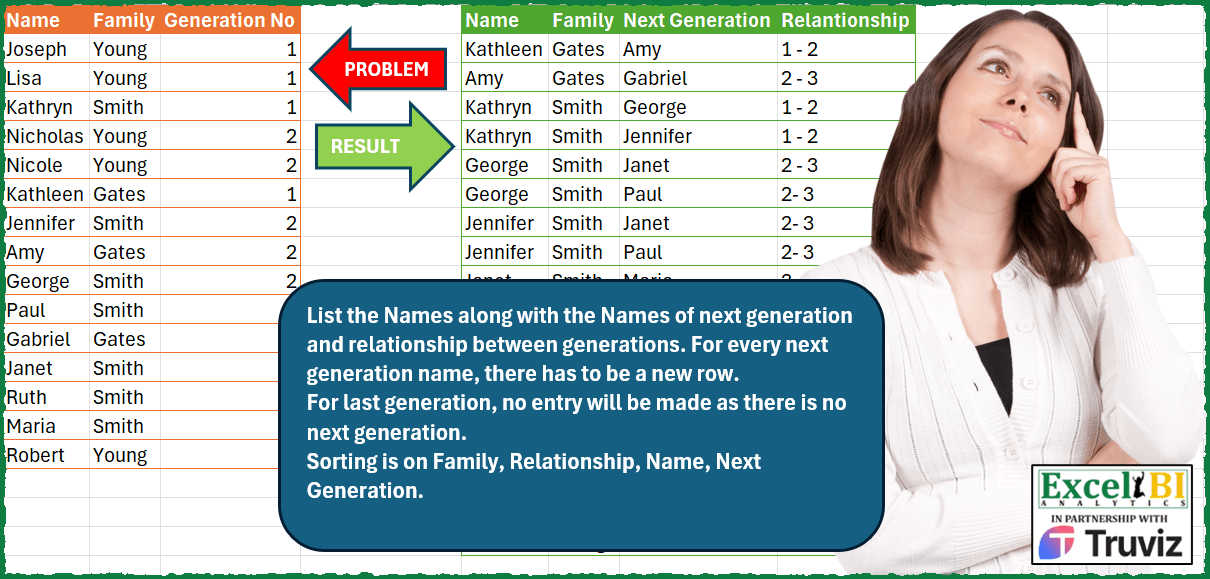
List the Names along with the Names of next generation and relationship between generations. For every next generation name, there has to be a new row. For last generation, no entry will be made as there is no next generation. Sorting is on Family, Relationship, Name, Next Generation.
📌 Challenge Details and Links
ExcelBI Power Query Challenge Number: 175
Challenge Difficulty: ⭐️⭐️⭐️⭐️
📥Download Sample File
📥Link to the solutions on LinkedIn
Solving the challenge of Family Relationship Tree View with Power Query
Power Query solution 1 for Family Relationship Tree View, proposed by Bo Rydobon 🇹🇭:
let
  Source = Excel.CurrentWorkbook(){[Name = "Table1"]}[Content],
  Sort = Table.Buffer(Table.Sort(Source, {{"Generation No", 0}, {"Family", 0}, {"Name", 0}})),
  Ans = Table.Combine(
    Table.Group(
      Sort,
      {"Family"},
      {
        "T",
        (t) =>
          Table.Combine(
            List.Transform(
              {1 .. List.Max(t[Generation No]) - 1},
              (i) =>
                Table.AddColumn(
                  Table.ExpandListColumn(
                    Table.AddColumn(
                      Table.SelectRows(t, (n) => n[Generation No] = i)[[Name], [Family]],
                      "Next Generation",
                      (x) => Table.SelectRows(t, each [Generation No] = i + 1)[Name]
                    ),
                    "Next Generation"
                  ),
                  "Relationship",
                  each Text.From(i) & " - " & Text.From(i + 1)
                )
            )
          )
      }
    )[T]
  )
in
  Ans
Power Query solution 2 for Family Relationship Tree View, proposed by Zoran Milokanović:
let
  Source = Table.ToRows(Excel.CurrentWorkbook(){[Name = "Input"]}[Content]),
  H = {"Name", "Family", "Next Generation", "Relationship"},
  S = Table.Sort(
    Table.FromRows(
      List.TransformMany(
        Source,
        each List.Select(Source, (p) => p{2} = _{2} + 1 and p{1} = _{1}),
        (i, _) => {i{0}, i{1}} & {_{0}, Text.From(i{2}) & " - " & Text.From(_{2})}
      ),
      H
    ),
    {H{1}, H{3}, H{0}, H{2}}
  )
in
  S
Power Query solution 3 for Family Relationship Tree View, proposed by Aditya Kumar Darak 🇮🇳:
let
  Source = Excel.CurrentWorkbook(){[Name = "data"]}[Content],
  NG = Table.AddColumn(Source, "NG", each [Generation No] + 1),
  Join = Table.NestedJoin(
    NG,
    {"Family", "NG"},
    Source,
    {"Family", "Generation No"},
    "Join",
    JoinSide.Left
  ),
  Expand = Table.ExpandTableColumn(Join, "Join", {"Name"}, {"Next Generation"}),
  Output = Table.AddColumn(
    Expand,
    "Relationship",
    each Text.From([Generation No]) & " - " & Text.From([NG])
  ),
  Sort = Table.Sort(Output, {"Family", "Generation No", "NG", "Name", "Next Generation"}),
  Return = Table.SelectColumns(Sort, {"Name", "Family", "Next Generation", "Relationship"})
in
  Return
Power Query solution 4 for Family Relationship Tree View, proposed by Alejandro Simón 🇵🇦 🇪🇸:
let
  Source = Excel.CurrentWorkbook(){[Name = "Table1"]}[Content],
  Sol = Table.Combine(
    Table.Sort(
      Table.Group(
        Source,
        {"Family"},
        {
          {
            "A",
            each
              let
                a = Table.Sort(_, {"Generation No", "Name"}),
                b = Table.Group(a, {"Generation No", "Family"}, {"Name", each List.Sort([Name])}),
                c = Table.SelectRows(
                  Table.AddColumn(b, "Next Generation", each b[Name]{[Generation No]}?),
                  each [Next Generation] <> null
                ),
                d = List.Accumulate(
                  {"Name", "Next Generation"},
                  c,
                  (s, t) => Table.ExpandListColumn(s, t)
                ),
                e = Table.AddColumn(
                  d,
                  "Relationship",
                  each Text.From([Generation No])
                    & "-"
                    & Text.From(a[Generation No]{List.PositionOf(a[Name], [Next Generation])})
                )[[Name], [Family], [Next Generation], [Relationship]]
              in
                e
          }
        }
      ),
      "Family"
    )[A]
  )
in
  Sol
Power Query solution 5 for Family Relationship Tree View, proposed by Luan Rodrigues:
let
  Fonte = Tabela1,
  gp = Table.Group(
    Fonte,
    {"Family"},
    {
      {
        "tab",
        each
          let
            a = Table.AddColumn(_, "Ind", each [Generation No] - 1),
            b = Table.SelectRows(
              Table.AddColumn(
                a,
                "select",
                (x) => Table.SelectRows(a, each x[Ind] = [Generation No])[[Name], [Generation No]]
              ),
              each [Ind] <> 0
            ),
            c = Table.ExpandTableColumn(b, "select", {"Name", "Generation No"}, {"Name_1", "n"}),
            d = Table.AddColumn(
              c,
              "Relantionsship",
              each Text.From([n]) & " - " & Text.From([Generation No])
            )[[Name_1], [Family], [Name], [Relantionsship]]
          in
            d
      }
    }
  )[tab],
  tb = Table.Combine(gp),
  col = Table.RenameColumns(tb, {{"Name", "Next Generation"}, {"Name_1", "Name"}}),
  res = Table.Sort(col, {"Family", "Relantionsship", "Name", "Next Generation"})
in
  res
Power Query solution 6 for Family Relationship Tree View, proposed by Hussein SATOUR:
let
  Source = Excel.CurrentWorkbook(){[Name = "Table1"]}[Content],
  Add1 = Table.AddColumn(Source, "Custom", each [Generation No] + 1),
  MergeItSelf = Table.NestedJoin(
    Add1,
    {"Family", "Custom"},
    Add1,
    {"Family", "Generation No"},
    "Add1",
    JoinKind.Inner
  ),
  Expand = Table.ExpandTableColumn(MergeItSelf, "Add1", {"Name"}, {"Next Generation"}),
  AddRelationship = Table.CombineColumns(
    Table.TransformColumnTypes(Expand, {{"Generation No", type text}, {"Custom", type text}}),
    {"Generation
  No", "Custom"},
    Combiner.CombineTextByDelimiter("-", QuoteStyle.None),
    "Relationship"
  ),
  Sort = Table.Sort(
    AddRelationship,
    {
      {"Family", Order.Ascending},
      {"Relationship", Order.Ascending},
      {"Next Generation", Order.Ascending}
    }
  )
in
  Sort
Power Query solution 7 for Family Relationship Tree View, proposed by Eric Laforce:
let
  Source = Excel.CurrentWorkbook(){[Name = "tData175"]}[Content],
  AddNextG = Table.AddColumn(Source, "NextG", each [#"Generation No"] + 1),
  GroupF = Table.Group(
    AddNextG,
    {"Family"},
    {
      {
        "G",
        each
          let
            Merge = Table.NestedJoin(_, "NextG", _, "Generation No", "Merge", JoinKind.Inner),
            ExpandNextG = Table.ExpandTableColumn(Merge, "Merge", {"Name"}, {"Next Generation"}),
            CombineGNum = Table.CombineColumns(
              ExpandNextG,
              {"Generation No", "NextG"},
              (x) => Text.From(x{0}) & " - " & Text.From(x{1}),
              "Relationship"
            )
          in
            CombineGNum[[Name], [Family], [Next Generation], [Relationship]]
      }
    }
  )[G],
  CombineSort = Table.Sort(
    Table.Combine(GroupF),
    {"Family", "Relationship", "Name", "Next Generation"}
  )
in
  CombineSort
Power Query solution 8 for Family Relationship Tree View, proposed by 🇮🇷 Navid Esmaeilzadeh اسماعیل زاده:
let
 S = Excel.CurrentWorkbook(){[Name="Table1"]}[Content],
 A = Table.Group(S, {"Family", "Generation No"}, {{"T1", each _, type table [Name=text, Family=text, Generation No=number]}}),
 B = Table.Group(A, {"Family"}, {{"T2", each _, type table [Family=text, Generation No=number, T1=table]}}),
 D = Table.AddColumn(B, "MF", each F([T2])),
 E = Table.SelectColumns(D,{"MF"}),
 F=(F)=>
let
 C = Table.TransformColumnTypes(F,{{"Generation No", Int64.Type}}),
 C1 = Table.AddColumn(C, "T2", each try C[T1]{[Generation No]} otherwise null),
 C2 = Table.AddColumn(C1, "T", each Table.FromColumns({{[T1]},{[T2]}})),
 C3 = Table.ExpandTableColumn(C2, "T", {"Column1", "Column2"}, {"Column1", "Column2"}),
 C4 = Table.ExpandTableColumn(C3, "Column1", {"Name", "Family", "Generation No"}, {"Name", "Family.1", "Generation No.1"}),
Power Query solution 9 for Family Relationship Tree View, proposed by 🇮🇷 Navid Esmaeilzadeh اسماعیل زاده:
Part2:
C5 = Table.ExpandTableColumn(C4, "Column2", {"Name", "Family", "Generation No"}, {"Column2.Name", "Column2.Family", "Column2.Generation No"}),
 C6 = Table.SelectRows(C5, each ([Column2.Name] <> null)),
 C7 = Table.CombineColumns(Table.TransformColumnTypes(C6, {{"Generation No.1", type text}, {"Column2.Generation No", type text}}, "en-US"),{"Generation No.1", "Column2.Generation No"},Combiner.CombineTextByDelimiter("-", QuoteStyle.None),"Generation"),
 C8 = Table.RenameColumns(C7,{{"Column2.Name", "Next.Generation"}}),
 C9 = Table.SelectColumns(C8,{"Name", "Family", "Next.Generation", "Generation"})
in
 C9,
 G = Table.ExpandTableColumn(E, "MF", {"Name", "Family", "Next.Generation", "Generation"}, {"Name", "Family", "Next.Generation", "Generation"})
in
 G
Power Query solution 10 for Family Relationship Tree View, proposed by Yaroslav Drohomyretskyi:
let
  Source = Excel.CurrentWorkbook(){[Name = "Table1"]}[Content],
  FullOuterJoin = Table.NestedJoin(
    Source,
    {"Family"},
    Source,
    {"Family"},
    "Source",
    JoinKind.FullOuter
  ),
  Expand = Table.ExpandTableColumn(
    FullOuterJoin,
    "Source",
    {"Name", "Generation No"},
    {"Next Generation", "Source.Generation No"}
  ),
  Filter = Table.SelectRows(
    Expand,
    each [Next Generation] <> [Name] and [Source.Generation No] = [Generation No] + 1
  ),
  Relationship = Table.CombineColumns(
    Table.TransformColumnTypes(
      Filter,
      {{"Generation No", type text}, {"Source.Generation No", type text}},
      "uk-UA"
    ),
    {"Generation No", "Source.Generation No"},
    Combiner.CombineTextByDelimiter(" - ", QuoteStyle.None),
    "Relationship"
  ),
  Sort = Table.Sort(
    Relationship,
    {
      {"Family", Order.Ascending},
      {"Relationship", Order.Ascending},
      {"Name", Order.Ascending},
      {"Next Generation", Order.Ascending}
    }
  )
in
  Sort
Power Query solution 11 for Family Relationship Tree View, proposed by Glyn Willis:
let
  Source = Excel.CurrentWorkbook(){[Name = "Table1"]}[Content],
  #"Changed Type" = Table.TransformColumnTypes(
    Source,
    {{"Name", type text}, {"Family", type text}, {"Generation No", Int64.Type}}
  ),
  L = Table.AddKey(#"Changed Type", {"Name", "Family", "Generation No"}, true),
  R = Table.AddColumn(
    Table.RenameColumns(
      L,
      {{"Name", "Next Generation"}, {"Family", "Family 2"}, {"Generation No", "Generation No 2"}}
    ),
    "Prev Generation No",
    each [Generation No 2] - 1,
    Int64.Type
  ),
  Inner_Join = Table.Join(
    L,
    {"Family", "Generation No"},
    R,
    {"Family 2", "Prev Generation No"},
    JoinKind.Inner
  )[[Name], [Family], [Next Generation], [Generation No], [Generation No 2]],
  Sort = Table.Sort(
    Inner_Join,
    {
      {"Family", Order.Ascending},
      {"Generation No", Order.Ascending},
      {"Generation No 2", Order.Ascending},
      {"Name", Order.Ascending},
      {"Next Generation", Order.Ascending}
    }
  ),
  Relationship = Table.CombineColumns(
    Table.TransformColumnTypes(
      Sort,
      {{"Generation No", type text}, {"Generation No 2", type text}},
      "en-GB"
    ),
    {"Generation No", "Generation No 2"},
    Combiner.CombineTextByDelimiter(" - ", QuoteStyle.None),
    "Relationship"
  )
in
  Relationship
Solving the challenge of Family Relationship Tree View with Excel
Excel solution 1 for Family Relationship Tree View, proposed by Bo Rydobon 🇹🇭:
=LET(a,A2:A16,b,B2:B16,g,C2:C16,SUBSTITUTE(SORT(REDUCE(0&E1:H1,a,LAMBDA(c,v,LET(r,ROWS(A2:v),f,INDEX(b,r),i,INDEX(g,r),
n,FILTER(a,(b=f)*(g=i+1)),IF(ISTEXT(@n),VSTACK(c,CHOOSE({1,2,3,4},v,f,n,i&" - "&i+1)),c)))),{2,4,1,3}),0,))
Excel solution 2 for Family Relationship Tree View, proposed by محمد حلمي:
=REDUCE(E1:H1,UNIQUE(B2:B16),LAMBDA(q,w,
SORT(VSTACK(q,LET(k,A2:C16,b,B2:B16,i,FILTER(k,b=w),r,REDUCE({0,0,0,0},
SEQUENCE(ROWS(i)),LAMBDA(a,v,VSTACK(a,LET(d,TAKE(i,,1),p,DROP(i,,2),
e,INDEX(d,v),r,INDEX(p,v),i,HSTACK(e,w,FILTER(d,p=r+1,0),r&" - "&r+1),
IFNA(i,TAKE(i,1)))))),FILTER(r,INDEX(r,,3)>0))),{2,4,1,3})))
Excel solution 3 for Family Relationship Tree View, proposed by 🇰🇷 Taeyong Shin:
=LET(a,A2:A16,b,B2:B16,c,C2:C16,f,LAMBDA(x,TOCOL(IFS(b&c+1=TOROW(b&c),x),2)),SORT(HSTACK(f(a),f(b),f(TOROW(a)),f(c&"-"&c+1)),{2,4,1,3}))Excel solution 4 for Family Relationship Tree View, proposed by Julian Poeltl:
=LET(T,A2:C16,CC,LAMBDA(A,N,CHOOSECOLS(A,N)),Sort,SORTBY(T,CC(T,2),1,CC(T,3),1,CC(T,1),1),CoC,TEXTJOIN(",",,BYROW(Sort,LAMBDA(A,LET(R,BYROW(IFERROR(HSTACK(CC(A,1),FILTER(Sort,(CC(Sort,2)=CC(A,2))*(CC(Sort,3))=CC(A,3)+1),"")," "),LAMBDA(A,TEXTJOIN(";",,A))),TEXTJOIN(",",TRUE,R))))),AR,TEXTSPLIT(CoC,";",","),ST,HSTACK(CHOOSECOLS(AR,1,3,2),CC(AR,4)-1&" - "&CC(AR,4)),F,FILTER(ST,NOT(ISNA(CC(ST,2)))),VSTACK(HSTACK("Name","Family","Next Generation","Relationship"),HSTACK(SCAN(,TAKE(F,,1),LAMBDA(A,B,IF(B=" ",A,B))),DROP(F,,1))))Excel solution 5 for Family Relationship Tree View, proposed by Sunny Baggu:
=LET(
 _s, SEQUENCE(3),
 rng, DROP(
 REDUCE(
 "",
 _s,
 LAMBDA(x, y,
 VSTACK(
 x,
 LET(
 _a, FILTER(A2:B16, C2:C16 = y),
 _b, FILTER(A2:B16, C2:C16 = (y + 1)),
 _c, INDEX(_b, SEQUENCE(ROWS(_b)), {2, 1}),
 _g, DROP(
 REDUCE(
 "",
 SEQUENCE(ROWS(_a)),
 LAMBDA(a, v,
 VSTACK(
 a,
 LET(_d, INDEX(_a, v, ), _e, FILTER(TAKE(_c, , -1), TAKE(_c, , 1) = TAKE(_d, , -1), ""), _f, y & "-" & (y + 1), IFNA(IFNA(HSTACK(_d, _e, _f), _d), _f))
 )
 )
 ),
 1
 ),
 _g
 )
 )
 )
 ),
 1
 ),
 SORT(FILTER(rng, INDEX(rng, , 3) <> ""), {2, 4, 1, 3})
)
Excel solution 6 for Family Relationship Tree View, proposed by LEONARD OCHEA 🇷🇴:
=LET(n,A2:A16,f,B2:B16,g,C2:C16,SORT(TEXTSPLIT(TEXTJOIN("|",,IF((g=TOROW(g)+1)*(f=TOROW(f)),TOROW(n)&"*"&f&"*"&n&"*"&TOROW(g)&" - "&g,"")),"*","|"),{2;4;1;3}))

With function naming, with lambda and without lambda
=LET(R,LAMBDA(x,TOROW(x)),n,A2:A16,f,B2:B16,g,C2:C16,SORT(TEXTSPLIT(TEXTJOIN("|",,IF((g=R(g)+1)*(f=R(f)),R(n)&"*"&f&"*"&n&"*"&R(g)&" - "&g,"")),"*","|"),{2;4;1;3}))

 =LET(R,TOROW,n,A2:A16,m,R(n),f,B2:B16,h,R(f),g,C2:C16,k,R(g),(SORT(TEXTSPLIT(TEXTJOIN("|",,IF((g=k+1)*(f=h),m&"*"&f&"*"&n&"*"&k&" - "&g,"")),"*","|"),{2;4;1;3})))
Excel solution 7 for Family Relationship Tree View, proposed by LUIS FLORENTINO COUTO CORTEGOSO:
=LET(m,SORT(A2:C16,{2,3,1}),VSTACK(E1:H1,TEXTSPLIT(TEXTJOIN("|",, TOCOL(MAP(INDEX(m,,2),INDEX(m,,3),INDEX(m,,1),LAMBDA(f,g,n,TEXTJOIN("|",1,n&"."&f&"."&FILTER(A2:A16,(B2:B16=f)*(C2:C16=g+1)) &"."&g&" - "&g+1))),3)),".","|")))Solving the challenge of Family Relationship Tree View with Python
Python solution 1 for Family Relationship Tree View, proposed by Konrad Gryczan, PhD:
import pandas as pd
import re
input = pd.read_excel("PQ_Challenge_175.xlsx",  usecols="A:C", nrows=15)
test = pd.read_excel("PQ_Challenge_175.xlsx", usecols="E:H", nrows=19)
test["Relantionship"] = test["Relantionship"].str.replace(" ", "")
test.columns = ["Name", "Family", "Next Generation", "Relantionship"]
result = pd.merge(input, input, left_on="Family", right_on="Family")
result = result[result["Generation No_x"] == result["Generation No_y"] - 1]
result["Relantionship"] = result["Generation No_x"].astype(str) + "-" + result["Generation No_y"].astype(str)
result = result[["Name_x", "Family", "Name_y", "Relantionship"]].rename(columns={"Name_x": "Name", "Name_y": "Next Generation"})
result = result.sort_values(by=["Family", "Relantionship", "Name", "Next Generation"]).reset_index(drop=True)
print(result.equals(test)) # True
Python solution 2 for Family Relationship Tree View, proposed by Luan Rodrigues:
import pandas as pd
df = pd.read_excel('PY/PQ_Challenge_175/PQ_Challenge_175.xlsx',usecols='A:C')
def calculate_sales(group):
 group["Ind"] = group["Generation No"]-1
 group = group[group['Ind'] > 0]
 return group
df_result = df.groupby("Family").apply(calculate_sales).reset_index(drop=True)
merged_df = pd.merge(df_result, df, left_on=["Family", "Ind"], right_on=["Family", "Generation No"], how="left", suffixes=("", "_2"))
merged_df['Relantionsship'] = merged_df['Ind'].astype(int).astype(str) +"-"+ merged_df['Generation No'].astype(int).astype(str)
merged_df2= merged_df.rename(columns={'Name':'Next Generation','Name_2':'Name'})
merged_df2 = merged_df2[['Name','Family','Next Generation','Relantionsship']]
res = merged_df2.sort_values(by=["Family","Relantionsship","Name","Next Generation"])
print(res)
Solving the challenge of Family Relationship Tree View with Python in Excel
Python in Excel solution 1 for Family Relationship Tree View, proposed by Abdallah Ally:
import pandas as pd
file_path = 'PQ_Challenge_175.xlsx'
df = pd.read_excel(file_path, usecols='A:C', nrows=15)
# Perform data transformation and cleansing
df = df.merge(df, how='inner', on='Family')
df = df[df['Generation No_x'] == df['Generation No_y'] + 1]
df['Relationship'] = df['Generation No_y'].astype(str) + ' - ' + df['Generation No_x'].astype(str)
df = df.iloc[ : , [3, 1, 0, 5]]
df.columns = ['Name', 'Family', 'Next Generation', 'Relationship']
df = df.sort_values(by=['Family', 'Relationship', 'Name', 'Next Generation'], ignore_index=True)
print(f'nFinal Results:nn{df}')
Python in Excel solution 2 for Family Relationship Tree View, proposed by Abdallah Ally:
import pandas as pd
file_path = 'PQ_Challenge_175.xlsx'
df = pd.read_excel(file_path, usecols='A:C', nrows=15)
# Perform data transformation and cleansing
dfs = [] # list of data frames
for gen in df['Generation No'].unique():
 dfp = df[df['Generation No'] == gen] # Parent
 dfc = df[df['Generation No'] == gen + 1] # Child
 dfm = dfp.merge(right=dfc, how='inner', on='Family').astype(str) # Merged
 dfm['Relationship'] = dfm['Generation No_x'] + ' - ' + dfm['Generation No_y']
 dfm = dfm.iloc[ : , [0, 1, 3, 5] ]
 dfm.columns = ['Name', 'Family', 'Next Generation', 'Relationship']
 dfs.append(dfm)
df = pd.concat(dfs, ignore_index=True)
df = df.sort_values(by=['Family', 'Relationship', 'Name', 'Next Generation'], ignore_index=True)
print(f'nFinal Results:nn{df}')
Solving the challenge of Family Relationship Tree View with R
R solution 1 for Family Relationship Tree View, proposed by Konrad Gryczan, PhD:
library(tidyverse)
library(readxl)
input = read_excel("Power Query/PQ_Challenge_175.xlsx", range = "A1:C16")
test = read_excel("Power Query/PQ_Challenge_175.xlsx", range = "E1:H19") %>%
 mutate(Relantionship = str_remove_all(Relantionship, " ")) # cleaned for purpose of validation
result = input %>%
 left_join(input, by = c("Family" = "Family")) %>%
 filter(`Generation No.x` == `Generation No.y` - 1) %>%
 unite("Relantionship", `Generation No.x`, `Generation No.y`, sep = "-") %>%
 select(Name = `Name.x`,Family,`Next Generation` = `Name.y`, Relantionship ) %>%
 arrange(Family, Relantionship , Name, `Next Generation`)
R solution 2 for Family Relationship Tree View, proposed by Anil Kumar Goyal:
library(readxl)
library(janitor)
library(tidyverse)
df <- read_xlsx("PQ/PQ_Challenge_175.xlsx", range = cell_cols(LETTERS[1:3])) %>%
 clean_names()
df %>%
 inner_join(
 df,
 by = join_by(family == family, closest(generation_no < generation_no)),
 suffix = c("", "_next")
 ) %>%
 rename(next_generation = name_next) %>%
 unite("relationship", starts_with("generation_no"), remove = TRUE, sep = " - ") %>%
 relocate(relationship, .after = next_generation) %>%
 arrange(family, relationship, name, next_generation)
Solving the challenge of Family Relationship Tree View with DAX
DAX solution 1 for Family Relationship Tree View, proposed by Zoran Milokanović:
EVALUATE
SELECTCOLUMNS(
 FILTER(
 CROSSJOIN(Input,
 SELECTCOLUMNS(
 Input,
 "N", Input[Name],
 "F", Input[Family],
 "G", Input[Generation No]
 )),
 AND(Input[Family] = [F], [G] = Input[Generation No] + 1)
 ),
 Input[Name], Input[Family], "Next Generation", [N],
 "Relationship", CONVERT(Input[Generation No], STRING) & " - " & CONVERT([G], STRING)
)
ORDER BY
 Input[Family], [Relationship], Input[Name], [Next Generation]
&&