
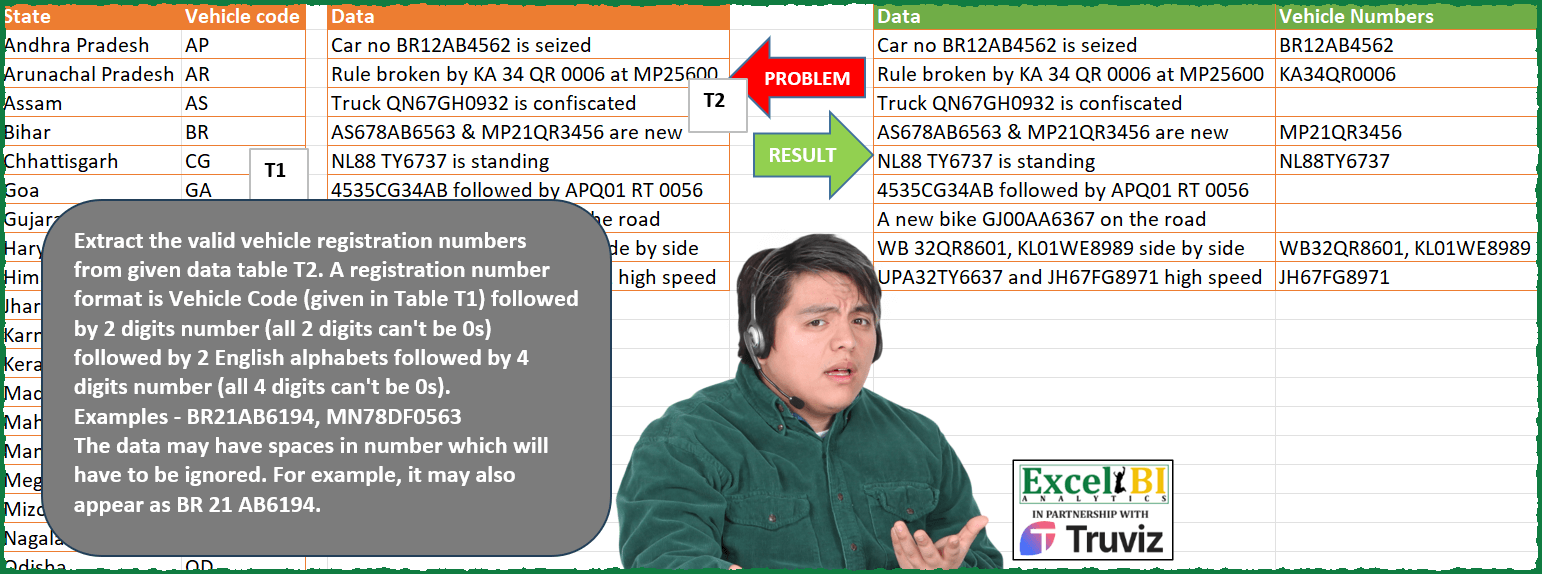
Extract the valid vehicle registration numbers from given data table T2. A registration number format is Vehicle Code (given in Table T1) followed by 2 digits number (all 2 digits can’t be 0s) followed by 2 English alphabets followed by 4 digits number (all 4 digits can’t be 0s). Examples – BR21AB6194, MN78DF0563 The data may have spaces in number which will have to be ignored. For example, it may also appear as BR 21 AB6194.
📌 Challenge Details and Links
ExcelBI Power Query Challenge Number: 163
Challenge Difficulty: ⭐️⭐️⭐️
📥Download Sample File
📥Link to the solutions on LinkedIn
Solving the challenge of Validate Vehicle Registration Numbers with Power Query
Power Query solution 1 for Validate Vehicle Registration Numbers, proposed by Zoran Milokanović:
let
  Source = each Excel.CurrentWorkbook(){[Name = _]}[Content],
  V = each Source("Table1"){[Vehicle code = _]}? <> null,
  D = each _ = Text.Select(_, {"0" .. "9"}),
  A = each _ = Text.Select(_, {"A" .. "Z"}),
  Z = each Text.Remove(_, {"0"}) <> "",
  E = (_, r) =>
    if Text.Length(_) < 10 then
      r
    else
      let
        M  = Text.Middle,
        v  = M(_, 0, 2),
        d2 = M(_, 2, 2),
        a  = M(_, 4, 2),
        d4 = M(_, 6, 4),
        f  = Number.From(List.AllTrue({V(v), D(d2), Z(d2), A(a), D(d4), Z(d4)}))
      in
        @E(Text.Range(_, 1 + 10 * f), r & {{}, {v & d2 & a & d4}}{f}),
  S = Table.AddColumn(
    Table.ReplaceValue(Source("Table2"), " ", "", Replacer.ReplaceText, {"Data"}),
    "Vehicle Numbers",
    each Text.Combine(E([Data], {}), ", ")
  )
in
  S
Power Query solution 2 for Validate Vehicle Registration Numbers, proposed by Alejandro Simón 🇵🇦 🇪🇸:
let
  Source = Excel.CurrentWorkbook(){[Name = "Table2"]}[Content],
  Lista = Excel.CurrentWorkbook(){[Name = "Table1"]}[Content][Vehicle code],
  Sol = Table.AddColumn(
    Source,
    "Vehicule Number",
    each
      let
        a = Text.Split([Data], " "),
        b = List.Transform(a, each Text.Remove(_, {"a" .. "z", ",", "&"})),
        c = List.Select(b, each Text.Length(_) > 1),
        d = Text.Combine(c),
        e = List.RemoveNulls(
          List.Transform({0 .. Text.Length(d) - 1}, each try Text.Range(d, _, 10) otherwise null)
        ),
        f = List.Select(e, each Text.Length(_) = 10),
        g = List.Transform(f, each Splitter.SplitTextByLengths({2, 2, 2, 4})(_)),
        h = List.Transform(
          {0 .. List.Count(g) - 1},
          each try
            List.AllTrue(
              {
                List.Contains(Lista, g{_}{0}),
                if Text.Length(Text.Select(g{_}{1}, "0")) <> 2 then
                  Number.From(g{_}{1}) is number
                else
                  false,
                List.AllTrue(
                  List.Transform(Text.ToList(g{_}{2}), each List.Contains({"A" .. "Z"}, _))
                ),
                if Text.Length(Text.Select(g{_}{3}, "0")) <> 4 then
                  Number.From(g{_}{3}) is number
                else
                  false
              }
            )
          otherwise
            false
        ),
        i = List.Transform(g, each Text.Combine(_)),
        j = List.PositionOf(h, true, 2),
        k = Text.Combine(List.Transform(j, each i{_}), ", ")
      in
        k
  )
in
  Sol
Power Query solution 3 for Validate Vehicle Registration Numbers, proposed by Luan Rodrigues:
let
  Fonte = T2,
  res = Table.AddColumn(
    Fonte,
    "Personalizar",
    each [
      a = List.Select(
        Text.Split(Text.Select([Data], {"A" .. "Z", "0" .. "9", " "}), " "),
        each Text.Length(_) > 1 and Text.Length(_) <= 10
      ),
      b = List.Accumulate(
        a,
        "",
        (s, c) => try if Text.Length(s & c) <= 10 then s & c else {s} & {c} otherwise null
      ),
      c =
        if b is list then
          List.Select(b, each Text.Length(_) = 10 and Text.Middle(_, 2, 2) <> "00")
        else
          List.Select({b}, each Text.Middle(_, 2, 2) <> "00"),
      d = List.ContainsAny(T1[Vehicle code], List.Transform(c, each Text.Start(_, 2))),
      e = if d then Text.Combine(c, ", ") else null
    ][e]
  )
in
  res
Power Query solution 4 for Validate Vehicle Registration Numbers, proposed by Eric Laforce:
let
  Source = each Excel.CurrentWorkbook(){[Name = _]}[Content],
  LVC = List.Buffer(Source("tData163a")[Vehicle code]),
  Add_V = Table.AddColumn(
    Source("tData163b"),
    "Vehicule",
    each
      let
        S = Text.Replace(Text.Upper([Data]), " ", ""),
        LVN = List.Accumulate(
          {0 .. Text.Length(S) - 10 - 1},
          {},
          (s, c) =>
            let
              VN = Text.Range(S, c, 10),
              Parts = Splitter.SplitTextByLengths({2, 2, 2, 4})(VN),
              VN_OK = List.Contains(LVC, Parts{0})
                and Parts{1}
                <> "00" and (Text.Remove(VN, {"0" .. "9"}) = Parts{0} & Parts{2})
            in
              if (VN_OK) then s & {VN} else s
        )
      in
        Text.Combine(LVN, ", ")
  )
in
  Add_V
Power Query solution 5 for Validate Vehicle Registration Numbers, proposed by Glyn Willis:
let
  Source = Excel.CurrentWorkbook(){[Name = "Table1"]}[Content],
  Source2 = Excel.CurrentWorkbook(){[Name = "Table2"]}[Content],
  #"Added Custom" = Table.AddColumn(
    Source2,
    "a",
    each [
      C1 = Text.Combine(
        List.Select(
          List.Combine(
            List.Transform(
              Text.Split([Data], " "),
              (y) => Splitter.SplitTextByCharacterTransition({"A" .. "Z"}, {"0" .. "9"})(y)
            )
          ),
          (x) => (Text.Length(Text.Select(x, {"A" .. "Z"})) >= 2)
            or (Text.Length(Text.Select(x, {"0" .. "9", "A", "Z"})) = 4)
            or (Text.Length(Text.Select(x, {"0" .. "9"})) > 0)
        )
      ),
      C2 = List.Accumulate(
        Text.ToList(C1) & {"a"},
        [r = {}, ar = {}, i = 0],
        (RI, LI) => [
          chk = List.Count(RI[r]),
          i = if chk = 10 then 0 else chk,
          p = "AA11AA1111",
          cp = Text.Middle(p, i, 1),
          l = List.Zip({{"A" .. "Z", "0" .. "9"}, List.Repeat({"A"}, 26) & List.Repeat({"1"}, 10)}),
          vp = try List.Select(l, (x) => x{0} = LI){0}{1} = cp otherwise false,
          r = if vp then RI[r] & {LI} else {},
          ar = if chk = 10 then RI[ar] & {RI[r]} else RI[ar]
        ]
      )[ar],
      C3 = Text.Combine(
        List.Select(
          List.Transform(C2, (x) => Text.Combine(x)),
          (y) =>
            List.AllTrue(
              {
                List.PositionOf(Source[Vehicle code], Text.Start(y, 2)) >= 0,
                Text.Length(Text.Remove(Text.Range(y, 2, 2), {"0"})) > 0,
                Text.Length(Text.Remove(Text.Range(y, 5, 4), {"0"})) > 0
              }
            )
        ),
        ", "
      )
    ][C3]
  )
in
  #"Added Custom"
Solving the challenge of Validate Vehicle Registration Numbers with Excel
Excel solution 1 for Validate Vehicle Registration Numbers, proposed by Bo Rydobon 🇹🇭:
=MAP(SUBSTITUTE(D2:D10," ",),LAMBDA(a,LET(s,SEQUENCE(LEN(a)),
TEXTJOIN(", ",,REPT(MID(a,s,10),IFERROR(XMATCH(MID(a,s,2),B2:B29)*MID(a,s+2,2)*MID(a,s+6,4)>0,)*(MID(a,s+4,1)>"9")*(MID(a,s+5,1)>"9"))))))
Excel solution 2 for Validate Vehicle Registration Numbers, proposed by Bo Rydobon 🇹🇭:
=MAP(SUBSTITUTE(D2:D10," ",),LAMBDA(a,LET(s,SEQUENCE(LEN(a)),
TEXTJOIN(", ",,REPT(MID(a,s,10),IFERROR(XMATCH(MID(a,s,2),B2:B29)*MID(a,s+2,2)*MID(a,s+6,4)>0,)*(MID(a,s+4,1)>"9")*(MID(a,s+5,1)>"9"))))))
Excel solution 3 for Validate Vehicle Registration Numbers, proposed by Bo Rydobon 🇹🇭:
=MAP(SUBSTITUTE(D2:D10," ",),LAMBDA(z,
LET(s,SEQUENCE(LEN(z)),TEXTJOIN(", ",,REPT(MID(z,s,10),BYROW(HSTACK((TEXTSPLIT(MID(z,s,2),B2:B29)=""),IFERROR(-MID(z,s+{2,6},{2,4}),),MID(z,s+{4,5},1)>"9"),AND))))))
Excel solution 4 for Validate Vehicle Registration Numbers, proposed by Rick Rothstein:
=SUBSTITUTE(TRIM(MAP(D2:D10,LAMBDA(r,LET(s,SEQUENCE(10),t,SUBSTITUTE(r," ",""),REDUCE("",TEXTSPLIT(t,TEXTSPLIT(t,BASE(SEQUENCE(36,,0),36),,1),,1),LAMBDA(a,x,a&" "&IF((MID(x,3,2)<>"00")*ISNUMBER(MATCH(LEFT(x,2),B2:B29,0))*(LEN(x)=10)*(SUM(ISNUMBER(MID(x,s,1)+0)*2^(s-1))=972),x,"")))))))," ",", ")Excel solution 5 for Validate Vehicle Registration Numbers, proposed by محمد حلمي:
=MAP(SUBSTITUTE(D2:D10," ",),
LAMBDA(a,LET(b,MID(a,FIND(B2:B29,a),10),
IFERROR(ARRAYTOTEXT(FILTER(b,
IFERROR((LEN(b)=10)*MID(b,3,2)*RIGHT(b,4),))),""))))
Excel solution 6 for Validate Vehicle Registration Numbers, proposed by محمد حلمي:
=MAP(SUBSTITUTE(D2:D11," ",),
LAMBDA(a,LET(s,SEQUENCE(30),
m,MID(a,IF(XMATCH(MID(a,s,2),B2:B30),s),10),
TEXTJOIN(", ",,IFERROR(IF((MID(m,5,1)>"9")*(
MID(m,6,1)>"9")*
MID(m,3,2)*RIGHT(m,4),m,""),"")))))
Excel solution 7 for Validate Vehicle Registration Numbers, proposed by محمد حلمي:
=MAP(SUBSTITUTE(D2:D10," ",),LAMBDA(d,
TEXTJOIN(", ",,IFERROR(MAP(B2:B29,LAMBDA(b,
LET(e,LEFT(TEXTSPLIT(d,b),8),TOCOL(IFS(LEFT(e,2)*
RIGHT(e,4)*(LEN(b&e)=10),b&e),2)))),""))))

///

=MAP(SUBSTITUTE(D2:D10," ",),
LAMBDA(a,LET(s,SEQUENCE(30),
m,MID(a,s*XMATCH(MID(a,s,2),B2:B29)^0,10),
TEXTJOIN(", ",,IFERROR(IFS((MID(m,5,1)>"9")*(
MID(m,6,1)>"9")*MID(m,3,2)*RIGHT(m,4),m),"")))))
Excel solution 8 for Validate Vehicle Registration Numbers, proposed by Kris Jaganah:
=MAP(D2:D10,LAMBDA(x,LET(a,SUBSTITUTE(x," ",""),b,FIND(B2:B29,a),c,SORT(FILTER(b,--ISERR(b)=0,"")),d,IFERROR(MID(a,c,10),""),e,LEN(d),f,IFERROR(--MID(d,3,2),0),g,ISERR(--MID(d,5,2)),h,IFERROR(--RIGHT(d,4),0)>0,ARRAYTOTEXT(FILTER(d,e*f*g*h,"")))))Excel solution 9 for Validate Vehicle Registration Numbers, proposed by Sunny Baggu:
=MAP(
 D2:D10,
 LAMBDA(x,
 LET(
 _a, SUBSTITUTE(x, " ", ""),
 _b, MID(_a, TOCOL(FIND(B2:B29, _a), 3), 10),
 _cri1, LEN(_b) = 10,
 _cri2, IFERROR((MID(_b, 3, 2) + 0) <> 0, 0),
 _cri3, IFERROR((MID(_b, 7, 4) + 0) <> 0, 0),
 _cri4, ISNUMBER(MID(_b, 3, 2) + 0),
 _cri5, ISNUMBER(MID(_b, 7, 4) + 0),
 ARRAYTOTEXT(IFERROR(FILTER(_b, _cri1 * _cri2 * _cri3 * _cri4 * _cri5), ""))
 )
 )
)
Excel solution 10 for Validate Vehicle Registration Numbers, proposed by LEONARD OCHEA 🇷🇴:
=HSTACK(D1:D10,REDUCE(G1,D2:D10,LAMBDA(a,b,LET(d,SUBSTITUTE(b," ",""),f,SORT(TOCOL(FIND(B2:B29,d),3)),b,BYROW(IFERROR(--MID(d,f+{2,6},{2,4})>0,0),AND),VSTACK(a,TEXTJOIN(", ",,IF(b,MID(d,f,10),"")))))))


only the answer

=MAP(D2:D10,LAMBDA(a,LET(d,SUBSTITUTE(a," ",),f,SORT(TOCOL( FIND(B2:B29,d),3)),b,BYROW(IFERROR(--MID(d,f+{2,6},{2,4})>0,0),AND) ,TEXTJOIN(", ",,IF(b,MID(d,f,10),"")))))
Solving the challenge of Validate Vehicle Registration Numbers with R
R solution 1 for Validate Vehicle Registration Numbers, proposed by Konrad Gryczan, PhD:
library(tidyverse)
library(readxl)
input1 = read_excel("Power Query/PQ_Challenge_163.xlsx", range = "A1:B29")
input2 = read_excel("Power Query/PQ_Challenge_163.xlsx", range = "D1:D10")
test  = read_excel("Power Query/PQ_Challenge_163.xlsx", range = "F1:G10")
pattern = "([A-Z]{2})(\d{2})([A-Z]{2})(\d{4})"
res = input2 %>%
 mutate(Data = str_remove_all(Data, " ")) %>%
 mutate(a = str_match_all(Data, pattern), nr = row_number()) %>%
 unnest_longer(a, keep_empty = TRUE) %>%
 mutate(p1_valid = a[,2] %in% input1$`Vehicle code`,
 p2_valid = a[,3] != "00",
 p4_valid = a[,5] != "0000",
 `Vehicle Numbers` = ifelse(p1_valid & p2_valid & p4_valid, a[,1], NA_character_)) %>%
 select(Data, `Vehicle Numbers`, nr) %>%
 group_by(nr) %>%
 mutate(r = row_number()) %>%
 pivot_wider(names_from = r, values_from = `Vehicle Numbers`) %>%
 ungroup() %>%
 unite("Vehicle Numbers", `1`, `2`, na.rm = TRUE, sep = ", ") %>%
 mutate(`Vehicle Numbers` = ifelse(`Vehicle Numbers` == "", NA, `Vehicle Numbers`))
identical(res$`Vehicle Numbers`, test$`Vehicle Numbers`)
# [1] TRUE
&&&