
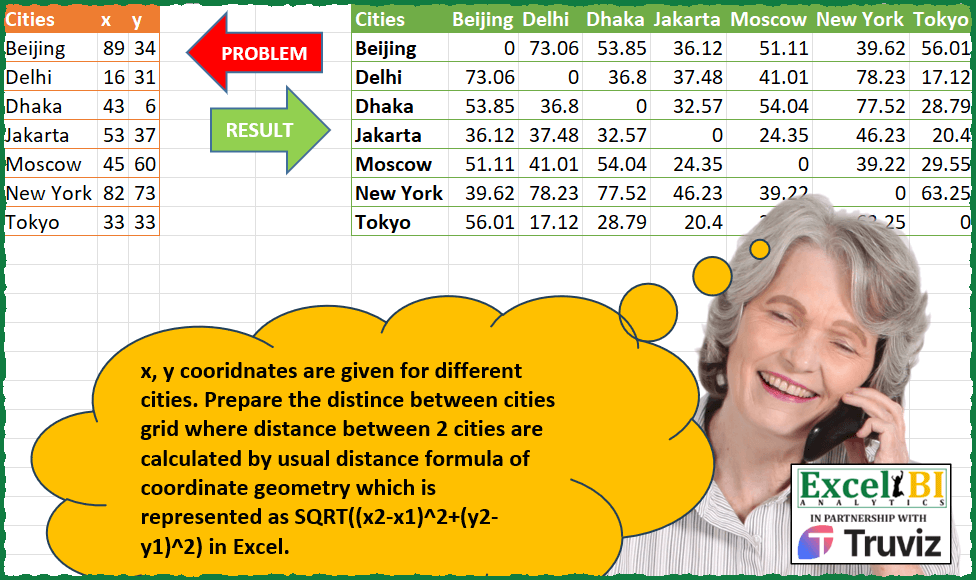
x, y coordinates are given for different cities. Prepare the distance between cities grid where distance between 2 cities are calculated by usual distance formula of coordinate geometry which is represented as SQRT((x2-x1)^2+(y2-y1)^2) in Excel.
📌 Challenge Details and Links
ExcelBI Power Query Challenge Number: 160
Challenge Difficulty: ⭐️⭐️
📥Download Sample File
📥Link to the solutions on LinkedIn
Solving the challenge of Distance Matrix Between Cities with Power Query
Power Query solution 1 for Distance Matrix Between Cities, proposed by Zoran Milokanović:
let
  Source = Excel.CurrentWorkbook(){[Name = "Input"]}[Content],
  P = Number.Power,
  S = Table.RemoveColumns(
    List.Accumulate(
      Table.ToRows(Source),
      Source,
      (s, c) => Table.AddColumn(s, c{0}, each P(P([x] - c{1}, 2) + P([y] - c{2}, 2), 0.5))
    ),
    {"x", "y"}
  )
in
  S
Power Query solution 2 for Distance Matrix Between Cities, proposed by Zoran Milokanović:
let
  Source = Excel.CurrentWorkbook(){[Name = "Input"]}[Content],
  R = Table.ToRows(Source),
  P = Number.Power,
  S = Table.FromRows(
    List.TransformMany(
      R,
      (x) => {List.Transform(R, each P(P(_{1} - x{1}, 2) + P(_{2} - x{2}, 2), 0.5))},
      (x, y) => {x{0}} & y
    ),
    {"Cities"} & (Source)[Cities]
  )
in
  S
Power Query solution 3 for Distance Matrix Between Cities, proposed by Alejandro Simón 🇵🇦 🇪🇸:
let
  Source = Excel.CurrentWorkbook(){[Name = "Table1"]}[Content],
  AddCol = List.Accumulate(
    Source[Cities],
    Source,
    (s, c) =>
      Table.AddColumn(
        s,
        c,
        each
          if c = [Cities] then
            0
          else
            let
              a = List.PositionOf,
              b = Number.Power,
              g = Number.Sqrt,
              d = Number.Round,
              e = Source[Cities]
            in
              d(g(b([x] - Source[x]{a(e, c)}, 2) + b([y] - Source[y]{a(e, c)}, 2)), 2)
      )
  ),
  Sol = Table.RemoveColumns(AddCol, {"x", "y"})
in
  Sol
Power Query solution 4 for Distance Matrix Between Cities, proposed by Luan Rodrigues:
let
  Fonte = Tabela1,
  fx = (x1, x2, y1, y2) => Number.Sqrt(Number.Power((x2 - x1), 2) + Number.Power((y2 - y1), 2)),
  tb = Table.AddColumn(
    Fonte,
    "Personalizar",
    (a) =>
      Table.FromRows(
        {Table.AddColumn(Fonte, "calc", each Number.Round(fx(a[x], [x], a[y], [y]), 2))[calc]},
        Fonte[Cities]
      )
  ),
  rs = Table.ExpandTableColumn(tb, "Personalizar", Table.ColumnNames(tb[Personalizar]{0}))
in
  rs
Power Query solution 5 for Distance Matrix Between Cities, proposed by Hussein SATOUR:
let
  Source = Excel.CurrentWorkbook(){[Name = "Table1"]}[Content],
  #"AddTable*" = Table.AddColumn(Source, "Custom", each Source),
  Expand = Table.ExpandTableColumn(
    #"AddTable*",
    "Custom",
    {"Cities", "x", "y"},
    {"Cities.1", "x.1", "y.1"}
  ),
  AddCalcs = Table.AddColumn(
    Expand,
    "Custom",
    each Number.Round(
      Number.Sqrt(Number.Power(([y.1] - [y]), 2) + Number.Power(([x.1] - [x]), 2)),
      2
    )
  ),
  KeepCols = Table.SelectColumns(AddCalcs, {"Cities", "Cities.1", "Custom"}),
  PivotCol = Table.Pivot(
    KeepCols,
    List.Distinct(KeepCols[Cities.1]),
    "Cities.1",
    "Custom",
    List.Sum
  )
in
  PivotCol
Power Query solution 6 for Distance Matrix Between Cities, proposed by Ramiro Ayala Chávez:
let
  S = Excel.CurrentWorkbook(){[Name = "Table1"]}[Content],
  a = List.Generate(
    () => [i = 0, j = 1],
    each [i] < Table.RowCount(S),
    each if [j] = Table.RowCount(S) then [i = [i] + 1, j = [i] + 2] else [i = [i], j = [j] + 1],
    each List.Transform({S{[i]}} & {S{[j] - 1}}, each Record.ToList(_))
  ),
  b = List.Transform(a, each List.Combine(_)),
  c = List.Transform(b, each List.Select(_, each _ is text)),
  d = List.Transform(c, each List.Reverse(_)),
  e = List.Transform(b, each List.Select(_, each _ is number)),
  f = List.Transform(
    e,
    each Number.Round(
      Number.Power(Number.Power(_{0} - _{2}, 2) + Number.Power(_{1} - _{3}, 2), 1 / 2),
      2
    )
  ),
  g = Table.FromRows(List.Transform({0 .. List.Count(c) - 1}, each c{_} & {f{_}})),
  h = Table.FromRows(List.Transform({0 .. List.Count(d) - 1}, each d{_} & {f{_}})),
  Sol = Table.RenameColumns(
    Table.Pivot(Table.Distinct(g & h), List.Distinct(h[Column2]), "Column2", "Column3"),
    {"Column1", "Cities"}
  )
in
  Sol
Power Query solution 7 for Distance Matrix Between Cities, proposed by Eric Laforce:
let
  Source = Excel.CurrentWorkbook(){[Name = "Table97"]}[Content],
  C = List.Buffer(Table.ToRows(Source)),
  Transform = List.Accumulate(
    C,
    {},
    (s, c1) =>
      let
        _L = List.Accumulate(
          C,
          {c1{0}},
          (s, c2) =>
            let
              _d = Number.Sqrt(Number.Power(c2{1} - c1{1}, 2) + Number.Power(c2{2} - c1{2}, 2))
            in
              s & {_d}
        )
      in
        s & {_L}
  ),
  Result = Table.FromRows(Transform, {"Cities"} & Source[Cities])
in
  Result
Power Query solution 8 for Distance Matrix Between Cities, proposed by 🇮🇷 Navid Esmaeilzadeh اسماعیل زاده:
let
  Source = Excel.CurrentWorkbook(){[Name = "Table1"]}[Content],
  #"Added Custom" = Table.AddColumn(Source, "T", each Source),
  #"Expanded T" = Table.ExpandTableColumn(
    #"Added Custom",
    "T",
    {"Cities", "x", "y"},
    {"Cities.1", "x.1", "y.1"}
  ),
  #"Added Custom1" = Table.AddColumn(
    #"Expanded T",
    "Dis",
    each Number.Sqrt(Number.Power([x.1] - [x], 2)) + Number.Sqrt(Number.Power([y.1] - [y], 2))
  ),
  #"Removed Other Columns" = Table.SelectColumns(#"Added Custom1", {"Cities", "Cities.1", "Dis"}),
  #"Pivoted Column" = Table.Pivot(
    #"Removed Other Columns",
    List.Distinct(#"Removed Other Columns"[Cities.1]),
    "Cities.1",
    "Dis"
  )
in
  #"Pivoted Column"
Power Query solution 9 for Distance Matrix Between Cities, proposed by Rafael González B.:
let
Source = Excel.CurrentWorkbook(){0}[Content],
TC = Table.TransformColumnTypes(Source,{{"x", Int64.Type}, {"y", Int64.Type}}),
Key = Table.AddColumn(TC, "Key", each 1),
Combine = Table.NestedJoin(Key, {"Key"}, Key, {"Key"}, "Key.1", 1),
Expand = Table.ExpandTableColumn(Combine, "Key.1", {"Cities", "x", "y"}, {"Cities.1", "x.2", "y.2"}),
Remove = Table.RemoveColumns(Expand,{"Key"}),
Fx_Dist = (x1, x2, y1, y2) =>
let
Dx = Number.Power((x2 - x1),2),
Dy = Number.Power((y2 - y1),2),
Df = Number.Round(Number.Sqrt(Dx + Dy),2)
in
Df,
Cal = Table.AddColumn(Remove, "Distance", each Fx_Dist([x], [x.2], [y], [y.2])),
RemCol = Table.RemoveColumns(Cal,{"x", "y", "x.2", "y.2"}),
Result = Table.Pivot(RemCol, List.Distinct(RemCol[Cities]), "Cities", "Distance")
in
Result
🧙♂️🧙♂️🧙♂️
Power Query solution 10 for Distance Matrix Between Cities, proposed by Sandeep Marwal:
let
  Source = Excel.CurrentWorkbook(){[Name = "Table1"]}[Content],
  #"Added Custom" = Table.AddColumn(Source, "Custom", each Source),
  #"Expanded Custom" = Table.ExpandTableColumn(
    #"Added Custom",
    "Custom",
    {"Cities", "x", "y"},
    {"Cities.1", "x.1", "y.1"}
  ),
  #"Added Custom1" = Table.AddColumn(
    #"Expanded Custom",
    "Custom",
    each Number.Sqrt(Number.Power(([x.1] - [x]), 2) + Number.Power(([y.1] - [y]), 2))
  ),
  #"Removed Other Columns" = Table.SelectColumns(#"Added Custom1", {"Cities", "Cities.1", "Custom"}),
  #"Rounded Off" = Table.TransformColumns(
    #"Removed Other Columns",
    {{"Custom", each Number.Round(_, 2), type number}}
  ),
  #"Pivoted Column" = Table.Pivot(
    #"Rounded Off",
    List.Distinct(#"Rounded Off"[Cities.1]),
    "Cities.1",
    "Custom",
    List.Sum
  )
in
  #"Pivoted Column"
Power Query solution 11 for Distance Matrix Between Cities, proposed by Glyn Willis:
let
  Cols = Source[Cities],
  Types = List.Transform(Cols, each {_, Currency.Type}),
  Source = Excel.CurrentWorkbook(){[Name = "Table1"]}[Content],
  #"Changed Type" = Table.TransformColumnTypes(
    Source,
    {{"Cities", type text}, {"x", Int64.Type}, {"y", Int64.Type}}
  ),
  #"Added Custom" = Table.AddColumn(
    #"Changed Type",
    "Custom",
    each Record.Combine(
      List.Transform(
        Table.ToRecords(#"Changed Type"),
        (r) =>
          Record.SelectFields(
            Record.AddField(
              r,
              r[Cities],
              Number.Round(
                Number.Sqrt(Number.Power((r[x] - [x]), 2) + Number.Power((r[y] - [y]), 2)),
                2,
                RoundingMode.AwayFromZero
              )
            ),
            r[Cities]
          )
      )
    )
  )[[Cities], [Custom]],
  #"Expanded Custom" = Table.ExpandRecordColumn(#"Added Custom", "Custom", Cols),
  #"Changed Type1" = Table.TransformColumnTypes(#"Expanded Custom", Types)
in
  #"Changed Type1"
Solving the challenge of Distance Matrix Between Cities with Excel
Excel solution 1 for Distance Matrix Between Cities, proposed by Rick Rothstein:
=SQRT((B2:B8-TOROW(B2:B8))^2+(C2:C8-TOROW(C2:C8))^2)

With the headers...
=VSTACK(HSTACK("Cities",TOROW(A2:A8)),HSTACK((A2:A8),SQRT((B2:B8-TOROW(B2:B8))^2+(C2:C8-TOROW(C2:C8))^2)))
Excel solution 2 for Distance Matrix Between Cities, proposed by محمد حلمي:
=LET(r,A2:A8,e,B2:C8,MAP(r&1&TOROW(r),LAMBDA(a,LET(x,FILTER(e,r=@TEXTSPLIT(a,1)),y,FILTER(e,r=TEXTAFTER(a,1)),((@x-@y)^2+(DROP(x,,1)-DROP(y,,1))^2)^0.5))))Excel solution 3 for Distance Matrix Between Cities, proposed by Kris Jaganah:
=LET(a,A2:A8,b,B2:B8,c,C2:C8,d,TOROW(a),VSTACK(HSTACK("Cities",d),HSTACK(a,ROUND(((b-XLOOKUP(d,a,b))^2+(c-XLOOKUP(d,a,c))^2)^0.5,2))))Excel solution 4 for Distance Matrix Between Cities, proposed by Sunny Baggu:
=HSTACK(
 A1:A8,
 VSTACK(
 TOROW(A2:A8),
 ROUND(
 MAP(
 TOROW(B2:B8) - B2:B8,
 TOROW(C2:C8) - C2:C8,
 LAMBDA(a, b, SQRT(SUMSQ(a, b)))
 ),
 2
 )
 )
)
Excel solution 5 for Distance Matrix Between Cities, proposed by LEONARD OCHEA 🇷🇴:
=LET(h,A1:A8,f,LAMBDA(a,(a-TOROW(a))^2),HSTACK(h,VSTACK(TOROW( DROP(h,1)),(f(B2:B8)+f(C2:C8))^0.5)))Excel solution 6 for Distance Matrix Between Cities, proposed by Abdallah Ally:
=LET(a,A2:A8,b,B2:B8,c,C2:C8,d,TOROW(b),e,TOROW(c),f,SQRT((b-d)^2+(c-e)^2),VSTACK(HSTACK("Cities",TOROW(a)),HSTACK(a,ROUND(f,2))))Excel solution 7 for Distance Matrix Between Cities, proposed by Abdallah Ally:
=LET(a,A2:A8,b,B2:B8,c,C2:C8,d,COUNTA(a),f,LAMBDA(x,y, CHOOSEROWS(x,y)),e,MAKEARRAY(d,d,LAMBDA(x,y,SQRT((XLOOKUP(f(a,x),a,b)-XLOOKUP(f(a,y),a,b))^2+(XLOOKUP(f(a,x),a,c)-XLOOKUP(f(a,y),a,c))^2))), VSTACK(HSTACK("Cities",TOROW(a)),HSTACK(a,ROUND(e,2))))Excel solution 8 for Distance Matrix Between Cities, proposed by 🇵🇪 Ned Navarrete C.:
=MAKEARRAY(7,7,LAMBDA(f,c,LET(x,INDEX(B2:C8,c,{1,2}),y,INDEX(B2:C8,f,{1,2}),SUM((x-y)^2)^0.5))))Excel solution 9 for Distance Matrix Between Cities, proposed by Md. Zohurul Islam:
=LET(u,A2:A8,v,TOROW(u),x,B2:B8,y,C2:C8,
a,XLOOKUP(u,u,x),
b,XLOOKUP(v,u,x),
n,ABS(a-b)^2,
c,XLOOKUP(u,u,y),
d,XLOOKUP(v,u,y),
m,ABS(c-d)^2,
w,ROUND(SQRT(n+m),2),
VSTACK(HSTACK(A1,v),HSTACK(u,w)))
Excel solution 10 for Distance Matrix Between Cities, proposed by Thang Van:
=LET(a,A2:A8,b,B2:B8,c,C2:C8,
_r1,ROUND(SQRT((b-TOROW(b))^2+ (c-TOROW(c))^2),2),
HSTACK(VSTACK("Cities",a),VSTACK(TOROW(a),_r1))
)
Excel solution 11 for Distance Matrix Between Cities, proposed by Charles Roldan:
=LET(f,LAMBDA(x,(x-TOROW(x))^2),
ROUND(SQRT(f(B2:B8)+f(C2:C8)),2))
Solving the challenge of Distance Matrix Between Cities with Python in Excel
Python in Excel solution 1 for Distance Matrix Between Cities, proposed by Alejandro Campos:
df160 = pd.DataFrame(xl("A1:C8", headers=True))
distances_df = pd.DataFrame(
 np.sqrt((df160['x'].values[:, None] - df160['x'].values)**2 +
 (df160['y'].values[:, None] - df160['y'].values)**2),
 index=['Beijing', 'Delhi', 'Dhaka', 'Jakarta', 'Moscow', 'New York', 'Tokyo'],
 columns=df160['City']
)
distances_df
Solving the challenge of Distance Matrix Between Cities with R
R solution 1 for Distance Matrix Between Cities, proposed by Konrad Gryczan, PhD:
library(tidyverse)
library(readxl)
input = read_excel("Power Query/PQ_Challenge_160.xlsx", range = "A1:C8")
test = read_excel("Power Query/PQ_Challenge_160.xlsx", range = "F1:M8")
grid = crossing(city1 = input$Cities, city2 = input$Cities) %>%
 mutate(x1 = input$x[match(city1, input$Cities)],
 y1 = input$y[match(city1, input$Cities)],
 x2 = input$x[match(city2, input$Cities)],
 y2 = input$y[match(city2, input$Cities)],
 dist = round(sqrt((x2 - x1)^2 + (y2 - y1)^2),2)) %>%
 select(Cities = city1, city2, dist) %>%
 pivot_wider(names_from = city2, values_from = dist)
&&&