
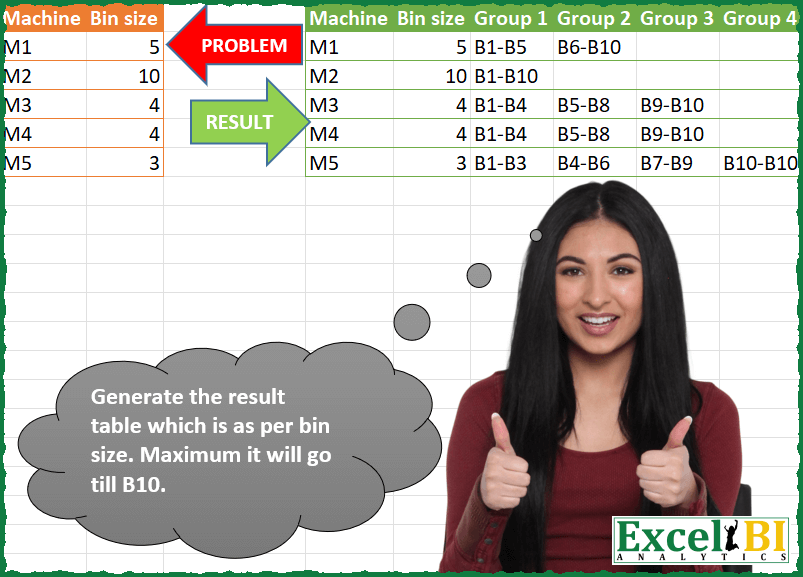
Generate the result table which is as per bin size. Maximum it will go till B10.
📌 Challenge Details and Links
ExcelBI Power Query Challenge Number: 135
Challenge Difficulty: ⭐️⭐️
📥Download Sample File
📥Link to the solutions on LinkedIn
Solving the challenge of Assign Groups to Value Bins with Power Query
Power Query solution 1 for Assign Groups to Value Bins, proposed by Zoran Milokanović:
let
  Source = Excel.CurrentWorkbook(){[Name = "Input"]}[Content],
  B = (t, _) => t & Text.From(_),
  P = List.Zip(
    Table.AddColumn(
      Source,
      "T",
      each Record.ToList(_)
        & List.Transform(
          List.Split({1 .. 10}, [Bin size]),
          each B("B", _{0}) & "-" & B("B", List.Last(_))
        )
    )[T]
  ),
  S = Table.FromColumns(
    P,
    Table.ColumnNames(Source) & List.Transform({1 .. List.Count(P) - 2}, each B("Group ", _))
  )
in
  S
Power Query solution 2 for Assign Groups to Value Bins, proposed by Kris Jaganah:
let
  Source = Excel.CurrentWorkbook(){[Name = "Table1"]}[Content],
  Transform = Table.AddColumn(
    Source,
    "Workings",
    each
      let
        a = List.Numbers(1, 4, [Bin size]),
        b = List.Transform(a, each if _ > 10 then null else "B" & Text.From(_) & "-B"),
        c = List.Numbers([Bin size], 4, [Bin size]),
        d = List.Transform(c, each if _ > 10 then 10 else _),
        e = List.Transform({0 .. List.Max({List.Count(b), List.Count(d)}) - 1}, each {b{_}, d{_}})
      in
        e
  ),
  Xpand = Table.ExpandListColumn(Transform, "Workings"),
  Xtract = Table.TransformColumns(
    Xpand,
    {"Workings", each Text.Combine(List.Transform(_, Text.From)), type text}
  ),
  Replace = Table.ReplaceValue(Xtract, "10", null, Replacer.ReplaceValue, {"Workings"}),
  Group = Table.Group(
    Replace,
    {"Machine", "Bin size"},
    {{"All", each _, type table [Machine = text, Bin size = number]}}
  ),
  Index = Table.AddColumn(Group, "Group", each Table.AddIndexColumn([All], "Group", 1)),
  Xpand1 = Table.ExpandTableColumn(Index, "Group", {"Workings", "Group"}, {"Workings", "Group"}),
  ColumnName = Table.TransformColumns(Xpand1, {"Group", each "Group " & Text.From(_)}),
  Remove = Table.RemoveColumns(ColumnName, {"All"}),
  Pivot = Table.Pivot(Remove, List.Distinct(Remove[Group]), "Group", "Workings")
in
  Pivot
Power Query solution 3 for Assign Groups to Value Bins, proposed by Alejandro Simón 🇵🇦 🇪🇸:
let
  Source = Excel.CurrentWorkbook(){[Name = "Table1"]}[Content],
  Cols = Table.AddColumn(
    Source,
    "A",
    (x) =>
      let
        a = {1 .. 10},
        b = List.Split(a, x[Bin size]),
        c = List.Transform(b, each "B" & Text.From(List.First(_)) & "-B" & Text.From(List.Last(_))),
        d = Table.FromRows({c}, List.Transform({1 .. List.Count(b)}, each "Group " & Text.From(_)))
      in
        d
  ),
  Sol = Table.ExpandTableColumn(Cols, "A", Table.ColumnNames(Table.Combine(Cols[A])))
in
  Sol
Power Query solution 4 for Assign Groups to Value Bins, proposed by Luan Rodrigues:
let
  Fonte = Tabela1,
  res = Table.Combine(
    Table.AddColumn(
      Fonte,
      "Personalizar",
      each [
        o = List.Transform(
          List.Split({1 .. 10}, [Bin size]),
          (x) =>
            [
              a = "B" & Text.From(List.First(x)),
              b = "B" & Text.From(List.Last(x)),
              c = Text.Combine({a} & {b}, "-")
            ][c]
        ),
        p = List.TransformMany(
          {o},
          each List.Transform({1 .. List.Count(_)}, each "Group" & Text.From(_)),
          (x, y) => y
        ),
        q = Table.FromRows({Record.FieldValues(_) & o}, Table.ColumnNames(Fonte) & p)
      ][q]
    )[Personalizar]
  )
in
  res
Power Query solution 5 for Assign Groups to Value Bins, proposed by Alexis Olson:
let
  Source = Table.FromRows(
    {{"M1", 5}, {"M2", 10}, {"M3", 4}, {"M4", 4}, {"M5", 3}},
    type table [Machine = text, Bin size = number]
  ),
  MaxItems = 10,
  #"Added Custom" = Table.AddColumn(
    Source,
    "Record",
    each [
      Bins = List.Split({1 .. MaxItems}, [Bin size]),
      Groups = List.Transform(
        Bins,
        each "B" & Number.ToText(List.Min(_)) & "-" & "B" & Number.ToText(List.Max(_))
      ),
      BinNames = List.Transform(List.Positions(Groups), each "Group " & Number.ToText(_ + 1)),
      Record = Record.FromList(Groups, BinNames)
    ][Record]
  ),
  ColumnNames = List.Union(List.Transform(#"Added Custom"[Record], Record.FieldNames)),
  #"Expanded Record" = Table.ExpandRecordColumn(#"Added Custom", "Record", ColumnNames)
in
  #"Expanded Record"
Power Query solution 6 for Assign Groups to Value Bins, proposed by Ramiro Ayala Chávez:
let
  Origen = Excel.CurrentWorkbook(){[Name = "Tabla1"]}[Content],
  Fx = (x) =>
    let
      a = x,
      b = {1 .. 10},
      c = List.Transform(b, Text.From),
      d = List.Transform(c, each "B" & _),
      e = List.Split(d, a),
      f = List.Transform(e, each List.First(_) & "-" & List.Last(_)),
      g = Table.FromRows({f})
    in
      g,
  h = Table.AddColumn(Origen, "G", each Fx([Bin size])),
  Sol = Table.ExpandTableColumn(
    h,
    "G",
    {"Column1", "Column2", "Column3", "Column4"},
    {"Group 1", "Group 2", "Group 3", "Group 4"}
  )
in
  Sol
Power Query solution 7 for Assign Groups to Value Bins, proposed by Eric Laforce:
let
  MaxB = 10,
  Source = Excel.CurrentWorkbook(){[Name = "tData135"]}[Content],
  PosMinBS = List.PositionOf(Source[Bin size], List.Min(Source[Bin size])),
  Add_RG = Table.AddColumn(
    Source,
    "RG",
    each
      let
        b = [Bin size],
        n = Number.IntegerDivide(MaxB, b) + Number.From(Number.Mod(MaxB, b) > 0),
        r = List.Accumulate(
          {1 .. n},
          [],
          (s, c) =>
            Record.AddField(
              s,
              "Group " & Text.From(c),
              "B" & Text.From((c - 1) * b + 1) & "-B" & Text.From(List.Min({c * b, MaxB}))
            )
        )
      in
        r
  ),
  Expand = Table.ExpandRecordColumn(Add_RG, "RG", Record.FieldNames(Add_RG[RG]{PosMinBS}))
in
  Expand
Power Query solution 8 for Assign Groups to Value Bins, proposed by Peter Tholstrup:
let
 Source = Excel.CurrentWorkbook(){[Name = "Data"]}[Content],
 PrefixList = (lst, prefix) => List.Transform(lst, each prefix & Text.From(_)),
 max_members = 10,
 group_members = PrefixList({1 .. max_members}, "B"),
 max_groups = Number.RoundUp(max_members / List.Min(Source[Bin size]), 0),
 group_headers = PrefixList({1 .. max_groups}, "Group "),
 SplitIntoGroups = (bin_size) =>
 [
 _groups = List.Split(group_members, bin_size),
 _group_headers = PrefixList({1 .. List.Count(_groups)}, "Group "),
 _group_intervals = List.Transform(_groups, each List.First(_) & "-" & List.Last(_)),
 _group_table = hashtag#table({"Attribute", "Value"}, List.Zip({_group_headers, _group_intervals})),
 _result = Table.Pivot(_group_table, _group_headers, "Attribute", "Value")
 ][_result],
 add_groups = Table.AddColumn(Source, "Groups", each SplitIntoGroups([Bin size])),
 result = Table.ExpandTableColumn(add_groups, "Groups", group_headers)
in
 result
Power Query solution 9 for Assign Groups to Value Bins, proposed by Sandeep Marwal:
let
  Source = Excel.CurrentWorkbook(){[Name = "Table1"]}[Content],
  #"Added Custom" = Table.AddColumn(
    Source,
    "Custom",
    (a) => {
      List.Transform(
        {1 .. Number.RoundAwayFromZero(10 / a[Bin size])},
        each "B"
          & Text.From(a[Bin size] * (_ - 1) + 1)
          & "- B"
          & Text.From(
            if (a[Bin size] * (_ - 1) + a[Bin size]) > 10 then
              10
            else
              (a[Bin size] * (_ - 1) + a[Bin size])
          )
      )
    }
  ),
  #"Added Custom1" = Table.AddColumn(#"Added Custom", "Custom.1", each Table.FromRows([Custom])),
  #"Expanded Custom.1" = Table.ExpandTableColumn(
    #"Added Custom1",
    "Custom.1",
    {"Column1", "Column2", "Column3", "Column4"},
    {"Group1", "Group2", "Group3", "Group4"}
  ),
  #"Removed Columns" = Table.RemoveColumns(#"Expanded Custom.1", {"Custom"})
in
  #"Removed Columns"
Solving the challenge of Assign Groups to Value Bins with Excel
Excel solution 1 for Assign Groups to Value Bins, proposed by Bo Rydobon 🇹🇭:
=LET(b,B2:B6,s,10,q,SEQUENCE(,ROUNDUP(s/MIN(b),)),
n,q*b,m,n-b+1,VSTACK("Group "&q,REPT("B"&m&"-B"&IF(n>s,s,n),m<=s)))
Excel solution 2 for Assign Groups to Value Bins, proposed by Rick Rothstein:
=LET(f,LAMBDA(b,LET(n,IFERROR(WRAPROWS(SEQUENCE(,10),b),10),TOROW("B"&TAKE(n,,1)&"-B"&TAKE(n,,-1)))),g,IFERROR(DROP(REDUCE("",B2:B6,LAMBDA(a,x,VSTACK(a,f(x)))),1),""),VSTACK("Group "&SEQUENCE(,COLUMNS(g)),g))Excel solution 3 for Assign Groups to Value Bins, proposed by محمد حلمي:
=REDUCE("Group"&SEQUENCE(,ROUNDUP(10/MIN(B2:B6),)),B2:B6,LAMBDA(a,d,LET(s,SEQUENCE(,ROUNDUP(10/d,),,
d),v,d+s-1,IFNA(VSTACK(a,"B"&s&"-B"&IF(v>9,10,v)),""))))
Excel solution 4 for Assign Groups to Value Bins, proposed by 🇰🇷 Taeyong Shin:
=LET(
 num, SEQUENCE(10),
 func, LAMBDA(r,
 LET(
 n, INDEX(r, , 2),
 t, SEQUENCE(MIN(n * QUOTIENT(10, n), 10)),
 gn, FILTER(num, ISNUMBER(EXPAND(SEARCH(MOD(t, n), 10), 10, , 1))),
 HSTACK(IF({1; 1}, r), WRAPCOLS(EXPAND(gn, CEILING(ROWS(gn), 2), , 10), 2))
 )
 ),
 Thunks, BYROW(A2:B6, LAMBDA(x, LAMBDA(func(x)))),
 tbl, REDUCE((@Thunks)(), DROP(Thunks, 1), LAMBDA(a, c, VSTACK(a, c()))),
 fx, LAMBDA(c, TEXTJOIN("-", , "B" & c)),
 IFNA(GROUPBY(TAKE(tbl, , 2), DROP(tbl, , 2), fx, , 0), "")
)
Excel solution 5 for Assign Groups to Value Bins, proposed by Kris Jaganah:
=LET(b,B2:B6,c,SEQUENCE(,4),d,b*c,e,IF(d>10,10,d),f,HSTACK(SEQUENCE(b),e+1),g,DROP(IF(f>10,"",f),,-1),HSTACK(A1:B6,VSTACK("Group "&c,IF(g="","","B"&g&"-B"&e))))Excel solution 6 for Assign Groups to Value Bins, proposed by Sunny Baggu:
=LET(
 _a, ROUNDUP(10 / B2:B6, 0),
 _num, IF(_a, SEQUENCE(, 10)),
 _cri, _num <= _a,
 _c, _num * B2:B6 - B2:B6 + 1,
 _d, _c + B2:B6 - 1,
 TAKE(IF(_cri, "B" & _c & "-B" & IF(_d > 10, 10, _d), ""), , MAX(_a))
)
Excel solution 7 for Assign Groups to Value Bins, proposed by Sunny Baggu:
=HSTACK(
 A2:B6,
 DROP(
 IFNA(
 REDUCE(
 "",
 SEQUENCE(ROWS(A2:A6)),
 LAMBDA(a, v,
 VSTACK(
 a,
 LET(
 _i, INDEX(B2:B6, v, ),
 _s, SEQUENCE(10),
 _d, ROUNDUP(_s / _i, 0),
 _ud, UNIQUE(_d),
 IF(
 _i = 10,
 "B1-B10",
 TOROW("B" & XLOOKUP(_ud, _d, _s, , , 1) & "-B" & XLOOKUP(_ud, _d, _s, , , -1))
 )
 )
 )
 )
 ),
 ""
 ),
 1
 )
)
Excel solution 8 for Assign Groups to Value Bins, proposed by Sunny Baggu:
=HSTACK(
 A2:B6,
 IFERROR(
 MAKEARRAY(
 ROWS(A2:A6),
 ROUNDUP(MAX(10 / B2:B6), 0),
 LAMBDA(r, c,
 INDEX(
 LET(
 _s, SEQUENCE(10),
 _f, MOD(_s, INDEX(B2:B6, r, )),
 _f1, FILTER(_s, IF(SUM(_f) = 0, 1, _f = 1)),
 _f2, VSTACK(DROP(_f1, 1) - 1, 10),
 _col, "B" & _f1 & "-B" & _f2,
 IFERROR(TOROW(_col), "B1-B10")
 ),
 c
 )
 )
 ),
 ""
 )
)
Excel solution 9 for Assign Groups to Value Bins, proposed by Sunny Baggu:
=DROP(
 IFNA(
 REDUCE(
 "",
 SEQUENCE(ROWS(A2:A6)),
 LAMBDA(a, v,
 VSTACK(
 a,
 LET(
 _s, SEQUENCE(10),
 _f, MOD(_s, INDEX(B2:B6, v, )),
 _f1, FILTER(_s, IF(SUM(_f) = 0, 1, _f = 1)),
 _f2, VSTACK(DROP(_f1, 1) - 1, 10),
 _col, "B" & IF(SUM(_f1) = 0, 1, _f1) & "-B" & _f2,
 HSTACK(INDEX(A2:B6, v, ), IFERROR(TOROW(_col), "B1-B10"))
 )
 )
 )
 ),
 ""
 ),
 1
)
Excel solution 10 for Assign Groups to Value Bins, proposed by LEONARD OCHEA 🇷🇴:
=LET(t,A1:B6,b,TAKE(DROP(t,1),,-1),m,MAX(b),g,SEQUENCE(,ROUNDUP(m/MIN(b),0)),HSTACK(t,IFNA(REDUCE("Group "&g,b,LAMBDA(x,y,LET(z,SEQUENCE(,ROUNDUP(m/y,0)),u,y*z,VSTACK(x,"B"&u-y+1&"-"&"B"&IF(u>m,m,u))))),"")))Excel solution 11 for Assign Groups to Value Bins, proposed by Mey Tithveasna:
=LET(bin,B2:B6,n,10,a,ROUNDUP(n/MIN(bin),0),s, SEQUENCE(,a),b,s*bin-bin+1,c,b+bin-1,d,IF(b>n,,b),VSTACK("Group"&s,IF(d,"B"&d&"-B"&IF(cExcel solution 12 for Assign Groups to Value Bins, proposed by Edwin Tisnado:
=LET(t,B2:B6,a,ROUNDUP(10/MIN(t),),b,SEQUENCE(,a)*t-t+1,c,b+t-1,s,IF(b>10,,b),m,"B"&IF(c<10,c,10),IF(s,"B"&s&"-"&m,""))Excel solution 13 for Assign Groups to Value Bins, proposed by LUIS FLORENTINO COUTO CORTEGOSO:
=LET(rangos,IFERROR(DROP(REDUCE("",B2:B6,LAMBDA(a,bs,VSTACK(a,LET(l,TRANSPOSE(SEQUENCE(10/bs+1,,0,bs)),MAP(FILTER(l,l<10),LAMBDA(n,"B"&n+1&"-B"&IF((n+bs+1)>10,10,n+bs+1))))))),1),""),HSTACK(A1:B6,VSTACK("Group"&SEQUENCE(,COLUMNS(rangos)),rangos)))Solving the challenge of Assign Groups to Value Bins with R
R solution 1 for Assign Groups to Value Bins, proposed by Konrad Gryczan, PhD:
library(tidyverse)
library(readxl)
sequence = data.frame(elements = str_c("B", 1:10))
input = read_excel("PQ_Challenge_135.xlsx", range = "A1:B6")
test = read_excel("PQ_Challenge_135.xlsx", range = "L1:Q6")
slice_df_to_range = function(df, x) {
 df_sliced = df %>%
 mutate(section = str_c("Group ",((row_number()-1) %/% x)+1)) %>%
 group_by(section) %>%
 mutate(range = str_c(first(elements),"-", last(elements))) %>%
 select(-elements) %>%
 distinct()

 return(df_sliced)
}
result = input %>%
 mutate(sections = map(`Bin size`, slice_df_to_range, df = sequence)) %>%
 unnest(cols = sections) %>%
 pivot_wider(names_from = section, values_from = range)
identical(result, test)
&&&