
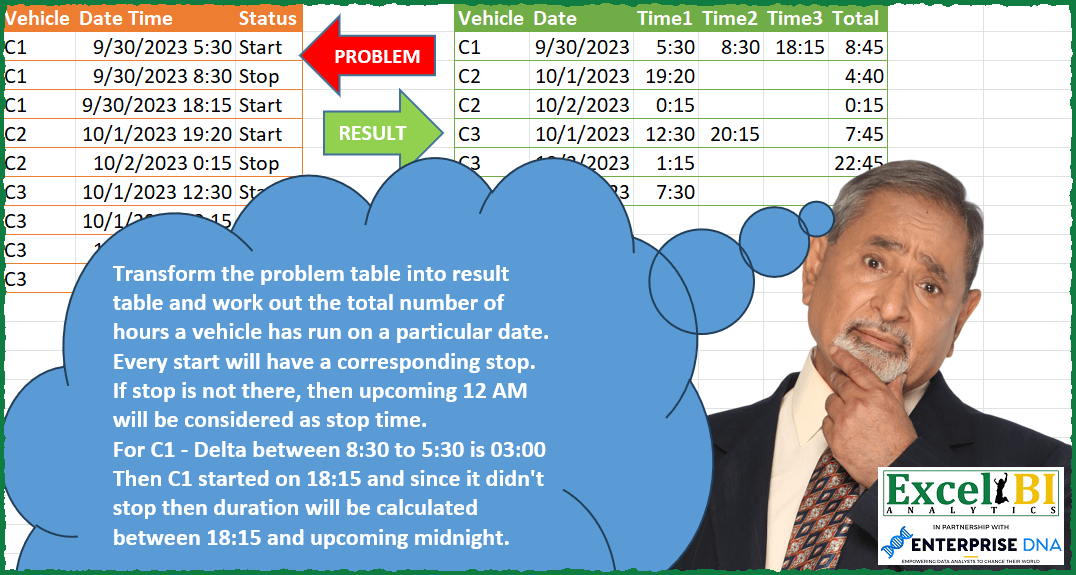
Transform the problem table into result table and work out the total number of hours a vehicle has run on a particular date. Every start will have a corresponding stop. If stop is not there, then upcoming 12 AM will be considered as stop time for that date. For C1 – Delta between 8:30 to 5:30 is 03:00 Then C1 started on 18:15 and since it didn’t stop then duration will be calculated between 18:15 and upcoming midnight which will be 5:45. Hence total for 30-Sep-23 is 03:00 + 05:45 = 08:45
📌 Challenge Details and Links
ExcelBI Power Query Challenge Number: 122
Challenge Difficulty: ⭐️⭐️⭐️⭐️⭐️⭐️
📥Download Sample File
📥Link to the solutions on LinkedIn
Solving the challenge of Calculate Vehicle Daily Usage with Power Query
Power Query solution 1 for Calculate Vehicle Daily Usage, proposed by Bo Rydobon 🇹🇭:
let
  Source = Excel.CurrentWorkbook(){[Name = "Table1"]}[Content],
  IDate = Table.AddColumn(Source, "Date", each DateTime.Date([Date Time]), type date),
  ITime = Table.AddColumn(IDate, "Time", each DateTime.Time([Date Time])),
  ITotal = Table.AddColumn(
    ITime,
    "Total",
    each Number.From([Time]) * (if [Status] = "Stop" then 1 else - 1)
  ),
  Group = Table.Group(
    ITotal,
    {"Vehicle", "Date"},
    {
      {
        "T",
        each Table.FromRows(
          {[Time] & {Duration.From(Number.Mod(List.Sum([Total] & {1}), 1))}},
          List.Transform({1 .. Table.RowCount(_)}, each "Time" & Text.From(_)) & {"Total"}
        )
      }
    }
  ),
  Expanded = Table.ExpandTableColumn(
    Group,
    "T",
    List.Union(List.Transform(Group[T], each Table.ColumnNames(_)))
  )
in
  Expanded
Power Query solution 2 for Calculate Vehicle Daily Usage, proposed by Zoran Milokanović:
let
  Source = Excel.CurrentWorkbook(){[Name = "Input"]}[Content],
  D = Date.From,
  T = each DateTime.From(Date.From(_)),
  G = Table.Group(
    Source,
    {"Vehicle", "Date Time"},
    {
      {
        "A",
        each
          let
            r = Table.ToRows(_),
            i = List.Positions(r),
            s = List.Accumulate(
              i,
              {},
              (s, d) =>
                s
                  & (
                    let
                      p = r{d - 1},
                      c = r{d},
                      n = r{d + 1}
                    in
                      if c{2}
                        = "Start" and d
                        < List.Max(i) and n{2} = "Stop" or c{2} = "Stop" and d
                        > 0 and p{2} = "Start"
                      then
                        {c}
                      else if c{2} = "Start" then
                        {c} & {{c{0}, T(Date.AddDays(c{1}, 1)), "Stop"}}
                      else
                        {{c{0}, T(c{1}), "Start"}} & {c}
                  )
            ),
            t = Table.TransformColumns(
              Table.CombineColumns(
                Table.AddIndexColumn(
                  Table.AddColumn(
                    Table.FromRows(
                      r
                        & {
                          {
                            r{0}{0},
                            T(r{0}{1})
                              + List.Sum(
                                List.Transform(
                                  List.Numbers(1, List.Count(s) / 2, 2),
                                  each s{_}{1} - s{_ - 1}{1}
                                )
                              ),
                            "Total"
                          }
                        },
                      Table.ColumnNames(Source)
                    ),
                    "Date",
                    each Date.From([Date Time])
                  ),
                  "I",
                  1
                ),
                {"Status", "I"},
                each if _{0} = "Total" then _{0} else "Time" & Text.From(_{1}),
                "S"
              ),
              {{"Date Time", each DateTime.ToText(_, "H:mm")}}
            )
          in
            Table.Pivot(t, List.Distinct(t[S]), "S", "Date Time")
      }
    },
    0,
    (c, n) => Number.From(D(c[Date Time]) <> D(n[Date Time]))
  ),
  S = Table.Combine(G[A])
in
  S
Power Query solution 3 for Calculate Vehicle Daily Usage, proposed by Alejandro Simón 🇵🇦 🇪🇸:
let
  Source = Excel.CurrentWorkbook(){[Name = "Table1"]}[Content],
  Group = Table.Combine(
    Table.Group(
      Source,
      {"Vehicle", "Date Time"},
      {
        {
          "All",
          each
            let
              a = Table.AddColumn(_, "Time", each Time.From([Date Time])),
              b = Table.AddColumn(
                a,
                "Hora",
                each if [Status] = "Start" then - Number.From([Time]) else Number.From([Time])
              ),
              c = Table.AddIndexColumn(b, "Idx", 1),
              d = Table.TransformColumns(
                c,
                {{"Date Time", each Date.From(_)}, {"Idx", each "Time" & Text.From(_)}}
              ),
              e = List.Split(d[Hora], 2),
              f = List.Sum(
                List.Transform(
                  e,
                  each
                    if List.Count(_) < 2 and _{0} > 0 then
                      _{0}
                    else if List.Count(_) < 2 and _{0} < 0 then
                      1 + _{0}
                    else
                      List.Sum(_)
                )
              ),
              g = Table.Pivot(
                Table.RemoveColumns(d, {"Status", "Hora"}),
                List.Distinct(d[Idx]),
                "Idx",
                "Time"
              ),
              h = Table.FromColumns(Table.ToColumns(g) & {{f}}, Table.ColumnNames(g) & {"Total"})
            in
              h
        }
      },
      0,
      (x, y) =>
        Number.From(x[Vehicle] <> y[Vehicle] or Date.From(x[Date Time]) <> Date.From(y[Date Time]))
    )[All]
  ),
  Sol = Table.TransformColumnTypes(Group, {{"Total", type duration}})
in
  Sol
Power Query solution 4 for Calculate Vehicle Daily Usage, proposed by Alejandro Simón 🇵🇦 🇪🇸:
Zoran Milokanović, apliqué el 5to parámetro de Table.Group, aunque todavía no creo dominarlo 😅😅😅...... Seguro me ahorré varios pasos.


        Show translation
Power Query solution 5 for Calculate Vehicle Daily Usage, proposed by Luan Rodrigues:
let
 Fonte = Tabela1,
 del = Table.SplitColumn(Table.TransformColumnTypes(Fonte, {{"Date Time", type text}}, "pt-BR"), "Date Time", Splitter.SplitTextByDelimiter(" ", QuoteStyle.Csv), {"Date", "Time"}),
 gp = Table.Group(del, {"Vehicle", "Date"}, {
{"Time", each
[
a = Table.FromRows({[Time]},b),
b = List.Transform({1..List.Count([Time])}, each "Time"&Text.From(_))
][a]},
{"Total", each
[
a1 = {List.Transform([Time], each Time.From(_)),List.Transform([Status],each _)},
a2 = List.Transform({a1}, (x)=> List.Last(x{1}) = "Stop" ),
a = List.Split(List.Transform(_[Time],Time.From)& {hashtag#time(24,00,00)},2),
b = if a2{0} = false then Time.From(DateTime.From(List.Sum(List.Transform(a, each List.Sum({Number.From(_{0}),-Number.From(_{1})}))))) else Time.From(List.Transform({List.Transform([Time],each Number.From(Time.From(_)))}, (x)=> DateTime.From(try List.Sum({x{0},-x{1}}) otherwise x{0})){0})
][b]
}}),
 res = Table.ExpandTableColumn(gp, "Time", Table.ColumnNames(gp[Time]{0}))
in
 res
Power Query solution 6 for Calculate Vehicle Daily Usage, proposed by Eric Laforce:
let
 Source = Excel.CurrentWorkbook(){[Name="tData122"]}[Content],
 ChangeType = Table.TransformColumnTypes(Source,{{"Date Time", type datetime}, {"Status", type text}}),
 Add_Date = Table.AddColumn(ChangeType, "Date", each Date.From([Date Time]), type date),
 Group = Table.Group(Add_Date, {"Vehicle", "Date"}, {"T", each let
 _S = List.Buffer(_[Status]),
 _DT = List.Buffer(_[Date Time]),
 _R_VD = _{0}[[Vehicle],[Date]],
 _R_Times = List.Accumulate(List.Zip({{1..Table.RowCount(_)},_DT}), [],
 (s,c) => Record.AddField(s, "Time"&Text.From(c{0}), DateTime.ToText(c{1}, [Format="HH:mm"])) ),
 _R_Total = let
 _LT = List.Combine( {
 if (_S{0}="Start") then {} else {Date.StartOfDay(_DT{0})},
 _DT,
 if (List.Last(_S)="Stop") then {} else {Date.EndOfDay(_DT{0})}
 }),
 _D = List.Sum(List.Transform(List.Split(_LT,2), each _{1}-_{0}))
 in [Total=Text.Start(Duration.ToText(_D+hashtag#duration(0,0,0,1)),5)]
 in Table.FromRecords({Record.Combine({_R_VD, _R_Times,_R_Total})})
 }),
 Combine = Table.Combine(Group[T])
in
 Combine
Power Query solution 7 for Calculate Vehicle Daily Usage, proposed by Eric Laforce:
let
  Source = Excel.CurrentWorkbook(){[Name = "tData122"]}[Content],
  Split_DT = Table.SplitColumn(
    Source,
    "Date Time",
    each
      let
        _DT = DateTime.From(_)
      in
        {DateTime.Date(_DT), DateTime.Time(_DT)},
    {"Date", "Time"}
  ),
  Group = Table.Group(
    Split_DT,
    {"Vehicle", "Date"},
    {
      "T",
      each
        let
          _R1 = _{0}[[Vehicle], [Date]],
          _R2 = List.Accumulate(
            List.Zip({{1 .. Table.RowCount(_)}, [Time]}),
            [],
            (s, c) => Record.AddField(s, "Time" & Text.From(c{0}), c{1})
          ),
          _D = List.Accumulate(
            Table.ToRecords(_),
            1,
            (s, c) => s + (if (c[Status] = "Stop") then 1 else - 1) * Number.From(c[Time])
          ),
          _R3 = [Total = Time.From(Number.Mod(_D, 1))]
        in
          Table.FromRecords({Record.Combine({_R1, _R2, _R3})})
    }
  ),
  Combine = Table.Combine(Group[T])
in
  Combine
Solving the challenge of Calculate Vehicle Daily Usage with Excel
Excel solution 1 for Calculate Vehicle Daily Usage, proposed by Bo Rydobon 🇹🇭:
=LET(a,A2:A10,b,B2:B10,s,C2:C10,d,INT(b),t,b-d,u,UNIQUE(HSTACK(a,d)),
v,TAKE(u,,1),x,DROP(REDUCE({"Total","Time"},v&DROP(u,,1),LAMBDA(c,x,LET(f,FILTER(t,x=a&d),g,IF(FILTER(s,x=a&d)="stop",1,-1),
IFNA(VSTACK(c,HSTACK(MOD(SUM(f*g,1),1),TOROW(f))),"")))),1),
VSTACK(HSTACK(A1,"Date","Time"&SEQUENCE(,COLUMNS(x)-1),"Total"),HSTACK(u,DROP(x,,1),TAKE(x,,1))))
Excel solution 2 for Calculate Vehicle Daily Usage, proposed by محمد حلمي:
=LET(
a,A2:A10, b,B2:B10,
x, a&" "&b,
e, a&" "&INT(b),
P,XMATCH(e,e),
K,MAX(FREQUENCY(P,P)),

REDUCE(
HSTACK(A1,"Date","Time"&SEQUENCE(,K),"Total"),
UNIQUE(e),LAMBDA(a,d,LET(
Q,FILTER(B2:C10,d=e),
m,ROWS(Q),
c,MOD(TAKE(Q,,1),1),
v,IF(MOD(SEQUENCE(m),2),-c,c),
w,FILTER(x,e=d),
r,--TEXTAFTER(w," "),

VSTACK(a,

HSTACK(EXPAND(HSTACK(
@TEXTSPLIT(w," "),
@INT(r),
TOROW(MOD(r,1))),,2+K,""),
@IF((m=1)*(DROP(Q,,1)="Stop"),c,
SUM(IF(MOD(m,2),VSTACK(v,1),v)))))))))
Excel solution 3 for Calculate Vehicle Daily Usage, proposed by محمد حلمي:
=IF(MOD(SEQUENCE(ROWS(AT2#)),2),-AT2#,AT2#)&&&