
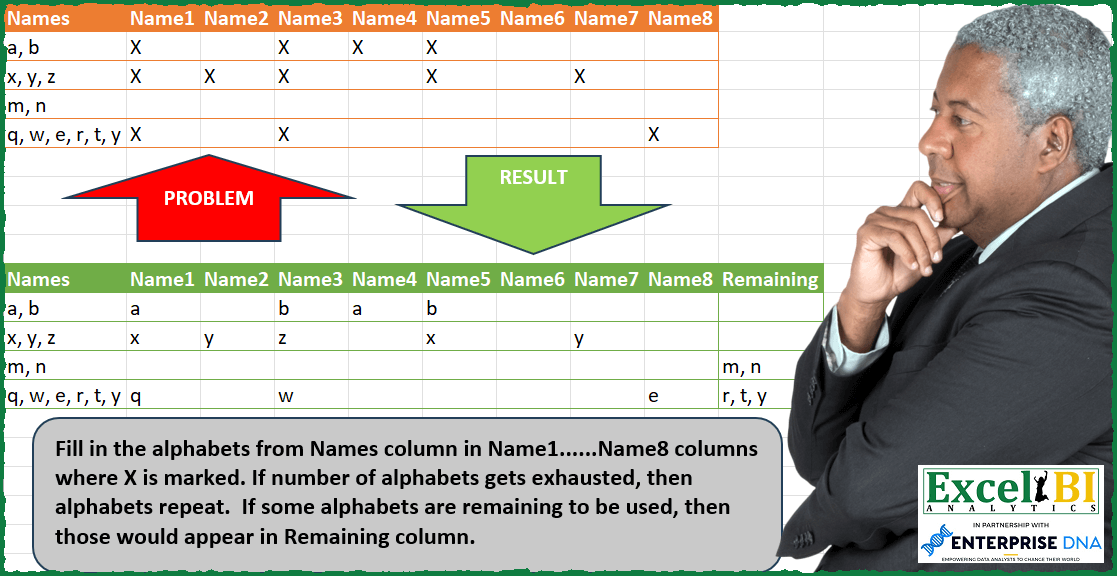
Fill in the alphabets from Names column in Name1……Name8 columns where X is marked. If number of alphabets gets exhausted, then alphabets repeat. If some alphabets are remaining to be used, then those would appear in Remaining column.
📌 Challenge Details and Links
ExcelBI Power Query Challenge Number: 110
Challenge Difficulty: ⭐️⭐️⭐️
📥Download Sample File
📥Link to the solutions on LinkedIn
Solving the challenge of Fill Alphabets in Pattern Columns with Power Query
Power Query solution 1 for Fill Alphabets in Pattern Columns, proposed by Bo Rydobon 🇹🇭:
let
  Source = Excel.CurrentWorkbook(){[Name = "Table1"]}[Content],
  Ans = Table.FromRows(
    Table.TransformRows(
      Source,
      each
        let
          l = Record.ToList(_),
          t = Text.Split(l{0}, ", ")
        in
          List.Transform(
            {0 .. List.Count(l)},
            (n) =>
              try

                  if n = 0 then
                    l{0}
                  else if l{n} = "X" then
                    t{Number.Mod(List.NonNullCount(List.FirstN(l, n)) - 1, List.Count(t))}
                  else
                    null
              otherwise
                Text.Combine(List.Skip(t, List.NonNullCount(l) - 1), ", ")
          )
    ),
    Table.ColumnNames(Source) & {"Remaining"}
  )
in
  Ans
Power Query solution 2 for Fill Alphabets in Pattern Columns, proposed by Zoran Milokanović:
let
  Source = Excel.CurrentWorkbook(){[Name = "Input"]}[Content],
  S = Table.FromRows(
    List.Transform(
      Table.ToRows(Source),
      each
        let
          n = Text.Split(_{0}, ", "),
          s = List.Skip(_),
          p = List.Transform(
            List.Positions(s),
            each
              if s{_} = null then
                s{_}
              else
                n{Number.Mod(List.NonNullCount(List.FirstN(s, _ + 1)) - 1, List.Count(n))}
          )
        in
          {_{0}} & p & {Text.Combine(List.Difference(n, p), ", ")}
    ),
    Table.ColumnNames(Source) & {"Remaining"}
  )
in
  S
Power Query solution 3 for Fill Alphabets in Pattern Columns, proposed by Kris Jaganah:
let
  Source = Excel.CurrentWorkbook(){[Name = "Table1"]}[Content],
  Rep = Table.ReplaceValue(Source, null, "Y", Replacer.ReplaceValue, Table.ColumnNames(Source)),
  Unpiv = Table.UnpivotOtherColumns(Rep, {"Names"}, "A", "V"),
  Filter = Table.SelectRows(Unpiv, each ([V] = "X")),
  Group = Table.Group(
    Filter,
    {"Names"},
    {
      "All",
      each Table.AddColumn(
        Table.AddIndexColumn(_, "I", 1, 1),
        "Col",
        each Text.Split([Names], ", "){Number.Mod([I] - 1, List.Count(Text.Split([Names], ", ")))}
      )
    }
  ),
  Xpand = Table.ExpandTableColumn(Group, "All", {"A", "Col"}, {"A", "V"}),
  FilY = Xpand & Table.SelectRows(Unpiv, each ([V] = "Y")),
  RepValue = Table.ReplaceValue(FilY, "Y", null, Replacer.ReplaceValue, {"V"}),
  Pivot = Table.Pivot(RepValue, List.Sort(List.Distinct(RepValue[A])), "A", "V"),
  Sort = Table.Sort(Pivot, {each List.PositionOf(Source[Names], [Names]), 0}),
  Rem = Table.AddColumn(
    Sort,
    "Remaining",
    each Text.Combine(
      List.Difference(
        Text.Split([Names], ", "),
        List.RemoveNulls(List.Distinct(List.Skip(Record.ToList(_))))
      ),
      ", "
    )
  )
in
  Rem
Power Query solution 4 for Fill Alphabets in Pattern Columns, proposed by Rick de Groot:
let
  Source = Excel.CurrentWorkbook(){[Name = "Table1"]}[Content],
  Unpv = Table.UnpivotOtherColumns(Source, {"Names"}, "Attribute", "Value"),
  Group = Table.Group(
    Unpv,
    {"Names"},
    {
      {"Count", each List.Count(_)},
      {"Details", each Table.AddIndexColumn(_, "i", 1, 1), type table}
    }
  ),
  Exp = Table.ExpandTableColumn(Group, "Details", {"Attribute", "Value", "i"}),
  Repl = Table.ReplaceValue(
    Exp,
    each [Value],
    each [
      z = List.Count(Text.Split([Names], ", ")),
      a = Number.Mod([i] - 1, z),
      b = Text.Split([Names], ", "){a}
    ][b],
    Replacer.ReplaceValue,
    {"Value"}
  ),
  Rem = Table.RemoveColumns(Repl, {"i"}),
  Table1 = Table.Pivot(Rem, List.Distinct(Rem[Attribute]), "Attribute", "Value"),
  Table2 = Table.SelectRows(Source, each List.NonNullCount(List.Skip(Record.FieldValues(_))) = 0),
  Comb = Table.Combine({Table2, Table1}),
  Remain = Table.AddColumn(
    Comb,
    "Remaining",
    each [
      NameItems  = Text.Split([Names], ", "),
      CNameItems = List.Count(Text.Split([Names], ", ")),
      XRecord    = [Count] ?? 0,
      c          = CNameItems - XRecord,
      d          = if CNameItems > XRecord then Text.Combine(List.LastN(NameItems, c), ", ") else ""
    ][d]
  ),
  Remove = Table.RemoveColumns(Remain, {"Count"})
in
  Remove
Power Query solution 5 for Fill Alphabets in Pattern Columns, proposed by Alejandro Simón 🇵🇦 🇪🇸:
let
  Source = Excel.CurrentWorkbook(){[Name = "Table1"]}[Content],
  Group = Table.Group(
    Source,
    {"Names"},
    {
      {
        "All",
        each
          let
            a = Table.ColumnNames(_),
            b = Table.RemoveColumns(
              Table.UnpivotOtherColumns(_, {"Names"}, "Name", "Att"),
              {"Names", "Att"}
            ),
            c = List.Transform([Names], each Text.Split(_, ", ")){0},
            d = List.FirstN(
              List.Repeat(c, Number.RoundUp(Table.RowCount(b) / List.Count(c))),
              Table.RowCount(b)
            ),
            e = Table.ToColumns(b){0} & List.Difference(List.Skip(a), Table.ToColumns(b){0}),
            g = List.FirstN(d & List.Repeat({null}, List.Count(e)), Table.ColumnCount(Source) - 1),
            f = Table.Sort(Table.FromColumns({e} & {d}, {"Names", "A"}), {"Names"})
          in
            f
      }
    }
  ),
  Expand = Table.ExpandTableColumn(Group, "All", {"Names", "A"}, {"Names.1", "A"}),
  Pivot = Table.Sort(
    Table.Pivot(Expand, List.Distinct(Expand[Names.1]), "Names.1", "A"),
    each List.PositionOf(Source[Names], [Names])
  ),
  Names = List.Transform(Pivot[Names], each Text.Split(_, ", ")),
  Sol = Table.AddColumn(
    Pivot,
    "Remaining",
    each Text.Combine(
      List.Difference(
        Text.Split([Names], ", "),
        List.Distinct(List.RemoveNulls(List.Skip(Record.ToList(_))))
      ),
      ", "
    )
  )
in
  Sol
Power Query solution 6 for Fill Alphabets in Pattern Columns, proposed by Luan Rodrigues:
let
  Fonte = Tabela1,
  ad = Table.AddColumn(
    Fonte,
    "Personalizar",
    each [
      a = List.Count(List.RemoveNulls(List.RemoveFirstN(Record.FieldValues(_), 1))),
      b =
        if List.Count(Text.Split([Names], ", ")) < a then
          List.Select(
            List.Transform(Text.ToList(Text.Repeat([Names], a)), each Text.Select(_, {"a" .. "z"})),
            each _ <> ""
          )
        else
          Text.Split([Names], ", ")
    ][b]
  ),
  gp = Table.Group(
    ad,
    {"Names"},
    {
      {
        "Contagem",
        each [
          a = Table.AddIndexColumn(
            Table.UnpivotOtherColumns(_, {"Names", "Personalizar"}, "Atributo", "Valor"),
            "Ind",
            0,
            1
          ),
          b = Table.AddColumn(a, "ext", each [Personalizar]{[Ind]})
        ][b]
      }
    }
  ),
  ex = Table.ExpandTableColumn(gp, "Contagem", {"Atributo", "ext"}),
  pb = Table.FillDown(ex, {"Atributo"}),
  pv = Table.Pivot(pb, List.Distinct(pb[Atributo]), "Atributo", "ext"),
  ac = Table.AddColumn(
    pv,
    "Remaining",
    each Text.Combine(
      List.Difference(
        Text.Split([Names], ", "),
        List.Distinct(List.RemoveNulls(List.RemoveFirstN(Record.FieldValues(_), 1)))
      ),
      ", "
    )
  ),
  cs = Table.Sort(ac, each List.PositionOf(ad[Names], [Names])),
  re = Table.ReorderColumns(
    cs,
    List.RemoveFirstN(Table.ColumnNames(Fonte), 1) & {"Remaining"},
    MissingField.UseNull
  )
in
  re
Power Query solution 7 for Fill Alphabets in Pattern Columns, proposed by Eric Laforce:
let
  Source = Excel.CurrentWorkbook(){[Name = "tData110"]}[Content],
  CN = Table.ColumnNames(Source),
  Transform = List.Transform(
    Table.ToRows(Source),
    each
      let
        _NV = Text.Split(_{0}, ", "),
        _Nb = List.Count(_NV),
        _NbCheck = List.Count(List.Select(_, each _ = "X")),
        _RemainV = Text.Combine(
          List.LastN(_NV, if (_NbCheck < _Nb) then _Nb - _NbCheck else 0),
          ", "
        ),
        _CNV = List.Select(List.Zip({List.Skip(CN), List.Skip(_)}), each _{1} = "X"),
        _RDetails = List.Accumulate(
          _CNV,
          [],
          (s, c) =>
            s
              & Record.FromList(
                {if (c{1} = "X") then _NV{Number.Mod(Record.FieldCount(s), _Nb)} else ""},
                {c{0}}
              )
        )
      in
        [Names = _{0}] & _RDetails & [Remaining = _RemainV]
  ),
  Result = Table.FromRecords(Transform, CN & {"Remaining"}, MissingField.UseNull)
in
  Result
Power Query solution 8 for Fill Alphabets in Pattern Columns, proposed by Matthias Friedmann:
let
  Source = Excel.CurrentWorkbook(){[Name = "DistributeNames"]}[Content],
  Custom = Table.FromRows(
    Table.TransformRows(
      Source,
      each [
        names = Text.Split([Names], ", "),
        nameCount = List.Count(names),
        row = Record.ToList(_),
        xCount = List.NonNullCount(row) - 1,
        remaining =
          let
            r = nameCount - xCount
          in
            if r > 0 then Text.Combine(List.LastN(names, r), ", ") else null,
        transform = List.Transform(
          {0 .. List.Count(row) - 1},
          each
            if row{_} = "X" then
              names{Number.Mod(List.NonNullCount(List.FirstN(row, _)) - 1, nameCount)}
            else
              row{_}
        )
          & {remaining}
      ][transform]
    ),
    Table.ColumnNames(Source) & {"Remaining"}
  )
in
  Custom
Power Query solution 9 for Fill Alphabets in Pattern Columns, proposed by Rafael González B.:
let
  Source = Excel.CurrentWorkbook(){0}[Content],
  New = Table.AddColumn(
    Source,
    "NewTable",
    each
      let
        a = Text.Split([Names], ", "),
        b = Record.RemoveFields(_, {"Names"}),
        c = Record.FieldCount(b),
        d = List.Repeat(a, c),
        e = List.Transform(
          List.PositionOf(Record.ToList(b), "X", 2),
          each "Name" & Text.From(_ + 1)
        ),
        f = Table.SelectRows(Table.FromColumns({e, d}), each [Column1] <> null),
        g = Table.PromoteHeaders(Table.Transpose(f)),
        h = Table.FromRecords({_}),
        i = Table.LastN(Table.FillDown(h & g, {"Names"}), 1),
        j = Text.Combine(List.Difference(a, f[Column2]), ", "),
        k = Table.AddColumn(i, "Remaining", each j)
      in
        k
  )[NewTable]
in
  Table.Combine(New)
Solving the challenge of Fill Alphabets in Pattern Columns with Excel
Excel solution 1 for Fill Alphabets in Pattern Columns, proposed by Bo Rydobon 🇹🇭:
=LET(z,A2:I5,REDUCE(HSTACK(A1:I1,"Remaining"),SEQUENCE(ROWS(z)),LAMBDA(a,r,LET(n,INDEX(z,r,),
s,TEXTSPLIT(@+n,,", "),r,ROWS(s),t,SCAN(0,n,LAMBDA(b,v,SWITCH(v,"X",INDEX(s,MOD(COUNTA(INDEX(n,2):v)-1,r)+1),0,"",v))),
VSTACK(a,HSTACK(t,IFERROR(TEXTJOIN(", ",,DROP(s,SUM(N(t>""))-1)),"")))))))
Excel solution 2 for Fill Alphabets in Pattern Columns, proposed by John V.:
=LET(n,A2:A5,z,B2:I5,VSTACK(HSTACK(A1:I1,"Remaining"),HSTACK(n,REPT(MID(n,1+3*MOD(MAP(z,LAMBDA(x,IF(x>0,SUM(N(TAKE(B2:x,-1)>0)))))-1,(2+LEN(n))/3),1),z>0),MID(n,1+3*BYROW(z,LAMBDA(r,SUM(N(r>0)))),99))))Excel solution 3 for Fill Alphabets in Pattern Columns, proposed by محمد حلمي:
=REDUCE(A1:I1,A2:A5,LAMBDA(c,d,LET(
b,OFFSET(d,,1,,8)>0,
x,TEXTSPLIT(d,", "),
r,IF(b,INDEX(x,
SCAN(,b,LAMBDA(a,d,IF(a+d>COUNTA(x),1,a+d)))),""),
IFNA(VSTACK(c,HSTACK(d,r,
ARRAYTOTEXT(IFERROR(DROP(x,,SUM(--b)),"")))),
"Remaining"))))
Excel solution 4 for Fill Alphabets in Pattern Columns, proposed by Hussein SATOUR:
=TEXTSPLIT(LET(u,IF(B2:I2="", NA(), $B$1:$I$1), v,TEXTSPLIT(A2,", "), w,TOCOL(u,2), x,TAKE(TOCOL(IFNA(v,SEQUENCE(COUNTA(w)))), COUNTA(w)), y,IFERROR(XLOOKUP(u,w,x), ""), z, TEXTJOIN(", ",,IF(ISNA(XMATCH(v,y)), v, "")), TEXTJOIN("/",0, y,z)), "/")Excel solution 5 for Fill Alphabets in Pattern Columns, proposed by Oscar Mendez Roca Farell:
=LET(_d,A2:I5, REDUCE(HSTACK(A1:I1, "Remaining"), SEQUENCE(ROWS(_d)), LAMBDA(j, y, LET(_a,INDEX(TAKE(_d, ,1), y),_w, TEXTSPLIT(_a, ,","),_r,IFERROR(INDEX(_w, SCAN(0, INDEX(DROP(_d, ,1), y, ), LAMBDA(i, x, IF(x="", "", MOD(COUNTIF(INDEX(DROP(_d,´,1), y, 1):x, "X")-1, ROWS(_w))+1)))), ""),_u, TEXTJOIN(", ", 1, REPT(_w,ISERROR(XMATCH(_w, UNIQUE(_r))))), VSTACK(j, HSTACK(_a,_r,_u))))))Excel solution 6 for Fill Alphabets in Pattern Columns, proposed by LEONARD OCHEA 🇷🇴:
=LET(t,A1:I5,x,--(DROP(t,1,1)="X"),n,DROP(INDEX(t,,1),1),l,SUBSTITUTE(n,", ",""),y,LEN(l),p,DROP(REDUCE("",SEQUENCE(ROWS(x)),LAMBDA(a,b,VSTACK(a,SCAN(0,INDEX(x,b,),LAMBDA(c,d,c+d))))),1)*x,z,BYROW(p,LAMBDA(a,MAX(a))),VSTACK(HSTACK(INDEX(t,1,),"Remaining"),HSTACK(n,IFERROR(MID(l,IF(p,MOD(p-1,y)+1,""),1),""),IF(y>z,RIGHT(n,3*(y-z)-2),""))))Excel solution 7 for Fill Alphabets in Pattern Columns, proposed by Ziad A.:
=MAP(A2:A5,LAMBDA(a,LET(s,SPLIT(a,", ",),r,INDEX(B1:I5,ROW(a)),v,MAP(r,LAMBDA(_,IF(_<>"X",,INDEX(s,,MOD(COUNTIF(INDEX(r,,1):_,"X")-1,COUNTA(s))+1)))),{v,IFNA(JOIN(", ",FILTER(s,COUNTIF(v,s)=0)))})))Excel solution 8 for Fill Alphabets in Pattern Columns, proposed by Daniel Garzia:
=LET(f,LAMBDA(r,LET(f,TAKE(r,,1),n,TEXTSPLIT(f,,", "),c,ROWS(n),d,DROP(r,,1),t,d>0,HSTACK(f,IF(t,INDEX(n,1+MOD(SCAN(0,d,LAMBDA(a,b,a+1*(b>0)))-1,c)),""),IFERROR(RIGHT(f,1+(c-SUM(1*t))*2),"")))),REDUCE(A1:I1,ROW(1:4),LAMBDA(a,b,VSTACK(IFNA(a,"Remaining"),f(INDEX(A2:I5,b,))))))Excel solution 9 for Fill Alphabets in Pattern Columns, proposed by samir tobeil:
=LET(r,HSTACK(A2:A5,MAP(B2:I5,LAMBDA(k,LET(h,INDIRECT("a"&ROW(k)),s,SUBSTITUTE(CONCAT(REPT(h,10)),", ",""),
IF(k="x",MID(s,COUNTA(OFFSET(h,,1,1,COLUMN(k)-1)),1),""))))),
p,BYROW(r,LAMBDA(t,SUBSTITUTE(TAKE(t,,1),TEXTJOIN(", ",,UNIQUE(TOCOL(DROP(t,,1)))),""))),HSTACK(r,p))
Excel solution 10 for Fill Alphabets in Pattern Columns, proposed by Md Ismail Hosen:
=LET(Data, A1:I5, fxOne, LAMBDA(RowIndex, LET(RowData, CHOOSEROWS(Data, RowIndex), Names, TEXTSPLIT(INDEX(RowData, 1, 1), ", "), NameCount, COLUMNS(Names), ColIndex, SCAN(0, DROP(RowData, , 1), LAMBDA(a,v, IF(v = "X", IF(a + 1 > NameCount, a + 1 - NameCount, a + 1), a))), Seq, SEQUENCE(, COLUMNS(RowData) - 1), XPlaceFilled, IF(INDEX(DROP(RowData, , 1), 1, Seq) = "X", INDEX(Names, 1, INDEX(ColIndex, 1, Seq)), ""), Remaining, IFERROR(TEXTJOIN(", ", FALSE, DROP(&Names, , MAX(ColIndex))), ""), Result, HSTACK(INDEX(RowData, 1, 1), XPlaceFilled, Remaining), Result)), Result, REDUCE(HSTACK(CHOOSEROWS(Data, 1), "Remaining"), SEQUENCE(ROWS(Data) - 1), LAMBDA(a,v, VSTACK(a, fxOne(v + 1)))), Result)Solving the challenge of Fill Alphabets in Pattern Columns with Python in Excel
Python in Excel solution 1 for Fill Alphabets in Pattern Columns, proposed by Bo Rydobon 🇹🇭:
https://1drv.ms/x/s!Ak8Fla2fCeo6g6kw7u789aFM5Tctlw?e=GO2Yau
def row(x):
 n = 0
 r =[]
 t = x[0].split(", ")
 for a in x:
 if a =='X':
 n +=1
 r.append(t[n% len(t)])
 else:
 r.append('' if a is None else a)
 r.append('') if n >= len(t) else r.append(', '.join(t[n:]))
 return r
[row(a) for a in list(xl("A2:I5").values)]
Python in Excel solution 2 for Fill Alphabets in Pattern Columns, proposed by Diarmuid Early:
Python solution...
def rowCalc(rw):
 ltrs = rw[0]
 ltrList = ltrs.split(", ")
 nmList = rw[1:len(rw)]
 ltrList = [ltrList[np.count_nonzero(nmList[0:clNum] == "X") % len(ltrList)] if nm == "X" else "" for clNum, nm in enumerate(nmList)]
 return np.hstack([ltrs, ltrList, ltrs[3 * np.count_nonzero(nmList == "X"):]])
df = xl("A3:I7").values
np.vstack([np.hstack([df[0],"Remaining"]),[rowCalc(testRw) for n, testRw in enumerate(df[1:])]])
https://1drv.ms/f/s!Aryypvyx4xIO3BDB5UetNvBOsC3a?e=kRX2o6
&&