
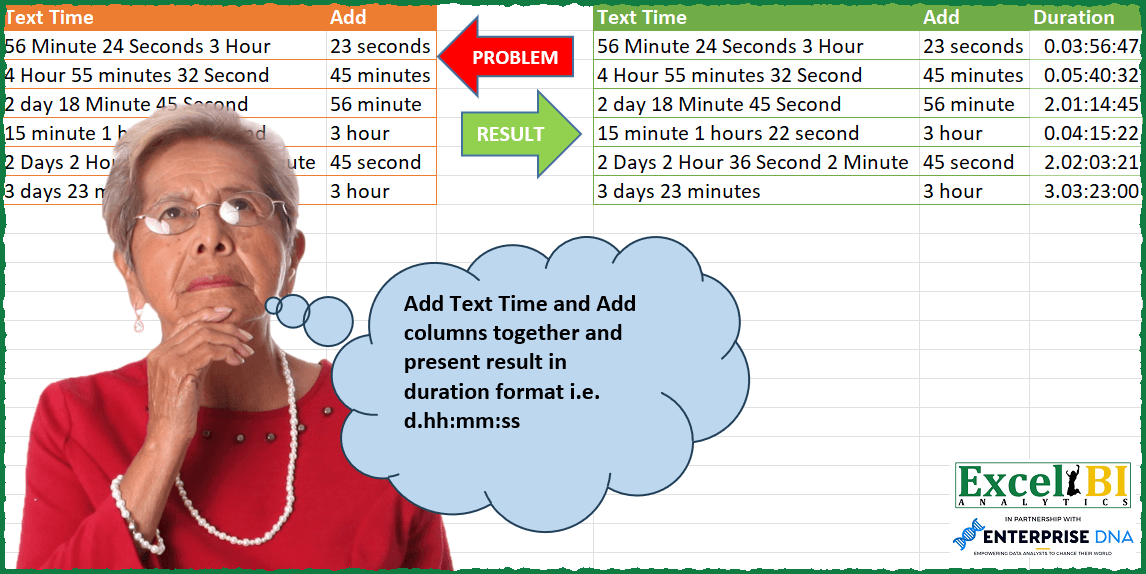
Add Text Time and Add columns together and present result in duration format i.e. d.hh:mm:ss
📌 Challenge Details and Links
ExcelBI Power Query Challenge Number: 105
Challenge Difficulty: ⭐️⭐️⭐️
📥Download Sample File
📥Link to the solutions on LinkedIn
Solving the challenge of Add Time to Duration Format with Power Query
Power Query solution 1 for Add Time to Duration Format, proposed by Bo Rydobon 🇹🇭:
let
  Source = Excel.CurrentWorkbook(){[Name = "Table1"]}[Content],
  Ans = Table.AddColumn(
    Source,
    "Duration",
    each
      let
        a = "0" & Text.Proper([Text Time] & " " & [Add])
      in
        Duration.From(
          List.Sum(
            List.Transform(
              List.Zip(
                {
                  List.Transform(
                    {"D", "H", "M", "S"},
                    (t) =>
                      List.Sum(
                        List.Transform(
                          Text.PositionOf(a, t, 2),
                          (n) => Number.From(Text.Middle(a, n - 3, 2))
                        )
                      )
                  ),
                  {1, 24, 1440, 86400}
                }
              ),
              each _{0} / _{1}
            )
          )
        )
  )
in
  Ans
Power Query solution 2 for Add Time to Duration Format, proposed by Zoran Milokanović:
let
  Source = Excel.CurrentWorkbook(){[Name = "Input"]}[Content],
  S = Table.AddColumn(
    Source,
    "Duration",
    each
      let
        p = {{"c", "t", "r", "y"}, {86400, 1440, 24, 1}},
        n = List.Transform(
          List.ReplaceMatchingItems(
            Text.Split(Text.Select([Text Time] & " " & [Add], {"0" .. "9", " "} & p{0}), " "),
            List.Zip(p)
          ),
          Number.From
        )
      in
        Duration.From(
          List.Sum(
            List.Transform(List.Select(List.Positions(n), Number.IsEven), each n{_} / n{_ + 1})
          )
        )
  )
in
  S
Power Query solution 3 for Add Time to Duration Format, proposed by Alejandro Simón 🇵🇦 🇪🇸:
let
  Source = Excel.CurrentWorkbook(){[Name = "Table1"]}[Content],
  B = Comparer.OrdinalIgnoreCase,
  C = Splitter.SplitTextByCharacterTransition,
  Fx = (g) =>
    List.Sum(
      List.Transform(
        g,
        each
          let
            a = List.Select(Text.Split(_, " "), each _ <> ""),
            b = List.Transform(
              a,
              each
                if Text.Contains(_, "day", B) then
                  1
                else if Text.Contains(_, "hour", B) then
                  1 / 24
                else if Text.Contains(_, "minute", B) then
                  1 / 1440
                else if Text.Contains(_, "second", B) then
                  1 / 86400
                else
                  Number.From(_)
            )
          in
            b{0} * b{1}
      )
    ),
  Sol = Table.AddColumn(
    Source,
    "Duration",
    each
      let
        a = C({"a" .. "z"}, {" "})([Text Time]),
        b = C({"a" .. "z"}, {" "})([Add])
      in
        Duration.From(Fx(a) + Fx(b))
  )[[Duration]]
in
  Sol
Power Query solution 4 for Add Time to Duration Format, proposed by Luan Rodrigues:
let
  Fonte = Tabela1,
  add = Table.AddColumn(
    Fonte,
    "Personalizar",
    each [
      a = List.Transform(
        Splitter.SplitTextByCharacterTransition({" "}, {"0" .. "9"})(
          Text.Lower([Text Time]) & " " & Text.Lower([Add])
        ),
        each List.Transform(List.Select(Text.Split(_, " "), each _ <> ""), each Text.Start(_, 3))
      ),
      d = List.Sum(List.Transform(List.Select(a, (x) => x{1} = "day"), each Number.From(_{0}))) / 1,
      h = List.Sum(List.Transform(List.Select(a, (x) => x{1} = "hou"), each Number.From(_{0}))) / 24,
      m = List.Sum(List.Transform(List.Select(a, (x) => x{1} = "min"), each Number.From(_{0})))
        / 1440,
      s = List.Sum(List.Transform(List.Select(a, (x) => x{1} = "sec"), each Number.From(_{0})))
        / 86400,
      duration = List.Sum(List.Transform({d, h, m, s}, Duration.From))
    ][duration]
  )
in
  add
Power Query solution 5 for Add Time to Duration Format, proposed by Hussein SATOUR:
let
  Source = Excel.CurrentWorkbook(){[Name = "Table1"]}[Content],
  SplitText = Table.AddColumn(
    Source,
    "Custom",
    each Splitter.SplitTextByCharacterTransition(
      (c) => not List.Contains({"0" .. "9"}, c),
      {"0" .. "9"}
    )([Text Time])
  ),
  ExpandIt = Table.ExpandListColumn(SplitText, "Custom"),
  TransfText = Table.AddColumn(
    ExpandIt,
    "Text",
    each
      let
        a = Text.Lower(Text.Start(Text.AfterDelimiter([Custom], " "), 1))
      in
        (if a = "d" then 86400 else if a = "h" then 3600 else if a = "m" then 60 else 1)
          * Number.From(Text.BeforeDelimiter([Custom], "
  "))
  ),
  TransfAdd = Table.AddColumn(
    TransfText,
    "Addd",
    each
      let
        c = Text.Lower(Text.Start(Text.AfterDelimiter([Add], " "), 1))
      in
        (if c = "d" then 86400 else if c = "h" then 3600 else if c = "m" then 60 else 1)
          * Number.From(Text.BeforeDelimiter([Add], " "))
  ),
  Group = Table.Group(
    TransfAdd,
    {"Text Time"},
    {{"Text", each List.Sum([Text]), type number}, {"Add", each List.Average([Addd]), type number}}
  ),
  Sum = Table.AddColumn(Group, "Addition", each List.Sum({[Add], [Text]}), type number),
  Divid = Table.TransformColumns(Sum, {{"Addition", each _ / 86400, type number}}),
  Type = Table.TransformColumnTypes(Divid, {{"Addition", type duration}})
in
  Type
Solving the challenge of Add Time to Duration Format with Excel
Excel solution 1 for Add Time to Duration Format, proposed by Bo Rydobon 🇹🇭:
=BYROW(0&A2:B7,LAMBDA(a,SUM(IFERROR(MID(a,SEARCH({"d";"h";"m";"se"},a)-3,2)/{1;24;1440;86400},))))Excel solution 2 for Add Time to Duration Format, proposed by محمد حلمي:
=MAP(A2:A7,B2:B7,LAMBDA(a,b,LET(u,LAMBDA(w,LET(v,TEXTSPLIT(w,," "),x,LAMBDA(n,XLOOKUP(n,LEFT(DROP(
v,1)),DROP(v,-1),0)),x("d")+TIME(x("h"),x("m"),x("s")))),
TEXT(u(a)+u(b),"d.hh:mm:ss"))))
Excel solution 3 for Add Time to Duration Format, proposed by Kris Jaganah:
=REDUCE({"Text Time","Add","Duration"},A2:A7&"#"&B2:B7,LAMBDA(x,y,VSTACK(x,LET(a,LEFT(TEXTSPLIT(y,,{" ","#"}),2),b,VSTACK(DROP(a,1),0),HSTACK(TEXTBEFORE(y,"#"),TEXTAFTER(y,"#"),TEXT(SUM(IFS(b="da",a/1,b="ho",a/24,b="mi",a/1440,b="se",a/86400,1,0)),"d.hh:mm:ss"))))))Excel solution 4 for Add Time to Duration Format, proposed by Hussein SATOUR:
=MAP(D2:D7,E2:E7, LAMBDA(y,z, LET(f, LAMBDA(x, LET(
a, WRAPROWS(TEXTSPLIT(x," "),2),
SUMPRODUCT(--INDEX(a,,1), XLOOKUP(LEFT(INDEX(a,,2)), {"M";"S";"H";"D"}, {60;1;3600;86400})))),
TEXT((f(y) + f(z))/86400, "d.hh:mm:ss"))))
Excel solution 5 for Add Time to Duration Format, proposed by Sunny Baggu:
=MAP(
 A2:A7,
 B2:B7,
 LAMBDA(a, b,
 LET(
 _e1, LAMBDA(x, WRAPROWS(TEXTSPLIT(x, " "), 2)),
 col, LAMBDA(arr, y, CHOOSECOLS(arr, y)),
 val, LAMBDA(c, d,
 XLOOKUP({"day*"; "hour*"; "min*"; "sec*"}, c, d, 0, 2, 1) + 0
 ),
 _r, val(col(_e1(a), 2), col(_e1(a), 1)) +
 val(col(_e1(b), 2), col(_e1(b), 1)),
 TAKE(_r, 1) & "." &
 TEXT(
 TIME(CHOOSEROWS(_r, 2), CHOOSEROWS(_r, 3), CHOOSEROWS(_r, 4)),
 "hh:mm:ss"
 )
 )
 )
)
Excel solution 6 for Add Time to Duration Format, proposed by LEONARD OCHEA 🇷🇴:
=LET(t,A1:B7,HSTACK(t,VSTACK("Duration",MAP(DROP(INDEX(t,,1),1),DROP(INDEX(t,,2),1),LAMBDA(a,b,LET(n,HSTACK(2,3),f,LAMBDA(x,BYROW(IFERROR(--MID(x,SEARCH(VSTACK("d","h","m","se"),x)-n,n),0),LAMBDA(c,MAX(c)))),TEXT(SUMPRODUCT(f(a)+f(b),1/VSTACK(1,24,1440,86400)),"d.hh:mm:ss")))))))Excel solution 7 for Add Time to Duration Format, proposed by Pieter de B.:
=MAP(A2:A7&" "&B2:B7,LAMBDA(a,LET(t,TEXTSPLIT(a," "),w,WRAPROWS(t,2),nt,--TAKE(w,,1),tt,LEFT(DROP(w,,1)),x,{"h","m","s"},y,{24,1440,86400},TEXT(SUM(nt/XLOOKUP(tt,x,y,1)),"d.hh:mm:ss"))))Excel solution 8 for Add Time to Duration Format, proposed by Ziad A.:
=ARRAYFORMULA(LET(X,LAMBDA(t,SUM(IFNA(REGEXEXTRACT(t,"(?i)(d+) "&{"d";"h";"m";"s"})/{1;24;1440;86400}))),MAP(A2:A7,B2:B7,LAMBDA(a,b,X(a)+X(b)))))Excel solution 9 for Add Time to Duration Format, proposed by Quadri Olayinka Atharu:
=LET(text_to_time,LAMBDA(x,LET(st,WRAPROWS(TEXTSPLIT(x,," "),2),
IFERROR(--st,LEFT(st)))),
MAP(A2:A7,B2:B7,LAMBDA(tt,add,
LET(with_add,VSTACK(text_to_time(tt),text_to_time(add)),
t, TAKE(with_add,,1),
tf, DROP(with_add,,1),
utf,UNIQUE(TAKE(with_add,,-1)),
r,MAP(utf,LAMBDA(x,SUM(IF(tf=x,t,0)))),
h, XLOOKUP("h",utf,r,0),
m, XLOOKUP("m",utf,r,0),
s, XLOOKUP("s",utf,r,0),
d, XLOOKUP("d",utf,r,0),
d&"."&TEXT(TIME(h,m,s),"hh:mm:ss")))))
Excel solution 10 for Add Time to Duration Format, proposed by Md Ismail Hosen:
=LET(Data, A2:B7, fx_One, LAMBDA(Text,AddPart, LET(Text2, A5, AddPart2, B5, Splitted, WRAPROWS(TEXTSPLIT(Text, " "), 2), MappedData, MAP({"Day","Hour","Minute","Second"}, LAMBDA(a, LET(Length, LEN(a), InTextTime, IFERROR(INDEX(FILTER(CHOOSECOLS(Splitted, 1), PROPER(LEFT(CHOOSECOLS(Splitted, 2), Length)) = a), 1, 1) * 1, 0), InAddPart, IF(PROPER(LEFT(TEXTAFTER(AddPart, " "), Length)) = a, TEXTBEFORE(AddPart, " ") * 1, 0), InTextTime + InAddPart))), TEXT(SUM(MappedData / {1,24,1440,86400}), "d.hh:mm:ss"))), Result, HSTACK(Data, MAP(CHOOSECOLS(Data, 1), CHOOSECOLS(Data, 2), fx_One)), Result)Excel solution 11 for Add Time to Duration Format, proposed by Amardeep Singh:
=VSTACK({"Text Time","Add","Duration"},
HSTACK(A2:B7,BYROW(LET(t,A2:B7,
f,LAMBDA(x,IFERROR(TEXTAFTER(TRIM(TEXTBEFORE(t,x,,1))," ",-1,,,TEXTBEFORE(t,x,,1)),0)),
s,f("sec")/60/60/24,
m,f("min")/60/24,
h,f("hour")/24,
d,--f("day"),
r,d+h+m+s,
r),LAMBDA(v,SUM(v)))))
Solving the challenge of Add Time to Duration Format with Excel VBA
Excel VBA solution 1 for Add Time to Duration Format, proposed by Mungunbayar Bat-Ochir:
Sub Main()
Dim a1, a2, vals, dk As Variant
Dim i, j As Long
Dim dt As Object
Dim tl As Long
Dim rg As Range
Set rg = ThisWorkbook.Worksheets("Sheet1").Range("A2:A7")
With rg
a1 = Application.Transpose(.Value)
a2 = Application.Transpose(.Offset(, 1).Value)
End With
Set dt = CreateObject("Scripting.dtionary")
dt.CompareMode = vbTextCompare
dt.Add "day", 86400
dt.Add "hour", 3600
dt.Add "minute", 60
dt.Add "second", 1
For i = 1 To UBound(a1)
tl = 0
vals = Split(a1(i), " ")
For j = 1 To UBound(vals) Step 2
For Each dk In dt.keys
If InStr(1, vals(j), dk, vbTextCompare) > 0 Then
tl = tl + (CLng(vals(j - 1)) * dt(dk))
Exit For
End If
Next dk
Next j
vals = Split(a2(i), " ")
For Each dk In dt.keys
If InStr(1, vals(1), dk, vbTextCompare) > 0 Then
tl = tl + (CLng(vals(0)) * dt(dk))
Exit For
End If
Next dk
a1(i) = f_sec(tl)
Next i
rg.Offset(, 2) = Application.Transpose(a1)
End Sub
Function f_sec(t_s As Long) As String
Dim t_m, t_h, t_d As Long
t_m = t_s  60
t_s = t_s Mod 60
t_h = t_m  60
t_m = t_m Mod 60
t_d = t_h  24
t_h = t_h Mod 24
f_sec = t_d & "." & Format(t_h, "00") & ":" & Format(t_m, "00") & ":" & Format(t_s, "00")
End Function
&&&