
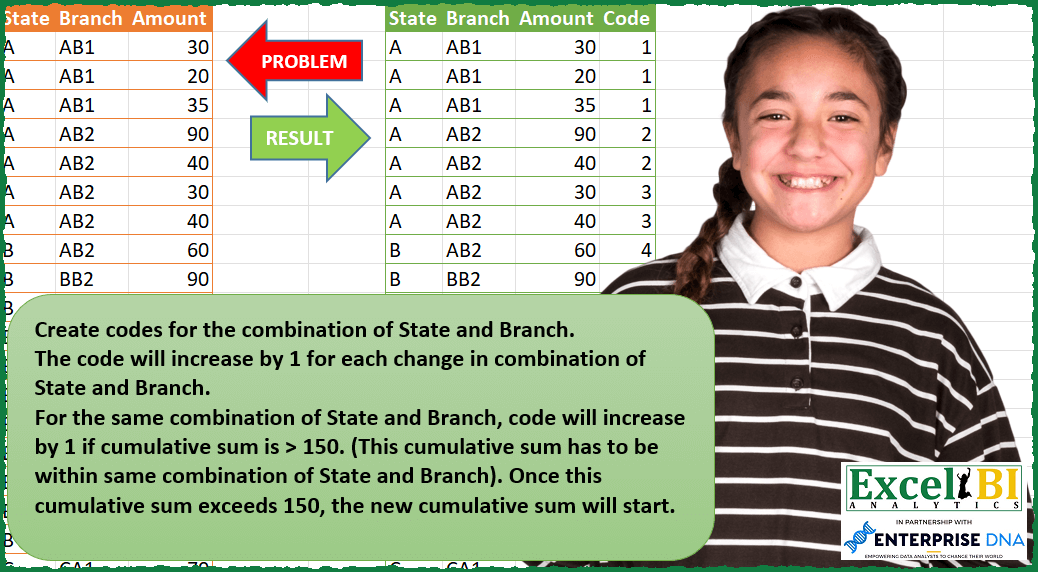
Create codes for the combination of State and Branch. The code will increase by 1 for each change in combination of State and Branch. For the same combination of State and Branch, code will increase by 1 if cumulative sum is > 150. (This cumulative sum has to be within same combination of State and Branch). Once this cumulative sum exceeds 150, the new cumulative sum will start. Ex. 90, 40, 30, 80, 70 for same state and branch. Let’s say for 90, code is 2. For 40 also code will be 2 but for 30, code will become 3 as 90+40+30 = 160 which is larger than 150. Now new cumulative sum will start from 30. Hence, code for 30 & 80 will be 3 but code for 70 will be 4 as 30+80+70 = 180 which is > 150.
📌 Challenge Details and Links
ExcelBI Power Query Challenge Number: 101
Challenge Difficulty: ⭐️⭐️⭐️⭐️⭐️
📥Download Sample File
📥Link to the solutions on LinkedIn
Solving the challenge of Code State-Branch Combinations with Power Query
Power Query solution 1 for Code State-Branch Combinations, proposed by Bo Rydobon 🇹🇭:
let
  Source = Excel.CurrentWorkbook(){[Name = "Table1"]}[Content],
  Group = List.Accumulate(
    List.Combine(
      Table.Group(
        Source,
        {"State", "Branch"},
        {
          "C",
          each List.Transform(
            List.Zip(
              {
                Table.ToColumns(_){2},
                List.Accumulate(
                  [Amount],
                  {},
                  (s, l) => s & {if List.Last(s, 0) + l > 150 then l else List.Last(s, 0) + l}
                )
              }
            ),
            each Number.From(_{0} = _{1})
          )
        }
      )[C]
    ),
    {},
    (s, l) => s & {List.Last(s, 0) + l}
  ),
  Combine = Table.FromColumns(
    Table.ToColumns(Source) & {Group},
    Table.ColumnNames(Source) & {"Code"}
  )
in
  Combine
Power Query solution 2 for Code State-Branch Combinations, proposed by Zoran Milokanović:
let
  Source = Excel.CurrentWorkbook(){[Name = "Input"]}[Content],
  Cols = Table.ToColumns(Source),
  Code = List.Transform(
    List.Accumulate(
      List.Positions(Cols{0}),
      {},
      (s, c) =>
        s
          & {
            let
              u = Cols{0}{c} & Cols{1}{c},
              l = List.Last(s, {"", 0, 0}),
              i = Cols{2}{c}
            in
              if u <> l{0} or (l{2} + i) > 150 then {u, l{1} + 1, i} else {u, l{1}, l{2} + i}
          }
    ),
    each _{1}
  ),
  S = Table.FromColumns(Cols & {Code}, Table.ColumnNames(Source) & {"Code"})
in
  S
Power Query solution 3 for Code State-Branch Combinations, proposed by Aditya Kumar Darak 🇮🇳:
let
  Source = Excel.CurrentWorkbook(){[Name = "data"]}[Content],
  Calculation = List.Generate(
    () => [a = - 1, e = 0],
    each [a] < Table.RowCount(Source),
    each [
      a = [a] + 1,
      b = Source{a},
      c = [b]?[State]? <> b[State] or [b]?[Branch]? <> b[Branch],
      d = if c or ([d] + b[Amount]) > 150 then b[Amount] else [d] + b[Amount],
      e = [e] + Number.From(d = b[Amount])
    ],
    each [b] & [Code = [e]]
  ),
  Return = Table.FromRecords(List.Skip(Calculation))
in
  Return
Power Query solution 4 for Code State-Branch Combinations, proposed by Alejandro Simón 🇵🇦 🇪🇸:
let
  Source = Excel.CurrentWorkbook(){[Name = "Table1"]}[Content],
  Group = Table.Group(
    Source,
    {"State", "Branch"},
    {
      {
        "All",
        each
          let
            a = [Amount],
            b = List.Generate(
              () => [x = a{0}, y = 1],
              each [y] <= List.Count(a),
              each [x = if [x] > 150 then a{[y] - 1} + a{[y]} else [x] + a{[y]}, y = [y] + 1],
              each [x]
            )
          in
            b
      }
    }
  ),
  Rows = Table.ToRows(Table.ExpandListColumn(Group, "All")),
  Code = List.Skip(
    List.Generate(
      () => [x = 0, y = 0, z = List.RemoveLastN],
      each [x] <= List.Count(Rows),
      each [
        y = try

            if [z](Rows{[x]}) <> [z](Rows{[x] - 1}) or List.Last(Rows{[x]}) > 150 then
              [y] + 1
            else
              [y]
        otherwise
          1,
        x = [x] + 1,
        z = [z]
      ],
      each [y]
    )
  ),
  Sol = Table.FromColumns(Table.ToColumns(Source) & {Code}, Table.ColumnNames(Source) & {"Code"})
in
  Sol
Power Query solution 5 for Code State-Branch Combinations, proposed by Alejandro Simón 🇵🇦 🇪🇸:
let
  Source = Excel.CurrentWorkbook(){[Name = "Table1"]}[Content],
  Group = Table.Group(
    Source,
    {"State", "Branch"},
    {
      {
        "All",
        each
          let
            a = [Amount],
            b = List.Generate(
              () => [x = a{0}, Amount = a{0}, y = 1],
              each [y] <= List.Count(a),
              each [
                x      = if [x] > 150 then a{[y] - 1} + a{[y]} else [x] + a{[y]},
                Amount = a{[y]},
                y      = [y] + 1
              ],
              each [x]
            )
          in
            b
      }
    }
  ),
  Expand = Table.ExpandListColumn(Group, "All"),
  Index = Table.AddIndexColumn(Expand, "Idx", 0, 1),
  Exp = Expand[State],
  Bran = Expand[Branch],
  Add1 = Table.AddColumn(
    Index,
    "Custom",
    each try

        if Exp{[Idx]} & Bran{[Idx]} <> Exp{[Idx] - 1} & Bran{[Idx] - 1} or [All] > 150 then
          1
        else
          null
    otherwise
      1
  ),
  Code = Table.AddColumn(Add1, "Code", each List.Sum(List.FirstN(Add1[Custom], [Idx] + 1)))[Code],
  Sol = Table.FromColumns(Table.ToColumns(Source) & {Code}, Table.ColumnNames(Source) & {"Code"})
in
  Sol
Power Query solution 6 for Code State-Branch Combinations, proposed by Matthias Friedmann:
let
 Source = Excel.CurrentWorkbook(){[Name="State_Branch"]}[Content],
 GRT = Table.FromColumns(
 Table.ToColumns(Source) & {fxStateBranchCode( List.Buffer(Source[State]) , List.Buffer(Source[Branch]) , List.Buffer(Source[Amount]) )},
 Table.ColumnNames(Source) & {"GRT"}
 )
in
 GRT
For small data sets you can do without List.Buffer.
Custom function fxStateBranchCode:
(state as list, branch as list, amount as list) as list =>
let
 GRTList = List.Generate(
 ()=> [ Code = 1, aa = amount{0}, i = 0 ],
 each [i] < List.Count(state),
 each try
 if state{[i]}&branch{[i]} <> state{[i] + 1}&branch{[i] + 1} or [aa]+amount{[i]+1}>150
 then [Code = [Code] + 1, aa = amount{[i]+1}, i = [i] + 1]
 else [Code = [Code], aa = [aa]+amount{[i]+1}, i = [i] + 1]
 otherwise [i = [i] + 1] ,
 each [Code]
 )
in
 GRTList
**Want to see/learn more cases like this?
Conditional Running Total AND Count challenge from Bhavya Gupta
https://www.youtube.com/watch?v=3Noy9hbQS1k
Simples National task from Luan Rodrigues
https://www.youtube.com/watch?v=JBcM3N2J5o0
Power Query solution 7 for Code State-Branch Combinations, proposed by Rafael González B.:
let
  Source = Excel.CurrentWorkbook(){0}[Content],
  TC = Table.TransformColumnTypes(Source, {{"Amount", Int64.Type}}),
  SnB = Table.CombineColumns(TC, {"State", "Branch"}, Combiner.CombineTextByDelimiter(""), "STnBR")[
    STnBR
  ],
  Coding = List.Generate(
    () => [Acum = TC{0}[Amount], RowIndex = 0, Code = 1, SB = true],
    each [RowIndex] < Table.RowCount(TC),
    each [
      SB       = try SnB{[RowIndex] + 1} = SnB{[RowIndex]} otherwise true,
      Reg      = TC{RowIndex},
      Acum     = if SB and [Acum] + Reg[Amount] <= 150 then [Acum] + Reg[Amount] else Reg[Amount],
      RowIndex = [RowIndex] + 1,
      Code     = [Code] + (Number.From(Acum = Reg[Amount]))
    ],
    each [Code]
  ),
  Answer = Table.FromColumns(Table.ToColumns(TC) & {Coding}, Table.ColumnNames(TC) & {"Code"})
in
  Answer
Power Query solution 8 for Code State-Branch Combinations, proposed by Sandeep Marwal:
let
  Source = Excel.CurrentWorkbook(){[Name = "Table1"]}[Content],
  S1 = Table.Group(
    Source,
    {"State", "Branch"},
    {
      {
        "Count",
        each Table.FromColumns(
          {
            _[Amount],
            List.Skip(
              (
                List.Accumulate(
                  _[Amount],
                  {0},
                  (a, v) => if List.Last(a) + v <= 150 then a & {List.Last(a) + v} else a & {v}
                )
              )
            )
          }
        )
      }
    }
  ),
  S2 = Table.TransformColumns(
    S1,
    {"Count", each Table.AddColumn(_, "check", each _[Column1] = _[Column2])[[Column1], [check]]}
  ),
  S3 = Table.ExpandTableColumn(S2, "Count", {"Column1", "check"}, {"Amount", "Count.check"}),
  S4 = Table.AddIndexColumn(S3, "Index", 1, 1, Int64.Type),
  S5 = Table.SelectRows(S4, each ([Count.check] = true)),
  S6 = Table.AddIndexColumn(S5, "Index.1", 1, 1, Int64.Type),
  S7 = Table.NestedJoin(S4, {"Index"}, S6, {"Index"}, "Added Index1", JoinKind.LeftOuter),
  S8 = Table.ExpandTableColumn(S7, "Added Index1", {"Index.1"}, {"Code"}),
  S9 = Table.Sort(S8, {{"Index", Order.Ascending}}),
  S10 = Table.FillDown(S9, {"Code"}),
  S11 = Table.RemoveColumns(S10, {"Count.check", "Index"})
in
  S11
Power Query solution 9 for Code State-Branch Combinations, proposed by Obi E, MPH:
let
  Source = Excel.CurrentWorkbook(){[Name = "Table1"]}[Content],
  #"Filtered Rows" = Table.SelectRows(Source, each ([State] <> null)),
  #"Added Custom" = Table.AddColumn(#"Filtered Rows", "Custom", each [State] & [Branch]),
  #"Grouped Rows" = Table.Group(
    #"Added Custom",
    {"Custom"},
    {
      {
        "Count",
        each _,
        type table [
          State = nullable text,
          Branch = nullable text,
          Amount = nullable number,
          Custom = nullable text
        ]
      }
    }
  ),
  #"Added Index" = Table.AddIndexColumn(#"Grouped Rows", "Index", 1, 1, Int64.Type),
  #"Expanded Count" = Table.ExpandTableColumn(
    #"Added Index",
    "Count",
    {"State", "Branch", "Amount", "Custom"},
    {"State", "Branch", "Amount", "Custom.1"}
  ),
  #"Removed Columns" = Table.RemoveColumns(#"Expanded Count", {"Custom", "Custom.1"})
in
  #"Removed Columns"
Solving the challenge of Code State-Branch Combinations with Excel
Excel solution 1 for Code State-Branch Combinations, proposed by Bo Rydobon 🇹🇭:
=VSTACK(HSTACK(A1:C1,"Code"),HSTACK(A2:C40,SCAN(0,SCAN(0,C2:C40,LAMBDA(a,v,LET(b,(OFFSET(v,,-2)=OFFSET(v,-1,-2))*(OFFSET(v,,-1)=OFFSET(v,-1,-1))*a,(b+v<=150)*b+v)))=C2:C40,LAMBDA(c,v,c+v))))Excel solution 2 for Code State-Branch Combinations, proposed by Bo Rydobon 🇹🇭:
=LET(a,A2:A40,b,B2:B40,d,(a=VSTACK(0,a))*(b=VSTACK(0,b)),s,SEQUENCE(ROWS(b)),
HSTACK(A1:C40,TAKE(REDUCE({"Code",0},s,LAMBDA(c,n,LET(m,INDEX(C2:C40,n),p,TAKE(c,-1,-1),x,INDEX(d,n)*p+m,y,IF(x>150,m,x),
VSTACK(c,HSTACK(N(TAKE(c,-1,1))+OR(x>150,1-INDEX(d,n)),y))))),,1)))
Excel solution 3 for Code State-Branch Combinations, proposed by محمد حلمي:
=SCAN(0,SCAN(0,A2:A40,LAMBDA(A,D,LET(i,OFFSET(D,,2),
IF((D&OFFSET(D,,1)=OFFSET(D,-1,)&OFFSET(D,-1,1))*(i+A<151),i+A,i))))=C2:C40,LAMBDA(a,d,d*1+a))
Excel solution 4 for Code State-Branch Combinations, proposed by Oscar Mendez Roca Farell:
=LET(_a,A2:A40,_b,B2:B40,_u,UNIQUE(_a&_b),_r,REDUCE(0,_u,LAMBDA(i, x, LET(_f,FILTER(C2:C40,_a&_b=x),_s,SCAN(0,--(_f=SCAN(0,_f, LAMBDA(j,y,IF(j+y>150,y,j+y)))), LAMBDA(k, z, k+z)), VSTACK(i,_s+MAX(i))))), HSTACK(A1:C40, IF(_r,_r,"Code")))Excel solution 5 for Code State-Branch Combinations, proposed by LEONARD OCHEA 🇷🇴:
=LET(t,A1:C40,c,LAMBDA(x,INDEX(t,,x)),e,LAMBDA(y,DROP(y,-1)<>DROP(y,1)),z,IF(e(c(1))+e(c(2)),1,0),v,SCAN(0,z,LAMBDA(a,b,a+b)),n,MAX(v),g,DROP(c(3),1),w,DROP(REDUCE("",SEQUENCE(n),LAMBDA(a,b,VSTACK(a,SCAN(0,FILTER(g,v=b),LAMBDA(c,d,IF(c+d>150,d,c+d)))))),1),q,w=g,r,IF(z+q,1,0),HSTACK(t,VSTACK("Code",SCAN(0,r,LAMBDA(a,b,a+b)))))&&&